change tire Acura TSX 2013 Owner's Manual
[x] Cancel search | Manufacturer: ACURA, Model Year: 2013, Model line: TSX, Model: Acura TSX 2013Pages: 325, PDF Size: 8.61 MB
Page 1 of 325
Contents
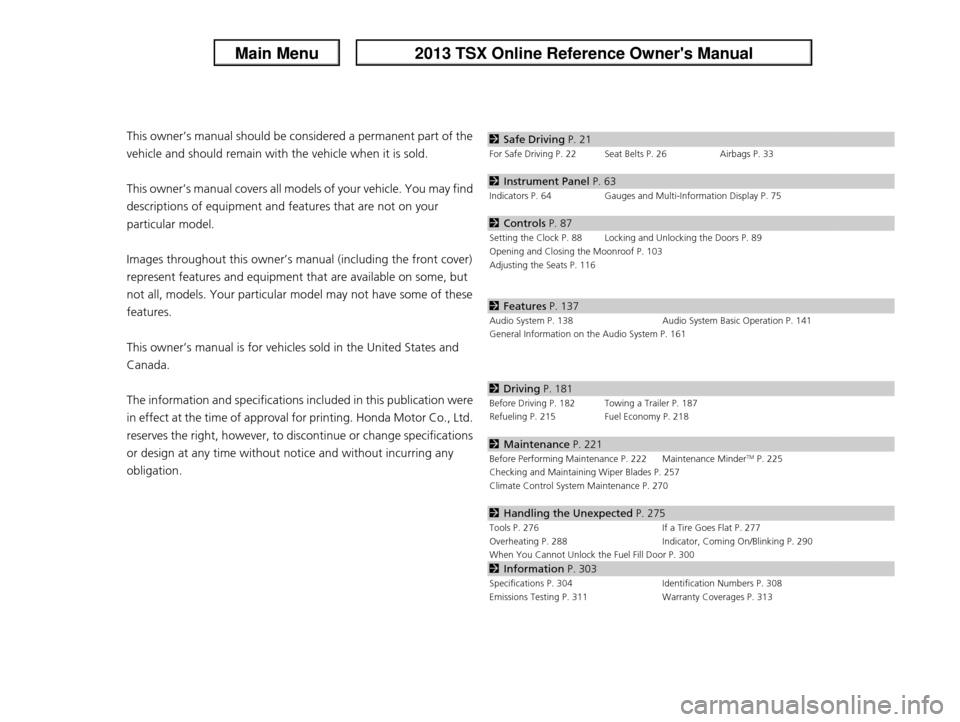
This owner’s manual should be considered a permanent part of the
vehicle and should remain with the vehicle when it is sold.
This owner’s manual covers all models of your vehicle. You may find
descriptions of equipment and features that are not on your
particular model.
Images throughout this owner’s manual (including the front cover)
represent features and equipment that are available on some, but
not all, models. Your particular mo del may not have some of these
features.
This owner’s manual is for vehicles sold in the United States and
Canada.
The information and specifications in cluded in this publication were
in effect at the time of approval for printing. Honda Motor Co., Ltd.
reserves the right, however, to discontinue or change specifications
or design at any time without notice and without incurring any
obligation.2 Safe Driving P. 21
For Safe Driving P. 22 Seat Belts P. 26 Airbags P. 33
2Instrument Panel P. 63
Indicators P. 64 Gauges and Multi-Information Display P. 75
2Controls P. 87
Setting the Clock P. 88 Locking and Unlocking the Doors P. 89
Opening and Closing the Moonroof P. 103
Adjusting the Seats P. 116
2Features P. 137
Audio System P. 138 Audio System Basic Operation P. 141
General Information on the Audio System P. 161
2 Driving P. 181
Before Driving P. 182 Towing a Trailer P. 187
Refueling P. 215 Fuel Economy P. 218
2Maintenance P. 221
Before Performing Maintenance P. 222 Maintenance MinderTM P. 225
Checking and Maintaining Wiper Blades P. 257
Climate Control System Maintenance P. 270
2Handling the Unexpected P. 275
Tools P. 276 If a Tire Goes Flat P. 277
Overheating P. 288 Indicator, Coming On/Blinking P. 290
When You Cannot Unlock the Fuel Fill Door P. 300
2 Information P. 303
Specifications P. 304 Identification Numbers P. 308
Emissions Testing P. 311 Warranty Coverages P. 313
Page 24 of 325

23
uuFor Safe Driving uImportant Safety Precautions
Safe Driving
■
Pay appropriate attention to the task of driving safely
Engaging in cell phone conversation or other activities that keep you from paying
close attention to the road, other vehicles, and pedestrians could lead to a crash.
Remember, situations can change quickly, and only you can decide when it is safe to
divert some attention away from driving.
■
Control your speed
Excessive speed is a major factor in crash injuries and deaths. Generally, the higher
the speed, the greater the risk, but serious injuries can also occur at lower speeds.
Never drive faster than is safe for current conditions, regardless of the maximum
speed posted.
■
Keep your vehicle in safe condition
Having a tire blowout or a mechanical failure can be extremely hazardous.
To reduce the possibility of such problems, check your tire pressures and condition
frequently, and perform all regularly scheduled maintenance.
Page 77 of 325
76
uuGauges and Multi- Information Display uMulti-Information Display
Instrument Panel
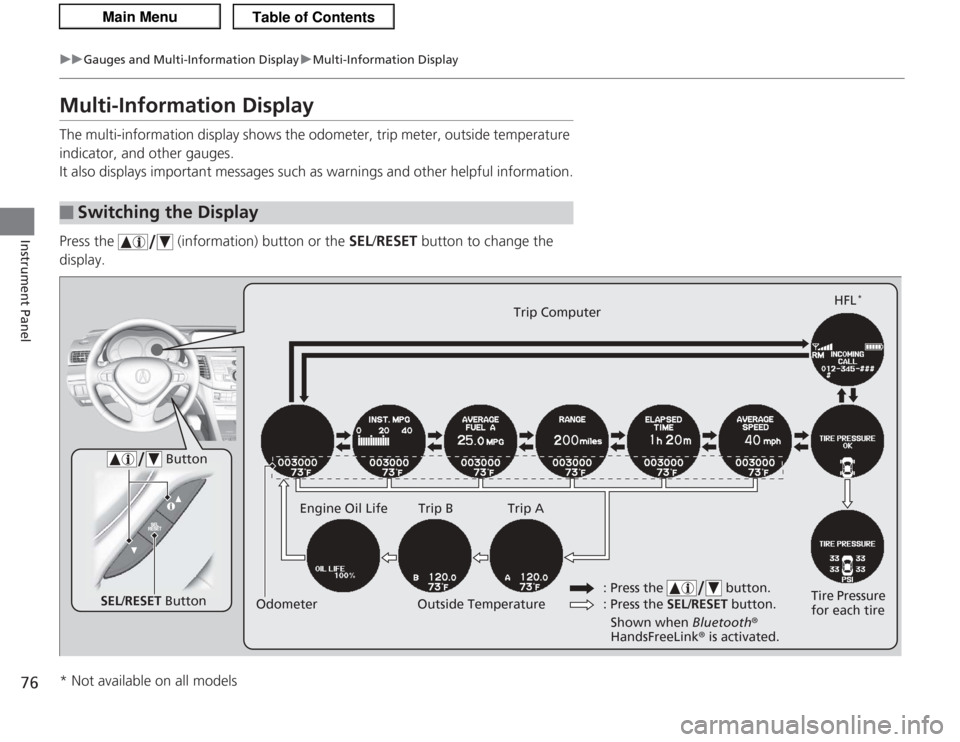
Multi-Information DisplayThe multi-information display shows the odometer, trip meter, outside temperature
indicator, and other gauges.
It also displays important messages such as warnings and other helpful information.
Press the (information) button or the SEL/RESET button to change the
display.■
Switching the Display
SEL /RESET Button Tire Pressure
for each tireHFL
*
Trip Computer
Trip B
Engine Oil Life Trip A
Outside Temperature
Odometer
Button
: Press the SEL/RESET button.
: Press the button.Shown when
Bluetooth®
HandsFreeLink ® is activated.
* Not available on all models
Page 80 of 325
Continued
79
uuGauges and Multi-Information Display uMulti-Information Display
Instrument Panel
The elapsed time display shows the time during one drive cycle.
The display shows the average speed in mph (U.S.) or km/h (Canada) since the last
time Trip A was reset.
Shows the remaining oil life and Maintenance Minder
TM.
2 Maintenance Minder
TM P. 225
Shows each tire’s pressure.
2TPMS (Tire Pressure Monitoring System) P. 206
Shows your paired cell phone’s information.
2Bluetooth ® HandsFreeLink ® P. 167
■
Elapsed Time
■
Average Speed
■
Engine Oil Life
■
Tire Pressure Monitor
■
Bluetooth ® HandsFreeLink ®
1Elapsed Time
You can change when to reset the elapsed time.
2 Customized Features P. 80
Page 207 of 325

206
uuWhen Driving uTPMS (Tire Pressure Monitoring System)
Driving
TPMS (Tire Pressure Monitoring System)Monitors the tire pressure while you are driving. If your vehicle’s tire pressure
becomes significantly low, the low tire pressure/TPMS indicator comes on and a
message appears on the multi-information display.
To select the tire pressure monitor, turn the
ignition switch to ON
(w
and press the
(information) button until you see
the tire pressure screen.
If all the tire pressures are normal, TIRE
PRESSURE OK will be displayed.
To display the pressure of all four tires, press
the SEL/RESET button.
The pressure for each tire is displayed in PSI
(U.S.) or kPa (Canada).
■
Tire Pressure Monitor
1 TPMS (Tire Pressure Monitoring System)
Conditions such as low ambient temperature and
altitude change di rectly affect tire pressure and can
trigger the low tire pr essure/TPMS indicator to come
on. 2 If the Low Tire Pressure/TPMS Indicator
Comes On or Blinks P. 2931Tire Pressure Monitor
The pressure displayed on the multi-information
display can be slightly diffe rent from the actual
pressure as measured by a gauge. If there is a
significant difference between the two values, or if
the low tire pressure/TPMS indicator and the message
on the multi-information display do not go off after
you have inflated the tire to the specified pressure,
have the system checked by a dealer.
SYSTEM FUNCTION ERROR may appear if you drive
with the compact spare tire, or there is a problem
with the TPMS.
Page 228 of 325

227
uuMaintenance Minder
TMu
Continued
Maintenance
■
Maintenance Service Items
1Maintenance Service Items•Independent of the Maintenance Minder
information, replace the brake fluid every 3 years.•Inspect idle speed every 160,000 miles (256,000
km).•Adjust the valves during services A, B, 1, 2, or 3 if
they are noisy.
Maintenance Minder Message
System Message
Indicator
Sub Items
Main Items
*1: If message, SERVICE DUE NOW does not appear more than 12 months after the display is reset,
change the engine oil every year.
*2: If you drive primarily in dusty conditions, replace the air cleaner element every 15,000 miles (24,000 km).
*3: If you drive primarily in urban areas that have high concentrations of soot in the air from industry and from diesel-powered vehicles, replace the dust and pollen filter every 15,000 miles (24,000 km).CODE
Maintenance Main Items
A
●
Replace engine oil
*1
B
●
Replace engine oil
*1 and oil filter
●
Inspect front and rear brakes
●
Check parking brake adjustment
●
Inspect tie rod ends, steering gear box, and boots
●
Inspect suspension components
●
Inspect driveshaft boots
●
Inspect brake hoses and lines (Including ABS)
●
Inspect all fluid levels and condition of fluids
●
Inspect exhaust system
#
●
Inspect fuel lines and connections
#
*4: Driving in mountainous areas at very low vehicle speeds or trailer towing results in higher transmission temperatures. This requires transmission fluid changes more frequently than recommended by the
Maintenance Minder. If you regularly drive your vehicle under these conditions, have the transmission
fluid changed at 60,000 miles (100,000 km), then every 30,000 miles (48,000 km). (For A/T only.)
*5: If you drive regularly in very high temperatures (over 110°F, 43 °C), in very low temperatures (under -20°F, -29°C), or tow a trailer, replace every 60,000 miles/100,000 km. (6-cylinder models only)
# : See information on maintenance and emissions warranty.CODE
Maintenance Sub Items
1
●
Rotate tires
2
●
Replace air cleaner element
*2
●
Replace dust and pollen filter
*3
●
Inspect drive belt
3
●
Replace transmission fluid
*4
4
●
Replace spark plugs
●
Replace timing belt and inspect water pump
*5
●
Inspect valve clearance
5
●
Replace engine coolant
Page 281 of 325

uuIf a Tire Goes Flat uChanging a Flat Tire
280Handling the Unexpected
1. Place the jack under the jacking point
closest to the tire to be changed.
2. Turn the end bracket (as shown in the
image) clockwise until the top of the jack
contacts the jacking point.
u Make sure that the jacking point tab is
resting in the jack notch.
3. Raise the vehicle, using the jack handle bar
and the jack handle, until the tire is off the
ground.
■
How to Set Up the Jack
1How to Set Up the Jack
Do not use the jack with people or luggage in the
vehicle.
Use the jack provided in your vehicle.
Other jacks may not support the weight (“load”) or
their shape may not match.
The following instructions must be followed to use
the jack safely.•Do not use while the engine is running.•Use only where the ground is firm and level.•Use only at the jacking points.•Do not get in the vehicle while using the jack.•Do not put anything on top of or underneath the
jack.
3
WARNING
The vehicle can easily roll off the jack,
seriously injuring anyone underneath.
Follow the directions for changing a tire
exactly, and never get under the vehicle
when it is supported only by the jack.
Jack
Handle
Bar Wheel Nut
Wrench as Jack Handle
Page 294 of 325

293
uuIndicator, Coming On/Blinking uIf the Low Tire Pressure/TPMS Indicator Comes On or Blinks
Handling the Unexpected
If the Low Tire Pressure/TPMS Indicator Comes On or Blinks
■
Reasons for the indicator to come on or blink
A tire pressure is significantly low. If there is a problem with the TPMS or
the compact spare tire is installed, the indicator blinks for about one
minute, and then stays on.
■
What to do when the indicator comes on
Stop your vehicle in a safe place. Check the tire pressure and adjust the
pressure to the specified level. The specified tire pressure is on a label on
the driver side doorjamb.
■
What to do when the indicator blinks
Have the tire inspected by a dealer as soon as possible. If the compact
spare tire causes the indicator to blink, change the tire to a full-size tire.
The indicator goes off after driving for a few miles (kilometers).
1 If the Low Tire Pressure/TPMS Indicator Comes On or Blinks
NOTICEDriving on an extremely underinflated tire can cause
it to overheat. An overheated tire can fail. Always
inflate your tires to the prescribed level.
Page 306 of 325

305
uuSpecifications u
Continued
Information
■Brake/Clutch Fluid
■ Transmission Fluid*1: Automatic transmission models
*2: Manual transmission modelsSpecified
Honda Heavy Duty Brake Fluid DOT 3
Specified
*1
Acura ATF DW-1
(automatic
transmission fluid)
2.6 US qt (2.5 ℓ)
(Change)
Specified
*2
Acura Manual
Transmission Fluid 2.0 US qt (1.9 ℓ)
(Change)
■
Engine Oil
■ Engine Coolant*1: Automatic transmission models
*2: Manual transmission modelsRecommended
·Acura Genuine Motor Oil 0W-20
·API Premium-grade 0W-20 detergent oil
Capacity Change 4.0 US qt (3.8 ℓ)
Change
including
filter
4.2 US qt (4.0 ℓ)
Specified
Honda Long-Life Antifreeze/Coolant Type2
Ratio 50/50 with distilled water
Capacity
*1
1.64 US gal (6.2 ℓ)
(change including the remaining
0.196 US gal (0.74 ℓ) in the reserve tank)
Capacity
*2
1.66 US gal (6.3 ℓ)
(change including the remaining
0.196 US gal (0.74 ℓ) in the reserve tank)
■ TireRegular
Size
P225/50R17 93V
Pressure
psi (kPa [kgf/cm
2])
33 (230 [2.3])
Compact
Spare Size
T135/80D16 101M
Pressure
psi (kPa [kgf/cm
2]) 60 (420 [4.2])
Wheel Size
Regular
17 x 7.5J
Compact Spare
16 x 4T
Page 308 of 325

307
uuSpecifications u
Information
■Brake/Clutch Fluid
■ Transmission FluidSpecified
Honda Heavy Duty Brake Fluid DOT 3
Specified
Acura ATF DW-1
(automatic
transmission fluid)
3.5 US qt (3.3 ℓ)
(Change)
■ Engine Oil
■ Engine CoolantRecommended
·Acura Genuine Motor Oil 0W-20
·API Premium-grade 0W-20 detergent oil
Capacity Change 4.2 US qt (4.0 ℓ)
Change
including
filter
4.5 US qt (4.3 ℓ)
Specified
Honda Long-Life Antifreeze/Coolant Type2
Ratio 50/50 with distilled water
Capacity
1.77 US gal (6.7 ℓ)
(change including the remaining
0.196 US gal (0.74 ℓ) in the reserve tank)
■ TireRegular
Size
P235/45R18 94V
Pressure
psi (kPa [kgf/cm
2])
33 (230 [2.3])
Compact
Spare Size
T135/80D16 101M
Pressure
psi (kPa [kgf/cm
2]) 60 (420 [4.2])
Wheel Size
Regular
18 x 8J
Compact Spare
16 x 4T