instrument panel Acura TSX 2014 Owner's Guide
[x] Cancel search | Manufacturer: ACURA, Model Year: 2014, Model line: TSX, Model: Acura TSX 2014Pages: 329, PDF Size: 15.95 MB
Page 79 of 329

uu Gauges and Multi-Information Display u Multi-Information Display
78
Shows the outside temperature in Fahr enheit (U.S.) or Celsius (Canada).
■Adjusting the outside temperature display
Adjust the temperature reading up to ±5°F or ±3°C if the temperature reading
seems incorrect.
Shows the instant fuel economy as a bar gr aph in mpg (U.S.) or l/100 km (Canada).
Shows the estimated average fuel economy of each trip meter in mpg (U.S.) or l/100
km (Canada). The display is updated at set intervals. When a trip meter is reset, the
average fuel economy is also reset.
Shows the estimated distance you can travel on the fuel remaining. This distance is
estimated from the fuel econom y of your trips in the past.
■Outside Temperature
■Instant Fuel Economy
■Average Fuel Economy
■Range
1Outside Temperature
The temperature sensor is in the front bumper. Road
heat and exhaust from anothe r vehicle can affect the
temperature reading when your vehicle speed is less
than 19 mph (30 km/h).
It may take several minutes for the display to be
updated after the temperature reading has stabilized.
Use the multi-information display’s customized
features to correct the temperature. 2 Customized Features P. 80
1Average Fuel Economy
You can change whether to reset the average fuel
economy.
2 Customized Features P. 80
14 ACURA TSX 4D-31TL16500.book 78 ページ 2013年6月17日 月曜日 午前9時40分
QRG
Index
Instrument PanelTOC
Page 80 of 329
Continued79
uu Gauges and Multi-Information Display u Multi-Information Display
The elapsed time display shows the time during one drive cycle.
The display shows the average speed in mph (U.S.) or km/h (Canada) since the last
time Trip A was reset.
Shows the remaining oil life and Maintenance Minder
TM.
2 Maintenance MinderTM P. 227
Shows each tire’s pressure.
2 Tire Pressure Monitoring System (TPMS) P. 208
Shows your paired cell phone’s information.
2 Bluetooth ® HandsFreeLink ® P. 169
■Elapsed Time
■Average Speed
■Engine Oil Life
■Tire Pressure Monitor
■Bluetooth ® HandsFreeLink ®
1Elapsed Time
You can change when to reset the elapsed time.
2 Customized Features P. 80
14 ACURA TSX 4D-31TL16500.book 79 ページ 2013年6月17日 月曜日 午前9時40分
QRG
Index
Instrument PanelTOC
Page 81 of 329
uu Gauges and Multi-Information Display u Multi-Information Display
80
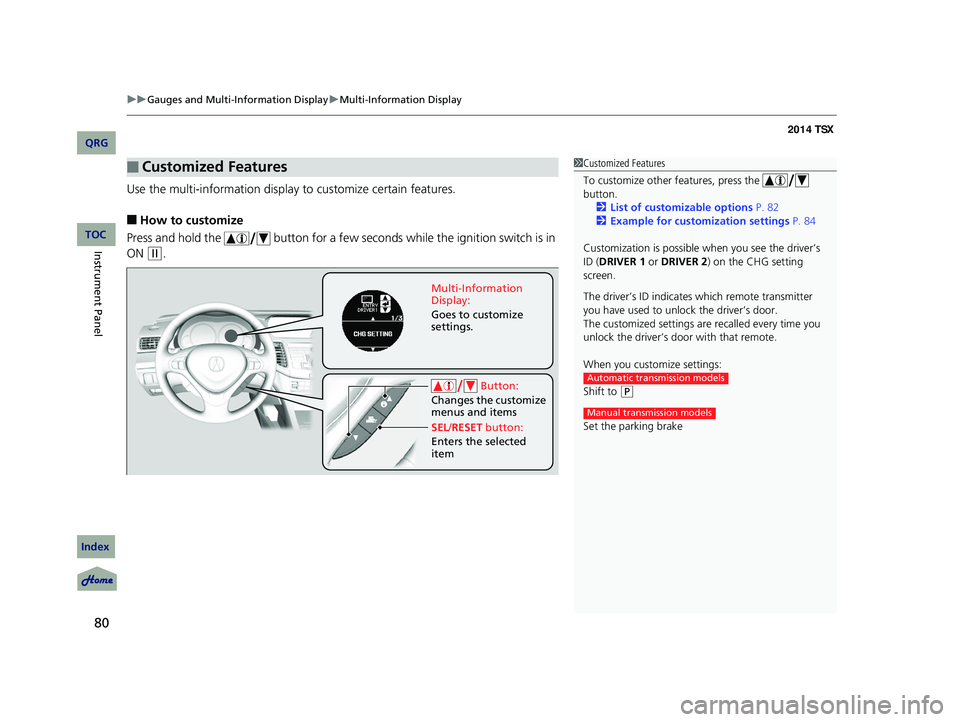
Use the multi-information display to customize certain features.
■How to customize
Press and hold the button for a few seconds while the ignition switch is in
ON
(w
.
■Customized Features1Customized Features
To customize other features, press the
button.
2 List of customizable options P. 82
2 Example for customization settings P. 84
Customization is possible when you see the driver’s
ID ( DRIVER 1 or DRIVER 2) on the CHG setting
screen.
The driver’s ID indicates which remote transmitter
you have used to unlock the driver’s door.
The customized settings are recalled every time you
unlock the driver’s door with that remote.
When you customize settings:
Shift to
(
P
Set the parking brake
Automatic transmission models
Manual transmission models
Button:
Changes the customize
menus and items
Multi-Information
Display:
Goes to customize
settings.
SEL /RESET button:
Enters the selected
item
14 ACURA TSX 4D-31TL16500.book 80 ページ 2013年6月17日 月曜日 午前9時40分
QRG
Index
Instrument PanelTOC
Page 82 of 329

81
uu Gauges and Multi-Information Display u Multi-Information Display
Continued
■Customization flow
CHG SETTING
Press and hold the button.
DEFAULT ALL
EXIT
METER SETUP
POSITION SETUP
LIGHTING SETUP
DOOR SETUP
ADJUST OUTSIDE TEMP. DISPLAY
LANGUAGE SELECTION
ELAPSED TIME RESET
TRIP A RESET with REFUEL
MEMORY POSITION LINK *
INTERIOR LIGHT DIMMING TIME
AUTO LIGHT SENSITIVITY
HEADLIGHT AUTO OFF TIMER
AUTO DOOR LOCK
SECURITY RELOCK TIMER
AUTO DOOR UNLOCK
DOOR LOCK MODE
KEYLESS LOCK ACKNOWLEDGMENT
SEL/RESET
Press and hold the button.
EXIT
SEL/RESET
SEL/RESET
SEL/RESET
SEL/RESET
SEL/RESET
* Not available on all models
14 ACURA TSX 4D-31TL16500.book 81 ページ 2013年6月17日 月曜日 午前9時40分
QRG
Index
Instrument PanelTOC
Page 83 of 329

82
uu Gauges and Multi-Information Display u Multi-Information Display
■List of customizable options
*1: Default Setting
Setup Group Customizable Features DescriptionSelectable settings
METER
SETUP
LANGUAGE SELECTIONChanges the displayed language.ENGLISH*1/FRENCH /SPANISH
ADJUST OUTSIDE TEMP.
DISPLAYAdjusts the temperature reading by a few degrees.-5°F ~ ±0°F*1 ~ +5°F (U.S.)
-3°C ~ ±0°C*1 ~ +3°C (Canada)
TRIP A RESET with
REFUELSets Trip A and the average fuel economy to reset
when you refuel.ON/OFF*1
ELAPSED TIME RESETChanges the resetting conditions of the elapsed
time.IGN OFF*1/TRIP A /TRIP B
POSITION
SETUPMEMORY POSITION
LINK *Changes the driver’s seat position to a stored
setting.ON*1/OFF
LIGHTING
SETUP
INTERIOR LIGHT
DIMMING TIMEChanges the length of time the interior lights stay
on after you close the doors.60sec /30sec*1/15sec
HEADLIGHT AUTO OFF
TIMER Changes the length of time the exterior lights stay
on after you close the driver’s door.
60sec
/30sec /15sec
*1/ 0sec
AUTO LIGHT
SENSITIVITY Changes the timing for the headlights to come on.
MAX/HIGH /MID
*1/LOW /MIN
* Not available on all models
14 ACURA TSX 4D-31TL16500.book 82 ページ 2013年6月17日 月曜日 午前9時40分
QRG
Index
Instrument PanelTOC
Page 84 of 329

83
uu Gauges and Multi-Information Display u Multi-Information Display
Continued
*1: Default Setting
*2: Default Setting for automatic transmission
*3: Default Setting for manual transmission
Setup Group Customizable Features DescriptionSelectable settings
DOOR
SETUP
AUTO DOOR LOCKChanges the setting for the automatic locking
feature.OFF/ WITH VEH SPD*1/SHIFT
FROM P (A/T only)
AUTO DOOR UNLOCKChanges the setting for when the doors unlock
automatically.
OFF/DRIVER DOOR With
SHIFT to P*2 (A/T only)/ ALL
DOORS With SHIFT to P (A/T
only)/ DRIVER DOOR With IGN
OFF
*3/ ALL DOORS With IGN
OFF
DOOR LOCK MODESets up either the driver’s door or all doors to unlock
on the first push of the remote.DRIVER DOOR*1/ ALL DOORS
KEYLESS LOCK
ACKNOWLEDGMENTLOCK/UNLOCK - The exterior lights flash LOCK (2nd
push) - The beeper soundsON*1/OFF
SECURITY RELOCK
TIMERChanges the time it takes fo r the doors to relock and
the security system to set after you unlock the
vehicle without opening any door.
90sec /60sec /30sec*1
DEFAULT ALLSets/Cancels all the customized settings as default.SET/ CANCEL
14 ACURA TSX 4D-31TL16500.book 83 ページ 2013年6月17日 月曜日 午前9時40分
QRG
Index
Instrument PanelTOC
Page 85 of 329
84
uu Gauges and Multi-Information Display u Multi-Information Display
■Example for customization settings
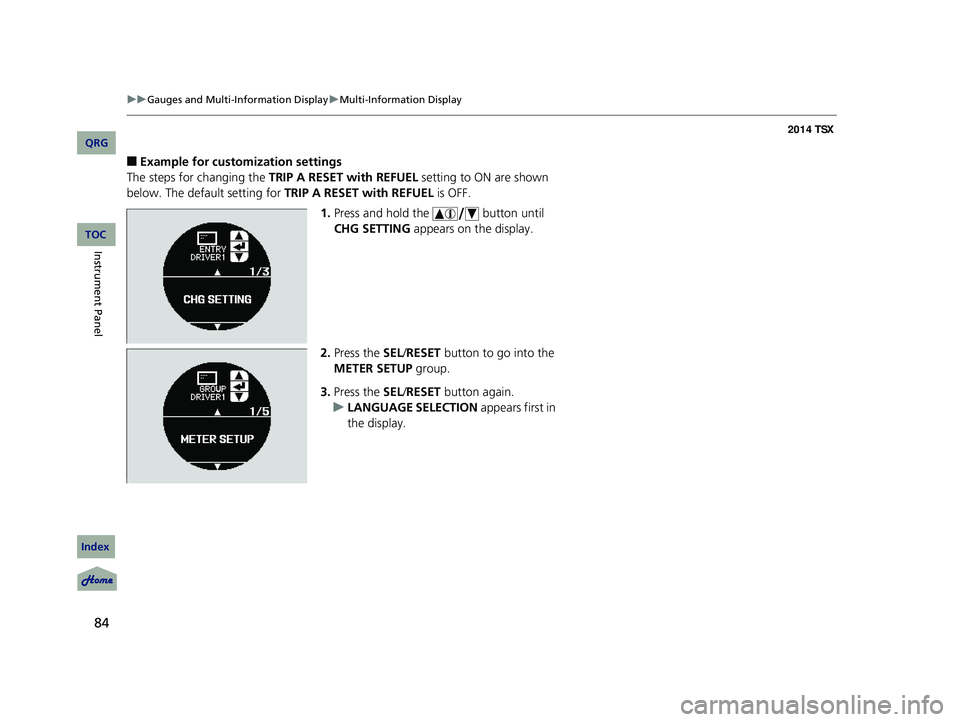
The steps for changing the TRIP A RESET with REFUEL setting to ON are shown
below. The default setting for TRIP A RESET with REFUEL is OFF.
1. Press and hold the button until
CHG SETTING appears on the display.
2. Press the SEL /RESET button to go into the
METER SETUP group.
3. Press the SEL /RESET button again.
u LANGUAGE SELECTION appears first in
the display.
14 ACURA TSX 4D-31TL16500.book 84 ページ 2013年6月17日 月曜日 午前9時40分
QRG
Index
Instrument PanelTOC
Page 86 of 329
85
uu Gauges and Multi-Information Display u Multi-Information Display
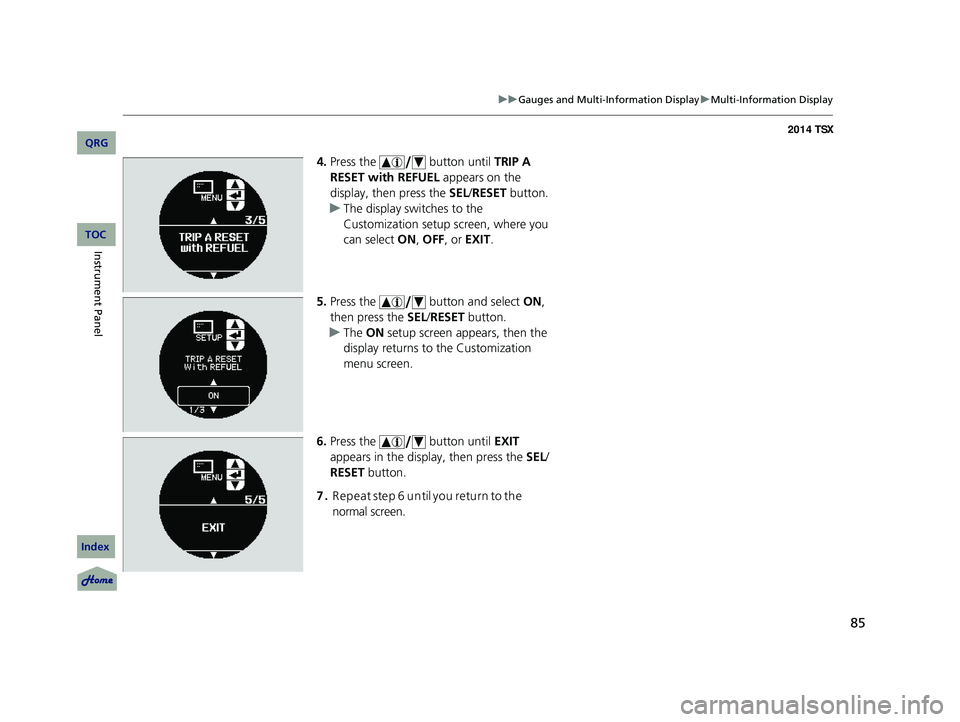
4. Press the button until TRIP A
RESET with REFUEL appears on the
display, then press the SEL/RESET button.
u The display swit ches to the
Customization setup screen, where you
can select ON, OFF , or EXIT .
5. Press the button and select ON,
then press the SEL/RESET button.
u The ON setup screen appears, then the
display returns to the Customization
menu screen.
6. Press the button until EXIT
appears in the display, then press the SEL/
RESET button.
7. Repeat step 6 until you retu rn to the
normal screen.
14 ACURA TSX 4D-31TL16500.book 85 ページ 2013年6月17日 月曜日 午前9時40分
QRG
Index
Instrument PanelTOC
Page 101 of 329

uu Security System u Security System Alarm
100
■Setting the security system alarm
The security system alarm automatically sets when the following conditions have
been met:
• The ignition switch is in LOCK
(0
, and the key has been removed from the
ignition switch.
• The hood and trunk are closed.
• All doors are locked with the remote transmitter.
■When the security system alarm sets
The security system alarm indicator in the instrument panel blinks. When the
blinking interval changes after about 15 seconds, the security system alarm is set.
■To cancel the security system alarm
The security system alarm is canceled when the vehicle is unlocked using the key or
remote transmitter. The security system al arm indicator goes off at the same time.
■The PANIC button on the remote
transmitter
If you press the PANIC button for
approximately one seco nd, the following will
occur for about 30 seconds:
• The horn sounds.
• Some exterior lights flash.
■Canceling panic mode
Press any button on the remote transmitter, or turn the ignition switch to ON
(w .
■Panic Mode
1
Security System Alarm
Do not set the security system alarm when someone
is in the vehicle or a window is open. The system can
accidentally activate when:
•Unlocking the door with th e lock tab or the master
door lock switch.
•Opening the trunk with the release button on the
driver’s door or the emergency trunk opener.
If the battery goes dead after you have set the
security system alarm, the security alarm may go off
once the battery is re charged or replaced.
If this occurs, deactivate the security system alarm by
unlocking a door using the ke y or remote transmitter.
Do not attempt to alter th is system or add another
device to it.
PANIC
Button
14 ACURA TSX 4D-31TL16500.book 100 ページ 2013年6月17日 月曜日 午前9時40分
QRG
Index
ControlsTOC
Page 108 of 329

107
uu Operating the Switches Around the Steering Wheel u Light Switches
Automatic lighting control can be used when
the ignition switch is in ON
(w
.
When you turn the light switch to AUTO, the
headlights and other exterior lights will switch
on and off automatically depending on the
ambient brightness. u You
can change the auto light sensitivity
setting.
2 Customized Features P. 80
■Automatic lighting off feature
The headlights, all other exterior lights, a nd the instrument panel lights turn off 15
seconds after you remove the key, and close the driver’s door.
u You can change the headlight auto off timer setting.
2Customized Features P. 80
If you turn the ignition switch to LOCK (0
with the headlight switch on, but do not
open the door, the lights turn off after 10 minu tes (3 minutes, if the switch is in the
AUTO position).
The lights turn on again when you unlock or open the driver’s door. If you unlock
the door, but do not open it within 15 seconds, the lights go off. If you open the
driver’s door, you will hear a lights on reminder chime.
■Automatic Operation (automatic lighting control)1 Automatic Operation (aut omatic lighting control)
We recommend that you tu rn on the lights manually
when driving at night, in a dense fog, or in dark areas
such as long tunnels or parking facilities.
The light sensor is in the location shown below.
Do not cover this light sensor with anything;
otherwise, the automatic lighting system may not
work properly.
Adjust the auto light sensitivity as follows:
SettingThe exterior lights come on
when the ambient light is at
MAX
HIGH
MID
LOW
MIN
Light Sensor
Bright
Dark
14 ACURA TSX 4D-31TL16500.book 107 ページ 2013年6月17日 月曜日 午前9時40分
QRG
Index
ControlsTOC