fuel Acura TSX 2014 Owner's Manual
[x] Cancel search | Manufacturer: ACURA, Model Year: 2014, Model line: TSX, Model: Acura TSX 2014Pages: 329, PDF Size: 15.95 MB
Page 1 of 329
Contents
This owner’s manual should be considered a permanent part of the
vehicle and should remain with the vehicle when it is sold.
This owner’s manual covers all models of your vehicle. You may find
desc riptions of equipment and features that are not on your
particular model.
Images throughout this owner’s manual (including the front
cover) represent features and equipment that are available on
some, but not all, models. Your particular model may not have
some of these features.
This owner’s manual is for vehicles sold in the United States
and Canada.
The information and specifications included in this publication
were in effect at the time of approval for printing. Honda Motor
Co., Ltd. reserves the right, however, to discontinue or change
specifications or design at any time without notice and without
incurring any obligation.
2 Safe Driving P. 21
For Safe Driving P. 22 Seat Belts P. 26 Airbags P. 33
2 Instrument Panel P. 63
Indicators P. 64 Gauges and Multi-Information Display P. 75
2 Controls P. 87
Setting the Clock P. 88 Locking and Unlocking the Doors P. 89
Opening and Closing the Moonroof P. 104
Adjusting the Seats P. 117
2 Features P. 139
Audio System P. 140 Audio System Basic Operation P. 143
HomeLink ® Universal Transceiver P. 167
2 Driving P. 183
Before Driving P. 184 Towing a Trailer P. 189
Refueling P. 217 Fuel Economy P. 220
2 Maintenance P. 223
Before Performing Maintenance P. 224 Maintenance MinderTM P. 227
Checking and Maintaining Wiper Blades P. 259
Climate Control Sy stem Maintenance P. 273
2 Handling the Unexpected P. 279
Tools P. 280 If a Tire Goes Flat P. 281
Overheating P. 292 Indicator, Coming On/Blinking P. 294
When You Cannot Unlock the Fuel Fill Door P. 304
2 Information P. 307
Specifications P. 308 Identification Numbers P. 312
Emissions Testing P. 315 Warranty Coverages P. 317
14 ACURA TSX 4D-31TL16500.book 0 ページ 2013年6月17日 月曜日 午前9時40分
2014 TSX
QRGQuick Reference Guide
IndexIndex
Book Table of Contents
TOCChapter Table of Contents
Navigation Key
QRG
Index
Page 5 of 329
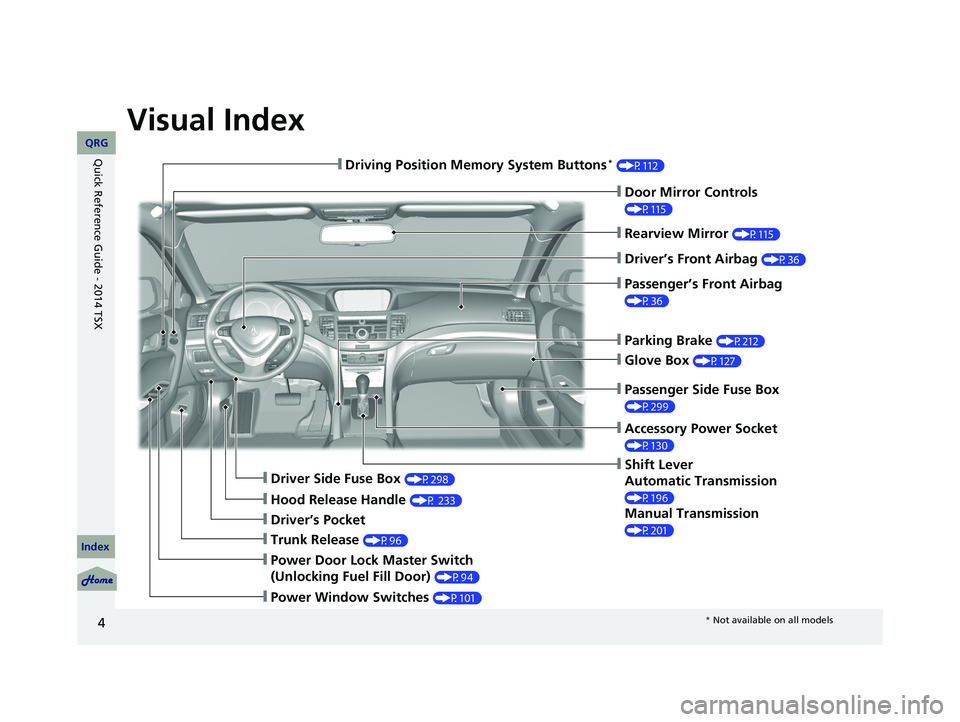
Visual Index
4
❙Door Mirror Controls
(P115)
❙Parking Brake (P212)
❙Glove Box (P127)
❙Rearview Mirror (P115)
❙Shift Lever
Automatic Transmission
(P196)
Manual Transmission
(P201)
❙Driver Side Fuse Box (P298)
❙Passenger Side Fuse Box
(P299)
❙Driver’s Pocket
❙Trunk Release (P96)
❙Power Window Switches (P101)
❙Driving Position Memory System Buttons * (P112)
❙Driver’s Front Airbag (P36)
❙Hood Release Handle (P 233)
❙Passenger’s Front Airbag
(P36)
❙Accessory Power Socket
(P130)
❙Power Door Lock Master Switch
(Unlocking Fuel Fill Door)
(P94)
14 ACURA TSX 4D-31TL16500.book 4 ページ 2013年6月17日 月曜日 午前9時40分
QRG
Index
Quick Reference Guide - 2014 TSX
* Not available on all models
Page 7 of 329
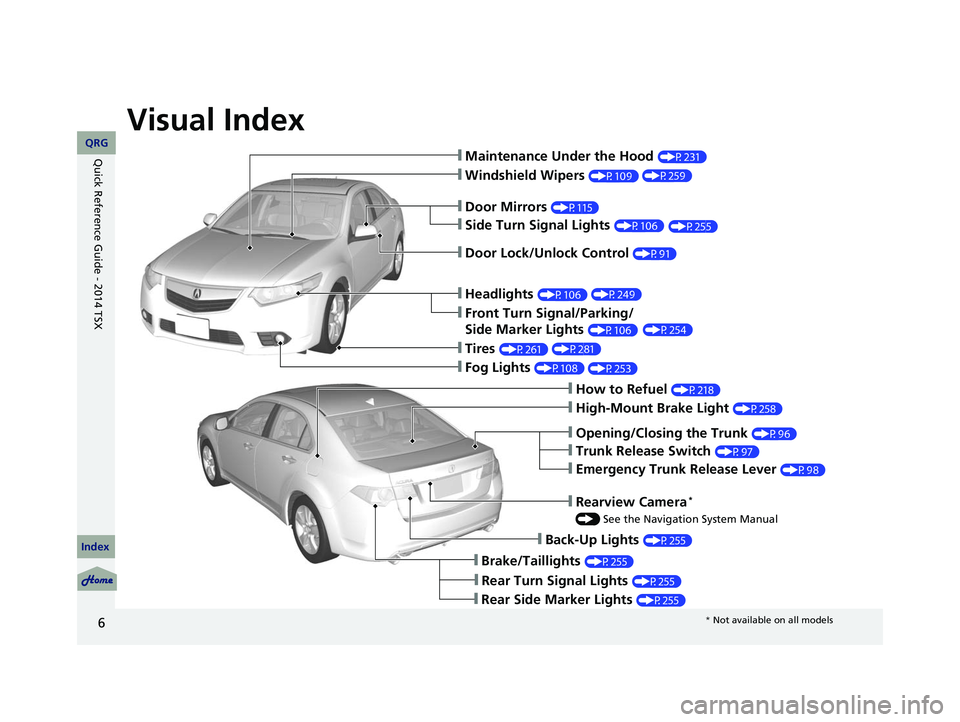
Visual Index
6
❙Maintenance Under the Hood (P231)
❙Windshield Wipers (P109)
❙Tires (P261)
❙Fog Lights (P108)
❙Door Lock/Unlock Control (P91)
❙Side Turn Signal Lights (P106)
❙Headlights (P106)
❙Front Turn Signal/Parking/
Side Marker Lights
(P106)
❙How to Refuel (P218)
❙High-Mount Brake Light (P258)
❙Emergency Trunk Release Lever (P98)
❙Opening/Closing the Trunk (P96)
❙Back-Up Lights (P255)
❙Brake/Taillights (P255)
❙Rear Side Marker Lights (P255)
❙Door Mirrors (P115)
❙Trunk Release Switch (P97)
❙Rear Turn Signal Lights (P255)
❙Rearview Camera *
() See the Navigation System Manual
14 ACURA TSX 4D-31TL16500.book 6 ページ 2013年6月17日 月曜日 午前9時40分
(P259)
(P255)
(P249) (P254)
(P281) (P253)
QRG
Index
Quick Reference Guide - 2014 TSX
* Not available on all models
Page 9 of 329
8
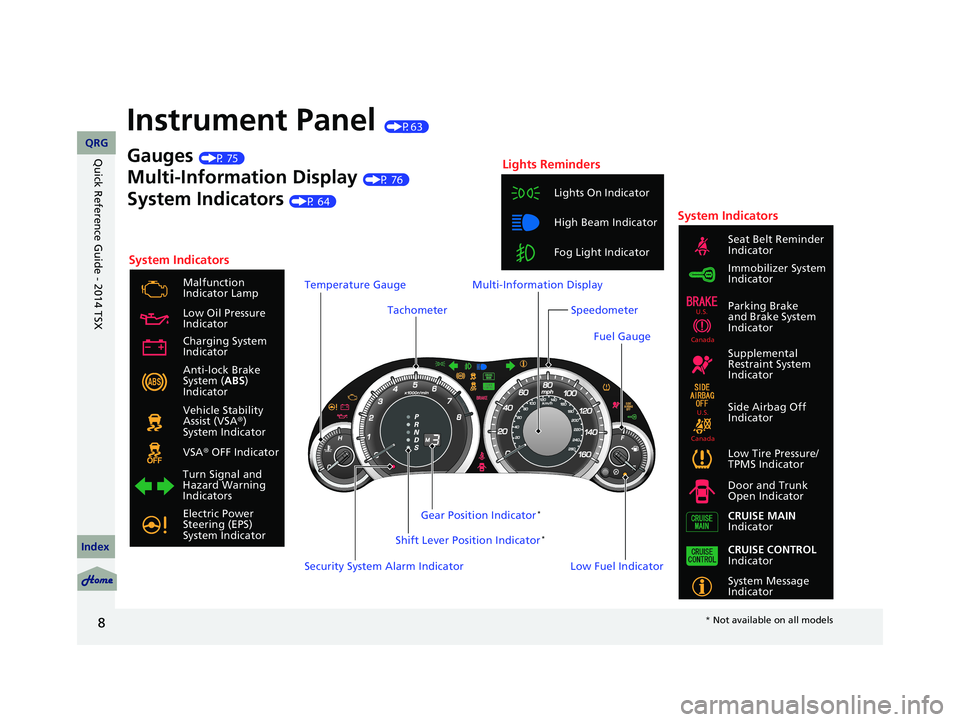
Instrument Panel (P63)
System Indicators
Malfunction
Indicator Lamp
Low Oil Pressure
Indicator
Anti-lock Brake
System ( ABS)
Indicator
Vehicle Stability
Assist (VSA ®)
System Indicator
VSA ® OFF Indicator
Low Tire Pressure/
TPMS Indicator
Electric Power
Steering (EPS)
System Indicator Lights On Indicator
High Beam Indicator
Fog Light Indicator
Immobilizer System
Indicator Seat Belt Reminder
Indicator
System Indicators
System Message
Indicator Parking Brake
and Brake System
Indicator
Supplemental
Restraint System
Indicator
Side Airbag Off
Indicator
Door and Trunk
Open Indicator
CRUISE MAIN
Indicator
Tachometer
Low Fuel Indicator
Security System Alarm Indicator Shift Lever Position Indicator
*
Gauges (P 75)
Multi-Information Display (P 76)
System Indicators (P 64)
Turn Signal and
Hazard Warning
Indicators Gear Position Indicator
*
Charging System
Indicator
CRUISE CONTROL
Indicator
Lights Reminders
Multi-Information Display
Speedometer
Fuel Gauge
Temperature Gauge
U.S.
Canada
U.S.
Canada
14 ACURA TSX 4D-31TL16500.book 8 ページ 2013年6月17日 月曜日 午前9時40分
QRG
Index
Quick Reference Guide - 2014 TSX
* Not available on all models
Page 15 of 329
14
VSA® OFF Button (P 207)
● The vehicle stability assist (VSA® ) system
helps stabilize the vehicle during
cornering, and helps maintain traction
while accelerating on loose or slippery
road surfaces.
● VSA ® c omes on automatically every time
you start the engine.
● To turn VSA ® on or off, press and hold
the button until you hear a beep.
Cruise Control (P 203)
● Cruise control allows you to maintain a
set speed without keeping your foot on
the accelerator pedal.
● To use cruise contr ol, press the
CRUISE
button, then press DECEL/SET once you
have achieved the desired speed (above
25 mph or 40 km/h).
Tire Pressure Monitoring
System (TPMS)
(P208)
● The TPMS monitors tire pressure.
● The TPMS is turned on automatically
every time you start the engine.
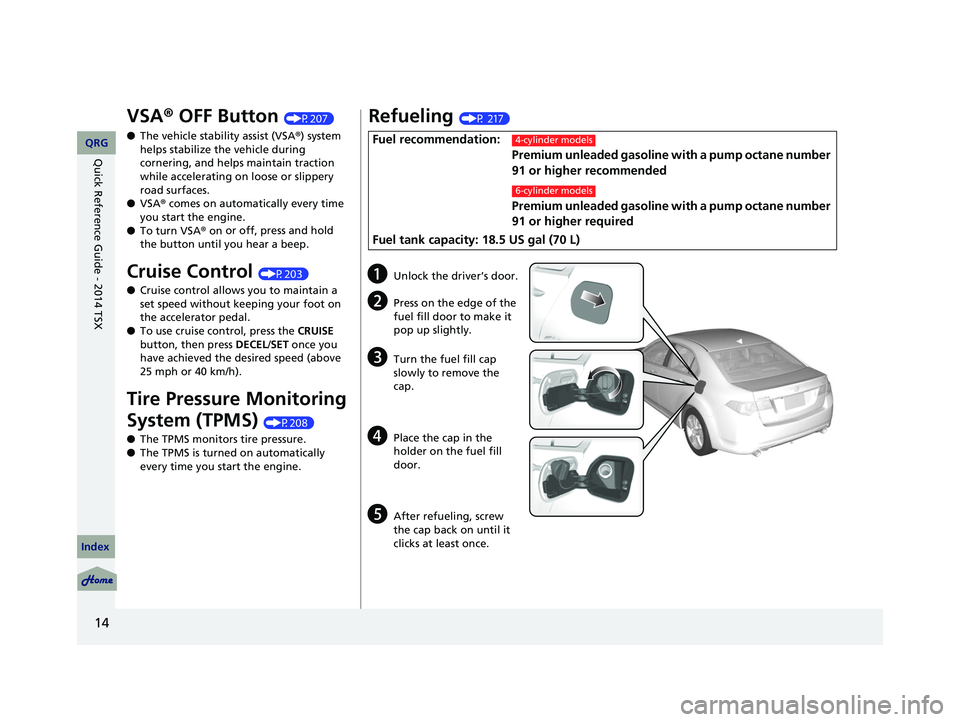
Refueling (P 217)
Fuel recommendation:
Premium unleaded gasoline wi th a pump octane number
91 or higher recommended
Premium unleaded gasoline wi th a
pump octane number
91 or higher required
Fuel tank capacity: 18.5 US gal (70 L)4-cylinder models
6-cylinder models
aUnlock the driver’s door.
bPress on the edge of the
fuel fill door to make it
pop up slightly.
cTurn the fuel fill cap
slowly to remove the
cap.
d
Place the cap in the
holder on the fuel fill
door.
e
After refueling, screw
the cap back on until it
clicks at least once.
14 ACURA TSX 4D-31TL16500.book 14 ページ 2013年6月17日 月曜日 午前9時40分
QRG
Index
Quick Reference Guide - 2014 TSX
Page 67 of 329

66
uu Indicators u
IndicatorNameOn/BlinkingExplanationMessage
M (sequential shift
mode) Indicator/
Gear Position
Indicator
*
●Comes on when the manual
sequential shift mode is applied.
●Blinks if the transmission system
has a problem.2 Sequential Shift Mode P. 199—
Seat Belt
Reminder
Indicator
●Comes on and the beeper sounds
if you are not wearing a seat belt
when you turn the ignition switch
to ON
(w
.●If the front passenger is not wearing
a seat belt, the indicator comes on
about a few seconds later.
●Blinks while driving if either you or
the front passenger has not
fastened a seat belt. The beeper
sounds and the indicator blinks at
regular intervals.
●The beeper stops and the indicator goes
off when you and the front passenger
fasten their seat belts.
●Stays on after you or the front
passenger has fastened the seat belt
- A detection error may have occurred in the sensor. Have the vehicle checked by a
dealer.
2 Seat Belt Reminder P. 27
Low Fuel
Indicator
●Comes on when the fuel reserve is
running low (approximately 2.8
U.S. gal./10.5 Liter left).
●Blinks if there is a problem with the
fuel gauge.
●Comes on - Refuel your vehicle as soon
as possible.
●Blinks - Have the vehicle checked by a
dealer.
Anti-lock Brake
System ( ABS)
●Comes on for a few seconds when
you turn the ignition switch to ON
(w
, then goes off.●If it comes on at any other time,
there is a problem with the ABS.
●Stays on constantly - Have the vehicle
checked by a dealer. With this indicator
on, your vehicle still has normal braking
ability but no anti-lock function.
2 Anti-lock Brake System (ABS) P. 214
Indicator
* Not available on all models
14 ACURA TSX 4D-31TL16500.book 66 ページ 2013年6月17日 月曜日 午前9時40分
QRG
Index
Instrument PanelTOC
Page 73 of 329

72
uu Indicators u Multi-Information Display Warn ing and Information Messages
Multi-Information Display Warn ing and Information Messages
The following messages appear only on the multi-information display. Press the (information) button to see the message again
with the system me ssage indicator on.
MessageConditionExplanation
●Appears when the engine coolant temperature gets
abnormally high.
2Overheating P. 292
●Appears when the fuel fill cap is loose or is not
installed.
2 Tighten Fuel Fill Cap Message P. 295
●Appears if there is a prob lem with the DRL system.●Have your vehicle checked by a dealer.
2Daytime Running Lights (DRL) P. 108
● Appears when the washer fluid gets low.●Refill washer fluid.
2 Refilling Window Washer Fluid P. 248
Canadian models
14 ACURA TSX 4D-31TL16500.book 72 ページ 2013年6月17日 月曜日 午前9時40分
QRG
Index
Instrument PanelTOC
Page 76 of 329

75
Gauges and Multi-Information Display
Gauges
Gauges include the speedometer, tachometer, fuel gauge, and related indicators.
They are displayed when the ignition switch is in ON
(w
.
Displays your driving speed in mph (U.S.) or km/h (Canada).
Displays the amount of fuel left in the fuel tank.
Displays the temperature of the engine coolant.
Shows the number of engine revolutions per minute.
■Speedometer
■Fuel Gauge
■Temperature Gauge
■Tachometer
1 Fuel Gauge
NOTICE
You should refuel when the reading approaches .
Running out of fuel can cause the engine to misfire,
damaging the cata lytic converter.
The actual amount of remain ing fuel may differ from
the fuel gauge reading.E
1 Temperature Gauge
NOTICE
Driving with the temperat ure gauge pointer in the
upper zone can cause serious engine damage. Pull
safely to the side of th e road and allow engine
temperature to return to normal.
2 Overheating P. 292
14 ACURA TSX 4D-31TL16500.book 75 ページ 2013年6月17日 月曜日 午前9時40分
QRG
Index
Instrument PanelTOC
Page 79 of 329

uu Gauges and Multi-Information Display u Multi-Information Display
78
Shows the outside temperature in Fahr enheit (U.S.) or Celsius (Canada).
■Adjusting the outside temperature display
Adjust the temperature reading up to ±5°F or ±3°C if the temperature reading
seems incorrect.
Shows the instant fuel economy as a bar gr aph in mpg (U.S.) or l/100 km (Canada).
Shows the estimated average fuel economy of each trip meter in mpg (U.S.) or l/100
km (Canada). The display is updated at set intervals. When a trip meter is reset, the
average fuel economy is also reset.
Shows the estimated distance you can travel on the fuel remaining. This distance is
estimated from the fuel econom y of your trips in the past.
■Outside Temperature
■Instant Fuel Economy
■Average Fuel Economy
■Range
1Outside Temperature
The temperature sensor is in the front bumper. Road
heat and exhaust from anothe r vehicle can affect the
temperature reading when your vehicle speed is less
than 19 mph (30 km/h).
It may take several minutes for the display to be
updated after the temperature reading has stabilized.
Use the multi-information display’s customized
features to correct the temperature. 2 Customized Features P. 80
1Average Fuel Economy
You can change whether to reset the average fuel
economy.
2 Customized Features P. 80
14 ACURA TSX 4D-31TL16500.book 78 ページ 2013年6月17日 月曜日 午前9時40分
QRG
Index
Instrument PanelTOC
Page 82 of 329

81
uu Gauges and Multi-Information Display u Multi-Information Display
Continued
■Customization flow
CHG SETTING
Press and hold the button.
DEFAULT ALL
EXIT
METER SETUP
POSITION SETUP
LIGHTING SETUP
DOOR SETUP
ADJUST OUTSIDE TEMP. DISPLAY
LANGUAGE SELECTION
ELAPSED TIME RESET
TRIP A RESET with REFUEL
MEMORY POSITION LINK *
INTERIOR LIGHT DIMMING TIME
AUTO LIGHT SENSITIVITY
HEADLIGHT AUTO OFF TIMER
AUTO DOOR LOCK
SECURITY RELOCK TIMER
AUTO DOOR UNLOCK
DOOR LOCK MODE
KEYLESS LOCK ACKNOWLEDGMENT
SEL/RESET
Press and hold the button.
EXIT
SEL/RESET
SEL/RESET
SEL/RESET
SEL/RESET
SEL/RESET
* Not available on all models
14 ACURA TSX 4D-31TL16500.book 81 ページ 2013年6月17日 月曜日 午前9時40分
QRG
Index
Instrument PanelTOC