sport mode Acura TSX 2014 Workshop Manual
[x] Cancel search | Manufacturer: ACURA, Model Year: 2014, Model line: TSX, Model: Acura TSX 2014Pages: 331, PDF Size: 16.94 MB
Page 161 of 331

uu Audio System Basic Operation u Playing an iPod ®
160
1.Press to display the iPod ® menu.
2. Rotate to select a menu.
3. Press to display the items on that menu.
4. Rotate to select an item, then press .
■How to Select a File from the iPod ® Menu1Playing an iPod®
Available operating functions vary on models or
versions. Some functions may not be available on the
vehicle’s audio system.
If there is a problem, you may see an error message
on the audio display. 2 iPod ®/USB Flash Drive P. 168
iPod® Menu:
Playlists, Artists,
Albums, and Songs
14 ACURA TSX 5D-31TL76300.book 160 ページ 2013年6月17日 月曜日 午後3時21分
QRG
Index
FeaturesTOC
2014 TSX Sport Wagon
Page 162 of 331
161
uu Audio System Basic Operation u Playing an iPod®
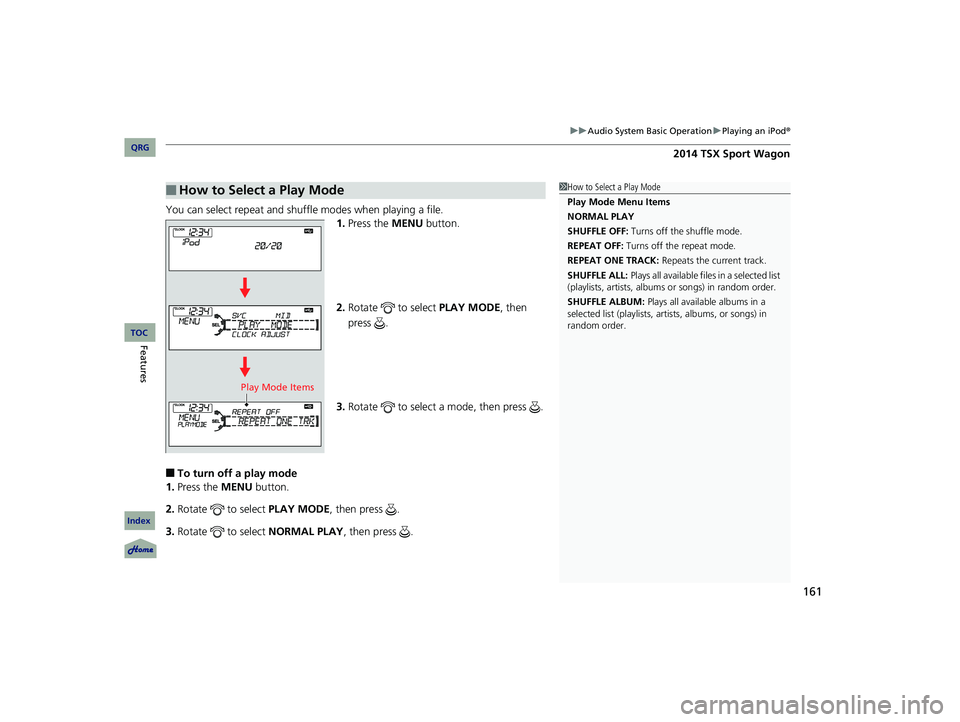
You can select repeat and shuffle modes when playing a file.
1.Press the MENU button.
2. Rotate to select PLAY MODE, then
press .
3. Rotate to select a mode, then press .
■To turn off a play mode
1. Press the MENU button.
2. Rotate to select PLAY MODE , then press .
3. Rotate to select NORMAL PLAY , then press .
■How to Select a Play Mode1How to Select a Play Mode
Play Mode Menu Items
NORMAL PLAY
SHUFFLE OFF: Turns off the shuffle mode.
REPEAT OFF: Turns off the repeat mode.
REPEAT ONE TRACK: Repeats the current track.
SHUFFLE ALL: Plays all available files in a selected list
(playlists, artists, albums or songs) in random order.
SHUFFLE ALBUM: Plays all available albums in a
selected list (play lists, artists, albums, or songs) in
random order.
Play Mode Items
14 ACURA TSX 5D-31TL76300.book 161 ページ 2013年6月17日 月曜日 午後3時21分
QRG
Index
FeaturesTOC
2014 TSX Sport Wagon
Page 165 of 331

uu Audio System Basic Operation u Playing a USB Flash Drive
164
You can select repeat, random, and scan modes when playing a file(s).
1. Press the MENU button.
2. Rotate to select PLAY MODE , then
press .
3. Rotate to select a mode, then press .
■To turn off a play mode
1. Press the MENU button.
2. Rotate to select PLAY MODE , then press .
3. Rotate to select NORMAL PLAY , then press .
■How to Select a Play Mode1How to Select a Play Mode
Play Mode Menu Items
NORMAL PLAY
REPEAT ONE TRACK: Repeats the current file.
REPEAT ONE FLD: Repeats all files in the current
folder.
RANDOM IN FLD: Plays all files in the current folder
in random order.
RANDOM ALL: Plays all files in random order.
SCAN TRK: Samples all files in the current folder.
SCAN FLD: Samples the first file in each folder.
Play Mode Items
14 ACURA TSX 5D-31TL76300.book 164 ページ 2013年6月17日 月曜日 午後3時21分
QRG
Index
FeaturesTOC
2014 TSX Sport Wagon
Page 167 of 331
uu Audio System Basic Operation u Playing Bluetooth® Audio
166
1.Make sure that your phone is paired and connected to HFL.
2. Press the AUX button.
If the phone is not recognized, another HFL-compatible phone, which is not
compatible for Bluetooth® Audio, may already be connected.
■To pause or resume a file
1. Press the MENU button.
2. Rotate to select RESUME/PAUSE , then press .
Each time you press , the setting switches between PAUSE and RESUME.
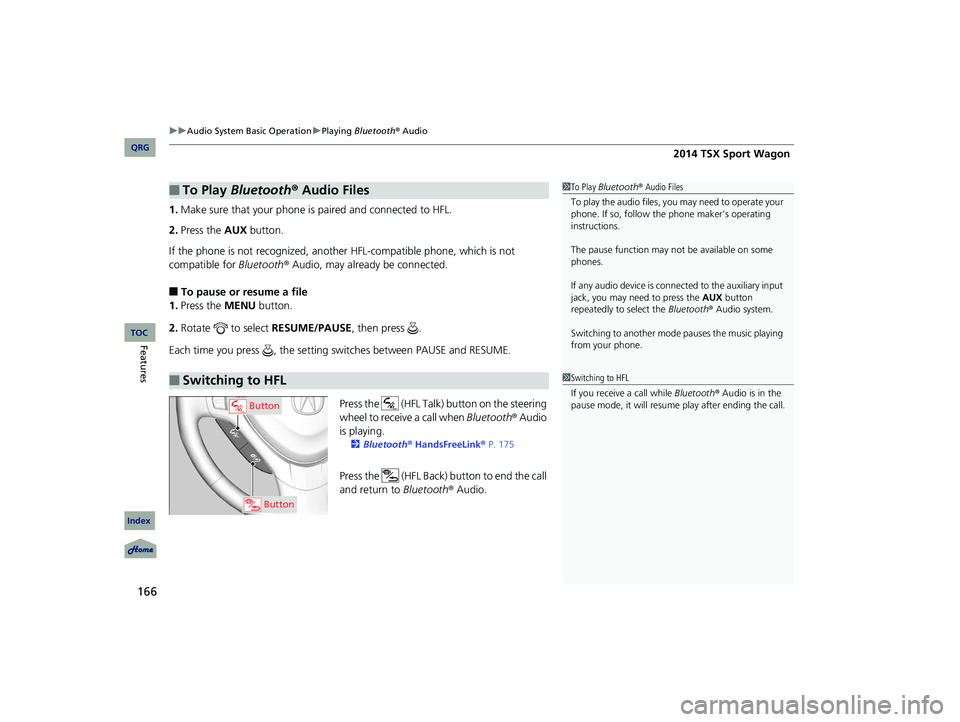
Press the (HFL Talk) button on the steering
wheel to receive a call when Bluetooth ® Audio
is playing.
2 Bluetooth ® HandsFreeLink ® P. 175
Press the (HFL Back) button to end the call
and return to Bluetooth® Audio.
■To Play Bluetooth ® Audio Files
■Switching to HFL
1To Play Bluetooth ® Audio Files
To play the audio files, y ou may need to operate your
phone. If so, follow the phone maker’s operating
instructions.
The pause function may not be available on some
phones.
If any audio device is connected to the auxiliary input
jack, you may need to press the AUX button
repeatedly to select the Bluetooth® Audio system.
Switching to another mode pauses the music playing
from your phone.
1 Switching to HFL
If you receive a call while Bluetooth® Audio is in the
pause mode, it will resume play after ending the call.
Button
Button
14 ACURA TSX 5D-31TL76300.book 166 ページ 2013年6月17日 月曜日 午後3時21分
QRG
Index
FeaturesTOC
2014 TSX Sport Wagon
Page 170 of 331

169
General Information on the Audio System
XM® Radio Service
1.You need your radio ID ready before registering for subscription.
To see the ID in the display: Turn the selector knob until 0 appears.
2. Have your radio ID and credit card number ready, and either call or visit the XM®
website to subscribe.
Press the (XM®) button and stay in this mode for about 30 minutes until the
service is activated. Make sure your vehicl e is in an open area with good reception.
LOADING: XM ® is loading the audio or program information.
OFF AIR: The channel is not currently broadcasting.
UPDATING: The encryption code is being updated. Channels 0 and 1 still work
normally.
NO SIGNAL: The signal is too weak in the current location.
--------: No such channel exists, the channel is not part of your subscription, or the
artist or title information is unavailable.
ANTENNA: There is a problem with the XM ® antenna. Contact a dealer.
■Subscribing to XM ® Radio
■Receiving XM ® Radio
■XM ® Radio Display Messages
1Subscribing to XM® Radio
Contact Information for XM ® Radio:
US: XM ® Radio at www.siriusxm.com , or
(800) 852- 9696
1 Receiving XM ® Radio
The XM ® satellites are in orbit over the equator;
therefore, objects south of the vehicle may cause
satellite reception interruptions. Satellite signals are
more likely to be blocked by tall buildings and
mountains the farther north you travel from the
equator.
You may experience recept ion problems under the
following circumstances:
•In a location with an obstruction to the south of
your vehicle.
•In tunnels•On the lower level of a multi-tiered road•Large items carried on the roof rack
14 ACURA TSX 5D-31TL76300.book 169 ページ 2013年6月17日 月曜日 午後3時21分
QRG
Index
FeaturesTOC
2014 TSX Sport Wagon
Page 173 of 331

172
uu General Information on the Audio System u Compatible iPod ® and USB Flash Drives
Compatible iPod® and USB Flash Drives
• Use a recommended USB flash drive of 256 MB or higher.
• Some digital audio players may not be compatible.
• Some USB flash drives (e.g., a device with security lockout) may not work.
• Some software files may not allow for audio play or text data display.
• Some versions of MP3, WMA, or AAC formats may be unsupported.
■iPod® Model Compatibility
Model
iPod ® (5th generation)
iPod classic ® 80/160GB (launched in 2007)
iPod classic ® 120GB (launched in 2008)
iPod classic ® 160GB (launched in 2009)
iPod touch ® (1st to 4th generation *) *launched in 2011
iPod nano ® (1st to 6th generation *) *launched in 2011
■USB Flash Drives
1iPod® Model Compatibility
This system may not work with all software versions
of these devices.
1 USB Flash Drives
Files on the USB flash drive are played in their stored
order. This order may be different from the order
displayed on your PC or device.
* Not available on all models
14 ACURA TSX 5D-31TL76300.book 172 ページ 2013年6月17日 月曜日 午後3時21分
QRG
Index
FeaturesTOC
2014 TSX Sport Wagon
Page 176 of 331
175Continued
Bluetooth® HandsFreeLink®
See the Navigation System Manual for how to operate Bluetooth® HandsFreeLink ®.
Bluetooth ® HandsFreeLink ® (HFL) allows you to place and receive phone calls using
your vehicle’s audio system, without handling your cell phone.
Using HFL
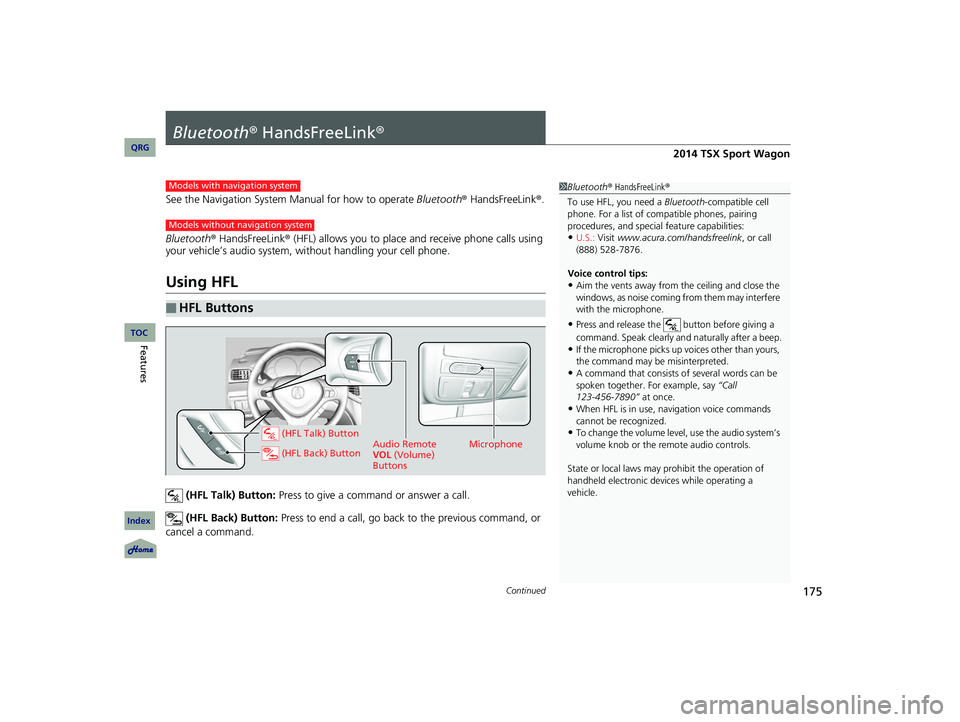
(HFL Talk) Button: Press to give a command or answer a call.
(HFL Back) Button: Press to end a call, go back to the previous command, or
cancel a command.
■HFL Buttons
1 Bluetooth ® HandsFreeLink®
To use HFL, you need a Bluetooth-compatible cell
phone. For a list of compatible phones, pairing
procedures, and specia l feature capabilities:
•U.S.: Visit www.acura.com/h andsfreelink, or call
(888) 528-7876.
Voice control tips:
•Aim the vents away from the ceiling and close the
windows, as noise coming fr om them may interfere
with the microphone.
•Press and release the button before giving a
command. Speak clearly and naturally after a beep.
•If the microphone picks up voices other than yours,
the command may be misinterpreted.
•A command that consists of several words can be
spoken together. For example, say “Call
at once.
•When HFL is in use, navigation voice commands
cannot be recognized.
•To change the volume level, use the audio system’s
volume knob or the remote audio controls.
State or local laws may prohibit the operation of
handheld electronic devi ces while operating a
vehicle.
123-456-7890”
Models with navigation system
Models without navigation system
Microphone
Audio Remote
VOL (Volume)
Buttons (HFL Talk) Button
(HFL Back) Button
14 ACURA TSX 5D-31TL76300.book 175 ページ 2013年6月17日 月曜日 午後3時21分
QRG
Index
FeaturesTOC
2014 TSX Sport Wagon
Page 177 of 331

uu Bluetooth® HandsFreeLink ® u Using HFL
176
• To hear general HFL information and help, say “Tutorial.”
• Say “Hands free help” or “Help” any time to get help or hear a list of commands.
The multi-information display notifies you
when there is an incoming call.
■Help Features
■HFL Status Display
1 Bluetooth® HandsFreeLink ®
Bluetooth ® Wireless Technology
The Bluetooth® word mark and logos are registered
trademarks owned by Bluetooth SIG, Inc., and any
use of such marks by Honda Motors Co., Ltd., is
under license. Other tradem arks and trade names are
those of their respective owners.
HFL Limitations
An incoming call on HFL will interrupt Bluetooth®
Audio when it is playing. Audio will resume when the
call is ended.
1HFL Status Display
The information that appears on the multi-
information display varies between phone models.Signal StrengthHFL Mode Battery Level
Status
Roam Status Phone
Number
14 ACURA TSX 5D-31TL76300.book 176 ページ 2013年6月17日 月曜日 午後3時21分
QRG
Index
FeaturesTOC
2014 TSX Sport Wagon
Page 179 of 331

178
uu Bluetooth® HandsFreeLink ® u HFL Menus
“Change passcode”
Store a phonebook entry.
Edit the number of an existing phonebook entry.
Delete a phonebook entry.
Transfer contacts from your phone to HFL.
Hear a list of all stored phonebook entries.
Apply a security passcode to the system that must be input at each key
cycle to access the system.
Change your security passcode.
Set how you want to be notified of an incoming call.
Set to automatically transfer calls from your phone to HFL when you
enter the vehicle.
Hear a tutorial for genera l rules on using the system.
Hear a list of available commands and additional information describing each command. “Store”
“Edit”
“Delete”
“Receive contact” *
“List”
“Security”
“Call notification”
“Auto transfer”
“Phonebook”
“System setup”
“Tutorial”
“Hands-free help”
Clear the system of all paired phon
es, phonebook entries, and security
passcode.
“Clear”
* Not available on all models
14 ACURA TSX 5D-31TL76300.book 178 ページ 2013年6月17日 月曜日 午後3時21分
QRG
Index
FeaturesTOC
2014 TSX Sport Wagon
Page 180 of 331
Continued179
uu Bluetooth® HandsFreeLink ® u HFL Menus
■To pair a cell phone
1. If no phone has been paired to the system before, HFL gives you information
about how to pair the first phone.
If a phone has already been paired: say “Phone Setup” and “Pair” after the
HFL prompts.
2. Follow the HFL prompts and put your phone in discovery or search mode.
u HFL gives you a four-digit code and begins searching for your phone.
3. When your phone finds a Bluetooth ® device, select HFL from the options and
enter the four-digit code.
4. Follow the HFL prompts and name the newly paired phone.
■To rename a paired phone
1. Say “Phone Setup.”
2. Say “Edit” after the prompts.
3. Follow the HFL prompts and rename the phone.
u If there is more than one phone paired to the system, HFL will ask you which
phone’s name you want to change.
■To delete a paired phone
1. Say “Phone Setup.”
2. Say “Delete” after the prompts.
3. Follow the HFL prompts.
u HFL will ask you which phone you want to delete.
■Phone Setup1Phone Setup
Press the button and follow the prompts.
Your Bluetooth-compatible phone must be paired to
HFL before you can make and receive hands-free
calls.
Phone Pairing Tips:
•You cannot pair your phone while the vehicle is
moving.
•Up to six phones can be paired.•Your phone’s battery may dr ain faster when it is
paired to HFL.
•If your phone is not ready for pairing or not found
by the system within three minutes, the system will
time out and returns to idle.
14 ACURA TSX 5D-31TL76300.book 179 ページ 2013年6月17日 月曜日 午後3時21分
QRG
Index
FeaturesTOC
2014 TSX Sport Wagon