automatic transmission Alfa Romeo 147 2007 Owner handbook (in English)
[x] Cancel search | Manufacturer: ALFA ROMEO, Model Year: 2007, Model line: 147, Model: Alfa Romeo 147 2007Pages: 291, PDF Size: 5.52 MB
Page 163 of 291
GETTING TO KNOW YOUR CAR
161
Controlling the station’s type of
PTY programme
To know the type of PTY programme of
the station heard, keep the “PTY” (2)
pressed until a “beep” is heard. After the
“beep” the display will show the type of pro-
gramme (see previous paragraph) offered
by the station tuned. If the station has no
PTY code, the display will show the wording
“NO-PTY”. After about 5 seconds the dis-
play will again show the RDS name or fre-
quency of the station tuned.
EON Function
(Enhanced Other Network)
Some countries have circuits which group
together several stations enabled to broad-
cast traffic information. In this case the pro-
gramme of the station being heard, will be
interrupted temporarily to receive traffic in-
formation (only with the TA function on),
every time these bulletins are given by one
of the stations of the same circuit. Scrolling transmissions
It is possible to receive different pro-
grammes in the same network and scroll
them in FM Band only) - e.g.: NDR1, NDR2,
NDR3, NDR4, N-JOY...
To turn on this function, briefly press the
“AF-TA” button (1) to turn on the AF func-
tion. The user can then start scrolling press-
ing “
˙˙” (7) or “¯¯” (4).
IMPORTANTThe station must have
been received previously at least once.
Stereophonic stations
If the signal received is weak, the device
switches automatically from Stereo to Mono.
MENU(fig. 137)
Functions of “MENU” button (9)
To turn on the menu function briefly press
(less than 1 second) the “MENU” button
(9). The display will show the word
“MENU”.
To scroll the Menu functions use “
▲” (6)
or “
▼” (8). To turn on/off the function se-
lected use “
˙˙” (7) or “¯¯” (4).
The display will show the current status
of the function selected.
The functions controlled by the menu are
the following:
–EQ SET(Equalizer settings, only if the
equalizer is on)
–PRESET/USER/CLASSIC/
ROCK/JAZZ(Turning on/off and choos-
ing predefined equalizer adjustments)
–HICUT(Treble reduction)
–PHONE(Volume of phone, if installed)
–CD NAME(Allocation of CD names,
only with CD inserted)
–SVC(Automatic volume control in re-
lation to speed)
–SENS DX/LO(Tuning sensitivity)
–CD(CD display setting)
Page 224 of 291
●●●●●●●●●
●●●●●●●●●
●●●●●●●●●
●●●●●●●●●
●●●●●●●●●
●●●●
●●●●●●●●●
●●●●●●●●●
●●
●●●●
●●
●●●●
●●●●●●●●●
●●●●●●●●●
●●
VEHICLE MAINTENANCE
222
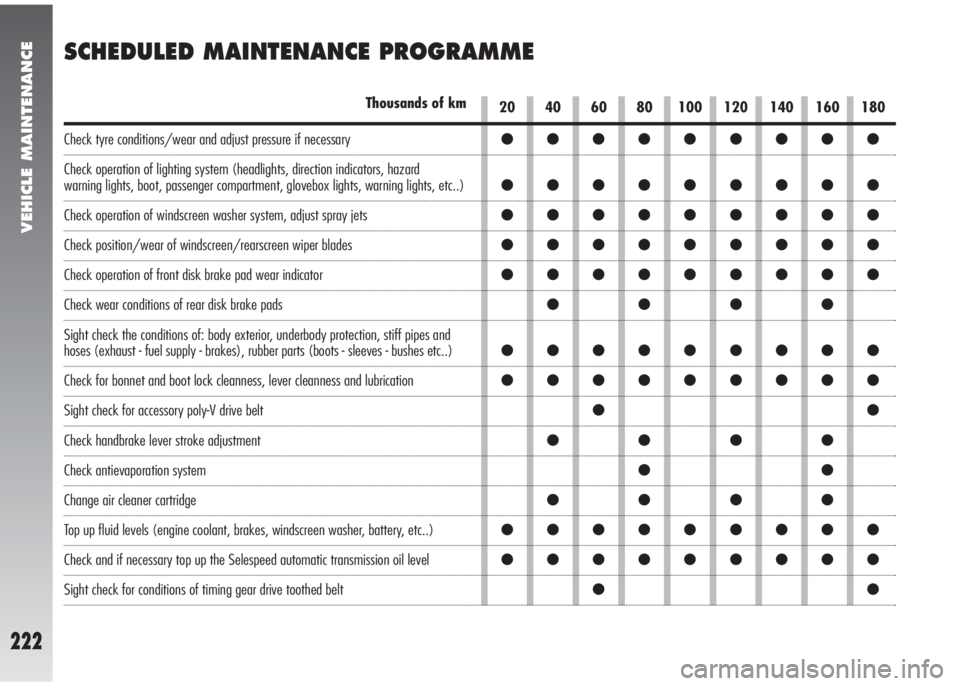
SCHEDULED MAINTENANCE PROGRAMME
20 40 60 80 100 120 140 160 180Thousands of km
Check tyre conditions/wear and adjust pressure if necessary
Check operation of lighting system (headlights, direction indicators, hazard
warning lights, boot, passenger compartment, glovebox lights, warning lights, etc..)
Check operation of windscreen washer system, adjust spray jets
Check position/wear of windscreen/rearscreen wiper blades
Check operation of front disk brake pad wear indicator
Check wear conditions of rear disk brake pads
Sight check the conditions of: body exterior, underbody protection, stiff pipes and
hoses (exhaust - fuel supply - brakes), rubber parts (boots - sleeves - bushes etc..)
Check for bonnet and boot lock cleanness, lever cleanness and lubrication
Sight check for accessory poly-V drive belt
Check handbrake lever stroke adjustment
Check antievaporation system
Change air cleaner cartridge
Top up fluid levels (engine coolant, brakes, windscreen washer, battery, etc..)
Check and if necessary top up the Selespeed automatic transmission oil level
Sight check for conditions of timing gear drive toothed belt