Alfa Romeo 4C Spider 2016 Owner's Manual
4C Spider 2016
Alfa Romeo
Alfa Romeo
https://www.carmanualsonline.info/img/27/9385/w960_9385-0.png
Alfa Romeo 4C Spider 2016 Owner's Manual
Page 314 of 371
BULB REPLACEMENT
NOTE:Lens fogging can occur under certain atmo-
spheric conditions. This will usually clear as atmospheric
conditions change to allow the condensation to change
back into a vapor. Turning the lamps on will usually
accelerate the clearing process.
Front Light Clusters
The front head lamp contains bulbs for the parking
lights/daytime running lights (DRL), low beam head-
lights, high beam headlights and direction indicators.
If bulb replacement is required, please see an authorized
dealer.
1 — Daytime Running Lights
2 — Direction Indicator
3 — High/Low Beam Lights
312 MAINTAINING YOUR VEHICLE
Page 315 of 371
Side Lights/Daytime Running Lights (DRL)
These are LEDs. For the replacement, contact the your
authorized dealer.
Low/High Beam Bi-Halogen Headlights
To change the bulb, proceed as follows:
1. Turn the steering wheel completely.
2. Open the protective flap by rotating the screw.3. Remove protective cover from headlamp assembly.
1 — Direction Indicator Bulb Protective Flap
2 — Headlamp Bulb Protective Flap
7
MAINTAINING YOUR VEHICLE 313
Page 317 of 371
6. Refit the new bulb, making sure that it is lockedcorrectly, and reconnect the electrical connector.
7. Reinstall protective cover in the headlamp assembly and close the protective flap.
Low/High Beam HID & LED Headlights
For the replacement, contact the your authorized dealer.
Direction Indicators
Front:
1. Turn the steering wheel completely.
2. Open the protective flap by rotating the screw.
3. Remove protective cover from headlamp assembly.
1 — Direction Indicator Bulb Protective Flap
2 — Headlamp Bulb Protective Flap
7
MAINTAINING YOUR VEHICLE 315
Page 320 of 371
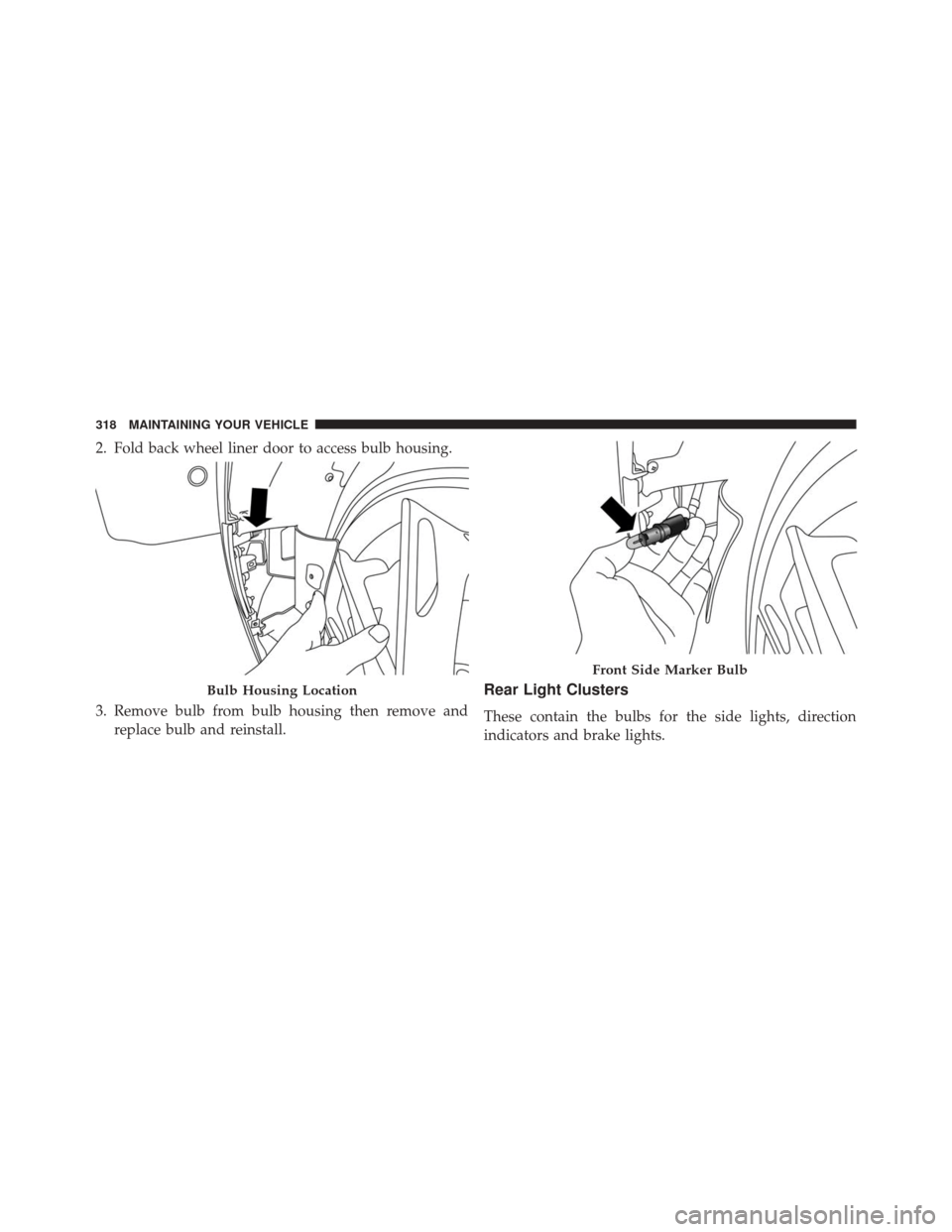
2. Fold back wheel liner door to access bulb housing.
3. Remove bulb from bulb housing then remove andreplace bulb and reinstall.
Rear Light Clusters
These contain the bulbs for the side lights, direction
indicators and brake lights.
Bulb Housing Location
Front Side Marker Bulb
318 MAINTAINING YOUR VEHICLE
Page 322 of 371
4. Install the bulb by pressing it into bulb holder thenturn install the bulb holder and turn it counterclock-
wise.
5. Install the previously removed protective caps.
Tail Lights/Brake Lights
These are LEDs. For the replacement, contact the your
local dealer.
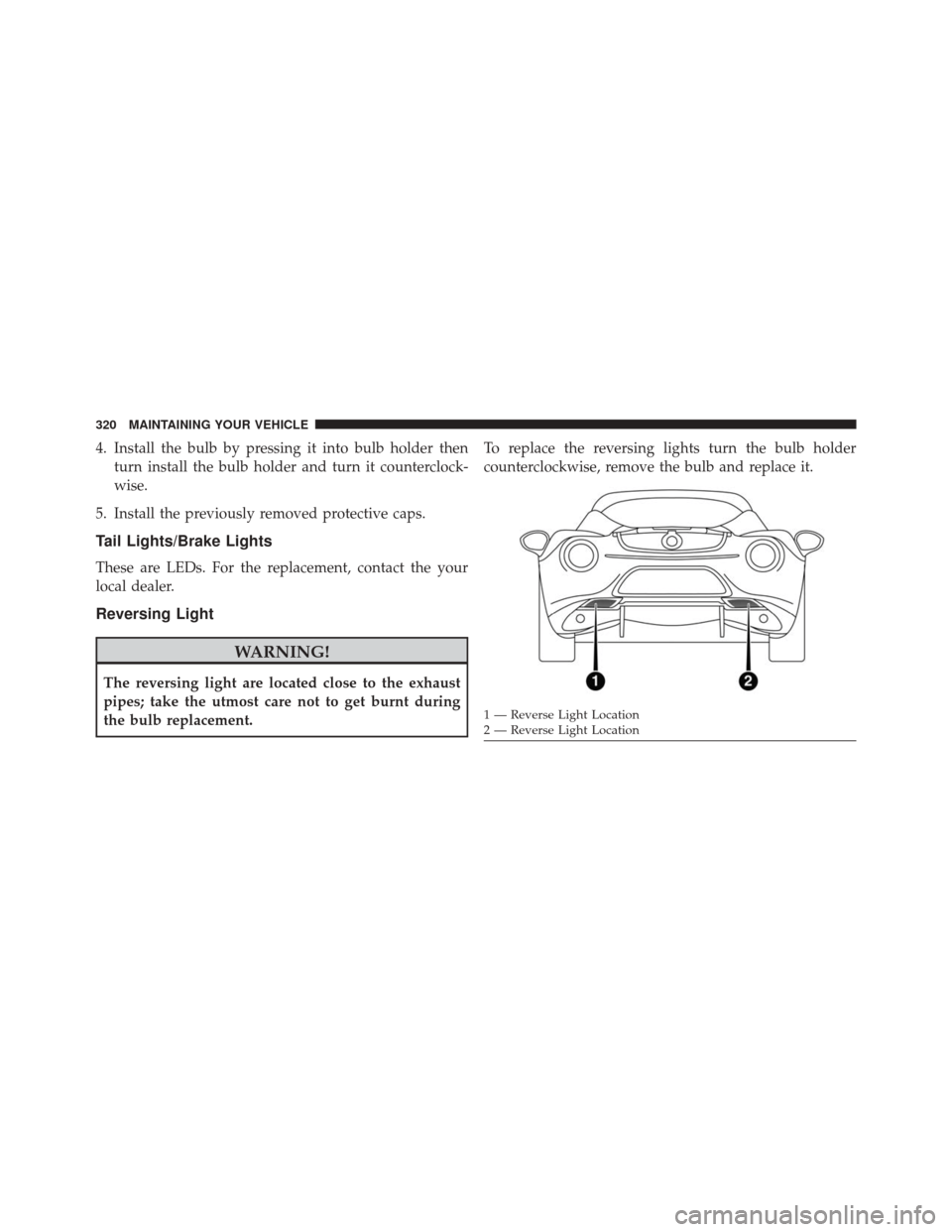
Reversing Light
WARNING!
The reversing light are located close to the exhaust
pipes; take the utmost care not to get burnt during
the bulb replacement. To replace the reversing lights turn the bulb holder
counterclockwise, remove the bulb and replace it.
1 — Reverse Light Location
2 — Reverse Light Location
320 MAINTAINING YOUR VEHICLE
Page 323 of 371
Third Brake Lights
These are LEDs. For the replacement, contact your local
dealer.
License Plate Lights
To replace the bulbs proceed as follows:
1. Position the lens in the point shown laterally tocompress the retaining clip, then pull the license plate
light cluster out.
Reversing Light Bulb Holder
License Plate Lamp Removal
7
MAINTAINING YOUR VEHICLE 321
Page 324 of 371
2. Turn bulb holder (1) counterclockwise, remove bulb(2) and replace it.Roof Light
To change the bulb, proceed as follows:
1. Remove roof light working at the points indicated bythe arrows.
1 — Bulb Holder
2 — Bulb
Roof Light
322 MAINTAINING YOUR VEHICLE
Page 325 of 371
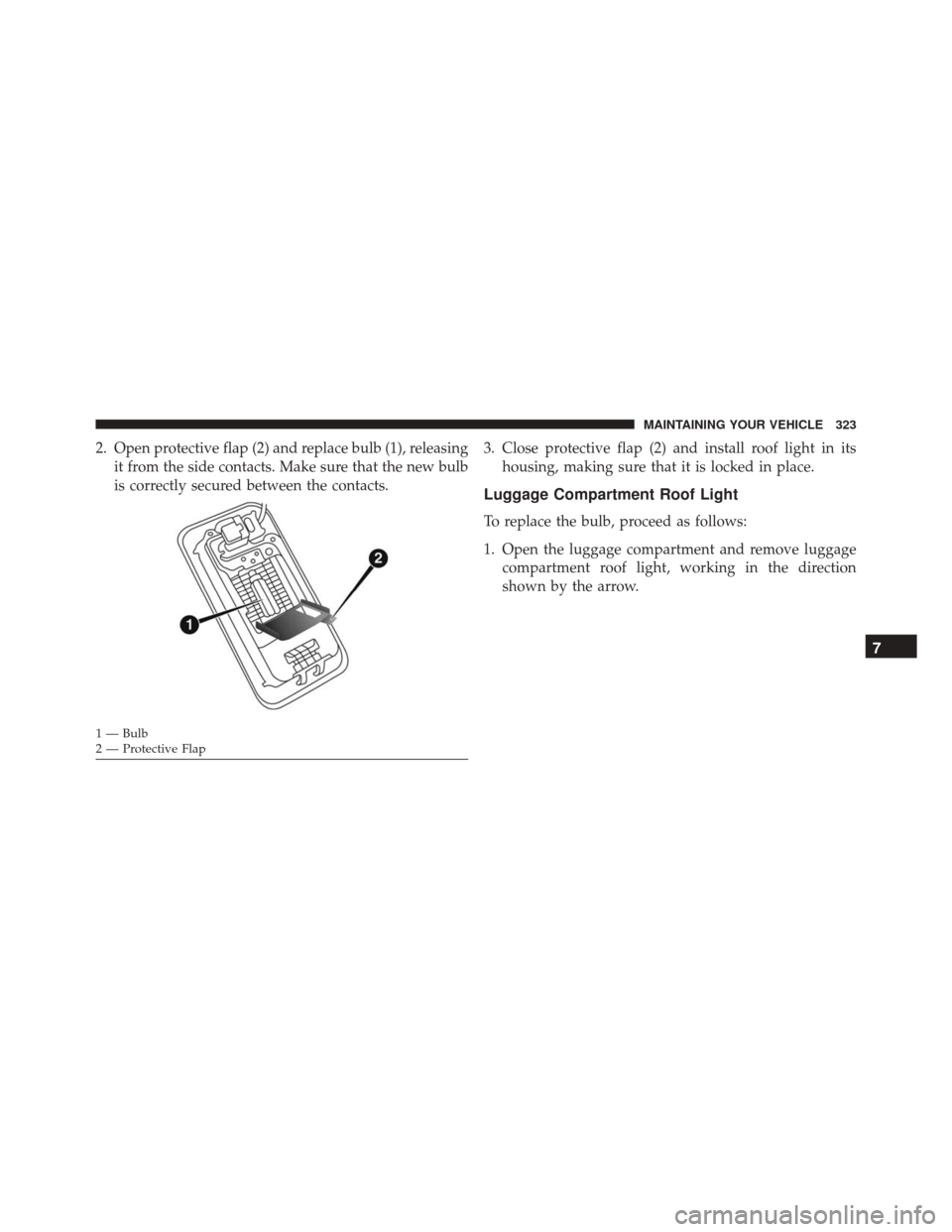
2. Open protective flap (2) and replace bulb (1), releasingit from the side contacts. Make sure that the new bulb
is correctly secured between the contacts. 3. Close protective flap (2) and install roof light in its
housing, making sure that it is locked in place.
Luggage Compartment Roof Light
To replace the bulb, proceed as follows:
1. Open the luggage compartment and remove luggagecompartment roof light, working in the direction
shown by the arrow.
1 — Bulb
2 — Protective Flap
7
MAINTAINING YOUR VEHICLE 323
Page 326 of 371
2. Open light protector (2) and replace the bulb.
3. Close protector on the lens.
4. Install luggage compartment roof light by inserting itin its correct position, first on one side and then
pressing on the other side until it clicks into place.
1 — Light Cover
2 — Light Protector 324 MAINTAINING YOUR VEHICLE
Page 332 of 371
MAINTENANCE SCHEDULE
Your vehicle is equipped with an automatic oil change
indicator system. The oil change indicator system will
remind you that it is time to take your vehicle in for
scheduled maintenance.
Based on engine operation conditions, the oil change
indicator message will illuminate in the instrument clus-
ter. This means that an engine oil and engine oil filter
change is required for your vehicle. Operating conditions
such as frequent short-trips, trailer tow, extremely hot or
cold ambient temperatures, and E85 fuel usage will
influence when the “Change Oil” or “Oil Change Re-
quired” message is displayed. Severe Operating Condi-
tions can cause the change oil message to illuminate as
early as 3,500 miles (5,600 km) since last reset. Have your
vehicle serviced as soon as possible, within the next 500
miles (805 km).The Wrench Warning Light may appear in the cluster as
a service reminder when vehicle maintenance is required,
according to the scheduled maintenance mileage. The
maintenance schedule intervals are set by the manufac-
turer. Failure to have them carried out may void your
New Vehicle Limited Warranty.
NOTE:
Under no circumstances should oil change inter-
vals exceed 10,000 miles (16,000 km), twelve months or
350 hours of engine run time, whichever comes first. The
350 hours of engine run or idle time is generally only a
concern for fleet customers.
Severe Duty All Models
In addition, if your vehicle is used under demanding
conditions, including:
• On the track
• On dusty roads
330 MAINTENANCE SCHEDULES