reset Alfa Romeo 4C Spider 2016 User Guide
[x] Cancel search | Manufacturer: ALFA ROMEO, Model Year: 2016, Model line: 4C Spider, Model: Alfa Romeo 4C Spider 2016Pages: 371, PDF Size: 2.93 MB
Page 160 of 371
Exit Menu
This function closes the initial menu screen.
Briefly push theSET/BACKbutton to go back to the
main screen.
Push and release the UP
arrow button to return to
the first menu option (Speed Buzzer).
Push and release the DOWNarrow button to return
to the last menu option (Daylights).
Change Engine Oil Indicator System
Your vehicle is equipped with an engine oil
change indicator system. The “Change Engine
Oil” message will flash in the EVIC display for approxi-
mately 10 seconds and the Oil Pressure Warning Light
will illuminate. The “Change Engine Oil” message in the
EVIC and the Oil Pressure Warning Light will turn off
after approximately 10 seconds. NOTE:
The reset of the Oil Change message must be
performed by an authorized dealer.
Trip Computer
The Trip Computer is located in the instrument cluster. It
features a driver-interactive display (displays informa-
tion such as trip information, range, fuel consumption,
average speed, and travel time).
Trip Button
The TRIP button, located on the right steering column
stalk, can be used to display and to reset the trip values.
158 UNDERSTANDING YOUR INSTRUMENT PANEL
Page 161 of 371
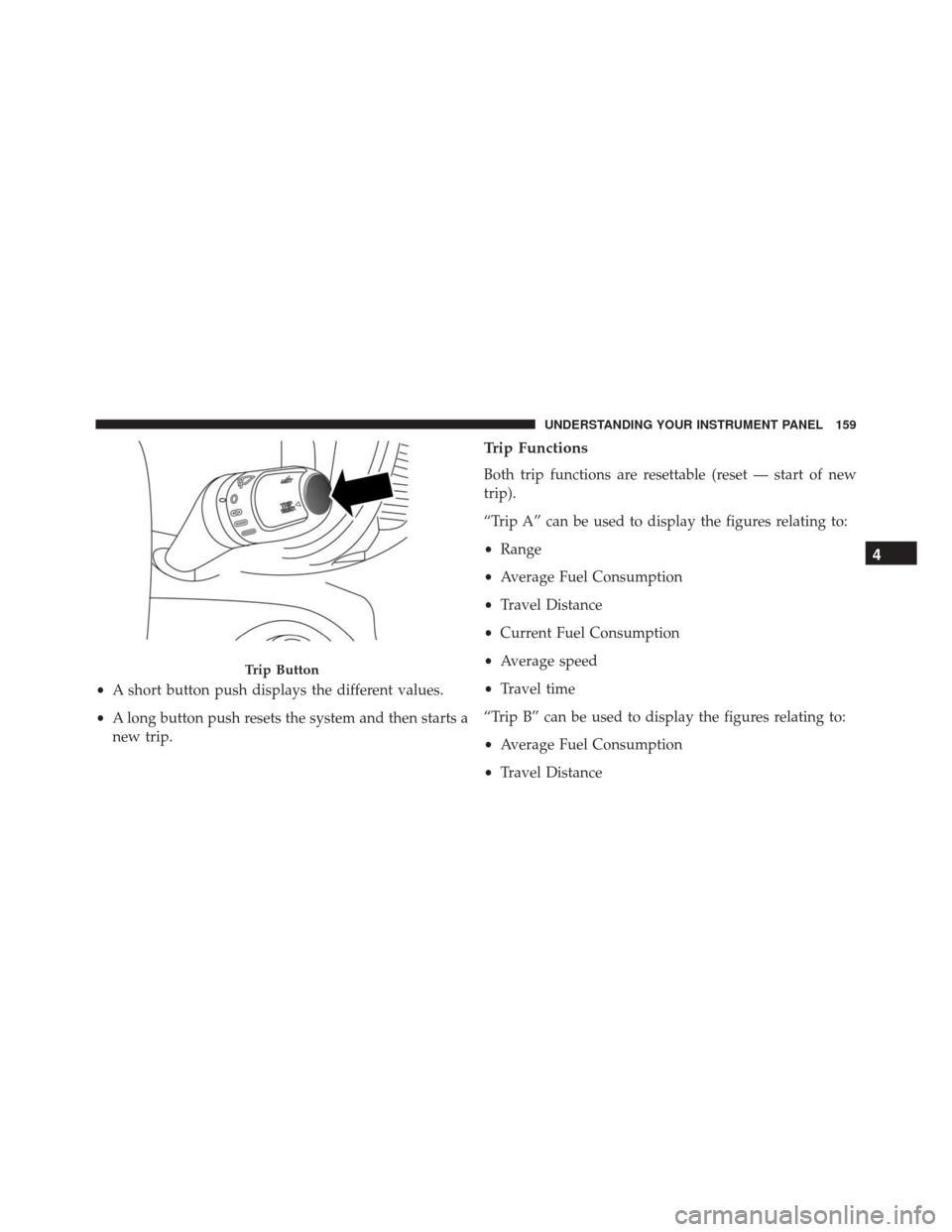
•A short button push displays the different values.
• A long button push resets the system and then starts a
new trip.
Trip Functions
Both trip functions are resettable (reset — start of new
trip).
“Trip A” can be used to display the figures relating to:
• Range
• Average Fuel Consumption
• Travel Distance
• Current Fuel Consumption
• Average speed
• Travel time
“Trip B” can be used to display the figures relating to:
• Average Fuel Consumption
• Travel Distance
Trip Button
4
UNDERSTANDING YOUR INSTRUMENT PANEL 159
Page 162 of 371
•Average speed
• Travel time
“Current Trip” can be used to display the figures relating
to:
NOTE: “Trip B” functions may be excluded (see “Trip
B Data”). “Range” and “Instantaneous consumption”
cannot be reset.
New Trip
To reset:
• Push and hold the TRIPbutton to reset the system
manually.
• When the “Trip distance” reaches 99999.9 miles or
kilometers or when the “Travel time” reaches 999.59
(999 hours and 59 minutes), the system is reset auto-
matically. •
Disconnecting/Reconnecting the battery resets the
system.
NOTE: If the reset operation occurs in the presence of
the screens concerning Trip A or Trip B, only the infor-
mation associated with Trip A or Trip B functions will be
reset.
Start Of Trip Procedure
With the ignition on, push and hold the TRIPbutton for
over one second to reset.
Exit Trip
To exit the Trip function, wait until all the values have
been displayed or hold the MENUbutton for longer than
one second.
Briefly push and release the MENUbutton to go back to
the menu screen or push and hold the MENU(approxi-
mately one second) to go back to the main screen without
storing settings.
160 UNDERSTANDING YOUR INSTRUMENT PANEL
Page 164 of 371
Range
This indicates the distance which may be traveled with
the fuel remaining in the tank, assuming that driving
conditions will not change. The message “----” will
appear on the display in the following cases:
•Distance less than 30 miles (or 50 km).
• The vehicle is parked for a long time with the engine
running.
NOTE: The range depends on several factors: driving
style, type of route (freeway, residential, mountain roads,
etc.), conditions of use of the vehicle (load, tire pressure,
etc.). Trip planning must take into account the above
notes.
Average Fuel Consumption
This value shows the approximate average consumption
since the last reset.
Travel Distance
This value shows the distance covered since the last reset.
Current Fuel Consumption
This indicates the fuel consumption. The value is con-
stantly updated. The message “----” will appear on the
display if the vehicle is parked with the engine running.
Average Speed
This value shows the vehicle’s average speed as a func-
tion of the overall time elapsed since the last reset.
Travel Time
This value shows the time elapsed since the last reset.
Tire Pressure Values
This screen will display OK at each Tire Pressure Moni-
toring sensor. Refer to “Tire Pressure Monitoring System”
in “Starting And Operating.”
162 UNDERSTANDING YOUR INSTRUMENT PANEL
Page 167 of 371
NOTE:Be sure to press the RESET button when using the
unit for the first time, after changing the vehicle battery,
or using the battery disconnect (anytime the vehicle loses
power).
For further information on radio functions and use, refer
to the dedicated Supplement attached to the On-Board
Documentation.
RADIO OPERATION AND MOBILE PHONES
Under certain conditions, the mobile phone being on in
your vehicle can cause erratic or noisy performance from
your radio. This condition may be lessened or eliminated
by relocating the mobile phone antenna. This condition is
not harmful to the radio. If your radio performance does
not satisfactorily “clear” by the repositioning of the
antenna, it is recommended that the radio volume be
turned down or off during mobile phone operation.
General Information
This device complies with Part 15 of the FCC rules and
RSS 210 of Industry Canada. Operation is subject to the
following conditions:
• Changes or modifications not expressly approved by
the party responsible for compliance could void the
user’s authority to operate the equipment.
• This device may not cause harmful interference.
• This device must accept any interference received,
including interference that may cause undesired op-
eration.
4
UNDERSTANDING YOUR INSTRUMENT PANEL 165
Page 202 of 371
The system’s pump motor runs during an ABS stop to
provide regulated hydraulic pressure. The pump motor
makes a low humming noise during operation, which is
normal.
The ABS includes an amber ABS Warning Light. When
the light is illuminated, the ABS is not functioning. The
system reverts to standard non-anti-lock brakes. Turning
the ignition Off and On again may reset the ABS if the
fault detected was only momentary.
WARNING!
•When the ABS intervenes and you feel the brake
pedal pulsating, do not reduce the pressure, but
hold it down firmly and confidently; in doing so
you will brake in the shortest distance possible,
depending on the current road conditions.
(Continued)
WARNING! (Continued)
•For maximum efficiency of the braking system, a
bedding-in period of about 311 miles (500 km) is
required: during this period it is advisable to avoid
sharp, repeated and prolonged braking.
• If the ABS intervenes, this indicates that the grip of
the tires on the road is nearing its limit: you must
slow down to a speed compatible with the avail-
able grip.
• The ABS can’t overrule the natural laws of physics,
and can’t increase the grip available according to
the condition of the road.
• The ABS cannot prevent accidents, including those
due to excessive speed on corners, driving on
low-grip surfaces or aquaplaning.
• The capability of the ABS must never be tested
irresponsibly and dangerously, in such a way as to
(Continued)
200 STARTING AND OPERATING
Page 299 of 371
CAUTION!
Using a transmission fluid other than the manufac-
turer ’s recommended fluid may cause deterioration
in transmission shift quality. Refer to “Fluids, Lubri-
cants, and Genuine Parts” in this section for fluid
specifications.
Special Additives
The manufacturer strongly recommends against using
any special additives in the transmission.
Transmission fluid is an engineered product and its
performance may be impaired by supplemental addi-
tives. Therefore, do not add any fluid additives to the
transmission. The only exception to this policy is the use
of special dyes for diagnosing fluid leaks.
CAUTION!
Do not use chemical flushes in your transmission as
the chemicals can damage your transmission compo-
nents. Such damage is not covered by the New
Vehicle Limited Warranty.
Fluid Level Check
The fluid level is preset at the factory and does not
require adjustment under normal operating conditions.
Routine fluid level checks are not required, therefore the
transmission has no dipstick. Your authorized dealer can
check your transmission fluid level using special service
tools. If you notice fluid leakage or transmission malfunc-
tion, visit your authorized dealer immediately to have
the transmission fluid level checked. Operating the ve-
hicle with an improper fluid level can cause severe
transmission damage.
7
MAINTAINING YOUR VEHICLE 297
Page 332 of 371
MAINTENANCE SCHEDULE
Your vehicle is equipped with an automatic oil change
indicator system. The oil change indicator system will
remind you that it is time to take your vehicle in for
scheduled maintenance.
Based on engine operation conditions, the oil change
indicator message will illuminate in the instrument clus-
ter. This means that an engine oil and engine oil filter
change is required for your vehicle. Operating conditions
such as frequent short-trips, trailer tow, extremely hot or
cold ambient temperatures, and E85 fuel usage will
influence when the “Change Oil” or “Oil Change Re-
quired” message is displayed. Severe Operating Condi-
tions can cause the change oil message to illuminate as
early as 3,500 miles (5,600 km) since last reset. Have your
vehicle serviced as soon as possible, within the next 500
miles (805 km).The Wrench Warning Light may appear in the cluster as
a service reminder when vehicle maintenance is required,
according to the scheduled maintenance mileage. The
maintenance schedule intervals are set by the manufac-
turer. Failure to have them carried out may void your
New Vehicle Limited Warranty.
NOTE:
Under no circumstances should oil change inter-
vals exceed 10,000 miles (16,000 km), twelve months or
350 hours of engine run time, whichever comes first. The
350 hours of engine run or idle time is generally only a
concern for fleet customers.
Severe Duty All Models
In addition, if your vehicle is used under demanding
conditions, including:
• On the track
• On dusty roads
330 MAINTENANCE SCHEDULES