light Alfa Romeo 4C Spider 2017 Owner's Guide
[x] Cancel search | Manufacturer: ALFA ROMEO, Model Year: 2017, Model line: 4C Spider, Model: Alfa Romeo 4C Spider 2017Pages: 297, PDF Size: 2.84 MB
Page 65 of 297
MIRRORS
Inside Day/Night Mirror
A single ball joint mirror is provided in the vehicle. It is
a twist on mirror that has a fixed position at the
windshield. The mirror installs on the windshield but-
ton with a counterclockwise rotation and requires no
tools for mounting. The mirror head can be adjusted up,
down, left, and right for various drivers. The mirror
should be adjusted to center on the view through the
rear window.
Headlight glare from vehicles behind you can be re-
duced by moving the small control under the mirror to
the night position (toward the rear of the vehicle). The
mirror should be adjusted while the small control under
the mirror is set in the day position (toward the
windshield).
Outside Mirrors
To receive maximum benefit, adjust the outside mirrors
to center on the adjacent lane of traffic and a slight
overlap of the view obtained from the inside mirror.
NOTE:The passenger side convex outside mirror will
give a much wider view to the rear, and especially of the
lane next to your vehicle.
Adjusting Rearview Mirror
3
UNDERSTANDING THE FEATURES OF YOUR VEHICLE 63
Page 73 of 297
•When using steam washers or high-pressure power
washers, maintain a suitable distance and do not
exceed a maximum temperature of 140 °F (60 °C).
Damage, alterations and water infiltrations may oc-
cur if the distance is too small.
• If a water jet is used, direct away from the edges of
the fabric to prevent water infiltrations.
• Never use alcohol, petroleum products, chemical
products, detergents, stain removers, wax, solvents,
and “wash and polish” products.
• Remove as much dirt from the surface of the top with
a soft brush or vacuum cleaner before washing it.
This operation will considerably improve the final
result. In lack of specific products, use water and
mild soap applied with a sponge preferably in the
shade for washing. Rinse the top with clean water
after having eliminated all the stains.
• Rinse immediately to remove soap to prevent stains.
• Leave the vehicle in the shade after washing avoid-
ing direct sunlight. •
Use specific waterproofing products for fabric tops
and follow the instructions on the product container
for best results.
• The rubber seals of the top must be washed with
water only. Apply talcum power or use specific
rubber care products (silicone spray) if the seals are
dry or partially stuck.
SEATS
Seats are a part of the Occupant Restraint System of the
vehicle.
WARNING!
•It is dangerous to ride in a cargo area, inside or
outside of a vehicle. In a collision, people riding
in these areas are more likely to be seriously
injured or killed.
• Do not allow people to ride in any area of your
vehicle that is not equipped with seats and seat
belts. In a collision, people riding in these areas
are more likely to be seriously injured or killed.
• Be sure everyone in your vehicle is in a seat and
using a seat belt properly.
3
UNDERSTANDING THE FEATURES OF YOUR VEHICLE 71
Page 74 of 297
Manual Seats
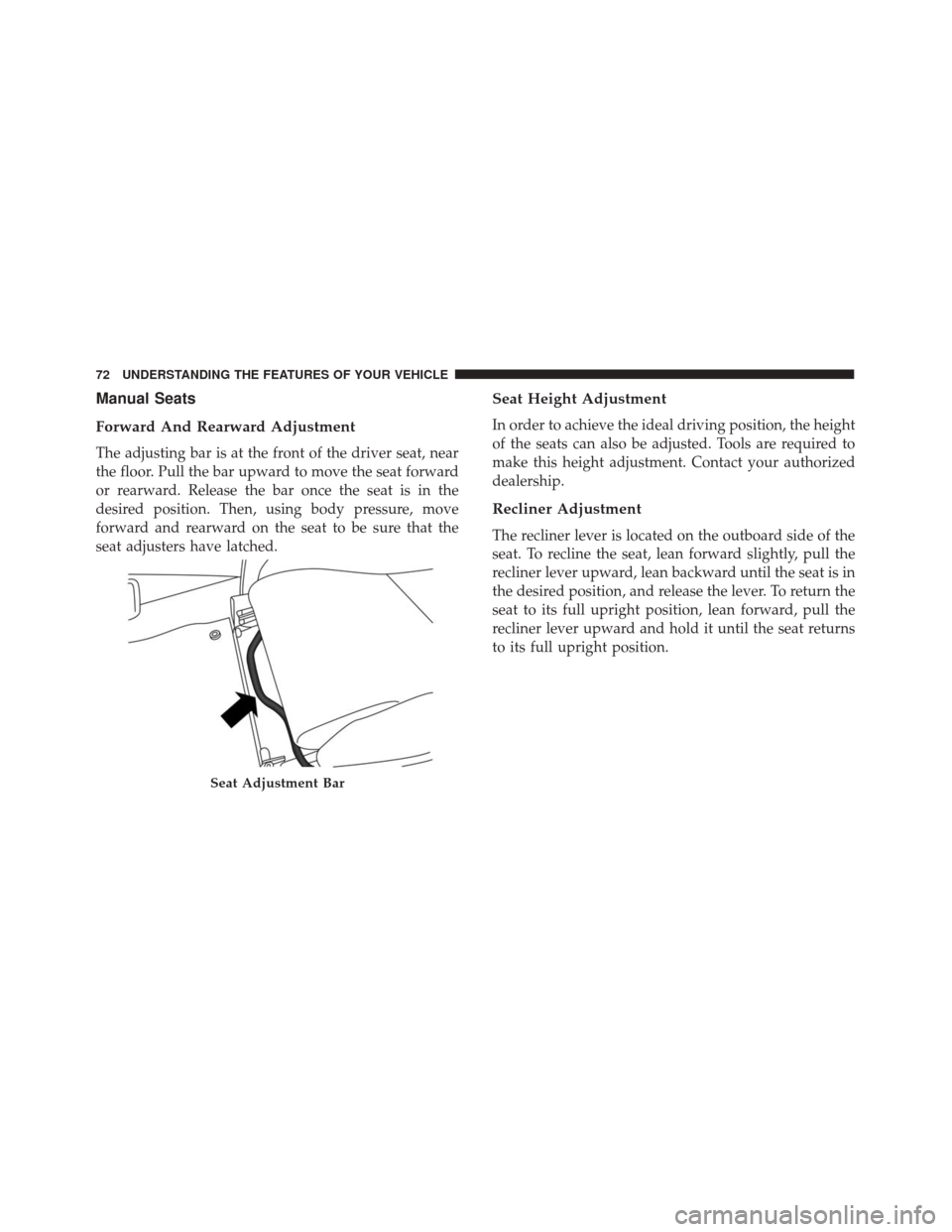
Forward And Rearward Adjustment
The adjusting bar is at the front of the driver seat, near
the floor. Pull the bar upward to move the seat forward
or rearward. Release the bar once the seat is in the
desired position. Then, using body pressure, move
forward and rearward on the seat to be sure that the
seat adjusters have latched.
Seat Height Adjustment
In order to achieve the ideal driving position, the height
of the seats can also be adjusted. Tools are required to
make this height adjustment. Contact your authorized
dealership.
Recliner Adjustment
The recliner lever is located on the outboard side of the
seat. To recline the seat, lean forward slightly, pull the
recliner lever upward, lean backward until the seat is in
the desired position, and release the lever. To return the
seat to its full upright position, lean forward, pull the
recliner lever upward and hold it until the seat returns
to its full upright position.
Seat Adjustment Bar
72 UNDERSTANDING THE FEATURES OF YOUR VEHICLE
Page 79 of 297
LIGHTS
Multifunction Lever
The multifunction lever, located on the left side of the
steering wheel, controls the operation of the headlights,
headlight beam selection, passing light and turn sig-
nals.
NOTE:The external lights can only be turned on with
the ignition in the ON/RUN position.
Headlights
Rotate the end of the multifunction lever
upward to the first detent for headlight
operation.
NOTE: When the headlights are turned on, the Daytime
Running Lights will be deactivated.
Multifunction Lever
Headlight Operation
3
UNDERSTANDING THE FEATURES OF YOUR VEHICLE 77
Page 80 of 297
Daytime Running Lights
To activate the Daytime Running Lights (DRL), rotate
the end of the multifunction lever to theOsymbol.
NOTE: The low beams and side/tail lights will not be
on with DRL.
High Beams
With the low beams activated, pull the multi-
function lever towards the steering wheel to turn
on the high beams. A high beam symbol will illuminate
in the cluster to indicate the high beams are on. Pull the
multifunction lever a second time to switch the head-
lights back to low beam.
Flash-To-Pass
You can signal another vehicle with your headlights by
partially pulling the multifunction lever toward the
steering wheel. This will cause the high beam head-
lights to turn on until the lever is released.
Parking Lights
To turn on the parking lights, remove the key
or turn the ignition to OFF/LOCK position
and turn on the headlights.
Turn Signals
Move the multifunction lever up or down and the
arrows on each side of the instrument cluster display
will flash to show proper operation of the front and rear
turn signal lights.
NOTE: If either light remains on and does not flash, or
there is a very fast flash rate, check for a defective
outside light bulb. If an indicator fails to light when the
lever is moved, it would suggest that the indicator bulb
is defective.
Lane Change Assist
Tap the lever up or down once, without moving beyond
the detent, and the turn signal (right or left) will flash
five times then automatically turn off.
78 UNDERSTANDING THE FEATURES OF YOUR VEHICLE
Page 81 of 297
Follow Me Home/Headlight Delay — If Equipped
When this feature is selected the driver can choose to
have the headlights remain on for a preset period of
time.
Activation
Remove the key or turn the ignition to the STOP
(OFF/LOCK) position, and pull the multifunction lever
toward the steering wheel, within two minutes. Each
time the lever is pulled, the activation of the lights will
be extended by 30 seconds. The activation of the lights
can be extended to a maximum of 210 seconds.
Deactivation
Pull the multifunction lever toward the steering wheel
and hold it for more than two seconds.
Dimmer Controls
The dimmer controls are located on the left side of the
instrument panel below the instrument cluster.
Pushing the up or down arrow will increase or decrease
the brightness of the instrument panel lights.
Dimmer Controls
3
UNDERSTANDING THE FEATURES OF YOUR VEHICLE 79
Page 82 of 297
Interior Light
The interior light is located in the headliner in between
the sun visors. The interior light can be set to three
different positions (off/left position, center position,
on/right position).
Using the interior light lens, push the lens to the right
from its center position and the lights are always on.
Push the lens to the left from its center position and the
lights are always off. Leave the lens in the center
position, and the light is turned on and off when the
doors are opened or closed.
CAUTION!
Before getting out of the vehicle be sure that the
Overhead Dome Lamp is in the center position or
that the lights are off to avoid draining the battery.
Interior Light Timing (Center Position)
There are four different modes of operation that can be
activated in this position:
•When one door is opened a three minute timer is
activated.
• When the key is removed from the ignition (within
two minutes of the ignition being turned off), a 10
second timer is activated.
• When the doors are unlocked with the key fob a 10
second timer is activated.
Interior Light (Off Position Shown)
80 UNDERSTANDING THE FEATURES OF YOUR VEHICLE
Page 83 of 297
•When the doors are locked with the key fob the lights
will turn off.
WINDSHIELD WIPERS AND WASHERS
The windshield wiper/washer controls are located on
the windshield wiper/washer lever on the right side of
the steering column. The front wipers are operated by
rotating a switch, located on the end of the lever.
Intermittent Wiper System
Use the intermittent wiper when weather conditions
make a single wiping cycle with a variable pause
between cycles. Rotate the end of the multifunction
lever to the first detent position. There are four possible
delay intervals that depend on the vehicle speed.
Windshield Wiper Operation
Rotate the end of the lever upward, to the first detent
past the intermittent settings for low-speed wiper op-
eration. Rotate the end of the lever upward to the
second detent past the intermittent settings for high-
speed wiper operation.
Mist
Use the mist feature when weather conditions make
occasional usage of the wipers necessary. Push the lever
upward to the mist position and release for a single
wiping cycle.
NOTE: The mist feature does not activate the washer
pump; therefore, no washer fluid will be sprayed on the
windshield. The wash function must be used in order to
spray the windshield with washer fluid.
Windshield Wiper/Washer Lever
3
UNDERSTANDING THE FEATURES OF YOUR VEHICLE 81
Page 85 of 297
WARNING!
Do not adjust the steering column while driving.
Adjusting the steering column while driving or
driving with the steering column unlocked, could
cause the driver to lose control of the vehicle.
Failure to follow this warning may result in serious
injury or death.
ELECTRONIC SPEED CONTROL —
IF EQUIPPED
When engaged, the Electronic Speed Control takes over
accelerator operations at speeds greater than 18 mph
(30 km/h) up to the maximum speed of 105 mph
(170 km/h).
The Electronic Speed Control Lever is located on the left
side of the steering column.
NOTE:In order to ensure proper operation, the Elec-
tronic Speed Control system has been designed to shut
down if multiple speed control functions are operated
at the same time. If this occurs, the Electronic Speed
Control system can be reactivated rotating the end of
the multifunction lever (on/off) and resetting the de-
sired vehicle set speed.
To Activate
Rotate the end of the multifunction lever upward to the
first detent, indicated by the speed control icon, to
activate the Electronic Speed Control. The Cruise Indi-
cator Light in the instrument cluster display will illu-
minate. To turn the system off, rotate the end of the
multifunction lever to the “O” position. The Cruise
Indicator Light will turn off. The system should be
turned off when not in use.
Electronic Speed Control Lever
3
UNDERSTANDING THE FEATURES OF YOUR VEHICLE 83
Page 89 of 297
If several obstacles are detected by the sensors, only the
nearest one is considered.
Indications On Display — If Equipped
When the sensors are activated, the screen appears on
the instrument cluster display.
Obstacle presence and distance information is therefore
provided both by the acoustic signal and the instrument
cluster display.
The system indicates a detected obstacle by displaying
an arc in one or more positions according to the distance
of the obstacle and its position in relation to the vehicle.If an obstacle is detected in the rear central area, the
instrument cluster display shows all the arcs in the rear
central area, up to the one that corresponds to the
position of the obstacle itself.
The signal is similar for obstacles in the rear left or right
area.
The arc that corresponds to the position of the obstacle
will flash.
The color on the instrument cluster display depends on
the distance from and position of the obstacle.
The vehicle is close to the obstacle when the instrument
cluster display shows a single constant arc and emits a
continuous sound.
If there are several obstacles, the closest one is indi-
cated.
Fault Indication
Parking sensor failures, if any, will be indicated when
reverse is engaged by the switching on of the
warn-
ing light in the instrument cluster display.
Parking Sensors Screen
3
UNDERSTANDING THE FEATURES OF YOUR VEHICLE 87