instrument panel Alfa Romeo Giulia 2016 Owner's Guide
[x] Cancel search | Manufacturer: ALFA ROMEO, Model Year: 2016, Model line: Giulia, Model: Alfa Romeo Giulia 2016Pages: 204, PDF Size: 4.95 MB
Page 78 of 204
vehicle may increase tyre pressure up to
approximately 1.95 bar (28.3 psi), but
the
warning light will stay on. In this
situation, the warning light will switch off
only after the tyres are inflated to the
prescribed cold pressure value for the
car.
IMPORTANT The TPMS is designed for
original tyres and wheels. The prescribed
pressures and consequent alarm
thresholds set in the TPMS are based on
the dimensions of the tyres fitted on the
vehicle. Using spare wheels of a size, type
and/or design different from the original
ones may cause an irregular operation of
the system and damage the sensors.
Aftermarket fitted wheels may damage
the sensors. Using aftermarket tyre
sealants may damage the Tyre Pressure
Monitoring System (TPMS) sensor. If
aftermarket tyre sealant is used it is
recommended to go to an Alfa Romeo
Dealership to have the sensors checked.
After checking or adjusting the tyre
pressure, always refit the valve cap to
prevent humidity and dirt from entering,
these may damage the Tyre Pressure
Monitoring System sensor.
INSUFFICIENT TYRE PRESSURE
INDICATION
If an insufficient pressure value is
detected on one or more tyres, the
warning light on the instrument panelswitches on and the dedicated messages
are shown on the display. The system also
highlights the tyre or tyres with
insufficient pressure graphically. An
acoustic signal is also emitted.
In this case, stop the car, check the
inflation pressure of each tyre and inflate
them to the correct cold inflation
pressure value, shown on the display or in
the dedicated TPMS menu.
TPMS TEMPORARILY DISABLED
TPMS check message
If a system failure is present, the
warning light flashes for about
75 seconds and then stays on solid. An
acoustic signal is also emitted.
A dedicated message and dashes "– –"
instead of the pressure value are shown
on the display, to indicate that detection
is impossible.
When the ignition device is set to STOP
and then back to ON, the indication
sequence repeats provided that the
failure is still resent.
The
warning light switches off when
the failure condition disappears and the
pressure value is displayed again in place
of the dashes.
A fault in the system could occur in the
following cases:
strong radio-frequency noises could
hinder the regular operation of the TPMS.This condition will be indicated by a
dedicated message on the display. The
message will disappear automatically as
soon as the radio-frequency interference
ceases to affect the system;
aftermarket application of coloured
films on the windows that interfere with
the radio waves emitted by the TPMS;
accumulation of layers of snow or ice
on the wheels or the wheel arches;
using snow chains;
use of rim/tyre assemblies without
sensors for TPMS;
After the punctured tyre has been
repaired with the original tyre sealant
contained in the TireKit, the previous
condition must be restored, so that the
warning light is off during normal
driving.
TPMS deactivation
The TPMS can be deactivated by
replacing the wheels equipped with
TPMS with others that are not (e.g. upon
replacement of the wheel assemblies in
winter) and if compatible with the
country of purchase that makes this
possibility available. Then drive for at
least 20 minutes at a speed higher than
about 15 mph (25 km/h).
The TPMS will emit an acoustic warning,
the
warning light will flash for about
75 seconds, then will stay on constantly
and the instrument panel will display the
76
SAFETY
Page 82 of 204
SBA (Seat Belt Alert)SYSTEM
The SBA system warns the passengers of
the front and rear (where provided) seats
if their seat belt is not fastened.
The system signals unfastened seat belts
with visual warnings (warning lights on in
the instrument panel and icons on the
display) and an acoustic signal (see the
following paragraphs).
NOTE Contact an Alfa Romeo Dealership
to deactivate the acoustic warning. The
acoustic warning can be reactivated at
any time through the Connect system.
FRONT SEAT BELT WARNING LIGHT
BEHAVIOUR
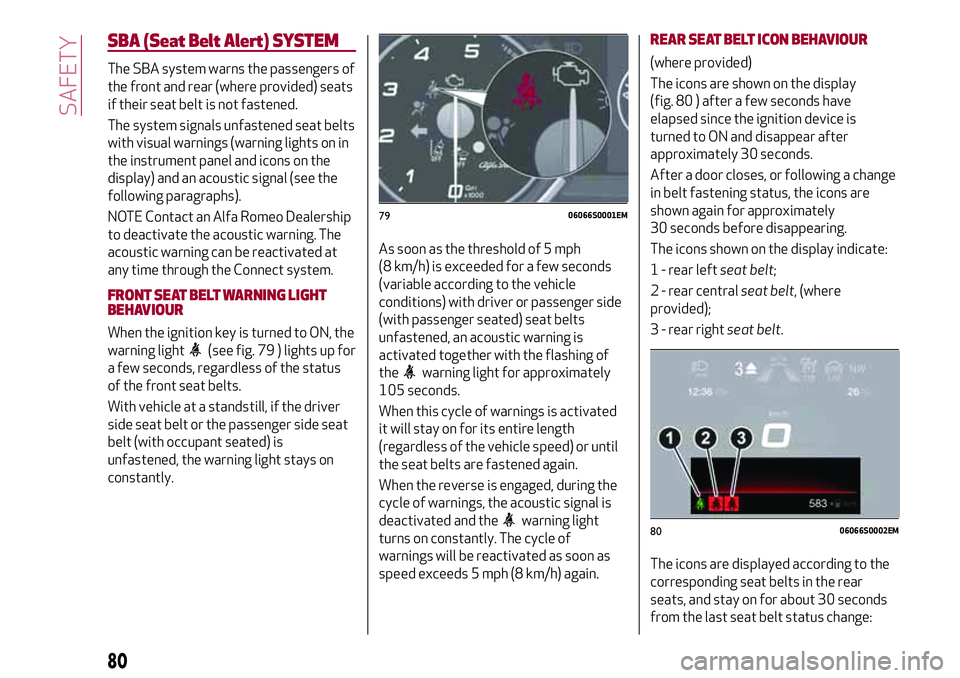
When the ignition key is turned to ON, the
warning light
(see fig. 79 ) lights up for
a few seconds, regardless of the status
of the front seat belts.
With vehicle at a standstill, if the driver
side seat belt or the passenger side seat
belt (with occupant seated) is
unfastened, the warning light stays on
constantly.As soon as the threshold of 5 mph
(8 km/h) is exceeded for a few seconds
(variable according to the vehicle
conditions) with driver or passenger side
(with passenger seated) seat belts
unfastened, an acoustic warning is
activated together with the flashing of
the
warning light for approximately
105 seconds.
When this cycle of warnings is activated
it will stay on for its entire length
(regardless of the vehicle speed) or until
the seat belts are fastened again.
When the reverse is engaged, during the
cycle of warnings, the acoustic signal is
deactivated and the
warning light
turns on constantly. The cycle of
warnings will be reactivated as soon as
speed exceeds 5 mph (8 km/h) again.
REAR SEAT BELT ICON BEHAVIOUR
(where provided)
The icons are shown on the display
(fig. 80 ) after a few seconds have
elapsed since the ignition device is
turned to ON and disappear after
approximately 30 seconds.
After a door closes, or following a change
in belt fastening status, the icons are
shown again for approximately
30 seconds before disappearing.
The icons shown on the display indicate:
1 - rear leftseat belt;
2 - rear centralseat belt, (where
provided);
3 - rear rightseat belt.
The icons are displayed according to the
corresponding seat belts in the rear
seats, and stay on for about 30 seconds
from the last seat belt status change:
7906066S0001EM
8006066S0002EM
80
SAFETY
Page 102 of 204
89)Do not affix rigid objects to the garment
hooks or support handles.
90)Do not rest your head, arms or elbows on
the door, windows or the area in which the
Window bag is located to avoid possible
injury during airbag inflation.
91)Never lean your head, arms or elbows
out of the window.
92)If, when the ignition device is turned to
ON, the
warning light does not switch on
or stays on whilst driving, a fault may have
occurred in the restraint systems. In this
case the airbags or pretensioners may not
be deployed in an impact or, in a lower
number of cases, they may be deployed
accidentally. Before continuing, contact an
Alfa Romeo Dealership immediately to have
the system checked.
93)In case of a LED
OFFfailure (located
on the front courtesy light), thewarning
light appears on the instrument panel.
94)On cars with side bags, do not cover the
front seat backrests with extra covers.
95)Do not travel carrying objects in your
lap, in front of your chest or between your
lips (pipe, pencils, etc.): they could cause
severe injury if the airbag is deployed.
96)If the car has been subject to theft,
attempted theft, vandalism, or flooding,
have the airbag system inspected at an Alfa
Romeo Dealership.
97)Malfunction of the airbag failure
warning light is indicated by the activation
of an airbag failure icon and a dedicated
message on the instrument panel display.
The pyrotechnic charges are not disabled.
Before continuing, contact an Alfa Romeo
Dealership immediately to have the system
checked.98)The airbag deployment threshold is
higher than that of the pretensioners. For
collisions in the range between the two
thresholds, it is normal for only the
pretensioners to be activated.
99)The airbag does not replace seat belts
but increases their efficiency. Because front
airbags are not deployed for low-speed
crashes, side collisions, rear-end shunts or
rollovers, occupants are protected, in
addition to any side bags, only by their seat
belts, which must therefore always be
fastened.
100
SAFETY
Page 104 of 204
STARTING THE ENGINE
STARTING THE ENGINE
Before starting the engine, adjust the
seat, the interior rear view mirrors, the
door mirrors and fasten the seat belt
correctly.
Never press the accelerator pedal for
starting the engine.
If necessary, messages indicating the
starting procedure can be shown on the
display.
100) 101) 102)
30) 31) 32)
Versions with manual gearbox
Proceed as follows:
engage the parking brake and set the
gear in neutral, on diesel versions turn the
ignition switch to ON, the
symbol will
appear on the instrument panel: wait until
it goes off;
fully depress the clutch pedal, without
touching the accelerator;
briefly press the ignition button;
if the engine doesn't start within a few
seconds, you need to repeat the procedure.
if the problem persists, contact an Alfa
Romeo Dealership.Versions with automatic transmission
Proceed as follows:
engage the electric parking brake and
set the gear lever to P (Park) or N
(Neutral),
fully depress the brake pedal without
touching the accelerator;
briefly press the ignition button;
if the engine doesn't start within a few
seconds, you need to repeat the procedure.
if the problem persists, contact an Alfa
Romeo Dealership.
ENGINE STARTING FAILURE
Starting the engine with electronic key
battery (Keyless Start) run down or flat
If the ignition device does not respond
when the relevant button is pressed the
electronic key battery might be run down
or flat. Therefore, the system does not
detect the presence of the electronic key
on board the vehicle and displays a
dedicated message.
STOPPING THE ENGINE
33)
To stop the engine, proceed as follows:
park the vehicle in a position that is not
dangerous for oncoming traffic;
engage a gear (versions with manual
gearbox) or select P (Park) mode
(versions with automatic transmission);
with engine idling, press the start
button.Vehicles with electronic key (Keyless
Start)
If the vehicle speed is above 5 mph
(8 km/h), it is still possible to switch off
the engine by selecting an operating
mode other than P (Park). To switch off
the engine in this situation, hold down the
ignition device button for a while or press
it 3 times in a row within a few seconds.
WARNING
100)It is dangerous to run the engine in
enclosed areas. The engine takes in oxygen
and releases carbon dioxide, carbon
monoxide and other toxic gases.
101)The electro-hydraulic braking system
is not active until the engine starts running.
So, the brake pedal travel will be longer than
normal. This does not indicate a fault.
102)Do not start the engine by pushing,
towing or driving downhill. These
manoeuvres may damage the catalytic
converter.
IMPORTANT
30)We recommend that during the initial
period, or during the first 1600 km
(1000 miles), you do not drive to full car
performance (e.g. excessive acceleration,
long journeys at top speed, sharp braking,
etc.).
102
STARTING AND DRIVING
Page 106 of 204
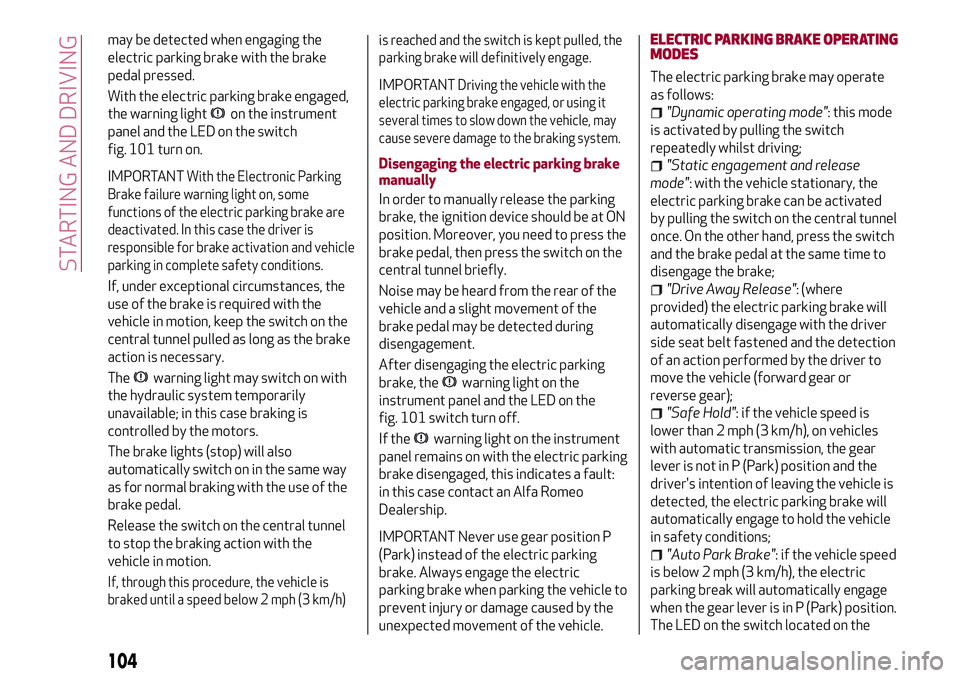
may be detected when engaging the
electric parking brake with the brake
pedal pressed.
With the electric parking brake engaged,
the warning light
on the instrument
panel and the LED on the switch
fig. 101 turn on.
IMPORTANTWith the Electronic Parking
Brake failure warning light on, some
functions of the electric parking brake are
deactivated. In this case the driver is
responsible for brake activation and vehicle
parking in complete safety conditions.
If, under exceptional circumstances, the
use of the brake is required with the
vehicle in motion, keep the switch on the
central tunnel pulled as long as the brake
action is necessary.
The
warning light may switch on with
the hydraulic system temporarily
unavailable; in this case braking is
controlled by the motors.
The brake lights (stop) will also
automatically switch on in the same way
as for normal braking with the use of the
brake pedal.
Release the switch on the central tunnel
to stop the braking action with the
vehicle in motion.
If, through this procedure, the vehicle is
braked until a speed below 2 mph (3 km/h)is reached and the switch is kept pulled, the
parking brake will definitively engage.
IMPORTANTDriving the vehicle with the
electric parking brake engaged, or using it
several times to slow down the vehicle, may
cause severe damage to the braking system.
Disengaging the electric parking brake
manually
In order to manually release the parking
brake, the ignition device should be at ON
position. Moreover, you need to press the
brake pedal, then press the switch on the
central tunnel briefly.
Noise may be heard from the rear of the
vehicle and a slight movement of the
brake pedal may be detected during
disengagement.
After disengaging the electric parking
brake, the
warning light on the
instrument panel and the LED on the
fig. 101 switch turn off.
If the
warning light on the instrument
panel remains on with the electric parking
brake disengaged, this indicates a fault:
in this case contact an Alfa Romeo
Dealership.
IMPORTANT Never use gear position P
(Park) instead of the electric parking
brake. Always engage the electric
parking brake when parking the vehicle to
prevent injury or damage caused by the
unexpected movement of the vehicle.ELECTRIC PARKING BRAKE OPERATING
MODES
The electric parking brake may operate
as follows:
"Dynamic operating mode": this mode
is activated by pulling the switch
repeatedly whilst driving;
"Static engagement and release
mode": with the vehicle stationary, the
electric parking brake can be activated
by pulling the switch on the central tunnel
once. On the other hand, press the switch
and the brake pedal at the same time to
disengage the brake;
"Drive Away Release": (where
provided) the electric parking brake will
automatically disengage with the driver
side seat belt fastened and the detection
of an action performed by the driver to
move the vehicle (forward gear or
reverse gear);
"Safe Hold": if the vehicle speed is
lower than 2 mph (3 km/h), on vehicles
with automatic transmission, the gear
lever is not in P (Park) position and the
driver's intention of leaving the vehicle is
detected, the electric parking brake will
automatically engage to hold the vehicle
in safety conditions;
"Auto Park Brake": if the vehicle speed
is below 2 mph (3 km/h), the electric
parking break will automatically engage
when the gear lever is in P (Park) position.
The LED on the switch located on the
104
STARTING AND DRIVING
Page 107 of 204
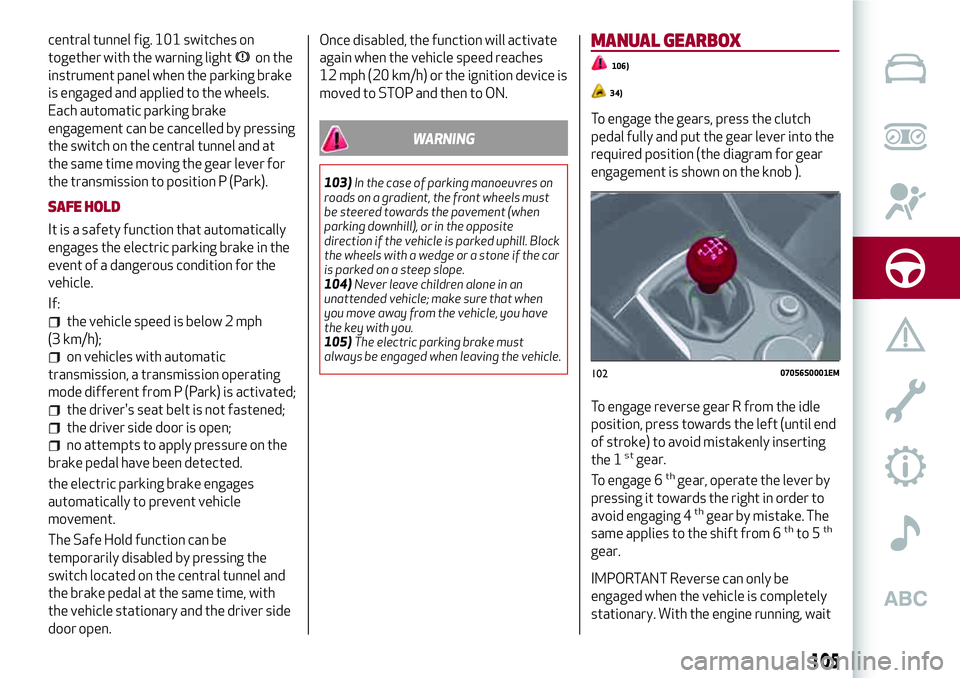
central tunnel fig. 101 switches on
together with the warning light
on the
instrument panel when the parking brake
is engaged and applied to the wheels.
Each automatic parking brake
engagement can be cancelled by pressing
the switch on the central tunnel and at
the same time moving the gear lever for
the transmission to position P (Park).
SAFE HOLD
It is a safety function that automatically
engages the electric parking brake in the
event of a dangerous condition for the
vehicle.
If:
the vehicle speed is below 2 mph
(3 km/h);
on vehicles with automatic
transmission, a transmission operating
mode different from P (Park) is activated;
the driver's seat belt is not fastened;
the driver side door is open;
no attempts to apply pressure on the
brake pedal have been detected.
the electric parking brake engages
automatically to prevent vehicle
movement.
The Safe Hold function can be
temporarily disabled by pressing the
switch located on the central tunnel and
the brake pedal at the same time, with
the vehicle stationary and the driver side
door open.Once disabled, the function will activate
again when the vehicle speed reaches
12 mph (20 km/h) or the ignition device is
moved to STOP and then to ON.
WARNING
103)In the case of parking manoeuvres on
roads on a gradient, the front wheels must
be steered towards the pavement (when
parking downhill), or in the opposite
direction if the vehicle is parked uphill. Block
the wheels with a wedge or a stone if the car
is parked on a steep slope.
104)Never leave children alone in an
unattended vehicle; make sure that when
you move away from the vehicle, you have
the key with you.
105)The electric parking brake must
always be engaged when leaving the vehicle.
MANUAL GEARBOX
106)
34)
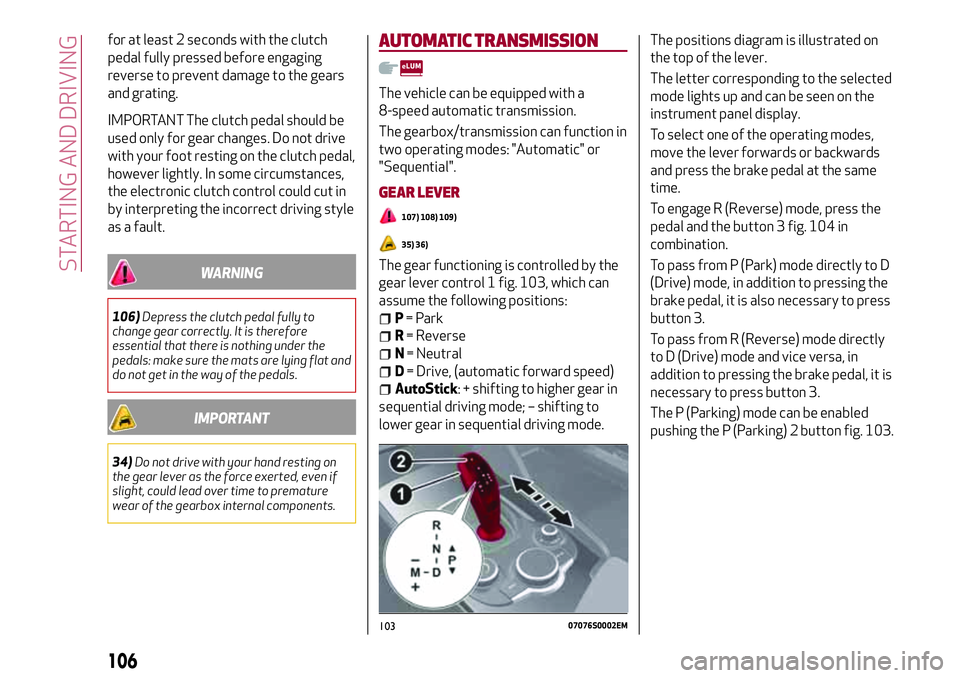
To engage the gears, press the clutch
pedal fully and put the gear lever into the
required position (the diagram for gear
engagement is shown on the knob ).
To engage reverse gear R from the idle
position, press towards the left (until end
of stroke) to avoid mistakenly inserting
the 1
stgear.
To engage 6thgear, operate the lever by
pressing it towards the right in order to
avoid engaging 4
thgear by mistake. The
same applies to the shift from 6thto 5th
gear.
IMPORTANT Reverse can only be
engaged when the vehicle is completely
stationary. With the engine running, wait
10207056S0001EM
105
Page 108 of 204
for at least 2 seconds with the clutch
pedal fully pressed before engaging
reverse to prevent damage to the gears
and grating.
IMPORTANT The clutch pedal should be
used only for gear changes. Do not drive
with your foot resting on the clutch pedal,
however lightly. In some circumstances,
the electronic clutch control could cut in
by interpreting the incorrect driving style
as a fault.
WARNING
106)Depress the clutch pedal fully to
change gear correctly. It is therefore
essential that there is nothing under the
pedals: make sure the mats are lying flat and
do not get in the way of the pedals.
IMPORTANT
34)Do not drive with your hand resting on
the gear lever as the force exerted, even if
slight, could lead over time to premature
wear of the gearbox internal components.
AUTOMATIC TRANSMISSION
The vehicle can be equipped with a
8-speed automatic transmission.
The gearbox/transmission can function in
two operating modes: "Automatic" or
"Sequential".
GEAR LEVER
107) 108) 109)
35) 36)
The gear functioning is controlled by the
gear lever control 1 fig. 103, which can
assume the following positions:
P= Park
R= Reverse
N= Neutral
D= Drive, (automatic forward speed)
AutoStick: + shifting to higher gear in
sequential driving mode; – shifting to
lower gear in sequential driving mode.The positions diagram is illustrated on
the top of the lever.
The letter corresponding to the selected
mode lights up and can be seen on the
instrument panel display.
To select one of the operating modes,
move the lever forwards or backwards
and press the brake pedal at the same
time.
To engage R (Reverse) mode, press the
pedal and the button 3 fig. 104 in
combination.
To pass from P (Park) mode directly to D
(Drive) mode, in addition to pressing the
brake pedal, it is also necessary to press
button 3.
To pass from R (Reverse) mode directly
to D (Drive) mode and vice versa, in
addition to pressing the brake pedal, it is
necessary to press button 3.
The P (Parking) mode can be enabled
pushing the P (Parking) 2 button fig. 103.
10307076S0002EM
106
STARTING AND DRIVING
Page 111 of 204
"ALFA DNA™"SYSTEM
"ALFA DNA™"SYSTEM
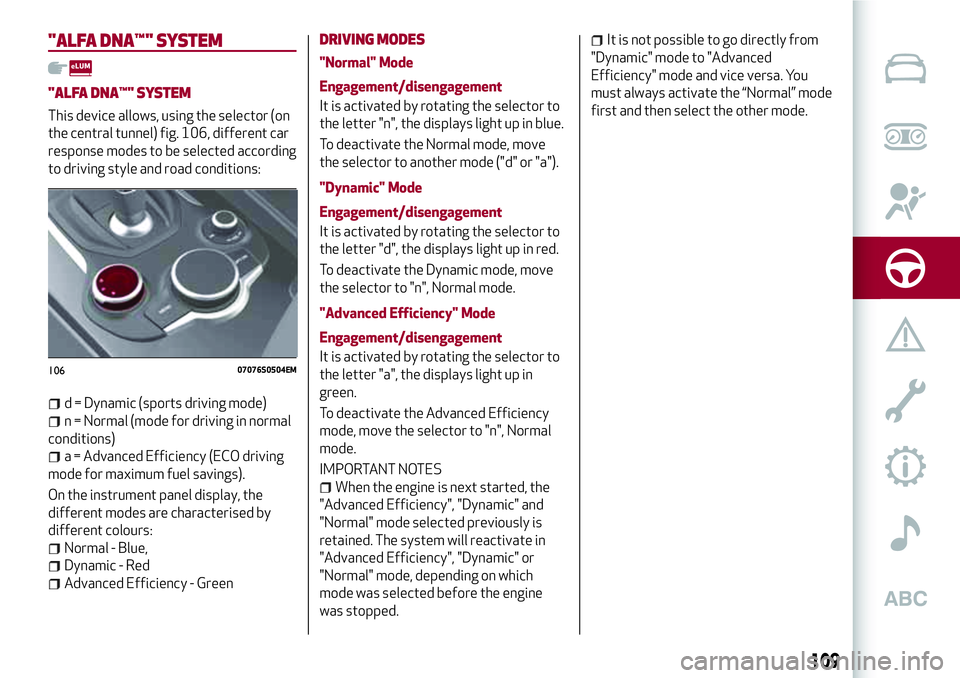
This device allows, using the selector (on
the central tunnel) fig. 106, different car
response modes to be selected according
to driving style and road conditions:
d = Dynamic (sports driving mode)
n = Normal (mode for driving in normal
conditions)
a = Advanced Efficiency (ECO driving
mode for maximum fuel savings).
On the instrument panel display, the
different modes are characterised by
different colours:
Normal - Blue,
Dynamic - Red
Advanced Efficiency - Green
DRIVING MODES
"Normal" Mode
Engagement/disengagement
It is activated by rotating the selector to
the letter "n", the displays light up in blue.
To deactivate the Normal mode, move
the selector to another mode ("d" or "a").
"Dynamic" Mode
Engagement/disengagement
It is activated by rotating the selector to
the letter "d", the displays light up in red.
To deactivate the Dynamic mode, move
the selector to "n", Normal mode.
"Advanced Efficiency" Mode
Engagement/disengagement
It is activated by rotating the selector to
the letter "a", the displays light up in
green.
To deactivate the Advanced Efficiency
mode, move the selector to "n", Normal
mode.
IMPORTANT NOTES
When the engine is next started, the
"Advanced Efficiency", "Dynamic" and
"Normal" mode selected previously is
retained. The system will reactivate in
"Advanced Efficiency", "Dynamic" or
"Normal" mode, depending on which
mode was selected before the engine
was stopped.
It is not possible to go directly from
"Dynamic" mode to "Advanced
Efficiency" mode and vice versa. You
must always activate the “Normal” mode
first and then select the other mode.
10607076S0504EM
109
Page 112 of 204
START & STOP EVO
The Start & Stop Evo system
automatically stops the engine each time
the vehicle is stationary and starts it
again when the driver wants to move off.
In this way, the vehicle efficiency is
increased, by reducing consumption,
dangerous gas emissions and sound
pollution.
OPERATING MODE
Stopping the engine
Versions with mechanical gearbox
With the vehicle stopped, the engine
stops with gearbox in neutral and clutch
pedal released.
Versions with automatic transmission
With vehicle at a standstill and brake
pedal pressed, the engine switches off if
the gear lever is in a position other than
R.
The system does not operate when the
gear lever is in R, for making parking
manoeuvres easier.
In the event of stops uphill, engine
switching off is disabled to make the "Hill
Start Assist" function available (works
only with running engine).
NOTE The engine can only be
automatically stopped after having run atabout 6 mph (10 km/h). After an
automatic restart, to stop the engine you
only need to move the vehicle (exceed a
speed of 0.3 mph (0.5 km/h)).
Engine stopping is signalled by the
symbol lighting up on the instrument
panel display.
Restarting the engine
Versions with mechanical gearbox
To restart the engine, press the clutch
pedal.
If the vehicle does not start when the
clutch is pressed, place the gear lever in
neutral and repeat the procedure. If the
problem persists, contact an Alfa Romeo
Dealership.
Versions with automatic transmission
To restart the engine, release the brake
pedal.
With brake pressed, if the gear lever is in
automatic mode - D (Drive) - the engine
can be restarted by moving the lever to R
(Reverse) or N (Neutral) or "AutoStick".
With brake pressed, if the gear lever is in
"AutoStick" mode, the engine can be
restarted by moving the lever to "+" or
"–", or R (Reverse) or N (Neutral).
When the engine has been stopped
automatically, keeping the brake pedal
pressed, the brake can be releasedkeeping the engine off by quickly shifting
the gear lever to P (Park).
To restart the engine, just move the lever
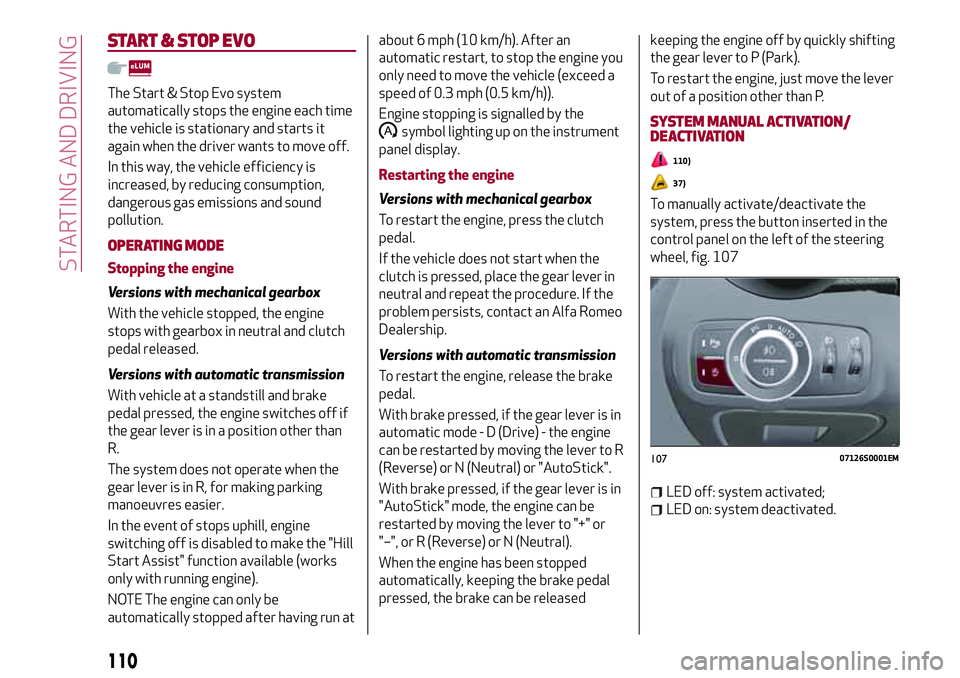
out of a position other than P.SYSTEM MANUAL ACTIVATION/
DEACTIVATION
110)
37)
To manually activate/deactivate the
system, press the button inserted in the
control panel on the left of the steering
wheel, fig. 107
LED off: system activated;
LED on: system deactivated.
10707126S0001EM
110
STARTING AND DRIVING
Page 115 of 204
RECALLING THE SPEED
For versions with automatic transmission
operating in D mode (Drive - automatic),
press and release the RES
fig. 108 button to recall the previously
set speed.
For versions with manual gearbox or
automatic transmission in Autostick
(sequential) mode, before recalling the
previously set speed you should
accelerate until getting close to it, then
press and release the RES button.
DEACTIVATING THE DEVICE
Lightly pressing the brake pedal
deactivates the Cruise Control without
deleting the stored speed.
The Cruise Control may be deactivated
also by applying the electric parking
brake or when the braking system is
operated (e.g. operation of the ESC
system).
The stored speed is deleted in the
following cases:
pressing the on/off button or
switching off the engine;
if there is a malfunction in the Cruise
Control.
DEACTIVATING THE DEVICE
The Cruise Control is deactivated by
pressing the activation/deactivation
button or bringing the ignition device to
the STOP position.
WARNING
111)When travelling with the device active,
never move the gear lever to neutral.
112)In case of a malfunction or failure of
the device, contact an Alfa Romeo
Dealership.
113)The Cruise Control can be dangerous if
the system cannot keep a constant speed. In
specific conditions speed may be excessive,
resulting in the risk of losing control of the
vehicle and causing accidents. Do not use the
device in heavy traffic or on winding, icy,
snowy or slippery roads.
PARK SENSORSSYSTEM
(where provided)
114)
38) 39) 40)
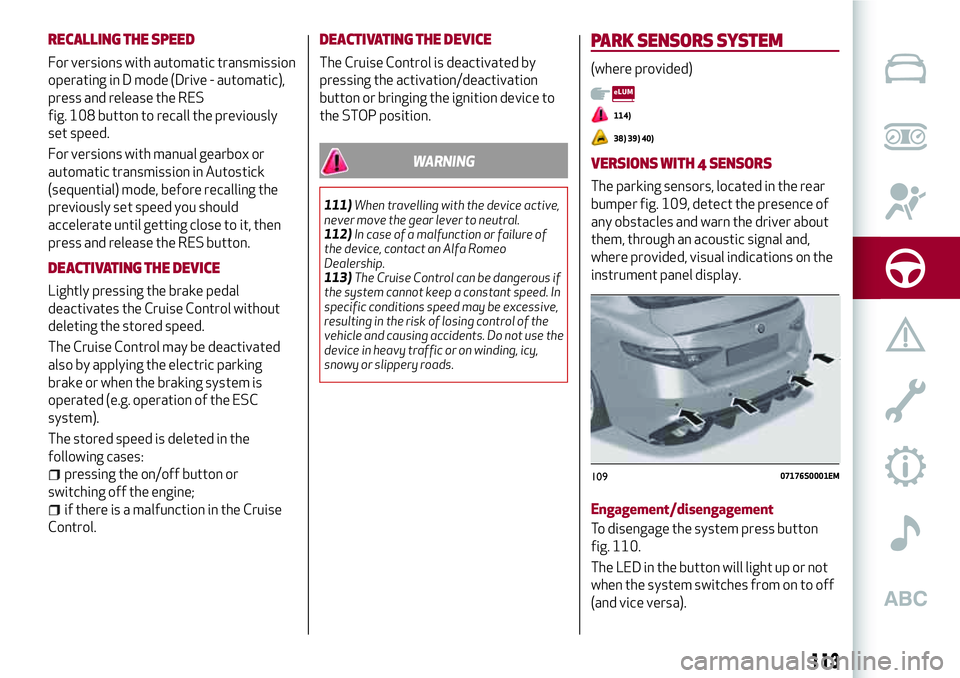
VERSIONS WITH 4 SENSORS
The parking sensors, located in the rear
bumper fig. 109, detect the presence of
any obstacles and warn the driver about
them, through an acoustic signal and,
where provided, visual indications on the
instrument panel display.
Engagement/disengagement
To disengage the system press button
fig. 110.
The LED in the button will light up or not
when the system switches from on to off
(and vice versa).
10907176S0001EM
113