change time Alfa Romeo Giulia 2018 User Guide
[x] Cancel search | Manufacturer: ALFA ROMEO, Model Year: 2018, Model line: Giulia, Model: Alfa Romeo Giulia 2018Pages: 260, PDF Size: 6 MB
Page 98 of 260
Engagement/Disengagement
The following functions can be selected
in sequence using the Information and
Entertainment System:
1. “Settings.”
2. “Safety.”
3. “Forward Collision Warning.”
4. “Mode.”
Select from among three operating
modes:
Warning And Brake: the system
(if active), in addition to the visual and
audible warnings, provides limited
braking, automatic braking, and
additional assistance in braking stage
where the driver does not brake
sufficiently in the event of a potential
front end collision.
Only Warning : the system (if active),
does not provide limited braking, but
guarantees automatic braking or
additional assistance in braking stage
where the driver does not brake at all or
not sufficiently enough in the event of a
potential front end collision.
Disabled: the system does not provide
visual and audible warnings, limited
braking, automatic braking, or additional
assistance in braking stage. The system
will therefore provide no indication of a
possible collision. Activation/Deactivation
The
Forward Collision Warning system is
activated whenever the engine is started
regardless of what is shown on the
Information and Entertainment System.
Following a deactivation, the system will
not warn the driver about the possible
collision with the preceding vehicle,
regardless of the setting selected with
the Information and Entertainment
System.
Note: Each time the engine is started,
the system is activated regardless of
what setting was selected when the
engine was turned OFF.
The system is active:
Each time the engine is started.
In the Information and Entertainment
System.
When the ignition is in the ON position.
The vehicle speed is between 4 mph
(7 km/h) and 124 mph (200 km/h).
When the front seat belts are
fastened.
Changing The System Sensitivity
The sensitivity of the system can be
changed through the Information and
Entertainment System menu, choosing
from one of the following three options:
"Near", "Med" or "Far". Refer to the
description in the Information and
Entertainment System Supplement for
how to change the settings. The default setting is "Med". With this
setting, the system warns the driver of a
possible collision with the vehicle in front
when that vehicle is at a standard
distance, between that of the other two
settings.
With the system sensitivity set to "Far",
the system will warn the driver of a
possible collision with the vehicle in front
when that vehicle is at a greater distance,
thus providing the possibility of acting on
the brakes more lightly and gradually.
This setting provides the drivers with the
maximum possible reaction time to
prevent a potential collision.
With the option set to "Near", the system
will alert the driver of a possible collision
with the vehicle in front when that vehicle
is close. This setting offers the driver a
lower reaction time compared to the
"Med" and "Far" settings, in the event of a
potential collision, but permits more
dynamic driving of the vehicle.
The system sensitivity setting is kept in
the memory when the engine is turned
OFF.
System Limited Operation Signal
If a dedicated message is displayed, a
condition limiting the system operation
may have occurred. The possible reasons
of this limitation are if something is
blocking the camera view, or a fault is
present.
96
SAFETY
Page 99 of 260
If an obstruction is signaled, clean the
area of the windshield.
Although the vehicle can still be driven in
normal conditions, the system may be not
completely available.
When the conditions limiting the system
functions end, this will go back to normal
and complete operation. Should the fault
persist, contact your authorized dealer.
System Failure Signaling
If the system turns off and a dedicated
message is shown on the display, it
means that there is a fault with the
system.
In this case, it is still possible to drive the
vehicle, but you are advised to contact an
authorized dealer as soon as possible.
Radar Indication Not Available
If conditions are such that the radar
cannot detect obstacles correctly, the
system is deactivated and a dedicated
message appears on the display. This
generally occurs in the event of poor
visibility, such as when it is snowing or
raining heavily.
The function of this system can also be
temporarily reduced due to obstructions
such as mud, dirt or ice on the bumper. In
such cases, a dedicated message will be
shown on the display and the system will
be deactivated. This message can
sometimes appear in conditions of high
reflectivity (e.g. tunnels with reflectivetiles or ice or snow). When the conditions
limiting the system functions end, it will
go back to normal and complete
operation.
In certain cases, this dedicated message
could be displayed when the radar is not
detecting any vehicles or objects within
its view range.
If atmospheric conditions are not the
reason behind this message, check if the
sensor is dirty. It could be necessary to
clean or remove any obstructions in the
area.
If the message appears frequently, even
in the absence of atmospheric conditions
such as snow, rain, mud or other
obstructions, contact your authorized
dealer for a sensor alignment check.
In the absence of visible obstructions,
manually removing the decorative cover
trim and cleaning the radar surface could
be required. Have this operation
performed at your authorized dealer.
Note:
It is recommended that you do not
install devices, accessories, or
aerodynamic attachments in front of the
sensor or darken it in any way, as this can
compromise the correct functioning of
the system. Frontal Collision Alarm With Active
Braking
If this function is selected, the brakes are
operated to reduce the speed of the
vehicle in the event of potential collision.
This function applies an additional
braking pressure if the braking pressure
applied by the driver does not suffice to
prevent potential collision.
The function is active with speed above
4 mph (7 km/h).
Driving In Special Conditions
In certain driving conditions, system
intervention might be unexpected or
delayed. The driver must therefore be
very careful, keeping control of the
vehicle.
Driving close to a bend.
The vehicle ahead is leaving a
roundabout.
Vehicles with small dimensions and/or
not aligned in the driving lane.
Lane change by other vehicles.
Vehicles traveling at right angles to the
vehicle.
Note: In particularly complex traffic
conditions, the driver can deactivate the
system manually through the Information
and Entertainment System.
97
Page 105 of 260
Researchhas shown that seat belts save
lives, and they can reduce the seriousness
of injuries in a collision. Some of the worst
injuries happen when people are thrown
from the vehicle. Seat belts reduce the
possibility of ejection and the risk of injury
caused by striking the inside of the
vehicle. Everyone in a motor vehicle
should be belted at all times.
Enhanced Seat Belt Use Reminder
System (BeltAlert)
Driver and Passenger BeltAlert
(if equipped)
BeltAlert is a feature intended to
remind the driver and outboard front seat
passenger (if equipped with outboard
front passenger seat BeltAlert) to buckle
their seat belts. The Belt Alert feature is
active whenever the ignition switch is in
the START or ON/RUN position.
Initial Indication
If the driver is unbuckled when the
ignition switch is first in the START or
ON/RUN position, a chime will signal for a
few seconds. If the driver or outboard
front seat passenger (if equipped with
outboard front passenger seat BeltAlert)
is unbuckled when the ignition switch is
first in the START or ON/RUN position
the Seat Belt Reminder Light will turn on
and remain on until both outboard front
seat belts are buckled. The outboard
front passenger seat BeltAlert is not
active when an outboard front passenger
seat is unoccupied. BeltAlert Warning Sequence
The BeltAlert warning sequence is
activated when the vehicle is moving
above a specified vehicle speed range
and the driver or outboard front seat
passenger is unbuckled (if equipped with
outboard front passenger seat BeltAlert)
(the outboard front passenger seat
BeltAlert is not active when the outboard
front passenger seat is unoccupied).
The BeltAlert warning sequence starts by
blinking the Seat Belt Reminder Light and
sounding an intermittent chime. Once the
BeltAlert warning sequence has
completed, the Seat Belt Reminder Light
will remain on until the seat belts are
buckled. The BeltAlert warning sequence
may repeat based on vehicle speed until
the driver and occupied outboard front
seat passenger seat belts are buckled.
The driver should instruct all occupants
to buckle their seat belts.
Change of Status
If the driver or outboard front seat
passenger (if equipped with outboard
front passenger seat BeltAlert)
unbuckles their seat belt while the
vehicle is traveling, the BeltAlert warning
sequence will begin until the seat belts
are buckled again.
The outboard front passenger seat
BeltAlert is not active when the outboard
front passenger seat is unoccupied.
BeltAlert may be triggered when an
animal or other items are placed on the
outboard front passenger seat or when
the seat is folded flat (if equipped). It is
recommended that pets be restrained in
the rear seat (if equipped) in pet
harnesses or pet carriers that are
secured by seat belts, and cargo is
properly stowed.
Lap/Shoulder Belts
All seating positions in your vehicle are
equipped with lap/shoulder belts.
The seat belt webbing retractor will lock
only during very sudden stops or
collisions. This feature allows the
shoulder part of the seat belt to move
freely with you under normal conditions.
However, in a collision the seat belt will
lock and reduce your risk of striking the
inside of the vehicle or being thrown out
of the vehicle.
Warning!
Relying on the air bags alone could lead to
more severe injuries in a collision. The air
bags work with your seat belt to restrain
you properly. In some collisions, the air bags
won’t deploy at all. Always wear your seat
belt even though you have air bags.
In a collision, you and your passengers can
suffer much greater injuries if you are not
properly buckled up. You can strike the
interior of your vehicle or other passengers,
or you can be thrown out of the vehicle.
Always be sure you and others in your
vehicle are buckled up properly.
103
Page 129 of 260
Warning!
An incorrectly anchored tether strap
could lead to increased head motion and
possible injury to the child. Use only the
anchorage position directly behind the child
seat to secure a child restraint top tether
strap.
If your vehicle is equipped with a split rear
seat, make sure the tether strap does not
slip into the opening between the seatbacks
as you remove slack in the strap.
Transporting Pets
Air Bags deploying in the front seat could
harm your pet. An unrestrained pet will be
thrown about and possibly injured, or
injure a passenger during panic braking or
in a collision.
Pets should be restrained in the rear seat
in pet harnesses or pet carriers that are
secured by seat belts.
SAFETY TIPS
Transporting Passengers
NEVER TRANSPORT PASSENGERS IN
THE CARGO AREA.
Warning!
Do not leave children or animals inside
parked vehicles in hot weather. Interior heat
build-up may cause serious injury or death.
It is extremely dangerous to ride in a
cargo area, inside or outside of a vehicle. In
a collision, people riding in these areas are
more likely to be seriously injured or killed.
Do not allow people to ride in any area of
your vehicle that is not equipped with seats
and seat belts.
Be sure everyone in your vehicle is in a
seat and using a seat belt properly.
Exhaust Gas
Warning!
Exhaust gases can injure or kill. They contain
carbon monoxide (CO), which is colorless and
odorless. Breathing it can make you
unconscious and can eventually poison you.
To avoid breathing (CO), follow these safety
tips:
Do not run the engine in a closed garage
or in confined areas any longer than needed
to move your vehicle in or out of the area.
If you are required to drive with the
trunk/liftgate/rear doors open, make sure
that all windows are closed and the climate
control BLOWER switch is set at high speed.
DO NOT use the recirculation mode.
If it is necessary to sit in a parked vehicle
with the engine running, adjust your heating
or cooling controls to force outside air into
the vehicle. Set the blower at high speed.
The best protection against carbon
monoxide entry into the vehicle body is a
properly maintained engine exhaust
system.
Whenever a change is noticed in the
sound of the exhaust system, when
exhaust fumes can be detected inside the
vehicle, or when the underside or rear of
the vehicle is damaged, have a competent
mechanic inspect the complete exhaust
system and adjacent body areas for
broken, damaged, deteriorated, or
mispositioned parts. Open seams or
loose connections could permit exhaust
fumes to seep into the passenger
compartment. In addition, inspect the
exhaust system each time the vehicle is
raised for lubrication or oil change.
Replace as required.
127
Page 158 of 260
The distance setting is changed.
The Adaptive Cruise Control system is
deactivated/paused.
Warning!
The maximum breaking applied by the
system is limited. The driver may apply the
brakes in all cases if needed.
If the system predicts that the braking
level is insufficient to hold the set distance,
either “BRAKE!” or a dedicated message is
displayed to warn the driver of approaching
the vehicle ahead. An acoustic signal is also
emitted. In this case, it is advised to brake
immediately as necessary to hold a safe
distance from the vehicle ahead.
The driver is responsible for ensuring that
there are no pedestrians, other vehicles or
objectives along the direction of the vehicle.
Failure to comply with these precautions
may cause serious accidents and injuries.
The driver is fully responsible for holding
a safe distance from the vehicle ahead
respecting the highway code in force in the
respective country.
“Stop And Go” Function
The “Stop and Go” operating strategy
allows you to maintain a safe distance
from the vehicle ahead until the vehicle
has completely stopped. It will also
restart the vehicle automatically if the vehicle ahead drives away within two
seconds, otherwise it is necessary to
press the accelerator pedal or push the
RES button to restart.
Warning!
When the ACC system is resumed, the driver
must ensure that there are no pedestrians,
vehicles or objects in the path of the vehicle.
Failure to follow these warnings can result in
a collision and death or serious personal
injury.
Deactivation
The system is deactivated and the set
speed is canceled if:
Thebutton on the Adaptive Cruise
Control is pushed (with the system
enabled or paused).
The ignition is cycled to STOP.
RACE mode is activated.
The system is canceled (the set speed
and distance are stored):
When the system is paused (refer to
the “Activation / Deactivation” section).
When the conditions shown in the
“Setting The Desired Speed” section
occur.
Limited Operation Warning
If the dedicated message is shown on the
display, a condition limiting the Adaptive
Cruise Control operation may have
occurred.
This could be due to an obstruction of the
vehicle’s sensor or camera. It could also
be due to a fault in the system. If an
obstruction is detected, clean the area of
the windshield opposite the interior rear
view mirror, where the camera is located,
as well as the area of the front bumper
where the sensor is located. Then check
that the message has disappeared.
When the conditions limiting the system
functions end, normal operation will
resume.
Should the fault persist, contact an
authorized dealer.
Precautions While Driving
The system may not work correctly in
some driving conditions (see below).
The driver must control the vehicle at all
times.
Vehicle Not Aligned
The system may not detect a vehicle
traveling in the same lane, in the same
direction, but is not aligned. It also may
not detect a vehicle which is cutting in
from a side lane. Sufficient distance
from the vehicles ahead may not be
guaranteed in these cases.
156
STARTING AND OPERATING
Page 159 of 260
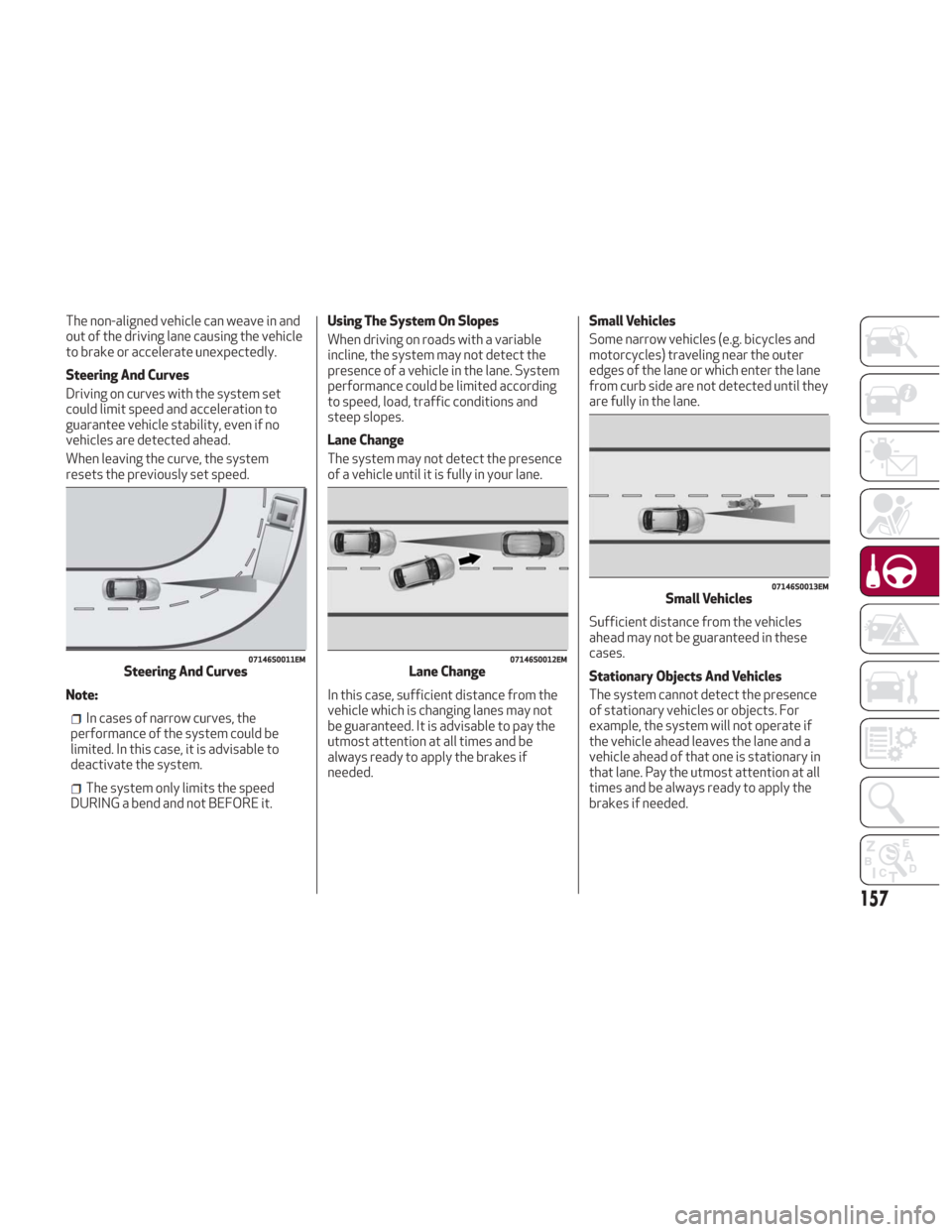
The non-aligned vehicle can weave in and
out of the driving lane causing the vehicle
to brake or accelerate unexpectedly.
Steering And Curves
Driving on curves with the system set
could limit speed and acceleration to
guarantee vehicle stability, even if no
vehicles are detected ahead.
When leaving the curve, the system
resets the previously set speed.
Note:
In cases of narrow curves, the
performance of the system could be
limited. In this case, it is advisable to
deactivate the system.
The system only limits the speed
DURING a bend and not BEFORE it. Using The System On Slopes
When driving on roads with a variable
incline, the system may not detect the
presence of a vehicle in the lane. System
performance could be limited according
to speed, load, traffic conditions and
steep slopes.
Lane Change
The system may not detect the presence
of a vehicle until it is fully in your lane.
In this case, sufficient distance from the
vehicle which is changing lanes may not
be guaranteed. It is advisable to pay the
utmost attention at all times and be
always ready to apply the brakes if
needed.
Small Vehicles
Some narrow vehicles (e.g. bicycles and
motorcycles) traveling near the outer
edges of the lane or which enter the lane
from curb side are not detected until they
are fully in the lane.
Sufficient distance from the vehicles
ahead may not be guaranteed in these
cases.
Stationary Objects And Vehicles
The system cannot detect the presence
of stationary vehicles or objects. For
example, the system will not operate if
the vehicle ahead leaves the lane and a
vehicle ahead of that one is stationary in
that lane. Pay the utmost attention at all
times and be always ready to apply the
brakes if needed.
07146S0011EMSteering And Curves07146S0012EMLane Change
07146S0013EMSmall Vehicles
157
Page 161 of 260
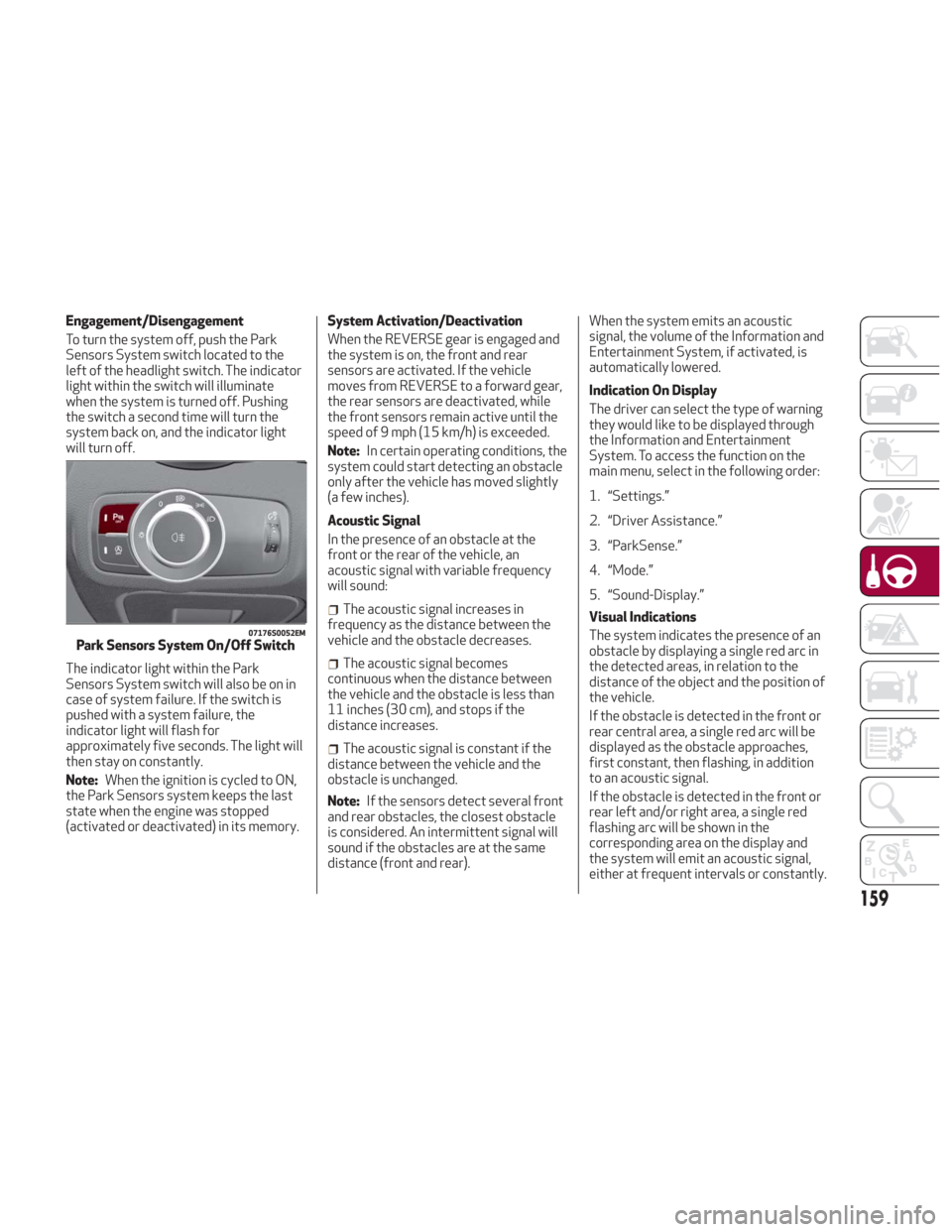
Engagement/Disengagement
To turn the system off, push the Park
Sensors System switch located to the
left of the headlight switch. The indicator
light within the switch will illuminate
when the system is turned off. Pushing
the switch a second time will turn the
system back on, and the indicator light
will turn off.
The indicator light within the Park
Sensors System switch will also be on in
case of system failure. If the switch is
pushed with a system failure, the
indicator light will flash for
approximately five seconds. The light will
then stay on constantly.
Note:When the ignition is cycled to ON,
the Park Sensors system keeps the last
state when the engine was stopped
(activated or deactivated) in its memory. System Activation/Deactivation
When the REVERSE gear is engaged and
the system is on, the front and rear
sensors are activated. If the vehicle
moves from REVERSE to a forward gear,
the rear sensors are deactivated, while
the front sensors remain active until the
speed of 9 mph (15 km/h) is exceeded.
Note:
In certain operating conditions, the
system could start detecting an obstacle
only after the vehicle has moved slightly
(a few inches).
Acoustic Signal
In the presence of an obstacle at the
front or the rear of the vehicle, an
acoustic signal with variable frequency
will sound:
The acoustic signal increases in
frequency as the distance between the
vehicle and the obstacle decreases.
The acoustic signal becomes
continuous when the distance between
the vehicle and the obstacle is less than
11 inches (30 cm), and stops if the
distance increases.
The acoustic signal is constant if the
distance between the vehicle and the
obstacle is unchanged.
Note: If the sensors detect several front
and rear obstacles, the closest obstacle
is considered. An intermittent signal will
sound if the obstacles are at the same
distance (front and rear). When the system emits an acoustic
signal, the volume of the Information and
Entertainment System, if activated, is
automatically lowered.
Indication On Display
The driver can select the type of warning
they would like to be displayed through
the Information and Entertainment
System. To access the function on the
main menu, select in the following order:
1. “Settings.”
2. “Driver Assistance.”
3. “ParkSense.”
4. “Mode.”
5. “Sound-Display.”
Visual Indications
The system indicates the presence of an
obstacle by displaying a single red arc in
the detected areas, in relation to the
distance of the object and the position of
the vehicle.
If the obstacle is detected in the front or
rear central area, a single red arc will be
displayed as the obstacle approaches,
first constant, then flashing, in addition
to an acoustic signal.
If the obstacle is detected in the front or
rear left and/or right area, a single red
flashing arc will be shown in the
corresponding area on the display and
the system will emit an acoustic signal,
either at frequent intervals or constantly.
07176S0052EMPark Sensors System On/Off Switch
159
Page 162 of 260
If several obstacles are detected
simultaneously in the front and rear area,
the display will show all of them,
regardless of the area in which they were
detected.
In general, the vehicle is closer to the
obstacle when a single or several flashing
arcs are shown on the display and the
acoustic signal becomes continuous.
It is not possible to exit from the display
screen while the vehicle is in REVERSE.
Fault Indication
Parking sensor faults, if any, will be
indicated by a message on the display on
the instrument cluster. Refer to "Warning
Lights And Messages" in "Getting To
Know Your Instrument Panel" for further
information.
Messages On The Display
In case of system failure, a dedicated
message appears on the instrument
cluster for about five seconds.
Cleaning The Front Or Rear Sensors:
If the display shows a message requiring
the sensors to be cleaned, make sure that
the outer surface and the underside of
the front and rear bumpers are free of
debris (e.g. snow, mud, ice, etc.). Once
these areas are clear, cycle the ignition to
STOP. Then, return it to ON mode. If the
message is still displayed, contact you
authorized dealer.
Audio System Not Available : If the
display shows a message that the audio
system is not available, it means that the
acoustic signal will be emitted by the
instrument panel, and not through the
vehicles speakers.
Note: Some conditions may influence
the performance of the Park Sensors
System:
Reduced sensor sensitivity could be
due to the presence of ice, snow, mud, or
thick paint on the surface of the sensor.
The sensors may detect a false
obstacle (echo interference) due to
mechanical interference, for example
when washing the vehicle or in extreme
weather.
The signals sent by the sensors can
be altered by the presence of ultrasonic
systems (e.g. pneumatic brake systems
of trucks or pneumatic drills) near the
vehicle.
System performance can be
influenced by the position of the
sensors. For example, due to a change in
the ride setting (caused by wear to the
shock absorbers or suspension), by
changing tires, overloading the vehicle or
operations that require the vehicle to be
lowered.
Be sure not to place bumper stickers
or other adhesives over the sensors as
this will affect system performance.
Warning!
Drivers must be careful when backing up
even when using the Parking Sensor system.
Always check carefully behind your vehicle,
and be sure to check for pedestrians,
animals, other vehicles, obstructions, or
blind spots before backing up. You are
responsible for the safety of your
surroundings and must continue to pay
attention while backing up. Failure to do so
can result in serious injury or death.
Caution!
The Parking Sensor system is only a
parking aid and it is unable to recognize
every obstacle, including small obstacles.
Parking curbs might be temporarily detected
or not detected at all. Obstacles located
above or below the sensors will not be
detected when they are in close proximity
The vehicle must be driven slowly when
using the Parking Sensor system in order to
be able to stop in time when an obstacle is
detected. It is recommended that the driver
looks over his/her shoulder when using the
Parking Sensor system.
160
STARTING AND OPERATING
Page 171 of 260
Transporting Passengers
Warning!
It is extremely dangerous to leave
children in a parked vehicle when the
temperature outside is very high. The heat
inside the passenger compartment may
have serious, or even fatal, consequences.
Never travel in the trunk of the vehicle.
In the event of an accident, anyone inside
the trunk would be at greater risk of serious
or even fatal injury.
Ensure that all the occupants of the
vehicle wear their seat belts correctly and
that any children are positioned correctly on
the dedicated child restraint systems.
Transporting Animals
The intervention of the airbags may be
dangerous for an animal on the front
seat. It is therefore advised to arrange
animals on the rear seat inside dedicated
cages restrained by the vehicle’s seat
belts.
Keep in mind that, in the event of a
sudden braking or an accident, an
inadequately restrained animal may be
projected within the passenger
compartment, risking injury to the animal
itself and the other occupants of the
vehicle.
Exhaust Gas
Exhaust emissions are very dangerous,
and may be lethal. They contain carbon
monoxide, a colorless, odorless gas
which can cause fainting and poisoning if
inhaled.
To avoid inhaling carbon monoxide, take
the following measures:
Do not keep the engine running in
closed spaces.
If, for some reason (e.g. transporting
bulky loads), it is necessary to drive with
the trunk open, close all the windows and
run the climate control fan at maximum
speed. DO NOT activate air recirculation
mode.
Should it be necessary to stay in the
stationary vehicle with engine running,
adjust the ventilation/heating system
and operate the fan in such a way that
outside air will enter the passenger
compartment. Activate the maximum fan
speed.
Maintenance of the exhaust system
provides the best protection against
leaks of carbon monoxide into the
passenger compartment.
Should an unusual noise from the exhaust
system or the presence of exhaust gas in
the passenger compartment be
identified, or if the underbody or rear
section of the vehicle is damaged, have the entire exhaust system and bodywork
areas checked to identify any
components which are broken, damaged,
worn or have moved from their correct
fitting position. If any of these things
occur, contact your authorized dealer.
Open welding or loose connections may
permit exhaust gas to enter the
passenger compartment.
Check the exhaust system each time the
vehicle is raised for lubrication or oil
change operations. Replace the
components if necessary, contact your
authorized dealer.
Performance
This vehicle is equipped with an engine
capable of delivering exceptionally fast
acceleration and speed:
Peak power: 505 HP at 6500 rpm.
Peak torque: 443 ft-lbs at
2500–5000 rpm.
Top speed: 191 mph (307 km/h).
Acceleration from 0 to 60 mph
(0 to 100 km/h): 3.8 seconds.
For safe driving, it is essential, particularly
during the first days of use, to get to know
the car by driving carefully and gradually
discovering its performance.
169
Page 196 of 260
SCHEDULED SERVICING
Correct servicing is crucial for
guaranteeing a long life for the vehicle
under the best conditions.
For this reason, Alfa Romeo has planned
a series of checks and services for your
vehicle at fixed intervals based on
distance and time, as described in the
Scheduled Servicing Plan.
Before each service, it is always
necessary to carefully follow the
instructions in the Scheduled Servicing
Plan (e.g. periodically check level of
fluids, tire pressure, etc.).
Scheduled Servicing is offered by an
authorized dealer according to a set time
schedule. If, during each operation, in
addition to the ones scheduled, the need
arises for further replacements or
repairs, these may be carried out with the
owner’s explicit consent only.
Note:Scheduled Servicing intervals are
required by the Manufacturer. Failure to
have them carried out may invalidate the
New Vehicle Limited Warranty.
You are advised to inform your
authorized dealer of any small operating
irregularities without waiting for the next
service.
Periodic Checks
Every month or every 600miles
( 1,000 km) or before long trips check
and, if necessary, top off:
Engine coolant level.
Brake fluid level (if insufficient, see an
authorized dealer as soon as possible).
Windshield washer fluid level.
Tire inflation pressure and condition.
Operation of lighting system
(headlights, direction indicators, hazard
warning lights, etc.).
Operation of windshield
washing/wiping system and
positioning/wear of wiper blades.
Every 2,000 miles ( 3,000km), check and
top off if required:
Engine oil level.
Heavy Usage Of The Vehicle
If the vehicle is used under one of the
following conditions:
Dusty roads.
Short, repeated journeys less than
4 miles (7-8 km) at sub-zero outside
temperatures.
Engine often idling or driving long
distances at low speeds or long periods
of inactivity.
In the event of a long period of inactivity.
The following checks must be carried out
more often than indicated in the
Scheduled Servicing Plan:
Check cleanliness of hood and trunk
locks, cleanliness and lubrication of
linkage.
Visually inspect conditions of: engine,
transmission, pipes and hoses
(exhaust/fuel system/brakes) and rubber
elements (sleeves/bushes, etc.).
Check battery charge and battery fluid
level (electrolyte).
Visually inspect conditions of the
accessory drive belts.
Check and, if necessary, change engine
oil and replace oil filter.
Check and, if necessary, replace cabin
air filter.
Check and, if necessary, replace air
cleaner.
Severe Duty All Models
Change Engine Oil at 4,000 miles
(6,500 km) if the vehicle is operated in a
dusty and off-road environment or is
operated predominately at idle or only
very low engine RPM’s. This type of
vehicle use is considered Severe Duty.
194
SERVICING AND MAINTENANCE