service Alfa Romeo Giulia 2018 User Guide
[x] Cancel search | Manufacturer: ALFA ROMEO, Model Year: 2018, Model line: Giulia, Model: Alfa Romeo Giulia 2018Pages: 260, PDF Size: 6 MB
Page 104 of 260
OCCUPANT RESTRAINT
SYSTEMS
Some of the most important safety
features in your vehicle are the restraint
systems:
Occupant Restraint Systems Features
Seat Belt Systems
Supplemental Restraint Systems
(SRS) Air Bags
Child Restraints
Some of the safety features described in
this section may be standard equipment
on some models, or may be optional
equipment on others. If you are not sure,
ask an authorized dealer.
Important Safety Precautions
Please pay close attention to the
information in this section. It tells you
how to use your restraint system
properly, to keep you and your
passengers as safe as possible.
Here are some simple steps you can take
to minimize the risk of harm from a
deploying air bag:
1. Children 12 years old and under
should always ride buckled up in the rear
seat of a vehicle with a rear seat. 2. If a child from 2 to 12 years old (not in
a rear-facing child restraint) must ride in
the front passenger seat, move the seat
as far back as possible and use the
proper child restraint (refer to “Child
Restraints” in this section for further
information).
3. Children that are not big enough to
wear the vehicle seat belt properly (refer
to “Child Restraints” in this section for
further information) should be secured in
the rear seat of a vehicle with a rear seat
in child restraints or belt-positioning
booster seats. Older children who do not
use child restraints or belt-positioning
booster seats should ride properly
buckled up in the rear seat of a vehicle
with a rear seat.
4. Never allow children to slide the
shoulder belt behind them or under their
arm.
5. You should read the instructions
provided with your child restraint to
make sure that you are using it properly.
6. All occupants should always wear
their lap and shoulder belts properly.
7. The driver and front passenger seats
should be moved back as far as practical
to allow the front air bags room to inflate.
8. Do not lean against the door or
window. If your vehicle has side air bags,
and deployment occurs, the side air bags
will inflate forcefully into the space
between occupants and the door and
occupants could be injured.
9. If the air bag system in this vehicle
needs to be modified to accommodate a
disabled person, refer to the “Customer
Assistance” section for customer service
contact information.
Warning!
Never place a rear-facing child restraint in
front of an air bag. A deploying passenger
front air bag can cause death or serious
injury to a child 12 years or younger,
including a child in a rear-facing child
restraint.
Only use a rear-facing child restraint in
the rear seat of a vehicle with a rear seat.
Seat Belt Systems
Buckle up even though you are an
excellent driver, even on short trips.
Someone on the road may be a poor
driver and could cause a collision that
includes you. This can happen far away
from home or on your own street.
102
SAFETY
Page 110 of 260
How To Disengage The Automatic
Locking Mode
Unbuckle the combination lap/shoulder
belt and allow it to retract completely to
disengage the Automatic Locking Mode
and activate the vehicle sensitive
(emergency) locking mode.
Warning!
The seat belt assembly must be replaced
if the switchable Automatic Locking
Retractor (ALR) feature or any other seat
belt function is not working properly when
checked according to the procedures in the
Service Manual.
Failure to replace the seat belt assembly
could increase the risk of injury in collisions.
Do not use the Automatic Locking Mode to
restrain occupants who are wearing the seat
belt or children who are using booster seats.
The locked mode is only used to install
rear-facing or forward-facing child restraints
that have a harness for restraining the child.
Supplemental Restraint Systems (SRS)
Some of the safety features described in
this section may be standard equipment
on some models, or may be optional
equipment on others. If you are not sure,
ask an authorized dealer.
The air bag system must be ready to
protect you in a collision. The Occupant
Restraint Controller (ORC) monitors the internal circuits and interconnecting
wiring associated with the electrical Air
Bag System Components. Your vehicle
may be equipped with the following Air
Bag System Components:
Air Bag System Components
Occupant Restraint Controller (ORC)
Air Bag Warning Light
Steering Wheel and Column
Instrument Panel
Knee Impact Bolsters
Driver and Front Passenger Air Bags
Seat Belt Buckle Switch
Supplemental Side Air Bags
Supplemental Knee Air Bags
Front and Side Impact Sensors
Seat Belt Pretensioners
Seat Track Position Sensors
Air Bag Warning Light
The ORC monitors the readiness of the
electronic parts of the air bag system
whenever the ignition switch is in the
START or ON/RUN position. If the ignition
switch is in the OFF position or in the ACC
position, the air bag system is not on and
the air bags will not inflate.The ORC contains a backup power supply
system that may deploy the air bag
system even if the battery loses power
or it becomes disconnected prior to
deployment.
The ORC turns on the Air Bag Warning
Light in the instrument panel for
approximately four to eight seconds for a
self-check when the ignition switch is
first in the ON/RUN position. After the
self-check, the Air Bag Warning Light will
turn off. If the ORC detects a malfunction
in any part of the system, it turns on the
Air Bag Warning Light, either
momentarily or continuously. A single
chime will sound to alert you if the light
comes on again after initial startup.
The ORC also includes diagnostics that
will illuminate the instrument panel Air
Bag Warning Light if a malfunction is
detected that could affect the air bag
system. The diagnostics also record the
nature of the malfunction. While the air
bag system is designed to be
maintenance free, if any of the following
occurs, have an authorized dealer service
the air bag system immediately.
The Air Bag Warning Light does not
come on during the four to eight seconds
when the ignition switch is first in the
ON/RUN position.
The Air Bag Warning Light remains on
after the four to eight-second interval.
108
SAFETY
Page 111 of 260
The Air Bag Warning Light comes on
intermittently or remains on while
driving.
Note: If the speedometer, tachometer,
or any engine related gauges are not
working, the Occupant Restraint
Controller (ORC) may also be disabled. In
this condition the air bags may not be
ready to inflate for your protection. Have
an authorized dealer service the air bag
system immediately.
Warning!
Ignoring the Air Bag Warning Light in your
instrument panel could mean you won’t have
the air bag system to protect you in a collision.
If the light does not come on as a bulb check
when the ignition is first turned on, stays on
after you start the vehicle, or if it comes on as
you drive, have an authorized dealer service
the air bag system immediately.
Redundant Air Bag Warning Light
If a fault with the Air Bag Warning Light is
detected, which could affect the
Supplemental Restraint System (SRS),
the Redundant Air Bag Warning Light will
illuminate on the instrument panel. The
Redundant Air Bag Warning Light will
stay on until the fault is cleared. In
addition, a single chime will sound to alert
you that the Redundant Air Bag Warning Light has come on and a fault has been
detected. If the Redundant Air Bag
Warning Light comes on intermittently or
remains on while driving have an
authorized dealer service the vehicle
immediately.
For additional information regarding the
Redundant Air Bag Warning Light refer to
“Getting To Know Your Instrument Panel”
section of this manual.
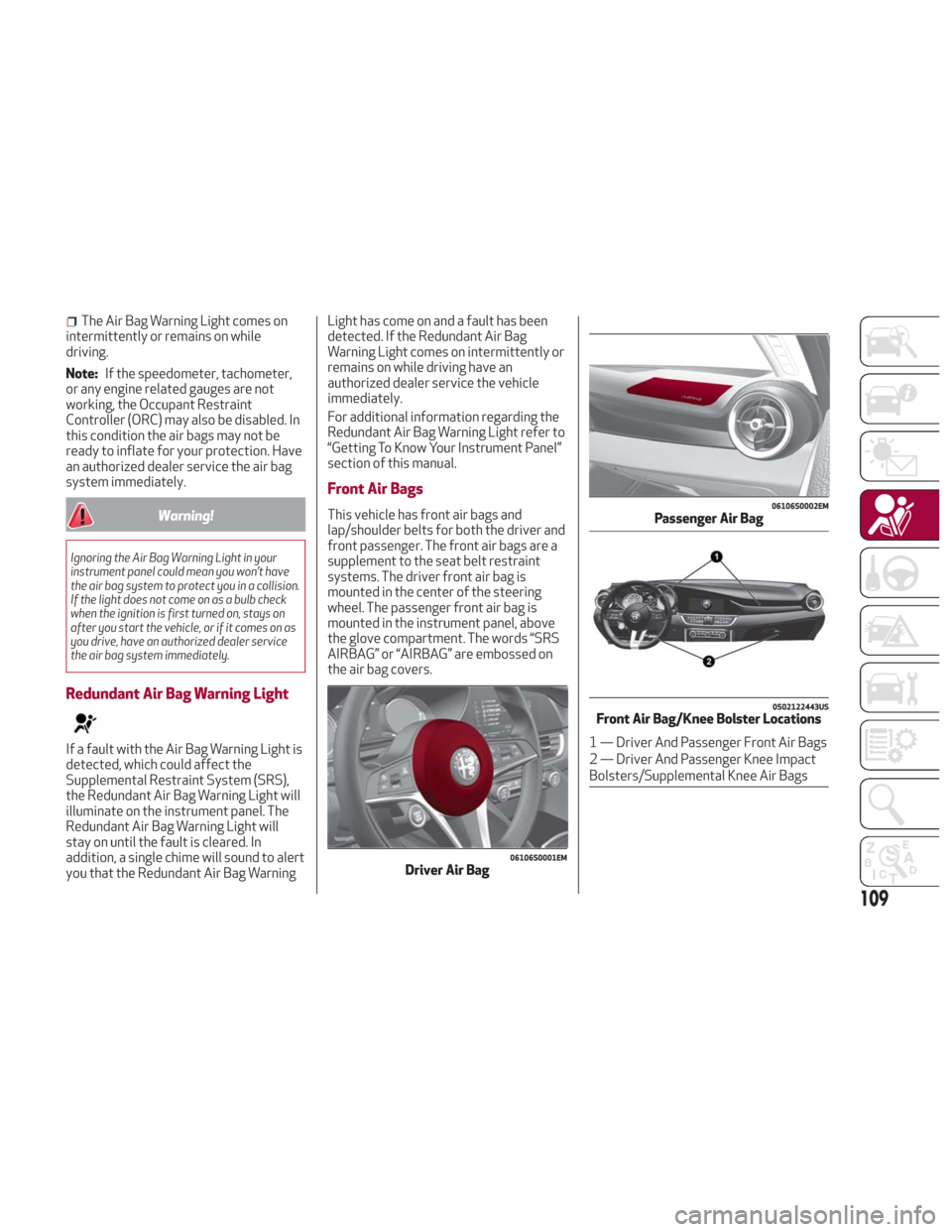
Front Air Bags
This vehicle has front air bags and
lap/shoulder belts for both the driver and
front passenger. The front air bags are a
supplement to the seat belt restraint
systems. The driver front air bag is
mounted in the center of the steering
wheel. The passenger front air bag is
mounted in the instrument panel, above
the glove compartment. The words “SRS
AIRBAG” or “AIRBAG” are embossed on
the air bag covers.
06106S0001EMDriver Air Bag
06106S0002EMPassenger Air Bag
0502122443USFront Air Bag/Knee Bolster Locations
1 — Driver And Passenger Front Air Bags
2 — Driver And Passenger Knee Impact
Bolsters/Supplemental Knee Air Bags
109
Page 116 of 260
If A Deployment Occurs
The front air bags are designed to deflate
immediately after deployment.
Note:Front and/or side air bags will not
deploy in all collisions. This does not
mean something is wrong with the air bag
system.
If you do have a collision which deploys
the air bags, any or all of the following
may occur:
The air bag material may sometimes
cause abrasions and/or skin reddening to
the occupants as the air bags deploy and
unfold. The abrasions are similar to
friction rope burns or those you might get
sliding along a carpet or gymnasium floor.
They are not caused by contact with
chemicals. They are not permanent and
normally heal quickly. However, if you
haven’t healed significantly within a few
days, or if you have any blistering, see
your doctor immediately.
As the air bags deflate, you may see
some smoke-like particles. The particles
are a normal by-product of the process
that generates the non-toxic gas used for
air bag inflation. These airborne particles
may irritate the skin, eyes, nose, or
throat. If you have skin or eye irritation,
rinse the area with cool water. For nose
or throat irritation, move to fresh air. If the irritation continues, see your
doctor. If these particles settle on your
clothing, follow the garment
manufacturer’s instructions for cleaning.
Do not drive your vehicle after the air
bags have deployed. If you are involved in
another collision, the air bags will not be
in place to protect you.
Warning!
Deployed air bags and seat belt
pretensioners cannot protect you in another
collision. Have the air bags, seat belt
pretensioners, and the seat belt retractor
assemblies replaced by an authorized dealer
immediately. Also, have the Occupant
Restraint Controller System serviced as
well.
Note:
Air bag covers may not be obvious in
the interior trim, but they will open
during air bag deployment.
After any collision, the vehicle should
be taken to an authorized dealer
immediately.
Enhanced Accident Response
System
In the event of an impact, if the
communication network remains intact,
and the power remains intact, depending
on the nature of the event, the ORC will
determine whether to have the Enhanced
Accident Response System perform the
following functions:
Cut off fuel to the engine (If Equipped)
Cut off battery power to the electric
motor (If Equipped)
Flash hazard lights as long as the
battery has power
Turn on the interior lights, which
remain on as long as the battery has
power or for 15 minutes from the
intervention of the Enhanced Accident
Response System.
Unlock the power door locks.
Your vehicle may also be designed to
perform any of these other functions in
response to the Enhanced Accident
Response System:
Turn off the Fuel Filter Heater, Turn off
the HVAC Blower Motor, Close the HVAC
Circulation Door
114
SAFETY
Page 119 of 260
Maintaining Your Air Bag System
Warning!
Modifications to any part of the air bag
system could cause it to fail when you need
it. You could be injured if the air bag system
is not there to protect you. Do not modify
the components or wiring, including adding
any kind of badges or stickers to the
steering wheel hub trim cover or the upper
passenger side of the instrument panel. Do
not modify the front bumper, vehicle body
structure, or add aftermarket side steps or
running boards.
It is dangerous to try to repair any part of
the air bag system yourself. Be sure to tell
anyone who works on your vehicle that it
has an air bag system.
Do not attempt to modify any part of your
air bag system. The air bag may inflate
accidentally or may not function properly if
modifications are made. Take your vehicle
to an authorized dealer for any air bag
system service. If your seat, including your
trim cover and cushion, needs to be serviced
in any way (including removal or
loosening/tightening of seat attachment
bolts), take the vehicle to an authorized
dealer. Only manufacturer approved seat
accessories may be used. If it is necessary
to modify the air bag system for persons
with disabilities, contact an authorized
dealer.
Event Data Recorder (EDR)
This vehicle is equipped with an event
data recorder (EDR). The main purpose of
an EDR is to record, in certain crash or
near crash-like situations, such as an air
bag deployment or hitting a road
obstacle, data that will assist in
understanding how a vehicle’s systems
performed. The EDR is designed to
record data related to vehicle dynamics
and safety systems for a short period of
time, typically 30 seconds or less. The
EDR in this vehicle is designed to record
such data as:
How various systems in your vehicle
were operating;
Whether or not the driver and
passenger safety belts were
buckled/fastened;
How far (if at all) the driver was
depressing the accelerator and/or brake
pedal; and,
How fast the vehicle was traveling.
These data can help provide a better
understanding of the circumstances in
which crashes and injuries occur.
Note: EDR data are recorded by your
vehicle only if a non-trivial crash situation
occurs; no data are recorded by the EDR
under normal driving conditions and no
personal data (e.g., name, gender, age,
and crash location) are recorded. However, other parties, such as law
enforcement, could combine the EDR
data with the type of personally
identifying data routinely acquired during
a crash investigation.
To read data recorded by an EDR, special
equipment is required, and access to the
vehicle or the EDR is needed. In addition
to the vehicle manufacturer, other
parties, such as law enforcement, that
have the special equipment, can read the
information if they have access to the
vehicle or the EDR.
Child Restraints
Everyone in your vehicle needs to be
buckled up at all times, including babies
and children. Every state in the United
States, and every Canadian province,
requires that small children ride in proper
restraint systems. This is the law, and you
can be prosecuted for ignoring it.
Children 12 years or younger should ride
properly buckled up in a rear seat, if
available. According to crash statistics,
children are safer when properly
restrained in the rear seats rather than
in the front.
117
Page 130 of 260
Safety Checks You Should Make Inside
The Vehicle
Seat Belts
Inspect the seat belt system periodically,
checking for cuts, frays, and loose parts.
Damaged parts must be replaced
immediately. Do not disassemble or
modify the system.
Front seat belt assemblies must be
replaced after a collision. Rear seat belt
assemblies must be replaced after a
collision if they have been damaged
(i.e., bent retractor, torn webbing, etc.).
If
there is any question regarding seat belt
or retractor condition, replace the seat belt.
Air Bag Warning Light
The Air Bag warning lightwill turn on
for four to eight seconds as a bulb check
when the ignition switch is first turned to
ON/RUN. If the light is either not on
during starting, stays on, or turns on while
driving, have the system inspected at
your authorized dealer as soon as
possible. After the bulb check, this light
will illuminate with a single chime when a
fault with the Air Bag System has been
detected. It will stay on until the fault is
removed. If the light comes on
intermittently or remains on while
driving, have your authorized dealer
service the vehicle immediately.
Refer to “Occupant Restraint Systems” in
“Safety” for further information.
Defroster
Check operation by selecting the defrost
mode and place the blower control on
high speed. You should be able to feel the
air directed against the windshield. See
your authorized dealer for service if your
defroster is inoperable.
Floor Mat Safety Information
Always use floor mats designed to fit
your vehicle. Only use a floor mat that
does not interfere with the operation of
the accelerator, brake or clutch pedals.
Only use a floor mat that is securely
attached using the floor mat fasteners so
it cannot slip out of position and interfere
with the accelerator, brake or clutch
pedals or impair safe operation of your
vehicle in other ways.
Warning!
An improperly attached, damaged, folded, or
stacked floor mat, or damaged floor mat
fasteners may cause your floor mat to
interfere with the accelerator, brake, or
clutch pedals and cause a loss of vehicle
control. To prevent SERIOUS INJURY or
DEATH:
ALWAYS securely attachyour floor
mat using the floor mat fasteners. DO NOT
install your floor mat upside down or turn
your floor mat over. Lightly pull to confirm
mat is secured using the floor mat fasteners
on a regular basis.
ALWAYS REMOVE THE EXISTING FLOOR
MAT FROM THE VEHICLEbefore
installing any other floor mat. NEVER install
or stack an additional floor mat on top of an
existing floor mat.
ONLY install floor mats designed to fit
your vehicle. NEVER install a floor mat that
cannot be properly attached and secured to
your vehicle. If a floor mat needs to be
replaced, only use a FCA approved floor mat
for the specific make, model, and year of
your vehicle.
ONLY use the driver’s side floor mat on
the driver’s side floor area. To check for
interference, with the vehicle properly
parked with the engine off, fully depress the
accelerator, the brake, and the clutch pedal
(if present) to check for interference. If your
floor mat interferes with the operation of
any pedal, or is not secure to the floor,
remove the floor mat from the vehicle and
place the floor mat in your trunk.
ONLY use the passenger’s side floor mat
on the passenger’s side floor area.
ALWAYS make sure objects cannot fall or
slide into the driver’s side floor area when
the vehicle is moving. Objects can become
trapped under accelerator, brake, or clutch
pedals and could cause a loss of vehicle
control.
NEVER place any objects under the floor
mat (e.g., towels, keys, etc.). These objects
could change the position of the floor mat
and may cause interference with the
accelerator, brake, or clutch pedals.
128
SAFETY
Page 143 of 260
Note:
To select the correct gear for
maximum deceleration (engine brake),
just keep the gear paddle pulled (–): the
transmission goes to an operating mode
in which the vehicle can slow down
easily.
The vehicle will keep the gear
selected by the driver until the safety
conditions allow it.
This means, for example, that the
system will try to prevent the engine
from switching off, automatically
downshifting if the engine speed is
too low.
Automatic Transmission Limp Home
Mode
Transmission function is monitored
electronically for abnormal conditions.
If a condition is detected that could
result in transmission damage,
Transmission Limp Home Mode is
activated.
In this condition, the transmission stays
in fourth gear, regardless of the selected
gear. Positions PARK (P), REVERSE (R)
and NEUTRAL (N) still work.
The
symbol might light up in the
instrument cluster. Temporary failure
In the event of a momentary problem, the
transmission can be reset to regain all
forward gears by performing the
following steps:
1. Stop the vehicle.
2. Shift the transmission into PARK (P),
if possible. If not, shift the transmission
to NEUTRAL (N).
3. Push and hold the ignition until the
engine turns OFF.
4. Wait for about 10 seconds, then
restart the engine.
5. Shift into the desired gear range.
If the problem is no longer detected,
the transmission will return to normal
operation.
Note:
Even if the transmission can be
reset, we recommend that you visit your
authorized dealer at your earliest
possible convenience. Your authorized
dealer has diagnostic equipment to
determine if the problem could reoccur.
If the transmission cannot be reset,
service is required at your authorized
dealer.
Brake/Transmission Shift Interlock
System
This vehicle is equipped with a Brake
Transmission Shift Interlock system
(BTSI) that holds the gear selector in
PARK (P) unless the brakes are applied.
This system prevents you from moving
the gear selector from position PARK (P)
unless the brakes are applied.
To shift the transmission out of PARK (P),
the ignition must be cycled to the AVV
mode (engine running or not) and the
brake pedal must be pressed.
Brake/Transmission Shift Interlock
Disabling
Only if strictly necessary (e.g. pushing the
vehicle, conveyor vehicle washing
systems) inhibit the automatic activation
of PARK (P) mode when stopping the
engine, or proceed as described below:
1. Vehicle at a standstill.
2. NEUTRAL (N) mode activated.
3. Push the ignition button for at least
three seconds.
The automatic park brake engagement
function when the engine is stopped can
also be deactivated on the Information
and Entertainment system by selecting
the following functions on the main menu:
"Settings", "Driver Assistance" and
"Automatic Parking Brake".
141
Page 160 of 260
Objects And Vehicles Moving In
Opposite Or Crosswise Direction
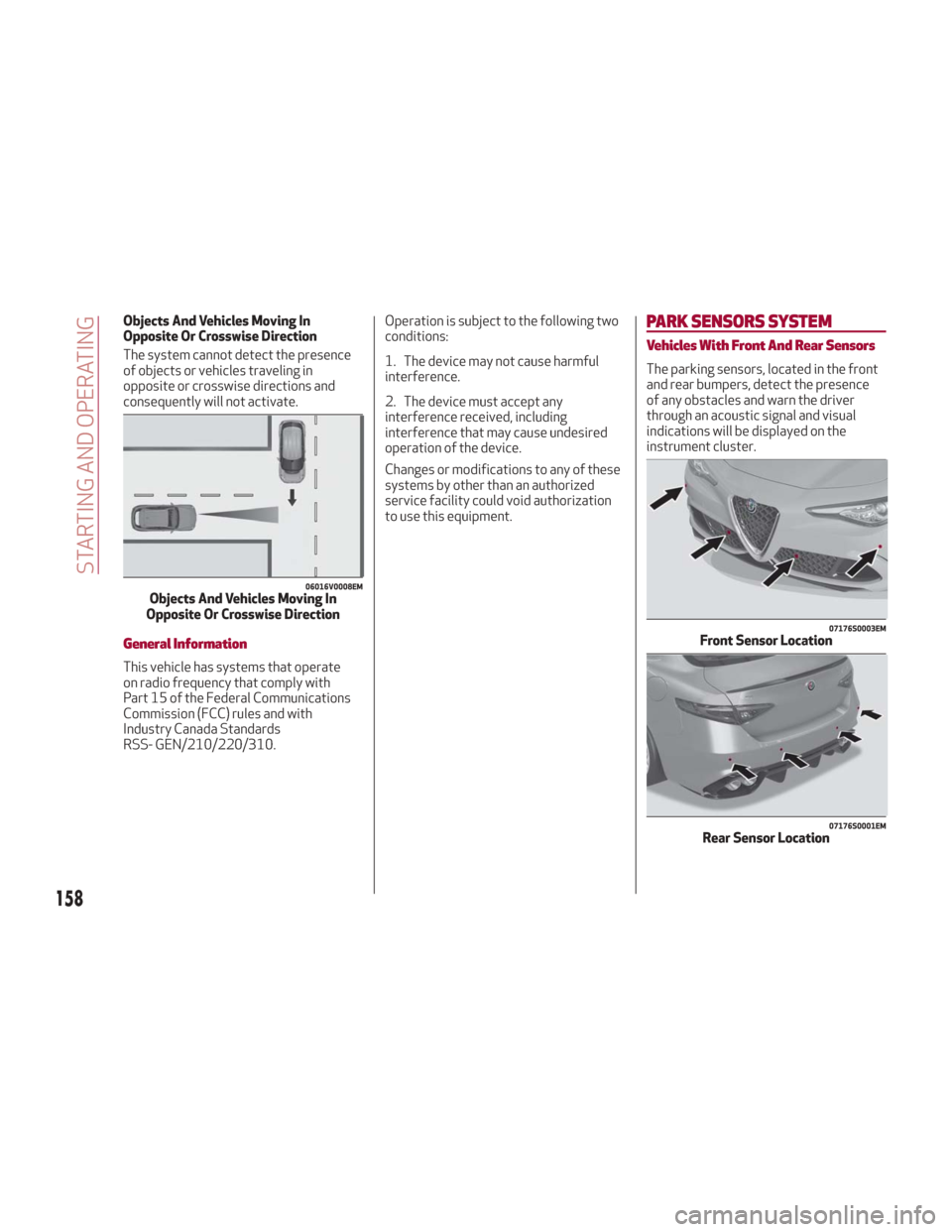
The system cannot detect the presence
of objects or vehicles traveling in
opposite or crosswise directions and
consequently will not activate.
General Information
This vehicle has systems that operate
on radio frequency that comply with
Part 15 of the Federal Communications
Commission (FCC) rules and with
Industry Canada Standards
RSS- GEN/210/220/310.Operation is subject to the following two
conditions:
1. The device may not cause harmful
interference.
2. The device must accept any
interference received, including
interference that may cause undesired
operation of the device.
Changes or modifications to any of these
systems by other than an authorized
service facility could void authorization
to use this equipment.
PARK SENSORS
SYSTEM
Vehicles With Front And Rear Sensors
The parking sensors, located in the front
and rear bumpers, detect the presence
of any obstacles and warn the driver
through an acoustic signal and visual
indications will be displayed on the
instrument cluster.
06016V0008EMObjects And Vehicles Moving In
Opposite Or Crosswise Direction
07176S0003EMFront Sensor Location
07176S0001EMRear Sensor Location
158
STARTING AND OPERATING
Page 173 of 260
IN CASE OF EMERGENCY
Have a flat tire or a burnt-out bulb?
At times, a problem such as these may
interfere with your driving experience.
The section on emergencies can help you
to deal with critical situations
independently.
In an emergency, we recommend that you
call the phone number found in the
Warranty Book.
You may also consider contacting an
authorized dealer.HAZARD WARNING LIGHTS.....172
BULB REPLACEMENT .........172
FUSES .................. .177
TIRE SERVICE KIT ............183
JUMP STARTING ............186
REFUELING IN EMERGENCY .....188
ENGINE OVERHEATING ........189
TOWING A DISABLED VEHICLE . . .190
TOW EYES ............... .191
ENHANCED ACCIDENT RESPONSE
SYSTEM (EARS) .............192
EVENT DATA RECORDER (EDR) . . .192
171
Page 180 of 260
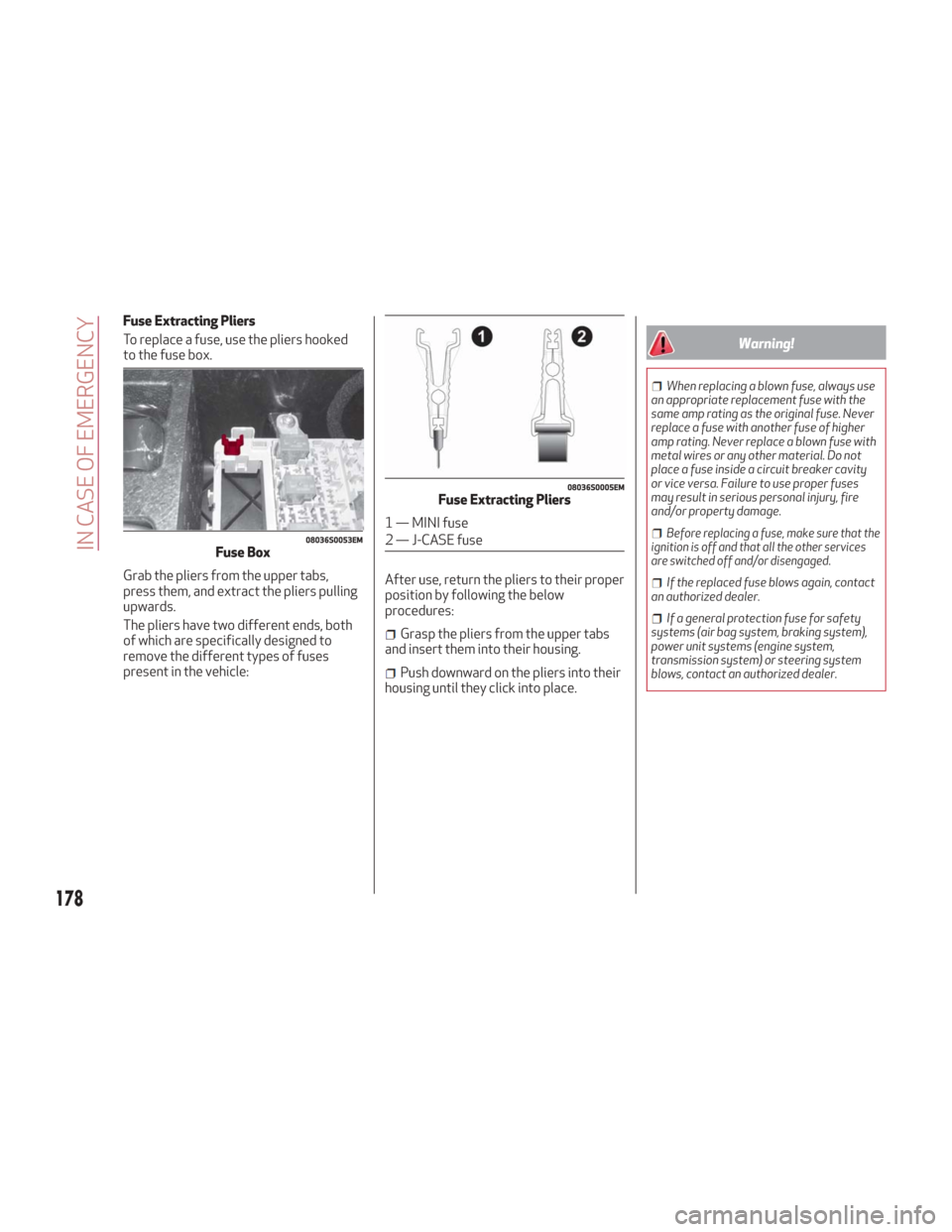
Fuse Extracting Pliers
To replace a fuse, use the pliers hooked
to the fuse box.
Grab the pliers from the upper tabs,
press them, and extract the pliers pulling
upwards.
The pliers have two different ends, both
of which are specifically designed to
remove the different types of fuses
present in the vehicle:After use, return the pliers to their proper
position by following the below
procedures:
Grasp the pliers from the upper tabs
and insert them into their housing.
Push downward on the pliers into their
housing until they click into place.
Warning!
When replacing a blown fuse, always use
an appropriate replacement fuse with the
same amp rating as the original fuse. Never
replace a fuse with another fuse of higher
amp rating. Never replace a blown fuse with
metal wires or any other material. Do not
place a fuse inside a circuit breaker cavity
or vice versa. Failure to use proper fuses
may result in serious personal injury, fire
and/or property damage.
Before replacing a fuse, make sure that the
ignition is off and that all the other services
are switched off and/or disengaged.
If the replaced fuse blows again, contact
an authorized dealer.
If a general protection fuse for safety
systems (air bag system, braking system),
power unit systems (engine system,
transmission system) or steering system
blows, contact an authorized dealer.
08036S0053EMFuse Box
08036S0005EMFuse Extracting Pliers
1 — MINI fuse
2 — J-CASE fuse
178
IN CASE OF EMERGENCY