tow Alfa Romeo Giulia 2019 User Guide
[x] Cancel search | Manufacturer: ALFA ROMEO, Model Year: 2019, Model line: Giulia, Model: Alfa Romeo Giulia 2019Pages: 232, PDF Size: 4.87 MB
Page 112 of 232
STARTING THE ENGINE
STARTING THE ENGINE
Before starting the engine, adjust the
seat, the interior rear view mirrors, the
door mirrors and fasten the seat belt
correctly.
Never press the accelerator pedal for
starting the engine.
If necessary, messages indicating the
starting procedure can be shown on the
display.
103) 104) 105)
33) 34) 35)
Versions with manual gearbox
Proceed as follows:
engage the parking brake and set the
gear in neutral, on diesel versions turn the
ignition switch to ON, the
symbol will
appear on the instrument panel: wait until
it goes off;
fully depress the clutch pedal, without
touching the accelerator;
briefly press the ignition button;
if the engine doesn't start within a few
seconds, you need to repeat the
procedure.
if the problem persists, contact an Alfa
Romeo Dealership.Versions with automatic transmission
Proceed as follows:
engage the electric parking brake and
set the gear lever to P (Park) or N
(Neutral),
fully depress the brake pedal without
touching the accelerator;
briefly press the ignition button;
if the engine doesn't start within a few
seconds, you need to repeat the
procedure.
if the problem persists, contact an Alfa
Romeo Dealership.
ENGINE STARTING FAILURE
Starting the engine with electronic key
battery (Keyless Start) run down or flat
If the ignition device does not respond
when the relevant button is pressed the
electronic key battery might be run down
or flat. Therefore, the system does not
detect the presence of the electronic key
on board the car and displays a dedicated
message.
In this case, follow the instructions in
paragraph "Starting with flat key battery"
in the "Knowing your car" chapter and
start the engine normally.
STOPPING THE ENGINE
36)
To stop the engine, proceed as follows:
park the car in a position that is not
dangerous for oncoming traffic;
engage a gear (versions with manual
gearbox) or activate P (Park) mode
(versions with automatic transmission);
with engine idling, press the start
button.
Cars with electronic key (Keyless Start)
If the car speed is above 5 mph (8 km/h),
it is still possible to stop the engine if a
gear operating mode other than P (Park)
is selected. To switch off the engine in
this situation, hold down the ignition
device button for a while or press it
3 times in a row within a few seconds.
WARNING
103)It is dangerous to run the engine in
enclosed areas. The engine takes in oxygen
and releases carbon dioxide, carbon
monoxide and other toxic gases.
104)The electro-hydraulic braking system
is not active until the engine starts running.
So, the brake pedal travel will be longer than
normal. This does not indicate a fault.
105)Do not start the engine by pushing,
towing or driving downhill. These
manoeuvres may damage the catalytic
converter.
110
STARTING AND DRIVING
Page 115 of 232
carbon-ceramic discs, before using “Drive
Away Release” mode and moving the
vehicle, it is necessary to buckle the seat
belts or manually release the electric
handbrake to prevent damage to the
carbon-ceramic discs themselves.
"Safe Hold": if the vehicle speed is
lower than 2 mph (3 km/h), on vehicles
with automatic transmission, the gear
lever is not in P (Park) position and the
driver's intention of leaving the vehicle is
detected, the electric parking brake will
automatically engage to hold the vehicle
in safety conditions;
"Auto Park Brake": if the vehicle speed
is below 2 mph (3 km/h), the electric
parking break will automatically engage
when the gear lever is in P (Park) position.
The LED on the switch located on the
central tunnel fig. 93 switches on
together with the warning light
on
the instrument panel when the parking
brake is engaged and applied to the
wheels. Each automatic parking brake
engagement can be cancelled by pressing
the switch on the central tunnel and at
the same time moving the gear lever for
the transmission to position P (Park).
SAFE HOLD
It is a safety function that automatically
engages the electric parking brake in the
event of a dangerous condition for the
car.
If:
the car speed is below 2 mph (3 km/h);
on cars with automatic transmission, a
transmission operating mode different
from P (Park) is activated;
the driver's seat belt is not fastened;
the driver side door is open;
no attempts to apply pressure on the
brake pedal have been detected;
the car is parked on roads which
gradient higher than 4%;
the electric parking brake engages
automatically to prevent car movement.
The Safe Hold function can be
temporarily disabled by pressing the
switch located on the central tunnel and
the brake pedal at the same time, with
the vehicle stationary and the driver side
door open.
Once disabled, the function will activate
again when the vehicle speed reaches
18 mph (20 km/h) or the ignition device is
moved to STOP and then to ON.
WARNING
106)In the case of parking manoeuvres on
roads on a gradient, the front wheels must
be steered towards the pavement (when
parking downhill), or in the opposite
direction if the vehicle is parked uphill. Block
the wheels with a wedge or a stone if the car
is parked on a steep slope.
107)Never leave children alone in an
unattended vehicle; make sure that when
you move away from the vehicle, you have
the key with you.
108)The electric parking brake must
always be engaged when leaving the vehicle.
113
Page 116 of 232
MANUAL GEARBOX
109)
37)
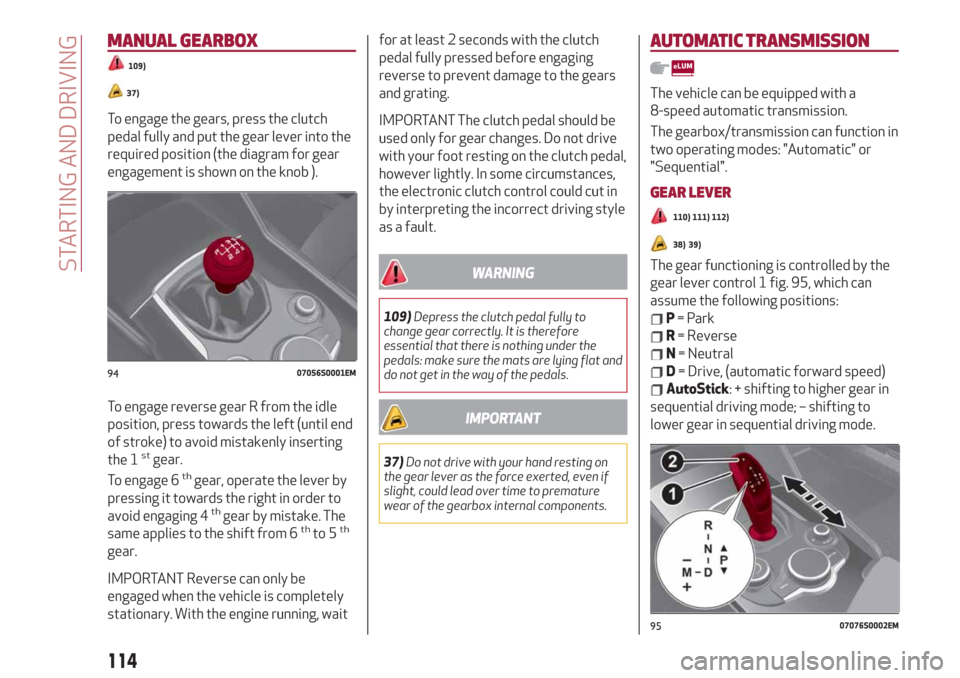
To engage the gears, press the clutch
pedal fully and put the gear lever into the
required position (the diagram for gear
engagement is shown on the knob ).
To engage reverse gear R from the idle
position, press towards the left (until end
of stroke) to avoid mistakenly inserting
the 1
stgear.
To engage 6thgear, operate the lever by
pressing it towards the right in order to
avoid engaging 4
thgear by mistake. The
same applies to the shift from 6thto 5th
gear.
IMPORTANT Reverse can only be
engaged when the vehicle is completely
stationary. With the engine running, waitfor at least 2 seconds with the clutch
pedal fully pressed before engaging
reverse to prevent damage to the gears
and grating.
IMPORTANT The clutch pedal should be
used only for gear changes. Do not drive
with your foot resting on the clutch pedal,
however lightly. In some circumstances,
the electronic clutch control could cut in
by interpreting the incorrect driving style
as a fault.
WARNING
109)Depress the clutch pedal fully to
change gear correctly. It is therefore
essential that there is nothing under the
pedals: make sure the mats are lying flat and
do not get in the way of the pedals.
IMPORTANT
37)Do not drive with your hand resting on
the gear lever as the force exerted, even if
slight, could lead over time to premature
wear of the gearbox internal components.
AUTOMATIC TRANSMISSION
The vehicle can be equipped with a
8-speed automatic transmission.
The gearbox/transmission can function in
two operating modes: "Automatic" or
"Sequential".
GEAR LEVER
110) 111) 112)
38) 39)
The gear functioning is controlled by the
gear lever control 1 fig. 95, which can
assume the following positions:
P= Park
R= Reverse
N= Neutral
D= Drive, (automatic forward speed)
AutoStick: + shifting to higher gear in
sequential driving mode; – shifting to
lower gear in sequential driving mode.
9407056S0001EM
9507076S0002EM
114
STARTING AND DRIVING
Page 117 of 232
The positions diagram is illustrated on
the top of the lever.
The letter corresponding to the selected
mode lights up and can be seen on the
instrument panel display.
To select one of the operating modes,
move the lever forwards or backwards
and press the brake pedal at the same
time.
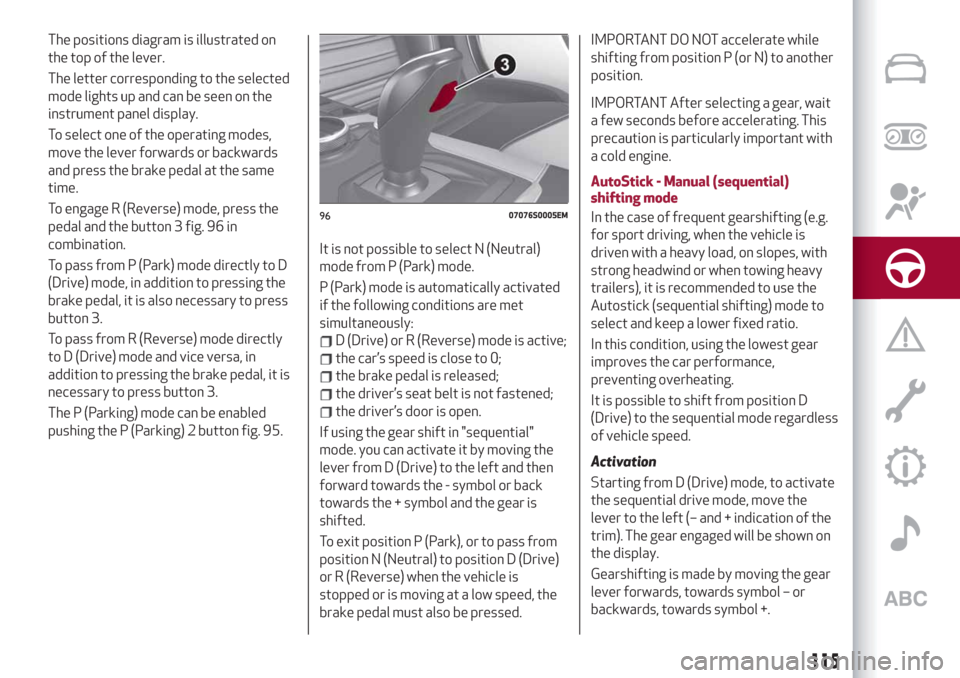
To engage R (Reverse) mode, press the
pedal and the button 3 fig. 96 in
combination.
To pass from P (Park) mode directly to D
(Drive) mode, in addition to pressing the
brake pedal, it is also necessary to press
button 3.
To pass from R (Reverse) mode directly
to D (Drive) mode and vice versa, in
addition to pressing the brake pedal, it is
necessary to press button 3.
The P (Parking) mode can be enabled
pushing the P (Parking) 2 button fig. 95.It is not possible to select N (Neutral)
mode from P (Park) mode.
P (Park) mode is automatically activated
if the following conditions are met
simultaneously:
D (Drive) or R (Reverse) mode is active;
the car’s speed is close to 0;
the brake pedal is released;
the driver’s seat belt is not fastened;
the driver’s door is open.
If using the gear shift in "sequential"
mode. you can activate it by moving the
lever from D (Drive) to the left and then
forward towards the - symbol or back
towards the + symbol and the gear is
shifted.
To exit position P (Park), or to pass from
position N (Neutral) to position D (Drive)
or R (Reverse) when the vehicle is
stopped or is moving at a low speed, the
brake pedal must also be pressed.
IMPORTANT DO NOT accelerate while
shifting from position P (or N) to another
position.
IMPORTANT After selecting a gear, wait
a few seconds before accelerating. This
precaution is particularly important with
a cold engine.
AutoStick - Manual (sequential)
shifting mode
In the case of frequent gearshifting (e.g.
for sport driving, when the vehicle is
driven with a heavy load, on slopes, with
strong headwind or when towing heavy
trailers), it is recommended to use the
Autostick (sequential shifting) mode to
select and keep a lower fixed ratio.
In this condition, using the lowest gear
improves the car performance,
preventing overheating.
It is possible to shift from position D
(Drive) to the sequential mode regardless
of vehicle speed.
Activation
Starting from D (Drive) mode, to activate
the sequential drive mode, move the
lever to the left (– and + indication of the
trim). The gear engaged will be shown on
the display.
Gearshifting is made by moving the gear
lever forwards, towards symbol – or
backwards, towards symbol +.
9607076S0005EM
115
Page 118 of 232
Steering wheel stalks
(where provided)
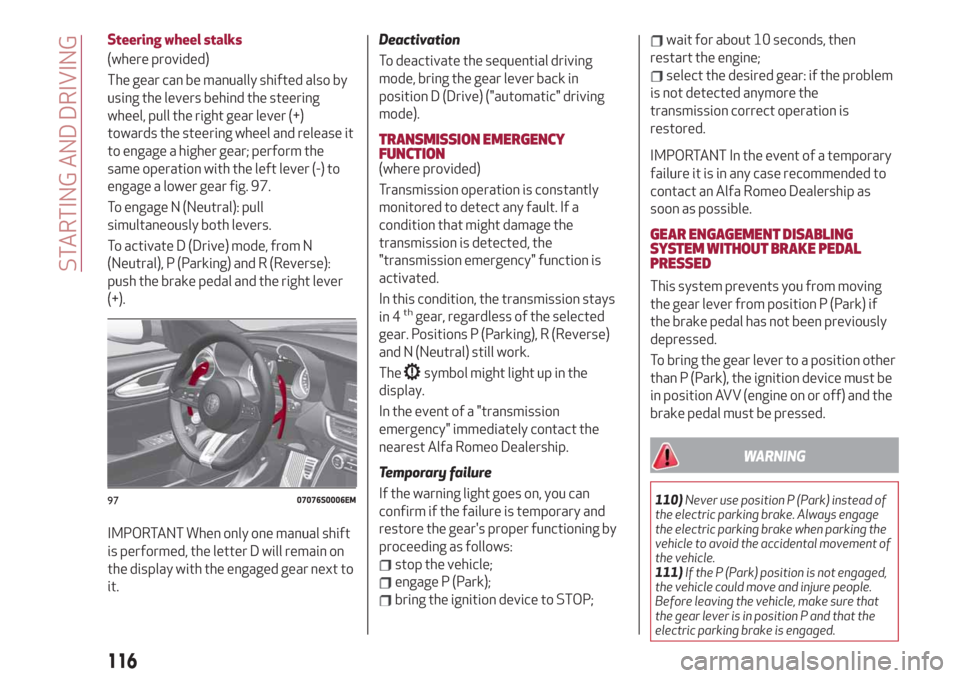
The gear can be manually shifted also by
using the levers behind the steering
wheel, pull the right gear lever (+)
towards the steering wheel and release it
to engage a higher gear; perform the
same operation with the left lever (-) to
engage a lower gear fig. 97.
To engage N (Neutral): pull
simultaneously both levers.
To activate D (Drive) mode, from N
(Neutral), P (Parking) and R (Reverse):
push the brake pedal and the right lever
(+).
IMPORTANT When only one manual shift
is performed, the letter D will remain on
the display with the engaged gear next to
it.
Deactivation
To deactivate the sequential driving
mode, bring the gear lever back in
position D (Drive) ("automatic" driving
mode).
TRANSMISSION EMERGENCY
FUNCTION
(where provided)
Transmission operation is constantly
monitored to detect any fault. If a
condition that might damage the
transmission is detected, the
"transmission emergency" function is
activated.
In this condition, the transmission stays
in 4
thgear, regardless of the selected
gear. Positions P (Parking), R (Reverse)
and N (Neutral) still work.
The
symbol might light up in the
display.
In the event of a "transmission
emergency" immediately contact the
nearest Alfa Romeo Dealership.
Temporary failure
If the warning light goes on, you can
confirm if the failure is temporary and
restore the gear's proper functioning by
proceeding as follows:
stop the vehicle;
engage P (Park);
bring the ignition device to STOP;
wait for about 10 seconds, then
restart the engine;
select the desired gear: if the problem
is not detected anymore the
transmission correct operation is
restored.
IMPORTANT In the event of a temporary
failure it is in any case recommended to
contact an Alfa Romeo Dealership as
soon as possible.
GEAR ENGAGEMENT DISABLING
SYSTEM WITHOUT BRAKE PEDAL
PRESSED
This system prevents you from moving
the gear lever from position P (Park) if
the brake pedal has not been previously
depressed.
To bring the gear lever to a position other
than P (Park), the ignition device must be
in position AVV (engine on or off) and the
brake pedal must be pressed.
WARNING
110)Never use position P (Park) instead of
the electric parking brake. Always engage
the electric parking brake when parking the
vehicle to avoid the accidental movement of
the vehicle.
111)If the P (Park) position is not engaged,
the vehicle could move and injure people.
Before leaving the vehicle, make sure that
the gear lever is in position P and that the
electric parking brake is engaged.9707076S0006EM
116
STARTING AND DRIVING
Page 122 of 232
CRUISE CONTROL
This is an electronically controlled driving
assistance device that allows the desired
car speed to be maintained, without
having to press the accelerator pedal.
This device can be used at a speed above
25 mph (40 km/h) on long stretches of
dry, straight roads with few variations
(e.g. motorways).
It is therefore not recommended to use
this device on extra-urban roads with
traffic. Do not use the device in town.
Travelling downhill, the system could
brake the car to keep the set speed
unvaried.
ACTIVATING THE DEVICE
114) 115) 116)
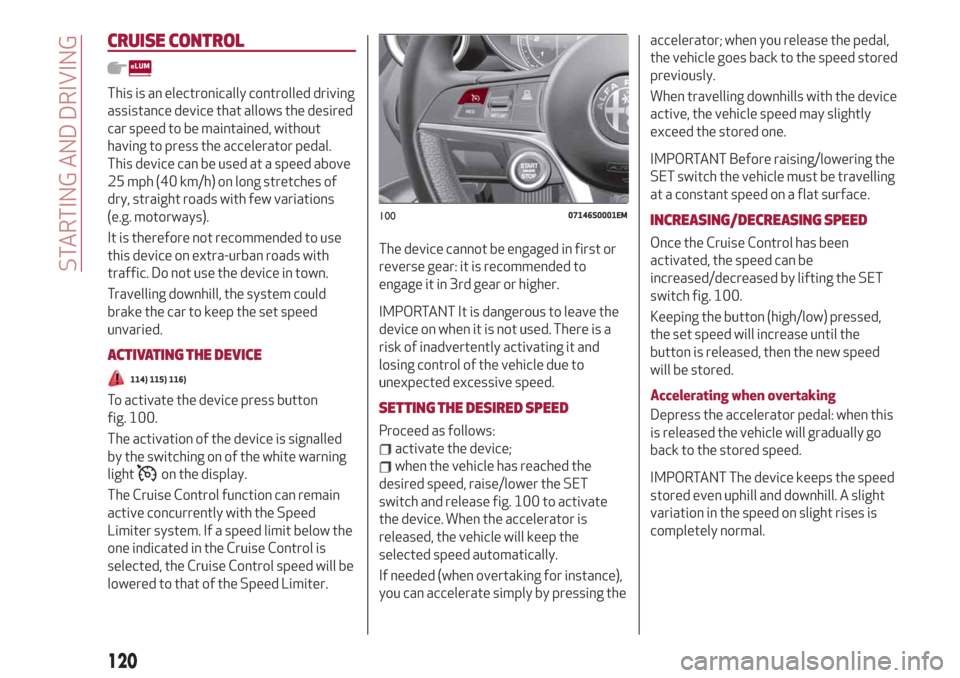
To activate the device press button
fig. 100.
The activation of the device is signalled
by the switching on of the white warning
light
on the display.
The Cruise Control function can remain
active concurrently with the Speed
Limiter system. If a speed limit below the
one indicated in the Cruise Control is
selected, the Cruise Control speed will be
lowered to that of the Speed Limiter.The device cannot be engaged in first or
reverse gear: it is recommended to
engage it in 3rd gear or higher.
IMPORTANT It is dangerous to leave the
device on when it is not used. There is a
risk of inadvertently activating it and
losing control of the vehicle due to
unexpected excessive speed.
SETTING THE DESIRED SPEED
Proceed as follows:
activate the device;
when the vehicle has reached the
desired speed, raise/lower the SET
switch and release fig. 100 to activate
the device. When the accelerator is
released, the vehicle will keep the
selected speed automatically.
If needed (when overtaking for instance),
you can accelerate simply by pressing theaccelerator; when you release the pedal,
the vehicle goes back to the speed stored
previously.
When travelling downhills with the device
active, the vehicle speed may slightly
exceed the stored one.
IMPORTANT Before raising/lowering the
SET switch the vehicle must be travelling
at a constant speed on a flat surface.
INCREASING/DECREASING SPEED
Once the Cruise Control has been
activated, the speed can be
increased/decreased by lifting the SET
switch fig. 100.
Keeping the button (high/low) pressed,
the set speed will increase until the
button is released, then the new speed
will be stored.
Accelerating when overtaking
Depress the accelerator pedal: when this
is released the vehicle will gradually go
back to the stored speed.
IMPORTANT The device keeps the speed
stored even uphill and downhill. A slight
variation in the speed on slight rises is
completely normal.
10007146S0001EM
120
STARTING AND DRIVING
Page 124 of 232
The device further enhances driving
comfort provided by the electronic
Cruise Control when on the motorway or
out of town with light traffic.
Important notes
If the sensor does not detect any vehicle
ahead, the device will maintain a fixed set
speed.
If the sensor detects a vehicle ahead, the
device automatically intervenes bybraking (or accelerating) slightly in order
not to exceed the original set speed, so
that the vehicle keeps the preset
distance, seeking to adapt to the speed
of the vehicle ahead.
In the cases described below, the system
performance is not guaranteed, it is
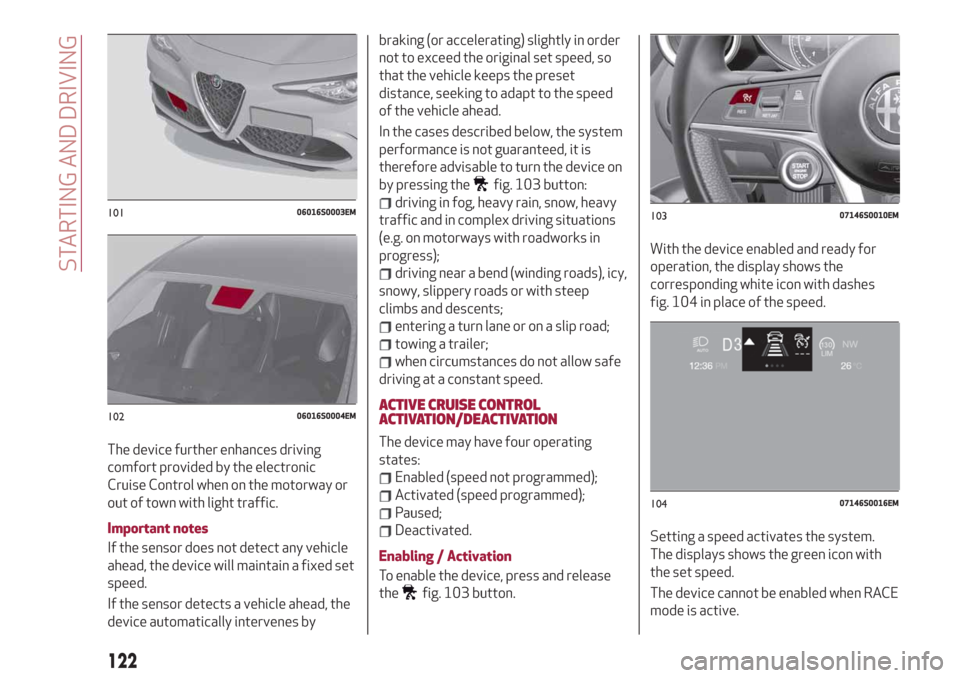
therefore advisable to turn the device on
by pressing the
fig. 103 button:
driving in fog, heavy rain, snow, heavy
traffic and in complex driving situations
(e.g. on motorways with roadworks in
progress);
driving near a bend (winding roads), icy,
snowy, slippery roads or with steep
climbs and descents;
entering a turn lane or on a slip road;
towing a trailer;
when circumstances do not allow safe
driving at a constant speed.
ACTIVE CRUISE CONTROL
ACTIVATION/DEACTIVATION
The device may have four operating
states:
Enabled (speed not programmed);
Activated (speed programmed);
Paused;
Deactivated.
Enabling / Activation
To enable the device, press and release
the
fig. 103 button.With the device enabled and ready for
operation, the display shows the
corresponding white icon with dashes
fig. 104 in place of the speed.
Setting a speed activates the system.
The displays shows the green icon with
the set speed.
The device cannot be enabled when RACE
mode is active.
10106016S0003EM
10206016S0004EM
10307146S0010EM
10407146S0016EM
122
STARTING AND DRIVING
Page 128 of 232
“STOP AND GO” STRATEGY
The “Stop and Go” operating strategy
allows you to maintain a safe distance
from the vehicle ahead until the car has
completely stopped. It will also restart
the car automatically if the vehicle ahead
moves off within two seconds, otherwise
it is necessary to press the accelerator
pedal or the RES button to restart.
DEACTIVATION
The device is deactivated and the set
speed is cancelled if:
if thebutton on the Active Cruise
Control is pressed (with the device
enabled or paused);
the ignition device is in the STOP
position;
RACE mode is activated.
The device is cancelled (the set speed
and distance are stored):
when the device is paused (see the
“Activating / Deactivating Active Cruise
Control” paragraph);
when the conditions shown in the
“Setting the desired speed” paragraph
occur;
SYSTEM LIMITED OPERATION
WARNING
If the dedicated message is shown on the
display, a condition limiting the system
operation may have occurred.
The possible reasons of this limitationare something blocking the camera view
or a fault. If an obstruction is signalled,
clean the area of the windscreen
indicated in fig. 102 and check that the
message has disappeared.
When the conditions limiting the system
functions end, this will go back to normal
and complete operation.
Should the fault persist, contact an Alfa
Romeo Dealership.
PRECAUTIONS WHILE DRIVING
The device may not work correctly in
some driving conditions (see below): the
driver must control the car at all times.
Towing a trailer
Use of the device is not recommended
while towing a trailer.
VEHICLE not aligned
The device may not detect a vehicle
travelling on the same lane but which is
not aligned along the same direction of
travel or a vehicle which is cutting in from
a side lane. Sufficient distance from the
vehicles ahead may not be guaranteed in
these cases.
The non-aligned vehicle can weave in and
out of the driving direction causing the
vehicle to brake or accelerate
unexpectedly.Steering and bends
When cornering with the device set, it
could limit speed and acceleration to
guarantee vehicle stability even if no
vehicles are detected ahead. When
leaving the bend, the device resets the
previously set speed.
IMPORTANT In case of narrow curves,
the performance of the device could be
limited. In this case, it is advisable to
deactivate the device. Moreover,
remember that the device only limits the
speed DURING a bend and not BEFORE
it, so always take great care.
Using the device on gradient
When driving on roads with variable
gradient, the device may not detect the
presence of a vehicle on the lane. Device
performance could be limited according
to speed, load, traffic conditions and
gradient steepness.
Lane change
The device may not detect the presence
of a vehicle until it is fully in your lane. In
this case, sufficient distance from the
vehicle which is changing lane may not be
guaranteed: it is advisable to pay the
utmost attention at all times and be
always ready to press the brakes if
needed.
126
STARTING AND DRIVING
Page 130 of 232
PARK SENSORSSYSTEM
(where provided)
123)
48) 49) 50)
VERSIONS WITH 4/8 SENSORS
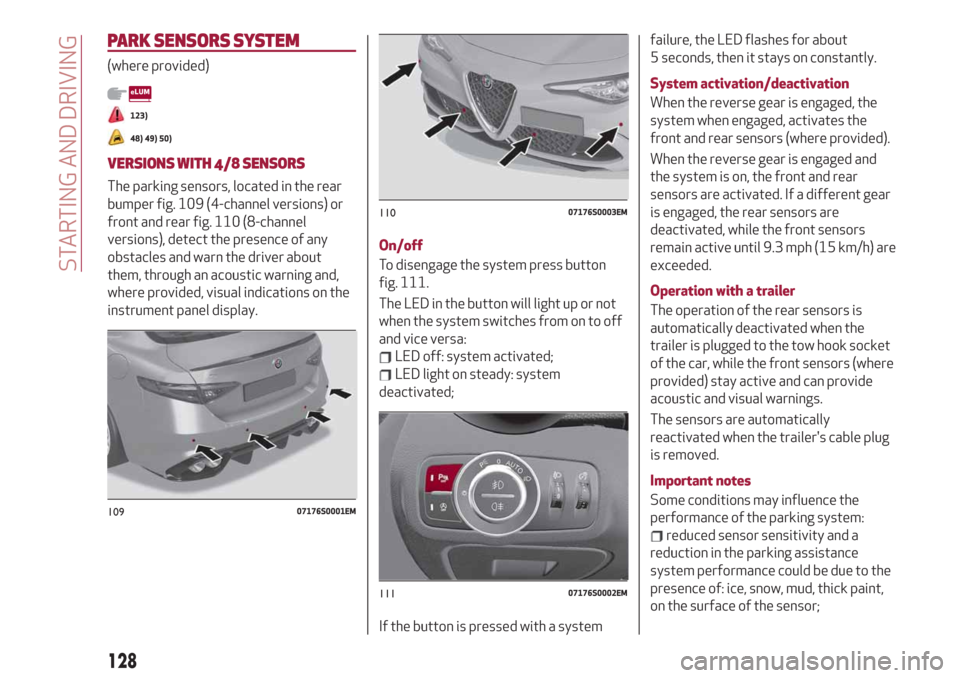
The parking sensors, located in the rear
bumper fig. 109 (4-channel versions) or
front and rear fig. 110 (8-channel
versions), detect the presence of any
obstacles and warn the driver about
them, through an acoustic warning and,
where provided, visual indications on the
instrument panel display.On/off
To disengage the system press button
fig. 111.
The LED in the button will light up or not
when the system switches from on to off
and vice versa:
LED off: system activated;
LED light on steady: system
deactivated;
If the button is pressed with a systemfailure, the LED flashes for about
5 seconds, then it stays on constantly.
System activation/deactivation
When the reverse gear is engaged, the
system when engaged, activates the
front and rear sensors (where provided).
When the reverse gear is engaged and
the system is on, the front and rear
sensors are activated. If a different gear
is engaged, the rear sensors are
deactivated, while the front sensors
remain active until 9.3 mph (15 km/h) are
exceeded.
Operation with a trailer
The operation of the rear sensors is
automatically deactivated when the
trailer is plugged to the tow hook socket
of the car, while the front sensors (where
provided) stay active and can provide
acoustic and visual warnings.
The sensors are automatically
reactivated when the trailer's cable plug
is removed.
Important notes
Some conditions may influence the
performance of the parking system:
reduced sensor sensitivity and a
reduction in the parking assistance
system performance could be due to the
presence of: ice, snow, mud, thick paint,
on the surface of the sensor;
10907176S0001EM
11007176S0003EM
11107176S0002EM
128
STARTING AND DRIVING
Page 131 of 232
the sensor may detect a non-existent
obstacle ("echo interference") due to
mechanical interference, for example
when washing the vehicle, in rain (strong
wind), hail;
the signals sent by the sensor can also
be altered by the presence of ultrasonic
systems (e.g. pneumatic brake systems
of trucks or pneumatic drills) near the
vehicle;
parking assistance system
performance can also be influenced by
the position of the sensors, for example
due to a change in the ride setting
(caused by wear to the shock absorbers,
suspension), or by changing tyres,
overloading the vehicle or carrying out
specific tuning operations that require
the vehicle to be lowered;
the presence of a tow hook without
trailer, which may interfere with the
correct operation of the parking sensors.
Before using the Park Sensors system, it
is recommended to remove the
removable tow hook ball assembly and
the relevant attachment from the car
when the latter is not used for towing
operations. Failure to comply with this
prescription may cause personal injuries
or damage to vehicles or obstacles since,
when the continuous acoustic signal is
emitted, the tow hook ball is already in a
position that is much closer to the
obstacle than the rear bumper. If youwish to leave the tow hook fitted without
towing a trailer, it is advisable to contact
an Alfa Romeo Dealership for the Park
Sensors system update operations
because the tow hook could be detected
as an obstacle by the central sensors.
the presence of adhesives on the
sensors. Therefore, take care not to place
stickers on the sensors.
WARNING
123)Parking and other potentially
dangerous manoeuvres are, however,
always the driver’s responsibility. When
performing these operations, always make
sure that there are no other people
(especially children) or animals on the route
you want to take. The parking sensors are an
aid for the driver, but the driver must never
allow their attention to lapse during
potentially dangerous manoeuvres, even
those executed at low speeds.
IMPORTANT
48)The sensors must be clean of mud, dirt,
snow or ice in order for the system to
operate correctly. Be careful not to scratch
or damage the sensors while cleaning them.
Avoid using dry, rough or hard cloths. The
sensors should be washed using clean water
with the addition of car shampoo if
necessary. When using special washing
equipment such as high pressure jets or
steam cleaning, clean the sensors very
quickly keeping the jet more than 10 cm
away.
49)Have interventions on the bumper in the
area of the sensors carried out only by an
Alfa Romeo Dealership. Interventions on the
bumper that are not carried out properly
may compromise the operation of the
parking sensors.
50)Only have the bumpers repainted or any
retouches to the paintwork in the area of the
sensors carried out by an Alfa Romeo
Dealership. Incorrect paint application could
affect the operation of the parking sensors.
129