warning Alfa Romeo Giulia 2019 Owner's Guide
[x] Cancel search | Manufacturer: ALFA ROMEO, Model Year: 2019, Model line: Giulia, Model: Alfa Romeo Giulia 2019Pages: 232, PDF Size: 4.87 MB
Page 41 of 232
TAILGATE
The tailgate unlocking is electrically
operated and is deactivated when the car
is in motion.
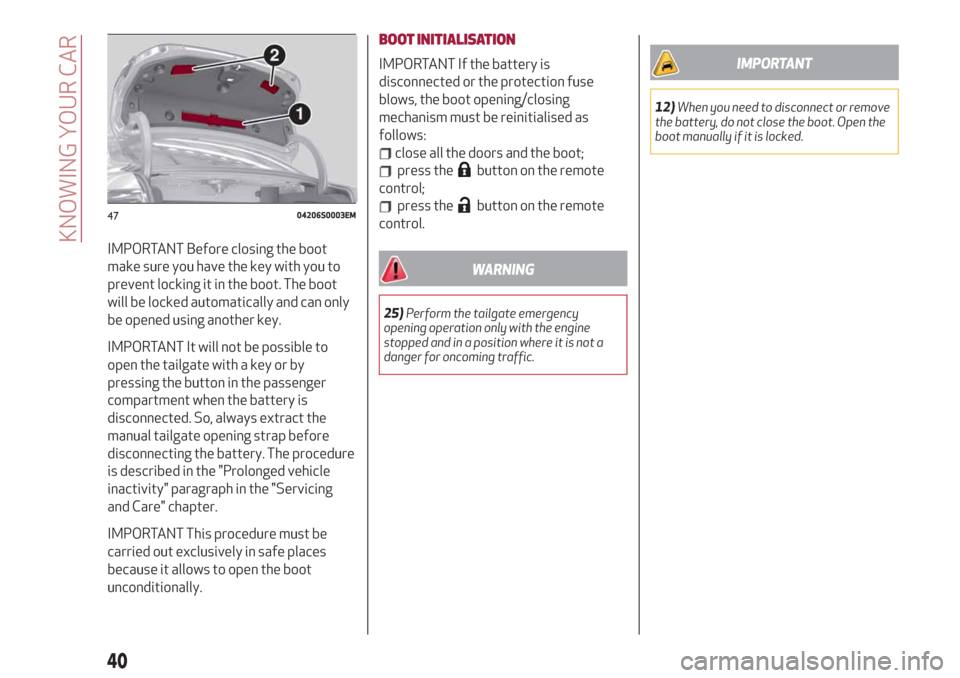
The warning triangle 1 fig. 47 is housed
inside the lining of the luggage
compartment lid.
OPENING
Opening from the outside
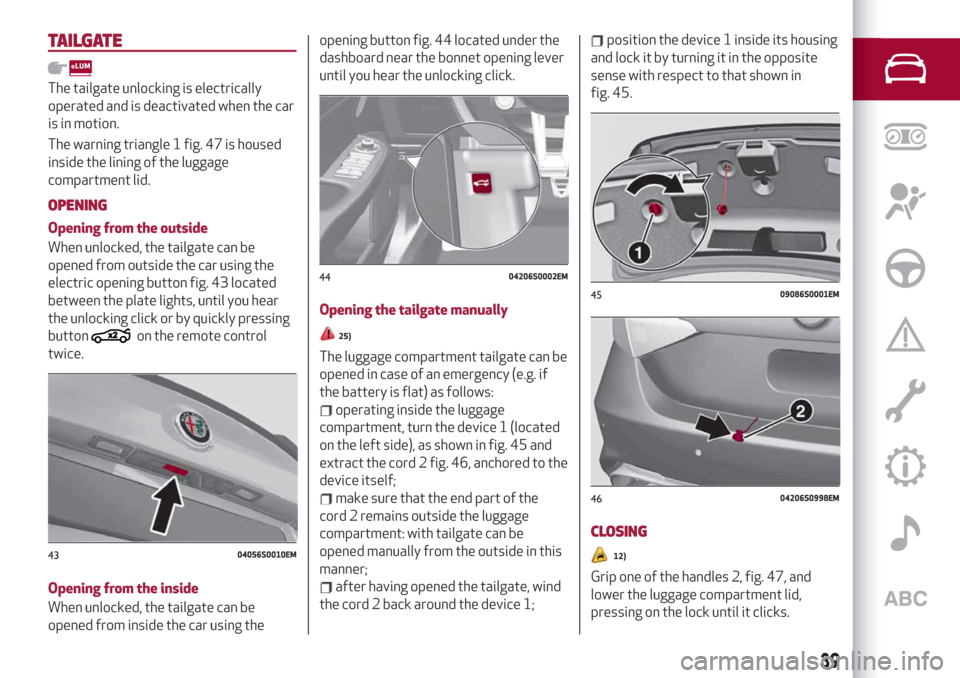
When unlocked, the tailgate can be
opened from outside the car using the
electric opening button fig. 43 located
between the plate lights, until you hear
the unlocking click or by quickly pressing
button
on the remote control
twice.
Opening from the inside
When unlocked, the tailgate can be
opened from inside the car using theopening button fig. 44 located under the
dashboard near the bonnet opening lever
until you hear the unlocking click.
Opening the tailgate manually25)
The luggage compartment tailgate can be
opened in case of an emergency (e.g. if
the battery is flat) as follows:
operating inside the luggage
compartment, turn the device 1 (located
on the left side), as shown in fig. 45 and
extract the cord 2 fig. 46, anchored to the
device itself;
make sure that the end part of the
cord 2 remains outside the luggage
compartment: with tailgate can be
opened manually from the outside in this
manner;
after having opened the tailgate, wind
the cord 2 back around the device 1;
position the device 1 inside its housing
and lock it by turning it in the opposite
sense with respect to that shown in
fig. 45.
CLOSING
12)
Grip one of the handles 2, fig. 47, and
lower the luggage compartment lid,
pressing on the lock until it clicks.
4304056S0010EM
4404206S0002EM
4509086S0001EM
4604206S0998EM
39
Page 42 of 232
IMPORTANT Before closing the boot
make sure you have the key with you to
prevent locking it in the boot. The boot
will be locked automatically and can only
be opened using another key.
IMPORTANT It will not be possible to
open the tailgate with a key or by
pressing the button in the passenger
compartment when the battery is
disconnected. So, always extract the
manual tailgate opening strap before
disconnecting the battery. The procedure
is described in the "Prolonged vehicle
inactivity" paragraph in the "Servicing
and Care" chapter.
IMPORTANT This procedure must be
carried out exclusively in safe places
because it allows to open the boot
unconditionally.BOOT INITIALISATION
IMPORTANT If the battery is
disconnected or the protection fuse
blows, the boot opening/closing
mechanism must be reinitialised as
follows:
close all the doors and the boot;
press thebutton on the remote
control;
press thebutton on the remote
control.
WARNING
25)Perform the tailgate emergency
opening operation only with the engine
stopped and in a position where it is not a
danger for oncoming traffic.
IMPORTANT
12)When you need to disconnect or remove
the battery, do not close the boot. Open the
boot manually if it is locked.
4704206S0003EM
40
KNOWING YOUR CAR
Page 43 of 232
ROOF RACK / SKI RACK
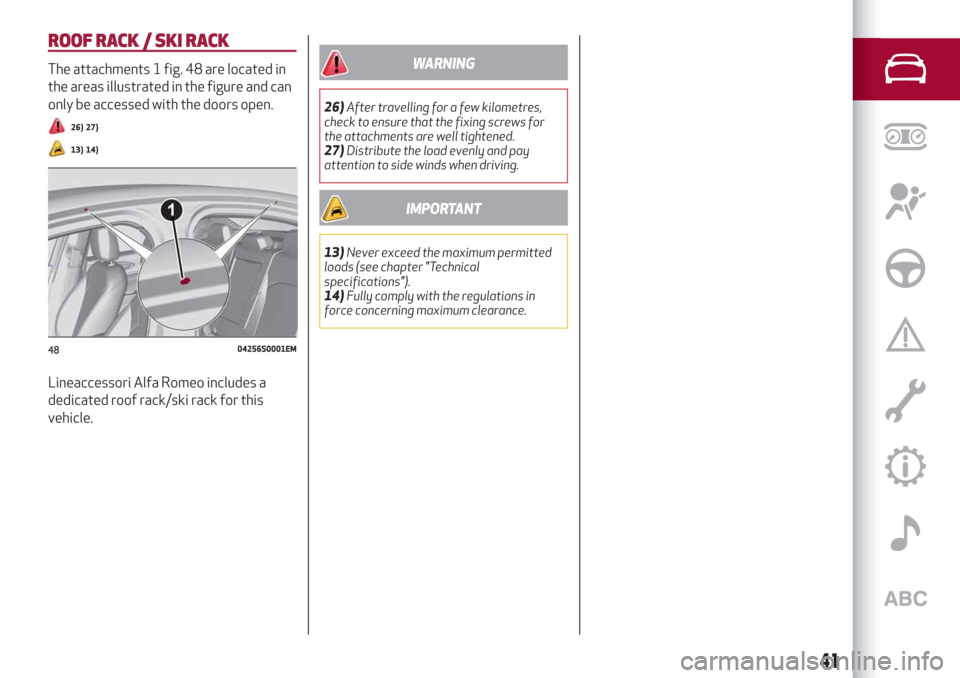
The attachments 1 fig. 48 are located in
the areas illustrated in the figure and can
only be accessed with the doors open.
26) 27)
13) 14)
Lineaccessori Alfa Romeo includes a
dedicated roof rack/ski rack for this
vehicle.
WARNING
26)After travelling for a few kilometres,
check to ensure that the fixing screws for
the attachments are well tightened.
27)Distribute the load evenly and pay
attention to side winds when driving.
IMPORTANT
13)Never exceed the maximum permitted
loads (see chapter "Technical
specifications").
14)Fully comply with the regulations in
force concerning maximum clearance.
4804256S0001EM
41
Page 45 of 232
This section of the handbook gives you all the information you
need to understand, interpret and use the instrument panel
correctly.
KNOWING THE INSTRUMENT PANEL
CONTROL PANEL AND ON-BOARD INSTRUMENTS .........44
DISPLAY....................................46
WARNING LIGHTS AND MESSAGES . ..................51
Page 46 of 232
CONTROL PANEL AND ON-BOARD INSTRUMENTS
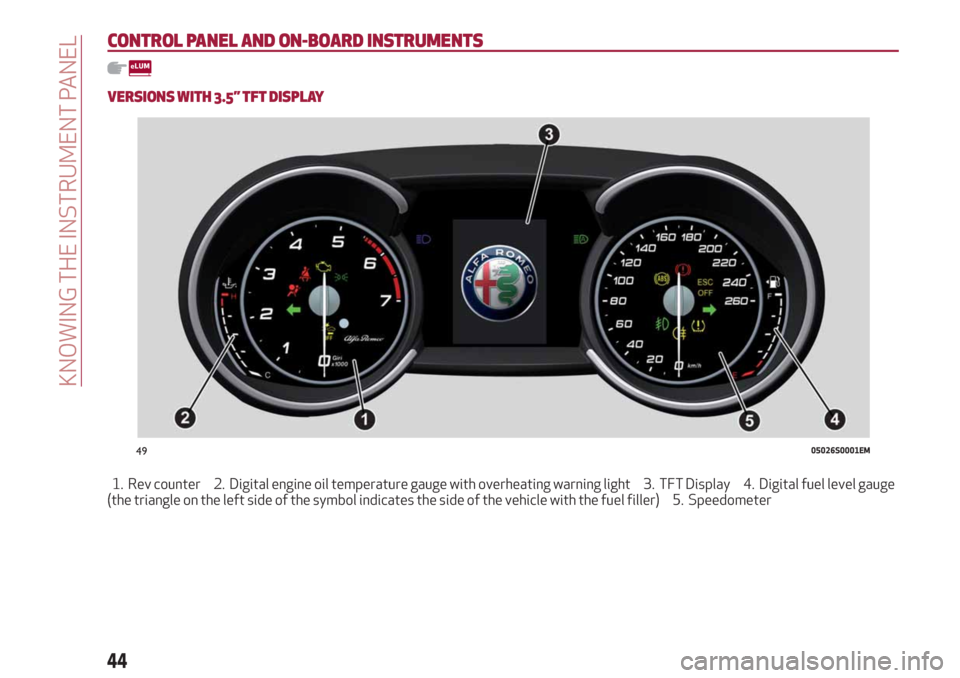
VERSIONS WITH 3.5” TFT DISPLAY
1. Rev counter 2. Digital engine oil temperature gauge with overheating warning light 3. TFT Display 4. Digital fuel level gauge
(the triangle on the left side of the symbol indicates the side of the vehicle with the fuel filler) 5. Speedometer
4905026S0001EM
44
KNOWING THE INSTRUMENT PANEL
Page 47 of 232
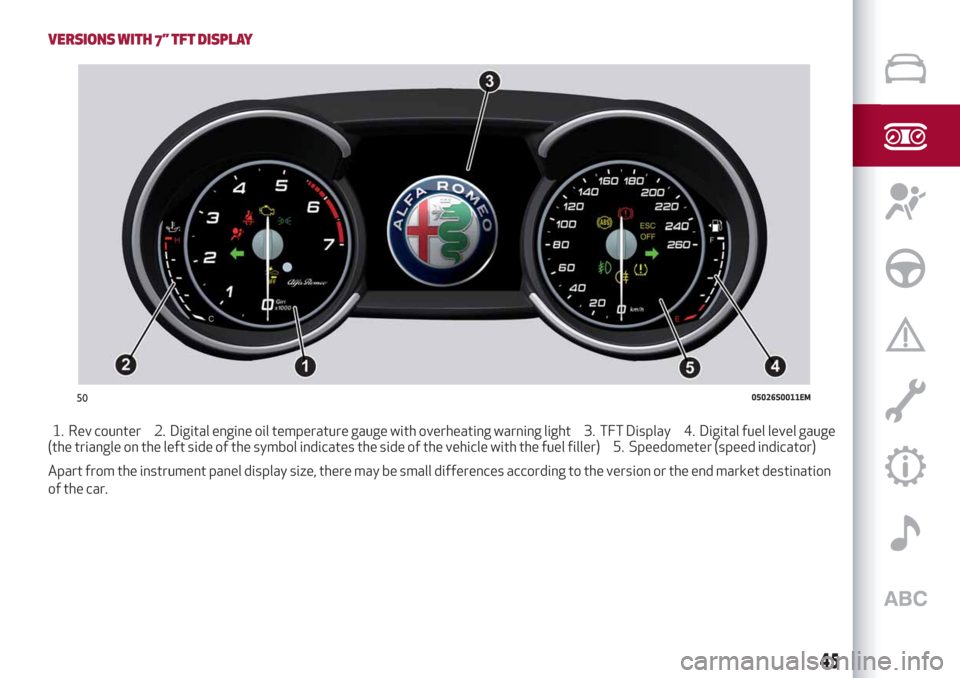
VERSIONS WITH 7” TFT DISPLAY
1. Rev counter 2. Digital engine oil temperature gauge with overheating warning light 3. TFT Display 4. Digital fuel level gauge
(the triangle on the left side of the symbol indicates the side of the vehicle with the fuel filler) 5. Speedometer (speed indicator)
Apart from the instrument panel display size, there may be small differences according to the version or the end market destination
of the car.
5005026S0011EM
45
Page 48 of 232
DISPLAY
DESCRIPTION
The vehicle can be equipped with a 3.5" or 7" TFT Display.
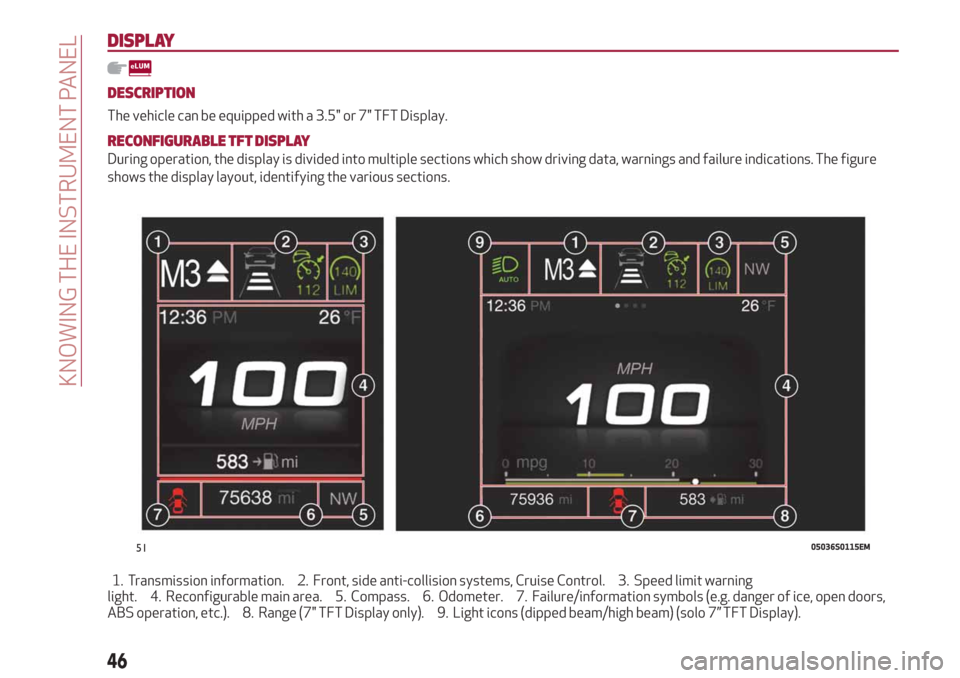
RECONFIGURABLE TFT DISPLAY
During operation, the display is divided into multiple sections which show driving data, warnings and failure indications. The figure
shows the display layout, identifying the various sections.
1. Transmission information. 2. Front, side anti-collision systems, Cruise Control. 3. Speed limit warning
light. 4. Reconfigurable main area. 5. Compass. 6. Odometer. 7. Failure/information symbols (e.g. danger of ice, open doors,
ABS operation, etc.). 8. Range (7" TFT Display only). 9. Light icons (dipped beam/high beam) (solo 7” TFT Display).
5105036S0115EM
46
KNOWING THE INSTRUMENT PANEL
Page 49 of 232
1 Gearbox Information
Automatic transmission
Displays the following information
regarding the gearbox operation:
transmission operating mode (M, P, R,
N, D). In D mode, when changing gear
using the steering wheel lever (where
present), or manually M, it also show the
gear engaged with a number. In M mode,
it also shows when to shift gear up or
down by displaying an arrow.
Manual transmission
Displays the following information
regarding the gearbox operation:
the engaged gear (1, 2, 3, 4, 5, 6, N or
R) and shows when to shift gear up or
down by displaying an arrow.
2 Front, side anti-collision systems,
Cruise Control
Displays the operation the following
modes:
Forward Collision Warning (FCW);
Lane Departure Warning (LDW);
Cruise Control (CC) or Active Cruise
Control (ACC) (where provided).
For further information, see relevant
paragraphs.
3 Speed limit warning light
Shows information regarding the Speed
Limiter function.
For further information, see relevant
paragraph.4 Reconfigurable main area
Can display the following screens:
Home.
Trip A.
Trip B (can be activated/deactivated
on the Connect system).
Performance.
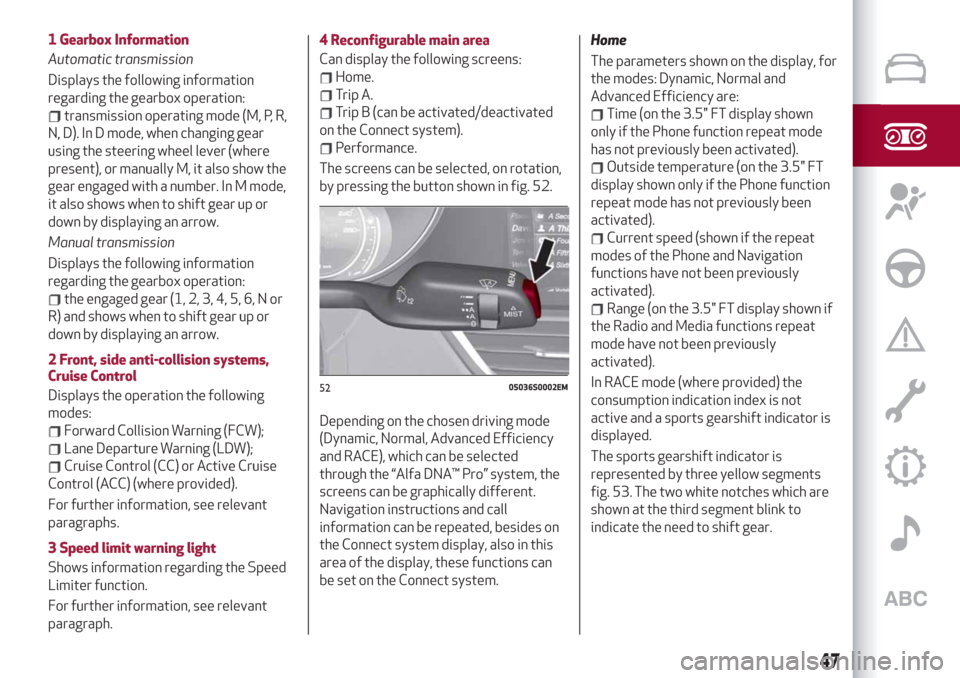
The screens can be selected, on rotation,
by pressing the button shown in fig. 52.
Depending on the chosen driving mode
(Dynamic, Normal, Advanced Efficiency
and RACE), which can be selected
through the “Alfa DNA™ Pro” system, the
screens can be graphically different.
Navigation instructions and call
information can be repeated, besides on
the Connect system display, also in this
area of the display, these functions can
be set on the Connect system.Home
The parameters shown on the display, for
the modes: Dynamic, Normal and
Advanced Efficiency are:
Time (on the 3.5" FT display shown
only if the Phone function repeat mode
has not previously been activated).
Outside temperature (on the 3.5" FT
display shown only if the Phone function
repeat mode has not previously been
activated).
Current speed (shown if the repeat
modes of the Phone and Navigation
functions have not been previously
activated).
Range (on the 3.5" FT display shown if
the Radio and Media functions repeat
mode have not been previously
activated).
In RACE mode (where provided) the
consumption indication index is not
active and a sports gearshift indicator is
displayed.
The sports gearshift indicator is
represented by three yellow segments
fig. 53. The two white notches which are
shown at the third segment blink to
indicate the need to shift gear.
5205036S0002EM
47
Page 52 of 232
Control panel
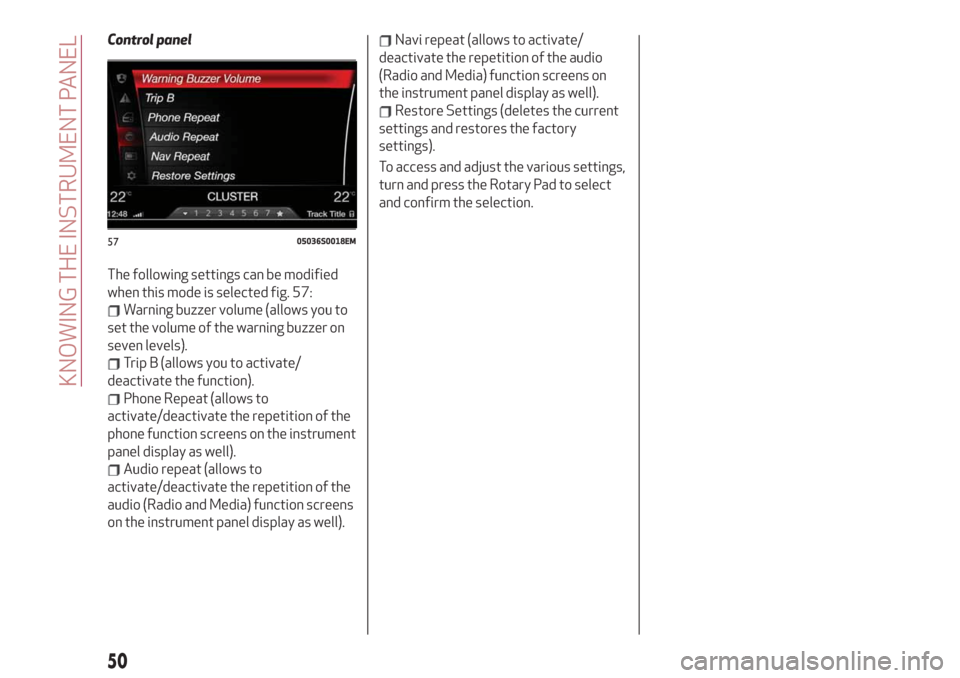
The following settings can be modified
when this mode is selected fig. 57:
Warning buzzer volume (allows you to
set the volume of the warning buzzer on
seven levels).
Trip B (allows you to activate/
deactivate the function).
Phone Repeat (allows to
activate/deactivate the repetition of the
phone function screens on the instrument
panel display as well).
Audio repeat (allows to
activate/deactivate the repetition of the
audio (Radio and Media) function screens
on the instrument panel display as well).
Navi repeat (allows to activate/
deactivate the repetition of the audio
(Radio and Media) function screens on
the instrument panel display as well).
Restore Settings (deletes the current
settings and restores the factory
settings).
To access and adjust the various settings,
turn and press the Rotary Pad to select
and confirm the selection.
5705036S0018EM
50
KNOWING THE INSTRUMENT PANEL
Page 53 of 232
WARNING LIGHTS AND MESSAGES
IMPORTANT The warning light switches on together with a dedicated message and/or acoustic signal when applicable. These
indications are indicative and precautionary and as such must not be considered as exhaustive and/or alternative to the information
contained in the Owner Handbook, which you are advised to read carefully in all cases. In the event of a failure indication, always
refer to the contents of this chapter.
IMPORTANT The failure indicators appearing on the display are divided into two categories: very serious and less serious faults.
Serious faults are indicated by a repeated and prolonged warning "cycle". Less serious faults are indicated by a warning "cycle" with a
shorter duration. You can stop the warning cycle in both cases by pressing the button located on the windscreen wiper lever. The
instrument panel warning light will stay on until the cause of the failure is eliminated.
51