Settings Alfa Romeo Giulia 2019 Owner's Manual
[x] Cancel search | Manufacturer: ALFA ROMEO, Model Year: 2019, Model line: Giulia, Model: Alfa Romeo Giulia 2019Pages: 232, PDF Size: 4.87 MB
Page 18 of 232
DOORS
LOCKING/UNLOCKING DOORS FROM
THE INSIDE
Central locking/unlocking
If all doors are closed properly, they will
automatically be locked once the vehicle
has exceeded approximately 12 mph
(20 km/h) ("Auto relock" function active).
Press the
button on the driver side,
passenger side or rear (where provided)
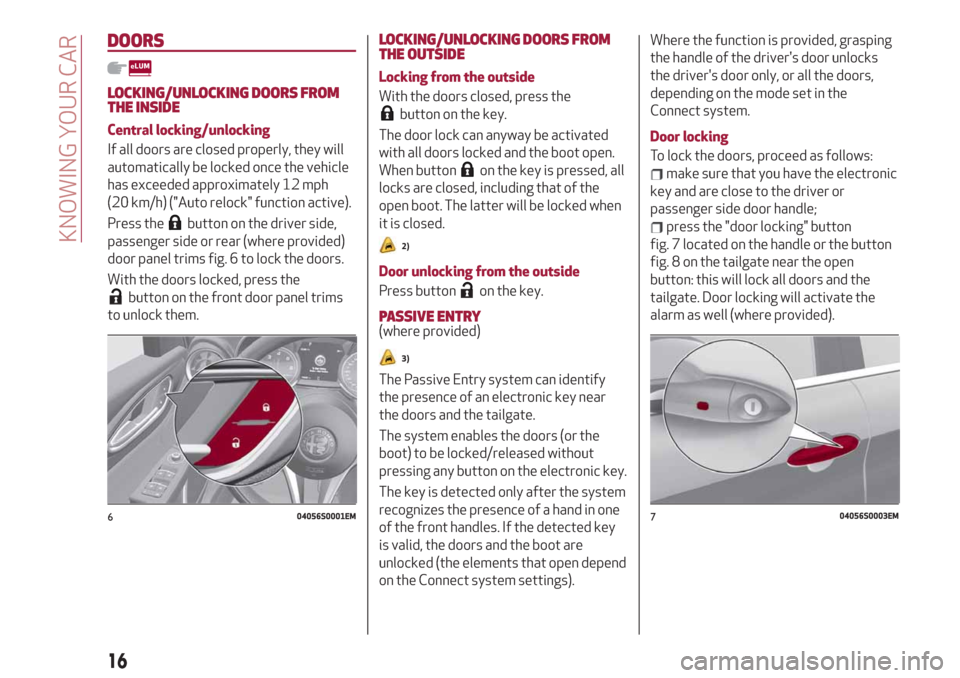
door panel trims fig. 6 to lock the doors.
With the doors locked, press the
button on the front door panel trims
to unlock them.
LOCKING/UNLOCKING DOORS FROM
THE OUTSIDE
Locking from the outside
With the doors closed, press the
button on the key.
The door lock can anyway be activated
with all doors locked and the boot open.
When button
on the key is pressed, all
locks are closed, including that of the
open boot. The latter will be locked when
it is closed.
2)
Door unlocking from the outside
Press button
on the key.
PASSIVE ENTRY(where provided)
3)
The Passive Entry system can identify
the presence of an electronic key near
the doors and the tailgate.
The system enables the doors (or the
boot) to be locked/released without
pressing any button on the electronic key.
The key is detected only after the system
recognizes the presence of a hand in one
of the front handles. If the detected key
is valid, the doors and the boot are
unlocked (the elements that open depend
on the Connect system settings).Where the function is provided, grasping
the handle of the driver's door unlocks
the driver's door only, or all the doors,
depending on the mode set in the
Connect system.
Door locking
To lock the doors, proceed as follows:
make sure that you have the electronic
key and are close to the driver or
passenger side door handle;
press the "door locking" button
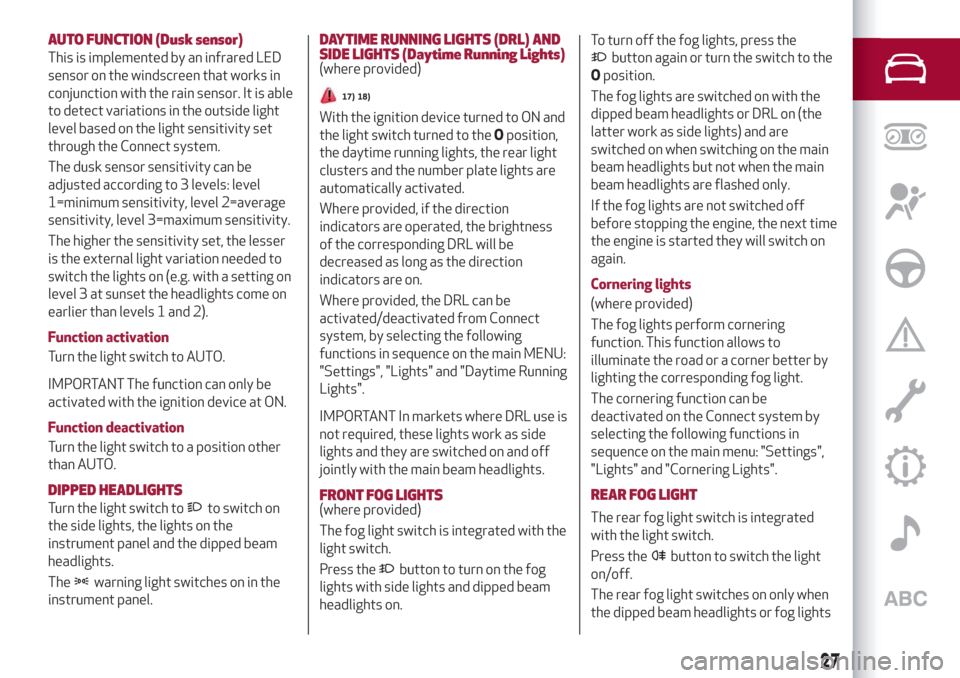
fig. 7 located on the handle or the button
fig. 8 on the tailgate near the open
button: this will lock all doors and the
tailgate. Door locking will activate the
alarm as well (where provided).
604056S0001EM704056S0003EM
16
KNOWING YOUR CAR
Page 29 of 232
AUTO FUNCTION (Dusk sensor)
This is implemented by an infrared LED
sensor on the windscreen that works in
conjunction with the rain sensor. It is able
to detect variations in the outside light
level based on the light sensitivity set
through the Connect system.
The dusk sensor sensitivity can be
adjusted according to 3 levels: level
1=minimum sensitivity, level 2=average
sensitivity, level 3=maximum sensitivity.
The higher the sensitivity set, the lesser
is the external light variation needed to
switch the lights on (e.g. with a setting on
level 3 at sunset the headlights come on
earlier than levels 1 and 2).
Function activation
Turn the light switch to AUTO.
IMPORTANT The function can only be
activated with the ignition device at ON.
Function deactivation
Turn the light switch to a position other
than AUTO.
DIPPED HEADLIGHTS
Turn the light switch toto switch on
the side lights, the lights on the
instrument panel and the dipped beam
headlights.
The
warning light switches on in the
instrument panel.
DAYTIME RUNNING LIGHTS (DRL) AND
SIDE LIGHTS (Daytime Running Lights)
(where provided)
17) 18)
With the ignition device turned to ON and
the light switch turned to theOposition,
the daytime running lights, the rear light
clusters and the number plate lights are
automatically activated.
Where provided, if the direction
indicators are operated, the brightness
of the corresponding DRL will be
decreased as long as the direction
indicators are on.
Where provided, the DRL can be
activated/deactivated from Connect
system, by selecting the following
functions in sequence on the main MENU:
"Settings", "Lights" and "Daytime Running
Lights".
IMPORTANT In markets where DRL use is
not required, these lights work as side
lights and they are switched on and off
jointly with the main beam headlights.
FRONT FOG LIGHTS
(where provided)
The fog light switch is integrated with the
light switch.
Press the
button to turn on the fog
lights with side lights and dipped beam
headlights on.To turn off the fog lights, press the
button again or turn the switch to the
Oposition.
The fog lights are switched on with the
dipped beam headlights or DRL on (the
latter work as side lights) and are
switched on when switching on the main
beam headlights but not when the main
beam headlights are flashed only.
If the fog lights are not switched off
before stopping the engine, the next time
the engine is started they will switch on
again.
Cornering lights
(where provided)
The fog lights perform cornering
function. This function allows to
illuminate the road or a corner better by
lighting the corresponding fog light.
The cornering function can be
deactivated on the Connect system by
selecting the following functions in
sequence on the main menu: "Settings",
"Lights" and "Cornering Lights".
REAR FOG LIGHT
The rear fog light switch is integrated
with the light switch.
Press the
button to switch the light
on/off.
The rear fog light switches on only when
the dipped beam headlights or fog lights
27
Page 30 of 232
are switched on. The light can be
switched off by pressing the
button
again or by switching off the dipped
beam headlights.
When the engine is stopped with the rear
fog lights on, the next time the engine is
started the lights will, however, be off.
PARKING LIGHTS
They are switched on if, within a few
seconds from stopping the engine, the
light switch is taken first to theO
position and then to position
. All side
lights switch on, if you want to leave only
those on one side (right/left) switched on,
you need to move the direction indicators
control on the position on the side you
wish to leave on.
When a front door is opened with the
light switch in position
, a tone will be
heard to inform the driver that the
parking lights are on.
The
warning light switches on in the
instrument panel.
IMPORTANT Turning the ignition switch
to ON turns off the parking lights, which
were on only on one side.
HEADLIGHTS OFF TIMER
The "Follow Me" function delays the
switching off of the headlights after the
vehicle has been stopped.
The function can be activated from theConnect system by selecting the
following functions in sequence on the
main menu: "Settings", "Lights" and
"Follow me"; the side lights and the
dipped beam headlights stay on for a
time that can be set between 30, 60 and
90 seconds.
Function activation
With the headlights on, take the ignition
device to the STOP position: the timer
starts when the light switch is rotated to
positionO.
IMPORTANT To activate this function the
headlights must be deactivated within
2 minutes after the ignition device has
been taken to STOP.
Function deactivation
This function is deactivated by switching
on the headlights, the side lights or
bringing the ignition device to ON.
AFS (Adaptive Frontlight System)
FUNCTION
(where provided)
This is a system combined with Bi-Xenon
Headlamps (35W) which directs the main
light beam, horizontally and vertically,
and continuously and automatically
adapts it to the driving conditions round
bends/when cornering.
The system directs the light beam to light
up the road in the best way, taking intoaccount the speed of the car, the
bend/corner angle and the speed of
steering.
MAIN BEAM HEADLIGHTS
To activate the fixed main beam
headlights push the left lever towards
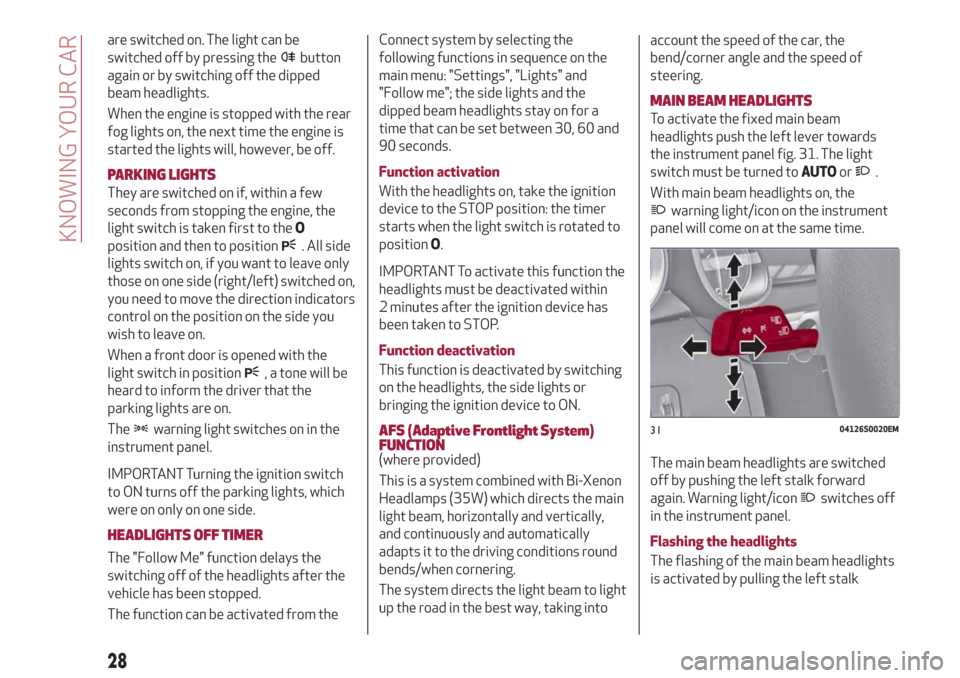
the instrument panel fig. 31. The light
switch must be turned toAUTOor
.
With main beam headlights on, the
warning light/icon on the instrument
panel will come on at the same time.
The main beam headlights are switched
off by pushing the left stalk forward
again. Warning light/icon
switches off
in the instrument panel.
Flashing the headlights
The flashing of the main beam headlights
is activated by pulling the left stalk
3104126S0020EM
28
KNOWING YOUR CAR
Page 31 of 232
towards the steering wheel, the lights
remain on while you are operating the
lever.
Automatic high beam (AHB system)
headlights
(where provided)
The AHB system is used to switch the
high beam headlights on and off
automatically and to adapt the lighting
near towns.
Function enabling
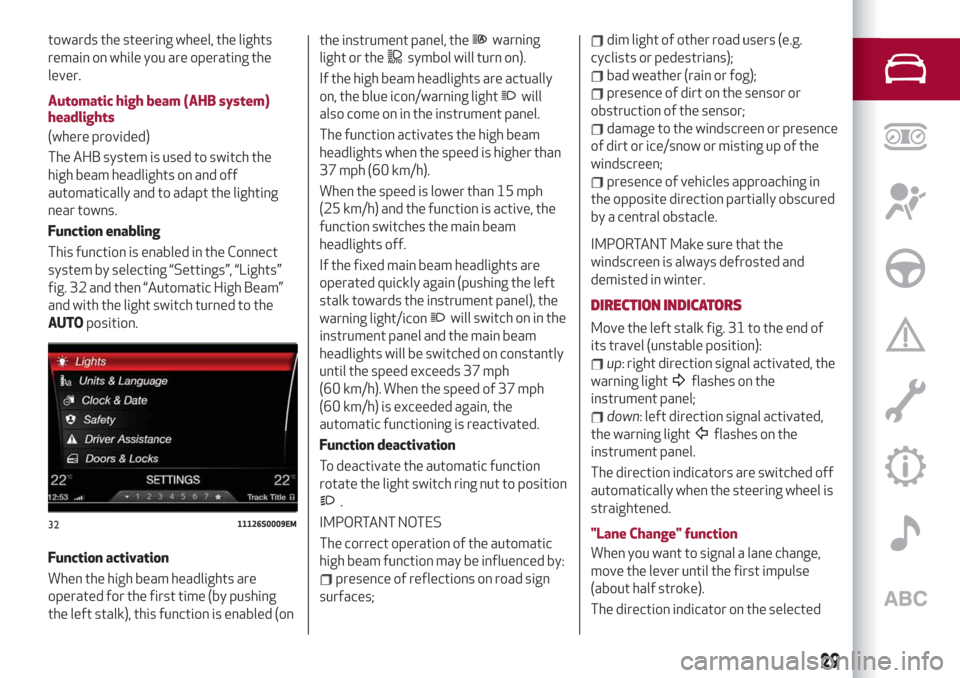
This function is enabled in the Connect
system by selecting “Settings”, “Lights”
fig. 32 and then “Automatic High Beam”
and with the light switch turned to the
AUTOposition.
Function activation
When the high beam headlights are
operated for the first time (by pushing
the left stalk), this function is enabled (onthe instrument panel, thewarning
light or the
symbol will turn on).
If the high beam headlights are actually
on, the blue icon/warning light
will
also come on in the instrument panel.
The function activates the high beam
headlights when the speed is higher than
37 mph (60 km/h).
When the speed is lower than 15 mph
(25 km/h) and the function is active, the
function switches the main beam
headlights off.
If the fixed main beam headlights are
operated quickly again (pushing the left
stalk towards the instrument panel), the
warning light/icon
will switch on in the
instrument panel and the main beam
headlights will be switched on constantly
until the speed exceeds 37 mph
(60 km/h). When the speed of 37 mph
(60 km/h) is exceeded again, the
automatic functioning is reactivated.
Function deactivation
To deactivate the automatic function
rotate the light switch ring nut to position
.
IMPORTANT NOTES
The correct operation of the automatic
high beam function may be influenced by:
presence of reflections on road sign
surfaces;
dim light of other road users (e.g.
cyclists or pedestrians);
bad weather (rain or fog);
presence of dirt on the sensor or
obstruction of the sensor;
damage to the windscreen or presence
of dirt or ice/snow or misting up of the
windscreen;
presence of vehicles approaching in
the opposite direction partially obscured
by a central obstacle.
IMPORTANT Make sure that the
windscreen is always defrosted and
demisted in winter.
DIRECTION INDICATORS
Move the left stalk fig. 31 to the end of
its travel (unstable position):
up: right direction signal activated, the
warning light
flashes on the
instrument panel;
down: left direction signal activated,
the warning light
flashes on the
instrument panel.
The direction indicators are switched off
automatically when the steering wheel is
straightened.
"Lane Change" function
When you want to signal a lane change,
move the lever until the first impulse
(about half stroke).
The direction indicator on the selected
3211126S0009EM
29
Page 51 of 232
PARAMETERS SET BY USER
A series of user-programmable functions
can be set using the Connect system.
The basic settings only are described:
Units & Language
Time and Date
Control panel
To access the list with the
aforementioned items, proceed as
follows: from the main menu, activated
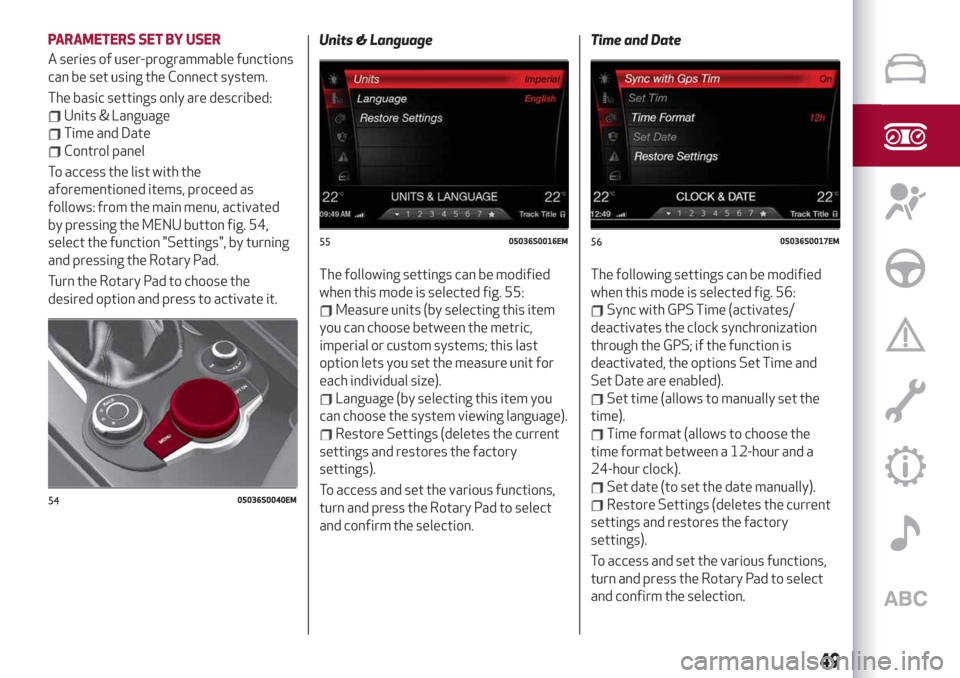
by pressing the MENU button fig. 54,
select the function "Settings", by turning
and pressing the Rotary Pad.
Turn the Rotary Pad to choose the
desired option and press to activate it.Units & Language
The following settings can be modified
when this mode is selected fig. 55:
Measure units (by selecting this item
you can choose between the metric,
imperial or custom systems; this last
option lets you set the measure unit for
each individual size).
Language (by selecting this item you
can choose the system viewing language).
Restore Settings (deletes the current
settings and restores the factory
settings).
To access and set the various functions,
turn and press the Rotary Pad to select
and confirm the selection.Time and Date
The following settings can be modified
when this mode is selected fig. 56:
Sync with GPS Time (activates/
deactivates the clock synchronization
through the GPS; if the function is
deactivated, the options Set Time and
Set Date are enabled).
Set time (allows to manually set the
time).
Time format (allows to choose the
time format between a 12-hour and a
24-hour clock).
Set date (to set the date manually).
Restore Settings (deletes the current
settings and restores the factory
settings).
To access and set the various functions,
turn and press the Rotary Pad to select
and confirm the selection.5405036S0040EM
5505036S0016EM5605036S0017EM
49
Page 52 of 232
Control panel
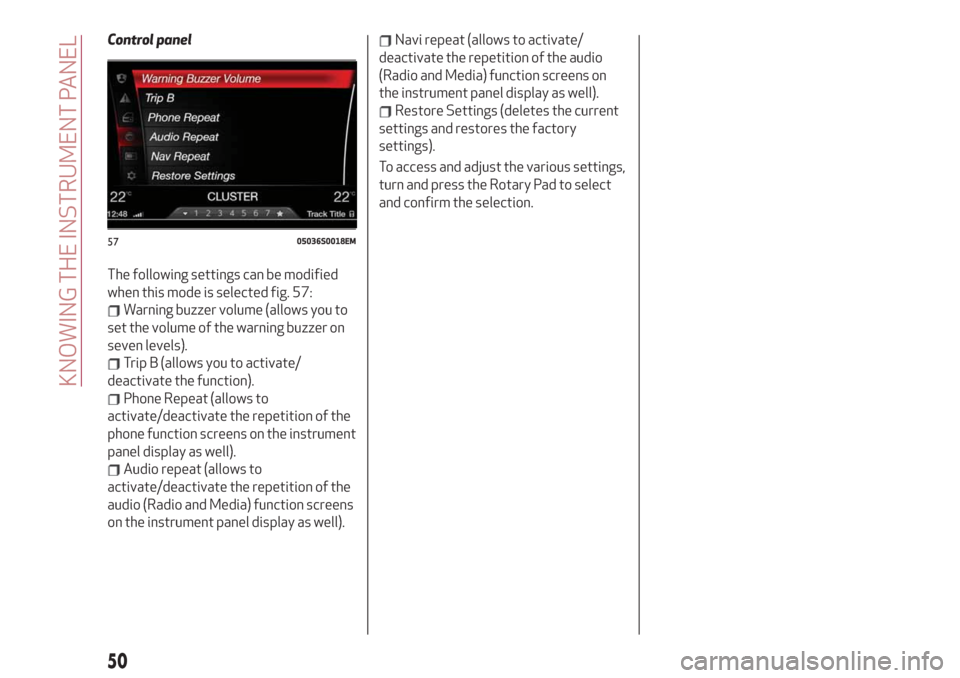
The following settings can be modified
when this mode is selected fig. 57:
Warning buzzer volume (allows you to
set the volume of the warning buzzer on
seven levels).
Trip B (allows you to activate/
deactivate the function).
Phone Repeat (allows to
activate/deactivate the repetition of the
phone function screens on the instrument
panel display as well).
Audio repeat (allows to
activate/deactivate the repetition of the
audio (Radio and Media) function screens
on the instrument panel display as well).
Navi repeat (allows to activate/
deactivate the repetition of the audio
(Radio and Media) function screens on
the instrument panel display as well).
Restore Settings (deletes the current
settings and restores the factory
settings).
To access and adjust the various settings,
turn and press the Rotary Pad to select
and confirm the selection.
5705036S0018EM
50
KNOWING THE INSTRUMENT PANEL
Page 78 of 232
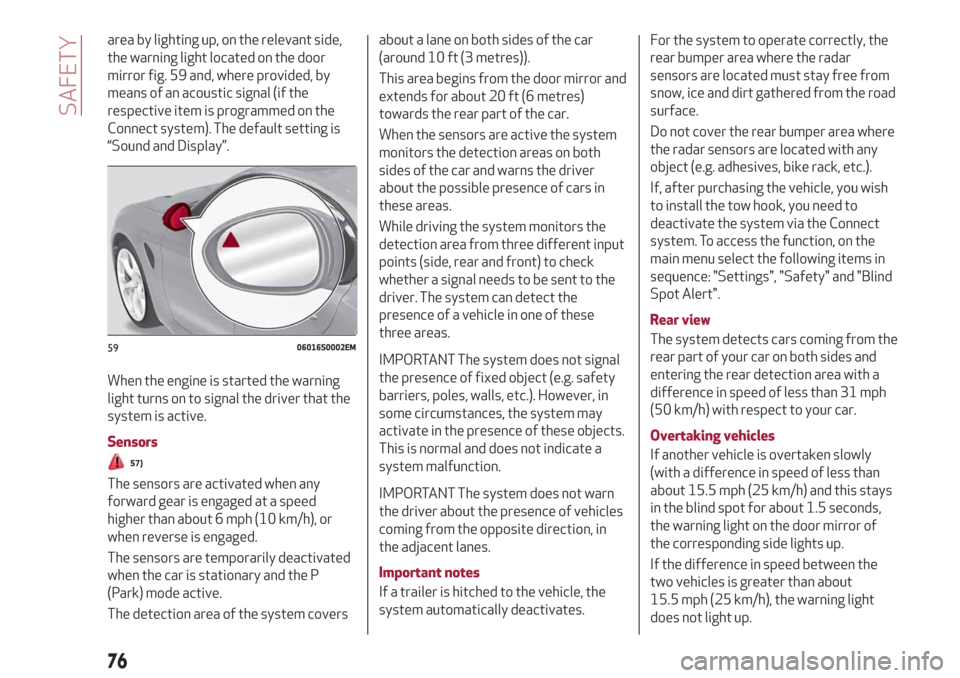
area by lighting up, on the relevant side,
the warning light located on the door
mirror fig. 59 and, where provided, by
means of an acoustic signal (if the
respective item is programmed on the
Connect system). The default setting is
“Sound and Display”.
When the engine is started the warning
light turns on to signal the driver that the
system is active.
Sensors
57)
The sensors are activated when any
forward gear is engaged at a speed
higher than about 6 mph (10 km/h), or
when reverse is engaged.
The sensors are temporarily deactivated
when the car is stationary and the P
(Park) mode active.
The detection area of the system coversabout a lane on both sides of the car
(around 10 ft (3 metres)).
This area begins from the door mirror and
extends for about 20 ft (6 metres)
towards the rear part of the car.
When the sensors are active the system
monitors the detection areas on both
sides of the car and warns the driver
about the possible presence of cars in
these areas.
While driving the system monitors the
detection area from three different input
points (side, rear and front) to check
whether a signal needs to be sent to the
driver. The system can detect the
presence of a vehicle in one of these
three areas.
IMPORTANT The system does not signal
the presence of fixed object (e.g. safety
barriers, poles, walls, etc.). However, in
some circumstances, the system may
activate in the presence of these objects.
This is normal and does not indicate a
system malfunction.
IMPORTANT The system does not warn
the driver about the presence of vehicles
coming from the opposite direction, in
the adjacent lanes.
Important notes
If a trailer is hitched to the vehicle, the
system automatically deactivates.For the system to operate correctly, the
rear bumper area where the radar
sensors are located must stay free from
snow, ice and dirt gathered from the road
surface.
Do not cover the rear bumper area where
the radar sensors are located with any
object (e.g. adhesives, bike rack, etc.).
If, after purchasing the vehicle, you wish
to install the tow hook, you need to
deactivate the system via the Connect
system. To access the function, on the
main menu select the following items in
sequence: "Settings", "Safety" and "Blind
Spot Alert".
Rear view
The system detects cars coming from the
rear part of your car on both sides and
entering the rear detection area with a
difference in speed of less than 31 mph
(50 km/h) with respect to your car.
Overtaking vehicles
If another vehicle is overtaken slowly
(with a difference in speed of less than
about 15.5 mph (25 km/h) and this stays
in the blind spot for about 1.5 seconds,
the warning light on the door mirror of
the corresponding side lights up.
If the difference in speed between the
two vehicles is greater than about
15.5 mph (25 km/h), the warning light
does not light up.
5906016S0002EM
76
SAFETY
Page 79 of 232
RCP (Rear Cross Path detection) system
This system helps the driver during
reverse manoeuvres in the case of
reduced visibility.
The RCP system monitors the rear
detection areas on both sides of the car,
to detect objects moving towards the
sides of the car at a minimum speed
between about 0.6 mph and 2 mph
(1 km/h and 3 km/h) and objects moving
at a maximum speed of 22 mph
(35 km/h), as generally happens in
parking areas.
The system activation is signalled to the
driver by means of a visual and acoustic
warning.
IMPORTANT If the sensors are covered
by objects or vehicles, the system will not
warn the driver.
Operating mode
The system may be activated/
deactivated via the Connect system. To
access the function, on the main menu
select the following items in sequence:
"Settings", "Safety" and "Blind Spot
Alert"."Blind spot alert", "Visual" mode
When the system is enabled, a visual
warning is sent to the door mirror on the
side of the detected object.
The visual warning on the mirror will blink
if the driver switches on the direction
indicators, thus indicating the intention
to change lane.
The warning will be fixed if the driver
stays on the same lane.
"Blind spot alert" function deactivation
When the system is deactivated ("Blind
Spot Alert" mode at "OFF"), the BSM or
RCP systems will not emit neither
acoustic warnings.
The BSM system will store the operating
mode running when the engine was
stopped. Each time the engine is started,
the operating mode stored previously will
be recalled and used.
FORWARD COLLISION WARNING (FCW)
SYSTEM
57) 58) 59) 60) 61) 62)
22) 23) 24) 25) 26) 27) 28) 29) 30)
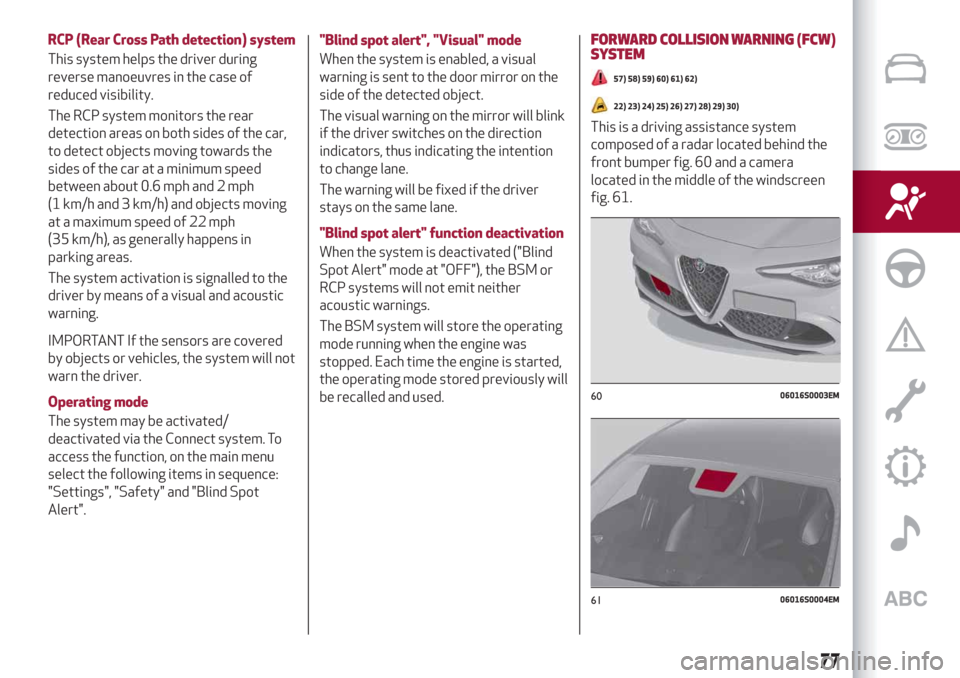
This is a driving assistance system
composed of a radar located behind the
front bumper fig. 60 and a camera
located in the middle of the windscreen
fig. 61.
6006016S0003EM
6106016S0004EM
77
Page 80 of 232
In the event of an imminent collision the
system intervenes by automatically
braking the car to prevent the impact or
reduce its effects.
The system provides the driver with
acoustic and visual signals through
specific messages on the instrument
panel display.
The acoustic and visual signals before the
system cuts in depend on the car speed.
No acoustic/visual signal is generated at
speeds slower than 30 km/h.
Acoustic/visual signal is generated at
speeds faster than 30 km/h, instead.
The system may lightly brake to warn the
driver if a possible frontal accident is
detected (limited braking). Signals and
limited braking are intended to allow the
driver to react promptly, in order to
prevent or reduce the effects of a
potential accident.
In situations with the risk of collision, if
the system detects no intervention by
the driver, it provides automatic braking
to help slow the car and mitigate the
potential frontal accident (automatic
braking). If intervention by the driver on
the brake pedal is detected but not
deemed sufficient, the system may
intervene in order to improve the
reaction of the braking system, therefore
reducing vehicle speed further
(additional assistance in braking stage).The system will intervene automatically
in case of imminent collision or impact
against a pedestrian crossing the road
(speed under 31 mph (50 km/h)).
IMPORTANT For safety reasons, when
the car has stopped, the brake callipers
may remain blocked for about 2 seconds.
Make sure you press the brake pedal if
the vehicle moves slightly forwards.
Engagement/disengagement
The Forward Collision Warning system
can be deactivated (and then reactivated)
via the Connect system. To access the
function, on the main menu select the
following items in sequence: "Settings",
"Safety", "Forward Collision Warning" and
"Status".
The system can be deactivated even with
the ignition device ON.
IMPORTANT The system status can be
changed with vehicle at a standstill only.
Activation/deactivation
The Forward Collision Warning system is
activated whenever the engine is started
regardless of the Connect system
setting.
After deactivation, the system will not
warn the driver about a possible collision
with the vehicle ahead, regardless of the
setting selected with the Connect
system.
IMPORTANT Each time the engine is
started, the system is activated
regardless of where was when it was
previously switched off.
This function is not active at a speed
lower than 4.3 mph (7 km/h) or higher
than 124 mph (200 km/h).
The system is active when:
each time the engine is started;
is active (ON) in the Connect system;
the ignition device is at ON;
- the vehicle speed is between 4.3 and
124 mph (7 and 200 km/h);
the front seat belts are fastened;
the "Alfa DNA™ Pro" selector is not in
RACE position (where present).
Changing the system sensitivity
The sensitivity of the system can be
changed through the Connect system
menu, choosing from one of the following
three options: "Near", "Med" or "Far". See
the description in the Connect system
supplement for how to change the
settings.
The default option is "Med". With this
setting, the system warns the driver of a
possible collision with the vehicle in front
when that vehicle is at a standard
distance, between that of the other two
settings.
With the system sensitivity set to "Far",
the system will warn the driver of a
possible accident with the vehicle in front
78
SAFETY
Page 81 of 232
when that vehicle is at a greater distance,
thus providing the possibility of acting on
the brakes more lightly and gradually.
This setting provides the drivers with the
maximum possible reaction time to
prevent a potential accident.
With the option set to "Near", the system
will warn the driver of a possible accident
with the vehicle in front when that vehicle
is close. This setting offers the driver a
lower reaction time compared to the
"Med" and "Far" settings, in the event of a
potential accident, but permits more
dynamic driving of the car.
The system sensitivity setting is kept in
the memory when the engine is switched
off.
System limited operation warning
If the dedicated message is displayed, a
condition limiting the system operation
may have occurred. The possible reasons
of this limitation are something blocking
the camera view or a fault.
In this condition it will still be possible to
drive the car normally, but automatic
braking will not be available in the event
of an impending collision.
If an obstruction is signalled, clean the
area of the windscreen indicated in
fig. 61.
When the conditions limiting the system
functions end, this will go back to normaland complete operation. Should the fault
persist, contact an Alfa Romeo
Dealership.
System failure warning
If the system switches off and a
dedicated message is shown on the
display, it means that there is a fault on
the system.
In this case, it is still possible to drive the
car, but you are advised to contact an
Alfa Romeo Dealership as soon as
possible.
Radar warning not available
If conditions are such that the radar
cannot detect obstacles correctly, the
system is deactivated and a dedicated
message appears on the display. This
generally occurs in the event of poor
visibility, such as when it is snowing or
raining heavily.
The system can also be temporarily
dimmed due to obstructions such as mud,
dirt or ice on the bumper. In such cases, a
dedicated message will be shown on the
display and the system will be
deactivated. This message can
sometimes appear in conditions of high
reflectivity (e.g. tunnels with reflective
tiles or ice or snow). When the conditions
limiting the system functions end, this
will go back to normal and complete
operation.In certain particular cases, this dedicated
message could be displayed when the
radar is not detecting any vehicles or
objects within its view range.
If atmospheric conditions are not the real
reason behind this message, check if the
sensor is dirty. It could be necessary to
clean or remove any obstructions in the
area shown in fig. 60.
If the message appears often, even in the
absence of atmospheric conditions such
as snow, rain, mud or other obstructions,
contact an Alfa Romeo Dealership for a
sensor alignment check.
In the absence of visible obstructions,
cleaning the radar surface, by manually
removing the decorative cover trim,
could be required. Have this operation
performed at an Alfa Romeo Dealership.
IMPORTANT It is recommended that you
do not install devices, accessories or
aerodynamic attachments in front of the
sensor or darken it in any way, as this can
compromise the correct functioning of
the system.
79