trailer Alfa Romeo Giulia 2019 Owner's Manual
[x] Cancel search | Manufacturer: ALFA ROMEO, Model Year: 2019, Model line: Giulia, Model: Alfa Romeo Giulia 2019Pages: 232, PDF Size: 4.87 MB
Page 65 of 232
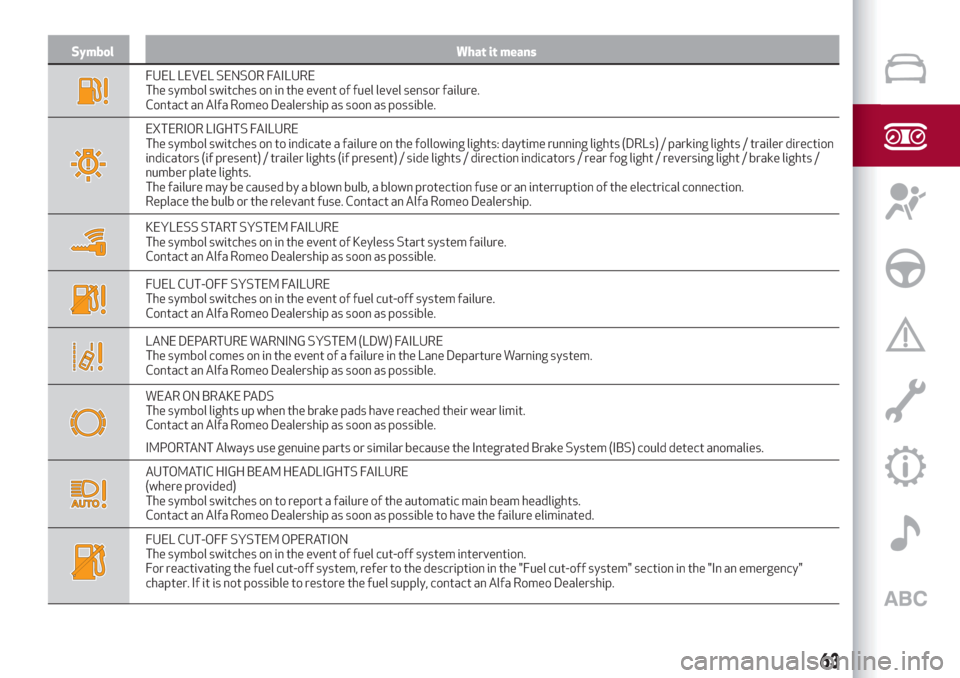
Symbol What it means
FUEL LEVEL SENSOR FAILURE
The symbol switches on in the event of fuel level sensor failure.
Contact an Alfa Romeo Dealership as soon as possible.
EXTERIOR LIGHTS FAILURE
The symbol switches on to indicate a failure on the following lights: daytime running lights (DRLs) / parking lights / trailer direction
indicators (if present) / trailer lights (if present) / side lights / direction indicators / rear fog light / reversing light / brake lights /
number plate lights.
The failure may be caused by a blown bulb, a blown protection fuse or an interruption of the electrical connection.
Replace the bulb or the relevant fuse. Contact an Alfa Romeo Dealership.
KEYLESS START SYSTEM FAILURE
The symbol switches on in the event of Keyless Start system failure.
Contact an Alfa Romeo Dealership as soon as possible.
FUEL CUT-OFF SYSTEM FAILURE
The symbol switches on in the event of fuel cut-off system failure.
Contact an Alfa Romeo Dealership as soon as possible.
LANE DEPARTURE WARNING SYSTEM (LDW) FAILURE
The symbol comes on in the event of a failure in the Lane Departure Warning system.
Contact an Alfa Romeo Dealership as soon as possible.
WEAR ON BRAKE PADS
The symbol lights up when the brake pads have reached their wear limit.
Contact an Alfa Romeo Dealership as soon as possible.
IMPORTANT Always use genuine parts or similar because the Integrated Brake System (IBS) could detect anomalies.
AUTOMATIC HIGH BEAM HEADLIGHTS FAILURE
(where provided)
The symbol switches on to report a failure of the automatic main beam headlights.
Contact an Alfa Romeo Dealership as soon as possible to have the failure eliminated.
FUEL CUT-OFF SYSTEM OPERATION
The symbol switches on in the event of fuel cut-off system intervention.
For reactivating the fuel cut-off system, refer to the description in the "Fuel cut-off system" section in the "In an emergency"
chapter. If it is not possible to restore the fuel supply, contact an Alfa Romeo Dealership.
63
Page 66 of 232
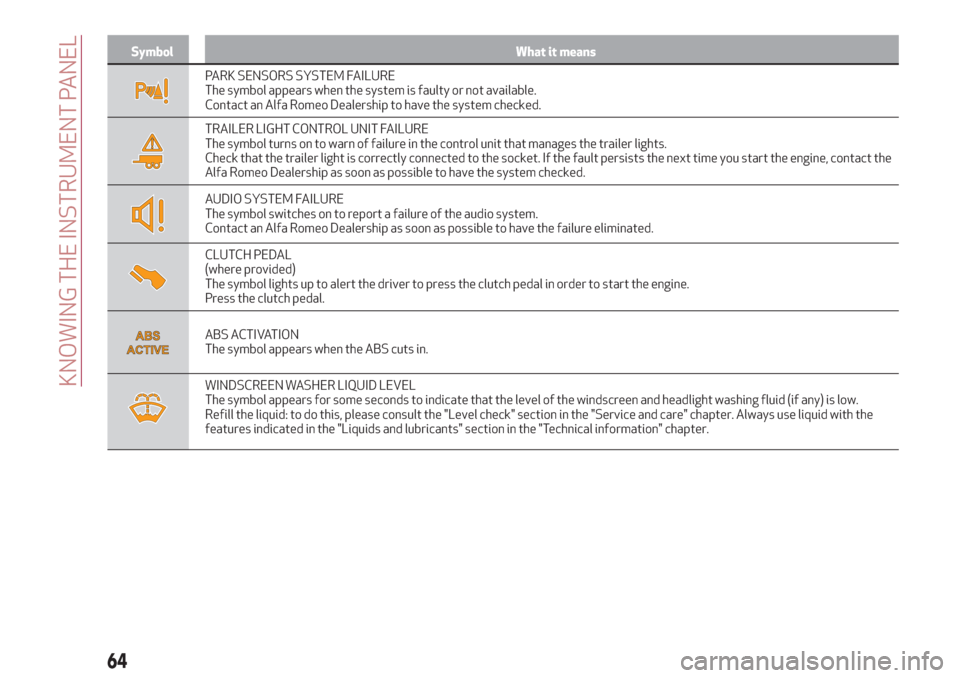
Symbol What it means
PARK SENSORS SYSTEM FAILURE
The symbol appears when the system is faulty or not available.
Contact an Alfa Romeo Dealership to have the system checked.
TRAILER LIGHT CONTROL UNIT FAILURE
The symbol turns on to warn of failure in the control unit that manages the trailer lights.
Check that the trailer light is correctly connected to the socket. If the fault persists the next time you start the engine, contact the
Alfa Romeo Dealership as soon as possible to have the system checked.
AUDIO SYSTEM FAILURE
The symbol switches on to report a failure of the audio system.
Contact an Alfa Romeo Dealership as soon as possible to have the failure eliminated.
CLUTCH PEDAL
(where provided)
The symbol lights up to alert the driver to press the clutch pedal in order to start the engine.
Press the clutch pedal.
ABS ACTIVATION
The symbol appears when the ABS cuts in.
WINDSCREEN WASHER LIQUID LEVEL
The symbol appears for some seconds to indicate that the level of the windscreen and headlight washing fluid (if any) is low.
Refill the liquid: to do this, please consult the "Level check" section in the "Service and care" chapter. Always use liquid with the
features indicated in the "Liquids and lubricants" section in the "Technical information" chapter.
64
KNOWING THE INSTRUMENT PANEL
Page 78 of 232
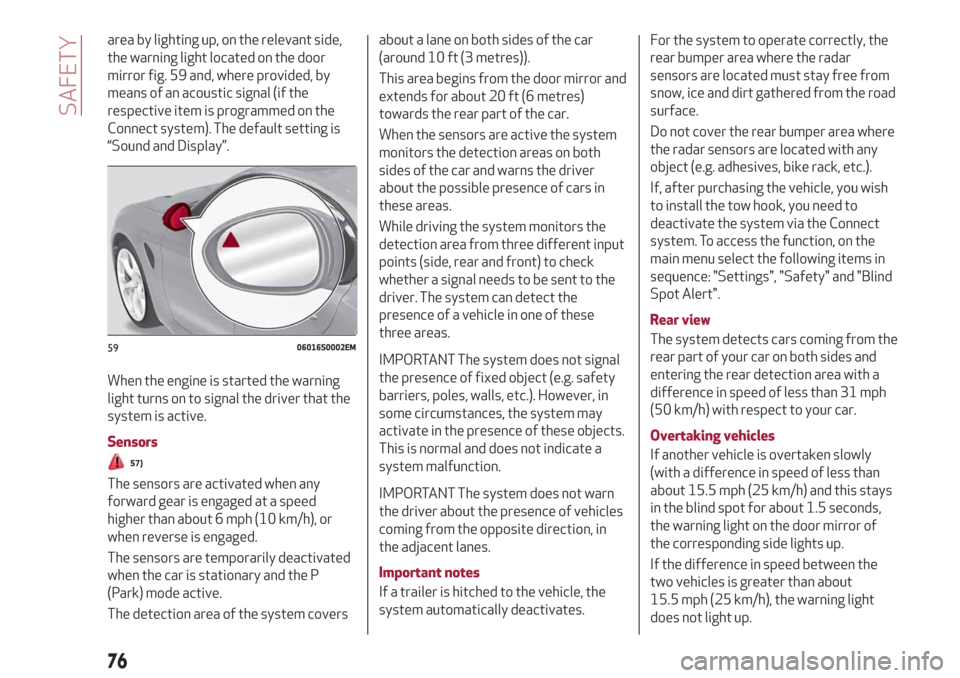
area by lighting up, on the relevant side,
the warning light located on the door
mirror fig. 59 and, where provided, by
means of an acoustic signal (if the
respective item is programmed on the
Connect system). The default setting is
“Sound and Display”.
When the engine is started the warning
light turns on to signal the driver that the
system is active.
Sensors
57)
The sensors are activated when any
forward gear is engaged at a speed
higher than about 6 mph (10 km/h), or
when reverse is engaged.
The sensors are temporarily deactivated
when the car is stationary and the P
(Park) mode active.
The detection area of the system coversabout a lane on both sides of the car
(around 10 ft (3 metres)).
This area begins from the door mirror and
extends for about 20 ft (6 metres)
towards the rear part of the car.
When the sensors are active the system
monitors the detection areas on both
sides of the car and warns the driver
about the possible presence of cars in
these areas.
While driving the system monitors the
detection area from three different input
points (side, rear and front) to check
whether a signal needs to be sent to the
driver. The system can detect the
presence of a vehicle in one of these
three areas.
IMPORTANT The system does not signal
the presence of fixed object (e.g. safety
barriers, poles, walls, etc.). However, in
some circumstances, the system may
activate in the presence of these objects.
This is normal and does not indicate a
system malfunction.
IMPORTANT The system does not warn
the driver about the presence of vehicles
coming from the opposite direction, in
the adjacent lanes.
Important notes
If a trailer is hitched to the vehicle, the
system automatically deactivates.For the system to operate correctly, the
rear bumper area where the radar
sensors are located must stay free from
snow, ice and dirt gathered from the road
surface.
Do not cover the rear bumper area where
the radar sensors are located with any
object (e.g. adhesives, bike rack, etc.).
If, after purchasing the vehicle, you wish
to install the tow hook, you need to
deactivate the system via the Connect
system. To access the function, on the
main menu select the following items in
sequence: "Settings", "Safety" and "Blind
Spot Alert".
Rear view
The system detects cars coming from the
rear part of your car on both sides and
entering the rear detection area with a
difference in speed of less than 31 mph
(50 km/h) with respect to your car.
Overtaking vehicles
If another vehicle is overtaken slowly
(with a difference in speed of less than
about 15.5 mph (25 km/h) and this stays
in the blind spot for about 1.5 seconds,
the warning light on the door mirror of
the corresponding side lights up.
If the difference in speed between the
two vehicles is greater than about
15.5 mph (25 km/h), the warning light
does not light up.
5906016S0002EM
76
SAFETY
Page 87 of 232
27)Do not tamper with nor carry out any
intervention on the radar sensor or on the
camera on the windscreen. In the event of a
sensor failure, contact an Alfa Romeo
Dealership.
28)Do not wash with high-pressure jets in
the bumper lower area: in particular do not
operate on the system's electrical connector.
29)Be careful in the case of repairs and new
paintings in the area around the sensor
(panel covering the sensor on the left side of
the bumper). In the event of a frontal impact
the sensor may automatically deactivate
and display a warning to indicate that the
sensor needs to be repaired. Even without a
malfunction warning, deactivate the system
operation if you think that the position of the
radar sensor has changed (e.g. due to
low-speed frontal impact as during parking
manoeuvres). In these cases, go to an Alfa
Romeo Dealership to have the radar sensor
realigned or replaced.
30)When towing a trailer, a vehicle or during
loading manoeuvres on a vehicle transporter
(or in vehicle for transport), the system must
be deactivated via the Connect system.
31)The Tire Repair Kit, provided with the
vehicle, is compatible with the TPMS
sensors. Using sealants different from that
in the original kit may compromise its
operation. If sealants not equivalent with the
original ones are used, it is recommended to
have the TPMS sensor operation checked by
a qualified repair centre.OCCUPANT PROTECTION
SYSTEMS
Some of the most important safety
equipment of the vehicle comprise the
following protection systems:
seat belts;
SBA (Seat Belt Alert) System;
head restraints;
child restraint systems;
Front airbags and side bags.
Read the information given the following
pages with the utmost care. It is of
fundamental importance that the
protection systems are used in the
correct way to guarantee the maximum
possible safety level for the driver and
the passengers.
For the description of the head restraint
adjustment see the "Head restraints"
paragraph in the "Knowing your vehicle"
chapter.
SEAT BELTS
All the seatbelts have three anchoring
points each with its own retractor.
The retractor mechanism operates
locking the belt in the event of sharp
braking or strong deceleration due to an
impact. This allows the belt strap to slide
freely and to adapt to the body of the
occupant. In the event of an accident, the
belt will lock reducing the risk of impact
inside the passenger compartment and
of being projected outside the vehicle.
The driver is responsible for respecting,
and ensuring that all the other occupants
of the vehicle also respect, the local laws
in force in relation to the use of the seat
belts.
Always fasten the seat belts before
setting off.
USING THE SEAT BELTS
The seat belt should be worn keeping the
chest straight and rested against the
backrest.
To fasten the seat belts, hold the tongue
1 fig. 68 and insert it into the buckle 2,
until it clicks into place.
85
Page 111 of 232
Let’s get to the core of the vehicle: seeing how you can exploit all
of its potential to the full. We’ll look at how to drive it safely in any
situation, so that it can be a welcome companion, with our comfort
and our wallets in mind.
STARTING AND DRIVING
STARTING THE ENGINE..........................110
PARKING THE VEHICLE..........................111
MANUAL GEARBOX............................114
AUTOMATIC TRANSMISSION . .....................114
"ALFA DNA™" SYSTEM..........................117
START&STOPEVO............................118
SPEED LIMITER..............................119
CRUISE CONTROL.............................120
ACTIVE CRUISE CONTROL........................121
PARK SENSORS SYSTEM........................128
LANE DEPARTURE WARNING (LDW) SYSTEM............130
REAR BACK-UP CAMERA / DYNAMIC GRIDLINES . ........131
REFUELLING THE VEHICLE . . .....................132
AdBlue® (UREA) ADDITIVE FOR DIESEL EMISSIONS........136
SUGGESTIONS FOR DRIVING......................136
TOWING TRAILERS............................138
Page 117 of 232
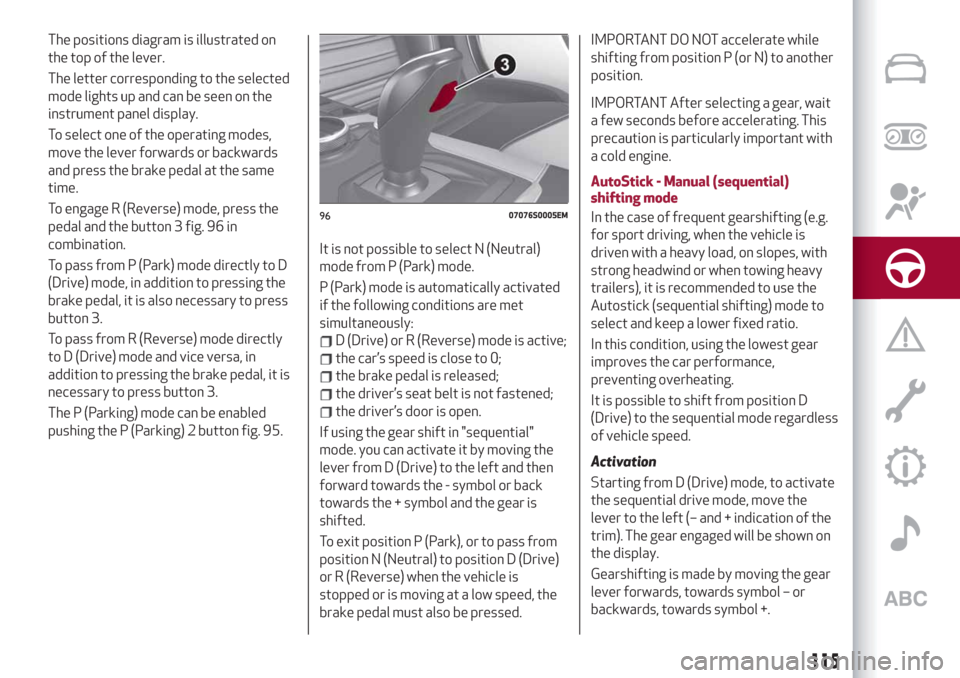
The positions diagram is illustrated on
the top of the lever.
The letter corresponding to the selected
mode lights up and can be seen on the
instrument panel display.
To select one of the operating modes,
move the lever forwards or backwards
and press the brake pedal at the same
time.
To engage R (Reverse) mode, press the
pedal and the button 3 fig. 96 in
combination.
To pass from P (Park) mode directly to D
(Drive) mode, in addition to pressing the
brake pedal, it is also necessary to press
button 3.
To pass from R (Reverse) mode directly
to D (Drive) mode and vice versa, in
addition to pressing the brake pedal, it is
necessary to press button 3.
The P (Parking) mode can be enabled
pushing the P (Parking) 2 button fig. 95.It is not possible to select N (Neutral)
mode from P (Park) mode.
P (Park) mode is automatically activated
if the following conditions are met
simultaneously:
D (Drive) or R (Reverse) mode is active;
the car’s speed is close to 0;
the brake pedal is released;
the driver’s seat belt is not fastened;
the driver’s door is open.
If using the gear shift in "sequential"
mode. you can activate it by moving the
lever from D (Drive) to the left and then
forward towards the - symbol or back
towards the + symbol and the gear is
shifted.
To exit position P (Park), or to pass from
position N (Neutral) to position D (Drive)
or R (Reverse) when the vehicle is
stopped or is moving at a low speed, the
brake pedal must also be pressed.
IMPORTANT DO NOT accelerate while
shifting from position P (or N) to another
position.
IMPORTANT After selecting a gear, wait
a few seconds before accelerating. This
precaution is particularly important with
a cold engine.
AutoStick - Manual (sequential)
shifting mode
In the case of frequent gearshifting (e.g.
for sport driving, when the vehicle is
driven with a heavy load, on slopes, with
strong headwind or when towing heavy
trailers), it is recommended to use the
Autostick (sequential shifting) mode to
select and keep a lower fixed ratio.
In this condition, using the lowest gear
improves the car performance,
preventing overheating.
It is possible to shift from position D
(Drive) to the sequential mode regardless
of vehicle speed.
Activation
Starting from D (Drive) mode, to activate
the sequential drive mode, move the
lever to the left (– and + indication of the
trim). The gear engaged will be shown on
the display.
Gearshifting is made by moving the gear
lever forwards, towards symbol – or
backwards, towards symbol +.
9607076S0005EM
115
Page 124 of 232
The device further enhances driving
comfort provided by the electronic
Cruise Control when on the motorway or
out of town with light traffic.
Important notes
If the sensor does not detect any vehicle
ahead, the device will maintain a fixed set
speed.
If the sensor detects a vehicle ahead, the
device automatically intervenes bybraking (or accelerating) slightly in order
not to exceed the original set speed, so
that the vehicle keeps the preset
distance, seeking to adapt to the speed
of the vehicle ahead.
In the cases described below, the system
performance is not guaranteed, it is
therefore advisable to turn the device on
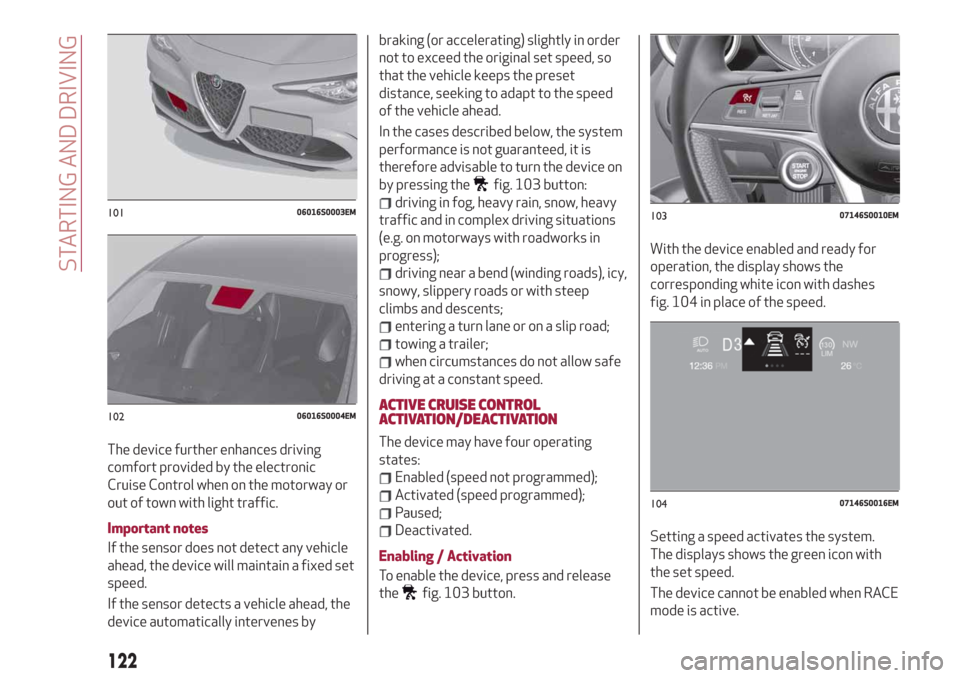
by pressing the
fig. 103 button:
driving in fog, heavy rain, snow, heavy
traffic and in complex driving situations
(e.g. on motorways with roadworks in
progress);
driving near a bend (winding roads), icy,
snowy, slippery roads or with steep
climbs and descents;
entering a turn lane or on a slip road;
towing a trailer;
when circumstances do not allow safe
driving at a constant speed.
ACTIVE CRUISE CONTROL
ACTIVATION/DEACTIVATION
The device may have four operating
states:
Enabled (speed not programmed);
Activated (speed programmed);
Paused;
Deactivated.
Enabling / Activation
To enable the device, press and release
the
fig. 103 button.With the device enabled and ready for
operation, the display shows the
corresponding white icon with dashes
fig. 104 in place of the speed.
Setting a speed activates the system.
The displays shows the green icon with
the set speed.
The device cannot be enabled when RACE
mode is active.
10106016S0003EM
10206016S0004EM
10307146S0010EM
10407146S0016EM
122
STARTING AND DRIVING
Page 128 of 232
“STOP AND GO” STRATEGY
The “Stop and Go” operating strategy
allows you to maintain a safe distance
from the vehicle ahead until the car has
completely stopped. It will also restart
the car automatically if the vehicle ahead
moves off within two seconds, otherwise
it is necessary to press the accelerator
pedal or the RES button to restart.
DEACTIVATION
The device is deactivated and the set
speed is cancelled if:
if thebutton on the Active Cruise
Control is pressed (with the device
enabled or paused);
the ignition device is in the STOP
position;
RACE mode is activated.
The device is cancelled (the set speed
and distance are stored):
when the device is paused (see the
“Activating / Deactivating Active Cruise
Control” paragraph);
when the conditions shown in the
“Setting the desired speed” paragraph
occur;
SYSTEM LIMITED OPERATION
WARNING
If the dedicated message is shown on the
display, a condition limiting the system
operation may have occurred.
The possible reasons of this limitationare something blocking the camera view
or a fault. If an obstruction is signalled,
clean the area of the windscreen
indicated in fig. 102 and check that the
message has disappeared.
When the conditions limiting the system
functions end, this will go back to normal
and complete operation.
Should the fault persist, contact an Alfa
Romeo Dealership.
PRECAUTIONS WHILE DRIVING
The device may not work correctly in
some driving conditions (see below): the
driver must control the car at all times.
Towing a trailer
Use of the device is not recommended
while towing a trailer.
VEHICLE not aligned
The device may not detect a vehicle
travelling on the same lane but which is
not aligned along the same direction of
travel or a vehicle which is cutting in from
a side lane. Sufficient distance from the
vehicles ahead may not be guaranteed in
these cases.
The non-aligned vehicle can weave in and
out of the driving direction causing the
vehicle to brake or accelerate
unexpectedly.Steering and bends
When cornering with the device set, it
could limit speed and acceleration to
guarantee vehicle stability even if no
vehicles are detected ahead. When
leaving the bend, the device resets the
previously set speed.
IMPORTANT In case of narrow curves,
the performance of the device could be
limited. In this case, it is advisable to
deactivate the device. Moreover,
remember that the device only limits the
speed DURING a bend and not BEFORE
it, so always take great care.
Using the device on gradient
When driving on roads with variable
gradient, the device may not detect the
presence of a vehicle on the lane. Device
performance could be limited according
to speed, load, traffic conditions and
gradient steepness.
Lane change
The device may not detect the presence
of a vehicle until it is fully in your lane. In
this case, sufficient distance from the
vehicle which is changing lane may not be
guaranteed: it is advisable to pay the
utmost attention at all times and be
always ready to press the brakes if
needed.
126
STARTING AND DRIVING
Page 130 of 232
PARK SENSORSSYSTEM
(where provided)
123)
48) 49) 50)
VERSIONS WITH 4/8 SENSORS
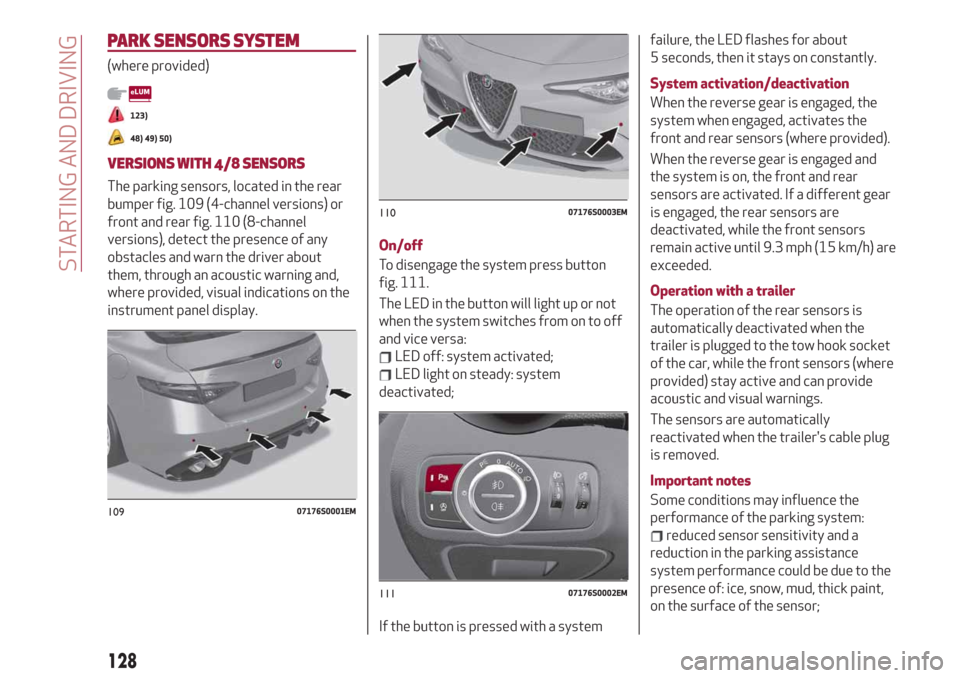
The parking sensors, located in the rear
bumper fig. 109 (4-channel versions) or
front and rear fig. 110 (8-channel
versions), detect the presence of any
obstacles and warn the driver about
them, through an acoustic warning and,
where provided, visual indications on the
instrument panel display.On/off
To disengage the system press button
fig. 111.
The LED in the button will light up or not
when the system switches from on to off
and vice versa:
LED off: system activated;
LED light on steady: system
deactivated;
If the button is pressed with a systemfailure, the LED flashes for about
5 seconds, then it stays on constantly.
System activation/deactivation
When the reverse gear is engaged, the
system when engaged, activates the
front and rear sensors (where provided).
When the reverse gear is engaged and
the system is on, the front and rear
sensors are activated. If a different gear
is engaged, the rear sensors are
deactivated, while the front sensors
remain active until 9.3 mph (15 km/h) are
exceeded.
Operation with a trailer
The operation of the rear sensors is
automatically deactivated when the
trailer is plugged to the tow hook socket
of the car, while the front sensors (where
provided) stay active and can provide
acoustic and visual warnings.
The sensors are automatically
reactivated when the trailer's cable plug
is removed.
Important notes
Some conditions may influence the
performance of the parking system:
reduced sensor sensitivity and a
reduction in the parking assistance
system performance could be due to the
presence of: ice, snow, mud, thick paint,
on the surface of the sensor;
10907176S0001EM
11007176S0003EM
11107176S0002EM
128
STARTING AND DRIVING
Page 131 of 232
the sensor may detect a non-existent
obstacle ("echo interference") due to
mechanical interference, for example
when washing the vehicle, in rain (strong
wind), hail;
the signals sent by the sensor can also
be altered by the presence of ultrasonic
systems (e.g. pneumatic brake systems
of trucks or pneumatic drills) near the
vehicle;
parking assistance system
performance can also be influenced by
the position of the sensors, for example
due to a change in the ride setting
(caused by wear to the shock absorbers,
suspension), or by changing tyres,
overloading the vehicle or carrying out
specific tuning operations that require
the vehicle to be lowered;
the presence of a tow hook without
trailer, which may interfere with the
correct operation of the parking sensors.
Before using the Park Sensors system, it
is recommended to remove the
removable tow hook ball assembly and
the relevant attachment from the car
when the latter is not used for towing
operations. Failure to comply with this
prescription may cause personal injuries
or damage to vehicles or obstacles since,
when the continuous acoustic signal is
emitted, the tow hook ball is already in a
position that is much closer to the
obstacle than the rear bumper. If youwish to leave the tow hook fitted without
towing a trailer, it is advisable to contact
an Alfa Romeo Dealership for the Park
Sensors system update operations
because the tow hook could be detected
as an obstacle by the central sensors.
the presence of adhesives on the
sensors. Therefore, take care not to place
stickers on the sensors.
WARNING
123)Parking and other potentially
dangerous manoeuvres are, however,
always the driver’s responsibility. When
performing these operations, always make
sure that there are no other people
(especially children) or animals on the route
you want to take. The parking sensors are an
aid for the driver, but the driver must never
allow their attention to lapse during
potentially dangerous manoeuvres, even
those executed at low speeds.
IMPORTANT
48)The sensors must be clean of mud, dirt,
snow or ice in order for the system to
operate correctly. Be careful not to scratch
or damage the sensors while cleaning them.
Avoid using dry, rough or hard cloths. The
sensors should be washed using clean water
with the addition of car shampoo if
necessary. When using special washing
equipment such as high pressure jets or
steam cleaning, clean the sensors very
quickly keeping the jet more than 10 cm
away.
49)Have interventions on the bumper in the
area of the sensors carried out only by an
Alfa Romeo Dealership. Interventions on the
bumper that are not carried out properly
may compromise the operation of the
parking sensors.
50)Only have the bumpers repainted or any
retouches to the paintwork in the area of the
sensors carried out by an Alfa Romeo
Dealership. Incorrect paint application could
affect the operation of the parking sensors.
129