ABS ALFA ROMEO GIULIA 2021 Owner's Manual
[x] Cancel search | Manufacturer: ALFA ROMEO, Model Year: 2021, Model line: GIULIA, Model: ALFA ROMEO GIULIA 2021Pages: 284, PDF Size: 8.87 MB
Page 151 of 284
149
System Availability
Aggressive driving of the car, or driving on the
median lines, will prevent the correct opera-
tion of the system.
In case of intervention of the stability and
braking systems (FCW, ESC, ABS) they will
prevent the system from operating.
Lane change will disable the system for a
certain period of time.
The road must also comply with some specific
characteristics, such as:
Maximum/minimum lane width.
Clearly identified and defined double yellow
lines and, for a limited period of time, a lane
with a single demarcation line.
NOTE:
In some cases, for a limited period of time, the
system may be activated by a lane with a
single median line.
In cases of good road surface conditions, the
system could correctly recognize other types
of valid lane markings (e.g. road edges, side -
walks, etc.). Hands Presence On The Steering Wheel
Detection
The system is able to detect the presence of
the driver’s hands on the steering wheel.
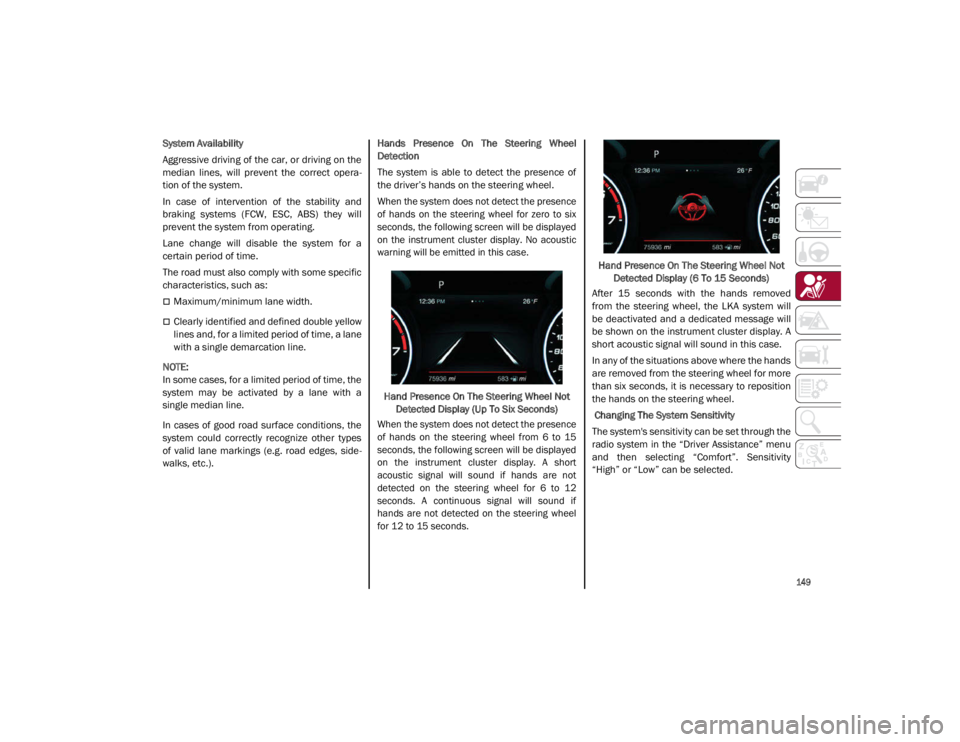
When the system does not detect the presence
of hands on the steering wheel for zero to six
seconds, the following screen will be displayed
on the instrument cluster display. No acoustic
warning will be emitted in this case.
Hand Presence On The Steering Wheel Not Detected Display (Up To Six Seconds)
When the system does not detect the presence
of hands on the steering wheel from 6 to 15
seconds, the following screen will be displayed
on the instrument cluster display. A short
acoustic signal will sound if hands are not
detected on the steering wheel for 6 to 12
seconds. A continuous signal will sound if
hands are not detected on the steering wheel
for 12 to 15 seconds.
Hand Presence On The Steering Wheel Not
Detected Display (6 To 15 Seconds)
After 15 seconds with the hands removed
from the steering wheel, the LKA system will
be deactivated and a dedicated message will
be shown on the instrument cluster display. A
short acoustic signal will sound in this case.
In any of the situations above where the hands
are removed from the steering wheel for more
than six seconds, it is necessary to reposition
the hands on the steering wheel.
Changing The System Sensitivity
The system's sensitivity can be set through the
radio system in the “Driver Assistance” menu
and then selecting “Comfort”. Sensitivity
“High” or “Low” can be selected.
21_GA_OM_EN_USC_t.book Page 149
Page 152 of 284

SAFETY
150
Rear Cross Path Detection (RCP) System
The Rear Cross Path Detection (RCP) system
assists the driver during reverse maneuvers in
the case of reduced visibility.
When the ABSA system is active, the RCP
system monitors the rear detection areas on
both sides of the vehicle to detect objects
moving towards the sides of the vehicle at a
minimum speed between 0.6 mph and 2 mph
(1 km/h and 3km/h) to objects moving at a
maximum speed of 22 mph (35 km/h).
These are generally occurrences that happen
in parking areas.
The system activation is signaled to the driver
by means of a visual and audible warning.
NOTE:
If the sensors are covered by objects or vehi-
cles, the system may not work as intended.
Changing the system sensitivity
To change the sensitivity and the strength of
the torque intervention on the steering wheel,
refer to the Information and Entertainment
System Owner’s Manual Supplement.Driver Attention Assist (DAA) System — If
Equipped
The Driver Attention Assist (DAA) system
detects when the driver is feeling fatigued and
warns the driver to pull over and take a break.
To Activate/Deactivate
The DAA system can be activated and deacti -
vated through the radio system by selecting
the following in order:
1. “Driver Assistance”
2. “Driver Attention Assist”
System Intervention
Using information from the front camera, the
system implements two operating logics:
The first operating logic takes the driving style
into account, observing the road and
detecting to what extent the driver can
continue driving with few lane crossing events.
The second operating logic measures the time
spent behind the wheel with the vehicle speed
above 40 mph (60 km/h) and below 110 mph
(180 km/h). If the “Standard” option is
selected, in these conditions, the “Dozy
Driver” message may appear after three hours
of driving. If the “Early” option is selected and
these conditions occur, the “Dozy Driver”
message will be displayed after two hours of
driving.
NOTE:
If the conditions described above are not
detected continuously during the entire driving
period, the “Dozy Driver” message may be
displayed later than two or three hours. If the
driving style indicates that the driver is unable
to follow the road trajectory and respect the
horizontal lane markings, the red symbol will
appear on the instrument cluster display to
suggest that the driver should stop for a break.
An audible signal will also sound.
If the driver accepts the suggestion provided
by the system by pushing the MENU button on
the multifunction lever, the message will
disappear from the display and the symbol will
be displayed in the dedicated area of the
instrument cluster display until the next
engine shutdown.
If the driver ignores the warning provided by
the system and does not stop, the message
will continue to remain on the display, along
with the symbol.
WARNING!
The DAA System is an aid for driving and does
not relieve the driver of the responsibility of
driving the vehicle. If you experience fatigue
while driving, pull over safely for a break
without waiting for the DAA to intervene. Only
return to the road when you are in the right
physical and mental condition to prevent
endangering yourself and other drivers.
21_GA_OM_EN_USC_t.book Page 150
Page 153 of 284
151
NOTE:
In the event of a DAA system failure, an
amber symbol will appear in the instrument
cluster display along with a dedicated
message.
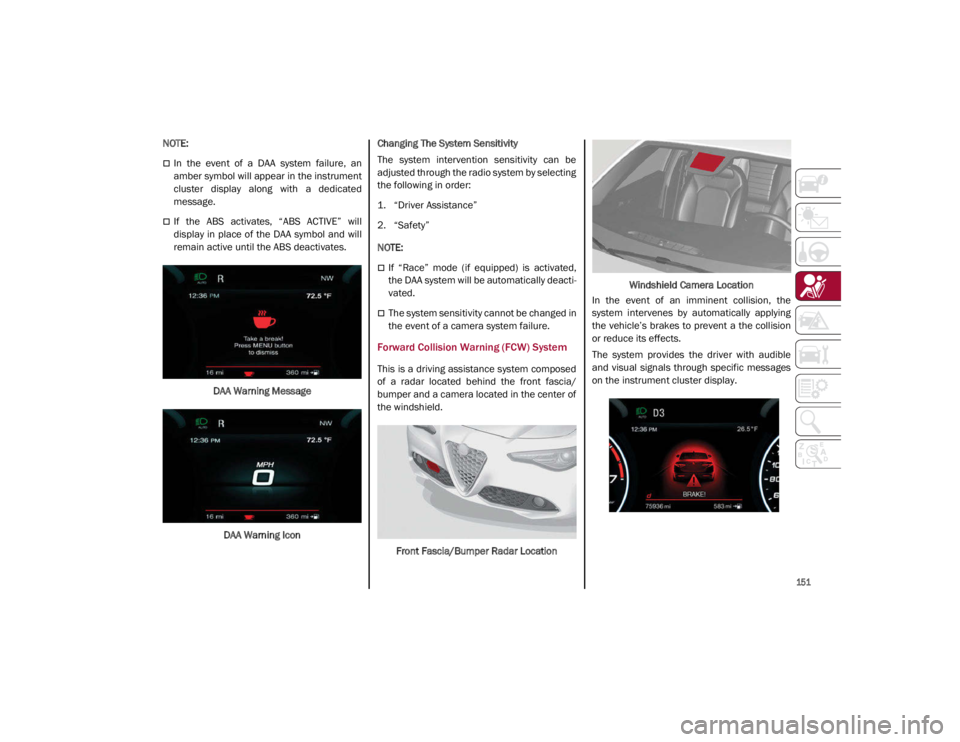
If the ABS activates, “ABS ACTIVE” will
display in place of the DAA symbol and will
remain active until the ABS deactivates.DAA Warning MessageDAA Warning Icon Changing The System Sensitivity
The system intervention sensitivity can be
adjusted through the radio system by selecting
the following in order:
1. “Driver Assistance”
2. “Safety”
NOTE:
If “Race” mode (if equipped) is activated,
the DAA system will be automatically deacti
-
vated.
The system sensitivity cannot be changed in
the event of a camera system failure.
Forward Collision Warning (FCW) System
This is a driving assistance system composed
of a radar located behind the front fascia/
bumper and a camera located in the center of
the windshield.
Front Fascia/Bumper Radar Location Windshield Camera Location
In the event of an imminent collision, the
system intervenes by automatically applying
the vehicle’s brakes to prevent a the collision
or reduce its effects.
The system provides the driver with audible
and visual signals through specific messages
on the instrument cluster display.
21_GA_OM_EN_USC_t.book Page 151
Page 155 of 284

153
NOTE:
If the safety belts of the front seats are not
correctly fastened, the system will not inter-
vene on the braking system (only audible and
visual signals will be provided).
Changing The System Sensitivity
The sensitivity of the system can be changed
through the radio system menu, choosing from
one of the following three options: "Near",
"Medium" or "Far". Refer to the description in
the Information and Entertainment System
Owner’s Manual Supplement for how to
change the settings.
The default setting is "Medium". With this
setting, the system warns the driver of a
possible collision with the vehicle in front
when that vehicle is at a standard distance,
between that of the other two settings.
With the system sensitivity set to "Far", the
system will warn the driver of a possible colli -
sion with the vehicle in front when that vehicle
is at a greater distance, thus providing the
possibility of acting on the brakes more lightly
and gradually. This setting provides the driver
with the maximum possible reaction time to
prevent a potential collision.
With the option set to "Near", the system will
alert the driver of a possible collision with the
vehicle in front when that vehicle is close. This
setting offers the driver a lower reaction time
compared to the "Medium" and "Far" settings,
in the event of a potential collision, but
permits more dynamic driving of the vehicle. The system sensitivity setting is kept in the
memory when the engine is turned off.
System Limited Operation Warning
If a dedicated message is displayed, a condi
-
tion limiting the system operation may have
occurred. The possible reasons of this limita -
tion are if something is blocking the camera
view, or a fault is present.
If an obstruction is signaled, clean the area of
the windshield.
Although the vehicle can still be driven in
normal conditions, the system may be not
completely available.
When the conditions limiting the system func -
tions end, this will go back to normal and
complete operation. Should the fault persist,
contact an authorized dealer.
System Failure Signaling
If the system turns off and a dedicated
message is shown on the display, it means
that there is a fault with the system.
In this case, it is still possible to drive the
vehicle, but you are advised to contact an
authorized dealer as soon as possible.
Radar Indication Not Available
If conditions are such that the radar cannot
detect obstacles correctly, the system is deac -
tivated and a dedicated message appears on
the display. This generally occurs in the event
of poor visibility, such as when it is snowing or
raining heavily. The function of this system can also be tempo
-
rarily reduced due to obstructions such as
mud, dirt or ice on the fascia/bumper. In such
cases, a dedicated message will be shown on
the display and the system will be deactivated.
This message can sometimes appear in condi -
tions of high reflectivity (e.g. tunnels with
reflective tiles or ice or snow). When the condi -
tions limiting the system functions end, it will
go back to normal and complete operation.
In certain cases, this dedicated message
could be displayed when the radar is not
detecting any vehicles or objects within its
view range.
If atmospheric conditions are not the reason
behind this message, check if the sensor is
dirty. It could be necessary to clean or remove
any obstructions in the area.
If the message appears frequently, even in the
absence of atmospheric conditions such as
snow, rain, mud or other obstructions, contact an
authorized dealer for a sensor alignment check.
In the absence of visible obstructions, manu -
ally removing the decorative cover trim and
cleaning the radar surface could be required.
Have this operation performed at an autho -
rized dealer.
NOTE:
It is recommended that you do not install
devices, accessories, or aerodynamic attach -
ments in front of the sensor or darken it in any
way, as this can compromise the correct func -
tioning of the system.
21_GA_OM_EN_USC_t.book Page 153
Page 171 of 284
169
(Continued)
Supplemental Side Air Bags
Supplemental Seat-Mounted Side Air Bags
(SABs)
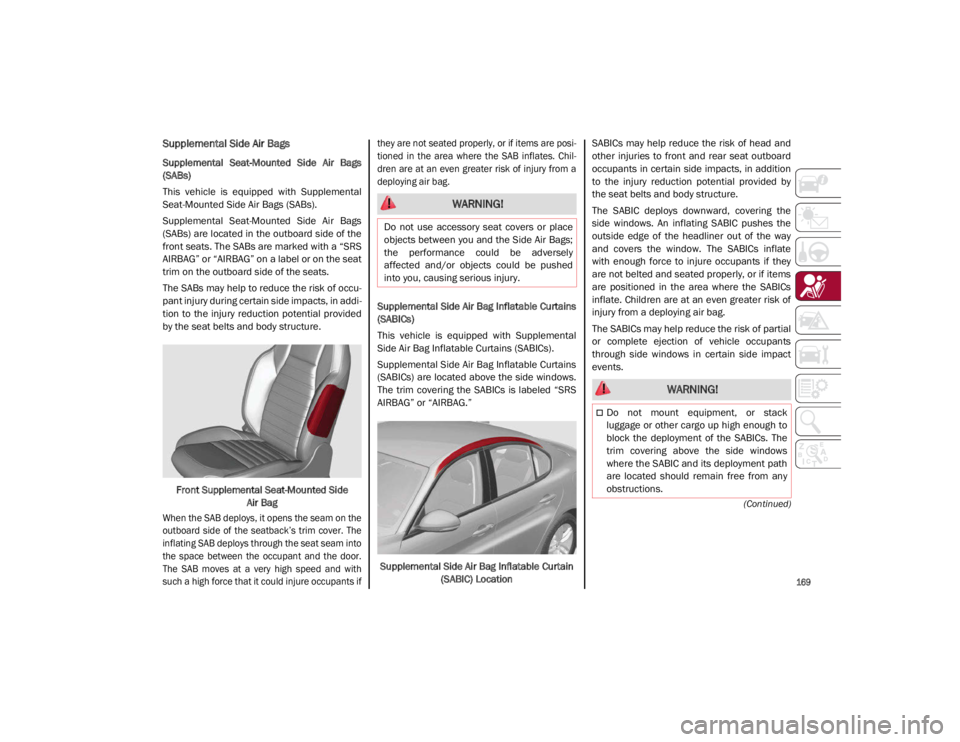
This vehicle is equipped with Supplemental
Seat-Mounted Side Air Bags (SABs).
Supplemental Seat-Mounted Side Air Bags
(SABs) are located in the outboard side of the
front seats. The SABs are marked with a “SRS
AIRBAG” or “AIRBAG” on a label or on the seat
trim on the outboard side of the seats.
The SABs may help to reduce the risk of occu-
pant injury during certain side impacts, in addi-
tion to the injury reduction potential provided
by the seat belts and body structure.
Front Supplemental Seat-Mounted Side Air Bag
When the SAB deploys, it opens the seam on the
outboard side of the seatback’s trim cover. The
inflating SAB deploys through the seat seam into
the space between the occupant and the door.
The SAB moves at a very high speed and with
such a high force that it could injure occupants if they are not seated properly, or if items are posi
-
tioned in the area where the SAB inflates. Chil -
dren are at an even greater risk of injury from a
deploying air bag.
Supplemental Side Air Bag Inflatable Curtains
(SABICs)
This vehicle is equipped with Supplemental
Side Air Bag Inflatable Curtains (SABICs).
Supplemental Side Air Bag Inflatable Curtains
(SABICs) are located above the side windows.
The trim covering the SABICs is labeled “SRS
AIRBAG” or “AIRBAG.”
Supplemental Side Air Bag Inflatable Curtain (SABIC) Location SABICs may help reduce the risk of head and
other injuries to front and rear seat outboard
occupants in certain side impacts, in addition
to the injury reduction potential provided by
the seat belts and body structure.
The SABIC deploys downward, covering the
side windows. An inflating SABIC pushes the
outside edge of the headliner out of the way
and covers the window. The SABICs inflate
with enough force to injure occupants if they
are not belted and seated properly, or if items
are positioned in the area where the SABICs
inflate. Children are at an even greater risk of
injury from a deploying air bag.
The SABICs may help reduce the risk of partial
or complete ejection of vehicle occupants
through side windows in certain side impact
events.
WARNING!
Do not use accessory seat covers or place
objects between you and the Side Air Bags;
the performance could be adversely
affected and/or objects could be pushed
into you, causing serious injury.
WARNING!
Do not mount equipment, or stack
luggage or other cargo up high enough to
block the deployment of the SABICs. The
trim covering above the side windows
where the SABIC and its deployment path
are located should remain free from any
obstructions.
21_GA_OM_EN_USC_t.book Page 169
Page 197 of 284
195
(Continued)
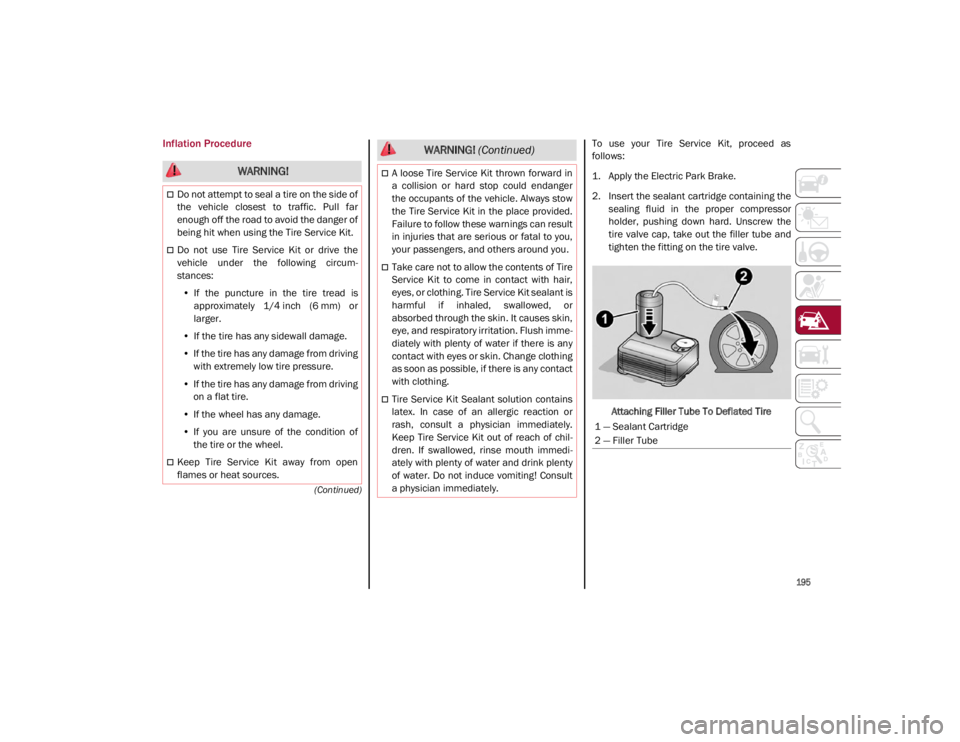
Inflation ProcedureTo use your Tire Service Kit, proceed as
follows:
1. Apply the Electric Park Brake.
2. Insert the sealant cartridge containing thesealing fluid in the proper compressor
holder, pushing down hard. Unscrew the
tire valve cap, take out the filler tube and
tighten the fitting on the tire valve.
Attaching Filler Tube To Deflated Tire
WARNING!
Do not attempt to seal a tire on the side of
the vehicle closest to traffic. Pull far
enough off the road to avoid the danger of
being hit when using the Tire Service Kit.
Do not use Tire Service Kit or drive the
vehicle under the following circum -
stances:
• If the puncture in the tire tread is
approximately 1/4 inch (6 mm) or
larger.
• If the tire has any sidewall damage.
• If the tire has any damage from driving
with extremely low tire pressure.
• If the tire has any damage from driving
on a flat tire.
• If the wheel has any damage.
• If you are unsure of the condition of
the tire or the wheel.
Keep Tire Service Kit away from open
flames or heat sources.
A loose Tire Service Kit thrown forward in
a collision or hard stop could endanger
the occupants of the vehicle. Always stow
the Tire Service Kit in the place provided.
Failure to follow these warnings can result
in injuries that are serious or fatal to you,
your passengers, and others around you.
Take care not to allow the contents of Tire
Service Kit to come in contact with hair,
eyes, or clothing. Tire Service Kit sealant is
harmful if inhaled, swallowed, or
absorbed through the skin. It causes skin,
eye, and respiratory irritation. Flush imme -
diately with plenty of water if there is any
contact with eyes or skin. Change clothing
as soon as possible, if there is any contact
with clothing.
Tire Service Kit Sealant solution contains
latex. In case of an allergic reaction or
rash, consult a physician immediately.
Keep Tire Service Kit out of reach of chil -
dren. If swallowed, rinse mouth immedi -
ately with plenty of water and drink plenty
of water. Do not induce vomiting! Consult
a physician immediately.
WARNING! (Continued)
1 — Sealant Cartridge
2 — Filler Tube
21_GA_OM_EN_USC_t.book Page 195
Page 224 of 284
SERVICING AND MAINTENANCE
222
Braking System
In order to guarantee the efficiency of the
braking system, periodically check its compo-
nents; for this operation, contact an autho -
rized dealer.
For the correct servicing intervals
Ú
page 204.
NOTE:
Driving with your foot resting on the brake
pedal may compromise its efficiency,
increasing the risk of accidents. When driving,
never keep your foot on the brake pedal and
don’t put unnecessary strain on it to prevent
the brakes from overheating: excess pad wear
may cause damage to the braking system.
When an insufficient oil level is detected,
contact an authorized dealer to have the
system checked.
Always keep the cap of the brake fluid reser-
voir (in the engine compartment)
completely closed.
Automatic Transmission
Use only a transmission oil with the same char -
acteristics as those indicated on
Ú
page 268.
Special Additives
Do not use any type of additive with the auto -
matic transmission oil. The automatic trans -
mission oil is a product designed specially for
this vehicle and its performance may be
compromised through the use of further addi -
tives.
Frequency Of Oil Changes
In normal vehicle operating conditions, it is not
necessary to change the transmission oil.
WARNING!
Use only FCA US LLC recommended brake
fluid
Ú
page 268. Using the wrong type of
brake fluid can severely damage your
brake system and/or impair its perfor -
mance. The proper type of brake fluid for
your vehicle is also identified on the orig -
inal factory installed hydraulic master
cylinder reservoir.
To avoid contamination from foreign
matter or moisture, use only new brake
fluid or fluid that has been in a tightly
closed container. Keep the master
cylinder reservoir cap secured at all times.
Brake fluid in a open container absorbs
moisture from the air resulting in a lower
boiling point. This may cause it to boil
unexpectedly during hard or prolonged
braking, resulting in sudden brake failure.
This could result in a collision.
Overfilling the brake fluid reservoir can
result in spilling brake fluid on hot engine
parts, causing the brake fluid to catch fire.
Brake fluid can also damage painted and
vinyl surfaces, care should be taken to
avoid its contact with these surfaces.
Do not allow petroleum-based fluid to
contaminate the brake fluid. Brake seal
components could be damaged, causing
partial or complete brake failure. This
could result in a collision.
CAUTION!
Do not use chemical flushes in your
transmission as the chemicals can damage
your transmission components. Such
damage is not covered by the New Vehicle
Limited Warranty.
CAUTION!
If a transmission fluid leak occurs, visit an
authorized dealer immediately. Severe
transmission damage may occur. An
authorized dealer has the proper tools to
adjust the fluid level accurately.
21_GA_OM_EN_USC_t.book Page 222
Page 226 of 284
SERVICING AND MAINTENANCE
224
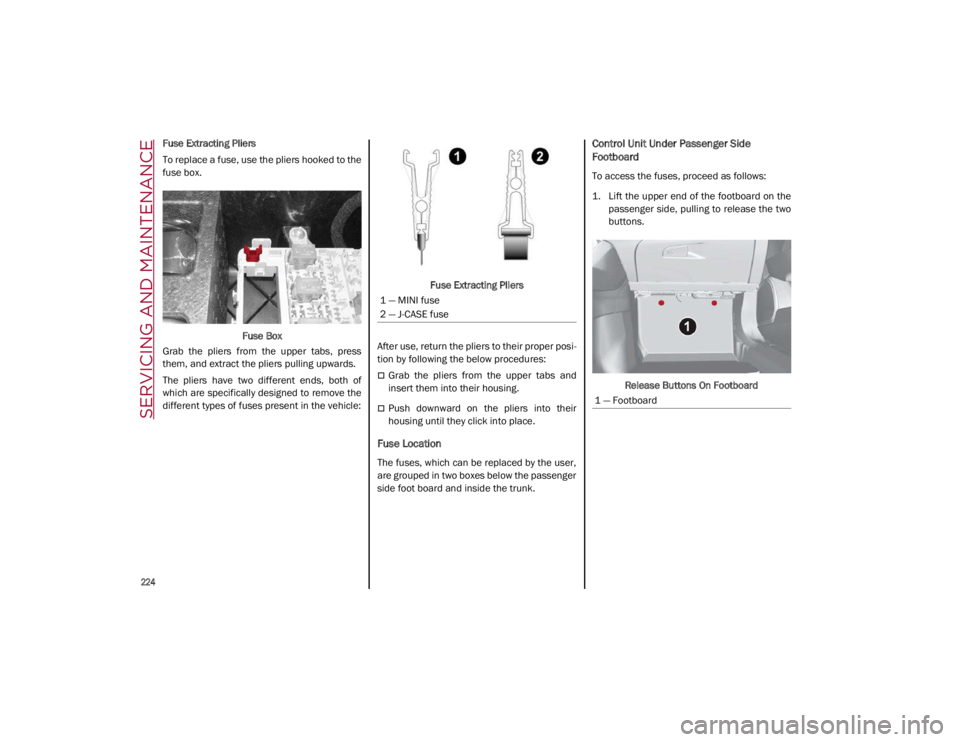
Fuse Extracting Pliers
To replace a fuse, use the pliers hooked to the
fuse box.Fuse Box
Grab the pliers from the upper tabs, press
them, and extract the pliers pulling upwards.
The pliers have two different ends, both of
which are specifically designed to remove the
different types of fuses present in the vehicle: Fuse Extracting Pliers
After use, return the pliers to their proper posi -
tion by following the below procedures:
Grab the pliers from the upper tabs and
insert them into their housing.
Push downward on the pliers into their
housing until they click into place.
Fuse Location
The fuses, which can be replaced by the user,
are grouped in two boxes below the passenger
side foot board and inside the trunk.
Control Unit Under Passenger Side
Footboard
To access the fuses, proceed as follows:
1. Lift the upper end of the footboard on the passenger side, pulling to release the two
buttons.
Release Buttons On Footboard
1 — MINI fuse
2 — J-CASE fuse
1 — Footboard
21_GA_OM_EN_USC_t.book Page 224
Page 236 of 284
SERVICING AND MAINTENANCE
234
TIRES
Tire Safety Information
Tire safety information will cover aspects of
the following information: Tire Markings, Tire
Identification Numbers, Tire Terminology and
Definitions, Tire Pressures, and Tire Loading.
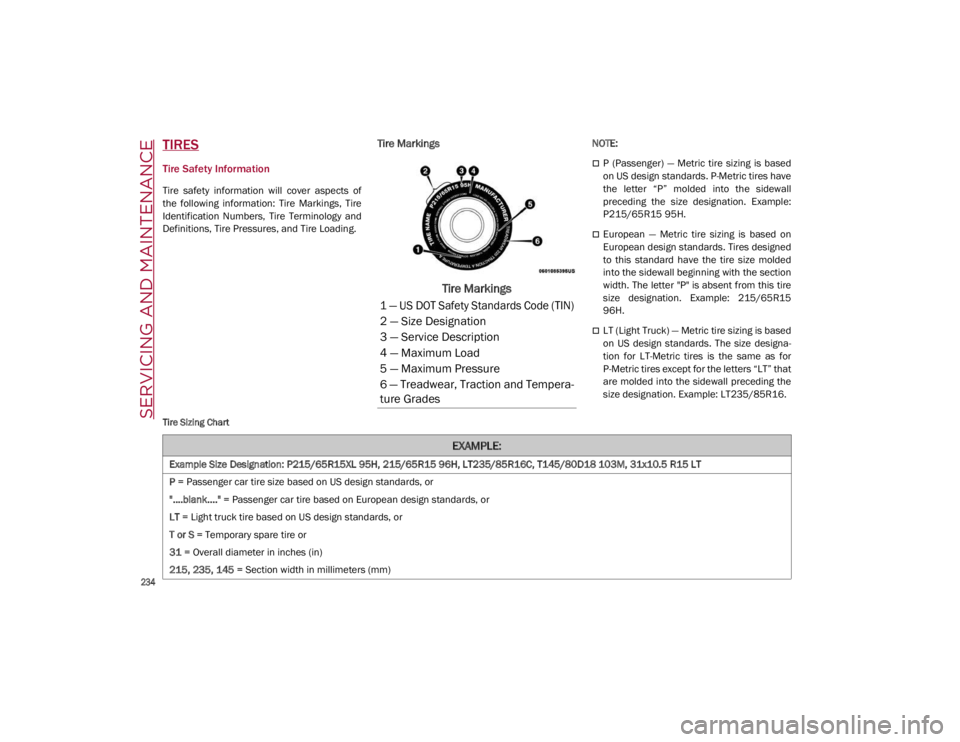
Tire Markings
Tire Markings
NOTE:
P (Passenger) — Metric tire sizing is based
on US design standards. P-Metric tires have
the letter “P” molded into the sidewall
preceding the size designation. Example:
P215/65R15 95H.
European — Metric tire sizing is based on
European design standards. Tires designed
to this standard have the tire size molded
into the sidewall beginning with the section
width. The letter "P" is absent from this tire
size designation. Example: 215/65R15
96H.
LT (Light Truck) — Metric tire sizing is based
on US design standards. The size designa-
tion for LT-Metric tires is the same as for
P-Metric tires except for the letters “LT” that
are molded into the sidewall preceding the
size designation. Example: LT235/85R16.
Tire Sizing Chart
1 — US DOT Safety Standards Code (TIN)
2 — Size Designation
3 — Service Description
4 — Maximum Load
5 — Maximum Pressure
6 — Treadwear, Traction and Tempera -
ture Grades
EXAMPLE:
Example Size Designation: P215/65R15XL 95H, 215/65R15 96H, LT235/85R16C, T145/80D18 103M, 31x10.5 R15 LT
P = Passenger car tire size based on US design standards, or
"....blank...." = Passenger car tire based on European design standards, or
LT = Light truck tire based on US design standards, or
T or S = Temporary spare tire or
31 = Overall diameter in inches (in)
215, 235, 145 = Section width in millimeters (mm)
21_GA_OM_EN_USC_t.book Page 234
Page 237 of 284
235
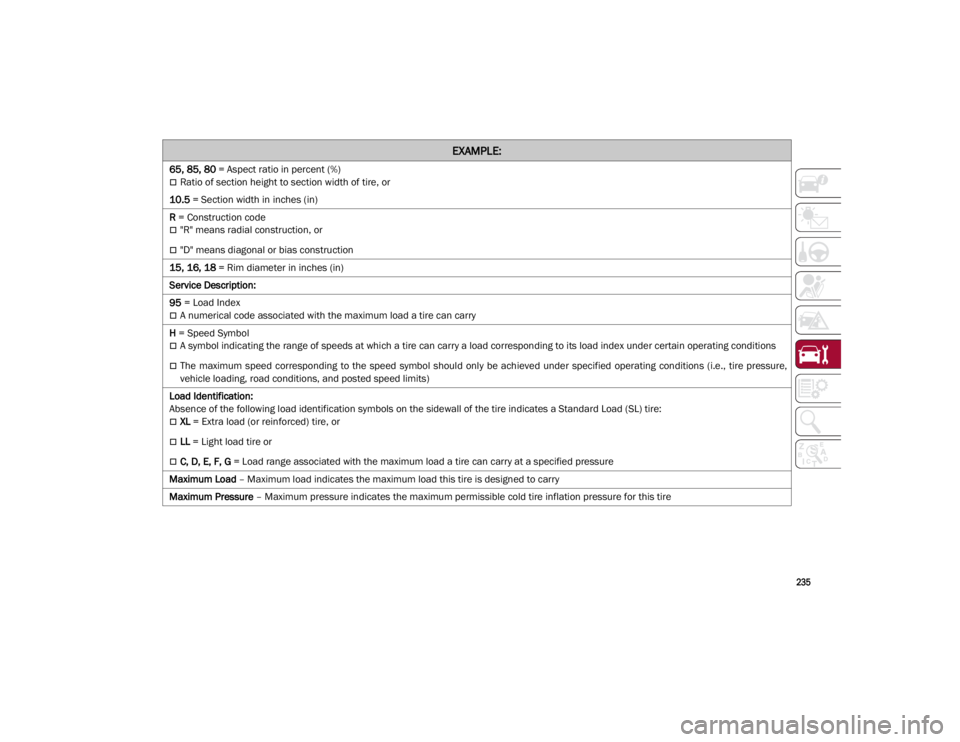
65, 85, 80 = Aspect ratio in percent (%)
Ratio of section height to section width of tire, or
10.5 = Section width in inches (in)
R = Construction code
"R" means radial construction, or
"D" means diagonal or bias construction
15, 16, 18 = Rim diameter in inches (in)
Service Description:
95 = Load Index
A numerical code associated with the maximum load a tire can carry
H = Speed Symbol
A symbol indicating the range of speeds at which a tire can carry a load corresponding to its load index under certain operating conditions
The maximum speed corresponding to the speed symbol should only be achieved under specified operating conditions (i.e., tire pressure,
vehicle loading, road conditions, and posted speed limits)
Load Identification:
Absence of the following load identification symbols on the sidewall of the tire indicates a Standard Load (SL) tire:
XL = Extra load (or reinforced) tire, or
LL = Light load tire or
C, D, E, F, G = Load range associated with the maximum load a tire can carry at a specified pressure
Maximum Load – Maximum load indicates the maximum load this tire is designed to carry
Maximum Pressure – Maximum pressure indicates the maximum permissible cold tire inflation pressure for this tire
EXAMPLE:
21_GA_OM_EN_USC_t.book Page 235