battery ALFA ROMEO GIULIA 2021 Owner's Guide
[x] Cancel search | Manufacturer: ALFA ROMEO, Model Year: 2021, Model line: GIULIA, Model: ALFA ROMEO GIULIA 2021Pages: 284, PDF Size: 8.87 MB
Page 106 of 284
STARTING AND OPERATING
104
Irregular Operation
In the event of malfunction, the Stop/Start
system is deactivated.
For further information on failure indications
Ú
page 73.
Vehicle Inactivity
In the event of vehicle inactivity (or if the battery
is replaced), special attention must be paid to
the disconnection of the battery power supply.
Proceed as follows:
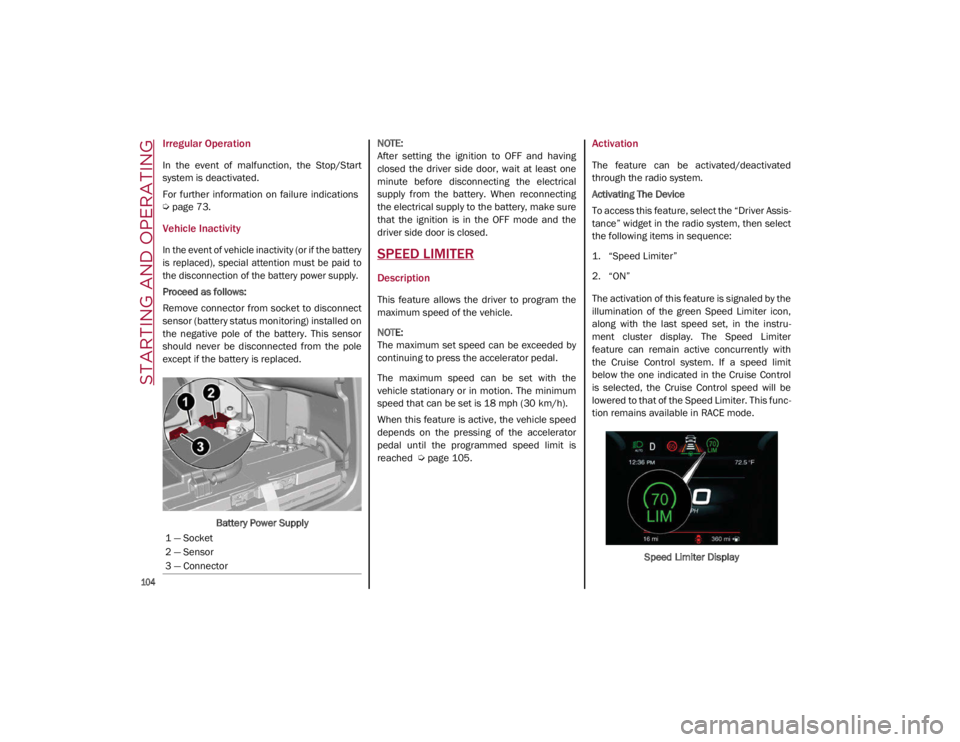
Remove connector from socket to disconnect
sensor (battery status monitoring) installed on
the negative pole of the battery. This sensor
should never be disconnected from the pole
except if the battery is replaced.
Battery Power Supply
NOTE:
After setting the ignition to OFF and having
closed the driver side door, wait at least one
minute before disconnecting the electrical
supply from the battery. When reconnecting
the electrical supply to the battery, make sure
that the ignition is in the OFF mode and the
driver side door is closed.SPEED LIMITER
Description
This feature allows the driver to program the
maximum speed of the vehicle.
NOTE:
The maximum set speed can be exceeded by
continuing to press the accelerator pedal.
The maximum speed can be set with the
vehicle stationary or in motion. The minimum
speed that can be set is 18 mph (30 km/h).
When this feature is active, the vehicle speed
depends on the pressing of the accelerator
pedal until the programmed speed limit is
reached
Ú
page 105.
Activation
The feature can be activated/deactivated
through the radio system.
Activating The Device
To access this feature, select the “Driver Assis -
tance” widget in the radio system, then select
the following items in sequence:
1. “Speed Limiter”
2. “ON”
The activation of this feature is signaled by the
illumination of the green Speed Limiter icon,
along with the last speed set, in the instru -
ment cluster display. The Speed Limiter
feature can remain active concurrently with
the Cruise Control system. If a speed limit
below the one indicated in the Cruise Control
is selected, the Cruise Control speed will be
lowered to that of the Speed Limiter. This func -
tion remains available in RACE mode.
Speed Limiter Display
1 — Socket
2 — Sensor
3 — Connector
21_GA_OM_EN_USC_t.book Page 104
Page 167 of 284

165
How To Disengage The Automatic Locking
Mode
Unbuckle the combination lap/shoulder belt
and allow it to retract completely to disengage
the Automatic Locking Mode and activate the
vehicle sensitive (emergency) locking mode.Supplemental Restraint Systems (SRS)
Some of the safety features described in this
section may be standard equipment on some
models, or may be optional equipment on
others. If you are not sure, ask an authorized
dealer.
The air bag system must be ready to protect
you in a collision. The Occupant Restraint
Controller (ORC) monitors the internal circuits
and interconnecting wiring associated with the
electrical Air Bag System Components. Your
vehicle may be equipped with the following Air
Bag System Components:
Air Bag System Components
Occupant Restraint Controller (ORC)
Air Bag Warning Light
Steering Wheel and Column
Instrument Panel
Knee Impact Bolsters
Driver and Front Passenger Air Bags
Seat Belt Buckle Switch
Supplemental Side Air Bags
Supplemental Knee Air Bags
Front and Side Impact Sensors
Seat Belt Pretensioners
Seat Track Position Sensors
Air Bag Warning Light
The Occupant Restraint Controller
(ORC) monitors the readiness of the
electronic parts of the air bag system
whenever the ignition switch is in the
START or ON/RUN position. If the ignition
switch is in the OFF position or in the ACC posi -
tion, the air bag system is not on and the air
bags will not inflate.
The ORC contains a backup power supply
system that may deploy the air bag system
even if the battery loses power or it becomes
disconnected prior to deployment.
The ORC turns on the Air Bag Warning Light in the
instrument panel for approximately four to eight
seconds for a self-check when the ignition switch
is first in the ON/RUN position. After the
self-check, the Air Bag Warning Light will turn off.
If the ORC detects a malfunction in any part of
the system, it turns on the Air Bag Warning Light,
either momentarily or continuously. A single
chime will sound to alert you if the light comes on
again after initial startup.
The ORC also includes diagnostics that will illu -
minate the instrument panel Air Bag Warning
Light if a malfunction is detected that could
affect the air bag system. The diagnostics also
record the nature of the malfunction. While
the air bag system is designed to be mainte - WARNING!
The seat belt assembly must be replaced
if the switchable Automatic Locking
Retractor (ALR) feature or any other seat
belt function is not working properly when
checked according to the procedures in
the Service Manual.
Failure to replace the seat belt assembly
could increase the risk of injury in colli-
sions.
Do not use the Automatic Locking Mode to
restrain occupants who are wearing the
seat belt or children who are using booster
seats. The locked mode is only used to
install rear-facing or forward-facing child
restraints that have a harness for
restraining the child.
21_GA_OM_EN_USC_t.book Page 165
Page 174 of 284

SAFETY
172
Enhanced Accident Response System
In the event of an impact, if the communica-
tion network remains intact, and the power
remains intact, depending on the nature of the
event, the Occupant Restraint Controller (ORC)
will determine whether to have the Enhanced
Accident Response System perform the
following functions:
Cut off fuel to the engine (if equipped)
Cut off battery power to the electric motor (if
equipped)
Flash hazard lights as long as the battery
has power
Turn on the interior lights, which remain on
as long as the battery has power or for
15 minutes from the intervention of the
Enhanced Accident Response System
Unlock the power door locks
Your vehicle may also be designed to perform
any of these other functions in response to the
Enhanced Accident Response System:
Turn off the Fuel Filter Heater, Turn off the
HVAC Blower Motor, Close the HVAC Circula -
tion Door
Cut off battery power to the:
• Engine
• Electric Motor (if equipped)
• Electric power steering
• Brake booster
• Electric park brake
• Automatic transmission gear selector
• Horn
• Front wiper
• Headlamp washer pump
NOTE:
After an accident, remember to cycle the ignition
to the OFF position and remove the key from the
ignition switch to avoid draining the battery.
Carefully check the vehicle for fuel leaks in the
engine compartment and on the ground near the
engine compartment and fuel tank before reset -
ting the system and starting the engine. If there
are no fuel leaks or damage to the vehicle elec -
trical devices (e.g. headlights) after an accident,
reset the system by following the procedure
described below. If you have any doubt, contact
an authorized dealer.
Enhanced Accident Response System
Reset Procedure
After the event occurs, when the system is active,
a message regarding fuel cutoff is displayed.
Turn the ignition switch from ignition ACC or ON/
RUN to ignition OFF. Carefully check the vehicle
for fuel leaks in the engine compartment and on
the ground near the engine compartment and
fuel tank before resetting the system and
starting the engine.
Depending on the nature of the event the left
and right turn signal lights, located in the
instrument panel, may both be blinking and
will continue to blink. In order to move your
vehicle to the side of the road, you must follow
the system reset procedure.
21_GA_OM_EN_USC_t.book Page 172
Page 192 of 284
190
IN CASE OF EMERGENCY
Have a flat tire or a burnt-out bulb?
At times, a problem such as these may inter-
fere with your driving experience.
The section on emergencies can help you to
deal with critical situations independently.
In an emergency, we recommend that you call
the phone number found in the Warranty
Book.
You may also consider contacting an autho -
rized dealer.
HAZARD WARNING FLASHERS
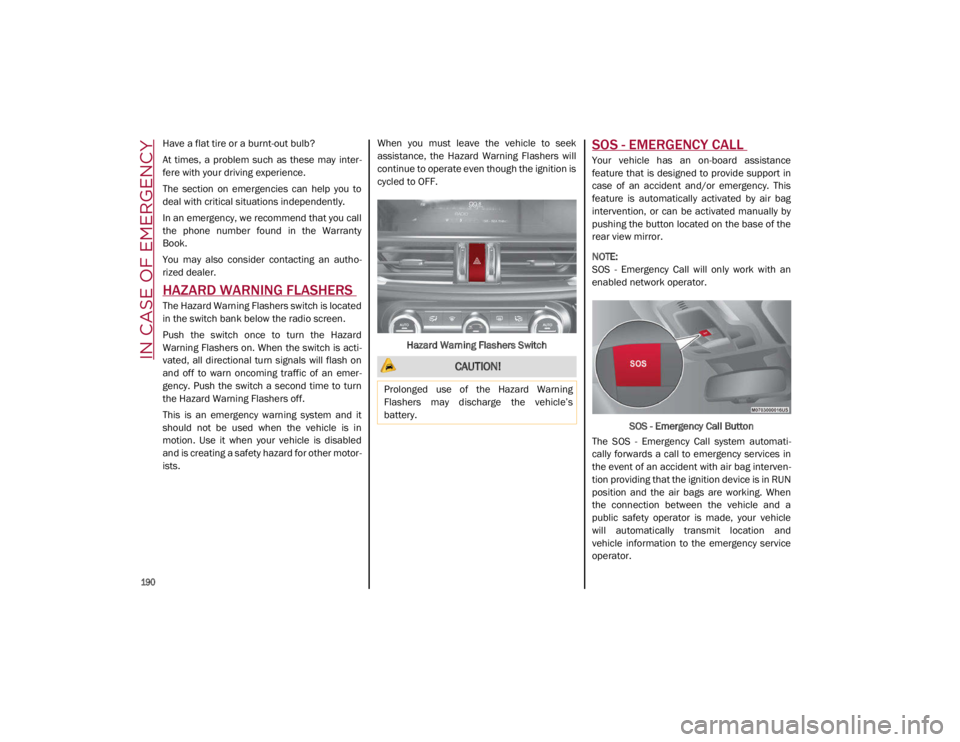
The Hazard Warning Flashers switch is located
in the switch bank below the radio screen.
Push the switch once to turn the Hazard
Warning Flashers on. When the switch is acti -
vated, all directional turn signals will flash on
and off to warn oncoming traffic of an emer -
gency. Push the switch a second time to turn
the Hazard Warning Flashers off.
This is an emergency warning system and it
should not be used when the vehicle is in
motion. Use it when your vehicle is disabled
and is creating a safety hazard for other motor -
ists. When you must leave the vehicle to seek
assistance, the Hazard Warning Flashers will
continue to operate even though the ignition is
cycled to OFF.
Hazard Warning Flashers Switch
SOS - EMERGENCY CALL
Your vehicle has an on-board assistance
feature that is designed to provide support in
case of an accident and/or emergency. This
feature is automatically activated by air bag
intervention, or can be activated manually by
pushing the button located on the base of the
rear view mirror.
NOTE:
SOS - Emergency Call will only work with an
enabled network operator. SOS - Emergency Call Button
The SOS - Emergency Call system automati -
cally forwards a call to emergency services in
the event of an accident with air bag interven -
tion providing that the ignition device is in RUN
position and the air bags are working. When
the connection between the vehicle and a
public safety operator is made, your vehicle
will automatically transmit location and
vehicle information to the emergency service
operator.
CAUTION!
Prolonged use of the Hazard Warning
Flashers may discharge the vehicle’s
battery.
21_GA_OM_EN_USC_t.book Page 190
Page 194 of 284
IN CASE OF EMERGENCY
192
(Continued)
SOS - Emergency Call System Limitations
When the ignition switches to the RUN position,
the Emergency Call system runs a routine check.
During this check, a red indicator will illuminate
for about three seconds. This signal must not be
confused with a fault warning. In the event of a
malfunction, the red indicator would remain on.
If the SOS - Emergency Call system detects a
malfunction, any of the following may occur at
the time the malfunction is detected:
NOTE:
The SOS Call function may not be available for
the first minute after the vehicle is started
The LED next to the SOS button will be
continuously illuminated red.
The Emergency Call system is powered by
its own non-rechargeable battery to ensure
operation, even when the vehicle battery is
discharged or disconnected. When system
battery is discharged, the instrument
cluster display will show a special message,
different than other messages referring to
other types of faults. In this case, the
system works only if powered by the
vehicle’s battery.
The instrument cluster will display a
message alerting you to contact the Service
Network along with a failure warning light.Even if the SOS - Emergency Call system is fully
functional, external or uncontrolled factors
may prevent or stop SOS - Emergency Call
operation. These include, but are not limited
to, the following factors:
The key fob has been removed from the
vehicle, and the delayed accessories mode
is active.
The ignition is in OFF position.
The vehicle’s electrical systems are not
intact.
The SOS - Emergency Call system software
and/or hardware is damaged during a
vehicle collision.
There are network problems that could limit
or impair service operation (e.g., error by
operator, busy network, bad weather, etc.).
If the vehicle battery connection fails due to a
collision or accident, the system can support
an SOS - Emergency Call for a limited period of
time. If the battery is disconnected for service,
the system turns off. In this case, it will be
possible to make an SOS - Emergency Call only
when the battery is reconnected to the
vehicle’s electrical system. System Requirements
Vehicle must have an operable 3G network
connection.
Vehicle must be powered with a properly
functioning electrical system.
The ignition must be in the RUN or ACC posi
-
tion.
WARNING!
Never place anything on or near the
vehicle’s 3G and GPS aerials. You could
prevent 3G and GPS signal reception,
which can prevent your vehicle from
placing an emergency call. An operable
3G network connection and a GPS signal
is required for the SOS-Emergency Call
system to function properly.
21_GA_OM_EN_USC_t.book Page 192
Page 195 of 284
193
(Continued)
Frequently Asked Questions:
What happens if I accidentally push the SOS -
Emergency Call Button? You have 10 seconds
after pushing the emergency button to cancel
the call. To cancel the call, push the button
again.
What type of information is sent when I make
an SOS - Emergency Call from my vehicle?
Certain vehicle information, such as the VIN, is
transmitted along with last known GPS loca-
tion. Also note that emergency service opera -
tors may record conversations and sounds
within your vehicle once a connection is made,
and by using the service you consent to having
this information shared.
When can I use the SOS - Emergency
Call button? You can ONLY Use the
SOS - Emergency Call button to
make a call if you or someone else
needs emergency assistance.
Do not add any aftermarket electrical
equipment to the vehicle’s electrical
system. This may prevent your vehicle from
sending a signal to initiate an emergency
call. To avoid interference that can cause
the SOS-Emergency Call system to fail,
never add aftermarket equipment (e.g.,
two-way mobile radio, CB radio, data
recorder, etc.) to your vehicle’s electrical
system or modify the antennas on your
vehicle. IF YOUR VEHICLE AND SYSTEM
LOSES BATTERY POWER FOR ANY REASON
(INCLUDING DURING OR AFTER AN ACCI -
DENT) THE SOS FEATURES, APPS AND
SERVICES AMONG OTHERS WILL NOT
OPERATE.
The Occupant Restraint Controller (ORC)
turns on the air bag warning light in the
instrument cluster if a malfunction in any
part of the air bag system is detected. If
the air bag warning light is illuminated, the
air bag system may not be working prop -
erly and the SOS-Emergency Call system
may not be able to send a signal to an
emergency service operator. If the air bag
warning light is illuminated, contact the
Service Network to have the air bag
system checked immediately.
WARNING! (Continued)
Ignoring the LED on the SOS-Emergency
Call button could mean you will not have
emergency call services if needed. If the
LED on SOS-Emergency Call button is illu -
minated red, contact the Service Network
to have the emergency call system
checked immediately.
If anyone in the vehicle could be in danger
(e.g., fire or smoke is visible, dangerous
road conditions or location), do not wait
for voice contact from an emergency
service operator. All occupants should exit
the vehicle immediately and move to a
safe location.
Failure to perform scheduled mainte -
nance and regularly inspect your vehicle
may result in vehicle damage, accident or
injury.
WARNING! (Continued)
21_GA_OM_EN_USC_t.book Page 193
Page 200 of 284
IN CASE OF EMERGENCY
198
JUMP STARTING
If your vehicle has a discharged battery, it can
be jump started using a set of jumper cables
and a battery in another vehicle, or by using a
portable battery booster pack. Jump starting
can be dangerous if done improperly, so
please follow the procedures in this section
carefully.
NOTE:
When using a portable battery booster pack,
follow the manufacturer's operating instruc-
tions and precautions.
Remote Battery Connection Posts
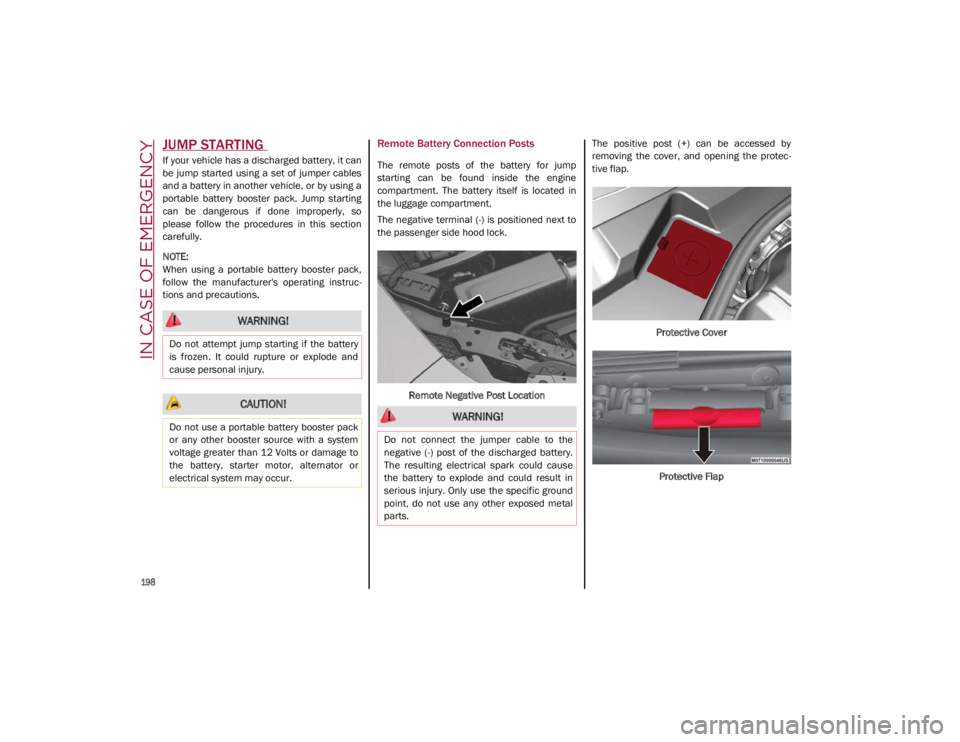
The remote posts of the battery for jump
starting can be found inside the engine
compartment. The battery itself is located in
the luggage compartment.
The negative terminal (-) is positioned next to
the passenger side hood lock.
Remote Negative Post Location The positive post (+) can be accessed by
removing the cover, and opening the protec
-
tive flap.
Protective CoverProtective Flap
WARNING!
Do not attempt jump starting if the battery
is frozen. It could rupture or explode and
cause personal injury.
CAUTION!
Do not use a portable battery booster pack
or any other booster source with a system
voltage greater than 12 Volts or damage to
the battery, starter motor, alternator or
electrical system may occur. WARNING!
Do not connect the jumper cable to the
negative (-) post of the discharged battery.
The resulting electrical spark could cause
the battery to explode and could result in
serious injury. Only use the specific ground
point, do not use any other exposed metal
parts.
21_GA_OM_EN_USC_t.book Page 198
Page 201 of 284
199
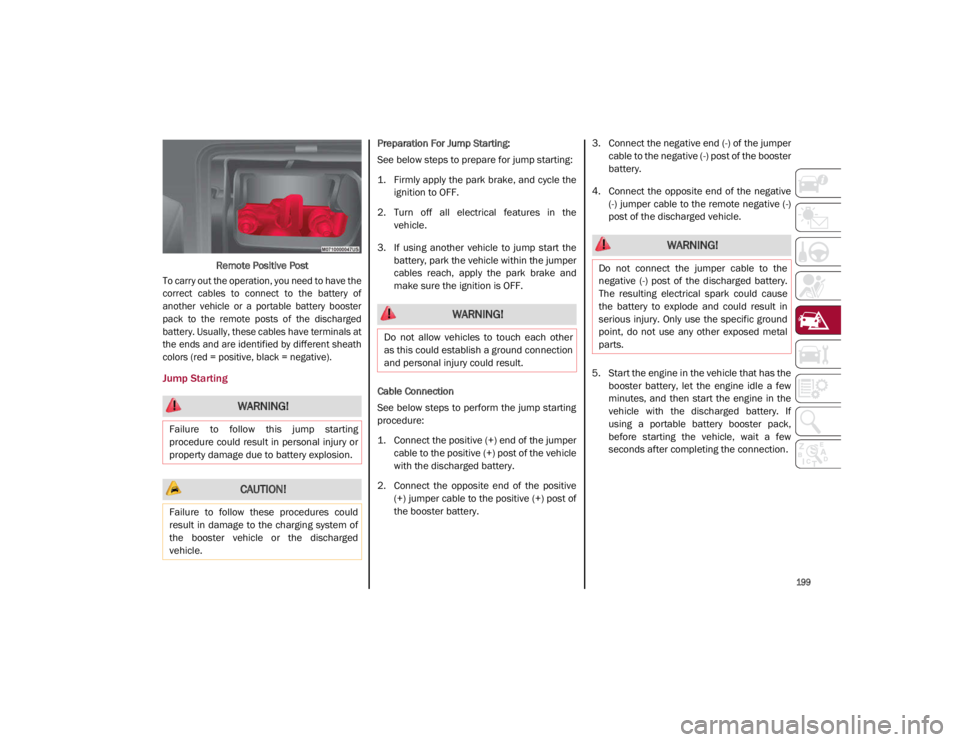
Remote Positive Post
To carry out the operation, you need to have the
correct cables to connect to the battery of
another vehicle or a portable battery booster
pack to the remote posts of the discharged
battery. Usually, these cables have terminals at
the ends and are identified by different sheath
colors (red = positive, black = negative).
Jump Starting
Preparation For Jump Starting:
See below steps to prepare for jump starting:
1. Firmly apply the park brake, and cycle the ignition to OFF.
2. Turn off all electrical features in the vehicle.
3. If using another vehicle to jump start the battery, park the vehicle within the jumper
cables reach, apply the park brake and
make sure the ignition is OFF.
Cable Connection
See below steps to perform the jump starting
procedure:
1. Connect the positive (+) end of the jumper cable to the positive (+) post of the vehicle
with the discharged battery.
2. Connect the opposite end of the positive (+) jumper cable to the positive (+) post of
the booster battery. 3. Connect the negative end (-) of the jumper
cable to the negative (-) post of the booster
battery.
4. Connect the opposite end of the negative (-) jumper cable to the remote negative (-)
post of the discharged vehicle.
5. Start the engine in the vehicle that has the booster battery, let the engine idle a few
minutes, and then start the engine in the
vehicle with the discharged battery. If
using a portable battery booster pack,
before starting the vehicle, wait a few
seconds after completing the connection.
WARNING!
Failure to follow this jump starting
procedure could result in personal injury or
property damage due to battery explosion.
CAUTION!
Failure to follow these procedures could
result in damage to the charging system of
the booster vehicle or the discharged
vehicle.
WARNING!
Do not allow vehicles to touch each other
as this could establish a ground connection
and personal injury could result.
WARNING!
Do not connect the jumper cable to the
negative (-) post of the discharged battery.
The resulting electrical spark could cause
the battery to explode and could result in
serious injury. Only use the specific ground
point, do not use any other exposed metal
parts.
21_GA_OM_EN_USC_t.book Page 199
Page 202 of 284
IN CASE OF EMERGENCY
200
Cable Disconnection
Once the engine is started, remove the
connection cables in reverse sequence, as
described below:
1. Disconnect the negative (-) jumper cablefrom the remote negative (-) post of the
discharged vehicle.
2. Disconnect the negative end (-) of the jumper cable from the negative (-) post of
the booster battery.
3. Disconnect the opposite end of the posi -
tive (+) jumper cable from the positive (+)
post of the booster battery.
4. Disconnect the positive (+) end of the jumper cable from the positive (+) post of
the vehicle with the discharged battery.
If frequent jump starting is required to start
your vehicle, you should have the battery and
charging system inspected at an authorized
dealer.Bump Starting
Never jump start the engine by pushing,
towing or coasting downhill.
NOTE:
You cannot start a vehicle with an automatic
transmission by pushing it.
IF YOUR ENGINE OVERHEATS
Engine overheating may occur in situations of
extreme environmental temperatures,
frequent engine stops/starts, or driving in
heavy traffic. If the engine becomes over -
heated, the Engine Temperature Warning
Light in the instrument cluster will illuminate
along with a dedicated message
Ú
page 73.
If the vehicle is overheating, it will need to be
serviced by an authorized dealer.
In any of the following situations, you can
reduce the potential for overheating by taking
the appropriate action.
On the highways — slow down.
In city traffic — while stopped, place the
transmission in NEUTRAL, but do not
increase engine idle speed.
NOTE:
There are steps that you can take to slow down
an impending overheat condition:
If your Air Conditioner (A/C) is on, turn it off.
The A/C system adds heat to the engine
cooling system and turning the A/C off can
help remove this heat.
You can also turn the temperature control
to maximum heat, the mode control to floor
and the blower control to high. This allows
the heater core to act as a supplement to
the radiator and aids in removing heat from
the engine cooling system.
CAUTION!
Accessories plugged into the vehicle power
outlets draw power from the vehicle’s
battery, even when not in use (i.e., cellular
phones, etc.). Eventually, if plugged in long
enough without engine operation, the
vehicle’s battery will discharge sufficiently
to degrade battery life and/or prevent the
engine from starting.
WARNING!
You or others can be badly burned by hot
engine coolant (antifreeze) or steam from
your radiator. If you see or hear steam
coming from under the hood, do not open
the hood until the radiator has had time to
cool. Never try to open a cooling system
pressure cap when the radiator or coolant
bottle is hot.
CAUTION!
Driving with a hot cooling system could
damage your vehicle. If temperature gauge
reads “H”, pull over and stop the vehicle.
Idle the vehicle with the air conditioner
turned off until the pointer drops back into
the normal range. If the pointer remains on
the “H”, turn the engine off immediately,
and call for service.
21_GA_OM_EN_USC_t.book Page 200
Page 206 of 284
204
SERVICING AND MAINTENANCE
Correct servicing permits the performance of
the vehicle to be maintained over time, as well
as limited running costs and safeguarding the
efficiency of the safety systems.
This chapter explains how.
SCHEDULED SERVICING
Correct servicing is crucial for guaranteeing a
long life for the vehicle under the best condi-
tions.
For this reason, Alfa Romeo has planned a
series of checks and services for your vehicle
at fixed intervals based on distance and time,
as described in the Scheduled Servicing Plan.
Before each service, it is always necessary to
carefully follow the instructions in the Sched -
uled Servicing Plan (e.g. periodically check
level of fluids, tire pressure, etc.).
Scheduled Servicing is offered by an autho -
rized dealer according to a set time schedule.
If, during each operation, in addition to the
ones scheduled, the need arises for further
replacements or repairs, these may be carried
out with the owner’s explicit consent only.
NOTE:
Scheduled Servicing intervals are required by
FCA US LLC. Failure to have them carried out
may invalidate the New Vehicle Limited
Warranty.
You are advised to inform an authorized
dealer of any small operating irregularities
without waiting for the next service.
Periodic Checks
Every month or every 600 miles (1,000 km) or
before long trips check and, if necessary, top
off:
Engine coolant level.
Brake fluid level (if insufficient, see an
authorized dealer as soon as possible).
Windshield washer fluid level.
Tire inflation pressure and condition.
Operation of lighting system (headlights,
direction indicators, hazard warning lights,
etc.).
Operation of windshield washing/wiping
system and positioning/wear of wiper
blades.
Inspect the CV/Universal joints.
Oil consumption of the engine depends on
conditions and driving style. For this reason,
the engine oil level must be checked every
1,860 miles (3,000 km), and top off if neces -
sary
Ú
page 213.
Heavy Usage Of The Vehicle
If the vehicle is used under one of the following
conditions:
Dusty roads.
Short, repeated journeys less than 4 miles
(7 km) at sub-zero outside temperatures.
Engine often idling or driving long distances
at low speeds or long periods of inactivity.
In the event of a long period of inactivity.
The following checks must be carried out more
often than indicated in the Scheduled
Servicing Plan:
Check cleanliness of hood and trunk locks,
cleanliness and lubrication of linkage.
Visually inspect conditions of: engine, trans -
mission, pipes and hoses (exhaust/fuel
system/brakes) and rubber elements
(sleeves/bushes, etc.).
Check battery charge and battery fluid level
(electrolyte).
Visually inspect conditions of the accessory
drive belts.
Check and, if necessary, change engine oil
and replace oil filter.
Check and, if necessary, replace cabin air
filter.
Check and, if necessary, replace engine air
cleaner.
Severe Duty All Models
Vehicles that are operated in a dusty and
off-road environment, or predominately at idle
or very low engine RPM are known as Severe
Duty vehicles. It is recommended that you
change engine oil at 4,000 miles (6,500 km)
or 350 hours of engine run time.
21_GA_OM_EN_USC_t.book Page 204