change time ALFA ROMEO GIULIA 2022 Owner's Manual
[x] Cancel search | Manufacturer: ALFA ROMEO, Model Year: 2022, Model line: GIULIA, Model: ALFA ROMEO GIULIA 2022Pages: 248, PDF Size: 9.71 MB
Page 139 of 248
137
System Intervention
Using information from the front camera, the
system implements two operating logics:
The first operating logic takes the driving style
into account, observing the road and detecting
to what extent the driver can continue driving
with few lane crossing events.
The second operating logic measures the time
spent behind the wheel with the vehicle speed
above 40 mph (60 km/h) and below 110 mph
(180 km/h). If the “Standard” option is
selected, in these conditions, the “Dozy Driver”
message may appear after three hours of
driving. If the “Early” option is selected and
these conditions occur, the “Dozy Driver”
message will be displayed after two hours of
driving.
NOTE:
If the conditions described above are not
detected continuously during the entire driving
period, the “Dozy Driver” message may be
displayed later than two or three hours. If the
driving style indicates that the driver is unable to
follow the road trajectory and respect the hori-
zontal lane markings, the red symbol will appear
on the instrument cluster display to suggest that
the driver should stop for a break. An audible
signal will also sound.
If the driver accepts the suggestion provided by
the system by pushing the MENU button on the
multifunction lever, the message will disappear
from the display and the symbol will be displayed
in the dedicated area of the instrument cluster
display until the next engine shutdown.
If the driver ignores the warning provided by the
system and does not stop, the message will
continue to remain on the display, along with the
symbol.
NOTE:
In the event of a DAA system failure, an amber
symbol will appear in the instrument cluster
display along with a dedicated message.
If the ABS activates, “ABS ACTIVE” will display
in place of the DAA symbol and will remain
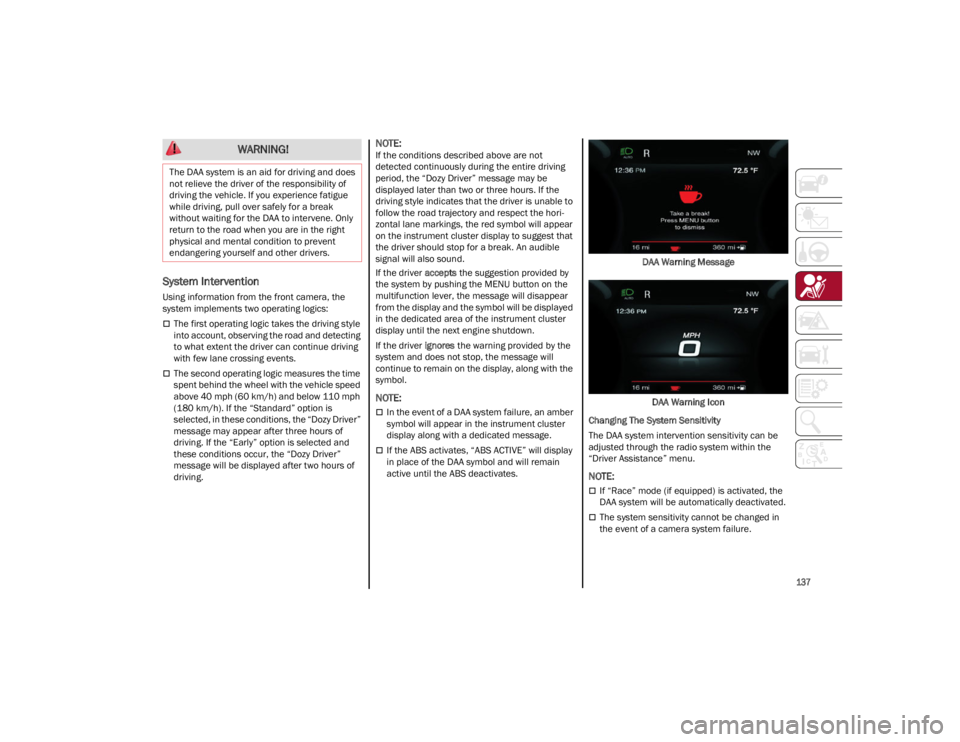
active until the ABS deactivates. DAA Warning Message
DAA Warning Icon
Changing The System Sensitivity
The DAA system intervention sensitivity can be
adjusted through the radio system within the
“Driver Assistance” menu.
NOTE:
If “Race” mode (if equipped) is activated, the
DAA system will be automatically deactivated.
The system sensitivity cannot be changed in
the event of a camera system failure.
WARNING!
The DAA system is an aid for driving and does
not relieve the driver of the responsibility of
driving the vehicle. If you experience fatigue
while driving, pull over safely for a break
without waiting for the DAA to intervene. Only
return to the road when you are in the right
physical and mental condition to prevent
endangering yourself and other drivers.
22_GA_OM_EN_USC_t.book Page 137
Page 140 of 248
SAFETY
138
FORWARD COLLISION WARNING (FCW)
S
YSTEM
This is a driving assistance system composed of
a radar located behind the front fascia/bumper
and a camera located in the center of the
windshield.
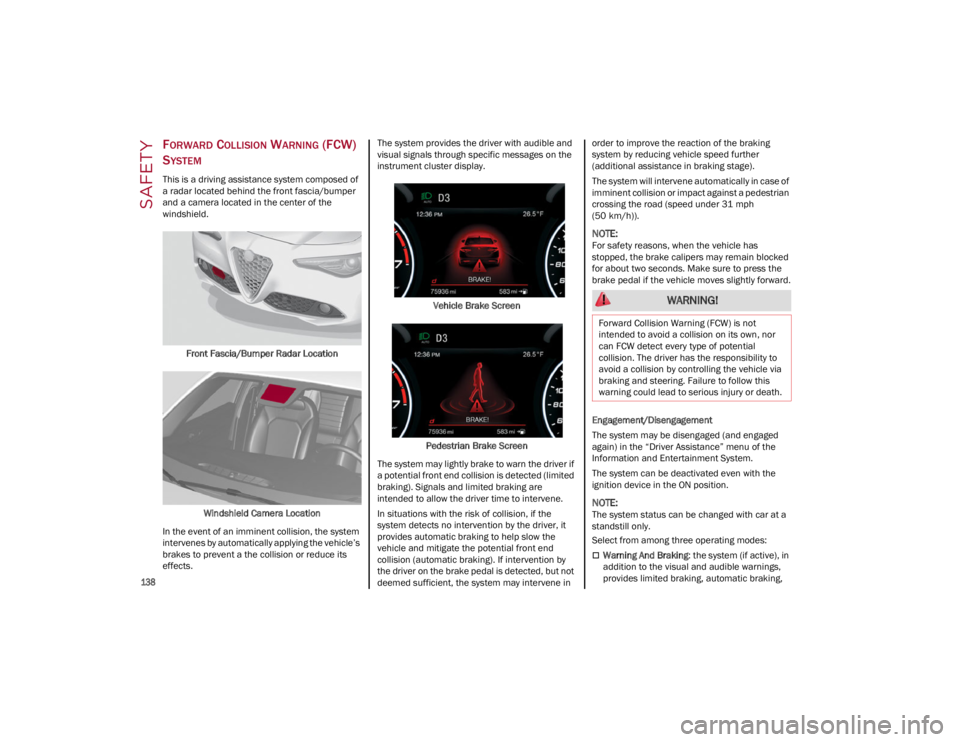
Front Fascia/Bumper Radar Location
Windshield Camera Location
In the event of an imminent collision, the system
intervenes by automatically applying the vehicle’s
brakes to prevent a the collision or reduce its
effects. The system provides the driver with audible and
visual signals through specific messages on the
instrument cluster display.
Vehicle Brake Screen
Pedestrian Brake Screen
The system may lightly brake to warn the driver if
a potential front end collision is detected (limited
braking). Signals and limited braking are
intended to allow the driver time to intervene.
In situations with the risk of collision, if the
system detects no intervention by the driver, it
provides automatic braking to help slow the
vehicle and mitigate the potential front end
collision (automatic braking). If intervention by
the driver on the brake pedal is detected, but not
deemed sufficient, the system may intervene in order to improve the reaction of the braking
system by reducing vehicle speed further
(additional assistance in braking stage).
The system will intervene automatically in case of
imminent collision or impact against a pedestrian
crossing the road (speed under 31 mph
(50 km/h)).
NOTE:
For safety reasons, when the vehicle has
stopped, the brake calipers may remain blocked
for about two seconds. Make sure to press the
brake pedal if the vehicle moves slightly forward.
Engagement/Disengagement
The system may be disengaged (and engaged
again) in the “Driver Assistance” menu of the
Information and Entertainment System.
The system can be deactivated even with the
ignition device in the ON position.
NOTE:
The system status can be changed with car at a
standstill only.
Select from among three operating modes:
Warning And Braking
: the system (if active), in
addition to the visual and audible warnings,
provides limited braking, automatic braking,
WARNING!
Forward Collision Warning (FCW) is not
intended to avoid a collision on its own, nor
can FCW detect every type of potential
collision. The driver has the responsibility to
avoid a collision by controlling the vehicle via
braking and steering. Failure to follow this
warning could lead to serious injury or death.
22_GA_OM_EN_USC_t.book Page 138
Page 141 of 248

139
and additional assistance in braking stage
where the driver does not brake sufficiently in
the event of a potential front-end collision.
Only Warning: the system (if active), does not
provide limited braking, but guarantees
automatic braking or additional assistance in
braking stage where the driver does not brake
at all or not sufficiently enough in the event of
a potential front-end collision.
Disabled : the system does not provide visual
and audible warnings, limited braking,
automatic braking, or additional assistance in
braking stage. The system will therefore
provide no indication of a possible collision.
Activation/Deactivation
The Forward Collision Warning system is
activated whenever the engine is started
regardless of what is shown on the radio system.
Following a deactivation, the system will not warn
the driver about the possible collision with the
preceding vehicle, regardless of the setting
selected with the radio system.
NOTE:
Each time the engine is started, the system is
activated regardless of what setting was selected
when the engine was turned off.
The system is active:
Each time the engine is started
In the radio system
When the ignition is in the ON position
When the vehicle speed is between 2 mph
(4 km/h) and 124 mph (200 km/h)
When the front seat belts are fastened
NOTE:
If the seat belts of the front seats are not correctly
fastened, the system will not intervene on the
braking system (only audible and visual signals
will be provided).
Changing The System Sensitivity
The sensitivity of the system can be changed
through the radio system menu, choosing from
one of the following three options: "Near",
"Medium" or "Far". Refer to the description in the
Information and Entertainment System Owner’s
Manual Supplement for how to change the
settings.
The default setting is "Medium". With this setting,
the system warns the driver of a possible collision
with the vehicle in front when that vehicle is at a
standard distance, between that of the other two
settings.
With the system sensitivity set to "Far", the
system will warn the driver of a possible collision
with the vehicle in front when that vehicle is at a
greater distance, thus providing the possibility of
acting on the brakes more lightly and gradually.
This setting provides the driver with the maximum
possible reaction time to prevent a potential
collision.
With the option set to "Near", the system will alert
the driver of a possible collision with the vehicle
in front when that vehicle is close. This setting
offers the driver a lower reaction time compared
to the "Medium" and "Far" settings, in the event of
a potential collision, but permits more dynamic
driving of the vehicle.
The system sensitivity setting is kept in the
memory when the engine is turned off. System Limited Operation Warning
If a dedicated message is displayed, a condition
limiting the system operation may have occurred.
The possible reasons of this limitation are if
something is blocking the camera view, or a fault
is present.
If an obstruction is signaled, clean the area of the
windshield.
Although the vehicle can still be driven in normal
conditions, the system may be not completely
available.
When the conditions limiting the system
functions end, this will go back to normal and
complete operation. Should the fault persist,
contact an authorized dealer.
System Failure Signaling
If the system turns off and a dedicated message
is shown on the display, it means that there is a
fault with the system.
In this case, it is still possible to drive the vehicle,
but you are advised to contact an authorized
dealer as soon as possible.
Radar Indication Not Available
If conditions are such that the radar cannot
detect obstacles correctly, the system is
deactivated and a dedicated message appears
on the display. This generally occurs in the event
of poor visibility, such as when it is snowing or
raining heavily.
The function of this system can also be
temporarily reduced due to obstructions such as
mud, dirt or ice on the fascia/bumper. In such
cases, a dedicated message will be shown on the
display and the system will be deactivated. This
message can sometimes appear in conditions of
high reflectivity (e.g. tunnels with reflective tiles or
22_GA_OM_EN_USC_t.book Page 139
Page 170 of 248
SAFETY
168
The best protection against carbon monoxide
entry into the vehicle body is a properly
maintained engine exhaust system.
Whenever a change is noticed in the sound of the
exhaust system, when exhaust fumes can be
detected inside the vehicle, or when the
underside or rear of the vehicle is damaged, have
an authorized dealer inspect the complete
exhaust system and adjacent body areas for
broken, damaged, deteriorated, or mispositioned
parts. Open seams or loose connections could
permit exhaust fumes to seep into the passenger
compartment. In addition, inspect the exhaust
system each time the vehicle is raised for
lubrication or oil change. Replace as required.CARBON MONOXIDE WARNINGS
WARNING!
Carbon monoxide (CO) in exhaust gases is
deadly. Follow the precautions below to
prevent carbon monoxide poisoning:
Do not inhale exhaust gases. They contain
carbon monoxide, a colorless and odorless
gas, which can kill. Never run the engine in a
closed area, such as a garage, and never sit
in a parked vehicle with the engine running
for an extended period. If the vehicle is
stopped in an open area with the engine
running for more than a short period, adjust
the ventilation system to force fresh, outside
air into the vehicle.
Guard against carbon monoxide with proper
maintenance. Have the exhaust system
inspected every time the vehicle is raised.
Have any abnormal conditions repaired
promptly. Until repaired, drive with all side
windows fully open.
22_GA_OM_EN_USC_t.book Page 168
Page 184 of 248
182
SERVICING AND MAINTENANCE
Correct servicing permits the performance of the
vehicle to be maintained over time, as well as
limited running costs and safeguarding the
efficiency of the safety systems.
This chapter explains how.
SCHEDULED SERVICING
Correct servicing is crucial for guaranteeing a
long life for the vehicle under the best conditions.
For this reason, Alfa Romeo has planned a series
of checks and services for your vehicle at fixed
intervals based on distance and time, as
described in the Scheduled Servicing Plan.
Before each service, it is always necessary to
carefully follow the instructions in the Scheduled
Servicing Plan (e.g. periodically check level of
fluids, tire pressure, etc.).
Scheduled Servicing is offered by an authorized
dealer according to a set time schedule. If, during
each operation, in addition to the ones
scheduled, the need arises for further
replacements or repairs, these may be carried
out with the owner’s explicit consent only.
NOTE:
Scheduled Servicing intervals are required by the
manufacturer. Failure to have them carried out
may invalidate the New Vehicle Limited Warranty.
You are advised to inform an authorized dealer of
any small operating irregularities without waiting
for the next service.
PERIODIC CHECKS
Every month or every 600 miles (1,000 km) or
before long trips check and, if necessary, top off:
Engine coolant level.
Brake fluid level (if insufficient, see an
authorized dealer as soon as possible).
Windshield washer fluid level.
Tire inflation pressure and condition.
Operation of lighting system (headlights,
direction indicators, hazard warning lights,
etc.).
Operation of windshield washing/wiping
system and positioning/wear of wiper blades.
Inspect the CV/Universal joints.
Oil consumption of the engine depends on
conditions and driving style. For this reason, the
engine oil level must be checked every
1,860 miles (3,000 km), and top off if necessary
Ú
page 188.
HEAVY USAGE OF THE VEHICLE
If the vehicle is used under one of the following
conditions:
Dusty roads.
Short, repeated journeys less than 4 miles
(7 km) at sub-zero outside temperatures.
Engine often idling or driving long distances at
low speeds or long periods of inactivity.
In the event of a long period of inactivity. The following checks must be carried out more
often than indicated in the Scheduled Servicing
Plan:
Check cleanliness of hood and trunk locks,
cleanliness and lubrication of linkage.
Visually inspect conditions of: engine,
transmission, pipes and hoses (exhaust/fuel
system/brakes) and rubber elements
(sleeves/bushes, etc.).
Check battery charge and battery fluid level
(electrolyte).
Visually inspect conditions of the accessory
drive belts.
Check and, if necessary, change engine oil and
replace oil filter.
Check and, if necessary, replace cabin air
filter.
Check and, if necessary, replace engine air
cleaner.
Severe Duty All Models
Vehicles that are operated in a dusty and off-road
environment, or predominately at idle or very low
engine RPM are known as Severe Duty vehicles.
It is recommended that you change engine oil at
4,000 miles (6,500 km) or 350 hours of engine
run time.
22_GA_OM_EN_USC_t.book Page 182
Page 197 of 248
195
(Continued)
ENGINE COOLING SYSTEM
Coolant Check
Your vehicle has two cooling systems and they
both need to be checked to ensure they are at
proper fill levels.
Check the engine coolant and intercooler coolant
level every oil change or before long trips.
If there are impurities in the engine coolant, the
system must be drained, flushed and refilled:
contact an authorized dealer.
Check the front part of the condenser for any
buildup of insects, leaves or other debris. Should
it be dirty, clean it by spraying delicately with
water.
Check the hoses of the engine/intercooler
cooling system to ensure that the rubber has not
deteriorated and that there are no cracks, tears,
cuts or obstructions in the expansion tank side
and radiator side connectors. Should there be
any doubt regarding leaks from the system (e.g. if
frequent top ups are required), have the seal
checked at an authorized dealer.
With the engine off and at normal operating
temperature, check that the cooling system
radiator cap is closed properly.
NOTE:
Before removing the coolant reservoir cap, wait
for the system to cool down.
Topping Up / Draining / Flushing The Engine/
Intercooler Coolant
If the engine coolant (antifreeze) is dirty, have
cleaning and flushing carried out at an authorized
dealer.
For the correct servicing intervals
Ú
page 182.
NOTE:
For topping up, use a fluid with the same
characteristics as those indicated on
Ú
page 233.
Do not use pure water, alcohol-based coolants,
corrosions inhibitors or additional anti-rust
products because they may be incompatible
with the engine coolant and cause the clogging
of the radiator. The use of propylene
glycol-based coolant is also not recommended.
Use care when filling under hood fluids such as
engine oil, windshield washer fluid, antifreeze
etc. to minimize spillage onto the top of the
engine. Any excess fluid that is spilled onto the
top of the engine should be removed using
compressed air or an absorbent cloth.
WARNING!
Exhaust gases can injure or kill. They contain
carbon monoxide (CO), which is colorless and
odorless. Breathing it can make you
unconscious and can eventually poison you.
A hot exhaust system can start a fire if you
park over materials that can burn. Such
materials might be grass or leaves coming
into contact with your exhaust system. Do not
park or operate your vehicle in areas where
your exhaust system can contact anything
that can burn.
WARNING!
You or others can be badly burned by hot
engine coolant (antifreeze) or steam from
your radiator. If you see or hear steam
coming from under the hood, do not open the
hood until the radiator has had time to cool.
Never open a cooling system pressure cap
when the radiator or coolant bottle is hot.
Keep hands, tools, clothing, and jewelry away
from the radiator cooling fan when the hood
is raised. The fan starts automatically and
may start at any time, whether the engine is
running or not.
When working near the radiator cooling fan,
disconnect the fan motor lead or turn the
ignition to the OFF position. The fan is
temperature controlled and can start at any
time the ignition is in the ON position.
WARNING!
Do not open hot engine cooling system.
Never add engine coolant (antifreeze) when
the engine is overheated. Do not loosen or
remove the cap to cool an overheated
engine. Heat causes pressure to build up in
the cooling system. To prevent scalding or
injury, do not remove the pressure cap while
the system is hot or under pressure.
Do not use a pressure cap other than the one
specified for your vehicle. Personal injury or
engine damage may result.
WARNING!
22_GA_OM_EN_USC_t.book Page 195
Page 199 of 248
197
(Continued)
Frequency Of Oil Changes
In normal vehicle operating conditions, it is not
necessary to change the transmission oil.
REPLACING THE BATTERY
If necessary, replace the battery with another
battery with the same specifications. It is advised
to contact an authorized dealer for replacement.
NOTE:
Each time the 12V battery is reconnected, cycle
the steering wheel all the way to the left. Then
cycle the steering wheel all the way to the right to
allow the steering angle sensor to learn the
steering angle thresholds. Follow the battery manufacturer's instructions for
maintenance.
NOTE:
It will not be possible to open the trunk with a key
or by pressing the button in the passenger
compartment when the battery is disconnected.
So, always position the manual trunk opening
strap on the trunk lock before disconnecting the
battery
Ú
page 220.
FUSES
General Information
The fuses protect electrical systems against
excessive current.
When a device does not work, you must check the
electrical circuit inside of the fuse for a break/
melt.
Also, please be aware that using power outlets for
extended periods of time with the engine off may
result in vehicle battery discharge.
Blade Fuses
CAUTION!
Do not use chemical flushes in your
transmission as the chemicals can damage
your transmission components. Such damage
is not covered by the New Vehicle Limited
Warranty.
CAUTION!
If a transmission fluid leak occurs, visit an
authorized dealer immediately. Severe
transmission damage may occur. An
authorized dealer has the proper tools to
adjust the fluid level accurately.
WARNING!
When replacing a blown fuse, always use an
appropriate replacement fuse with the same
amp rating as the original fuse. Never
replace a fuse with another fuse of higher
amp rating. Never replace a blown fuse with
metal wires or any other material. Do not
place a fuse inside a circuit breaker cavity or
vice versa. Failure to use proper fuses may
result in serious personal injury, fire and/or
property damage.
Before replacing a fuse, make sure that the
ignition is off and that all the other services
are switched off and/or disengaged.
If the replaced fuse blows again, contact an
authorized dealer.
If a general protection fuse for safety
systems (air bag system, braking system),
power unit systems (engine system,
transmission system) or steering system
blows, contact an authorized dealer.
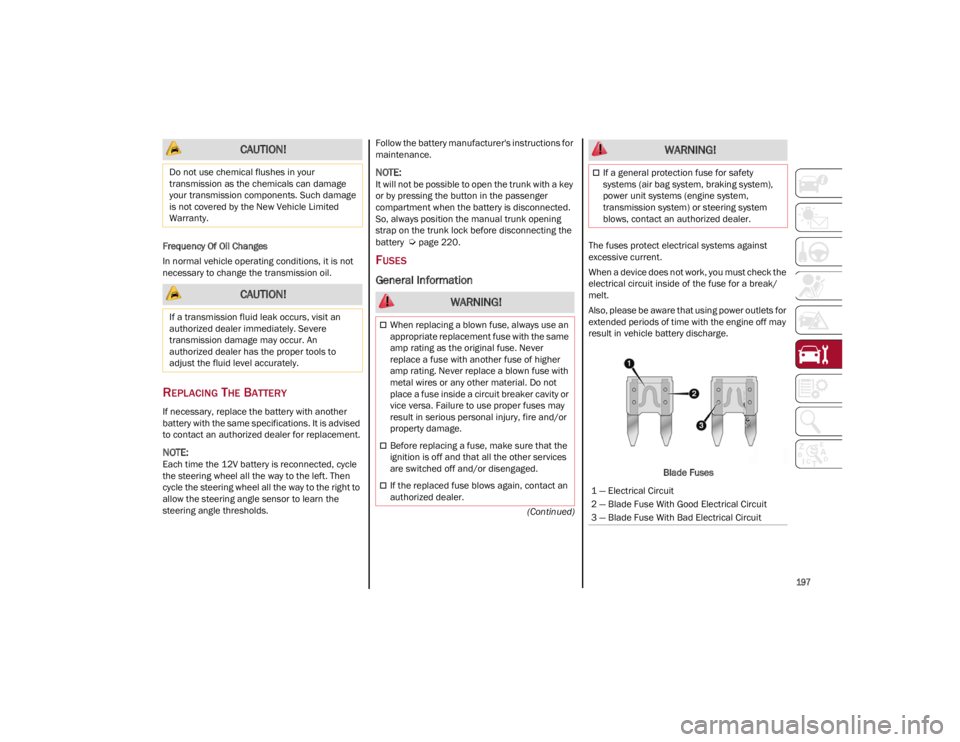
1 — Electrical Circuit
2 — Blade Fuse With Good Electrical Circuit
3 — Blade Fuse With Bad Electrical Circuit
WARNING!
22_GA_OM_EN_USC_t.book Page 197
Page 243 of 248

241
Instrument Cluster ....................................... 64Descriptions ............................................. 74
Display ...................................................... 66
Instrument Panel Features ................................................... 64
Interior And Instrument Lights ............. 45, 46
Interior Lights ...................................... 44, 204
Interiors (Cleaning)..................................... 222
Internal Equipment ...................................... 55
J
Jump Starting ............................................. 175
K
Keyless Enter 'n Go™ ................................... 26 Passive Entry ............................................ 26
Keys .............................................................. 19
L
Lane Change And Turn Signals ................... 44
Lane Change Assist...................................... 44
LaneSense ..................................................117
Lap/Shoulder Belts ....................................145
Latches .......................................................167
Leaks, Fluid ................................................167
Life Of Tires.................................................215
Light Bulbs ..................................................167
Lights .......................................................... 167 Air Bag ...........................................149, 166
Ambient .................................................... 45
Brake Warning .................................. 70, 72Courtesy/Reading .................................... 45Daytime Running ..................................... 42
Electronic Stability Program (ESP) Indicator ............................................... 75 Exterior ............................................. 42, 167
Fog.............................................................44
Hazard Warning Flasher ....................... 169
High Beam/Low Beam Select .................42
Interior.......................................................44
Low Fuel ....................................................76
Malfunction Indicator (Check Engine) ....73
Park .................................................... 43, 74
Seat Belt Reminder ..................................71
Turn Signals .............................. 44, 74, 167
Types Of Bulbs ....................................... 203
Warning Instrument Cluster Descriptions .................................. 74, 75
Loading Vehicle ......................................... 125 Tires........................................................ 209
Locks Automatic Door.........................................27
Child Protection ........................................ 27
M
Maintenance .................................................60
Malfunction Indicator Light
(Check Engine)..............................................73
Manual Service ................................................... 238
Memory Feature (Memory Seats) ................30
Memory Seat.................................................30
Methanol .................................................... 230
Mirrors Automatic Dimming..................................37
Electric Powered.......................................38
Exterior Folding.........................................38
Heated ...................................................... 38
Rearview ...................................................37
Vanity ..................................................... 204 O
Occupant Restraints .................................. 143
Oil Pressure Light ......................................... 75
Oil, Engine
Pressure Warning Light ........................... 75
Onboard Diagnostic System........................ 79
Opener, Garage Door (Homelink) ............... 39
Operator Manual Owner's Manual ..................................... 238
P
Paintwork (Cleaning And Maintenance) ... 222
Panic Brake Assist (PBA) System.............. 131
ParkSense System ..................................... 115
Passive Entry ................................................ 26
Performance (Top Speed) ......................... 235
Pets ............................................................. 166
Pinch Protection ........................................... 59
Placard, Tire And Loading Information ..... 209
Power Deck Lid Release ..................................... 61
Seats ........................................................ 33
Sunroof..................................................... 58
Power Seats Forward ..............................................31, 33
Rearward............................................31, 33
Recline ...............................................31, 34
Power Supply.............................................. 225
Pregnant Women And Seat Belts ............. 148
Pretensioners Seat Belts ............................................... 148
Programmable Settings ............................... 69
Prolonged Vehicle Inactivity ...................... 220
22_GA_OM_EN_USC_t.book Page 241