brake ALFA ROMEO GIULIA 2022 Workshop Manual
[x] Cancel search | Manufacturer: ALFA ROMEO, Model Year: 2022, Model line: GIULIA, Model: ALFA ROMEO GIULIA 2022Pages: 248, PDF Size: 9.71 MB
Page 140 of 248
SAFETY
138
FORWARD COLLISION WARNING (FCW)
S
YSTEM
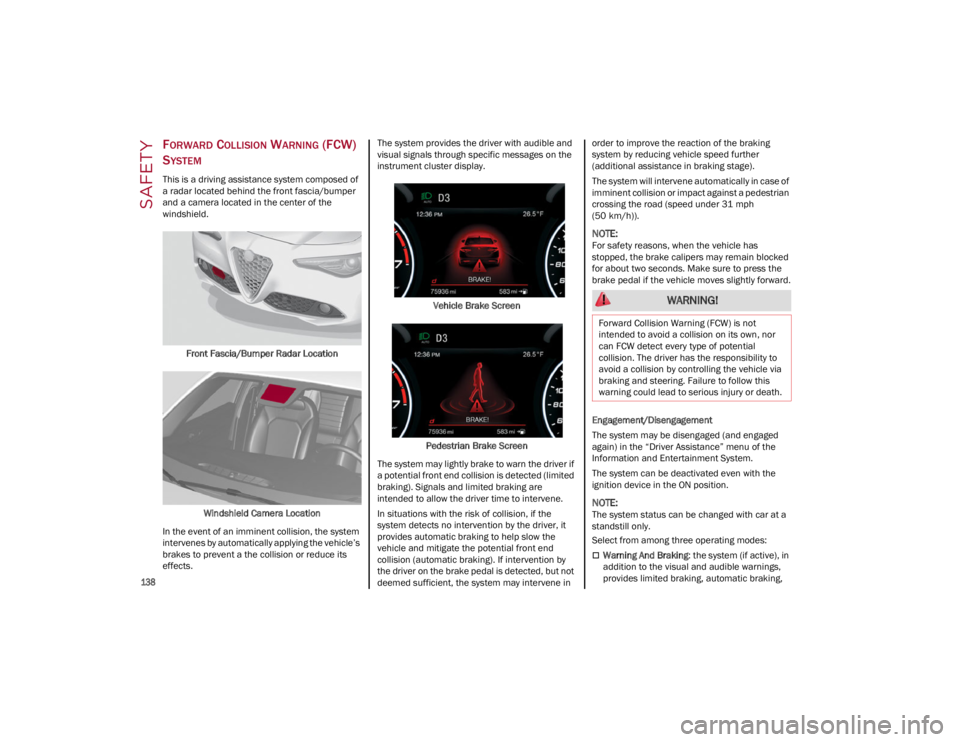
This is a driving assistance system composed of
a radar located behind the front fascia/bumper
and a camera located in the center of the
windshield.
Front Fascia/Bumper Radar Location
Windshield Camera Location
In the event of an imminent collision, the system
intervenes by automatically applying the vehicle’s
brakes to prevent a the collision or reduce its
effects. The system provides the driver with audible and
visual signals through specific messages on the
instrument cluster display.
Vehicle Brake Screen
Pedestrian Brake Screen
The system may lightly brake to warn the driver if
a potential front end collision is detected (limited
braking). Signals and limited braking are
intended to allow the driver time to intervene.
In situations with the risk of collision, if the
system detects no intervention by the driver, it
provides automatic braking to help slow the
vehicle and mitigate the potential front end
collision (automatic braking). If intervention by
the driver on the brake pedal is detected, but not
deemed sufficient, the system may intervene in order to improve the reaction of the braking
system by reducing vehicle speed further
(additional assistance in braking stage).
The system will intervene automatically in case of
imminent collision or impact against a pedestrian
crossing the road (speed under 31 mph
(50 km/h)).
NOTE:
For safety reasons, when the vehicle has
stopped, the brake calipers may remain blocked
for about two seconds. Make sure to press the
brake pedal if the vehicle moves slightly forward.
Engagement/Disengagement
The system may be disengaged (and engaged
again) in the “Driver Assistance” menu of the
Information and Entertainment System.
The system can be deactivated even with the
ignition device in the ON position.
NOTE:
The system status can be changed with car at a
standstill only.
Select from among three operating modes:
Warning And Braking
: the system (if active), in
addition to the visual and audible warnings,
provides limited braking, automatic braking,
WARNING!
Forward Collision Warning (FCW) is not
intended to avoid a collision on its own, nor
can FCW detect every type of potential
collision. The driver has the responsibility to
avoid a collision by controlling the vehicle via
braking and steering. Failure to follow this
warning could lead to serious injury or death.
22_GA_OM_EN_USC_t.book Page 138
Page 141 of 248

139
and additional assistance in braking stage
where the driver does not brake sufficiently in
the event of a potential front-end collision.
Only Warning: the system (if active), does not
provide limited braking, but guarantees
automatic braking or additional assistance in
braking stage where the driver does not brake
at all or not sufficiently enough in the event of
a potential front-end collision.
Disabled : the system does not provide visual
and audible warnings, limited braking,
automatic braking, or additional assistance in
braking stage. The system will therefore
provide no indication of a possible collision.
Activation/Deactivation
The Forward Collision Warning system is
activated whenever the engine is started
regardless of what is shown on the radio system.
Following a deactivation, the system will not warn
the driver about the possible collision with the
preceding vehicle, regardless of the setting
selected with the radio system.
NOTE:
Each time the engine is started, the system is
activated regardless of what setting was selected
when the engine was turned off.
The system is active:
Each time the engine is started
In the radio system
When the ignition is in the ON position
When the vehicle speed is between 2 mph
(4 km/h) and 124 mph (200 km/h)
When the front seat belts are fastened
NOTE:
If the seat belts of the front seats are not correctly
fastened, the system will not intervene on the
braking system (only audible and visual signals
will be provided).
Changing The System Sensitivity
The sensitivity of the system can be changed
through the radio system menu, choosing from
one of the following three options: "Near",
"Medium" or "Far". Refer to the description in the
Information and Entertainment System Owner’s
Manual Supplement for how to change the
settings.
The default setting is "Medium". With this setting,
the system warns the driver of a possible collision
with the vehicle in front when that vehicle is at a
standard distance, between that of the other two
settings.
With the system sensitivity set to "Far", the
system will warn the driver of a possible collision
with the vehicle in front when that vehicle is at a
greater distance, thus providing the possibility of
acting on the brakes more lightly and gradually.
This setting provides the driver with the maximum
possible reaction time to prevent a potential
collision.
With the option set to "Near", the system will alert
the driver of a possible collision with the vehicle
in front when that vehicle is close. This setting
offers the driver a lower reaction time compared
to the "Medium" and "Far" settings, in the event of
a potential collision, but permits more dynamic
driving of the vehicle.
The system sensitivity setting is kept in the
memory when the engine is turned off. System Limited Operation Warning
If a dedicated message is displayed, a condition
limiting the system operation may have occurred.
The possible reasons of this limitation are if
something is blocking the camera view, or a fault
is present.
If an obstruction is signaled, clean the area of the
windshield.
Although the vehicle can still be driven in normal
conditions, the system may be not completely
available.
When the conditions limiting the system
functions end, this will go back to normal and
complete operation. Should the fault persist,
contact an authorized dealer.
System Failure Signaling
If the system turns off and a dedicated message
is shown on the display, it means that there is a
fault with the system.
In this case, it is still possible to drive the vehicle,
but you are advised to contact an authorized
dealer as soon as possible.
Radar Indication Not Available
If conditions are such that the radar cannot
detect obstacles correctly, the system is
deactivated and a dedicated message appears
on the display. This generally occurs in the event
of poor visibility, such as when it is snowing or
raining heavily.
The function of this system can also be
temporarily reduced due to obstructions such as
mud, dirt or ice on the fascia/bumper. In such
cases, a dedicated message will be shown on the
display and the system will be deactivated. This
message can sometimes appear in conditions of
high reflectivity (e.g. tunnels with reflective tiles or
22_GA_OM_EN_USC_t.book Page 139
Page 142 of 248
SAFETY
140
ice or snow). When the conditions limiting the
system functions end, it will go back to normal
and complete operation.
In certain cases, this dedicated message could
be displayed when the radar is not detecting any
vehicles or objects within its view range.
If atmospheric conditions are not the reason
behind this message, check if the sensor is dirty.
It could be necessary to clean or remove any
obstructions in the area.
If the message appears frequently, even in the
absence of atmospheric conditions such as
snow, rain, mud or other obstructions, contact an
authorized dealer for a sensor alignment check.
In the absence of visible obstructions, manually
removing the decorative cover trim and cleaning
the radar surface could be required. Have this
operation performed at an authorized dealer.
NOTE:
It is recommended that you do not install devices,
accessories, or aerodynamic attachments in
front of the sensor or darken it in any way, as this
can compromise the correct functioning of the
system.
Frontal Collision Alarm With Active Braking
If this function is selected, the brakes are
operated to reduce the speed of the vehicle in the
event of potential collision.
This function applies an additional braking
pressure if the braking pressure applied by the
driver does not suffice to prevent potential
collision.
The function is active with speed above 2 mph
(4 km/h).
NOTE:
When using an automatic car wash it is recom-
mended to deactivate the system through the
settings of the radio system. The system may
detect the presence of a car, a wall or another
obstacle and activate.
Driving In Special Conditions
In certain driving conditions, system intervention
might be unexpected or delayed. The driver must
therefore be very careful, keeping control of the
vehicle.
Driving close to a bend.
The vehicle ahead is leaving a roundabout.
Vehicles with small dimensions and/or not
aligned in the driving lane.
Lane change by other vehicles.
Vehicles traveling at right angles to the vehicle.
NOTE:
In particularly complex traffic conditions, the
driver can deactivate the system manually
through the radio system.
If the driver presses the brake pedal fully or
makes an excessive steering maneuver during
system operation, the automatic braking
function may deactivate (e.g. to allow a
possible maneuver to avoid the obstacle).
The FCW system is automatically deactivated
when operating in race mode and a warning
message will be displayed on the instrument
cluster
Ú
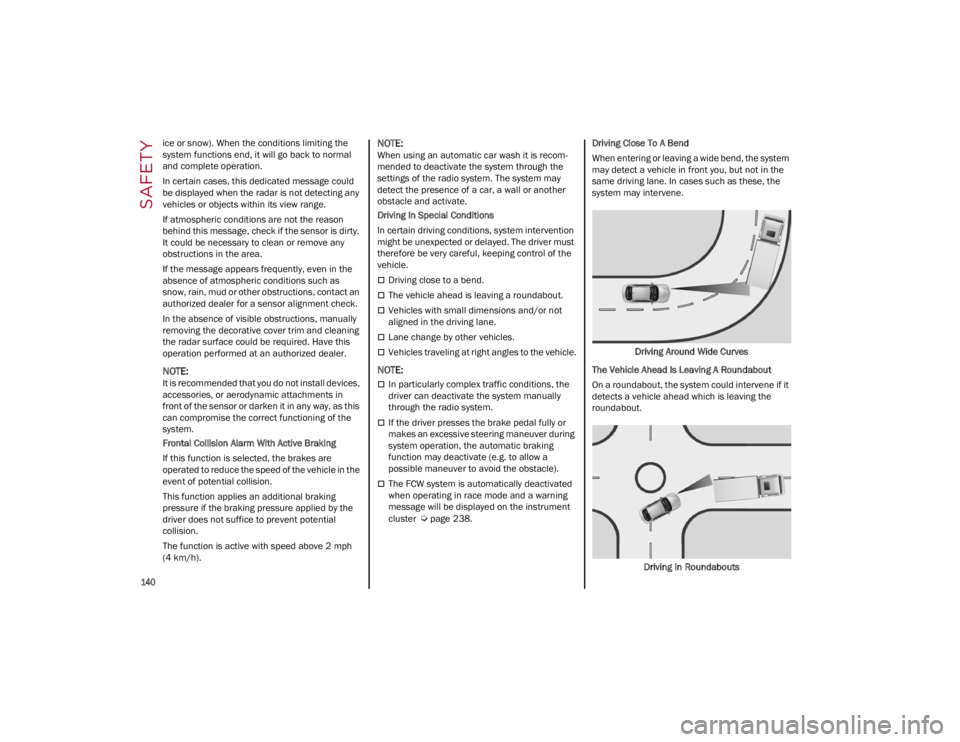
page 238. Driving Close To A Bend
When entering or leaving a wide bend, the system
may detect a vehicle in front you, but not in the
same driving lane. In cases such as these, the
system may intervene.
Driving Around Wide Curves
The Vehicle Ahead Is Leaving A Roundabout
On a roundabout, the system could intervene if it
detects a vehicle ahead which is leaving the
roundabout.
Driving In Roundabouts
22_GA_OM_EN_USC_t.book Page 140
Page 157 of 248
155
NOTE:
Air bag covers may not be obvious in the
interior trim, but they will open during air bag
deployment.
After any collision, the vehicle should be taken
to an authorized dealer immediately.
Enhanced Accident Response System
In the event of an impact, if the communication
network remains intact, and the power remains
intact, depending on the nature of the event, the
Occupant Restraint Controller (ORC) will
determine whether to have the Enhanced
Accident Response System perform the following
functions:
Cut off fuel to the engine (if equipped)
Cut off battery power to the electric motor (if
equipped)
Flash hazard lights as long as the battery has
power
Turn on the interior lights, which remain on as
long as the battery has power or for
15 minutes from the intervention of the
Enhanced Accident Response System
Unlock the power door locksYour vehicle may also be designed to perform any
of these other functions in response to the
Enhanced Accident Response System:
Turn off the Fuel Filter Heater, Turn off the
HVAC Blower Motor, Close the HVAC
Circulation Door
Cut off battery power to the:
• Engine
• Electric Motor (if equipped)
• Electric power steering
• Brake booster
• Electric park brake
• Automatic transmission gear selector
• Horn
• Front wiper
• Headlamp washer pump (if equipped)
NOTE:
After an accident, remember to cycle the ignition
to the OFF position and remove the key from the
ignition switch to avoid draining the battery. Care -
fully check the vehicle for fuel leaks in the engine
compartment and on the ground near the engine
compartment and fuel tank before resetting the
system and starting the engine. If there are no fuel leaks or damage to the vehicle electrical
devices (e.g. headlights) after an accident, reset
the system by following the procedure described
below. If you have any doubt, contact an autho
-
rized dealer.
Enhanced Accident Response System
Reset Procedure
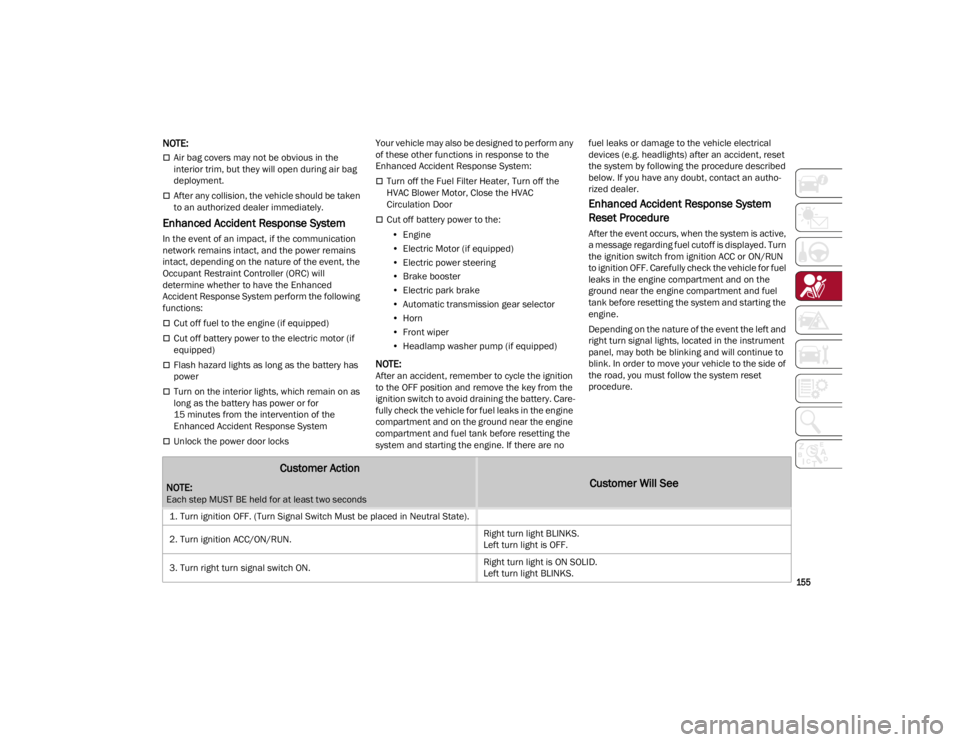
After the event occurs, when the system is active,
a message regarding fuel cutoff is displayed. Turn
the ignition switch from ignition ACC or ON/RUN
to ignition OFF. Carefully check the vehicle for fuel
leaks in the engine compartment and on the
ground near the engine compartment and fuel
tank before resetting the system and starting the
engine.
Depending on the nature of the event the left and
right turn signal lights, located in the instrument
panel, may both be blinking and will continue to
blink. In order to move your vehicle to the side of
the road, you must follow the system reset
procedure.
Customer Action
NOTE:
Each step MUST BE held for at least two seconds
Customer Will See
1. Turn ignition OFF. (Turn Signal Switch Must be placed in Neutral State).
2. Turn ignition ACC/ON/RUN. Right turn light BLINKS.
Left turn light is OFF.
3. Turn right turn signal switch ON. Right turn light is ON SOLID.
Left turn light BLINKS.
22_GA_OM_EN_USC_t.book Page 155
Page 159 of 248
157
Maintaining Your Air Bag System Event Data Recorder (EDR)
This vehicle is equipped with an event data
recorder (EDR). The main purpose of an EDR is to
record, in certain crash or near crash-like
situations, such as an air bag deployment or
hitting a road obstacle, data that will assist in
understanding how a vehicle’s systems
performed. The EDR is designed to record data
related to vehicle dynamics and safety systems
for a short period of time, typically 30 seconds or
less. The EDR in this vehicle is designed to record
such data as:
How various systems in your vehicle were
operating;
Whether or not the driver and passenger safety
belts were buckled/fastened;
How far (if at all) the driver was depressing the
accelerator and/or brake pedal; and,
How fast the vehicle was traveling.
These data can help provide a better
understanding of the circumstances in which
crashes and injuries occur.
NOTE:
EDR data are recorded by your vehicle only if a
non-trivial crash situation occurs; no data are
recorded by the EDR under normal driving condi -
tions and no personal data (e.g., name, gender,
age, and crash location) are recorded. However,
other parties, such as law enforcement, could
combine the EDR data with the type of personally
identifying data routinely acquired during a crash
investigation. To read data recorded by an EDR, special
equipment is required, and access to the vehicle
or the EDR is needed. In addition to the vehicle
manufacturer, other parties, such as law
enforcement, that have the special equipment,
can read the information if they have access to
the vehicle or the EDR.
CHILD RESTRAINTS
Everyone in your vehicle needs to be buckled up
at all times, including babies and children. Every
state in the United States, and every Canadian
province, requires that small children ride in
proper restraint systems. This is the law, and you
can be prosecuted for ignoring it.
Children 12 years or younger should ride properly
buckled up in a rear seat, if available. According
to crash statistics, children are safer when
properly restrained in the rear seats rather than
in the front.
There are different sizes and types of restraints
for children from newborn size to the child almost
large enough for an adult safety belt. Always
check the child seat Owner’s Manual to make
sure you have the correct seat for your child.
Carefully read and follow all the instructions and
WARNING!
Modifications to any part of the air bag
system could cause it to fail when you need
it. You could be injured if the air bag system
is not there to protect you. Do not modify the
components or wiring, including adding any
kind of badges or stickers to the steering
wheel hub trim cover or the upper passenger
side of the instrument panel. Do not modify
the front fascia/bumper, vehicle body
structure, or add aftermarket side steps or
running boards.
It is dangerous to try to repair any part of the
air bag system yourself. Be sure to tell
anyone who works on your vehicle that it has
an air bag system.
Do not attempt to modify any part of your air
bag system. The air bag may inflate
accidentally or may not function properly if
modifications are made. Take your vehicle to
an authorized dealer for any air bag system
service. If your seat, including your trim cover
and cushion, needs to be serviced in any way
(including removal or loosening/tightening of
seat attachment bolts), take the vehicle to
an authorized dealer. Only manufacturer
approved seat accessories may be used. If it
is necessary to modify the air bag system for
persons with disabilities, contact an
authorized dealer.
WARNING!
In a collision, an unrestrained child can
become a projectile inside the vehicle. The
force required to hold even an infant on your
lap could become so great that you could not
hold the child, no matter how strong you are.
The child and others could be badly injured or
killed. Any child riding in your vehicle should be
in a proper restraint for the child’s size.
22_GA_OM_EN_USC_t.book Page 157
Page 168 of 248
SAFETY
166
(Continued)
TRANSPORTING PETS
Air Bags deploying in the front seat could harm
your pet. An unrestrained pet will be thrown about
and possibly injured, or injure a passenger during
panic braking or in a collision.
Pets should be restrained in the rear seat (if
equipped) in pet harnesses or pet carriers that
are secured by seat belts.
CONNECTED VEHICLES
Privacy of any wireless and wired communi-
cations cannot be assured. Third parties may
unlawfully intercept information and private
communications without your consent. For
further information, refer to “Data Collection &
Privacy” in your Uconnect Owner’s Manual
Supplement or “Onboard Diagnostic System
(OBD II) Cybersecurity”
Ú
page 79.
SAFETY CHECKS YOU SHOULD MAKE
I
NSIDE THE VEHICLE
Seat Belts
Inspect the seat belt system periodically,
checking for cuts, frays, and loose parts.
Damaged parts must be replaced immediately.
Do not disassemble or modify the system.
If your vehicle is involved in a collision, or if you
have questions regarding the seat belt or
retractor conditions, take your vehicle to an
authorized FCA dealer or authorized FCA Certified
Collision Care Program facility for inspection.
Air Bag Warning Light
The Air Bag Warning Light will turn on for
four to eight seconds as a bulb check
when the ignition switch is first turned
to ON/RUN. If the light is either not on
during starting, stays on, or turns on while driving,
have the system inspected at an authorized
dealer as soon as possible. After the bulb check,
this light will illuminate with a single chime when
a fault with the Air Bag System has been
detected. It will stay on until the fault is removed. If the light comes on intermittently or remains on
while driving, have an authorized dealer service
the vehicle immediately
Ú
page 143.
Defroster
Check operation by selecting the defrost mode
and place the blower control on high speed. You
should be able to feel the air directed against the
windshield. See an authorized dealer for service
if your defroster is inoperable.
Floor Mat Safety Information
Always use floor mats designed to fit your vehicle.
Only use a floor mat that does not interfere with
the operation of the accelerator, brake or clutch
pedals. Only use a floor mat that is securely
attached using the floor mat fasteners so it
cannot slip out of position and interfere with the
accelerator, brake or clutch pedals or impair safe
operation of your vehicle in other ways.
It is extremely dangerous to ride in a cargo
area, inside or outside of a vehicle. In a
collision, people riding in these areas are
more likely to be seriously injured or killed.
Do not allow people to ride in any area of
your vehicle that is not equipped with seats
and seat belts.
Be sure everyone in your vehicle is in a seat
and using a seat belt properly.
WARNING! WARNING!
It is not possible to know or to predict all of the
possible outcomes if your vehicle’s systems
are breached. It may be possible that vehicle
systems, including safety related systems,
could be impaired or a loss of vehicle control
could occur that may result in an accident
involving serious injury or death.
WARNING!
An improperly attached, damaged, folded, or
stacked floor mat, or damaged floor mat
fasteners may cause your floor mat to
interfere with the accelerator, brake, or clutch
pedals and cause a loss of vehicle control. To
prevent SERIOUS INJURY or DEATH:
ALWAYS securely attach your floor
mat using the floor mat fasteners. DO
NOT install your floor mat upside down
or turn your floor mat over. Lightly pull
to confirm mat is secured using the floor mat
fasteners on a regular basis.
22_GA_OM_EN_USC_t.book Page 166
Page 169 of 248
167
(Continued)
(Continued)
PERIODIC SAFETY CHECKS YOU SHOULD
M
AKE OUTSIDE THE VEHICLE
Tires
Examine tires for excessive tread wear and
uneven wear patterns. Check for stones, nails,
glass, or other objects lodged in the tread or
sidewall. Inspect the tread for cuts and cracks.
Inspect sidewalls for cuts, cracks, and bulges.
Check the wheel nuts for tightness. Check the
tires (including spare) for proper cold inflation
pressure.
Lights
Have someone observe the operation of brake
lights and exterior lights while you work the
controls. Check turn signal and high beam
indicator lights on the instrument panel.
Door Latches
Check for proper closing, latching, and locking.
Fluid Leaks
Check area under the vehicle after overnight
parking for fuel, coolant, oil, or other fluid leaks.
Also, if gasoline fumes are detected or if fuel or
brake fluid leaks are suspected the cause should
be located and corrected immediately.
EXHAUST GAS
ALWAYS REMOVE THE EXISTING
FLOOR MAT FROM THE VEHICLE
before installing any other floor mat.
NEVER install or stack an additional
floor mat on top of an existing floor mat.
ONLY install floor mats designed to fit your
vehicle. NEVER install a floor mat that cannot
be properly attached and secured to your
vehicle. If a floor mat needs to be replaced,
only use a FCA approved floor mat for the
specific make, model, and year of your
vehicle.
ONLY use the driver’s side floor mat on the
driver’s side floor area. To check for
interference, with the vehicle properly
parked with the engine off, fully press the
accelerator, the brake, and the clutch pedal
(if present) to check for interference. If your
floor mat interferes with the operation of any
pedal, or is not secure to the floor, remove
the floor mat from the vehicle and place the
floor mat in your trunk.
ONLY use the passenger’s side floor mat on
the passenger’s side floor area.
ALWAYS make sure objects cannot fall or
slide into the driver’s side floor area when
the vehicle is moving. Objects can become
trapped under accelerator, brake, or clutch
pedals and could cause a loss of vehicle
control.
WARNING!
NEVER place any objects under the floor mat
(e.g., towels, keys, etc.). These objects could
change the position of the floor mat and may
cause interference with the accelerator,
brake, or clutch pedals.
If the vehicle carpet has been removed and
re-installed, always properly attach carpet to
the floor and check the floor mat fasteners
are secure to the vehicle carpet. Fully press
each pedal to check for interference with the
accelerator, brake, or clutch pedals then
re-install the floor mats.
It is recommended to only use mild soap and
water to clean your floor mats. After cleaning,
always check your floor mat has been
properly installed and is secured to your
vehicle using the floor mat fasteners by
lightly pulling mat.
WARNING!
WARNING!
Exhaust gases can injure or kill. They contain
carbon monoxide (CO), which is colorless and
odorless. Breathing it can make you
unconscious and can eventually poison you. To
avoid breathing (CO), follow these safety tips:
Do not run the engine in a closed garage or in
confined areas any longer than needed to
move your vehicle in or out of the area.
If you are required to drive with the trunk/
liftgate/rear doors open, make sure that all
windows are closed and the climate control
BLOWER switch is set at high speed. DO NOT
use the recirculation mode.
If it is necessary to sit in a parked vehicle with
the engine running, adjust your heating or
cooling controls to force outside air into the
vehicle. Set the blower at high speed.
22_GA_OM_EN_USC_t.book Page 167
Page 174 of 248
IN CASE OF EMERGENCY
172
(Continued)
(Continued)
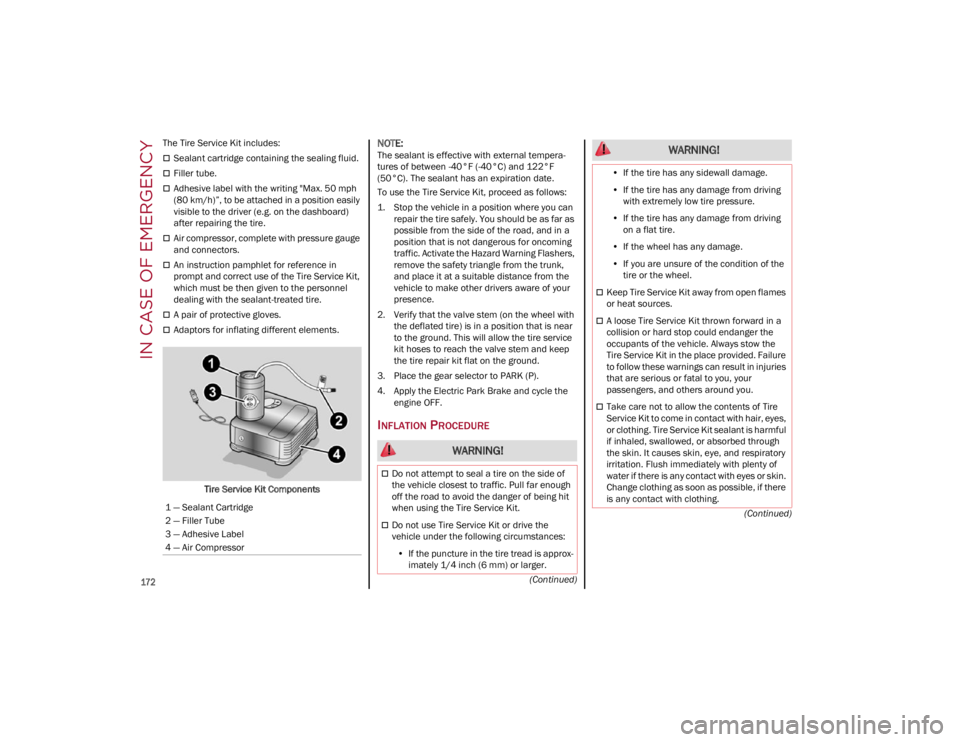
The Tire Service Kit includes:
Sealant cartridge containing the sealing fluid.
Filler tube.
Adhesive label with the writing "Max. 50 mph
(80 km/h)”, to be attached in a position easily
visible to the driver (e.g. on the dashboard)
after repairing the tire.
Air compressor, complete with pressure gauge
and connectors.
An instruction pamphlet for reference in
prompt and correct use of the Tire Service Kit,
which must be then given to the personnel
dealing with the sealant-treated tire.
A pair of protective gloves.
Adaptors for inflating different elements.
Tire Service Kit Components
NOTE:
The sealant is effective with external tempera -
tures of between -40°F (-40°C) and 122°F
(50°C). The sealant has an expiration date.
To use the Tire Service Kit, proceed as follows:
1. Stop the vehicle in a position where you can repair the tire safely. You should be as far as
possible from the side of the road, and in a
position that is not dangerous for oncoming
traffic. Activate the Hazard Warning Flashers,
remove the safety triangle from the trunk,
and place it at a suitable distance from the
vehicle to make other drivers aware of your
presence.
2. Verify that the valve stem (on the wheel with the deflated tire) is in a position that is near
to the ground. This will allow the tire service
kit hoses to reach the valve stem and keep
the tire repair kit flat on the ground.
3. Place the gear selector to PARK (P).
4. Apply the Electric Park Brake and cycle the engine OFF.
INFLATION PROCEDURE
1 — Sealant Cartridge
2 — Filler Tube
3 — Adhesive Label
4 — Air Compressor
WARNING!
Do not attempt to seal a tire on the side of
the vehicle closest to traffic. Pull far enough
off the road to avoid the danger of being hit
when using the Tire Service Kit.
Do not use Tire Service Kit or drive the
vehicle under the following circumstances:
• If the puncture in the tire tread is approx-
imately 1/4 inch (6 mm) or larger.
•If the tire has any sidewall damage.
• If the tire has any damage from driving
with extremely low tire pressure.
• If the tire has any damage from driving
on a flat tire.
• If the wheel has any damage.
• If you are unsure of the condition of the
tire or the wheel.
Keep Tire Service Kit away from open flames
or heat sources.
A loose Tire Service Kit thrown forward in a
collision or hard stop could endanger the
occupants of the vehicle. Always stow the
Tire Service Kit in the place provided. Failure
to follow these warnings can result in injuries
that are serious or fatal to you, your
passengers, and others around you.
Take care not to allow the contents of Tire
Service Kit to come in contact with hair, eyes,
or clothing. Tire Service Kit sealant is harmful
if inhaled, swallowed, or absorbed through
the skin. It causes skin, eye, and respiratory
irritation. Flush immediately with plenty of
water if there is any contact with eyes or skin.
Change clothing as soon as possible, if there
is any contact with clothing.
WARNING!
22_GA_OM_EN_USC_t.book Page 172
Page 175 of 248
173
To use your Tire Service Kit, proceed as follows:
1. Apply the Electric Park Brake.
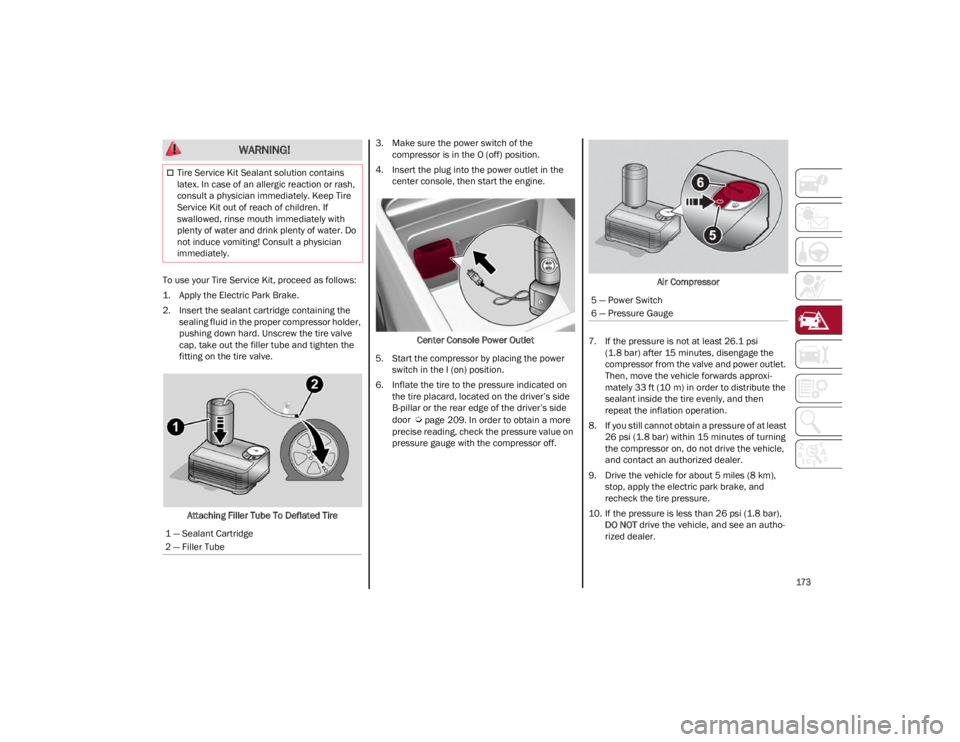
2. Insert the sealant cartridge containing thesealing fluid in the proper compressor holder,
pushing down hard. Unscrew the tire valve
cap, take out the filler tube and tighten the
fitting on the tire valve.
Attaching Filler Tube To Deflated Tire 3. Make sure the power switch of the
compressor is in the O (off) position.
4. Insert the plug into the power outlet in the center console, then start the engine.
Center Console Power Outlet
5. Start the compressor by placing the power switch in the I (on) position.
6. Inflate the tire to the pressure indicated on the tire placard, located on the driver’s side
B-pillar or the rear edge of the driver’s side
door
Ú
page 209. In order to obtain a more
precise reading, check the pressure value on
pressure gauge with the compressor off. Air Compressor
7. If the pressure is not at least 26.1 psi (1.8 bar) after 15 minutes, disengage the
compressor from the valve and power outlet.
Then, move the vehicle forwards approxi -
mately 33 ft (10 m) in order to distribute the sealant inside the tire evenly, and then
repeat the inflation operation.
8. If you still cannot obtain a pressure of at least 26 psi (1.8 bar) within 15 minutes of turning
the compressor on, do not drive the vehicle,
and contact an authorized dealer.
9. Drive the vehicle for about 5 miles (8 km), stop, apply the electric park brake, and
recheck the tire pressure.
10. If the pressure is less than 26 psi (1.8 bar), DO NOT drive the vehicle, and see an autho -
rized dealer.
Tire Service Kit Sealant solution contains
latex. In case of an allergic reaction or rash,
consult a physician immediately. Keep Tire
Service Kit out of reach of children. If
swallowed, rinse mouth immediately with
plenty of water and drink plenty of water. Do
not induce vomiting! Consult a physician
immediately.
1 — Sealant Cartridge
2 — Filler Tube
WARNING!
5 — Power Switch
6 — Pressure Gauge
22_GA_OM_EN_USC_t.book Page 173
Page 176 of 248
IN CASE OF EMERGENCY
174
11. If a pressure value of at least 26 psi (1.8 bar)is detected, restore the correct pressure (with
engine running and electric park brake
applied), and drive immediately with great
care to an authorized dealer.
12. Apply the adhesive label from the sealant bottle where it can be easily seen by the
driver as a reminder that the tire has been
treated with a Tire Service Kit, as well as not
to exceed the speed restriction for the
treated tire.CHECKING AND RESTORING TIRE
P
RESSURE
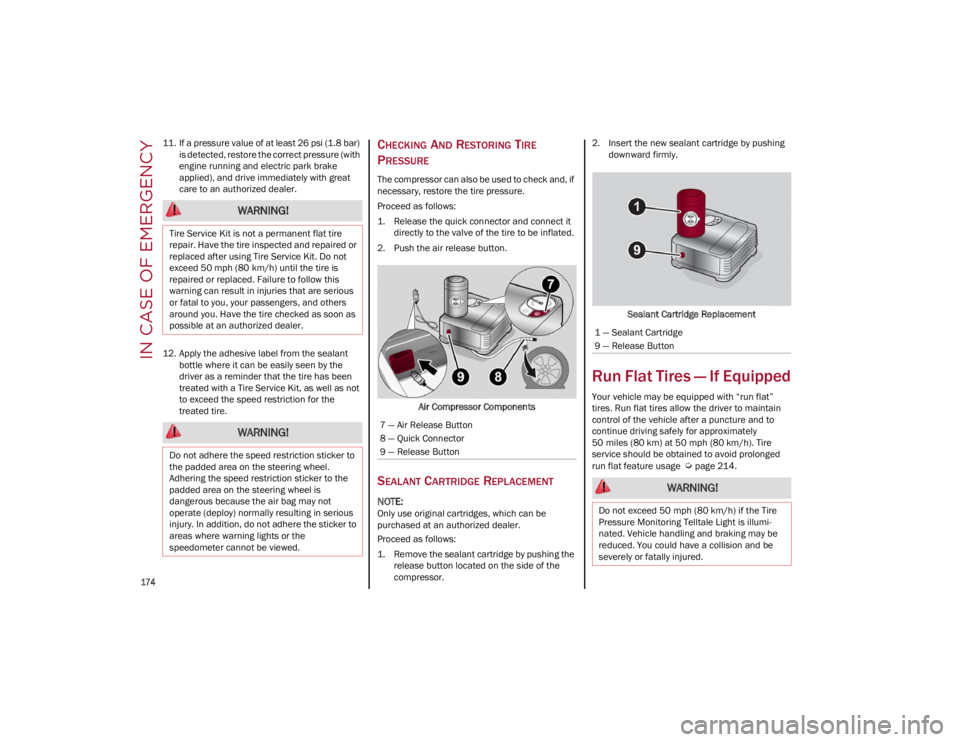
The compressor can also be used to check and, if
necessary, restore the tire pressure.
Proceed as follows:
1. Release the quick connector and connect it
directly to the valve of the tire to be inflated.
2. Push the air release button.
Air Compressor Components
SEALANT CARTRIDGE REPLACEMENT
NOTE:
Only use original cartridges, which can be
purchased at an authorized dealer.
Proceed as follows:
1. Remove the sealant cartridge by pushing therelease button located on the side of the
compressor. 2. Insert the new sealant cartridge by pushing
downward firmly.
Sealant Cartridge Replacement
Run Flat Tires — If Equipped
Your vehicle may be equipped with “run flat”
tires. Run flat tires allow the driver to maintain
control of the vehicle after a puncture and to
continue driving safely for approximately
50 miles (80 km) at 50 mph (80 km/h). Tire service should be obtained to avoid prolonged
run flat feature usage
Ú
page 214.
WARNING!
Tire Service Kit is not a permanent flat tire
repair. Have the tire inspected and repaired or
replaced after using Tire Service Kit. Do not
exceed 50 mph (80 km/h) until the tire is
repaired or replaced. Failure to follow this
warning can result in injuries that are serious
or fatal to you, your passengers, and others
around you. Have the tire checked as soon as
possible at an authorized dealer.
WARNING!
Do not adhere the speed restriction sticker to
the padded area on the steering wheel.
Adhering the speed restriction sticker to the
padded area on the steering wheel is
dangerous because the air bag may not
operate (deploy) normally resulting in serious
injury. In addition, do not adhere the sticker to
areas where warning lights or the
speedometer cannot be viewed.
7 — Air Release Button
8 — Quick Connector
9 — Release Button
1 — Sealant Cartridge
9 — Release Button
WARNING!
Do not exceed 50 mph (80 km/h) if the Tire
Pressure Monitoring Telltale Light is illumi -
nated. Vehicle handling and braking may be
reduced. You could have a collision and be
severely or fatally injured.
22_GA_OM_EN_USC_t.book Page 174