light ALFA ROMEO GIULIA 2022 Repair Manual
[x] Cancel search | Manufacturer: ALFA ROMEO, Model Year: 2022, Model line: GIULIA, Model: ALFA ROMEO GIULIA 2022Pages: 248, PDF Size: 9.71 MB
Page 104 of 248
STARTING AND OPERATING
102
Setting a speed activates the system. The display
shows the icon in green with the set speed.
To Pause/Deactivate
With the feature enabled (speed not set), push
the on/off button to disable.
With the feature active (speed set), push the on/
off button to pause. The display will show the icon
in white with the speed in brackets. To deactivate
the feature, push the on/off button a second
time.
To Set A Desired Speed
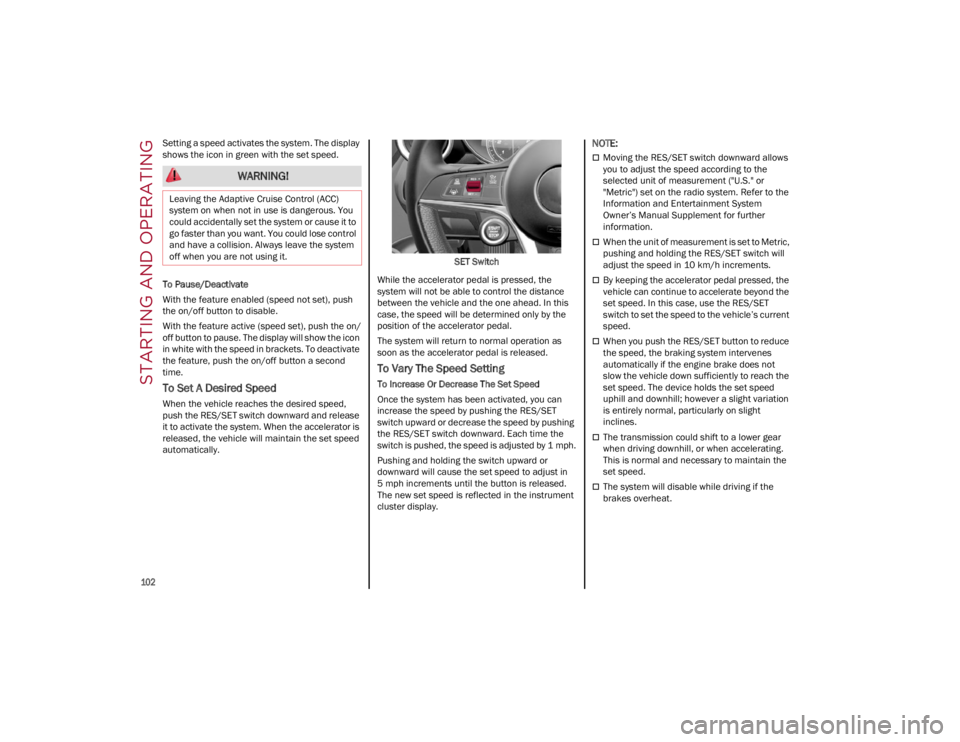
When the vehicle reaches the desired speed,
push the RES/SET switch downward and release
it to activate the system. When the accelerator is
released, the vehicle will maintain the set speed
automatically.SET Switch
While the accelerator pedal is pressed, the
system will not be able to control the distance
between the vehicle and the one ahead. In this
case, the speed will be determined only by the
position of the accelerator pedal.
The system will return to normal operation as
soon as the accelerator pedal is released.
To Vary The Speed Setting
To Increase Or Decrease The Set Speed
Once the system has been activated, you can
increase the speed by pushing the RES/SET
switch upward or decrease the speed by pushing
the RES/SET switch downward. Each time the
switch is pushed, the speed is adjusted by 1 mph.
Pushing and holding the switch upward or
downward will cause the set speed to adjust in
5 mph increments until the button is released.
The new set speed is reflected in the instrument
cluster display.
NOTE:
Moving the RES/SET switch downward allows
you to adjust the speed according to the
selected unit of measurement ("U.S." or
"Metric") set on the radio system. Refer to the
Information and Entertainment System
Owner’s Manual Supplement for further
information.
When the unit of measurement is set to Metric,
pushing and holding the RES/SET switch will
adjust the speed in 10 km/h increments.
By keeping the accelerator pedal pressed, the
vehicle can continue to accelerate beyond the
set speed. In this case, use the RES/SET
switch to set the speed to the vehicle’s current
speed.
When you push the RES/SET button to reduce
the speed, the braking system intervenes
automatically if the engine brake does not
slow the vehicle down sufficiently to reach the
set speed. The device holds the set speed
uphill and downhill; however a slight variation
is entirely normal, particularly on slight
inclines.
The transmission could shift to a lower gear
when driving downhill, or when accelerating.
This is normal and necessary to maintain the
set speed.
The system will disable while driving if the
brakes overheat.
WARNING!
Leaving the Adaptive Cruise Control (ACC)
system on when not in use is dangerous. You
could accidentally set the system or cause it to
go faster than you want. You could lose control
and have a collision. Always leave the system
off when you are not using it.
22_GA_OM_EN_USC_t.book Page 102
Page 109 of 248
107
Suspension Conditions
The following operations will suspend the HAS
system:
Steer manually
Press the brake pedal
Disable the ACC device
Activate the turn signals
Push the ACC activation setting button for two
seconds to activate Cruise Control
Place the gear selector in PARK, REVERSE, or
NEUTRAL
Reactivating the ACC system will reactivate HAS
Ú
page 99.
Automatic Deactivation
The system can be deactivated in any of the
following situations:
If there are narrow bends
When hands are removed from the steering
wheel
If the left or right turn signal is activated
If the driver intentionally changes lanes
without using the turn signal
If the driver’s seat belt is released
If the gear selector is placed in DRIVE
If the “Active Braking” function is activated
Ú
page 138
If the vehicle exits the highway
If the lane markings are not detected by the
camera
If the ACC device is deactivated
If the vehicle speed exceeds 90 mph
(145 km/h)
NOTE:
When the HAS system is turned off, the symbol
on the display turns red and then grey.
Hands on the steering wheel are detected by a
capacitive sensor installed in it.
When the automatic suspension conditions are
over, HAS will be automatically reactivated.
OPERATION
The HAS system only operates when the driver’s
hands are on the steering wheel.
If the system detects that the driver’s hands have
been removed from the steering wheel, the
system will alert the driver to place their hands
back on the steering wheel
Ú
page 108.
If the vehicle crosses the lane boundary, the
steering wheel will vibrate and the dedicated
screen will appear in the instrument cluster
display.
NOTE:
The HAS system may take up to five seconds to
turn on once all conditions are met. During this
time, a grey indicator light will appear on the
instrument cluster display and the system will
automatically activate as soon as all of the condi -
tions are met with no intervention from the driver.
The following conditions must be met before the
HAS system turns on:
The HAS system must be enabled by pushing
the button on the steering wheel
The vehicle must be on a highway
ACC must be activated
The right and left lane boundaries must be
visible
The vehicle speed must be between 0 and
90 mph (0 and 145 km/h)
The camera, radar, and radio system must be
functioning properly
The road lane width must be between 8.5 ft
and 13.7 ft (2.6 m and 4.2 m)
The turn signals must not be activated
The HAS system must be functioning properly
Other operating limits:
If the speed of ACC can be set to a higher value
(top speed 110 mph (180 km/h), HAS is only
available as long as the vehicle speed is equal
to or less than 90 mph (145 km/h).
When the ACC speed is reduced and the
vehicle speed is less than 90 mph (145 km/h),
the system will automatically reactivate.
If the ACC speed is set to 90 mph (145 km/h),
traveling downhill may increase the vehicle
speed. The HAS system will deactivate until the
speed returns to 90 mph (145 km/h).
INDICATIONS ON THE DISPLAY
The HAS system status can always be viewed in
the instrument cluster display.
The system status is indicated by the color of the
symbol on the display.
The HAS system uses sensors in the steering
wheel to detect if the driver’s hands are on it.
If the driver’s hands are not on the steering
wheel, a series of warnings will appear in the
instrument cluster display to alert the driver to
reposition their hands on the steering wheel. An
acoustic signal will also sound. After a period of
22_GA_OM_EN_USC_t.book Page 107
Page 111 of 248
109
LIMITED SYSTEM AVAILABILITY/
O
PERATION
System Availability
External factors and conditions may affect the
proper operation of the HAS system, such as:
Narrow, winding, curvy streets
Poor visibility (due to heavy rain, snow, fog,
etc.)
Front lights of oncoming vehicles or direct
sunlight or shade
Damage or obstructions caused by mud, ice,
snow, etc.
Bumper damaged or not aligned
Interference with other equipment that causes
electromagnetic waves
Presence of roadwork/road construction sites
If the indications given by the navigation
system (if any) of the radio system are not yet
ready and/or if the navigation system is
recalculating the route
System Limited Operation
The HAS system may have limited or reduced
functionality when one of the following conditions
occur:
Lane markings are not clear or in conditions of
poor visibility (e.g. in heavy rain, snow, fog,
etc.)
Either the camera or radar are damaged,
covered, or obstructed (e.g. by mud, ice, snow,
etc.)
When driving on hills or roads with narrow
bends
Near highway toll booths
When the highway entrance or exit is wider
than 20 ft (6 m)
If the camera is exposed to glare caused by
reflections or direct sunlight
If the navigation system information is
unavailable or being recalculated
NOTE:
If the vehicle approaches a bend that is too
narrow with respect to the current speed, the
HAS system will disable.
If damage to the windshield occurs, have the
windshield replaced by an authorized dealer as
soon as possible.
TRAFFIC JAM ASSIST (TJA)
SYSTEM — IF EQUIPPED
The Traffic Jam Assist (TJA) system can be
activated on all road types. The system uses a camera to detect lane markings and keep the
vehicle in the center of the lane.
When the system is unable to detect lane
markings, it will still operate using surrounding
traffic. This can occur in congested traffic
scenarios, when the vehicles ahead or
surrounding obstruct the visibility of the lane
markings. When the speed is below 12 mph
(20 km/h), the system can use a lock-on strategy
that allows the vehicle to automatically follow the
vehicle ahead.
The TJA system combines Adaptive Cruise Control
(ACC) functions with Lane Departure Warning
functions to maintain vehicle speed and steering
wheel behavior.
NOTE:
Do not use the TJA system while driving in urban
areas.
TO ACTIVATE/DEACTIVATE
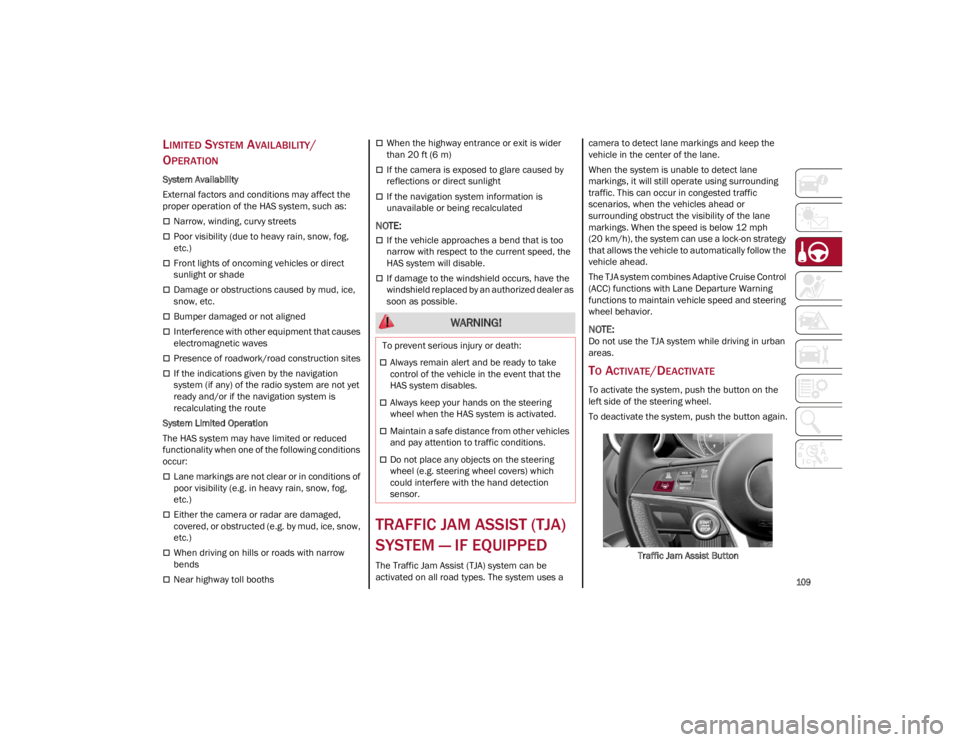
To activate the system, push the button on the
left side of the steering wheel.
To deactivate the system, push the button again.
Traffic Jam Assist Button
WARNING!
To prevent serious injury or death:
Always remain alert and be ready to take
control of the vehicle in the event that the
HAS system disables.
Always keep your hands on the steering
wheel when the HAS system is activated.
Maintain a safe distance from other vehicles
and pay attention to traffic conditions.
Do not place any objects on the steering
wheel (e.g. steering wheel covers) which
could interfere with the hand detection
sensor.
22_GA_OM_EN_USC_t.book Page 109
Page 113 of 248
111
SYSTEM STATUS
Active System
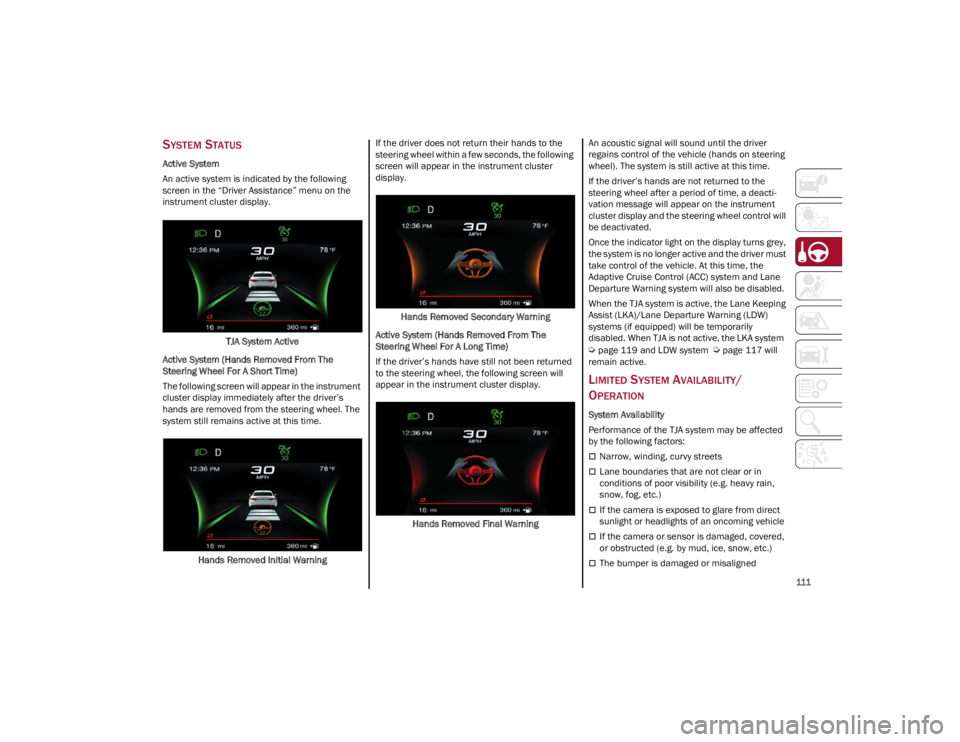
An active system is indicated by the following
screen in the “Driver Assistance” menu on the
instrument cluster display.TJA System Active
Active System (Hands Removed From The
Steering Wheel For A Short Time)
The following screen will appear in the instrument
cluster display immediately after the driver’s
hands are removed from the steering wheel. The
system still remains active at this time.
Hands Removed Initial Warning If the driver does not return their hands to the
steering wheel within a few seconds, the following
screen will appear in the instrument cluster
display.
Hands Removed Secondary Warning
Active System (Hands Removed From The
Steering Wheel For A Long Time)
If the driver’s hands have still not been returned
to the steering wheel, the following screen will
appear in the instrument cluster display.
Hands Removed Final Warning An acoustic signal will sound until the driver
regains control of the vehicle (hands on steering
wheel). The system is still active at this time.
If the driver’s hands are not returned to the
steering wheel after a period of time, a deacti
-
vation message will appear on the instrument
cluster display and the steering wheel control will
be deactivated.
Once the indicator light on the display turns grey,
the system is no longer active and the driver must
take control of the vehicle. At this time, the
Adaptive Cruise Control (ACC) system and Lane
Departure Warning system will also be disabled.
When the TJA system is active, the Lane Keeping
Assist (LKA)/Lane Departure Warning (LDW)
systems (if equipped) will be temporarily
disabled. When TJA is not active, the LKA system
Ú
page 119 and LDW system
Ú
page 117 will
remain active.
LIMITED SYSTEM AVAILABILITY/
O
PERATION
System Availability
Performance of the TJA system may be affected
by the following factors:
Narrow, winding, curvy streets
Lane boundaries that are not clear or in
conditions of poor visibility (e.g. heavy rain,
snow, fog, etc.)
If the camera is exposed to glare from direct
sunlight or headlights of an oncoming vehicle
If the camera or sensor is damaged, covered,
or obstructed (e.g. by mud, ice, snow, etc.)
The bumper is damaged or misaligned
22_GA_OM_EN_USC_t.book Page 111
Page 114 of 248
STARTING AND OPERATING
112
Interference with other equipment causes
electromagnetic waves
Construction sites
If the indications given by the navigation
system of the radio system are not yet ready or
if the system is recalculating
System Limited Operation
The TJA system may have limited or reduced
functionality when one of the following conditions
occurs:
Lane boundaries are not clear or in conditions
of poor visibility (e.g. in heavy rain, snow, fog,
etc.)
Either the camera or radar are damaged,
covered, or obstructed (e.g. by mud, ice, snow,
etc.)
When driving on hills or narrow bends
Near highway toll booths
When the highway entrance or exit is more
than 20 ft (6 m) wide
If the camera is exposed to glare from
reflections or direct sunlight
NOTE:
If damage to the windshield occurs, have the
windshield replaced by an authorized dealer
as soon as possible.
If the vehicle approaches a bend that is too
narrow with respect to the current speed, the
TJA system will deactivate.
TRAFFIC SIGN
RECOGNITION (TSR)
SYSTEM — IF EQUIPPED
The Traffic Sign Recognition (TSR) system uses a
camera mounted on the windshield to detect
recognizable road signs such as:
Speed limits
Signs indicating the end of the situations
indicated above If the camera does not detect valid speed limits,
the radio system navigation system may suggest
unregulated speed limits.
The system always checks the traffic signs
indicating the current speed limit signs. The
system is able to recognize and display up to two
different road signs in the instrument cluster
display.
Depending on the unit of measurement (km or
mph) set through the “Unit of Measurement”
menu in the radio system, the TSR system will
automatically show the indication of the road sign
in the unit of measurements selected in the
instrument cluster display.
TO ACTIVATE/DEACTIVATE
The TSR System can be activated/deactivated in
the radio system in the “Driver Assistance” menu.
The system activation is signaled by road signs
shown on the instrument cluster display.
NOTE:
By selecting “Blinking”, the driver can activate
a warning to display when the speed exceeds
the limit indicated by the TSR System. The
speed road sign on the instrument cluster
display will blink until the vehicle speed drops
below the displayed limit.
Selecting “Offset” will set the speed at which
“Blinking” is activated up to a maximum of
6 mph (10 km/h) above the limit detected by
the system.
If no speed limit signs are found, the system
will revert to the speed limit signs that are
stored in the NAV system.
WARNING!
To prevent serious injury or death:
Always remain alert and be ready to take
control of the car in the event that the TJA
system disables.
Always keep your hands on the steering
wheel when the TJA system is activated.
Maintain a safe distance from other vehicles
and pay attention to traffic conditions.
The TJA system should only be used as a
driving aid. The driver must always pay
attention to their surroundings when the
system is operating and be ready to take
control of the vehicle at any time.
Do not place any objects on the steering
wheel (e.g. steering wheel covers) that could
interfere with the hand detection sensor on
the steering wheel.
22_GA_OM_EN_USC_t.book Page 112
Page 115 of 248
113
(Continued)
INDICATIONS ON THE DISPLAY
The system status can always be viewed through
the instrument cluster display.
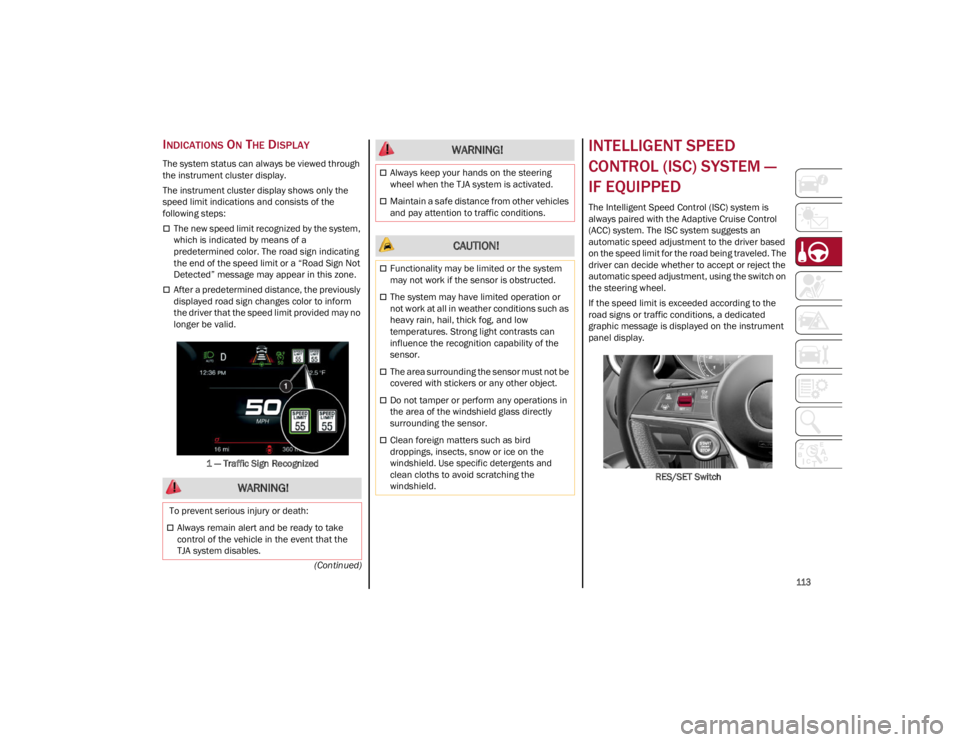
The instrument cluster display shows only the
speed limit indications and consists of the
following steps:
The new speed limit recognized by the system,
which is indicated by means of a
predetermined color. The road sign indicating
the end of the speed limit or a “Road Sign Not
Detected” message may appear in this zone.
After a predetermined distance, the previously
displayed road sign changes color to inform
the driver that the speed limit provided may no
longer be valid.1 — Traffic Sign Recognized
INTELLIGENT SPEED
CONTROL (ISC) SYSTEM —
IF EQUIPPED
The Intelligent Speed Control (ISC) system is
always paired with the Adaptive Cruise Control
(ACC) system. The ISC system suggests an
automatic speed adjustment to the driver based
on the speed limit for the road being traveled. The
driver can decide whether to accept or reject the
automatic speed adjustment, using the switch on
the steering wheel.
If the speed limit is exceeded according to the
road signs or traffic conditions, a dedicated
graphic message is displayed on the instrument
panel display. RES/SET Switch
WARNING!
To prevent serious injury or death:
Always remain alert and be ready to take
control of the vehicle in the event that the
TJA system disables.
Always keep your hands on the steering
wheel when the TJA system is activated.
Maintain a safe distance from other vehicles
and pay attention to traffic conditions.
CAUTION!
Functionality may be limited or the system
may not work if the sensor is obstructed.
The system may have limited operation or
not work at all in weather conditions such as
heavy rain, hail, thick fog, and low
temperatures. Strong light contrasts can
influence the recognition capability of the
sensor.
The area surrounding the sensor must not be
covered with stickers or any other object.
Do not tamper or perform any operations in
the area of the windshield glass directly
surrounding the sensor.
Clean foreign matters such as bird
droppings, insects, snow or ice on the
windshield. Use specific detergents and
clean cloths to avoid scratching the
windshield.
WARNING!
22_GA_OM_EN_USC_t.book Page 113
Page 116 of 248
STARTING AND OPERATING
114
TO ACTIVATE/DEACTIVATE
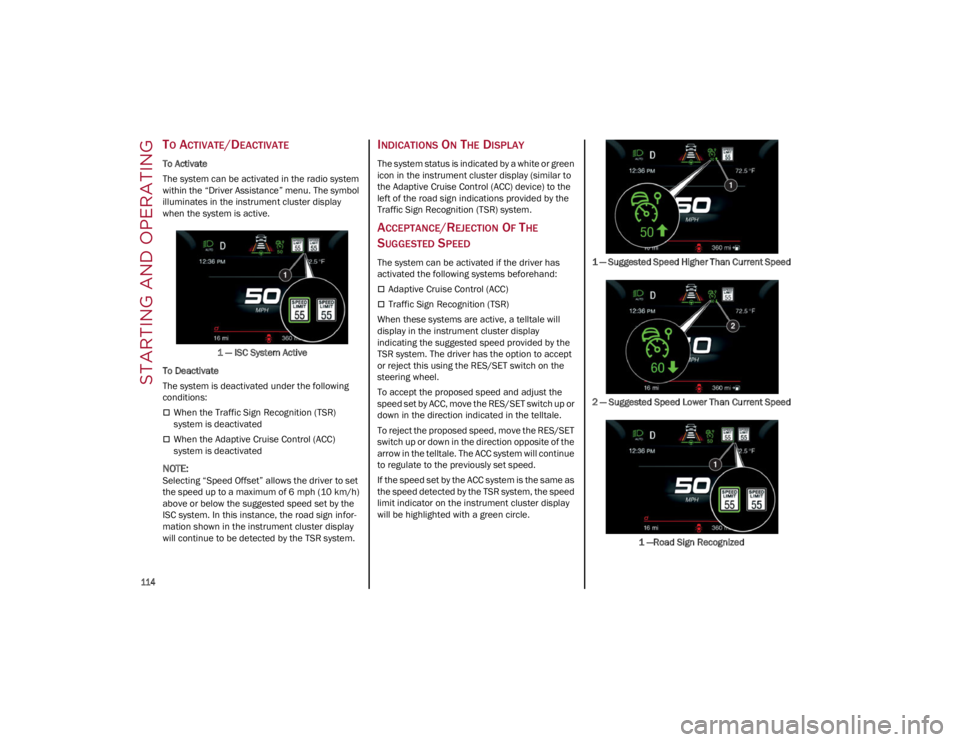
To Activate
The system can be activated in the radio system
within the “Driver Assistance” menu. The symbol
illuminates in the instrument cluster display
when the system is active.1 — ISC System Active
To Deactivate
The system is deactivated under the following
conditions:
When the Traffic Sign Recognition (TSR)
system is deactivated
When the Adaptive Cruise Control (ACC)
system is deactivated
NOTE:
Selecting “Speed Offset” allows the driver to set
the speed up to a maximum of 6 mph (10 km/h)
above or below the suggested speed set by the
ISC system. In this instance, the road sign infor -
mation shown in the instrument cluster display
will continue to be detected by the TSR system.
INDICATIONS ON THE DISPLAY
The system status is indicated by a white or green
icon in the instrument cluster display (similar to
the Adaptive Cruise Control (ACC) device) to the
left of the road sign indications provided by the
Traffic Sign Recognition (TSR) system.
ACCEPTANCE/REJECTION OF THE
S
UGGESTED SPEED
The system can be activated if the driver has
activated the following systems beforehand:
Adaptive Cruise Control (ACC)
Traffic Sign Recognition (TSR)
When these systems are active, a telltale will
display in the instrument cluster display
indicating the suggested speed provided by the
TSR system. The driver has the option to accept
or reject this using the RES/SET switch on the
steering wheel.
To accept the proposed speed and adjust the
speed set by ACC, move the RES/SET switch up or
down in the direction indicated in the telltale.
To reject the proposed speed, move the RES/SET
switch up or down in the direction opposite of the
arrow in the telltale. The ACC system will continue
to regulate to the previously set speed.
If the speed set by the ACC system is the same as
the speed detected by the TSR system, the speed
limit indicator on the instrument cluster display
will be highlighted with a green circle. 1 — Suggested Speed Higher Than Current Speed
2 — Suggested Speed Lower Than Current Speed
1 —Road Sign Recognized
22_GA_OM_EN_USC_t.book Page 114
Page 117 of 248
115
PARKSENSE FRONT/REAR
PARK ASSIST SYSTEM —
IF EQUIPPED
The ParkSense system provides visual and
audible indications of the distance between the
rear, and if equipped, the front fascia/bumper
and a detected obstacle when backing up or
moving forward (e.g. during a parking maneuver).
The vehicle brakes may be automatically applied
and released when performing a reverse parking
maneuver if the system detects a possible
collision with an obstacle.
When the REVERSE gear is engaged and the
system is on, the front and rear sensors are
activated. If the vehicle moves from REVERSE to
a forward gear, the rear sensors are deactivated,
while the front sensors remain active until the
speed of 9 mph (15 km/h) is exceeded.
NOTE:
In certain operating conditions, the system could
start detecting an obstacle only after the vehicle
has moved slightly (a few inches).
PARKSENSE SENSORS
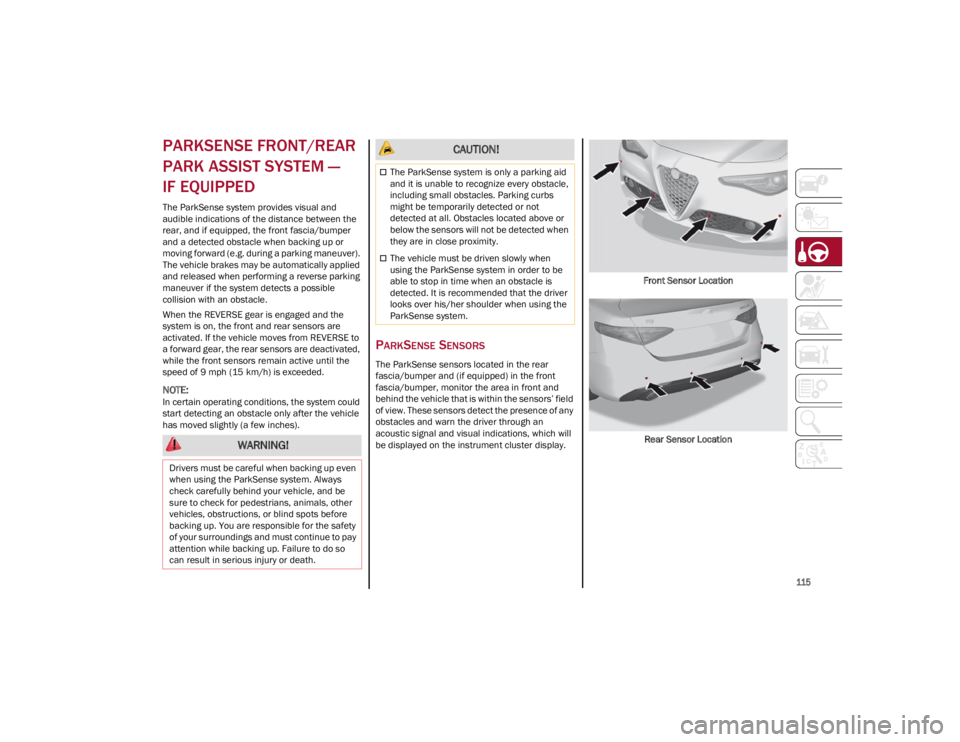
The ParkSense sensors located in the rear
fascia/bumper and (if equipped) in the front
fascia/bumper, monitor the area in front and
behind the vehicle that is within the sensors’ field
of view. These sensors detect the presence of any
obstacles and warn the driver through an
acoustic signal and visual indications, which will
be displayed on the instrument cluster display.Front Sensor Location
Rear Sensor Location
WARNING!
Drivers must be careful when backing up even
when using the ParkSense system. Always
check carefully behind your vehicle, and be
sure to check for pedestrians, animals, other
vehicles, obstructions, or blind spots before
backing up. You are responsible for the safety
of your surroundings and must continue to pay
attention while backing up. Failure to do so
can result in serious injury or death.
CAUTION!
The ParkSense system is only a parking aid
and it is unable to recognize every obstacle,
including small obstacles. Parking curbs
might be temporarily detected or not
detected at all. Obstacles located above or
below the sensors will not be detected when
they are in close proximity.
The vehicle must be driven slowly when
using the ParkSense system in order to be
able to stop in time when an obstacle is
detected. It is recommended that the driver
looks over his/her shoulder when using the
ParkSense system.
22_GA_OM_EN_USC_t.book Page 115
Page 118 of 248
STARTING AND OPERATING
116
PARKSENSE DISPLAY
The driver can select the type of warning they
would like to be displayed through the radio
system. To access the function on the main
menu, select in the following order:
1. Driver Assistance
2. ParkSense
3. Mode
4. Sound and Display
Visual Indications
The system indicates the presence of an obstacle
by displaying a single red arc in the detected
area, in relation to the distance of the object and
the position of the vehicle.
If the obstacle is detected in the front or rear
central area, a single red arc will be displayed as
the obstacle approaches, first constant, then
flashing, in addition to an acoustic signal.
If the obstacle is detected in the front or rear left
and/or right area, a single red flashing arc will be
shown in the corresponding area on the display
and the system will emit an acoustic signal, either
at frequent intervals or constantly.
In general, the vehicle is closer to the obstacle
when a single red flashing arc is shown on the
display and the acoustic signal becomes
continuous.
If several obstacles are detected simultaneously
in the front and rear area, the display will show all
of them, regardless of the area in which they were
detected.It is not possible to exit from the display screen
while the vehicle is in REVERSE.
Acoustic Signal
In the presence of an obstacle at the front or the
rear of the vehicle, an acoustic signal with
variable frequency will sound:
The acoustic signal increases in frequency as
the distance between the vehicle and the
obstacle decreases.
The acoustic signal becomes continuous when
the distance between the vehicle and the
obstacle is less than 11 inches (30 cm), and
stops if the distance increases.
The acoustic signal is constant if the distance
between the vehicle and the obstacle is
unchanged.
NOTE:
If the sensors detect several front and rear obsta
-
cles, the closest obstacle is considered. An inter -
mittent signal will sound if the obstacles are at
the same distance (front and rear).
When the system emits an acoustic signal, the
volume of the radio system, if activated, is
automatically lowered.
An acoustic signal will not sound if the vehicle is
in PARK.
ENABLING AND DISABLING PARKSENSE
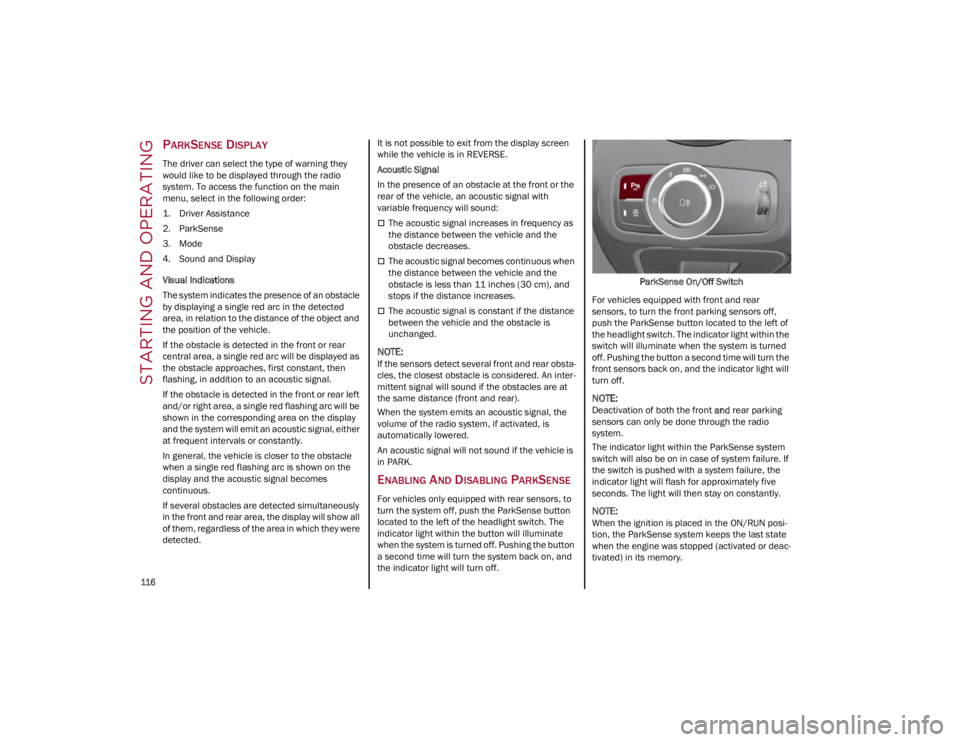
For vehicles only equipped with rear sensors, to
turn the system off, push the ParkSense button
located to the left of the headlight switch. The
indicator light within the button will illuminate
when the system is turned off. Pushing the button
a second time will turn the system back on, and
the indicator light will turn off. ParkSense On/Off Switch
For vehicles equipped with front and rear
sensors, to turn the front parking sensors off,
push the ParkSense button located to the left of
the headlight switch. The indicator light within the
switch will illuminate when the system is turned
off. Pushing the button a second time will turn the
front sensors back on, and the indicator light will
turn off.
NOTE:
Deactivation of both the front and rear parking
sensors can only be done through the radio
system.
The indicator light within the ParkSense system
switch will also be on in case of system failure. If
the switch is pushed with a system failure, the
indicator light will flash for approximately five
seconds. The light will then stay on constantly.
NOTE:
When the ignition is placed in the ON/RUN posi -
tion, the ParkSense system keeps the last state
when the engine was stopped (activated or deac -
tivated) in its memory.
22_GA_OM_EN_USC_t.book Page 116
Page 119 of 248
117
(Continued)
PARKSENSE WARNING DISPLAY
Parking sensor faults, if any, will be indicated
when REVERSE is engaged by a message on the
instrument cluster display
Ú
page 70.
In case of system failure, a dedicated message
appears on the instrument cluster for about five
seconds.
Cleaning The Front Or Rear Sensors : If the
display shows a message requiring the
sensors to be cleaned, make sure that the
outer surface and the underside of the front
and rear fascias/bumpers are free of debris
(e.g. snow, mud, ice, etc.). Once these areas
are clear, place the ignition in the OFF position,
then return it to ON/RUN. If the message is still
displayed, contact an authorized dealer.
Audio System Not Available : If the display
shows a message that the audio system is not
available, it means that the acoustic signal will
be emitted by the instrument panel, and not
through the vehicle’s speakers.
PARKSENSE SYSTEM USAGE
P
RECAUTIONS
NOTE:
Some conditions may influence the performance
of the ParkSense system:
Reduced sensor sensitivity could be due to the
presence of ice, snow, mud, or thick paint on
the surface of the sensor.
The sensors may detect a false obstacle (echo
interference) due to mechanical interference,
for example when washing the vehicle or in
extreme weather.
The signals sent by the sensors can be altered
by the presence of ultrasonic systems (e.g.
pneumatic brake systems of trucks or
pneumatic drills) near the vehicle.
System performance can be influenced by the
position of the sensors. For example, due to a
change in the ride setting (caused by wear to
the shock absorbers or suspension), by
changing tires, overloading the vehicle or
operations that require the vehicle to be
lowered.
Be sure not to place bumper stickers or other
adhesives over the sensors as this will affect
system performance.
LANE DEPARTURE
WARNING (LDW) SYSTEM —
IF EQUIPPED
LANE DEPARTURE WARNING OPERATION
The Lane Departure Warning system uses a
forward looking camera located on the
windshield to detect lane markings and measure
vehicle position within the lane boundaries.
When one or both lane limits are detected and
the vehicle passes over one without an activated
turn signal, the system emits a visual as well as
an audible signal.
If the vehicle continues to go beyond the line of
the lane without any intervention from the driver,
the surpassed line will light up on the display (left
or right) to urge the driver to bring the vehicle
back into the limits of the lane.
CAUTION!
Projecting loads on the roof of the vehicle
may interfere with the correct operation of
the camera. Before starting, make sure the
load is correctly positioned in order to not
cover the camera operating range.
Do not cover the operating range of the
camera with stickers or other objects.
Do not tamper with nor operate on the
camera. Do not close the openings in the
aesthetic cover located under the interior
rearview mirror. In the event of a failure of
the camera, contact an authorized dealer.
The camera may have limited or absent
operation due to weather conditions such as:
heavy rain, hail, thick fog, heavy snow, or
formation of ice layers on the windshield.
Camera operation may also be compromised
by the presence of dust, condensation, dirt
or ice on the windshield, by traffic conditions
(e.g. vehicles that are driving not aligned with
yours, vehicle driving in a transverse or
opposite way on the same lane, bend with a
small radius of curvature), by road surface
conditions and by driving conditions (e.g.
off-road driving). Make sure the windshield is
always clean. Use specific detergents and
clean cloths to avoid scratching the
windshield. The camera operation may also
be limited or absent in some driving, traffic
and road surface conditions.
22_GA_OM_EN_USC_t.book Page 117