child lock ALFA ROMEO GIULIA 2022 Owners Manual
[x] Cancel search | Manufacturer: ALFA ROMEO, Model Year: 2022, Model line: GIULIA, Model: ALFA ROMEO GIULIA 2022Pages: 248, PDF Size: 9.71 MB
Page 10 of 248
8
READ THIS CAREFULLY
Refueling..................................................... 2
Starting The Engine .................................... 2
Parking On Flammable Material ............... 2
Respecting The Environment .................... 2
Electrical Accessories ................................ 2
Scheduled Servicing .................................. 2
VEHICLE CHANGES /
ALTERATIONS
Accessories Purchased By The Owner ...... 3
Installing Electrical/Electronic Devices .... 3
Radio Transmitters And Mobile Phones ... 4
HOW TO USE THIS MANUAL
Operating Instructions ............................... 5
Warnings And Cautions.............................. 5
Symbols Key ............................................... 6
Symbols ...................................................... 6
Symbols Glossary ....................................... 7
GETTING TO KNOW YOUR
VEHICLE
KEYS..........................................................19
Key Fob .................................................. 19
ENGINE IMMOBILIZER SYSTEM ..............21
IGNITION SWITCH .....................................22
Keyless Push Button Ignition ................ 22
REMOTE START — IF EQUIPPED .............. 23
How To Use Remote Start ..................... 23
To Exit Remote Start Mode ................... 23
Remote Start Comfort Systems —
If Equipped ............................................. 23
VEHICLE SECURITY
SYSTEM — IF EQUIPPED .......................... 24
To Arm The System................................ 24
To Disarm The System .......................... 24
Volumetric/Anti-Lift Protection —
If Equipped ............................................. 24
DOORS ...................................................... 25
Power Door Locks.................................. 25
Locking The Doors With A Depleted
Battery .................................................... 25 Passive Entry System ........................... 26
Automatic Door Locks — If Equipped .. 27
Child-Protection Door Lock
System — Rear Doors ............................ 27
STEERING WHEEL.................................... 28
Manual Tilt/Telescoping Steering
Column ................................................... 28 Heated Steering Wheel —
If Equipped ............................................. 29
DRIVER MEMORY SETTINGS —
IF EQUIPPED ............................................ 30
Programming The Memory Feature ..... 30
Memory Position Recall ........................ 30
SEATS ....................................................... 30
Sparco Racing Seats
(Quadrifoglio Vehicles) — If Equipped .. 31 Manual Adjustment (Rear Seats) ......... 31 Power Adjustment (Front Seats) ...........33
Heated Seats — If Equipped .................35
Head Restraints .................................... 35
MIRRORS ..................................................37
Automatic Dimming Mirror ....................37
Vanity Mirror ...........................................37
Outside Power Mirrors ...........................38
Power Folding Outside Mirrors ..............38
Outside Automatic Dimming
Mirrors — If Equipped............................. 38 Heated Mirrors ......................................38
UNIVERSAL GARAGE DOOR OPENER
(HOMELINK®)
S....................................39
Before You Begin Programming
HomeLink® ............................................39 Erasing All The HomeLink® Channels ..39
Identifying Whether You Have A
Rolling Code Or Non-Rolling Code
Device .....................................................39 Programming HomeLink® To A
Garage Door Opener ..............................40 Programming HomeLink® To A
Miscellaneous Device ............................ 40 Reprogramming A Single HomeLink®
Button .....................................................41 Canadian/Gate Operator
Programming .......................................... 41 Security ...................................................41
Troubleshooting Tips..............................41
22_GA_OM_EN_USC_t.book Page 8
Page 13 of 248
11
LANE KEEPING ASSIST (LKA)
SYSTEM — IF EQUIPPED........................ 119
Turning Lane Keeping Assist On Or
Off ......................................................... 120 Lane Keeping Assist Warning
Message ...............................................120
REAR BACK UP CAMERA / DYNAMIC
GRIDLINES ............................................. 122 REFUELING THE VEHICLE ..................... 123
Refueling Procedure ...........................124
VEHICLE LOADING ................................. 125
Certification Label................................ 125
TRAILER TOWING................................... 125
SUGGESTIONS FOR DRIVING................ 126
Saving Fuel ...........................................126
Driving Style .........................................126
Conditions Of Use ................................ 126
Transporting Passengers ....................126
Transporting Animals...........................127
Exhaust Gas .........................................127
Performance — Quadrifoglio ...............127
SAFETY
ACTIVE SAFETY SYSTEMS ..................... 129
Anti-Lock Brake System (ABS) ........... 129
Active Torque Vectoring (ATV) —
If Equipped ...........................................129 Dynamic Steering Torque (DST) .........130
Drive Train Control (DTC) System —
If Equipped ...........................................130 Electronic Stability Control (ESC) ....... 130
Hill Start Assist (HSA) .......................... 131
Panic Brake Assist (PBA) .................... 131
Traction Control System (TCS)............ 131
AUXILIARY DRIVING SYSTEMS .............. 132
Blind Spot Monitoring (BSM)
System — If Equipped ........................ 132 Active Blind Spot Assist (ABSA)
System — If Equipped ........................ 134 Driver Attention Assist (DAA)
System — If Equipped ......................... 136 Forward Collision Warning (FCW)
System ................................................. 138 Tire Pressure Monitoring System
(TPMS).................................................. 142
OCCUPANT RESTRAINT SYSTEMS ....... 143
Occupant Restraint Systems
Features .............................................. 143 Important Safety Precautions ............ 144
Seat Belt Systems .............................. 144
Supplemental Restraint Systems
(SRS) .................................................... 149 Child Restraints ................................... 157
SAFETY TIPS........................................... 165
Transporting Passengers .................... 165
Transporting Pets ................................ 166
Connected Vehicles ............................ 166
Safety Checks You Should Make
Inside The Vehicle .............................. 166 Periodic Safety Checks You Should
Make Outside The Vehicle .................. 167 Exhaust Gas ........................................ 167
Carbon Monoxide Warnings ............... 168
IN CASE OF EMERGENCY
HAZARD WARNING FLASHERS ............ 169
SOS — EMERGENCY CALL ..................... 169TIRE SERVICE KIT .................................. 171
Description ........................................... 171
Inflation Procedure .............................. 172
Checking And Restoring Tire
Pressure ............................................... 174 Sealant Cartridge Replacement ......... 174
Run Flat Tires — If Equipped ................. 174
JUMP STARTING ................................... 175
Remote Battery Connection Posts ..... 175
Jump Starting Procedure .................... 177
Bump Starting...................................... 178
IF YOUR ENGINE OVERHEATS ............... 178
MANUAL PARK RELEASE....................... 179
TOWING A DISABLED VEHICLE ............. 179
Rear Wheel Drive (RWD) Models ........ 179
All Wheel Drive (AWD) Models ............ 180
TOW EYES ............................................. 180
ENHANCED ACCIDENT RESPONSE
SYSTEM (EARS) .................................... 181 EVENT DATA RECORDER (EDR) ............ 181
SERVICING AND MAINTENANCE
SCHEDULED SERVICING ....................... 182
Periodic Checks ................................... 182
Heavy Usage Of The Vehicle ............... 182
Maintenance Plan — 2.0L Engine ...... 183
Maintenance Plan — 2.9L Engine ...... 185
22_GA_OM_EN_USC_t.book Page 11
Page 23 of 248
21
Proceed in reverse order to reassemble the key
fob.
Programming And Requesting Additional
Key Fobs
Programming the key fob may be performed by an
authorized dealer.
NOTE:
Once a key fob is programmed to a vehicle, it
cannot be repurposed and reprogrammed to
another vehicle.
Only key fobs that are programmed to the
vehicle electronics can be used to start and operate the vehicle. Once a key fob is
programmed to a vehicle, it cannot be
programmed to any other vehicle.
Duplication of key fobs may be performed at an
authorized dealer. This procedure consists of
programming a blank key fob to the vehicle
electronics. A blank key fob is one that has never
been programmed.
NOTE:
When having the Engine Immobilizer system
serviced, bring all vehicle keys with you to an
authorized dealer.
For Quadrifoglio models, if you need a
replacement key fob, contact an authorized
dealer.
ENGINE IMMOBILIZER
SYSTEM
The Engine Immobilizer system prevents
unauthorized vehicle operation by disabling the
engine. The system does not need to be armed or
activated. Operation is automatic, regardless of
whether the vehicle is locked or unlocked.
The system uses a key fob, keyless push button
ignition and a Radio Frequency (RF) receiver to
prevent unauthorized vehicle operation. Therefore, only key fobs that are programmed to
the vehicle can be used to start and operate the
vehicle. The system will shut the engine off in two
seconds if an invalid key fob is used to start the
engine.
After placing the ignition switch in the ON/RUN
position, the Vehicle Security Light will turn on for
three seconds for a bulb check. If the light
remains on after the bulb check, it indicates that
there is a problem with the electronics. In
addition, if the light begins to flash after the bulb
check, it indicates that someone used an invalid
key fob to start the engine. Either of these
conditions will result in the engine being shut off
after two seconds.
If the Vehicle Security Light turns on during
normal vehicle operation (vehicle running for
longer than 10 seconds), it indicates that there is
a fault in the electronics. Should this occur, have
the vehicle serviced as soon as possible by an
authorized dealer.
All of the key fobs provided with your new vehicle
have been programmed to the vehicle
electronics.
NOTE:
A key fob that has not been programmed is also
considered an invalid key
Ú
page 238.
WARNING!
The integrated key fob contains a coin cell
battery. Do not ingest the battery; there is a
chemical burn hazard. If the coin cell battery
is swallowed, it can cause severe internal
burns in just two hours and can lead to
death.
If you think a battery may have been
swallowed or placed inside any part of the
body, seek immediate medical attention.
Keep new and used batteries away from
children. If the battery compartment does
not close securely, stop using the product
and keep it away from children.
CAUTION!
The battery replacement operation must be
done with care, in order not to damage the
electronic key.
WARNING!
Always remove the key fobs from the vehicle
and lock all doors when leaving the vehicle
unattended.
Always remember to place the ignition in the
OFF position.
CAUTION!
The Engine Immobilizer system is not compati -
ble with some aftermarket Remote Start sys -
tems. Use of these systems may result in
vehicle starting problems and loss of security
protection.
22_GA_OM_EN_USC_t.book Page 21
Page 24 of 248
GETTING TO KNOW YOUR VEHICLE
22
IGNITION SWITCH
KEYLESS PUSH BUTTON IGNITION
This feature allows the driver to operate the
ignition switch with the push of a button as long
as the key fob is in the passenger compartment.
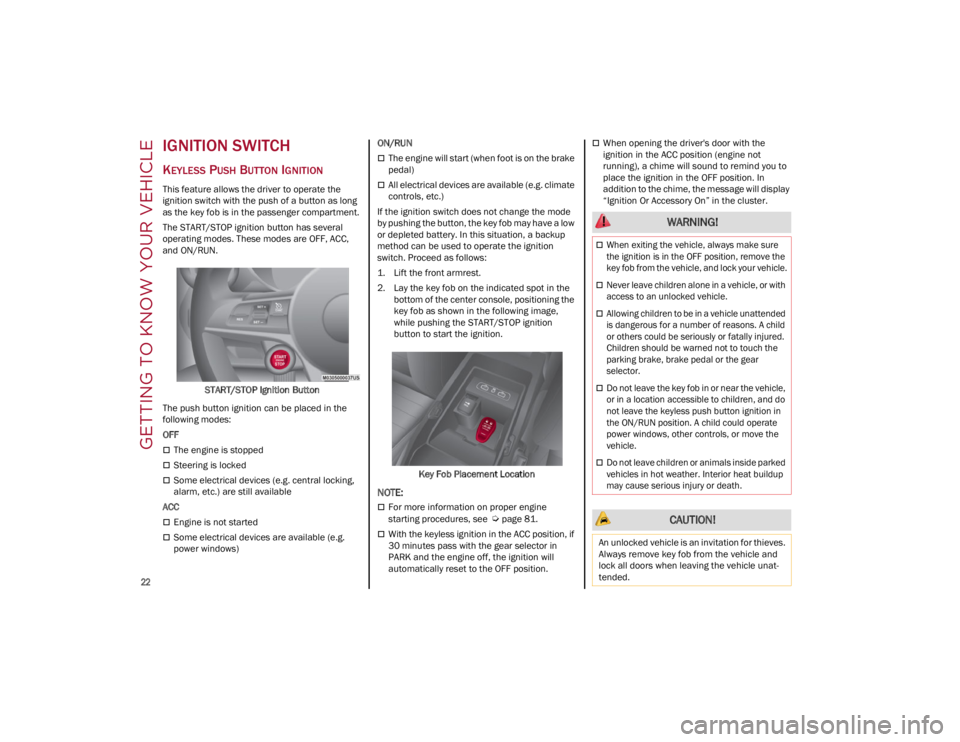
The START/STOP ignition button has several
operating modes. These modes are OFF, ACC,
and ON/RUN.START/STOP Ignition Button
The push button ignition can be placed in the
following modes:
OFF
The engine is stopped
Steering is locked
Some electrical devices (e.g. central locking,
alarm, etc.) are still available
ACC
Engine is not started
Some electrical devices are available (e.g.
power windows) ON/RUN
The engine will start (when foot is on the brake
pedal)
All electrical devices are available (e.g. climate
controls, etc.)
If the ignition switch does not change the mode
by pushing the button, the key fob may have a low
or depleted battery. In this situation, a backup
method can be used to operate the ignition
switch. Proceed as follows:
1. Lift the front armrest.
2. Lay the key fob on the indicated spot in the bottom of the center console, positioning the
key fob as shown in the following image,
while pushing the START/STOP ignition
button to start the ignition.
Key Fob Placement Location
NOTE:
For more information on proper engine
starting procedures, see
Ú
page 81.
With the keyless ignition in the ACC position, if
30 minutes pass with the gear selector in
PARK and the engine off, the ignition will
automatically reset to the OFF position.
When opening the driver's door with the
ignition in the ACC position (engine not
running), a chime will sound to remind you to
place the ignition in the OFF position. In
addition to the chime, the message will display
“Ignition Or Accessory On” in the cluster.
WARNING!
When exiting the vehicle, always make sure
the ignition is in the OFF position, remove the
key fob from the vehicle, and lock your vehicle.
Never leave children alone in a vehicle, or with
access to an unlocked vehicle.
Allowing children to be in a vehicle unattended
is dangerous for a number of reasons. A child
or others could be seriously or fatally injured.
Children should be warned not to touch the
parking brake, brake pedal or the gear
selector.
Do not leave the key fob in or near the vehicle,
or in a location accessible to children, and do
not leave the keyless push button ignition in
the ON/RUN position. A child could operate
power windows, other controls, or move the
vehicle.
Do not leave children or animals inside parked
vehicles in hot weather. Interior heat buildup
may cause serious injury or death.
CAUTION!
An unlocked vehicle is an invitation for thieves.
Always remove key fob from the vehicle and
lock all doors when leaving the vehicle unat -
tended.
22_GA_OM_EN_USC_t.book Page 22
Page 25 of 248
23
REMOTE START —
IF EQUIPPED
This system uses the key fob to start the
engine conveniently from outside the
vehicle while still maintaining security.
NOTE:
Obstructions between the vehicle and key fob
may reduce this range
Ú
page 238.
HOW TO USE REMOTE START
Push the Remote Start button on the key fob
twice within five seconds. The vehicle doors will
lock, the turn signals will flash twice, and the horn
will chirp twice. Pushing the Remote Start button
a third time shuts the engine off.
NOTE:
With Remote Start, the engine will only run for
15 minutes.
Remote Start can only be used twice.
If an engine fault is present or fuel level is low,
the vehicle will start and then shut down in
10 seconds.
The park lamps will turn on and remain on
during Remote Start mode.
For security, power window operation is
disabled when the vehicle is in the Remote
Start mode.
The ignition must be placed in the ACC position
before the Remote Start sequence can be
repeated for a third cycle.
All of the following conditions must be met before
the engine will remote start:
Gear selector in PARK
Doors closed
Hood closed
Trunk closed
Hazard switch off
Brake switch inactive (brake pedal not
pressed)
Battery at an acceptable charge level
PANIC button not pushed
System not disabled from previous Remote
Start event
Vehicle Security system indicator flashing
Ignition in OFF position
Fuel level meets minimum requirement
Vehicle Security system is not signaling an
intrusion
Malfunction Indicator Light (MIL) is not
illuminated
TO EXIT REMOTE START MODE
To drive the vehicle after starting the Remote
Start system, either push and release the unlock
button on the key fob to unlock the doors, or
unlock the vehicle using Passive Entry via the
door handles, and disarm the Vehicle Security
system (if equipped). Then, prior to the end of the
15 minute cycle, push and release the START/
STOP ignition button while pressing the brake
pedal.
The Remote Start system will turn the engine off
with another push and release of the Remote
Start button on the key fob, or if the engine is
allowed to run for the entire 15 minute cycle.
REMOTE START COMFORT SYSTEMS —
I
F EQUIPPED
When Remote Start is activated, the heated
steering wheel and front heated seat features will
automatically activate when ambient
temperature is less than 39°F (4°C). These
features will stay on through the duration of
Remote Start.
NOTE:
This feature can be activated through the radio
system. Refer to the Information and Entertain -
ment System Owner’s Manual Supplement for
further information.
WARNING!
Do not start or run an engine in a closed
garage or confined area. Exhaust gas
contains Carbon Monoxide (CO) which is
odorless and colorless. Carbon Monoxide is
poisonous and can cause serious injury or
death when inhaled.
Keep key fobs away from children. Operation
of the Remote Start system, windows, door
locks or other controls could cause serious
injury or death.
22_GA_OM_EN_USC_t.book Page 23
Page 27 of 248
25
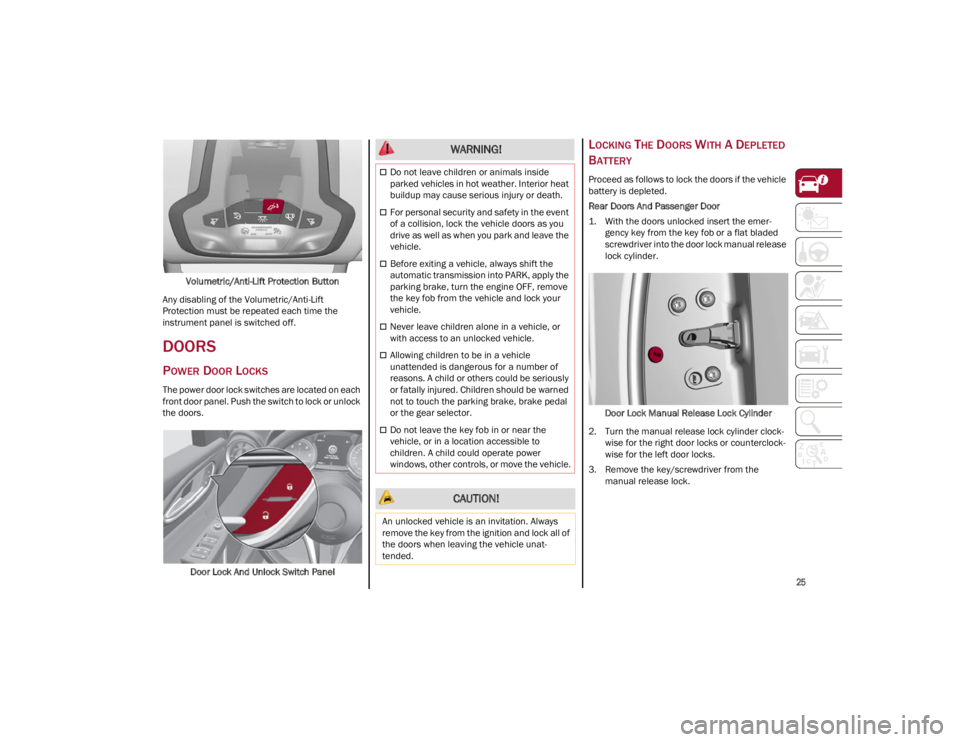
Volumetric/Anti-Lift Protection Button
Any disabling of the Volumetric/Anti-Lift
Protection must be repeated each time the
instrument panel is switched off.
DOORS
POWER DOOR LOCKS
The power door lock switches are located on each
front door panel. Push the switch to lock or unlock
the doors.
Door Lock And Unlock Switch Panel
LOCKING THE DOORS WITH A DEPLETED
B
ATTERY
Proceed as follows to lock the doors if the vehicle
battery is depleted.
Rear Doors And Passenger Door
1. With the doors unlocked insert the emer -
gency key from the key fob or a flat bladed
screwdriver into the door lock manual release
lock cylinder.
Door Lock Manual Release Lock Cylinder
2. Turn the manual release lock cylinder clock -
wise for the right door locks or counterclock -
wise for the left door locks.
3. Remove the key/screwdriver from the manual release lock.
WARNING!
Do not leave children or animals inside
parked vehicles in hot weather. Interior heat
buildup may cause serious injury or death.
For personal security and safety in the event
of a collision, lock the vehicle doors as you
drive as well as when you park and leave the
vehicle.
Before exiting a vehicle, always shift the
automatic transmission into PARK, apply the
parking brake, turn the engine OFF, remove
the key fob from the vehicle and lock your
vehicle.
Never leave children alone in a vehicle, or
with access to an unlocked vehicle.
Allowing children to be in a vehicle
unattended is dangerous for a number of
reasons. A child or others could be seriously
or fatally injured. Children should be warned
not to touch the parking brake, brake pedal
or the gear selector.
Do not leave the key fob in or near the
vehicle, or in a location accessible to
children. A child could operate power
windows, other controls, or move the vehicle.
CAUTION!
An unlocked vehicle is an invitation. Always
remove the key from the ignition and lock all of
the doors when leaving the vehicle unat -
tended.
22_GA_OM_EN_USC_t.book Page 25
Page 28 of 248
GETTING TO KNOW YOUR VEHICLE
26
Proceed in one of the following ways to realign
the door lock device (only when the battery
charge has been restored):
Push the lock button on the key fob
Push the unlock button on the door panel
Unlock the driver’s door lock cylinder with the
emergency key
Operate the internal door handle
NOTE:
For the rear doors, if the Child Safety Locks are
engaged, and the previously described locking
procedure is carried out, operating the internal
handle will not open the door. Instead, it will only
realign the lock release device. To open the door,
the outside handle must be used. The door
central locking/unlocking buttons are not deacti-
vated when the emergency lock is engaged.
PASSIVE ENTRY SYSTEM
The Passive Entry system is an enhancement to
the vehicle’s key fob. This feature allows you to
lock and unlock the vehicle’s door(s) and trunk lid
without having to push the key fob lock or unlock
buttons.
NOTE:
Passive Entry may be programmed on/off
through the radio screen. Refer to the
Information and Entertainment System
Owner’s Manual Supplement for Passive Entry
settings.
The key fob may not be detected by the vehicle
Passive Entry system if it is located next to a
mobile phone, laptop, or other electronic
device; these devices may block the key fob’s wireless signal and prevent the Passive Entry
system from locking/unlocking the vehicle.
If wearing gloves, or if it has been raining/
snowing on the Passive Entry door handle, the
unlock sensitivity can be affected, resulting in
a slower response time.
If the vehicle is unlocked by Passive Entry and
no door is opened within 60 seconds, the
vehicle will relock and (if equipped) will arm
the Vehicle Security system.
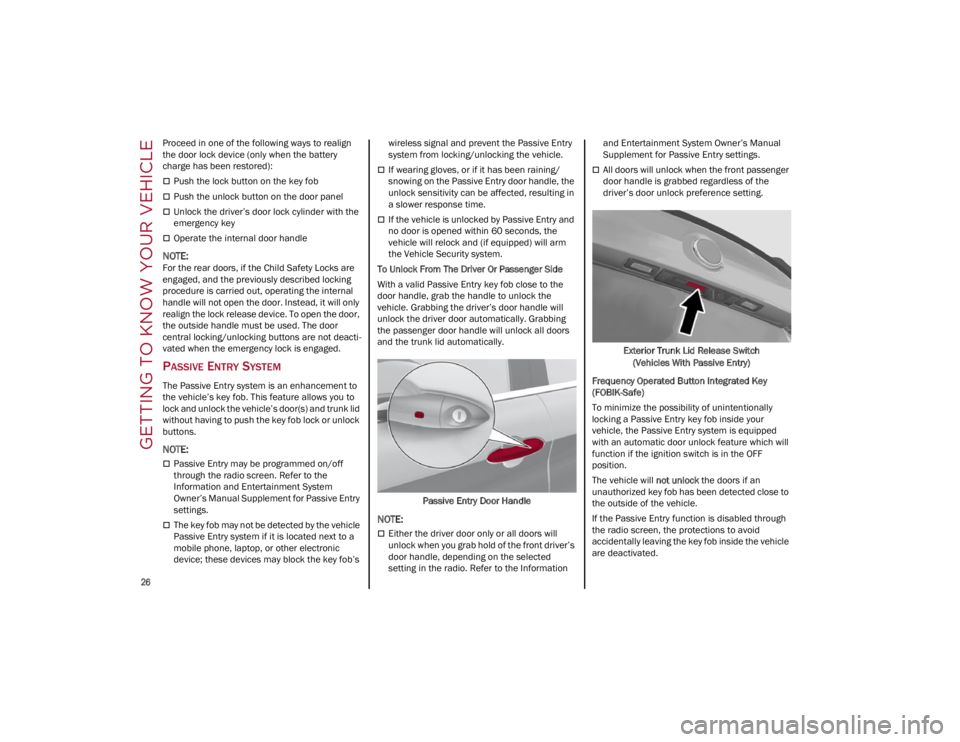
To Unlock From The Driver Or Passenger Side
With a valid Passive Entry key fob close to the
door handle, grab the handle to unlock the
vehicle. Grabbing the driver’s door handle will
unlock the driver door automatically. Grabbing
the passenger door handle will unlock all doors
and the trunk lid automatically.
Passive Entry Door Handle
NOTE:
Either the driver door only or all doors will
unlock when you grab hold of the front driver’s
door handle, depending on the selected
setting in the radio. Refer to the Information and Entertainment System Owner’s Manual
Supplement for Passive Entry settings.
All doors will unlock when the front passenger
door handle is grabbed regardless of the
driver’s door unlock preference setting.
Exterior Trunk Lid Release Switch (Vehicles With Passive Entry)
Frequency Operated Button Integrated Key
(FOBIK-Safe)
To minimize the possibility of unintentionally
locking a Passive Entry key fob inside your
vehicle, the Passive Entry system is equipped
with an automatic door unlock feature which will
function if the ignition switch is in the OFF
position.
The vehicle will not unlock the doors if an
unauthorized key fob has been detected close to
the outside of the vehicle.
If the Passive Entry function is disabled through
the radio screen, the protections to avoid
accidentally leaving the key fob inside the vehicle
are deactivated.
22_GA_OM_EN_USC_t.book Page 26
Page 29 of 248
27
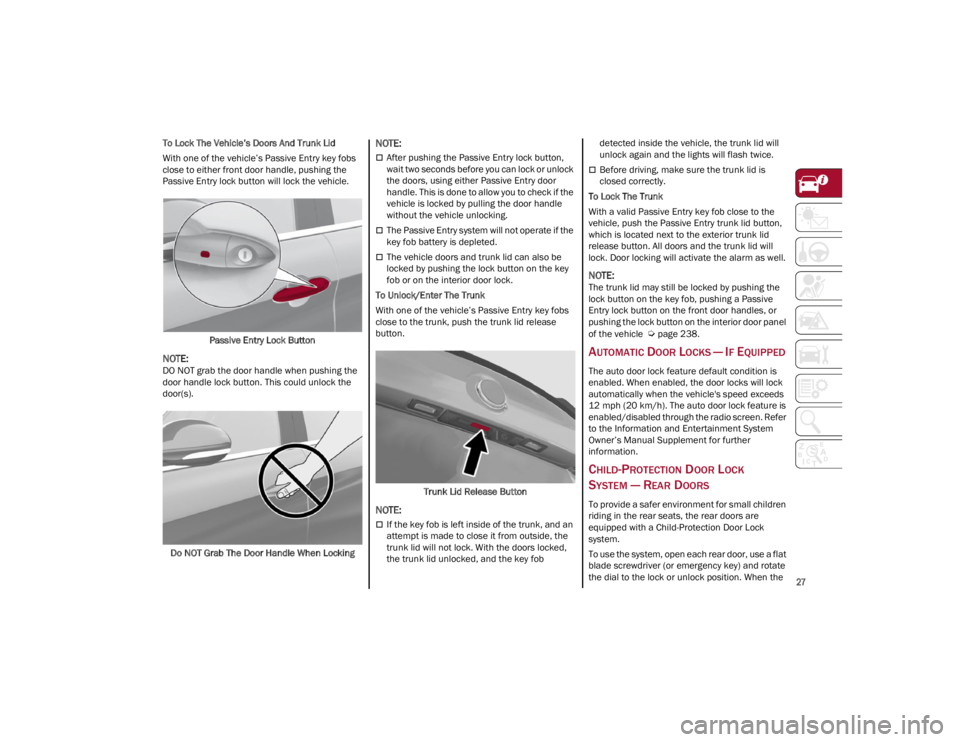
To Lock The Vehicle’s Doors And Trunk Lid
With one of the vehicle’s Passive Entry key fobs
close to either front door handle, pushing the
Passive Entry lock button will lock the vehicle.Passive Entry Lock Button
NOTE:
DO NOT grab the door handle when pushing the
door handle lock button. This could unlock the
door(s).
Do NOT Grab The Door Handle When Locking
NOTE:
After pushing the Passive Entry lock button,
wait two seconds before you can lock or unlock
the doors, using either Passive Entry door
handle. This is done to allow you to check if the
vehicle is locked by pulling the door handle
without the vehicle unlocking.
The Passive Entry system will not operate if the
key fob battery is depleted.
The vehicle doors and trunk lid can also be
locked by pushing the lock button on the key
fob or on the interior door lock.
To Unlock/Enter The Trunk
With one of the vehicle’s Passive Entry key fobs
close to the trunk, push the trunk lid release
button.
Trunk Lid Release Button
NOTE:
If the key fob is left inside of the trunk, and an
attempt is made to close it from outside, the
trunk lid will not lock. With the doors locked,
the trunk lid unlocked, and the key fob detected inside the vehicle, the trunk lid will
unlock again and the lights will flash twice.
Before driving, make sure the trunk lid is
closed correctly.
To Lock The Trunk
With a valid Passive Entry key fob close to the
vehicle, push the Passive Entry trunk lid button,
which is located next to the exterior trunk lid
release button. All doors and the trunk lid will
lock. Door locking will activate the alarm as well.
NOTE:
The trunk lid may still be locked by pushing the
lock button on the key fob, pushing a Passive
Entry lock button on the front door handles, or
pushing the lock button on the interior door panel
of the vehicle
Ú
page 238.
AUTOMATIC DOOR LOCKS — IF EQUIPPED
The auto door lock feature default condition is
enabled. When enabled, the door locks will lock
automatically when the vehicle's speed exceeds
12 mph (20 km/h). The auto door lock feature is
enabled/disabled through the radio screen. Refer
to the Information and Entertainment System
Owner’s Manual Supplement for further
information.
CHILD-PROTECTION DOOR LOCK
SYSTEM — REAR DOORS
To provide a safer environment for small children
riding in the rear seats, the rear doors are
equipped with a Child-Protection Door Lock
system.
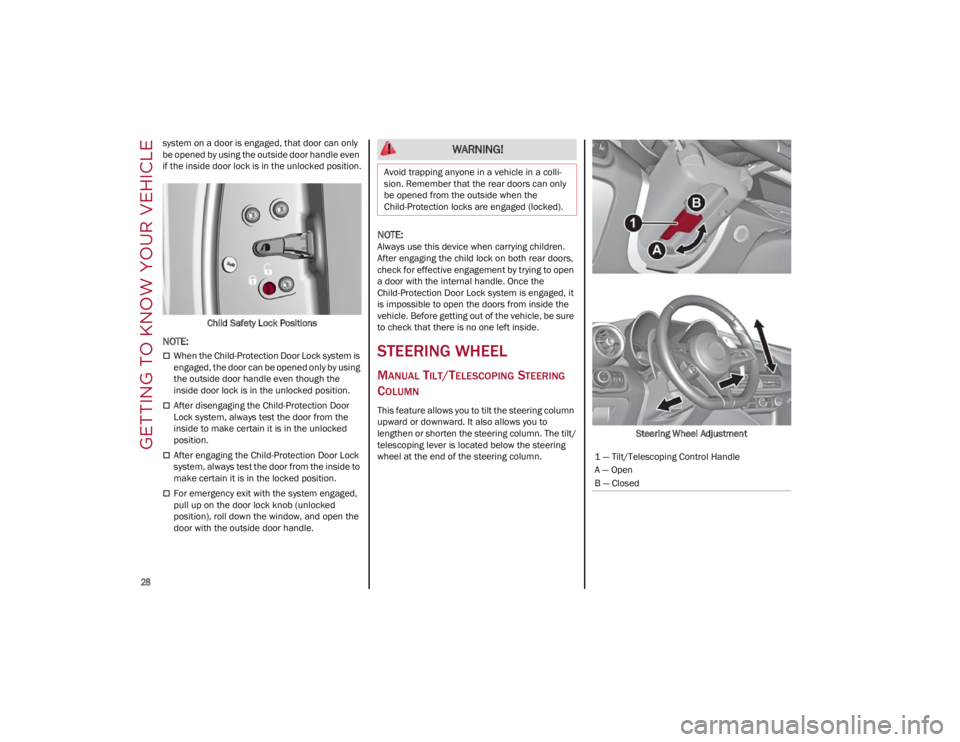
To use the system, open each rear door, use a flat
blade screwdriver (or emergency key) and rotate
the dial to the lock or unlock position. When the
22_GA_OM_EN_USC_t.book Page 27
Page 30 of 248
GETTING TO KNOW YOUR VEHICLE
28
system on a door is engaged, that door can only
be opened by using the outside door handle even
if the inside door lock is in the unlocked position.Child Safety Lock Positions
NOTE:
When the Child-Protection Door Lock system is
engaged, the door can be opened only by using
the outside door handle even though the
inside door lock is in the unlocked position.
After disengaging the Child-Protection Door
Lock system, always test the door from the
inside to make certain it is in the unlocked
position.
After engaging the Child-Protection Door Lock
system, always test the door from the inside to
make certain it is in the locked position.
For emergency exit with the system engaged,
pull up on the door lock knob (unlocked
position), roll down the window, and open the
door with the outside door handle.
NOTE:
Always use this device when carrying children.
After engaging the child lock on both rear doors,
check for effective engagement by trying to open
a door with the internal handle. Once the
Child-Protection Door Lock system is engaged, it
is impossible to open the doors from inside the
vehicle. Before getting out of the vehicle, be sure
to check that there is no one left inside.
STEERING WHEEL
MANUAL TILT/TELESCOPING STEERING
C
OLUMN
This feature allows you to tilt the steering column
upward or downward. It also allows you to
lengthen or shorten the steering column. The tilt/
telescoping lever is located below the steering
wheel at the end of the steering column. Steering Wheel Adjustment
WARNING!
Avoid trapping anyone in a vehicle in a colli
-
sion. Remember that the rear doors can only
be opened from the outside when the
Child-Protection locks are engaged (locked).
1 — Tilt/Telescoping Control Handle
A — Open
B — Closed
22_GA_OM_EN_USC_t.book Page 28
Page 35 of 248
33
Center Seatback Lowering
The center seatback can be folded forward for a
“Ski Pass-Through” feature from the trunk. Before
lowering the center seatback, make sure that the
rear center seat belt is not fastened and that
there are not any objects in the middle part of the
cushion.
Using the release strap, pull upward to release
the seatback and lower the center seatback
forward.Center Seatback Lowering Center Seatback Repositioning
Using the head restraint, raise the center
seatback, and lightly push to make sure that it is
properly locked into place. If the seatback is not
locked, repeat the operation.
POWER ADJUSTMENT (FRONT SEATS)
NOTE:
The seat layout may vary according to the vehicle
options.
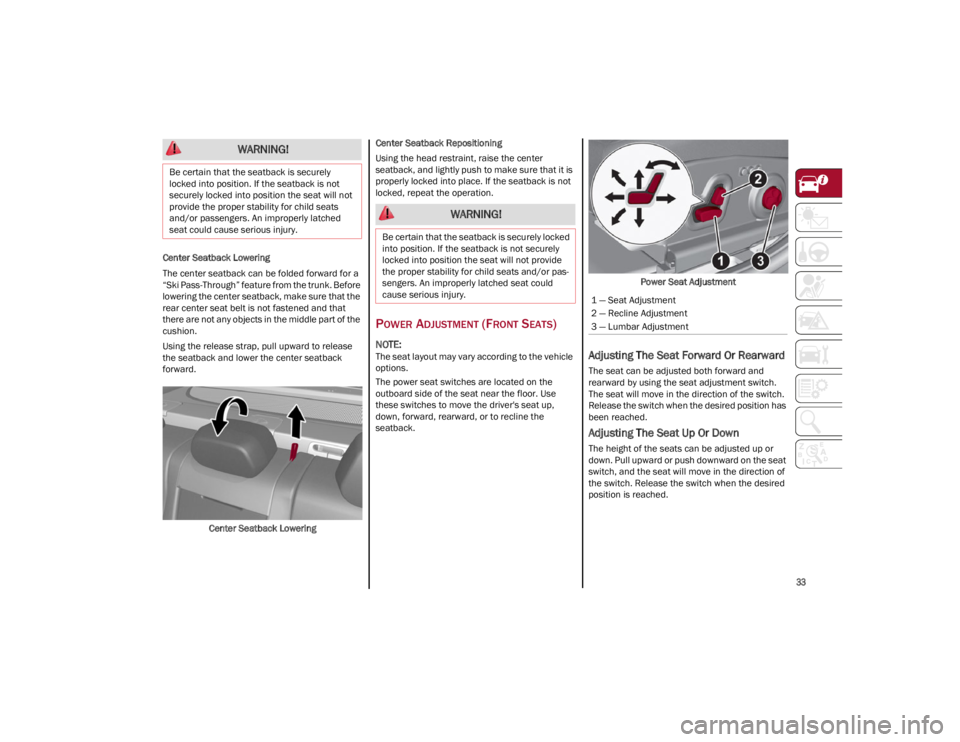
The power seat switches are located on the
outboard side of the seat near the floor. Use
these switches to move the driver's seat up,
down, forward, rearward, or to recline the
seatback.
Power Seat AdjustmentAdjusting The Seat Forward Or Rearward
The seat can be adjusted both forward and
rearward by using the seat adjustment switch.
The seat will move in the direction of the switch.
Release the switch when the desired position has
been reached.
Adjusting The Seat Up Or Down
The height of the seats can be adjusted up or
down. Pull upward or push downward on the seat
switch, and the seat will move in the direction of
the switch. Release the switch when the desired
position is reached.
WARNING!
Be certain that the seatback is securely
locked into position. If the seatback is not
securely locked into position the seat will not
provide the proper stability for child seats
and/or passengers. An improperly latched
seat could cause serious injury.
WARNING!
Be certain that the seatback is securely locked
into position. If the seatback is not securely
locked into position the seat will not provide
the proper stability for child seats and/or pas -
sengers. An improperly latched seat could
cause serious injury.
1 — Seat Adjustment
2 — Recline Adjustment
3 — Lumbar Adjustment
22_GA_OM_EN_USC_t.book Page 33