light Alfa Romeo Giulietta 2014 User Guide
[x] Cancel search | Manufacturer: ALFA ROMEO, Model Year: 2014, Model line: Giulietta, Model: Alfa Romeo Giulietta 2014Pages: 280, PDF Size: 6.65 MB
Page 20 of 280
STEERING LOCK
Engagement
When the key is at STOP, remove the
key and turn the steering wheel until
it locks.
Disengagement
Move the steering wheel slightly and
turn the ignition key to MAR-ON.
4) 5)
WARNING
2) If the ignition device has been
tampered with (e.g. an attempted
theft), have it checked over by a
Alfa Romeo Dealership as soon as
possible.
3) When getting out of the car,
always remove the key to prevent
someone from accidentally
activating the controls.
Remember to engage the
handbrake. Engage 1
stgear if the
car is parked uphill or reverse if
the car is parked downhill. Never
leave children unattended in the
car.4) It is absolutely forbidden to carry
out any after-market operation
involving steering system or
steering column modifications
(e.g.: installation of anti-theft
device). This could badly affect
performance and safety,
invalidate the warranty and also
result in the non-compliance
of the car with approval
requirements.
5) Never remove the key while the
car is moving. The steering wheel
will lock as soon as it is turned.
This holds true for cars being
towed as well.
SEATSFRONT SEATS
Lengthwise adjustment
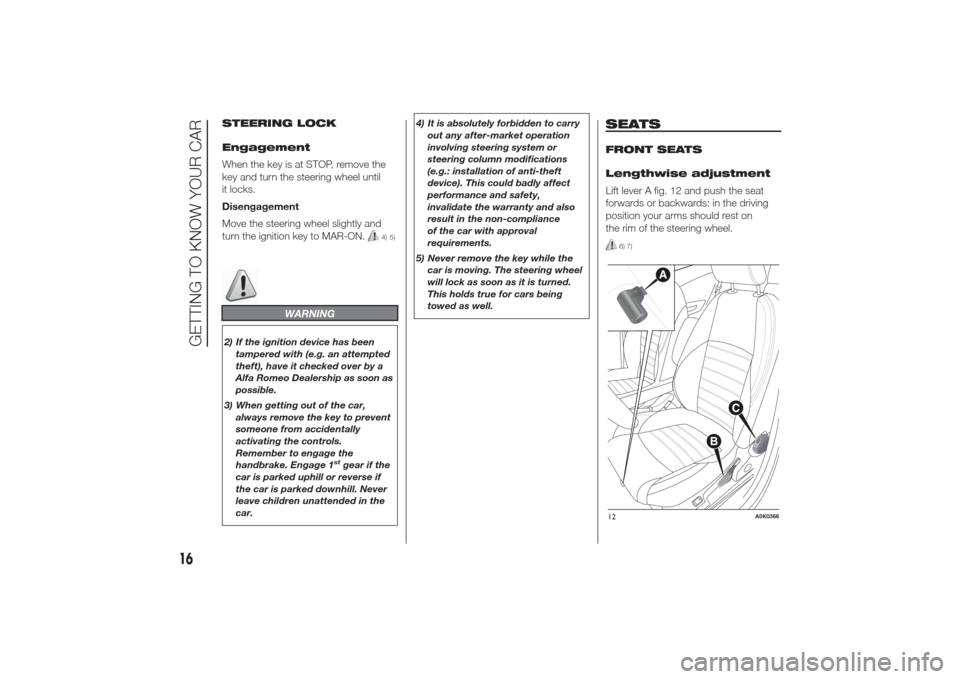
Lift lever A fig. 12 and push the seat
forwards or backwards: in the driving
position your arms should rest on
the rim of the steering wheel.
6) 7)
12
A0K0366
16
GETTING TO KNOW YOUR CAR
Page 25 of 280
DOOR MIRRORS
Electric adjustment
The mirrors can only be adjusted/folded
with the ignition in the MAR position.
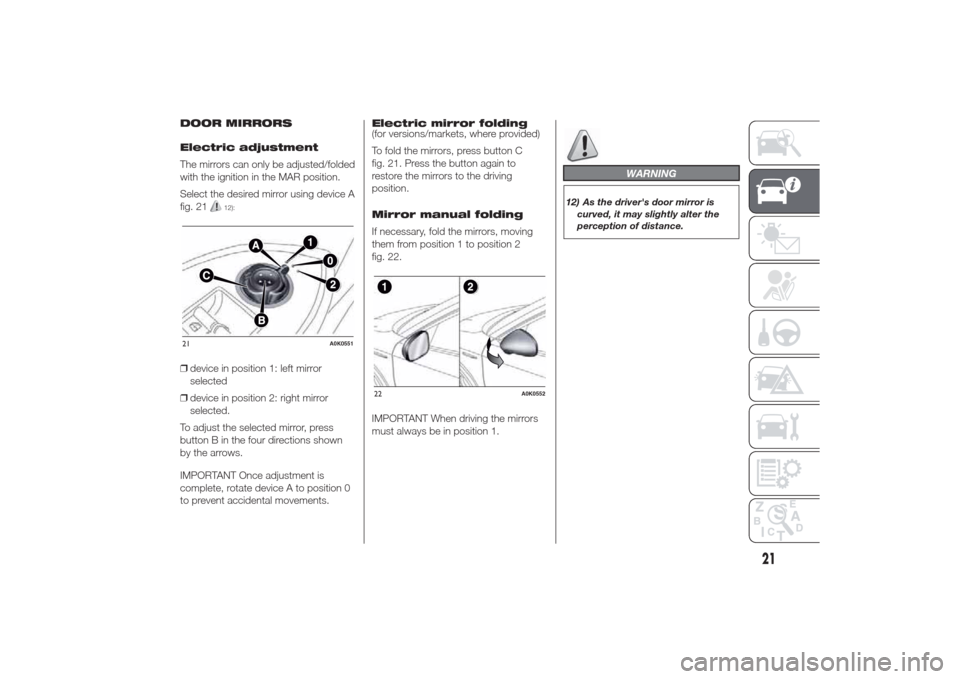
Select the desired mirror using device A
fig. 21
12):
❒device in position 1: left mirror
selected
❒device in position 2: right mirror
selected.
To adjust the selected mirror, press
button B in the four directions shown
by the arrows.
IMPORTANT Once adjustment is
complete, rotate device A to position 0
to prevent accidental movements.Electric mirror folding
(for versions/markets, where provided)
To fold the mirrors, press button C
fig. 21. Press the button again to
restore the mirrors to the driving
position.
Mirror manual folding
If necessary, fold the mirrors, moving
them from position 1 to position 2
fig. 22.
IMPORTANT When driving the mirrors
must always be in position 1.
WARNING
12) As the driver's door mirror is
curved, it may slightly alter the
perception of distance.
21
A0K0551
22
A0K0552
21
Page 29 of 280
CLIMATE CONTROL
(cooling)
To cool, proceed as follows:
❒turn knob A to the blue section;
❒press button F to turn internal air
recirculation on (circular LED around
the button on);
❒turn knob E to
;
❒press button B to turn the climate
control system on and turn knob C to
at least 1 (1st speed); for faster
action, turn knob C to 6 (maximum
fan speed).
Adjusting cooling
Proceed as follows:
❒turn knob A to the right to increase
the temperature;
❒press button F to turn internal air
recirculation off (circular LED around
the button off);
❒turn knob C to reduce the fan speed.
PASSENGER
COMPARTMENT HEATING
For rapid heating, proceed as follows:
❒turn knob A to the red section;
❒press button F to turn on the internal
air recirculation system;❒turn knob E to
;
❒turn knob C to 6 (maximum fan
speed).
Then use the controls to maintain the
desired comfort conditions and press
button F to turn internal air recirculation
off (circular LED around the button off)
and prevent misting.
IMPORTANT When the engine is cold, it
takes a few minutes to obtain fast
heating.
AUTOMATIC
DEMISTING/DEFROSTING
(MAX-DEF function)
This function activates automatic
demisting/defrosting of: front windows
(windscreen and side windows), heated
nozzles, heated exterior rear view
mirrors.
To activate the function, turn knob E to
the “Defrosting” symbol identified by
the
symbol.The manual climate control system will
automatically set itself to the following
configuration:
❒the demisting symbol
will turn
from red to orange (to indicate that
the function has been activated);
❒the heated rear window (and all
defrosting devices in the car) will be
turned on. The circular LED around
the
button will light up to indicate
that the function has been activated;
❒the air flow will go to maximum
speed (6th);
❒air circulation will be opened, if it was
closed (the circular LED around the
corresponding button will be off);
❒air mixing will go to “maximum heat”;
❒the additional electric heater (for
versions/markets, where provided)
will be turned on;
❒the compressor will be activated (the
circular LED will switch on to indicate
that the AC function is on).
25
Page 34 of 280
During automatic operation, you can
change the set temperatures, air
distribution and fan speed at any time
by using the relevant buttons or knobs:
the system will automatically change
the settings to adjust to the new
requirements.
During fully automatic operation
(AUTO), the word AUTO will disappear
if the air distribution and/or flow rate
and/or engagement of the compressor
and/or recirculation settings are
changed.
During fully automatic operation (FULL
AUTO), the word FULL will disappear
if the air distribution and/or flow rate
and/or activation of the compressor
and/or recirculation settings are
changed.
In this way the climate control system
will continue to automatically manage
all functions except for those that have
been manually adjusted. The fan speed
is the same in all the zones of the
passenger compartment.ADJUSTING THE AIR
TEMPERATURE
Turn knob A or L to the right or left to
adjust the air temperature: knob A
for the front left area, knob L for the
front right area of the passenger
compartment. The set temperatures are
shown on the displays.
Press the MONO button to align the air
temperature between the two areas.
Turn knob L to return to the separate
management of air temperatures in the
two areas.
Turn the knobs fully right or left to
engage HI (maximum heating) or LO
(maximum cooling) respectively. To
deactivate these functions, turn the
temperature knob to the desired
temperature.
SETTING THE AIR
DISTRIBUTION
By pressing the buttons (
/
/
), it
is possible to set one of the 7 possible
air distributions manually:
Air flow to the windscreen and
front side window diffusers to
demist/defrost them.Air flow at central and side
dashboard vents to ventilate the
chest and the face during the hot
season.
Air flow to the front and rear
footwell diffusers. This air
distribution setting heats the
passenger compartment most
quickly, giving a prompt sensation
of warmth.
Air flow distributed between
footwell vents (hotter air) and
central and side dashboard
vents (cooler air). This
distribution setting is useful in
spring and autumn on sunny
days.Air flow distributed between
footwell diffusers and
windscreen and front side
window defrosting/demisting
diffusers. This distribution
setting allows the passenger
compartment to warm up
efficiently and prevents the
windows from misting up.Air flow distribution between
windscreen demisting/
defrosting diffusers and side
and central dashboard vents.
This allows air to be sent to
the windscreen in conditions of
strong sunlight.
Air flow distribution to all
vents on the car.
30
GETTING TO KNOW YOUR CAR
Page 39 of 280
ADDITIONAL HEATER
(for versions/markets, where provided)
This allows the passenger
compartment to be heated more
quickly in cold weather conditions. The
additional heater turns off automatically
after the required comfort conditions
are achieved.
Automatic dual zone
climate control system
(for versions/markets, where provided)
The additional heater activates
automatically depending on the
environmental conditions and with
engine started.
Manual climate control
system
The additional heater activates
automatically when knob A is turned to
the end of the red section and the fan
is set to at least 1
stspeed.
IMPORTANT The heater only works if
the outside temperature and engine
coolant temperature are low. The heater
will not activate if the battery voltage is
too low.
IMPORTANT
2) The climate control system
detects the passenger
compartment temperature with a
mean radiant temperature sensor
fitted in a cover under the internal
rear view mirror. Obstructing the
field of view of this sensor with
any object could cause the
climate control system to operate
with less than optimal efficiency
EXTERNAL LIGHTS
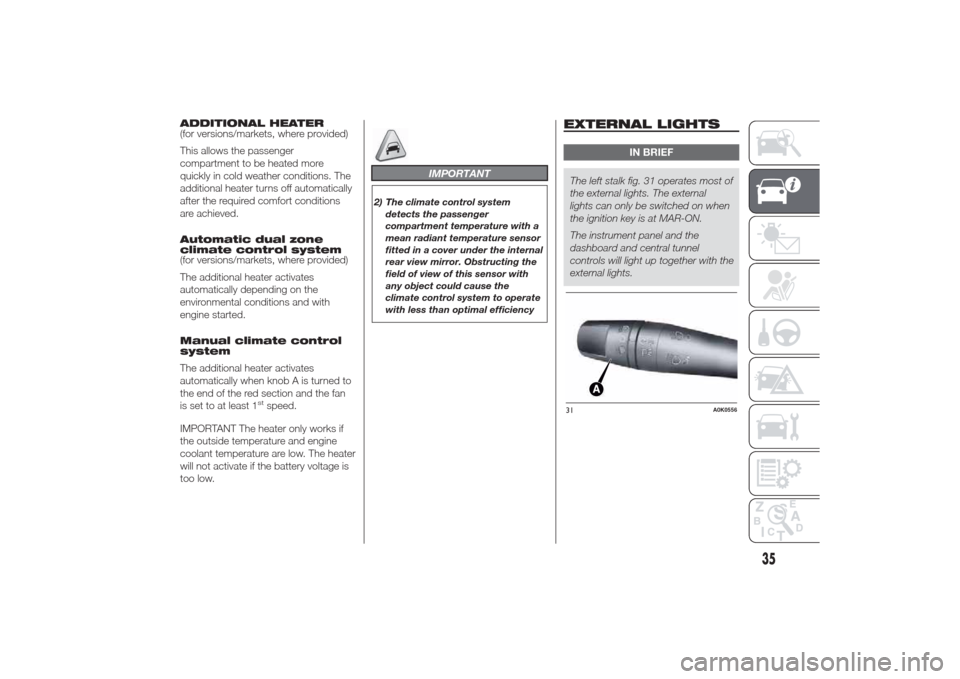
IN BRIEF
The left stalk fig. 31 operates most of
the external lights. The external
lights can only be switched on when
the ignition key is at MAR-ON.
The instrument panel and the
dashboard and central tunnel
controls will light up together with the
external lights.31
A0K0556
35
Page 40 of 280
DAYTIME RUNNING
LIGHTS (DRL)
“Daytime Running Lights”
With the ignition key at MAR-ON and
ring nut A fig. 31 turned to
, the
daytime running lights switch on. The
other lights and interior lighting stay off.
IMPORTANT The daytime running
lights are an alternative to the dipped
beam headlights for driving during
the daytime in countries where it is
compulsory to have lights on during the
day; where it is not compulsory, the
use of daytime running lights is
permitted.
IMPORTANT Daytime running lights
cannot replace dipped beam headlights
when driving at night or through
tunnels. The use of daytime running
lights is governed by the Highway Code
of the country in which you are driving.
Comply with legal requirements.
SIDE LIGHTS/DIPPED
BEAM HEADLIGHTS
With the ignition key turned to
MAR-ON, turn ring nut A fig. 31 to
.
The daytime running lights are switched
off and the side lights and dipped
beam headlights are switched on. The
warning light switches on in the
instrument panel.PARKING LIGHTS
These lights can only be switched on
with ignition key at STOP or removed,
by moving ring nut A fig. 31 first to
position
and then to position
.
The
warning light switches on
in the instrument panel.
AUTOMATIC LIGHTING
CONTROL (AUTOLIGHT)
(Dusk sensor)
(for versions/markets, where provided)
This infrared LED sensor, combined
with the rain sensor and located on the
windscreen, detects the variations in
outside brightness depending on the
light sensitivity set with the Setup
Menu: the greater the sensitivity, the
less external light is required to activate
the external lights.Activation
The dusk sensor activates when ring
nut A fig. 31 is turned to
. In this
way the side lights and dipped beam
headlights are activated automatically
according to the external lighting
conditions.
IMPORTANT The sensor is unable to
detect the presence of fog. Therefore
under these circumstances, these lights
must be turned on manually.
When the lights are turned on by the
sensor, the fog lights (for versions/
markets, where provided) and the rear
fog lights may be turned on.
When the lights are automatically
switched off, the front and rear fog
lights (if activated) are also switched off.
The next time the lights are switched
on automatically, the fog lights must be
reactivated manually (if required).
With the sensor active, it is possible to
flash the headlights but the main beam
headlights cannot be switched on. To
activate these lights, turn the ring nut A
to
and activate the fixed dipped
beam headlights.
36
GETTING TO KNOW YOUR CAR
Page 41 of 280
When the lights have been activated
automatically and are then switched off
by the sensor, the dipped beam
headlights are switched off first,
followed by the side lights a few
seconds later.
If the sensor is activated but is
malfunctioning, the side lights and
dipped beam headlights are switched
on irrespective of the outside light
level and the sensor failure is indicated
on the display.
It is also possible to deactivate the
sensor and switch on the side lights
and dipped beam headlights.MAIN BEAM HEADLIGHTS
To activate the main beam headlights,
with ring nut A fig. 31 at
, pull the
stalk towards the steering wheel
beyond the end of travel position. The
warning light switches on in the
instrument panel.
When the stalk is pulled towards the
steering wheel again, beyond the end
of travel position, the main beam
headlights deactivate, the dipped beam
headlights reactivate and thewarning light switches off.
It is not possible to switch on the main
beam headlights constantly if automatic
light control is active.
FLASHING
To do this, pull the stalk towards the
steering wheel (unstable position)
regardless of the position of ring nut A
fig. 31. The
warning light switches
on in the instrument panel.
REAR FOG LIGHTS
For the activation and deactivation of
the rear fog lights, refer to the
"Controls" section.DIRECTION INDICATORS
Bring the stalk to the (stable) position:
❒upwards: activates right direction
indicator;
❒downwards: activates left direction
indicator.
Warning light
or
will blink on the
instrument panel.
The direction indicators are switched off
automatically when the steering wheel
is straightened.
"Lane change" function
If you wish to signal a lane change,
place the left stalk in the unstable
position for less than half a second. The
direction indicator on the side selected
will flash five times and then switch
off automatically.
37
Page 42 of 280
“FOLLOW ME HOME”
DEVICE
This device allows you to illuminate the
area in front of the car for a certain
amount of time.
Activation
With the key turned to STOP or
removed, pull stalk A towards the
steering wheel within 2 minutes from
when the engine is turned off.
Each time the stalk is moved, the lights
stay on for an extra 30 seconds up to
a maximum of 210 seconds; then
the lights are switched off automatically.
Also, each time the stalk is operated,
the
warning light on the
instrument panel switches on. The
display shows the time set for the
function and the corresponding
graphics.
The warning light comes on when the
lever is operated and stays on until
the function is automatically
deactivated. Each movement of the
stalk only increases the amount of time
the lights stay on.Deactivation
Keep the stalk pulled towards the
steering wheel for more than 2
seconds.
EXTERNAL COURTESY
LIGHTS
These light up the car and the space in
front of it when the doors are unlocked.
Activation
When the car is parked and the doors
are unlocked by pressing the
button
on the remote control (or the luggage
compartment is unlocked by pressing
), the dipped beam headlights, rear
side lights and number plate lights are
activated.
The lights stay on for approximately 25
seconds unless the doors and luggage
compartment are locked again with
the remote control or the doors (or
luggage compartment) are opened and
reclosed. In these cases they switch
off after 5 seconds.
The external courtesy lights can be
enabled/disabled using the Setup Menu
(see the “Menu Items” paragraph in
this chapter).AFS ADAPTIVE LIGHTS
(Adaptive Frontlight System)
(for versions/markets, where provided)
This is a system combined with Xenon
headlamps which directs the main
light beam and adapts it to the driving
conditions round bends/when
cornering, continuously and
automatically.
The system directs the light beam to
light up the road in the best way, taking
into account the speed of the car, the
bend/corner angle and the speed of
steering.
The adaptive lights are automatically
activated when the car is started.
To activate/deactivate the lights use the
Setup Menu (see paragraph “Menu
Items” in the “Knowing the instrument
panel” section).
38
GETTING TO KNOW YOUR CAR
Page 45 of 280
CRUISE CONTROL(for versions/markets, where provided)
IN BRIEF
This is an electronically controlled
driving assistance device that allows
the desired car speed to be
maintained, without having to press
the accelerator pedal. This device
can be used at a speed above
30 km/h on long stretches of dry,
straight roads with few variations
(e.g. motorways).
The use of this device on extra-urban
roads with traffic is not therefore
recommended. Do not use it in town.
TURNING THE DEVICE
ON
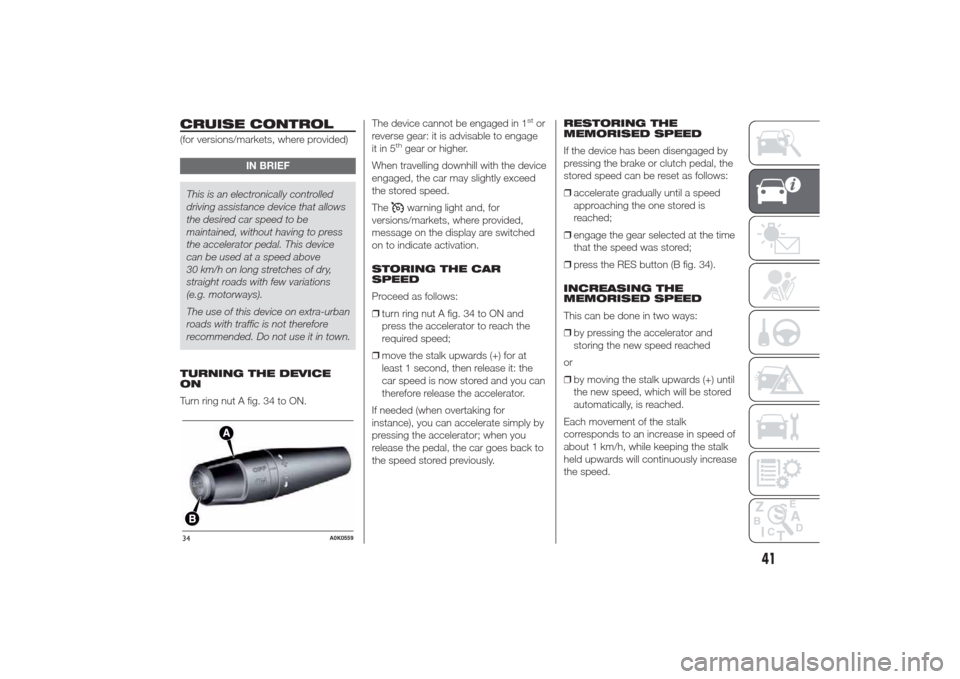
Turn ring nut A fig. 34 to ON.The device cannot be engaged in 1
stor
reverse gear: it is advisable to engage
it in 5
thgear or higher.
When travelling downhill with the device
engaged, the car may slightly exceed
the stored speed.
Thewarning light and, for
versions/markets, where provided,
message on the display are switched
on to indicate activation.
STORING THE CAR
SPEED
Proceed as follows:
❒turn ring nut A fig. 34 to ON and
press the accelerator to reach the
required speed;
❒move the stalk upwards (+) for at
least 1 second, then release it: the
car speed is now stored and you can
therefore release the accelerator.
If needed (when overtaking for
instance), you can accelerate simply by
pressing the accelerator; when you
release the pedal, the car goes back to
the speed stored previously.RESTORING THE
MEMORISED SPEED
If the device has been disengaged by
pressing the brake or clutch pedal, the
stored speed can be reset as follows:
❒accelerate gradually until a speed
approaching the one stored is
reached;
❒engage the gear selected at the time
that the speed was stored;
❒press the RES button (B fig. 34).
INCREASING THE
MEMORISED SPEED
This can be done in two ways:
❒by pressing the accelerator and
storing the new speed reached
or
❒by moving the stalk upwards (+) until
the new speed, which will be stored
automatically, is reached.
Each movement of the stalk
corresponds to an increase in speed of
about 1 km/h, while keeping the stalk
held upwards will continuously increase
the speed.
34
A0K0559
41
Page 46 of 280
REDUCING THE
MEMORISED SPEED
This can be done in two ways:
❒by deactivating the device and then
storing the new speed
or
❒by moving the stalk downwards (–)
until the new speed, which will be
stored automatically, is reached.
Each movement of the lever
corresponds to a slight reduction in
speed of about 1 km/h, while keeping
the stalk held downwards will decrease
the speed continuously.
TURNING THE DEVICE
OFF
The device can be deactivated in the
following ways:
❒by turning ring nut A fig. 34 to the
OFF position
❒by switching off the engine;❒by pressing the brake pedal, the
clutch or the accelerator; in this
last case the system is not effectively
deactivated but the system gives
priority to the acceleration request.
The device still remains active,
without the need to press the RES
button to return to the previous
conditions once acceleration
is concluded.
Automatic deactivation
The device deactivates automatically in
the following cases:
❒if the ABS or ESC systems intervene;
❒with the car speed below the set
limit;
❒in the event of system failure.
15) 16)
WARNING
15) When travelling with the device
active, do not move the gear lever
to neutral.
16) In the event of device faults or
failures, turn the ring nut A to
OFF and contact an Alfa Romeo
Dealership.
ROOF LIGHTSFRONT ROOF LIGHT
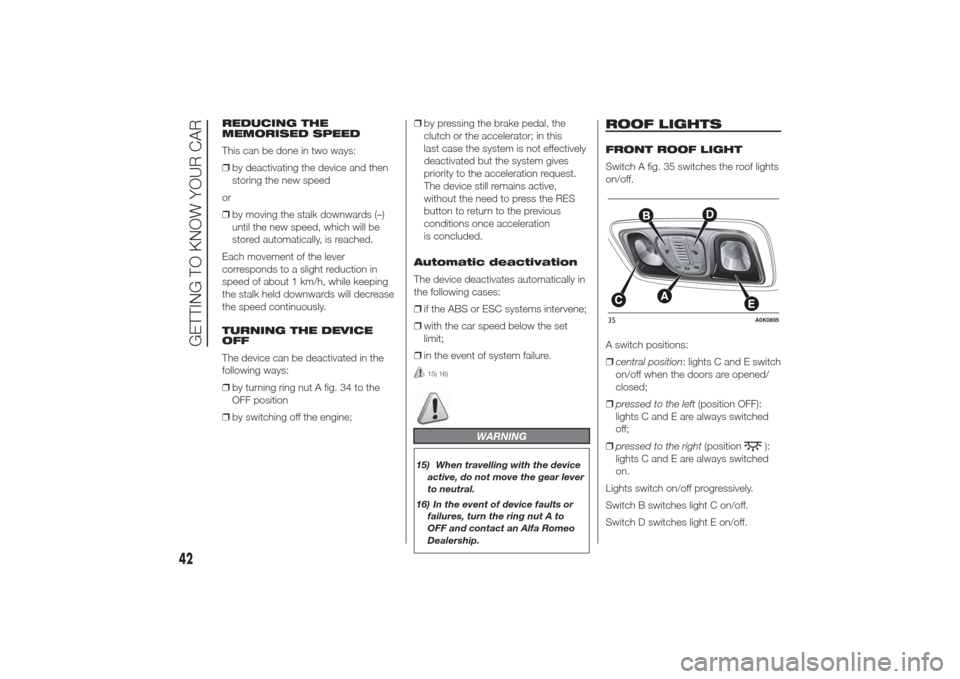
Switch A fig. 35 switches the roof lights
on/off.
A switch positions:
❒central position: lights C and E switch
on/off when the doors are opened/
closed;
❒pressed to the left(position OFF):
lights C and E are always switched
off;
❒pressed to the right(position
):
lights C and E are always switched
on.
Lights switch on/off progressively.
Switch B switches light C on/off.
Switch D switches light E on/off.
35
A0K0805
42
GETTING TO KNOW YOUR CAR