display Alfa Romeo Giulietta 2014 Owner's Guide
[x] Cancel search | Manufacturer: ALFA ROMEO, Model Year: 2014, Model line: Giulietta, Model: Alfa Romeo Giulietta 2014Pages: 280, PDF Size: 6.65 MB
Page 100 of 280
Set date (Setting the
date)
Using this function it is possible to
change the date (day – month – year).
Proceed as follows to start the update:
❒briefly press the SET/
button:
the "year" starts flashing on the
display;
❒press the "
"or"
" button
to make the adjustment;
❒briefly press the SET/button: the
"month" will flash on the display;
❒press the "
"or"
" button
to make the adjustment;
❒briefly press the SET/button: the
“day” will flash on the display;
❒press the "
"or"
" button
to make the adjustment.
IMPORTANT The setting will increase or
decrease by one unit each time the
"
"or"
" button is pressed.
Hold the button down to increase/
decrease the setting rapidly. Complete
the setting by single pressing the
button when you approach the required
value.
Briefly press the SET/
button to go
back to the menu screen or hold the
button down to go back to the
standard screen without saving.First page (Display of
information on the main
screen)
(for versions/markets, where provided)
This function allows you to choose
the information you would like to see on
the main screen. You can view the
date or the trip distance.
To make your choice, proceed as
follows:
❒briefly press the SET/
button:
"Initial page" will be displayed;
❒press the SET/
button again
briefly to display the "date" and
"engine info" options;
❒press "
"or"
" to select
the information you wish to see on
the main page of the display;
❒briefly press the SET/button to
go back to the menu screen or hold
the button down to go back to the
standard screen without saving.
When the key is turned to MAR-ON
and the initial check stage is over, the
display will show the information
selected via the "First page" menu
function.Autoclose (Automatic
door lock operation with
car running)
When activated (On), this function locks
the doors automatically when the
vehicle speed exceeds 20 km/h.
Proceed as follows to activate or
deactivate this function:
❒press the SET/
button briefly to
display a submenu;
❒press the SET/button briefly to
make the display flash "On" or "Off"
according to what was previously set;
❒press the "
"or"
" button
to select;
❒press the SET/
button briefly to
return to the submenu screen or
hold the button down to return to the
main menu screen without saving;
❒hold the SET/button down
again to return to the standard
screen or to the main menu
according to where you are in the
menu.
96
KNOWING THE INSTRUMENT PANEL
Page 101 of 280
Unit of measurement
(Setting the unit of
measurement)
With this function it is possible to set
the measurement units through three
sub-menus: “Distance”, “Consumption”
and “Temperature”.
To set the desired measurement unit,
proceed as follows:
❒briefly press the SET/
button to
display the three sub-menus;
❒press the "
"or"
" button
to navigate through the three
submenus;
❒once the submenu to be modified
has been selected, briefly press
the SET/
button;
❒when the “Distance” submenu is
entered: briefly pressing
SET/
displays "km" or "mi"
depending on the previous setting;
❒press the "
"or"
" button
to select;
❒when the “Consumption” submenu is
entered, pressing SET/displays
km/l, l/100 km or mpg depending
on the previous setting;
If the set distance unit is "km", the fuel
consumption unit will be displayed in
km/l or l/100 km.If the distance unit set is “mi” the fuel
consumption unit will be displayed
in “mpg”.
❒press the "
"or"
" button
to select;
❒when the “Temperature” submenu is
entered, pressing SET/displays
“°C” or “°F” depending on the
previous setting;
❒press the "
"or"
" button
to select;
When you have made the required
settings, briefly press the
SET/
button to go back to the
submenu screen or hold the button
down to go back to the main menu
screen without saving the new settings.
Hold the SET/
button down again
to return to the standard screen or
to the main menu according to where
you are in the menu.
Language (Language
selection)
Display messages can be shown in
different languages: Italian, English,
German, Portuguese, Spanish, French,
Dutch, Turkish and Brazilian.
To set the desired language proceed as
follows:❒briefly press the SET/
button: the
previously set "language" starts
flashing on the display;
❒press the "
"or"
" button
to select;
❒briefly press the SET/button to
go back to the menu screen or hold
the button down to go back to the
standard screen without saving.
Warnings volume
(Adjusting the
alert/warning acoustic
signal volume)
With this function it is possible to adjust
(to eight levels) the volume of the
acoustic signal which sounds in the
event of alerts and warning.
To set the desired volume proceed as
follows:
❒press the SET/
button briefly,
making the display flash the
previously set volume "level";
❒press the "
"or"
" button
to make the adjustment;
❒briefly press the SET/button to
go back to the menu screen or hold
the button down to go back to the
standard screen without saving.
97
Page 102 of 280
Belt reminder
(Reactivation of SBR
buzzer)
(for versions/markets, where provided)
This function can be displayed only
after an Alfa Romeo Dealership has
deactivated the SBR system (see
paragraph “SBR system” in the “Safety”
chapter).
To reactivate this function, proceed as
follows:
❒briefly press the SET/
button, the
display shows "OFF" flashing. Press
the "
"or"
" button and
"On" will be displayed;
❒briefly press the SET/
button to
go back to the previous screen or
hold the button down to go back to
the standard screen without saving.
Service (Scheduled
servicing)
With this function it is possible to view
information on servicing deadlines
depending on kilometres travelled or
daily intervals.
To consult this information, proceed as
follows:❒briefly press the SET/
button: the
display shows when servicing is due
in km or mi according to the previous
setting (see paragraph "Units of
measurement");
❒briefly press the SET/button to
go back to the menu screen or hold
the button down to go back to the
standard screen.
IMPORTANT The “Scheduled Servicing
Plan” includes car maintenance at
fixed intervals, refer to the
"Maintenance and care" chapter. This
message is displayed automatically
when the key is turned to MAR-ON,
starting at 2,000 km (or equivalent
value in miles) from when the
next service is due and reappearing
every 200 km (or equivalent value
in miles). Below 200 km servicing
indications are more frequent. The
display will be in km or mi depending
on the measurement unit settings.
When the next scheduled service is
approaching and the key is turned to
MAR-ON, the word "Service" will
appear on the display, followed by the
number of kilometres or miles left.
Go to an Alfa Romeo Dealership, where
the “Scheduled Servicing Plan”
operations will be performed and the
message will be reset.Passenger airbag/side
bag (front passenger
side airbag and side
bag for pelvis, chest
and shoulder protection
- Side bag -
activation/deactivation)
This function is used to activate/
deactivate the passenger side air bag.
Proceed as follows:
❒press the SET/
button and, after
the message (Bag pass: Off) (to
deactivate) or (Bag pass: On) (to
activate) is displayed by pressing
buttons "
" and "
", press
the SET/
button again;
❒a confirmation request message will
appear on the display;
❒by pressing the "
"or"
"
buttons select "Yes" (to confirm
activation/deactivation) or "No" (to
cancel);
❒press the SET/
button briefly, a
message confirming the selection
will be displayed and you will return
to the menu screen or, pressing
the button for longer, you will return
to the standard screen without
memorising.
98
KNOWING THE INSTRUMENT PANEL
Page 103 of 280
Daytime running lights
(DRL)
With this function is possible to turn the
daytime running lights on and off.
Proceed as follows to activate or
deactivate this function:
❒press the SET/
button briefly to
display a submenu;
❒press the SET/button briefly to
make the display flash "On" or "Off"
according to what was previously set;
❒press the "
"or"
" button
to select;
❒press the SET/
button briefly to
return to the submenu screen or
hold the button down to return to the
main menu screen without saving;
❒hold the SET/button down
again to return to the standard
screen or to the main menu
according to where you are in the
menu.
AFS adaptive lights
(Adaptive Frontlight
System)
(for versions/markets, where provided)
This function allows the AFS (Adaptive
Frontlight System) to be activated/
deactivated.Proceed as follows to activate or
deactivate this function:
❒press the SET/
button briefly to
display a submenu;
❒press the SET/button briefly to
make the display flash "On" or "Off"
according to what was previously set;
❒press the "
"or"
" button to
select;
❒press the SET/button briefly to
return to the submenu screen or
hold the button down to return to the
main menu screen without saving;
❒hold the SET/button down
again to return to the standard
screen or to the main menu
according to where you are in the
menu.
Courtesy lights
(Activation/deactivation
of “Greeting lights”)
(for versions/markets, where provided)
With this function it is possible to turn
on the side lights, the number plate
lights and the ceiling lights for
approximately 25 seconds when the
doors or boot are opened using the
remote control, with the following
exceptions:
❒interruption after 5 seconds from
when the door closes❒interruption after locking using the
remote control
❒interruption after a lock or other
action using the remote control
Proceed as follows to activate or
deactivate this function:
❒press the SET/
button briefly to
make the display flash "On" or "Off"
according to what was previously set;
❒press the "
"or"
" button
to select;
❒briefly press the SET/button to
go back to the menu screen or hold
the button down to go back to the
standard screen without saving.
Menu exit
This is the last function that closes the
cycle of settings listed in the menu
screen.
Pressing the SET/
button briefly will
return the display to the standard
screen without saving.
Press the
button to return to the
first menu item.
99
Page 104 of 280
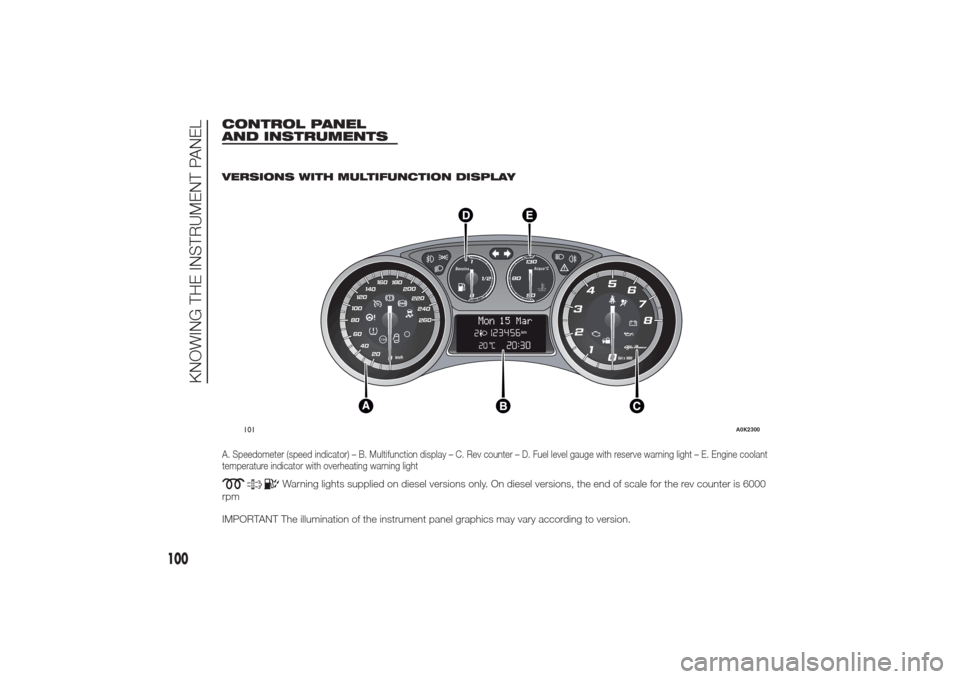
CONTROL PANEL
AND INSTRUMENTS
.
VERSIONS WITH MULTIFUNCTION DISPLAYA. Speedometer (speed indicator) – B. Multifunction display – C. Rev counter – D. Fuel level gauge with reserve warning light – E. Engine coolant
temperature indicator with overheating warning light
Warning lights supplied on diesel versions only. On diesel versions, the end of scale for the rev counter is 6000
rpm
IMPORTANT The illumination of the instrument panel graphics may vary according to version.
.
260 240220 200 180 160
140
100120
80
60
40
20
0
120
0Giri x 1000
2
1 345
6
7
8
011/2
Benzina
50130Acqua°C
90
Mon
15 Mar
101
A0K2300
100
KNOWING THE INSTRUMENT PANEL
Page 105 of 280
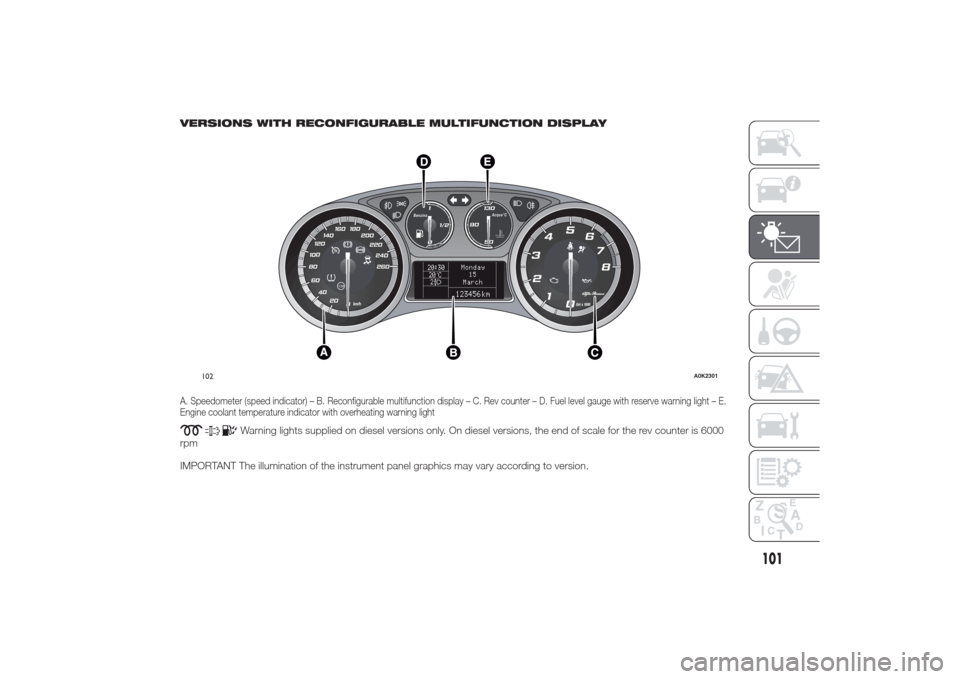
VERSIONS WITH RECONFIGURABLE MULTIFUNCTION DISPLAYA. Speedometer (speed indicator) – B. Reconfigurable multifunction display – C. Rev counter – D. Fuel level gauge with reserve warning light – E.
Engine coolant temperature indicator with overheating warning light
Warning lights supplied on diesel versions only. On diesel versions, the end of scale for the rev counter is 6000
rpm
IMPORTANT The illumination of the instrument panel graphics may vary according to version.
260 240220 200 180 160
140
100120
80
60
40
20
0
120
0Giri x 1000
2
1 345
6
7
8
011/2
Benzina
50130Acqua°C
90
20:30
20 C°2
Monday
15
March123456 km
102
A0K2301
101
Page 106 of 280
SPEEDOMETER (SPEED
INDICATOR)
This shows the speed of the car.
REV COUNTER
This indicates the engine rpm.
FUEL LEVEL GAUGE
This shows the amount of fuel left in the
fuel tank.
The warning light in the gauge lights up
when there are only 8 to 10 litres of
fuel remaining in the tank; if this
happens, refuel as soon as possible.
Do not travel with the fuel tank almost
empty: any gaps in fuel delivery could
damage the catalytic converter.ENGINE COOLANT
TEMPERATURE
INDICATOR
The needle shows the temperature of
the engine coolant and starts supplying
indications when the fluid temperature
exceeds approx. 50°C.
Under normal conditions, the needle
assumes different positions within
the scale depending on the usage
conditions.
The warning light turns on to indicate
an overheating of the engine coolant. In
this case, stop the engine and contact
an Alfa Romeo Dealership.
TRIP COMPUTER
IN BRIEF
The Trip computer is used to display
information on car operation when
the key is turned to MAR.
This function is characterised by two
separate memories, called "Trip A"
and "Trip B", where the car's
"complete missions" (journeys) are
recorded in a reciprocally
independent manner.
Both memories can be reset: i.e. start
of a new journey.
“Trip A” is used to display the figures
relating to:
❒Range
❒Distance travelled
❒Average fuel consumption
❒Instant fuel consumption
❒Average speed
❒Trip time (driving time).
“Trip B” may be used to display the
figures relating to:
❒Distance travelled B
❒Average consumption B
102
KNOWING THE INSTRUMENT PANEL
Page 107 of 280
❒Average speed B
❒Trip time B (driving time).
The “Trip B” function may be disabled
(see “Activating Trip B”). “Range” and
“Instant consumption" parameters
cannot be reset.
VALUES DISPLAYED
Range
This indicates the indicative distance
that may be travelled with the fuel in the
tank, assuming that driving conditions
do not change.
The display will show the reading '-----'
when the following events take place:
❒range value lower than 50 km (or
30 mi)
❒car parked with engine running for a
long period.IMPORTANT The range can be affected
by several factors: driving style (see
“Driving style” paragraph in the
“Starting and driving” chapter), type of
route (motorway, towns and cities,
mountain roads, etc.), conditions of use
(load, tyre pressures, etc.). Trip
planning must therefore take the above
into account.
Distance covered
Shows the distance covered since the
start of the new journey.
Average consumption
Shows the approximate average fuel
consumption since the start of the new
journey.
Instantaneous consumption
This indicates the fuel consumption.
The value is constantly updated. The
display will show “----”ifthecar
is parked with the engine running.Average speed
This shows the average car speed as a
function of the overall time elapsed
since the start of the new journey.
Trip time
The time elapsed since the start of a
new journey.
103
Page 108 of 280
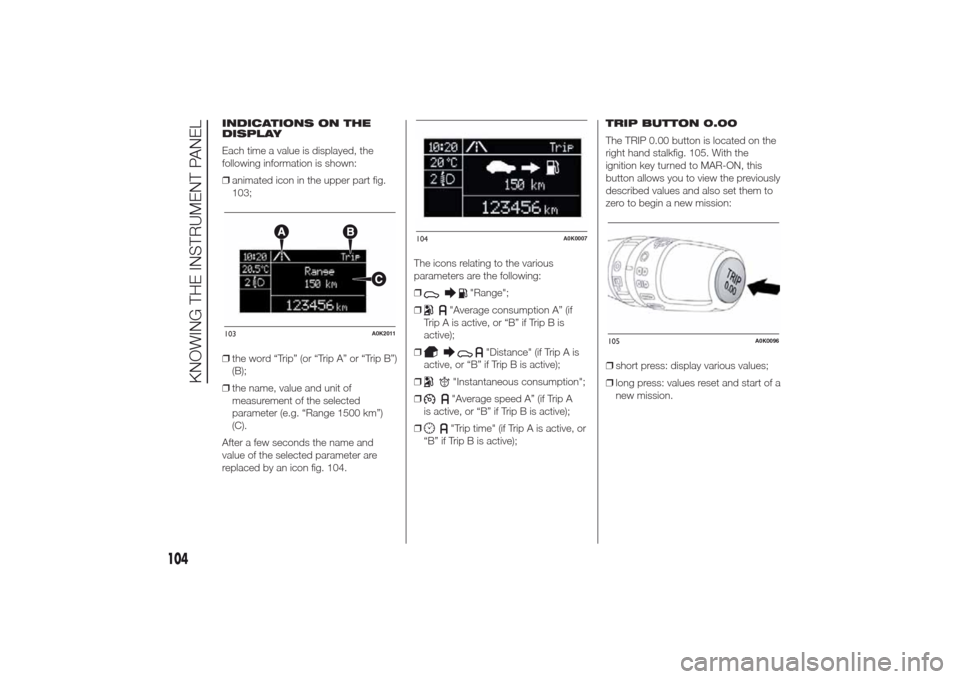
INDICATIONS ON THE
DISPLAY
Each time a value is displayed, the
following information is shown:
❒animated icon in the upper part fig.
103;
❒the word “Trip” (or “Trip A” or “Trip B”)
(B);
❒the name, value and unit of
measurement of the selected
parameter (e.g. “Range 1500 km”)
(C).
After a few seconds the name and
value of the selected parameter are
replaced by an icon fig. 104.The icons relating to the various
parameters are the following:
❒
"Range";
❒
"Average consumption A” (if
Trip A is active, or “B” if Trip B is
active);
❒
"Distance" (if Trip A is
active, or “B” if Trip B is active);
❒
"Instantaneous consumption";
❒"Average speed A” (if Trip A
is active, or “B” if Trip B is active);
❒"Trip time" (if Trip A is active, or
“B” if Trip B is active);TRIP BUTTON 0.00
The TRIP 0.00 button is located on the
right hand stalkfig. 105. With the
ignition key turned to MAR-ON, this
button allows you to view the previously
described values and also set them to
zero to begin a new mission:
❒short press: display various values;
❒long press: values reset and start of a
new mission.
103
A0K2011
104
A0K0007
105
A0K0096
104
KNOWING THE INSTRUMENT PANEL
Page 109 of 280
New mission
This begins after a reset:
❒“manual” resetting by the user, by
pressing the relevant button;
❒“automatic” resetting, when the “trip
distance” reaches 99999.9 km or
when the “Travel time” reaches
999:59 (999 hours and 59 minutes);
❒after disconnection/reconnection of
the battery.
IMPORTANT The reset operation when
“Trip A” details are being displayed
only resets the information associated
with this function.
IMPORTANT The reset operation when
“Trip B” details are being displayed
resets only the information associated
with this function.
Start of journey
procedure
With the ignition key at MAR-ON, reset
by pressing the TRIP 0.00 button and
holding it down for more than 2
seconds.Trip Exit
You can automatically exit the Trip
function once all the values have been
displayed or by holding the
SET/
button down for more than 1
second.
105