sensor Alfa Romeo Giulietta 2016 User Guide
[x] Cancel search | Manufacturer: ALFA ROMEO, Model Year: 2016, Model line: Giulietta, Model: Alfa Romeo Giulietta 2016Pages: 288, PDF Size: 7.34 MB
Page 82 of 288
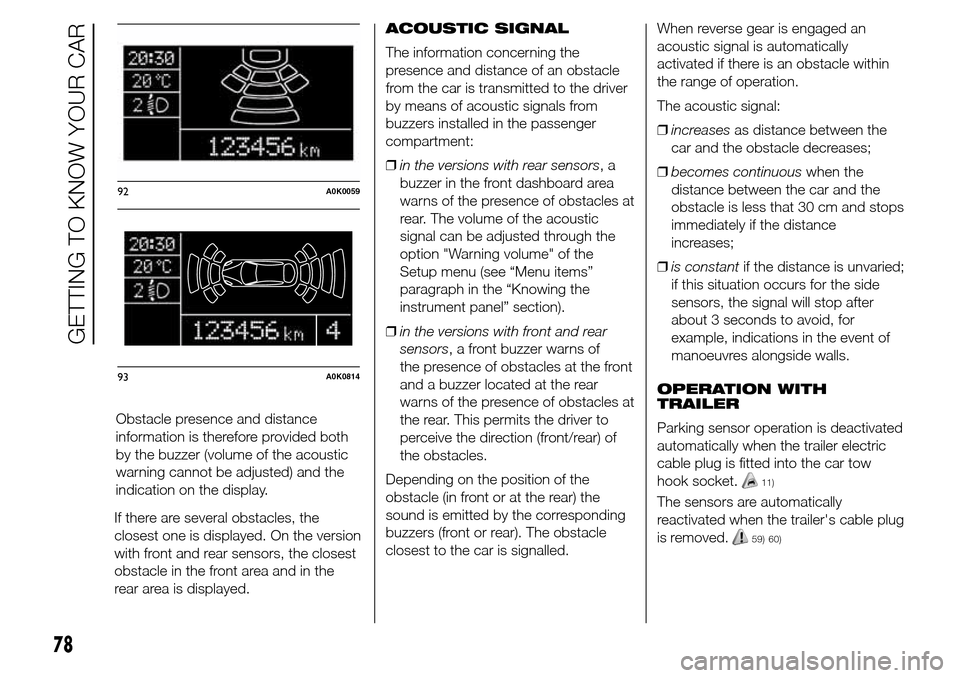
If there are several obstacles, the
closest one is displayed. On the version
with front and rear sensors, the closest
obstacle in the front area and in the
rear area is displayed.ACOUSTIC SIGNAL
The information concerning the
presence and distance of an obstacle
from the car is transmitted to the driver
by means of acoustic signals from
buzzers installed in the passenger
compartment:
❒in the versions with rear sensors,a
buzzer in the front dashboard area
warns of the presence of obstacles at
rear. The volume of the acoustic
signal can be adjusted through the
option "Warning volume" of the
Setup menu (see “Menu items”
paragraph in the “Knowing the
instrument panel” section).
❒in the versions with front and rear
sensors, a front buzzer warns of
the presence of obstacles at the front
and a buzzer located at the rear
warns of the presence of obstacles at
the rear. This permits the driver to
perceive the direction (front/rear) of
the obstacles.
Depending on the position of the
obstacle (in front or at the rear) the
sound is emitted by the corresponding
buzzers (front or rear). The obstacle
closest to the car is signalled.When reverse gear is engaged an
acoustic signal is automatically
activated if there is an obstacle within
the range of operation.
The acoustic signal:
❒increasesas distance between the
car and the obstacle decreases;
❒becomes continuouswhen the
distance between the car and the
obstacle is less that 30 cm and stops
immediately if the distance
increases;
❒is constantif the distance is unvaried;
if this situation occurs for the side
sensors, the signal will stop after
about 3 seconds to avoid, for
example, indications in the event of
manoeuvres alongside walls.
OPERATION WITH
TRAILER
Parking sensor operation is deactivated
automatically when the trailer electric
cable plug is fitted into the car tow
hook socket.
11)
The sensors are automatically
reactivated when the trailer's cable plug
is removed.
59) 60)
92A0K0059
93A0K0814
78
GETTING TO KNOW YOUR CAR
Obstacle presence and distance
information is therefore provided both
by the buzzer (volume of the acoustic
warning cannot be adjusted) and the
indication on the display.
Page 83 of 288
GENERAL WARNINGS
During parking manoeuvres, pay the
utmost attention to any obstacles that
could be located above or below the
sensors.
Objects located near the rear of the car
are not detected under certain
circumstances and could therefore
cause damage to the car or be
damaged.
The following conditions may influence
the performance of the parking sensor
system:
❒reduced sensor sensitivity and a
reduction in the parking assistance
system performance could be due to
the presence on the surface of the
sensor of: ice, snow, mud, thick paint
❒the sensors may detect a non-
existent obstacle (echo interference)
due to mechanical interference, for
example when washing the car,
in rain (strong wind), hail;
❒The signals sent by the sensors can
also be altered by the presence of
ultrasonic systems (e.g. pneumatic
brake systems or pneumatic drills)
near the vehicle.❒sensor performance can also be
influenced by the position of the
sensors. For example by a change in
the ride setting (caused by the wear
of the shock absorbers, suspension),
overloading the vehicle and carrying
out specific tuning operations that
require the vehicle to be lowered;
❒The detection of obstacles at the top
part of the car may not be
guaranteed because the system
detects obstacles that could cause
an impact with the car in the bottom
part.
IMPORTANT
11) The sensors must be clean of
mud, dirt, snow and ice in order
for the system to work. Be careful
not to scratch or damage the
sensors while cleaning them.
Avoid using dry, rough or hard
cloths. The sensors must be
washed using clean water, with
the addition of car shampoo if
necessary. When using special
washing equipment such as high
pressure jets or steam cleaning,
clean the sensors very quickly
keeping the jet more than 10 cm
away.
WARNING
59) Only have the bumpers repainted
or any retouches to the paintwork
in the area of the sensors carried
out by an Alfa Romeo Dealership.
Incorrect paint application could
affect the operation of the parking
sensors.
79
Page 84 of 288
60) Parking and other dangerous
manoeuvres are, however, always
the driver’s responsibility. While
carrying out these manoeuvres,
always make sure that no people
(especially children) or animals are
in the area concerned. The
parking sensors are an aid for the
driver, but the driver must never
allow their attention to lapse
during potentially dangerous
manoeuvres, even those executed
at low speeds.REFUELLING THE
CAR
Stop the engine before refuelling.
PETROL ENGINES
Only use unleaded petrol 95 R.O.N.
compliant with the European
specification EN228. The petrol octane
rating (R.O.N.) must not be lower than
95. In order to prevent damage to
the catalytic converter never introduce
even the smallest amount of leaded
petrol, even in the event of an
emergency.
DIESEL ENGINES
Use only diesel fuel compliant with
European specification EN590. The use
of other products or mixtures may
damage the engine beyond repair and
consequently invalidate the warranty,
due to the damage caused.
Operation at low
temperatures
If the outside temperature is very low,
the diesel thickens due to the formation
of paraffin clots with consequent
defective operation of the fuel supply
system.In order to avoid these problems,
different types of diesel are distributed
according to the season: summer type,
winter type and arctic type (cold,
mountain areas).
If refuelling with diesel whose
specifications are not suitable for the
usage temperature, it is advisable
to mix TUTELA DIESEL ART additive in
the proportions shown on the container
with the fuel. Pour the additive into
the tank before the fuel.
When using or parking the car for a
long time in the mountains or cold
areas, it is advisable to refuel using
locally available fuel. In this case, it is
also advisable to keep the tank over
50% full.
FILLING THE TANK
To fill the tank completely, top-up twice
after the first click of the fuel supply
gun. Further top-ups could cause faults
in the fuel feeding system.
FUEL TANK CAP
The fuel flap is unlocked when the
central locking system is released and
automatically locked when the central
locking system is applied.
80
GETTING TO KNOW YOUR CAR
Page 85 of 288
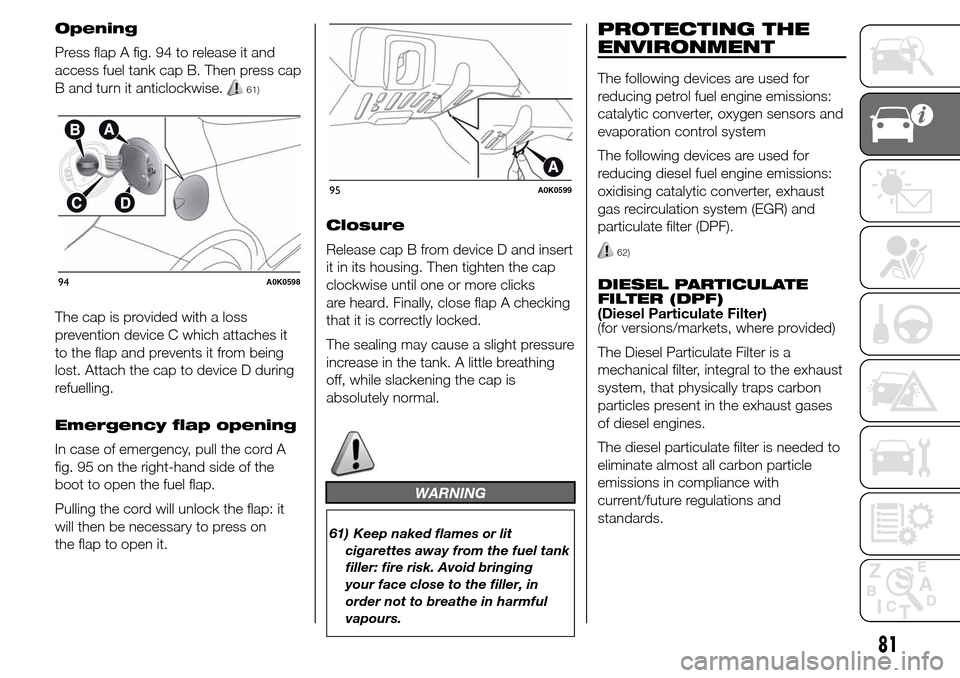
Opening
Press flap A fig. 94 to release it and
access fuel tank cap B. Then press cap
B and turn it anticlockwise.
61)
The cap is provided with a loss
prevention device C which attaches it
to the flap and prevents it from being
lost. Attach the cap to device D during
refuelling.
Emergency flap opening
In case of emergency, pull the cord A
fig. 95 on the right-hand side of the
boot to open the fuel flap.
Pulling the cord will unlock the flap: it
will then be necessary to press on
the flap to open it.Closure
Release cap B from device D and insert
it in its housing. Then tighten the cap
clockwise until one or more clicks
are heard. Finally, close flap A checking
that it is correctly locked.
The sealing may cause a slight pressure
increase in the tank. A little breathing
off, while slackening the cap is
absolutely normal.
WARNING
61) Keep naked flames or lit
cigarettes away from the fuel tank
filler: fire risk. Avoid bringing
your face close to the filler, in
order not to breathe in harmful
vapours.
PROTECTING THE
ENVIRONMENT
The following devices are used for
reducing petrol fuel engine emissions:
catalytic converter, oxygen sensors and
evaporation control system
The following devices are used for
reducing diesel fuel engine emissions:
oxidising catalytic converter, exhaust
gas recirculation system (EGR) and
particulate filter (DPF).
62)
DIESEL PARTICULATE
FILTER (DPF)
(Diesel Particulate Filter)
(for versions/markets, where provided)
The Diesel Particulate Filter is a
mechanical filter, integral to the exhaust
system, that physically traps carbon
particles present in the exhaust gases
of diesel engines.
The diesel particulate filter is needed to
eliminate almost all carbon particle
emissions in compliance with
current/future regulations and
standards.94A0K0598
95A0K0599
81
Page 87 of 288
KNOWING THE INSTRUMENT PANEL
This section of the booklet gives you all
the information you need to
understand, interpret and use the
instrument panel correctly.DISPLAY ......................................... 84
MENU ITEMS .................................. 87
CONTROL PANEL AND
INSTRUMENTS ............................... 94
TRIP COMPUTER ........................... 96
WARNING LIGHTS AND
MESSAGES ................................... 99
- LOW BRAKE FLUID/HANDBRAKE
ENGAGED .......................................... 99
- EBD FAILURE .................................. 100
- AIRBAG FAILURE ............................. 100
- SEAT BELTS NOT FASTENED .......... 100
- ALTERNATOR FAILURE ................... 101
- LOW ENGINE OIL PRESSURE ......... 102
-DEGRADED ENGINE OIL (for
versions/markets, where provided) ..... 103
- ENGINE COOLANT TEMPERATURE
TOO HIGH .......................................... 105
- ALFA TCT FAILURE .......................... 106
-INCOMPLETE DOOR LOCKING ........ 106
-SPEED LIMIT EXCEEDED ................. 106
- DUAL PINION ACTIVE STEERING
FAILURE ............................................. 107
- ALFA ROMEO CODE SYSTEM
FAILURE/ALARM FAILURE ................. 107
- FUEL RESERVE/LIMITED RANGE .... 108
- GENERAL FAILURE ......................... 109
- GENERAL FAILURE ......................... 110
-REAR FOG LIGHTS ........................... 111
- ABS FAILURE ................................... 112
-BRAKE PAD WEAR ........................... 112
- PASSENGER SIDE AIRBAG
DEACTIVATED .................................... 112
- INJECTION/EOBD SYSTEM
FAILURE ............................................. 113
- GLOW PLUG HEATING/GLOW
PLUG HEATING FAILURE (diesel
versions) ............................................. 114-WATER IN DIESEL FILTER (diesel
versions) ............................................. 114
- DPF CLEANING (particulate trap) in
progress (diesel versions with DPF
only) ................................................... 116
- iTPMS SYSTEM ............................... 117
- ELECTRONIC STABILITY CONTROL
(ESC) SYSTEM ................................... 119
- ELECTRONIC STABILITY CONTROL
(ESC) SYSTEM ................................... 120
- CRUISE CONTROL (for
versions/markets, where provided) ..... 121
- SIDE LIGHTS ................................... 121
- FOLLOW ME HOME ........................ 121
- DIPPED BEAM HEADLIGHTS .......... 121
- FOG LIGHTS .................................... 121
- LEFT-HAND DIRECTION
- RIGHT-HAND DIRECTION
INDICATOR ........................................ 122
- MAIN BEAM HEADLIGHTS .............. 122
-FUEL CUT-OFF SYSTEM ................... 123
- POSSIBLE ICE ON ROAD ................ 123
- BRAKE LIGHT FAILURE ................... 123
- DUSK SENSOR FAILURE ................. 123
- RAIN SENSOR FAILURE .................. 124
- PARKING SENSOR FAILURE ........... 124
-START&STOP SYSTEM
ACTIVATION/DEACTIVATION (for
versions/markets, where provided) ..... 125
-START&STOP FAILURE .................... 125
- DISPLAY OF SELECTED DRIVING
MODE (“Alfa DNA” system) ................. 126
83
INDICATOR.......................................... 122
Page 90 of 288
SET/: press briefly to access the
menu and/or go to next screen or
confirm the selection. Hold down to go
back to the standard screen.
: to scroll down through the
displayed menu and the related options
or to decrease the value displayed.
IMPORTANT The
and
buttons activate different
functions according to the following
situations:
❒within the menu, they allow you to
scroll up and down through the
options;
❒during settings operations, they
increase or decrease values.
SETUP MENU
The menu comprises a series of
options which can be selected using
the
andbuttons to access
the different selection and setting
(Setup) operations indicated below.
Some options have a submenu. The
menu can be activated by briefly
pressing the SET/
button.
The menu comprises the following
options:
❒MENU
❒LIGHTING❒SPEED BEEP
❒LIGHT SENSOR (for versions/
markets where provided)
❒RAIN SENSOR (for versions/markets,
where provided)
❒TRIP B ACTIVATION/DATA
❒SET TIME
❒SET DATE
❒FIRST PAGE (for versions/markets
where provided)
❒AUTOCLOSE
❒MEASUREMENT UNIT
❒LANGUAGE
❒BUZZER VOLUME
❒SEAT BELT BEEP/BUZZ
❒SERVICE
❒AIRBAG/PASSENGER BAG
❒DAYTIME RUNNING LIGHTS
❒ADAPTIVE LIGHTS (for versions/
markets, where provided)
❒COURTESY LIGHTS
❒MENU EXIT
NoteOn cars equipped with radio
navigator systems (for versions/
markets, where provided), some menu
items are shown on the navigator
display.Selecting an option from
the main menu without a
submenu:
❒press the SET/
button briefly to
select the main menu setting you
wish to change;
❒press buttons
or(with
single presses) to select the new
setting;
❒press the SET/
button briefly to
save the new setting and go back to
the previous main menu option.
Selecting an option from
the main menu with a
submenu:
❒briefly press the SET/
button to
display the first submenu option;
❒press buttons
or(with
single presses) to scroll through all
the submenu options;
❒briefly press the SET/
button to
select the displayed submenu option
and to open the relevant settings
menu;
❒press buttons
or(with
single presses) to select the new
setting for this submenu option;
❒press the SET/
button briefly to
save the new setting and go back to
the previous submenu option.
86
KNOWING THE INSTRUMENT PANEL
Page 92 of 288
Headlight sensor
(Automatic
headlight/dusk sensor
sensitivity adjustment)
(for versions/markets, where provided)
This function enables the headlights
to come on or go off depending on
external lighting conditions.
The dusk sensor sensitivity can be
adjusted according to 3 levels (level
1=minimum sensitivity, level 2=average
sensitivity, level 3=maximum sensitivity).
The higher the sensitivity set, the
lesser is the external light variation
needed to switch the lights on (e.g. with
a setting on level 3 at sunset the
headlights come on in advance in
relation to levels 1 and 2).
Proceed as follows to set the desired
adjustment:
❒press the SET/
button briefly to
make the display flash the previously
set level;
❒press
orto make your
choice;
❒briefly press the SET/
button to
go back to the menu screen or hold
the button down to go back to the
standard screen without saving.Rain sensor (Rain
sensor sensitivity
adjustment)
(for versions/markets, where provided)
This function allows you to adjust the
rain sensor sensitivity to 4 levels.
To set the required sensitivity level
proceed as follows:
❒briefly press the SET/
button, the
previously set sensitivity level will
flash on the display;
❒press the
orbutton to
make the adjustment;
❒briefly press the SET/
button to
go back to the menu screen or hold
the button down to go back to the
standard screen without saving.
Activation/Trip B data
(Trip B enablement)
This function may be used to activate
(On) or deactivate (Off) the Trip B (partial
trip). For further information see “Trip
computer”.
Proceed as follows to switch the
function on and off:
❒press the SET/
button briefly to
make the display flash "On" or "Off"
according to what was previously set;
❒press
orto make your
choice;❒briefly press the SET/
button to
go back to the menu screen or hold
the button down to go back to the
standard screen without saving.
Time adjustment (Clock
adjustment)
This function enables to set the clock
through two submenus: "Time" and
"Format".
To carry out the adjustment, proceed as
follows:
❒briefly press the SET/
button and
two submenus ("Time" and "Format")
will be displayed;
❒press the
orbutton to
switch between the two submenus;
❒once you have selected a sub-menu
to be modified, press SET/
briefly;
❒when the “Time” submenu is entered,
by briefly pressing SET/
the
hours flash on the display;
❒press the
orbutton to
make the adjustment;
❒briefly press the SET/
button,
which makes the display flash the
"minutes";
❒press the button
orto
make the adjustment.
88
KNOWING THE INSTRUMENT PANEL
Page 113 of 288
Warning lights on
panelWhat it means What to do
amberGENERAL FAILURE
(for versions/markets, where provided)
The warning light switches on in the
circumstances indicated below.In these cases contact an Alfa Romeo Dealership
to have the fault fixed as soon as possible.
Fuel cut-off
The warning light switches on when the fuel
cut-off system intervenes. The display shows the
dedicated message.
Start&Stop system failure
(for versions/markets, where provided)
The warning light comes on when a fault is
detected in the Start&Stop system.
Rain sensor failure
(for versions/markets, where provided)
The warning light switches on when a rain sensor
fault is detected.
Parking sensor failure
(for versions/markets, where provided)
See the following description for “Parking sensor
failure”.
109
Page 114 of 288
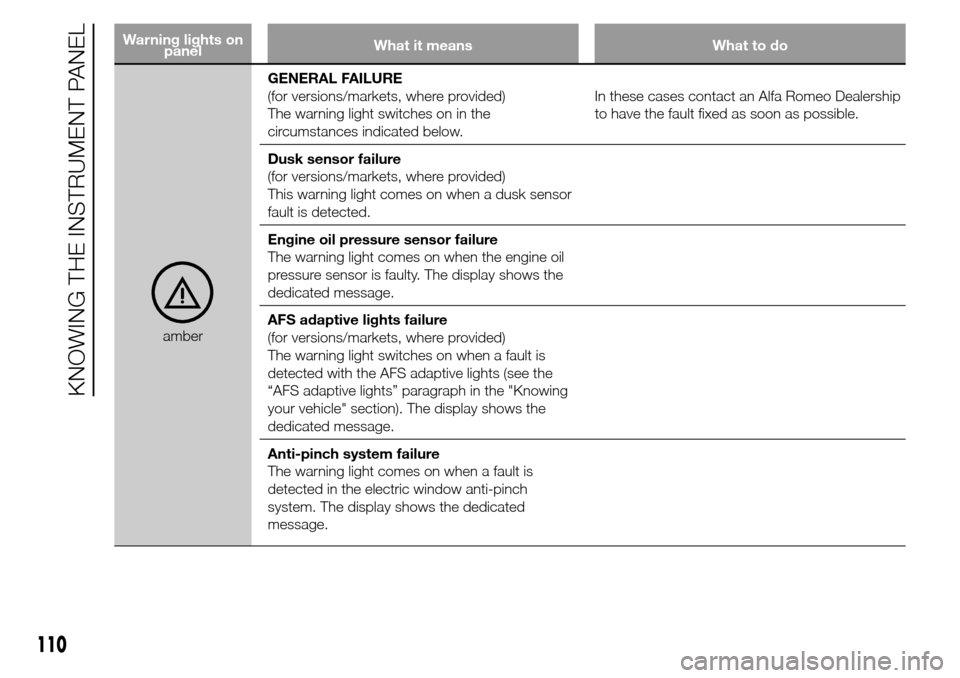
Warning lights on
panelWhat it means What to do
amberGENERAL FAILURE
(for versions/markets, where provided)
The warning light switches on in the
circumstances indicated below.In these cases contact an Alfa Romeo Dealership
to have the fault fixed as soon as possible.
Dusk sensor failure
(for versions/markets, where provided)
This warning light comes on when a dusk sensor
fault is detected.
Engine oil pressure sensor failure
The warning light comes on when the engine oil
pressure sensor is faulty. The display shows the
dedicated message.
AFS adaptive lights failure
(for versions/markets, where provided)
The warning light switches on when a fault is
detected with the AFS adaptive lights (see the
“AFS adaptive lights” paragraph in the "Knowing
your vehicle" section). The display shows the
dedicated message.
Anti-pinch system failure
The warning light comes on when a fault is
detected in the electric window anti-pinch
system. The display shows the dedicated
message.
110
KNOWING THE INSTRUMENT PANEL
Page 127 of 288
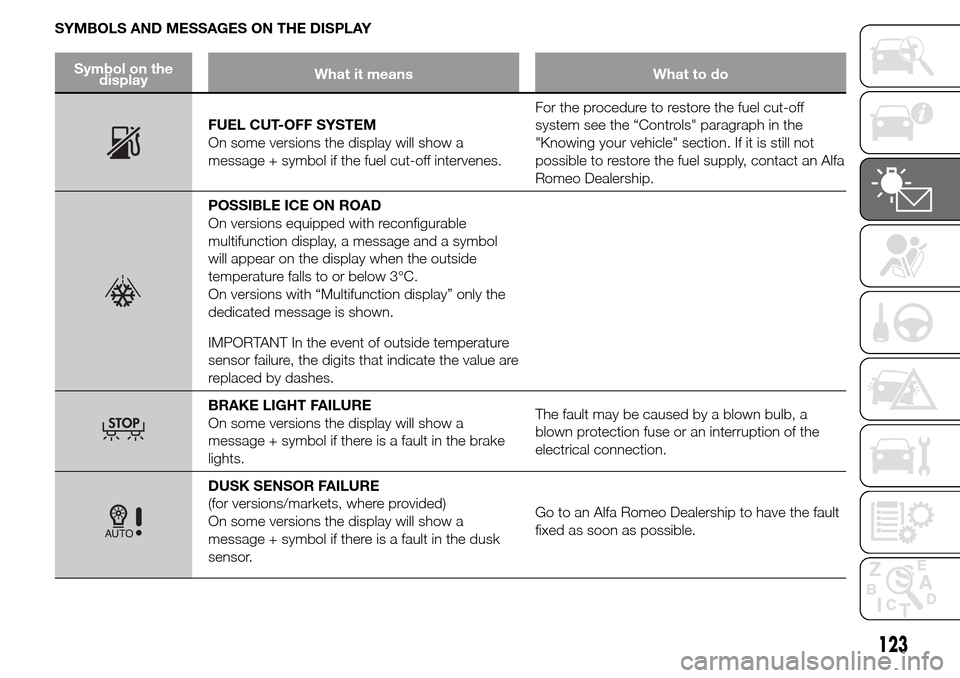
SYMBOLS AND MESSAGES ON THE DISPLAY
Symbol on the
displayWhat it means What to do
FUEL CUT-OFF SYSTEM
On some versions the display will show a
message + symbol if the fuel cut-off intervenes.For the procedure to restore the fuel cut-off
system see the “Controls" paragraph in the
"Knowing your vehicle" section. If it is still not
possible to restore the fuel supply, contact an Alfa
Romeo Dealership.
POSSIBLE ICE ON ROAD
On versions equipped with reconfigurable
multifunction display, a message and a symbol
will appear on the display when the outside
temperature falls to or below 3°C.
On versions with “Multifunction display” only the
dedicated message is shown.
IMPORTANT In the event of outside temperature
sensor failure, the digits that indicate the value are
replaced by dashes.
BRAKE LIGHT FAILURE
On some versions the display will show a
message + symbol if there is a fault in the brake
lights.The fault may be caused by a blown bulb, a
blown protection fuse or an interruption of the
electrical connection.
DUSK SENSOR FAILURE
(for versions/markets, where provided)
On some versions the display will show a
message + symbol if there is a fault in the dusk
sensor.Go to an Alfa Romeo Dealership to have the fault
fixed as soon as possible.
123