ignition Alfa Romeo Giulietta 2018 User Guide
[x] Cancel search | Manufacturer: ALFA ROMEO, Model Year: 2018, Model line: Giulietta, Model: Alfa Romeo Giulietta 2018Pages: 216, PDF Size: 3.39 MB
Page 19 of 216
IMPORTANT When driving, the mirrors
must always be open.
WARNING
12)As the driver's door mirror is curved, it
may slightly alter the perception of distance.
EXTERNAL LIGHTS
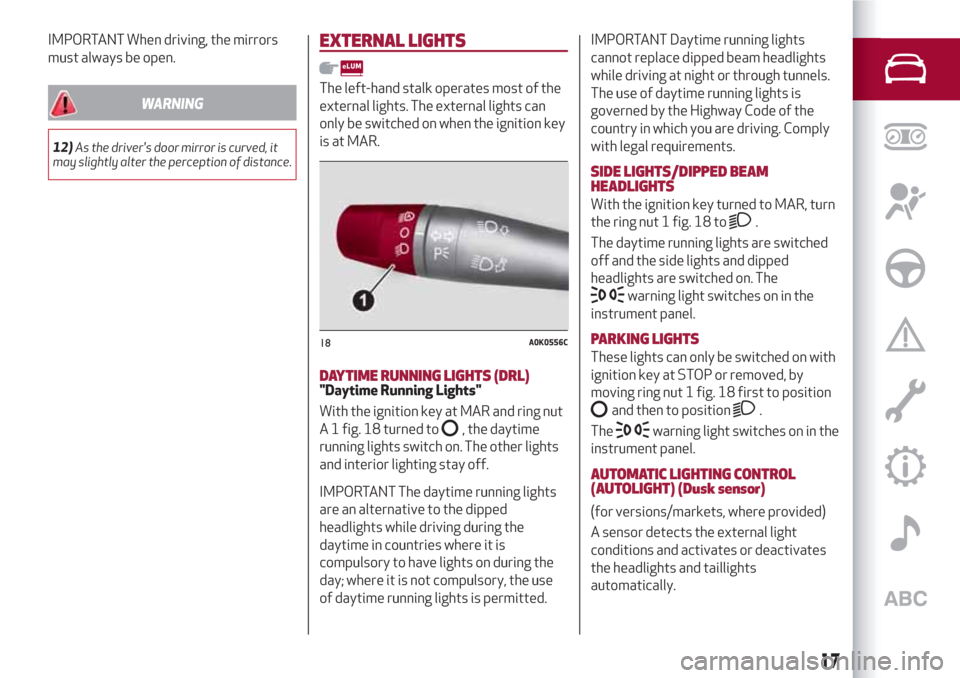
The left-hand stalk operates most of the
external lights. The external lights can
only be switched on when the ignition key
is at MAR.
DAYTIME RUNNING LIGHTS (DRL)"Daytime Running Lights"
With the ignition key at MAR and ring nut
A 1 fig. 18 turned to
, the daytime
running lights switch on. The other lights
and interior lighting stay off.
IMPORTANT The daytime running lights
are an alternative to the dipped
headlights while driving during the
daytime in countries where it is
compulsory to have lights on during the
day; where it is not compulsory, the use
of daytime running lights is permitted.IMPORTANT Daytime running lights
cannot replace dipped beam headlights
while driving at night or through tunnels.
The use of daytime running lights is
governed by the Highway Code of the
country in which you are driving. Comply
with legal requirements.
SIDE LIGHTS/DIPPED BEAM
HEADLIGHTS
With the ignition key turned to MAR, turn
the ring nut 1 fig. 18 to
.
The daytime running lights are switched
off and the side lights and dipped
headlights are switched on. The
warning light switches on in the
instrument panel.
PARKING LIGHTS
These lights can only be switched on with
ignition key at STOP or removed, by
moving ring nut 1 fig. 18 first to position
and then to position.
The
warning light switches on in the
instrument panel.
AUTOMATIC LIGHTING CONTROL
(AUTOLIGHT) (Dusk sensor)
(for versions/markets, where provided)
A sensor detects the external light
conditions and activates or deactivates
the headlights and taillights
automatically.
18A0K0556C
17
Page 20 of 216
Activation
Turn the knurled ring 1 fig. 18 to position
. To activate automatic control of the
side lights and dipped beam headlights
according to the external light conditions.
When the lights are automatically
switched off, the front and rear fog lights
(if activated) are also switched off. The
next time the lights are switched on
automatically, the fog lights must be
reactivated manually (if required).
MAIN BEAM HEADLIGHTS
To activate the main beam headlights,
with ring nut 1 fig. 18 at
, pull the
stalk towards the steering wheel beyond
the end of travel position. The
warning light switches on in the
instrument panel.
When the stalk is pulled towards the
steering wheel again, beyond the end of
travel position, the main beam headlights
deactivate, the dipped headlights
reactivate and the
warning light
switches off.
FLASHING THE HEADLIGHTS
To do this, pull the stalk towards the
steering wheel (unstable position),
regardless of the position of ring nut 1
fig. 18. The
warning light switches
on in the instrument panel.
HEADLIGHT ALIGNMENT CORRECTOR
This device works with the ignition key in
the MAR position and the dipped
headlights on.
Headlight alignment adjustment
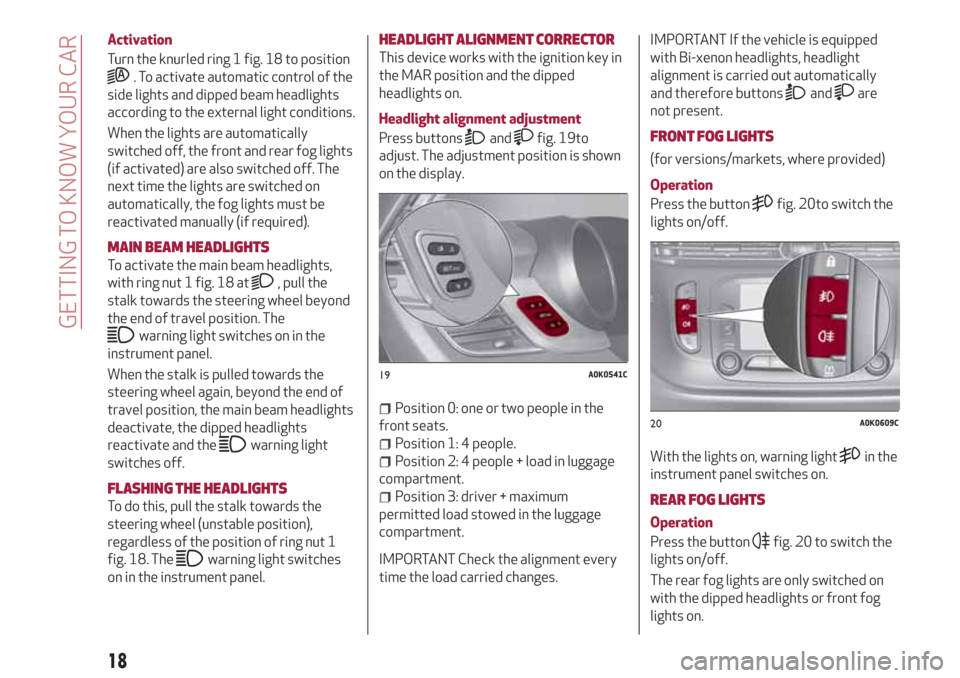
Press buttons
andfig. 19to
adjust. The adjustment position is shown
on the display.
Position 0: one or two people in the
front seats.
Position 1: 4 people.
Position 2: 4 people + load in luggage
compartment.
Position 3: driver + maximum
permitted load stowed in the luggage
compartment.
IMPORTANT Check the alignment every
time the load carried changes.IMPORTANT If the vehicle is equipped
with Bi-xenon headlights, headlight
alignment is carried out automatically
and therefore buttons
andare
not present.
FRONT FOG LIGHTS
(for versions/markets, where provided)
Operation
Press the button
fig. 20to switch the
lights on/off.
With the lights on, warning light
in the
instrument panel switches on.
REAR FOG LIGHTS
Operation
Press the button
fig. 20 to switch the
lights on/off.
The rear fog lights are only switched on
with the dipped headlights or front fog
lights on.
19A0K0541C
20A0K0609C
18
GETTING TO KNOW YOUR CAR
Page 22 of 216
INTERIOR LIGHTS
FRONT CEILING LIGHT
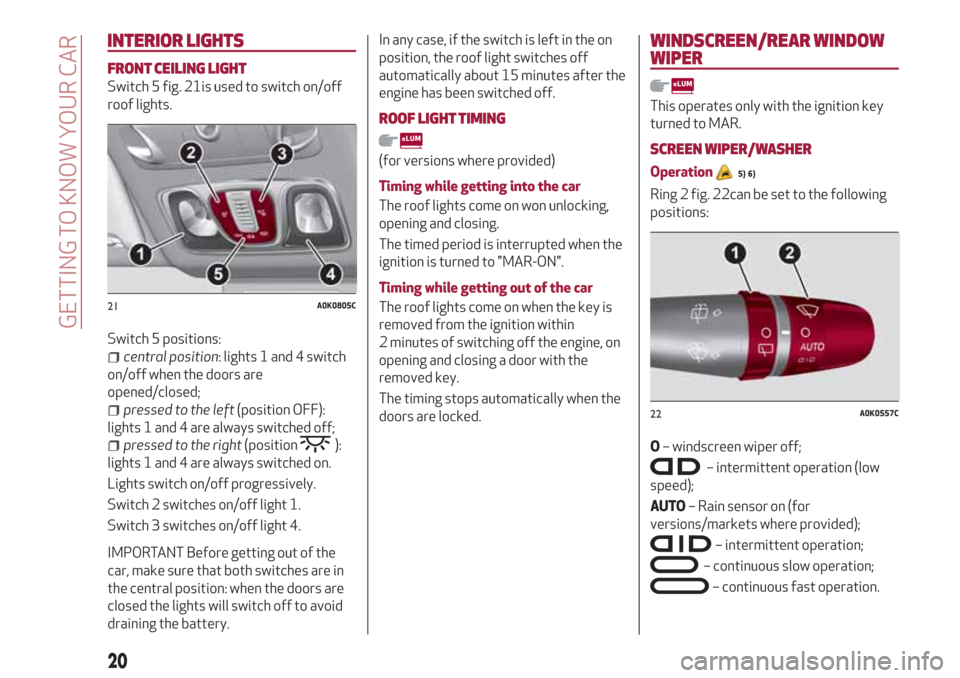
Switch 5 fig. 21is used to switch on/off
roof lights.
Switch 5 positions:
central position: lights 1 and 4 switch
on/off when the doors are
opened/closed;
pressed to the left(position OFF):
lights 1 and 4 are always switched off;
pressed to the right(position):
lights 1 and 4 are always switched on.
Lights switch on/off progressively.
Switch 2 switches on/off light 1.
Switch 3 switches on/off light 4.
IMPORTANT Before getting out of the
car, make sure that both switches are in
the central position: when the doors are
closed the lights will switch off to avoid
draining the battery.
In any case, if the switch is left in the on
position, the roof light switches off
automatically about 15 minutes after the
engine has been switched off.
ROOF LIGHT TIMING
(for versions where provided)
Timing while getting into the car
The roof lights come on won unlocking,
opening and closing.
The timed period is interrupted when the
ignition is turned to "MAR-ON".
Timing while getting out of the car
The roof lights come on when the key is
removed from the ignition within
2 minutes of switching off the engine, on
opening and closing a door with the
removed key.
The timing stops automatically when the
doors are locked.
WINDSCREEN/REAR WINDOW
WIPER
This operates only with the ignition key
turned to MAR.
SCREEN WIPER/WASHER
Operation5) 6)
Ring 2 fig. 22can be set to the following
positions:
O– windscreen wiper off;
– intermittent operation (low
speed);
AUTO– Rain sensor on (for
versions/markets where provided);
– intermittent operation;
– continuous slow operation;
– continuous fast operation.
21A0K0805C
22A0K0557C
20
GETTING TO KNOW YOUR CAR
Page 23 of 216
Move the stalk upwards (unstable
position) to limit operation to the time
for which the stalk is held in this position.
When released, the stalk will return to its
default position and the windscreen
wiper will be automatically stopped.
“Smart washing” function
Pull the stalk towards the steering wheel
(unstable position) to operate the
windscreen washer. Keep the stalk pulled
for more than half a second to operate
the windscreen washer jet and wiper
automatically with a single movement.
The windscreen wiper stops working
three strokes after the stalk is released.
A further stroke after approx. 6 seconds
completes the wiping cycle.
RAIN SENSOR
(for versions/markets, where provided)
It can detect the presence of rain and
consequently manage windscreen wiping
in accordance with the amount of water
on the windscreen.
The sensor is activated when the ring 2
fig. 22 is turned to "automatic" position
("AUTO" control): the windscreen wiper
stroke frequency is thus adjusted in
accordance with the amount of water on
the windscreen.
If no rain is detected, the wiper will not
carry out any strokes.If the engine is switched off with the
lever in the automatic position, when the
car is next started, no wiping cycle will
take place even if it is raining. This is to
prevent unwanted activation of the rain
sensor when the engine is started (i.e.
when the windscreen is being washed by
hand or the wiper blades are stuck to the
windscreen by ice).
To restore automatic operation of the
rain sensor, turn the ring on the right stalk
2 fig. 22 from automatic position (AUTO)
to positionOand then turn ring 2 back to
the AUTO position.
When the rain sensor is reactivated using
any of the manoeuvres described above,
reactivation is indicated by a single
stroke of the windscreen wipers,
regardless of the condition of the
windscreen.
REAR WINDOW WIPER/WASHER
(for versions/markets, where provided)
This operates only with the ignition key
turned to MAR.
Turn ring 1 fig. 22 from positionOto
position
to operate the rear window
wiper as follows:
in intermittent mode when the
windscreen wiper is not operating;
in synchronous mode (at half the
speed of the windscreen wiper) when the
windscreen wiper is operating;
in continuous mode with reverse gear
engaged and the control active.
Pushing the stalk towards the dashboard
(rocking position) will activate the rear
window washer jet. Keep the stalk pushed
for more than half a second to activate
the rear window wiper as well. Releasing
the stalk will activate the smart washing
function, as described for the windscreen
wiper.
IMPORTANT
5)Never use the windscreen wipers to
remove layers of snow or ice from the
windscreen. In such conditions, the
windscreen wiper may be subjected to
excessive stress and the motor cut-out
switch, which prevents operation for a few
seconds, may intervene. If operation is not
restored (even after restarting that car with
the key), contact an Alfa Romeo Dealership.
6)Do not operate the windscreen wiper with
the blades lifted from the windscreen.
21
Page 28 of 216
ELECTRIC WINDOWS
These operate when the ignition key is
turned to MAR and for about 3 minutes
after turning the key to STOP or
removing it if one of the front doors is
open.
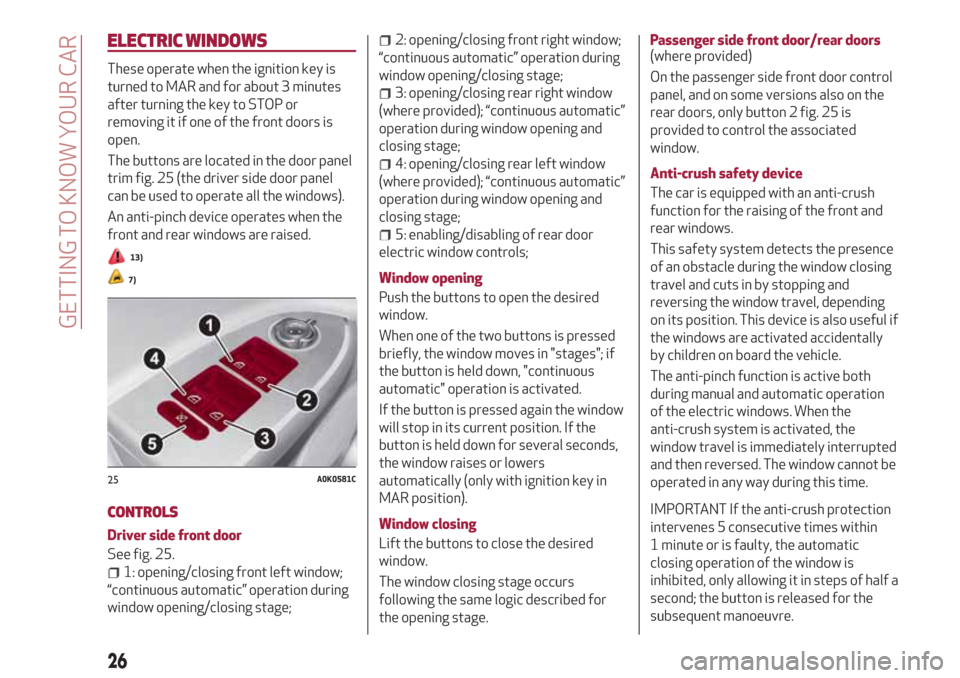
The buttons are located in the door panel
trim fig. 25 (the driver side door panel
can be used to operate all the windows).
An anti-pinch device operates when the
front and rear windows are raised.
13)
7)
CONTROLS
Driver side front door
See fig. 25.
1: opening/closing front left window;
“continuous automatic” operation during
window opening/closing stage;
2: opening/closing front right window;
“continuous automatic” operation during
window opening/closing stage;
3: opening/closing rear right window
(where provided); “continuous automatic”
operation during window opening and
closing stage;
4: opening/closing rear left window
(where provided); “continuous automatic”
operation during window opening and
closing stage;
5: enabling/disabling of rear door
electric window controls;
Window opening
Push the buttons to open the desired
window.
When one of the two buttons is pressed
briefly, the window moves in "stages"; if
the button is held down, "continuous
automatic" operation is activated.
If the button is pressed again the window
will stop in its current position. If the
button is held down for several seconds,
the window raises or lowers
automatically (only with ignition key in
MAR position).
Window closing
Lift the buttons to close the desired
window.
The window closing stage occurs
following the same logic described for
the opening stage.Passenger side front door/rear doors
(where provided)
On the passenger side front door control
panel, and on some versions also on the
rear doors, only button 2 fig. 25 is
provided to control the associated
window.
Anti-crush safety device
The car is equipped with an anti-crush
function for the raising of the front and
rear windows.
This safety system detects the presence
of an obstacle during the window closing
travel and cuts in by stopping and
reversing the window travel, depending
on its position. This device is also useful if
the windows are activated accidentally
by children on board the vehicle.
The anti-pinch function is active both
during manual and automatic operation
of the electric windows. When the
anti-crush system is activated, the
window travel is immediately interrupted
and then reversed. The window cannot be
operated in any way during this time.
IMPORTANT If the anti-crush protection
intervenes 5 consecutive times within
1 minute or is faulty, the automatic
closing operation of the window is
inhibited, only allowing it in steps of half a
second; the button is released for the
subsequent manoeuvre.
25A0K0581C
26
GETTING TO KNOW YOUR CAR
Page 29 of 216
In order to restore the correct operation
of the system, the relevant window must
be lowered.
IMPORTANT With ignition key at STOP or
removed, the electric windows remain
active for about 3 minutes and are
deactivated when a door is opened.
IMPORTANT On versions with anti-crush
protection, when the button
on the
remote control is pressed for longer than
2 seconds the windows will open, whilst if
the button
is pressed for longer than
2 seconds the windows will close.
Electric window system initialisation
The system must be re-initialised after
disconnecting the battery or if the
relevant protection fuse is blown.
Initialisation procedure:
fully close the window to initialise
manually;
after the window has reached the
upper end of travel, hold the up button
pressed for at least one second.
For versions/markets where provided,
after there has been no power supply for
the control units (battery replaced or
disconnected or protection fuses for the
electric window control units replaced),
the automatic operation of the windows
must be restored.The restoration procedure must be
performed as described below with the
doors closed:
completely open the driver's door
window keeping the operating button
pressed for at least three seconds after
the (lower) end of travel position is
reached;
completely raise the driver side
window and hold the button down for at
least 3 seconds once the (upper) end of
travel position has been reached;
proceed in the same way also on the
passenger's side door;
make sure that the initialisation is
correct by checking that the windows
work automatically.
IMPORTANT
7)The system conforms to the 2000/4/EC
standard concerning the safety of
passengers leaning out of the passenger
compartment.
WARNING
13)Incorrect use of the electric windows
may be dangerous. Before and during their
operation, ensure that any passengers are
not at risk from the moving glass either by
personal objects getting caught in the
mechanism or by being hit by it directly.
When leaving the car, always remove the key
from the ignition to prevent accidental
operation of the electric windows from being
a hazard for those still on board.
27
Page 30 of 216
ELECTRIC SUNROOF
(for versions/markets, where provided)
The large electric sun roof comprises two
glass panels; the front one is mobile and
the rear one fixed. These are equipped
with two sun blinds (front and rear) that
can be moved manually.
With the sun roof closed, the blinds can
be placed in any position.
OPERATION
The sun roof can be operated only with
the ignition key turned to MAR.
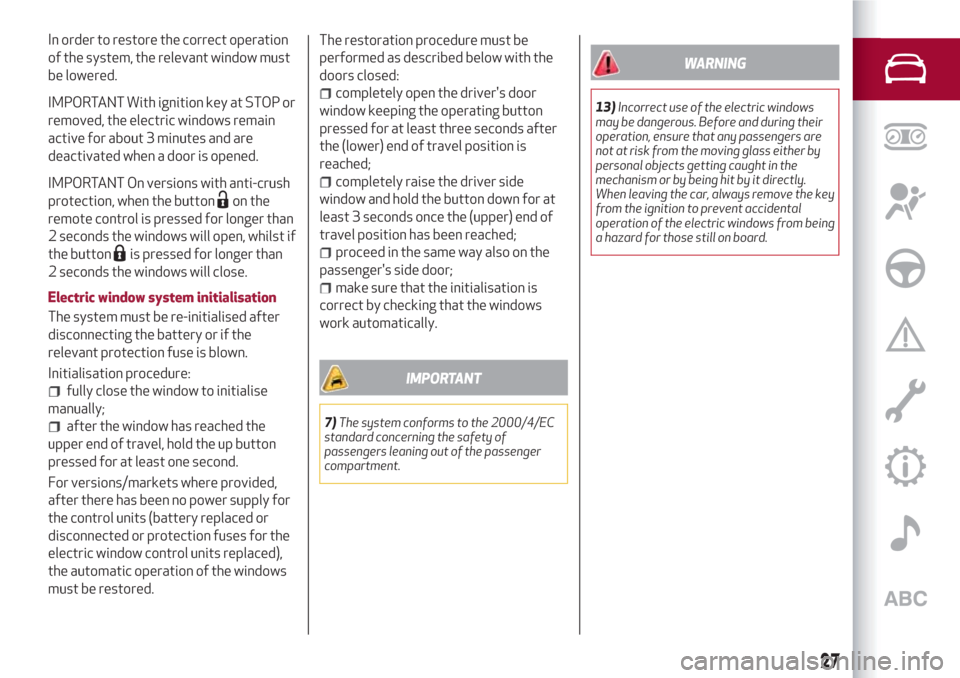
Controls 1 and 2 fig. 26,on the panel next
to the front roof light control sun roof
opening/closing.Open the sunroof
Press button 1 fig. 26:
First press: the front glass panel will
move to the “spoiler” position.
Second press for more than half a
second: the sun roof glass automatically
moves to an intermediate position
(“Comfort” position).
Third press for more than half a
second: the sun roof will automatically
open fully.
8)
14)
Closing the sun roof
Press button 2 fig. 26.
ANTI-PINCH SAFETY DEVICE
The sun roof has an anti-pinch safety
system capable of detecting the
presence of an obstacle whilst the roof is
closing; when this happens, the system
stops and the movement of the front
glass is immediately reversed.
SUN BLINDS
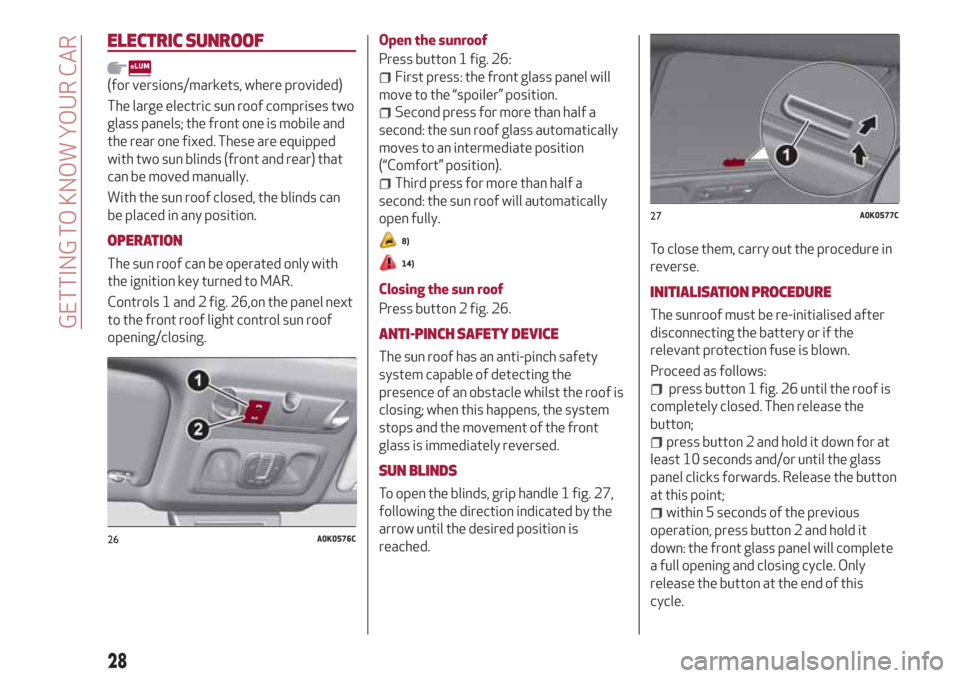
To open the blinds, grip handle 1 fig. 27,
following the direction indicated by the
arrow until the desired position is
reached.To close them, carry out the procedure in
reverse.
INITIALISATION PROCEDURE
The sunroof must be re-initialised after
disconnecting the battery or if the
relevant protection fuse is blown.
Proceed as follows:
press button 1 fig. 26 until the roof is
completely closed. Then release the
button;
press button 2 and hold it down for at
least 10 seconds and/or until the glass
panel clicks forwards. Release the button
at this point;
within 5 seconds of the previous
operation, press button 2 and hold it
down: the front glass panel will complete
a full opening and closing cycle. Only
release the button at the end of this
cycle.
26A0K0576C
27A0K0577C
28
GETTING TO KNOW YOUR CAR
Page 31 of 216
MAINTENANCE/EMERGENCY
In case of emergency or maintenance the
roof can be moved manually when there
is no power supply (opening/closing of
the front glass panel) by carrying out the
following operations:
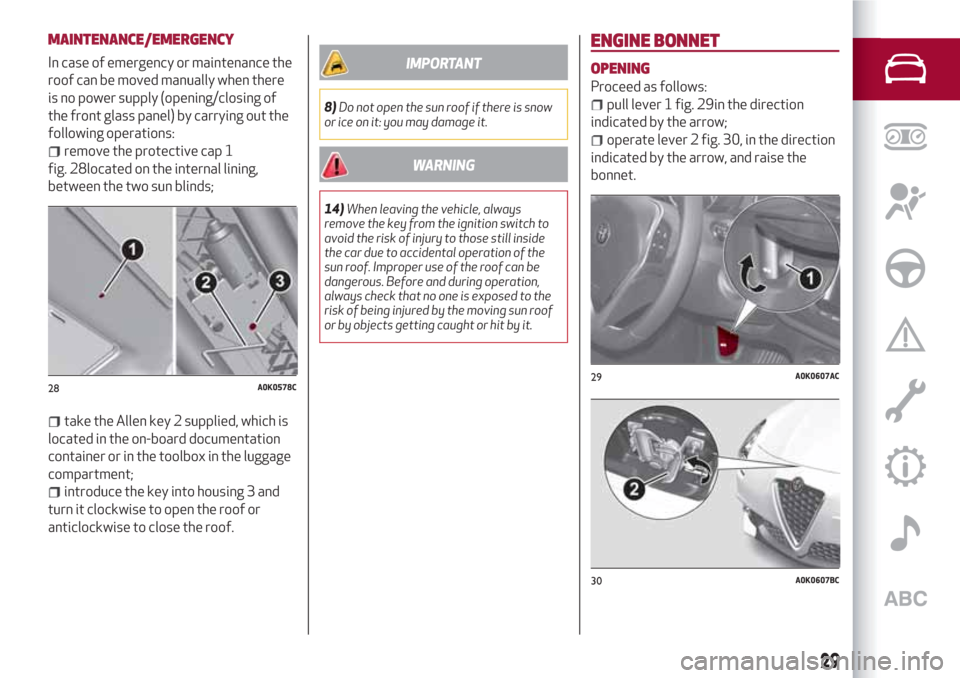
remove the protective cap 1
fig. 28located on the internal lining,
between the two sun blinds;
take the Allen key 2 supplied, which is
located in the on-board documentation
container or in the toolbox in the luggage
compartment;
introduce the key into housing 3 and
turn it clockwise to open the roof or
anticlockwise to close the roof.
IMPORTANT
8)Do not open the sun roof if there is snow
or ice on it: you may damage it.
WARNING
14)When leaving the vehicle, always
remove the key from the ignition switch to
avoid the risk of injury to those still inside
the car due to accidental operation of the
sun roof. Improper use of the roof can be
dangerous. Before and during operation,
always check that no one is exposed to the
risk of being injured by the moving sun roof
or by objects getting caught or hit by it.
ENGINE BONNET
OPENING
Proceed as follows:
pull lever 1 fig. 29in the direction
indicated by the arrow;
operate lever 2 fig. 30, in the direction
indicated by the arrow, and raise the
bonnet.
28A0K0578C29A0K0607AC
30A0K0607BC
29
Page 42 of 216
DISPLAY
The car is equipped with a reconfigurable
multifunction display that, according to
the previously applied settings, will show
useful driving information.
With the ignition key removed, the
display lights up and shows the time and
total odometer reading (in km or miles)
for a few seconds when a door is
opened/closed.
RECONFIGURABLE MULTIFUNCTION
DISPLAY
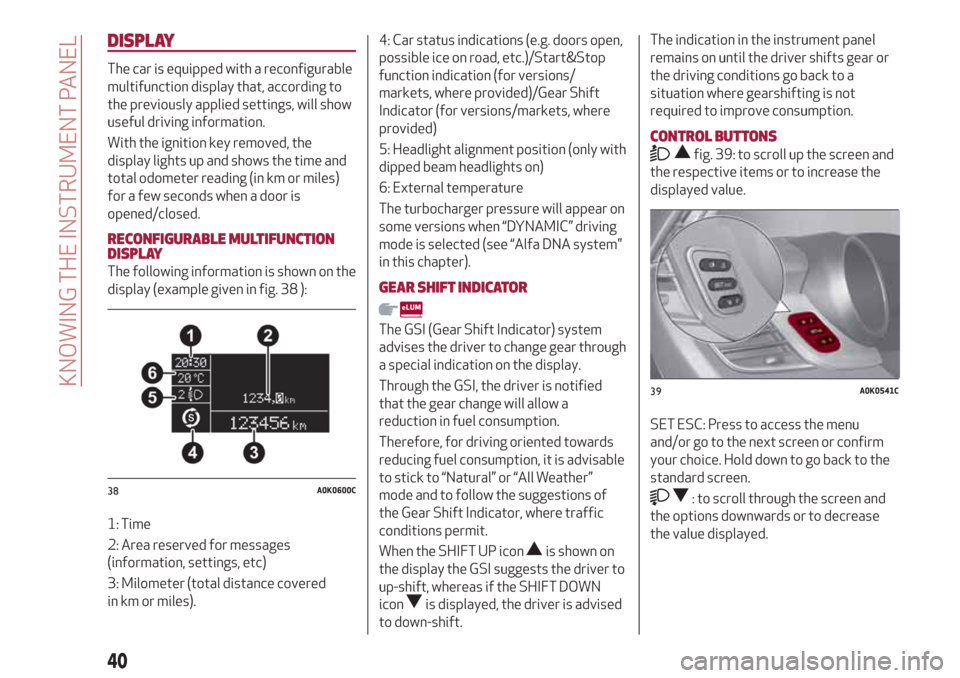
The following information is shown on the
display (example given in fig. 38 ):
1: Time
2: Area reserved for messages
(information, settings, etc)
3: Milometer (total distance covered
in km or miles).4: Car status indications (e.g. doors open,
possible ice on road, etc.)/Start&Stop
function indication (for versions/
markets, where provided)/Gear Shift
Indicator (for versions/markets, where
provided)
5: Headlight alignment position (only with
dipped beam headlights on)
6: External temperature
The turbocharger pressure will appear on
some versions when “DYNAMIC” driving
mode is selected (see “Alfa DNA system”
in this chapter).GEAR SHIFT INDICATOR
The GSI (Gear Shift Indicator) system
advises the driver to change gear through
a special indication on the display.
Through the GSI, the driver is notified
that the gear change will allow a
reduction in fuel consumption.
Therefore, for driving oriented towards
reducing fuel consumption, it is advisable
to stick to “Natural” or “All Weather”
mode and to follow the suggestions of
the Gear Shift Indicator, where traffic
conditions permit.
When the SHIFT UP icon
is shown on
the display the GSI suggests the driver to
up-shift, whereas if the SHIFT DOWN
icon
is displayed, the driver is advised
to down-shift.
The indication in the instrument panel
remains on until the driver shifts gear or
the driving conditions go back to a
situation where gearshifting is not
required to improve consumption.
CONTROL BUTTONS
fig. 39: to scroll up the screen and
the respective items or to increase the
displayed value.
SET ESC: Press to access the menu
and/or go to the next screen or confirm
your choice. Hold down to go back to the
standard screen.
: to scroll through the screen and
the options downwards or to decrease
the value displayed.38A0K0600C
39A0K0541C
40
KNOWING THE INSTRUMENT PANEL
Page 47 of 216
Warning lights on
panelWhat it means What to do
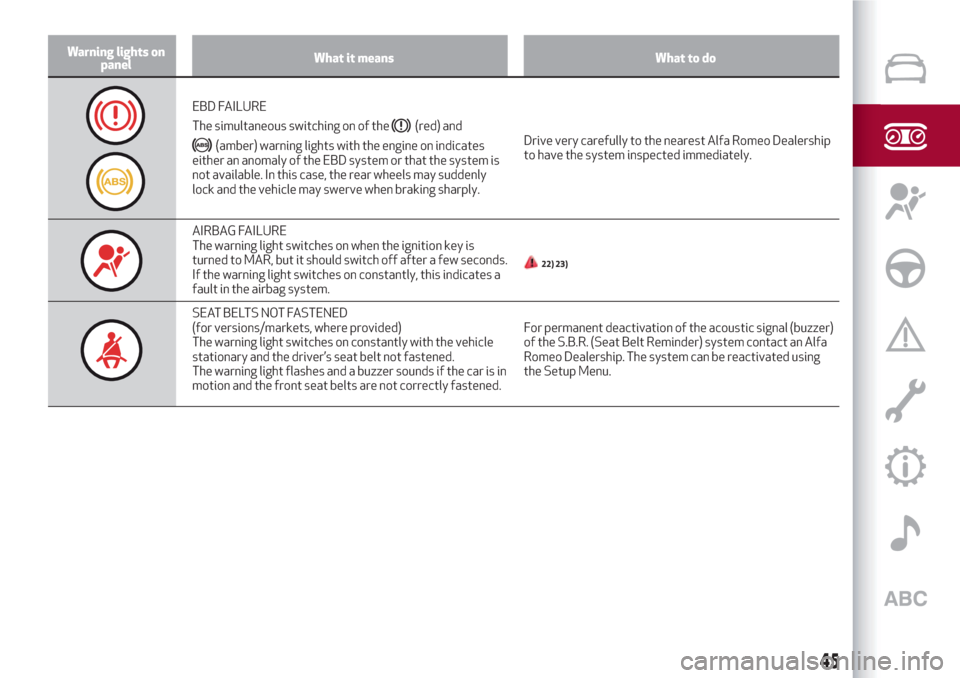
EBD FAILURE
The simultaneous switching on of the
(red) and
(amber) warning lights with the engine on indicates
either an anomaly of the EBD system or that the system is
not available. In this case, the rear wheels may suddenly
lock and the vehicle may swerve when braking sharply.Drive very carefully to the nearest Alfa Romeo Dealership
to have the system inspected immediately.
AIRBAG FAILURE
The warning light switches on when the ignition key is
turned to MAR, but it should switch off after a few seconds.
If the warning light switches on constantly, this indicates a
fault in the airbag system.
22) 23)
SEAT BELTS NOT FASTENED
(for versions/markets, where provided)
The warning light switches on constantly with the vehicle
stationary and the driver’s seat belt not fastened.
The warning light flashes and a buzzer sounds if the car is in
motion and the front seat belts are not correctly fastened.For permanent deactivation of the acoustic signal (buzzer)
of the S.B.R. (Seat Belt Reminder) system contact an Alfa
Romeo Dealership. The system can be reactivated using
the Setup Menu.
45