instrument panel Alfa Romeo Giulietta 2018 User Guide
[x] Cancel search | Manufacturer: ALFA ROMEO, Model Year: 2018, Model line: Giulietta, Model: Alfa Romeo Giulietta 2018Pages: 216, PDF Size: 3.39 MB
Page 41 of 216
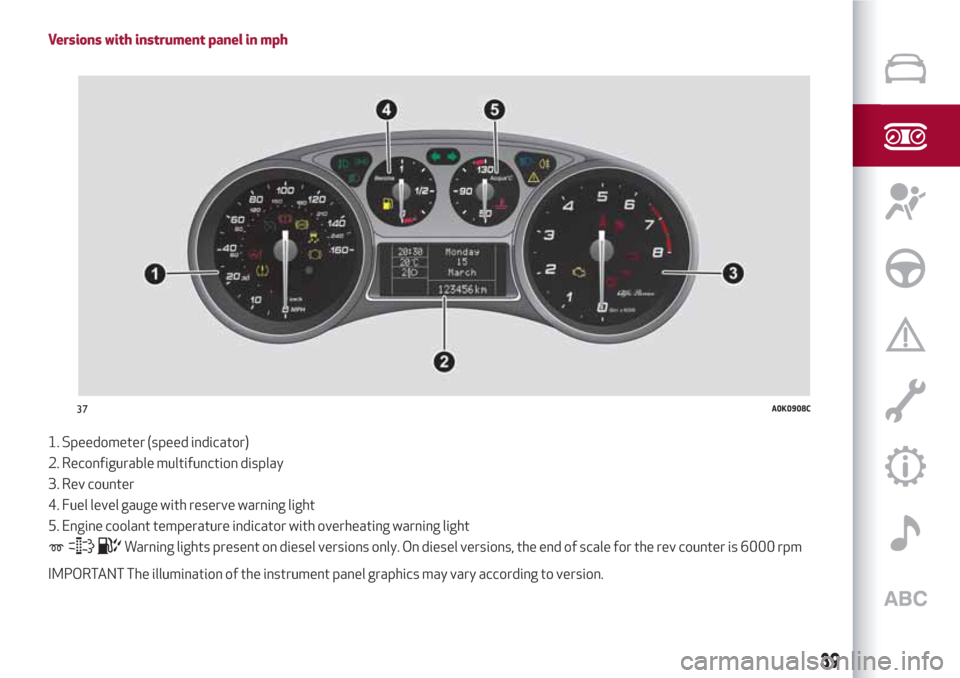
Versions with instrument panel in mph
1. Speedometer (speed indicator)
2. Reconfigurable multifunction display
3. Rev counter
4. Fuel level gauge with reserve warning light
5. Engine coolant temperature indicator with overheating warning light
Warning lights present on diesel versions only. On diesel versions, the end of scale for the rev counter is 6000 rpm
IMPORTANT The illumination of the instrument panel graphics may vary according to version.
37A0K0908C
39
Page 42 of 216
DISPLAY
The car is equipped with a reconfigurable
multifunction display that, according to
the previously applied settings, will show
useful driving information.
With the ignition key removed, the
display lights up and shows the time and
total odometer reading (in km or miles)
for a few seconds when a door is
opened/closed.
RECONFIGURABLE MULTIFUNCTION
DISPLAY
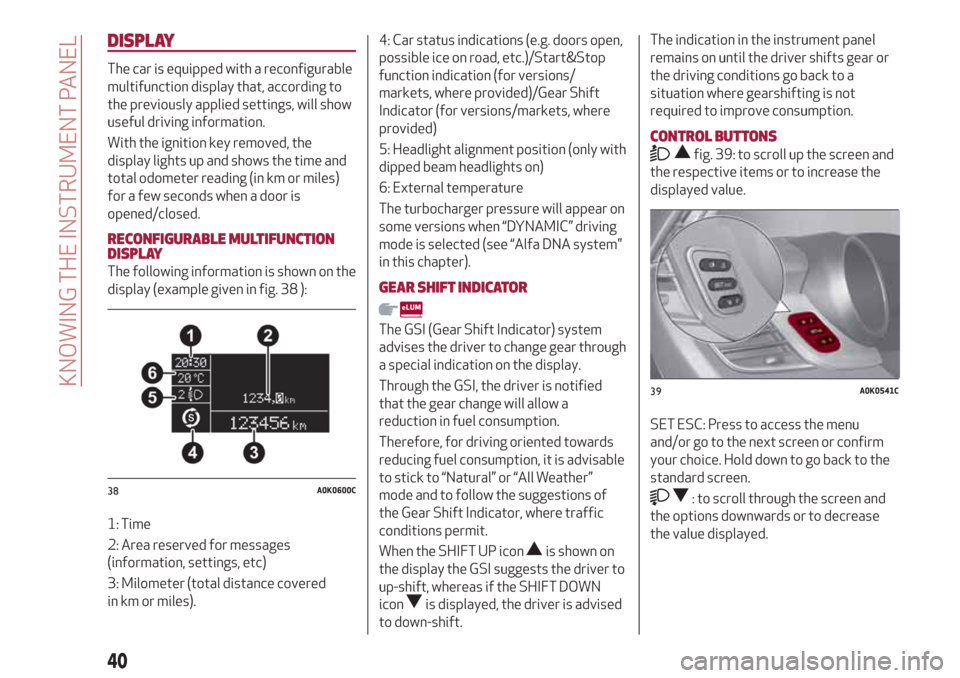
The following information is shown on the
display (example given in fig. 38 ):
1: Time
2: Area reserved for messages
(information, settings, etc)
3: Milometer (total distance covered
in km or miles).4: Car status indications (e.g. doors open,
possible ice on road, etc.)/Start&Stop
function indication (for versions/
markets, where provided)/Gear Shift
Indicator (for versions/markets, where
provided)
5: Headlight alignment position (only with
dipped beam headlights on)
6: External temperature
The turbocharger pressure will appear on
some versions when “DYNAMIC” driving
mode is selected (see “Alfa DNA system”
in this chapter).GEAR SHIFT INDICATOR
The GSI (Gear Shift Indicator) system
advises the driver to change gear through
a special indication on the display.
Through the GSI, the driver is notified
that the gear change will allow a
reduction in fuel consumption.
Therefore, for driving oriented towards
reducing fuel consumption, it is advisable
to stick to “Natural” or “All Weather”
mode and to follow the suggestions of
the Gear Shift Indicator, where traffic
conditions permit.
When the SHIFT UP icon
is shown on
the display the GSI suggests the driver to
up-shift, whereas if the SHIFT DOWN
icon
is displayed, the driver is advised
to down-shift.
The indication in the instrument panel
remains on until the driver shifts gear or
the driving conditions go back to a
situation where gearshifting is not
required to improve consumption.
CONTROL BUTTONS
fig. 39: to scroll up the screen and
the respective items or to increase the
displayed value.
SET ESC: Press to access the menu
and/or go to the next screen or confirm
your choice. Hold down to go back to the
standard screen.
: to scroll through the screen and
the options downwards or to decrease
the value displayed.38A0K0600C
39A0K0541C
40
KNOWING THE INSTRUMENT PANEL
Page 44 of 216
MENU ITEMS
IMPORTANT If there is anUconnect™
system, some menu items are displayed
and managed by the latter and not the
instrument panel (refer to the
description in the Multimedia chapter or
in the supplements available online).
Menu
Access to the Setup Menu.
Lights
(only with side lights on)
Adjustment (8 levels) of the brightness of
the instrument panel, theUconnect™
system controls (for versions/markets
where provided) and the automatic
climate control system controls (for
versions/markets where provided).
Speed warning
Vehicle speed limit setting (km/h or mph).
When this is exceeded, the driver is
notified by an audible warning signal.
Headlight sensor
(for versions/markets, where provided)
Automatic switch on/off of lights
according to external light conditions.
The dusk sensor sensitivity can be
adjusted according to 3 levels (level
1=minimum sensitivity, level 2=average
sensitivity, level 3=maximum sensitivity).Rain sensor
(for versions/markets, where provided)
Adjustment (4 levels) of the sensitivity of
the rain sensor.
TripB activation
Activation (On) and deactivation (Off) of
Trip B display (partial trip counter). For
more information see the "Trip computer"
section.
Set time
Clock setting through two sub-menus:
“Time” and “Format”.
Set date
Date setting (day - month - year).
First page
(for versions/markets, where provided)
Selection of the information you would
like to see on the main screen. You can
view the date or the trip distance.
Autoclose
Activation of the automatic locking of the
doors on exceeding the speed of
20 km/h.
Measurement unit
Unit of measurement setting via three
submenus: “Distances”, “Fuel
consumption” and “Temperature”.If the set distance unit is "km", the display
allows the fuel consumption unit to be set
as km/l or l/100km. If the set distance
unit is “mi” the fuel consumption unit will
be displayed in “mpg”.
Language
Display language selection.
Warning volume
Adjustment (8 levels) of the volume of
the buzzer which accompanies the
display of failures/warnings.
Seat belt beep
This function can be displayed only after
an Alfa Romeo Dealership has
deactivated the SBR system (see
paragraph “SBR system” in the “Safety”
chapter).
Service
Display of information about km/mileage
intervals or, for versions/markets, where
provided, time intervals for car servicing.
Passenger airbag
Activation/deactivation of front
passenger side airbag and side air bag for
pelvis, chest and shoulder protection -
Side bag
Daytime running lights
Activation/deactivation of Daytime
Running Lights (DRL).
42
KNOWING THE INSTRUMENT PANEL
Page 46 of 216
WARNING LIGHTS AND MESSAGES
IMPORTANT The warning light switches on in the instrument panel together with a dedicated message and/or acoustic signal when
applicable. These indications are indicative and precautionary and as such must not be considered as exhaustive and/or alternative
to the information contained in the Owner Handbook, which you are advised to read carefully in all cases. Always refer to the
information in this section in the event of a failure indication.
IMPORTANT Failure indications displayed are divided into two categories: very serious and less serious failures. Serious faults are
indicated by a repeated and prolonged warning "cycle". Less serious faults are indicated by a warning "cycle" with a shorter duration.
The display cycle of both categories can be interrupted. The instrument panel warning light will stay on until the cause of the
malfunction is eliminated.
WARNING LIGHTS ON INSTRUMENT PANEL
Warning lights on
panelWhat it means What to do
LOW BRAKE FLUID/HANDBRAKE ENGAGED
The warning light switches on when the key is turned to
MAR-ON, but it should switch off after a few seconds.
Low brake fluid level
The warning light (or symbol on the display) switches on
when the level of the brake fluid in the reservoir falls below
the minimum level, possibly due to leaks in the circuit.Restore the brake fluid level, then check that the warning
light has switched off.
If the warning light stays on, contact an Alfa Romeo
Dealership.
Handbrake engaged
The warning light (or symbol on the display) switches on
when the handbrake is engaged. If the car is moving an
acoustic signal is also emitted.Release the handbrake, then check that the warning light
has switched off.
If the warning light (or symbol on the display) stays on,
contact an Alfa Romeo Dealership.
44
KNOWING THE INSTRUMENT PANEL
Page 48 of 216
Warning lights on
panelWhat it means What to do
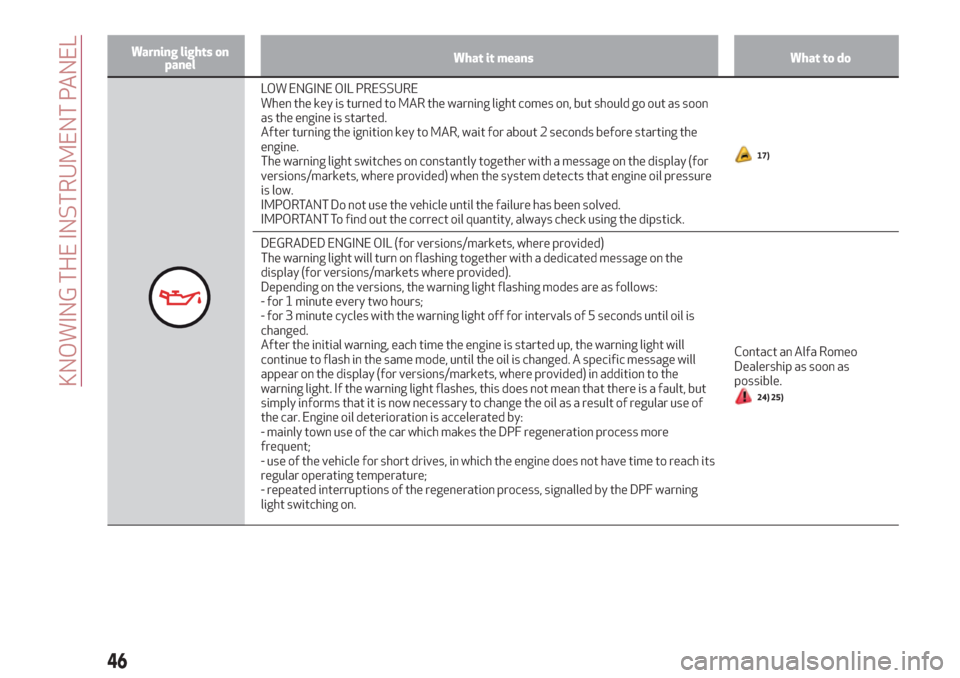
LOW ENGINE OIL PRESSURE
When the key is turned to MAR the warning light comes on, but should go out as soon
as the engine is started.
After turning the ignition key to MAR, wait for about 2 seconds before starting the
engine.
The warning light switches on constantly together with a message on the display (for
versions/markets, where provided) when the system detects that engine oil pressure
is low.
IMPORTANT Do not use the vehicle until the failure has been solved.
IMPORTANT To find out the correct oil quantity, always check using the dipstick.
17)
DEGRADED ENGINE OIL (for versions/markets, where provided)
The warning light will turn on flashing together with a dedicated message on the
display (for versions/markets where provided).
Depending on the versions, the warning light flashing modes are as follows:
- for 1 minute every two hours;
- for 3 minute cycles with the warning light off for intervals of 5 seconds until oil is
changed.
After the initial warning, each time the engine is started up, the warning light will
continue to flash in the same mode, until the oil is changed. A specific message will
appear on the display (for versions/markets, where provided) in addition to the
warning light. If the warning light flashes, this does not mean that there is a fault, but
simply informs that it is now necessary to change the oil as a result of regular use of
the car. Engine oil deterioration is accelerated by:
- mainly town use of the car which makes the DPF regeneration process more
frequent;
- use of the vehicle for short drives, in which the engine does not have time to reach its
regular operating temperature;
- repeated interruptions of the regeneration process, signalled by the DPF warning
light switching on.Contact an Alfa Romeo
Dealership as soon as
possible.
24) 25)
46
KNOWING THE INSTRUMENT PANEL
Page 50 of 216
Warning lights on
panelWhat it means What to do
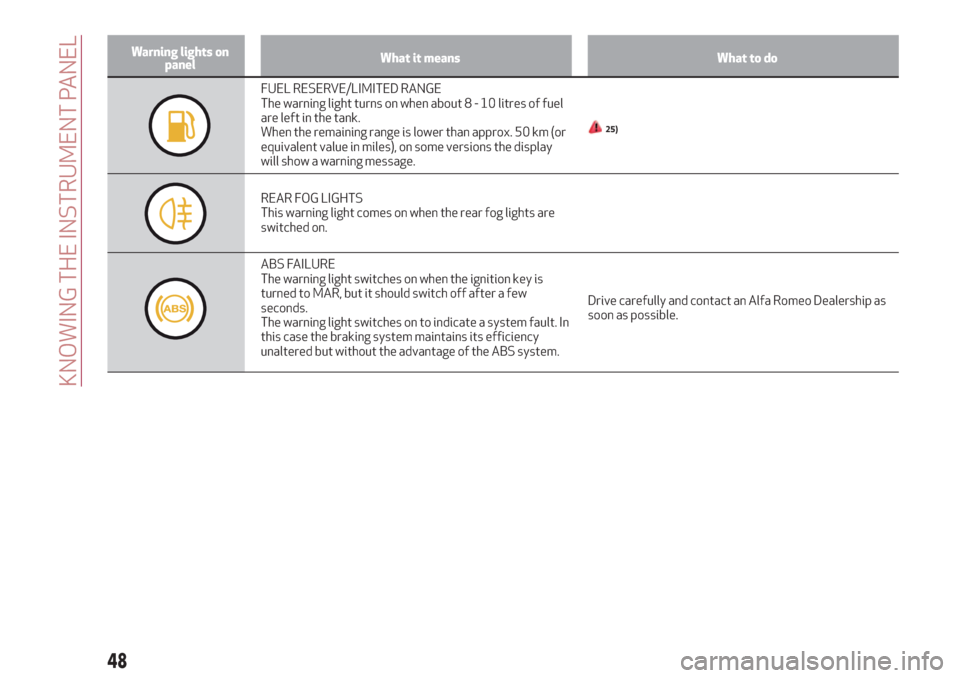
FUEL RESERVE/LIMITED RANGE
The warning light turns on when about8-10litres of fuel
are left in the tank.
When the remaining range is lower than approx. 50 km (or
equivalent value in miles), on some versions the display
will show a warning message.
25)
REAR FOG LIGHTS
This warning light comes on when the rear fog lights are
switched on.
ABS FAILURE
The warning light switches on when the ignition key is
turned to MAR, but it should switch off after a few
seconds.
The warning light switches on to indicate a system fault. In
this case the braking system maintains its efficiency
unaltered but without the advantage of the ABS system.Drive carefully and contact an Alfa Romeo Dealership as
soon as possible.
48
KNOWING THE INSTRUMENT PANEL
Page 52 of 216
Warning lights on
panelWhat it means What to do
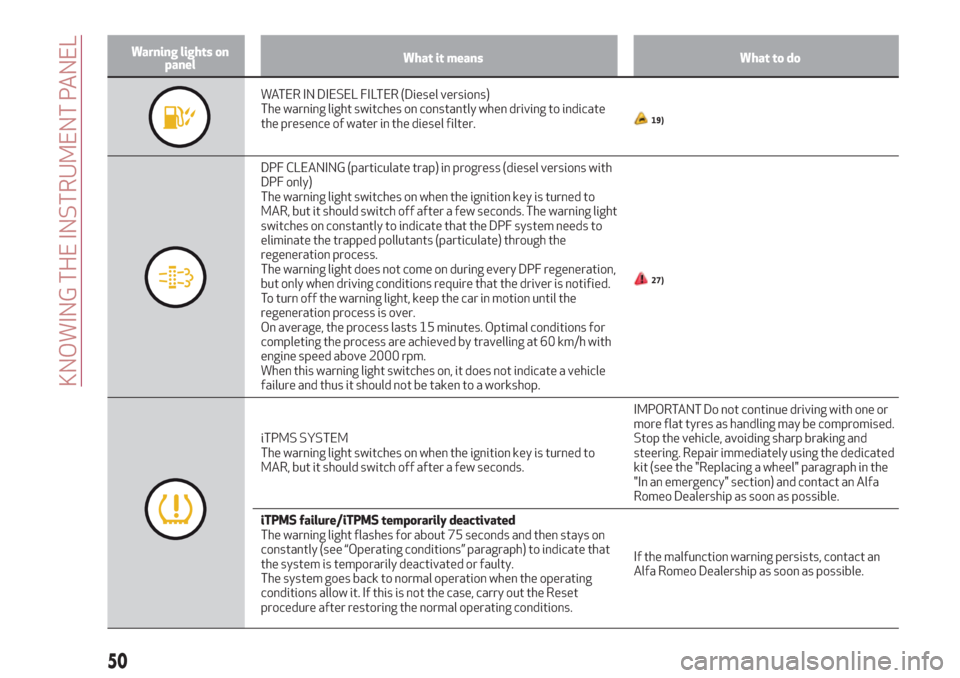
WATER IN DIESEL FILTER (Diesel versions)
The warning light switches on constantly when driving to indicate
the presence of water in the diesel filter.
19)
DPF CLEANING (particulate trap) in progress (diesel versions with
DPF only)
The warning light switches on when the ignition key is turned to
MAR, but it should switch off after a few seconds. The warning light
switches on constantly to indicate that the DPF system needs to
eliminate the trapped pollutants (particulate) through the
regeneration process.
The warning light does not come on during every DPF regeneration,
but only when driving conditions require that the driver is notified.
To turn off the warning light, keep the car in motion until the
regeneration process is over.
On average, the process lasts 15 minutes. Optimal conditions for
completing the process are achieved by travelling at 60 km/h with
engine speed above 2000 rpm.
When this warning light switches on, it does not indicate a vehicle
failure and thus it should not be taken to a workshop.
27)
iTPMS SYSTEM
The warning light switches on when the ignition key is turned to
MAR, but it should switch off after a few seconds.IMPORTANT Do not continue driving with one or
more flat tyres as handling may be compromised.
Stop the vehicle, avoiding sharp braking and
steering. Repair immediately using the dedicated
kit (see the "Replacing a wheel" paragraph in the
"In an emergency" section) and contact an Alfa
Romeo Dealership as soon as possible.
iTPMS failure/iTPMS temporarily deactivated
The warning light flashes for about 75 seconds and then stays on
constantly (see “Operating conditions” paragraph) to indicate that
the system is temporarily deactivated or faulty.
The system goes back to normal operation when the operating
conditions allow it. If this is not the case, carry out the Reset
procedure after restoring the normal operating conditions.If the malfunction warning persists, contact an
Alfa Romeo Dealership as soon as possible.
50
KNOWING THE INSTRUMENT PANEL
Page 54 of 216
Warning lights on
panelWhat it means What to do
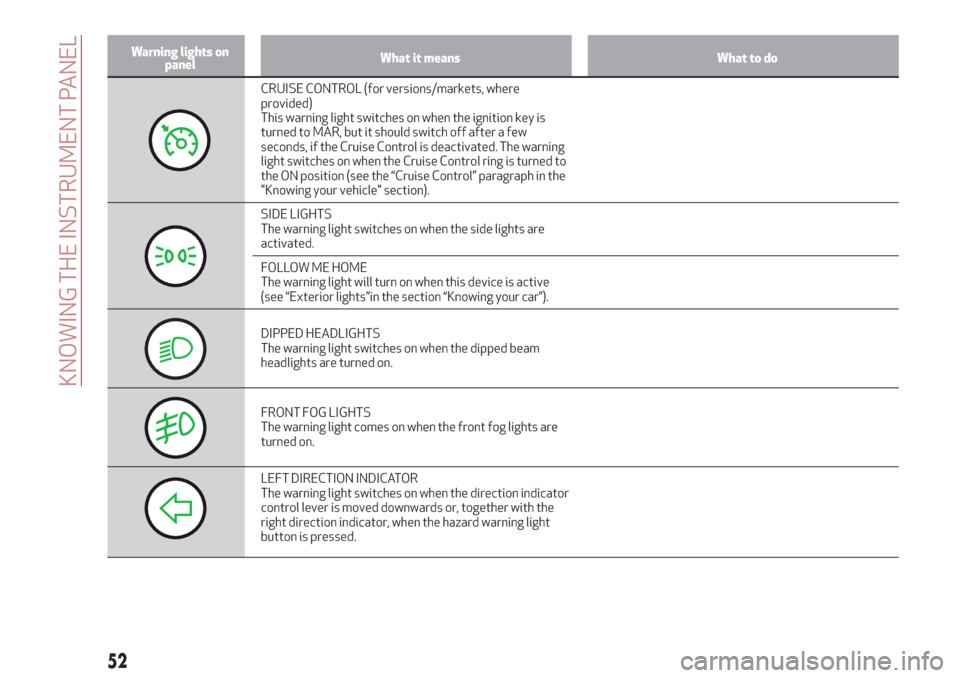
CRUISE CONTROL (for versions/markets, where
provided)
This warning light switches on when the ignition key is
turned to MAR, but it should switch off after a few
seconds, if the Cruise Control is deactivated. The warning
light switches on when the Cruise Control ring is turned to
the ON position (see the “Cruise Control” paragraph in the
"Knowing your vehicle" section).
SIDE LIGHTS
The warning light switches on when the side lights are
activated.
FOLLOW ME HOME
The warning light will turn on when this device is active
(see “Exterior lights”in the section “Knowing your car”).
DIPPED HEADLIGHTS
The warning light switches on when the dipped beam
headlights are turned on.
FRONT FOG LIGHTS
The warning light comes on when the front fog lights are
turned on.
LEFT DIRECTION INDICATOR
The warning light switches on when the direction indicator
control lever is moved downwards or, together with the
right direction indicator, when the hazard warning light
button is pressed.
52
KNOWING THE INSTRUMENT PANEL
Page 56 of 216
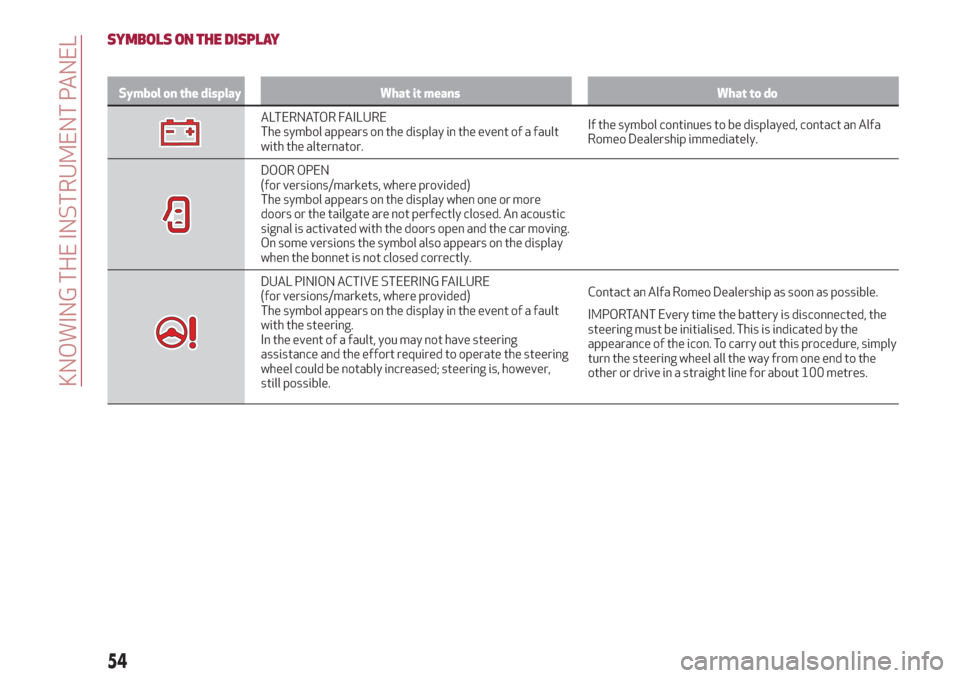
SYMBOLS ON THE DISPLAY
Symbol on the display What it means What to do
ALTERNATOR FAILURE
The symbol appears on the display in the event of a fault
with the alternator.If the symbol continues to be displayed, contact an Alfa
Romeo Dealership immediately.
DOOR OPEN
(for versions/markets, where provided)
The symbol appears on the display when one or more
doors or the tailgate are not perfectly closed. An acoustic
signal is activated with the doors open and the car moving.
On some versions the symbol also appears on the display
when the bonnet is not closed correctly.
DUAL PINION ACTIVE STEERING FAILURE
(for versions/markets, where provided)
The symbol appears on the display in the event of a fault
with the steering.
In the event of a fault, you may not have steering
assistance and the effort required to operate the steering
wheel could be notably increased; steering is, however,
still possible.Contact an Alfa Romeo Dealership as soon as possible.
IMPORTANT Every time the battery is disconnected, the
steering must be initialised. This is indicated by the
appearance of the icon. To carry out this procedure, simply
turn the steering wheel all the way from one end to the
other or drive in a straight line for about 100 metres.
54
KNOWING THE INSTRUMENT PANEL
Page 58 of 216
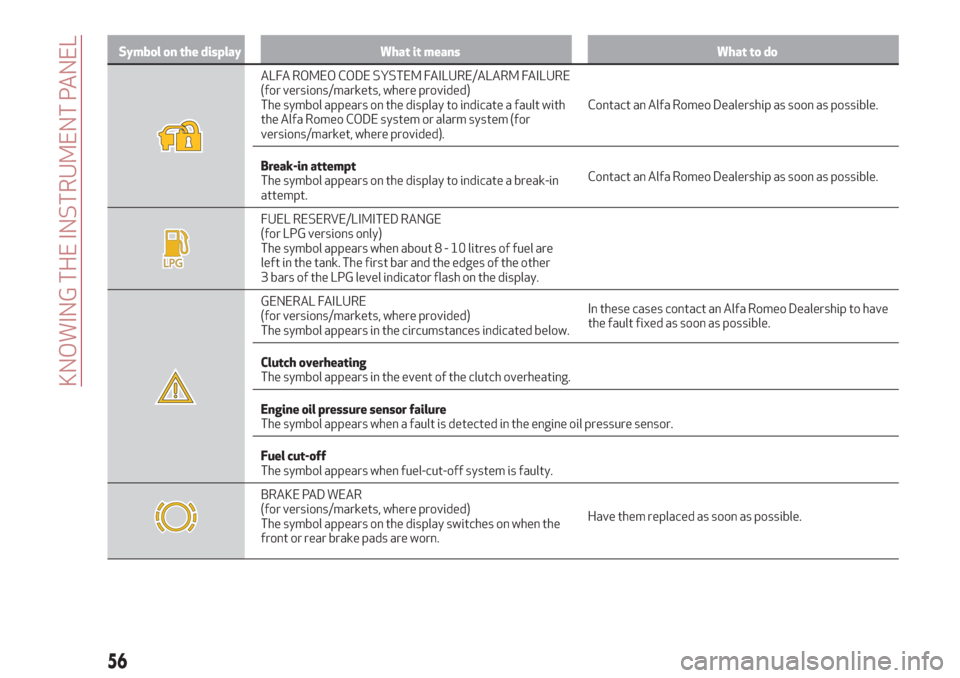
Symbol on the display What it means What to do
ALFA ROMEO CODE SYSTEM FAILURE/ALARM FAILURE
(for versions/markets, where provided)
The symbol appears on the display to indicate a fault with
the Alfa Romeo CODE system or alarm system (for
versions/market, where provided).Contact an Alfa Romeo Dealership as soon as possible.
Break-in attempt
The symbol appears on the display to indicate a break-in
attempt.Contact an Alfa Romeo Dealership as soon as possible.
FUEL RESERVE/LIMITED RANGE
(for LPG versions only)
The symbol appears when about8-10litres of fuel are
left in the tank. The first bar and the edges of the other
3 bars of the LPG level indicator flash on the display.
GENERAL FAILURE
(for versions/markets, where provided)
The symbol appears in the circumstances indicated below.In these cases contact an Alfa Romeo Dealership to have
the fault fixed as soon as possible.
Clutch overheating
The symbol appears in the event of the clutch overheating.
Engine oil pressure sensor failure
The symbol appears when a fault is detected in the engine oil pressure sensor.
Fuel cut-off
The symbol appears when fuel-cut-off system is faulty.
BRAKE PAD WEAR
(for versions/markets, where provided)
The symbol appears on the display switches on when the
front or rear brake pads are worn.Have them replaced as soon as possible.
56
KNOWING THE INSTRUMENT PANEL