AUX Alfa Romeo MiTo 2014 User Guide
[x] Cancel search | Manufacturer: ALFA ROMEO, Model Year: 2014, Model line: MiTo, Model: Alfa Romeo MiTo 2014Pages: 280, PDF Size: 8.79 MB
Page 257 of 280
PHONE FUNCTION(telephone volume adjustment)
With Speech volume function present in Menu
This function makes it possible to adjust (settings from 1 to 40), by
turning the ON/OFF left knob/button or pressing the
/
buttons, or mute (OFF setting) the volume of the telephone.
The display shows the current function status:
❒“Speech Off”: function deactivated.
❒“Speech volume 23”: function active with volume setting 23.
With Speech volume function not present
on the Menu
When a phone call is received, the audio passes to the car’s audio
system through the radio.
The telephone audio always arrives at a fixed volume, but it can be
adjusted during a conversation using the ON/OFF button/knob.
AUX OFFSET function(alignment of the portable device volume with that of
the other sources)
(for versions/markets, where provided)
This function enables the alignment of the volume of the AUX
source, depending on its own portable player, with that of the
other sources.
To activate the function, press the MENU button and select “AUX
offset”.
Press the
or
buttons to decrease or increase the volume value
(set from–6to+6).
RADIO OFF function(on and off mode)
This function is used to set the radio switching-off mode to one of
two different settings.
To activate the function, use the
or
button.
The selected mode will appear on the display:
❒“00 MIN”: the radio switches off automatically in connection
with the ignition key; the radio switches off automatically as
soon as the key is turned to STOP position;
❒“20 MIN”: the radio switches off independently of the ignition
key; the radio remains switched on for a maximum period of 20
minutes after the key has been turned to STOP position.
SYSTEM RESET functionThis function is used to restore all settings to the factory values.
The options are:
❒NO: no restore intervention;
❒YES: the default parameters will be restored. During this
operation, the word “Resetting” appears on the display. At the
end of the operation, the source does not change and the
previous situation will be displayed.
253SOUND-SYSTEM
Page 259 of 280
Car radio passport
This document certifies ownership of the radio. The car radio
passport shows the radio model, serial number and secret code.
NoteKeep this car radio passport in a safe place so that you can
give the information to the relevant authorities if the car radio is
stolen.
In case of loss of the car radio passport, contact the Alfa Romeo
Authorised Services, taking an ID document and the car ownership
documents.
RADIO (TUNER)INTRODUCTIONWhen the radio is switched on, the last function selected before it
was switched off is activated: Radio, CD, CD MP3 or AUX (only
with ) (for versions/markets, where provided).
To select the Radio function when another audio source is being
listened to, briefly press the FM AS or AM buttons depending on
the desired band.
Once the Radio mode has been activated, the display will show the
name (RDS stations only) and the frequency of the selected radio
station, the frequency band selected (e.g. FM1) and the preselect
button number (e.g. P1).FREQUENCY BAND SELECTIONWith the Radio mode active, press the FM AS or AM button briefly
and repeatedly to select the desired reception band.
Each time the button is pressed the following bands are selected
cyclically:
❒By pressing the FM AS button: “FM1”, “FM2” or “FMA”;
❒By pressing the AM button: “MW1, MW2”.
Each band is highlighted by the name in the display. The last
station selected on the respective frequency band will be tuned
into.
The FM band is divided into sections: FM1, FM2 or “FMA”; the
FMA reception band is reserved for broadcasters stored
automatically using the AutoSTore function.
255SOUND-SYSTEM
Page 266 of 280
AUX(for versions/markets, where provided)INTRODUCTIONThis section describes the variants regarding the operation of the
AUX source: as far as the operation of the radio is concerned, refer
to the description in the "Functions and Adjustments" section.AUX MODETo activate the AUX source, press the MEDIA button or the SRC
control on the steering wheel repeatedly until the corresponding
source is displayed.
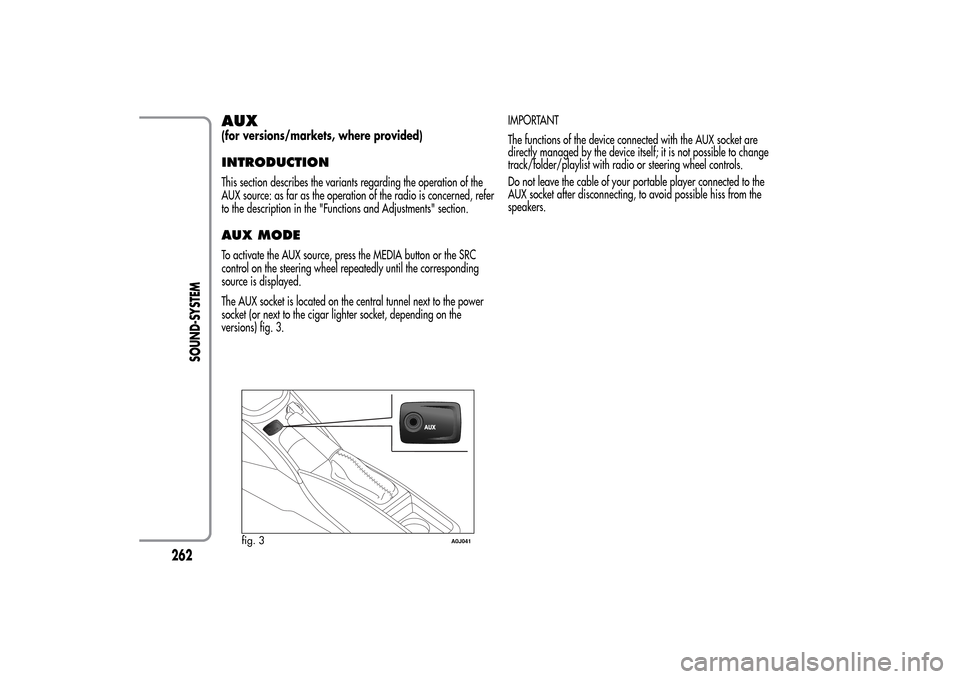
The AUX socket is located on the central tunnel next to the power
socket (or next to the cigar lighter socket, depending on the
versions) fig. 3.IMPORTANT
The functions of the device connected with the AUX socket are
directly managed by the device itself; it is not possible to change
track/folder/playlist with radio or steering wheel controls.
Do not leave the cable of your portable player connected to the
AUX socket after disconnecting, to avoid possible hiss from the
speakers.
fig. 3
A0J041
262
SOUND-SYSTEM