Radio Alfa Romeo MiTo 2014 User Guide
[x] Cancel search | Manufacturer: ALFA ROMEO, Model Year: 2014, Model line: MiTo, Model: Alfa Romeo MiTo 2014Pages: 280, PDF Size: 8.79 MB
Page 241 of 280
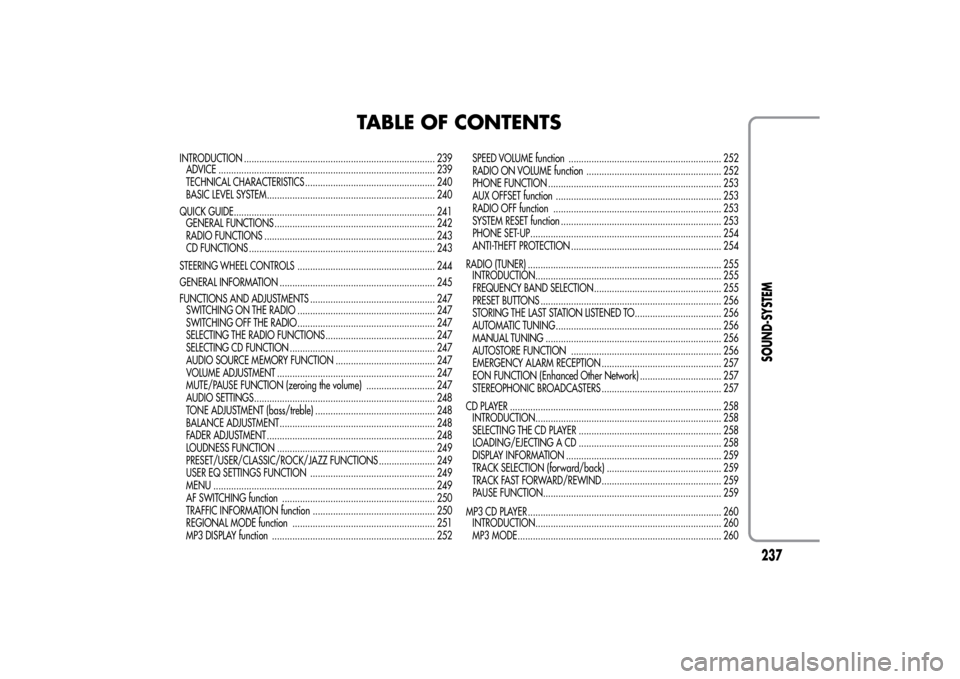
TABLE OF CONTENTS
INTRODUCTION ........................................................................... 239
ADVICE ..................................................................................... 239
TECHNICAL CHARACTERISTICS ................................................... 240
BASIC LEVEL SYSTEM.................................................................. 240
QUICK GUIDE............................................................................... 241
GENERAL FUNCTIONS ............................................................... 242
RADIO FUNCTIONS ................................................................... 243
CD FUNCTIONS ......................................................................... 243
STEERING WHEEL CONTROLS ...................................................... 244
GENERAL INFORMATION ............................................................. 245
FUNCTIONS AND ADJUSTMENTS ................................................. 247
SWITCHING ON THE RADIO ...................................................... 247
SWITCHING OFF THE RADIO ...................................................... 247
SELECTING THE RADIO FUNCTIONS ........................................... 247
SELECTING CD FUNCTION ......................................................... 247
AUDIO SOURCE MEMORY FUNCTION ....................................... 247
VOLUME ADJUSTMENT .............................................................. 247
MUTE/PAUSE FUNCTION (zeroing the volume) ........................... 247
AUDIO SETTINGS....................................................................... 248
TONE ADJUSTMENT (bass/treble) ............................................... 248
BALANCE ADJUSTMENT ............................................................. 248
FADER ADJUSTMENT .................................................................. 248
LOUDNESS FUNCTION .............................................................. 249
PRESET/USER/CLASSIC/ROCK/JAZZ FUNCTIONS ...................... 249
USER EQ SETTINGS FUNCTION ................................................. 249
MENU ....................................................................................... 249
AF SWITCHING function ............................................................ 250
TRAFFIC INFORMATION function ................................................ 250
REGIONAL MODE function ........................................................ 251
MP3 DISPLAY function ................................................................ 252SPEED VOLUME function ............................................................ 252
RADIO ON VOLUME function ..................................................... 252
PHONE FUNCTION .................................................................... 253
AUX OFFSET function ................................................................. 253
RADIO OFF function .................................................................. 253
SYSTEM RESET function ............................................................... 253
PHONE SET-UP........................................................................... 254
ANTI-THEFT PROTECTION ........................................................... 254
RADIO (TUNER) ............................................................................ 255
INTRODUCTION......................................................................... 255
FREQUENCY BAND SELECTION.................................................. 255
PRESET BUTTONS ....................................................................... 256
STORING THE LAST STATION LISTENED TO.................................. 256
AUTOMATIC TUNING................................................................. 256
MANUAL TUNING ..................................................................... 256
AUTOSTORE FUNCTION ........................................................... 256
EMERGENCY ALARM RECEPTION ............................................... 257
EON FUNCTION (Enhanced Other Network) ................................ 257
STEREOPHONIC BROADCASTERS ............................................... 257
CD PLAYER ................................................................................... 258
INTRODUCTION......................................................................... 258
SELECTING THE CD PLAYER ........................................................ 258
LOADING/EJECTING A CD ........................................................ 258
DISPLAY INFORMATION ............................................................. 259
TRACK SELECTION (forward/back) ............................................. 259
TRACK FAST FORWARD/REWIND ............................................... 259
PAUSE FUNCTION...................................................................... 259
MP3 CD PLAYER ............................................................................ 260
INTRODUCTION......................................................................... 260
MP3 MODE................................................................................ 260
237SOUND-SYSTEM
Page 243 of 280
INTRODUCTIONThe radio has been designed according to the passenger
compartment's specific characteristics and with a personalised
design that complements the style of the dashboard.
The instructions for use are given below. We recommend that you
read them carefully.ADVICERoad safety
Familiarise yourself with the various car radio functions (e.g.
storing radio stations), before starting to drive.
Reception conditions
Reception conditions change constantly while driving. Reception
may be interfered with by the presence of mountains, buildings or
bridges, or when you are far away from the broadcaster.
NoteThe volume may be increased when receiving traffic alerts
and news.
If the volume is too loud this could be
dangerous for the driver and for passengers
when driving in traffic. Always adjust the
volume so that you can still hear background noises.
Maintenance and care
Only clean the cover with a soft, anti-static cloth. Cleaning and
polishing products may damage the surface.
CD
Dirt, scratches or any distortions on CDs may cause skipping
during playback and poor sound quality. Follow these tips for
optimum playback conditions:
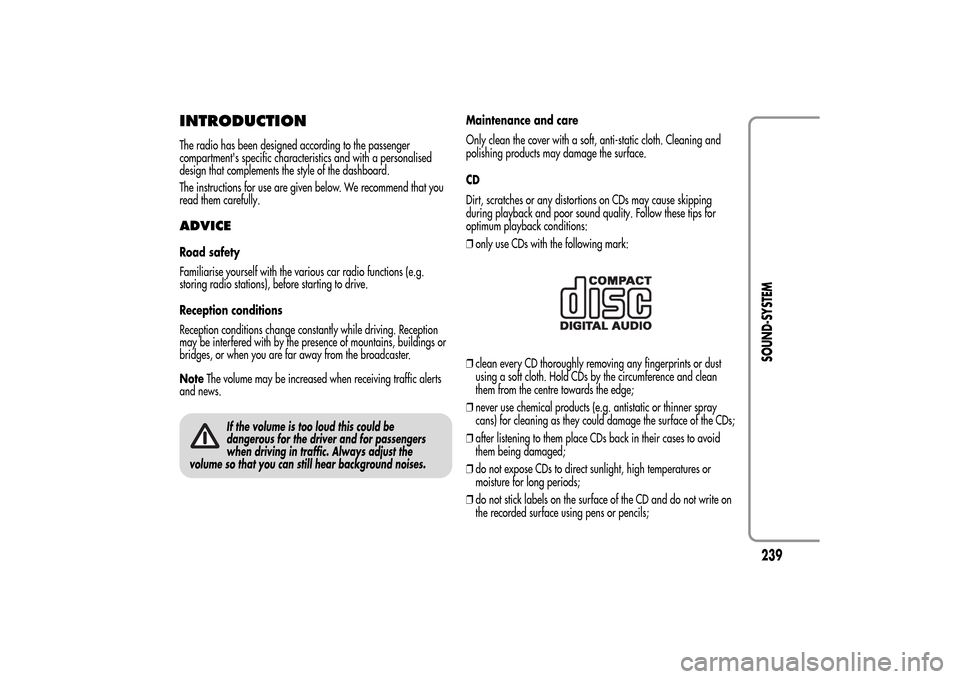
❒only use CDs with the following mark:❒clean every CD thoroughly removing any fingerprints or dust
using a soft cloth. Hold CDs by the circumference and clean
them from the centre towards the edge;
❒never use chemical products (e.g. antistatic or thinner spray
cans) for cleaning as they could damage the surface of the CDs;
❒after listening to them place CDs back in their cases to avoid
them being damaged;
❒do not expose CDs to direct sunlight, high temperatures or
moisture for long periods;
❒do not stick labels on the surface of the CD and do not write on
the recorded surface using pens or pencils;
239SOUND-SYSTEM
Page 246 of 280
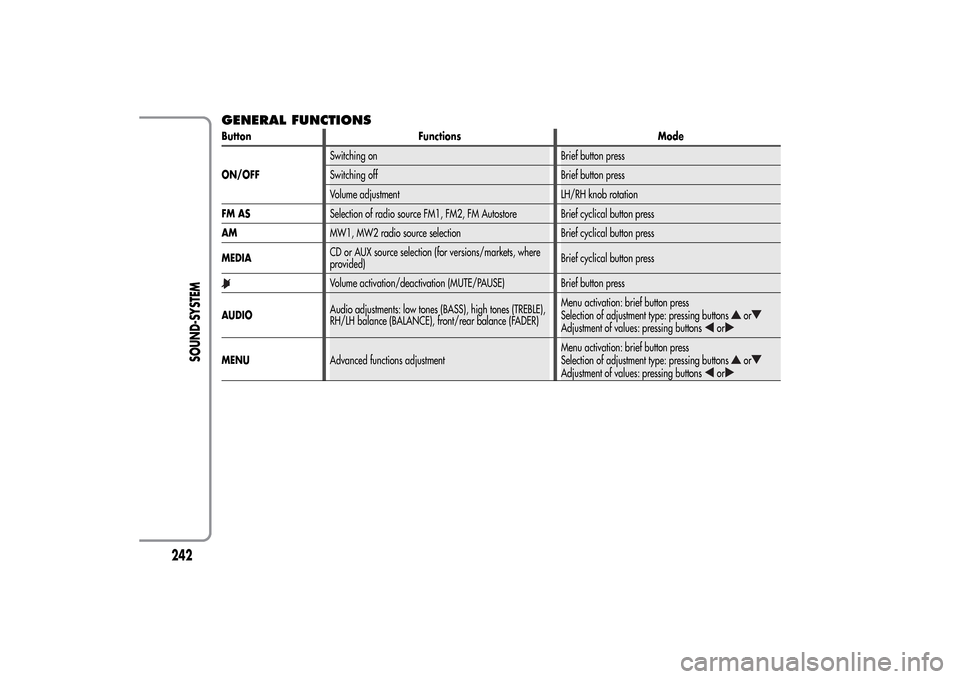
GENERAL FUNCTIONSButton Functions Mode
ON/OFFSwitching on Brief button press
Switching off Brief button press
Volume adjustment LH/RH knob rotation
FM ASSelection of radio source FM1, FM2, FM Autostore Brief cyclical button press
AMMW1, MW2 radio source selection Brief cyclical button press
MEDIACD or AUX source selection (for versions/markets, where
provided)Brief cyclical button press
Volume activation/deactivation (MUTE/PAUSE) Brief button press
AUDIOAudio adjustments: low tones (BASS), high tones (TREBLE),
RH/LH balance (BALANCE), front/rear balance (FADER)Menu activation: brief button press
Selection of adjustment type: pressing buttons
or
Adjustment of values: pressing buttons
or
MENUAdvanced functions adjustmentMenu activation: brief button press
Selection of adjustment type: pressing buttons
or
Adjustment of values: pressing buttons
or
242
SOUND-SYSTEM
Page 247 of 280
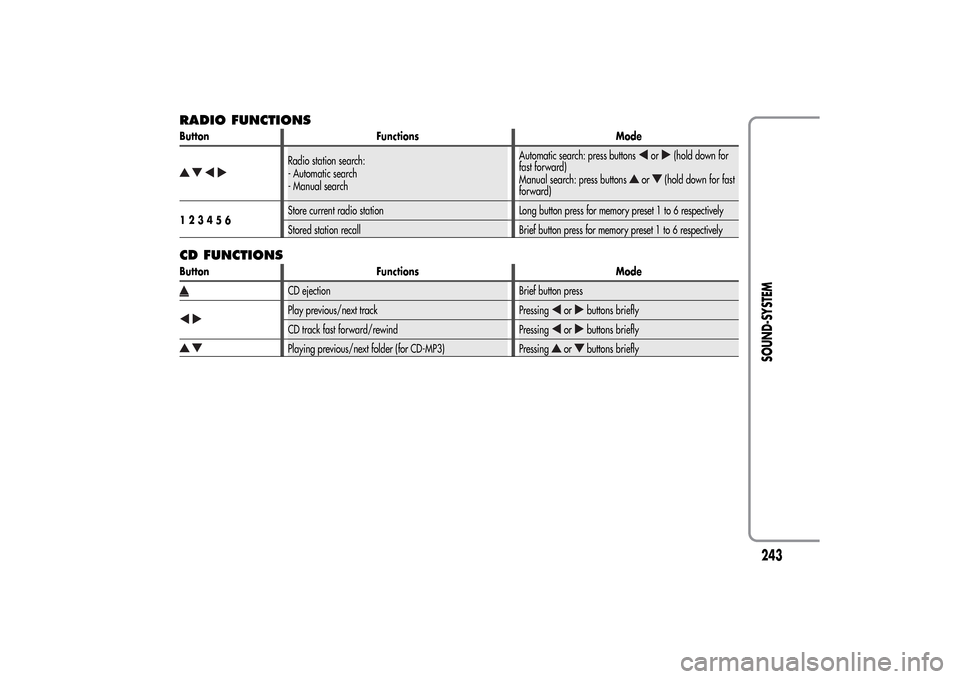
RADIO FUNCTIONSButton Functions Mode
Radio station search:
- Automatic search
- Manual searchAutomatic search: press buttons
or
(hold down for
fast forward)
Manual search: press buttons
or
(hold down for fast
forward)
123456Store current radio station Long button press for memory preset 1 to 6 respectively
Stored station recall Brief button press for memory preset 1 to 6 respectively
CD FUNCTIONSButton Functions Mode
CD ejection Brief button pressPlay previous/next track Pressing
or
buttons briefly
CD track fast forward/rewind Pressing
or
buttons briefly
Playing previous/next folder (for CD-MP3) Pressing
or
buttons briefly
243SOUND-SYSTEM
Page 248 of 280
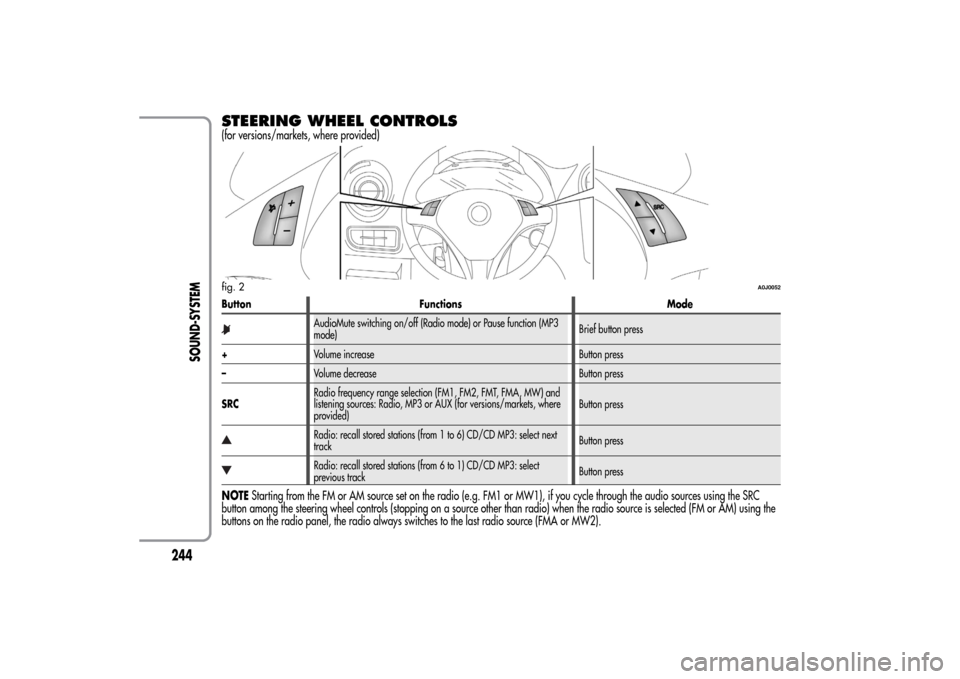
STEERING WHEEL CONTROLS(for versions/markets, where provided)Button Functions Mode
AudioMute switching on/off (Radio mode) or Pause function (MP3
mode)Brief button press
+Volume increase Button press
–Volume decrease Button press
SRCRadio frequency range selection (FM1, FM2, FMT, FMA, MW) and
listening sources: Radio, MP3 or AUX (for versions/markets, where
provided)Button pressRadio: recall stored stations (from 1 to 6) CD/CD MP3: select next
trackButton pressRadio: recall stored stations (from 6 to 1) CD/CD MP3: select
previous trackButton press
NOTEStarting from the FM or AM source set on the radio (e.g. FM1 or MW1), if you cycle through the audio sources using the SRC
button among the steering wheel controls (stopping on a source other than radio) when the radio source is selected (FM or AM) using the
buttons on the radio panel, the radio always switches to the last radio source (FMA or MW2).fig. 2
A0J0052
244
SOUND-SYSTEM
Page 249 of 280
GENERAL INFORMATIONThe radio offers the following functions:
Radio section
❒PLL tuning with FM/AM/MW frequency bands;
❒RDS (Radio Data System) with TA (traffic alerts) function - TP
(traffic programmes) - EON (Enhanced Other Network) - REG
(regional programmes);
❒AF: search selection for alternative frequencies in RDS mode;
❒provision for emergency alarm;
❒automatic/manual tuning of stations;
❒FM Multipath detector;
❒manual storing of 30 stations: 18 on FM band (6 on FM1, 6 on
FM2, 6 on FMT), 12 on MW band (6 on MW1, 6 on MW2);
❒automatic memorization (AUTOSTORE function) of 6 stations in
the dedicated FM band;
❒SPEED VOLUME function (excluding versions with Bose Hi-Fi
system): speed-dependent automatic volume adjustment;
❒automatic Stereo/Mono selection.CD section
❒Direct selection of the disc;
❒Track selection (forward/back);
❒Fast advance (forward/back) through tracks;
❒CD Display function: display of disc name and time elapsed
since the start of the track;
❒Playing of audio CDs, CD-Rs and CD-RWs.
Multimedia CDs include data tracks in addition
to the audio tracks. Playing this type of CD can
cause hissing at a volume that may jeopardise
road safety as well as causing damage to the final
stages and the speakers.
245SOUND-SYSTEM
Page 251 of 280
FUNCTIONS AND ADJUSTMENTSSWITCHING ON THE RADIOThe radio switches on when the ON/OFF button is pressed briefly.
When the radio is turned on, the volume is limited to level 20 if it
was set to a higher value when previously used or to level 5 if it
was previously set to value 0 or to Mute/Pause. The previously set
value is maintained in all other cases.
When the radio is switched on with the key extracted from the
ignition, it switches off automatically after about 20 minutes. After
the radio has switched itself off automatically it can be switched on
for a further 20 minutes by pressing the ON/OFF button.SWITCHING OFF THE RADIOBriefly press the ON/OFF button.SELECTING THE RADIO FUNCTIONSBy pressing the FM AS button quickly and repeatedly, the following
audio sources can be selected cyclically:
❒TUNER (“FM1”, “FM2”, “FMA”).
By pressing the AM button briefly and repeatedly, the following
audio sources can be selected cyclically:
❒TUNER (“MW1”, “MW2”).
SELECTING CD FUNCTIONBy pressing the MEDIA button briefly it is possible to select the CD
function.AUDIO SOURCE MEMORY FUNCTIONIf another function (e.g. the radio) is selected whilst listening to a
CD, playback is interrupted and is resumed from the same point
when returning to the CD source.
If another function is selected whilst listening to the radio, the last
station selected is tuned into when returning to Radio mode.VOLUME ADJUSTMENTTo adjust the volume, turn the ON/OFF knob.
If the volume level is changed during the transmission of traffic
news, the new setting will only be maintained until the update is
finished.MUTE/PAUSE FUNCTION
(zeroing the volume)Press the
button briefly to activate the Mute function. The volume
will gradually decrease and the words “RADIO Mute” (in radio
mode) or “PAUSE” (in CD mode) will be displayed.
Press thebutton again to deactivate the Mute function. The
volume will gradually increase until it reaches the level set
previously.
When the volume level is changed using the dedicated controls, the
Mute function is deactivated and the volume is adjusted to the new
level selected.
247SOUND-SYSTEM
Page 254 of 280
❒SPEED VOLUME (speed-dependent automatic volume control);
❒RADIO ON VOLUME (radio volume limit
activation/deactivation);
❒SPEECH VOLUME (telephone volume adjustment) (for
versions/markets, where provided);
❒AUX OFFSET (alignment of the portable device volume to that of
the other sources) (for versions/markets, where provided);
❒RADIO OFF (switching-off mode);
❒SYSTEM RESET
Press the MENU button again to exit the Menu function.
NoteThe AF SWITCHING, TRAFFIC INFORMATION and
REGIONAL MODE adjustments are only possible in FM mode.AF SWITCHING function(alternative frequency search)
The radio can operate in two different modes using RDS:
❒“AF Switching On”: search for alternative frequencies active (the
letters “AF” appear on the display);
❒“AF Switching Off”: search for alternative frequencies not active.
Proceed as follows to activate/deactivate the function:
❒press the MENU button and select “AF Switching On”;
❒press the
/
buttons to activate/deactivate the function.
When the function is activated, the radio automatically tunes into
the station with the strongest signal broadcasting the same
programme. While driving, the same station can be continuously
listened to without having to change the frequency when you
change zones.Obviously, it must be possible to receive the station that you are
listening to in the area you are driving through.
If the AF function has been activated, “AF” will light up in the
display.
If the AF function has been activated and the radio is not able to
receive the current station, the radio activates the automatic search,
during which “FM Search” appears on the display (only for top-of-
the-range radios).
With the AF function deactivated, the remaining RDS functions,
such as the display of the station name, still remain active.
The AF function can only be activated on FM bands.
TRAFFIC INFORMATION function(traffic information)
Some stations on the FM band (FM1, FM2 and FMA) can
broadcast information about traffic conditions. In this case the
letters “TA” appear on the display.
Proceed as follows to switch the TA function on/off:
❒press the MENU button briefly and select “Traffic info”;
❒press the
/
buttons to activate/deactivate the function.
If the TA function has been activated, the “TA” icon lights up on the
display.
NoteIf the TA function is activated with an audio source other
than Tuner (Radio) (CD, MP3, telephone or Mute/Pause), the radio
can carry out an automatic search and therefore it is possible,
when reactivating the Tuner (Radio) source, that the frequency
tuned into is different from the one previously set.
250
SOUND-SYSTEM
Page 255 of 280
With the TA function, it is possible to:
❒search only for RDS stations that broadcast in FM and are
enabled to broadcast traffic information;
❒receive traffic information even when the CD player is in
operation;
❒receive traffic information at a minimum preset volume even with
the radio volume off.
NoteIn some countries there are radio stations that, even with the
TP function activated, do not transmit traffic information (the “TP”
icon appears on the display).
If the radio is tuned to a station in the AM band, when TA is
activated it will tune into the last selected station in the FM1 band.
The volume at which the traffic news is transmitted depends on the
listening volume:
❒listening volume below 5: traffic news volume 5 (fixed value);
❒listening volume above 5: traffic news volume equal to listening
volume +1.
If the volume is changed during traffic news, the level will not be
shown on the display; the new level will only be maintained during
the news.
While traffic information is being received, “TRAFFIC
INFORMATION” will appear on the display.
The TA function can be interrupted by pressing any button on the
radio.
REGIONAL MODE function(regional transmission reception)
Some national broadcasters will transmit regional programmes at
certain times of the day (that vary from region to region).
This function makes it possible to tune into local (regional)
broadcasters automatically (see “EON function” paragraph).
If you want the radio to automatically tune into the regional
stations being broadcast on the selected network, the function must
be activated.
To activate/deactivate the function use the
or
buttons.
The current status of the function appears on the display:
❒“Regional On”: function activated;
❒“Regional Off”: function deactivated.
If the function is deactivated and you have tuned into a regional
station working in a given area and you enter a different area,
then the regional station received in the new area will be
broadcast.
NoteIf the AF and REG functions are on at the same time, once a
border between two regions is crossed, the radio may not switch
correctly to a valid alternative frequency.
251SOUND-SYSTEM
Page 256 of 280
MP3 DISPLAY function(MP3 CD data display)
This function makes it possible to select the information shown by
the display when listening to a CD containing MP3 tracks.
The function can only be selected if an MP3 CD is inserted: in this
case “MP3 Display” will appear on the display.
To change the function, use the
or
buttons.
The following settings are available:
❒“Title” (track title, if the ID3-TAG is available);
❒“Author” (track author, if the ID3-TAG is available);
❒“Album” (track album, if the ID3-TAG is available);
❒“Folder” name (name assigned to the folder);
❒“File” name (name assigned to the MP3 file).
SPEED VOLUME function(speed-based volume change)
This function automatically adapts the volume level to the speed of
the car, increasing the volume when the speed increases to
maintain the ratio with the noise level inside the passenger
compartment.
To activate/deactivate the function, press the
/
buttons. The
words “Speed volume” appear on the display, followed by the
current status of the function:
❒Off: function deactivated
❒Low: function activated (low sensitivity)
❒High: function activated (high sensitivity).
RADIO ON VOLUME function(radio volume limit activation/deactivation)
This function makes it possible to activate/deactivate the volume
limits when the radio is turned on.
The display shows the function status:
❒“Radio on vol – Limit on”: when the radio is switched on the
volume level will be:
– if the volume level is equal to or higher than the maximum value,
the radio will switch on at the maximum volume;
– if the volume level is between the minimum and maximum values,
the radio will switch on at the same volume as before it was
switched off.
❒“Radio on vol – Limit off”: the radio will switch on at the volume
level it was at before switching off. The volume may be between
0 and 40.
To change the setting of the selected function, use the
/
buttons.
NOTES
❒Using the Menu it is only possible to adjust the
activation/deactivation of the function and not the minimum or
maximum volume value.
❒If the “TA” or “TEL” functions or an external audio source are
activated when the radio is turned on, the radio will switch on at
the volume set for these sources. When the external audio source
is deactivated, the volume can be adjusted between the
minimum and maximum levels.
❒If the battery charge is low, it will not be possible to adjust the
volume between the minimum and maximum levels.
252
SOUND-SYSTEM