maintenance Alfa Romeo MiTo 2015 Owner's Guide
[x] Cancel search | Manufacturer: ALFA ROMEO, Model Year: 2015, Model line: MiTo, Model: Alfa Romeo MiTo 2015Pages: 280, PDF Size: 8.52 MB
Page 34 of 280
Courtesy lights (Activation/
deactivation of “Greeting lights”)
(for versions/markets, where provided)
With this function it is possible to turn on the side lights, the number
plate lights and the ceiling lights for approximately 25 seconds when
the doors or boot are opened using the remote control, with the
following exceptions:
❒interruption after 5 seconds from when the door closes
❒interruption after locking using the remote control
❒interruption after a lock or other action using the remote control
Proceed as follows to activate or deactivate this function:
❒press the SET/
button briefly to make the display flash "On" or
"Off" according to what was previously set;
❒press the "+" or "−" button to select;
❒briefly press the SET/
button to go back to the menu screen or
hold the button down to go back to the standard screen without
saving.
Menu exit
This is the last function that closes the cycle of settings listed in the
menu screen.
Pressing the SET/
button briefly will return the display to the
standard screen without saving.
Press the − button to return to the first menu option.
TRIP COMPUTER
GENERAL INFORMATION
The Trip computer is used to display information on car operation
when the key is turned to MAR.
This function allows you to define two separate trips called “Trip A”
and “Trip B” for monitoring the car's "complete journey" in a
reciprocally independent manner.
Both functions are resettable (reset - start of a new journey).
“Trip A” is used to display the figures relating to:
❒Range
❒Distance travelled
❒Average fuel consumption
❒Instant fuel consumption
❒Average speed
❒Trip time (driving time).
“Trip B” may be used to display the figures relating to:
❒Distance travelled B
❒Average consumption B
❒Average speed B
❒Trip time B (driving time).
The “Trip B” function may be disabled (see “Activating Trip B”).
“Range” and “Instant consumption" parameters cannot be reset.
30
GETTING TO
KNOW YOUR CAR
SAFETY
STARTING AND
DRIVING
IN AN EMERGENCY
SERVICING AND
MAINTENANCE
TECHNICAL
SPECIFICATIONS
INDEX
Page 35 of 280
VALUES DISPLAYED
Range
This indicates the indicative distance that may be travelled with the fuel
in the tank, assuming that driving conditions do not change.
The display will show the reading '-----' when the following events take
place:
❒range value lower than 50 km (or 30 mi)
❒car parked with engine running for a long period.
IMPORTANT The range can be affected by several factors: driving style
(see “Driving style” in the “Starting and driving” section), type of
route (motorway, towns and cities, mountain roads, etc.), conditions of
use (load, tyre pressures, etc.). Trip planning must therefore take the
above into account.
Distance covered
Shows the distance covered since the start of the new journey.
Average consumption
Shows the approximate average fuel consumption since the start of the
new journey.
Instantaneous consumption
This indicates the fuel consumption. The value is constantly updated.
The display will show “----”ifthecarisparked with the engine
running.Average speed
This shows the average car speed as a function of the overall time
elapsed since the start of the new journey.
Trip time
The time elapsed since the start of a new journey.
Indications on display
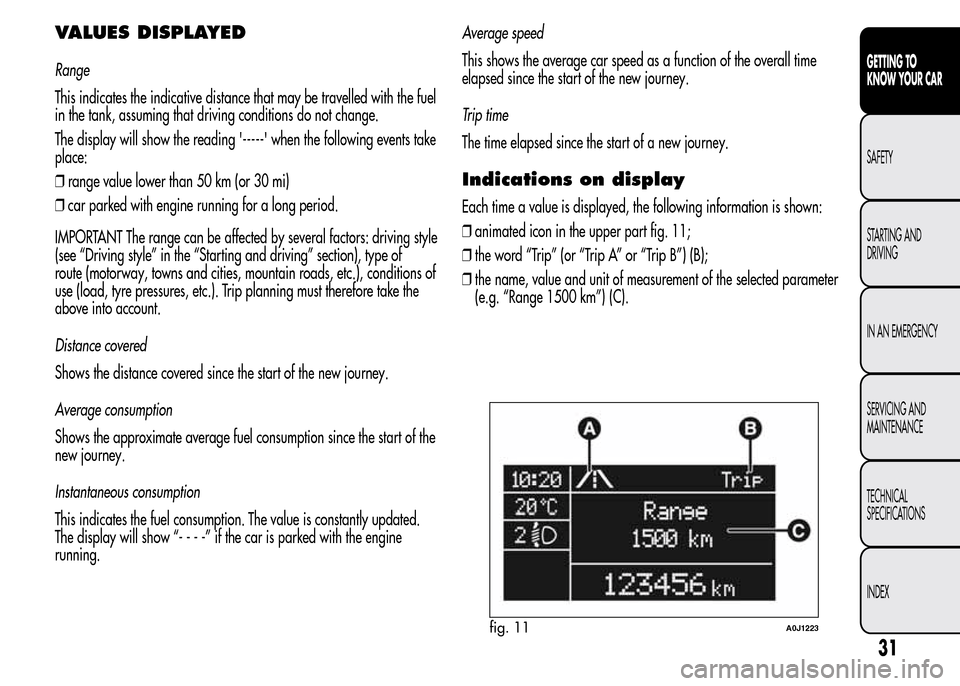
Each time a value is displayed, the following information is shown:
❒animated icon in the upper part fig. 11;
❒the word “Trip” (or “Trip A” or “Trip B”) (B);
❒the name, value and unit of measurement of the selected parameter
(e.g. “Range 1500 km”) (C).
fig. 11A0J1223
31
GETTING TO
KNOW YOUR CAR
SAFETY
STARTING AND
DRIVING
IN AN EMERGENCY
SERVICING AND
MAINTENANCE
TECHNICAL
SPECIFICATIONS
INDEX
Page 36 of 280
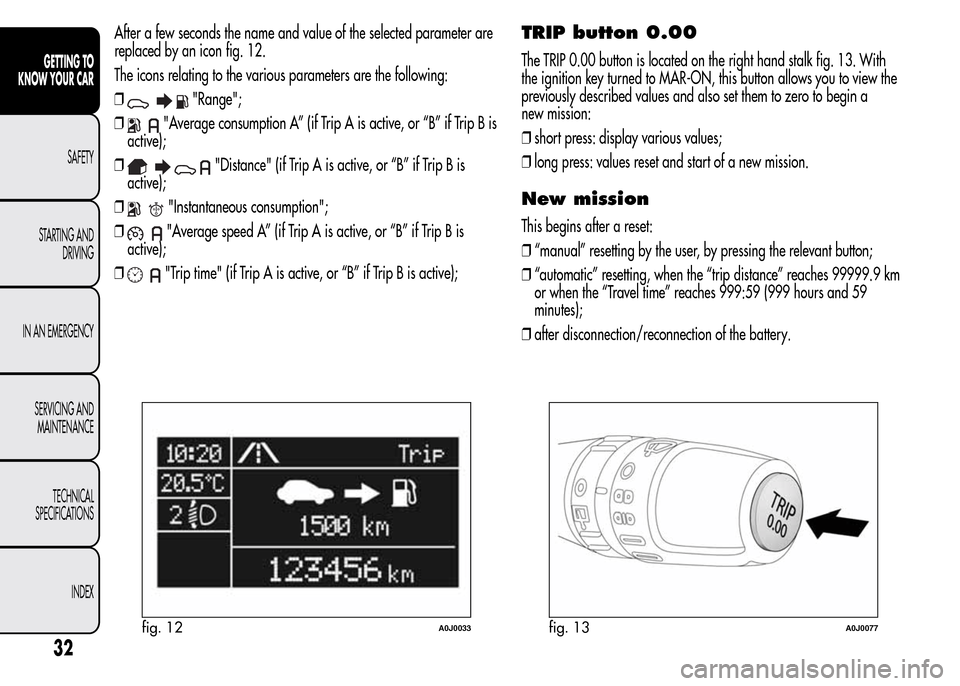
After a few seconds the name and value of the selected parameter are
replaced by an icon fig. 12.
The icons relating to the various parameters are the following:
❒
"Range";
❒
"Average consumption A” (if Trip A is active, or “B” if Trip B is
active);
❒
"Distance" (if Trip A is active, or “B” if Trip B is
active);
❒
"Instantaneous consumption";
❒
"Average speed A” (if Trip A is active, or “B” if Trip B is
active);
❒
"Trip time" (if Trip A is active, or “B” if Trip B is active);
TRIP button 0.00
The TRIP 0.00 button is located on the right hand stalk fig. 13. With
the ignition key turned to MAR-ON, this button allows you to view the
previously described values and also set them to zero to begin a
new mission:
❒short press: display various values;
❒long press: values reset and start of a new mission.
New mission
This begins after a reset:
❒“manual” resetting by the user, by pressing the relevant button;
❒“automatic” resetting, when the “trip distance” reaches 99999.9 km
or when the “Travel time” reaches 999:59 (999 hours and 59
minutes);
❒after disconnection/reconnection of the battery.
fig. 12A0J0033fig. 13A0J0077
32
GETTING TO
KNOW YOUR CAR
SAFETY
STARTING AND
DRIVING
IN AN EMERGENCY
SERVICING AND
MAINTENANCE
TECHNICAL
SPECIFICATIONS
INDEX
Page 37 of 280
IMPORTANT The reset operation when “Trip A” details are being
displayed only resets the information associated with this function.
IMPORTANT The reset operation when “Trip B” details are being
displayed resets only the information associated with this function.
Start of journey procedure
With the ignition key at MAR-ON, reset by pressing the TRIP 0.00
button and holding it down for more than 2 seconds.
Trip Exit
You can automatically exit the Trip function once all the values have
been displayed or by holding the SET/
button down for more than
1 second.
SYMBOLS
Some car components have coloured labels whose symbols indicate
precautions to be observed when using this component. Under the
bonnet there is also a label that summarises all the symbols.
33
GETTING TO
KNOW YOUR CAR
SAFETY
STARTING AND
DRIVING
IN AN EMERGENCY
SERVICING AND
MAINTENANCE
TECHNICAL
SPECIFICATIONS
INDEX
Page 38 of 280
ALFA ROMEO CODE SYSTEM
To further protect your car from theft, it has been fitted with an engine
immobilising system. It is automatically activated when the ignition
key is removed.
Each key contains an electronic device which modulates the signal
emitted during ignition by an antenna built into the ignition device. The
modulated signal, which changes each time the engine is started, is
the “password”, by means of which the control unit recognises the key
and enables to start the engine.
OPERATION
Each time the car is started by turning the ignition key to MAR, the
Alfa Romeo CODE system control unit sends an acknowledgement
code to the engine management control unit to deactivate the inhibitor.
The code is sent only if the Alfa Romeo CODE system control unit has
recognised the code transmitted from the key.
Each time the ignition key is turned to STOP, the Alfa Romeo CODE
system deactivates the functions of the engine management control
unit. If, during starting, the code is not correctly recognised, the
warning light switches on in the instrument panel.
In this case, turn the key to STOP and then to MAR; if it is still locked,
try again with the other keys that come with the vehicle. If you are
still unable to start the engine contact Alfa Romeo Authorized Services.Activation of warning light while driving
❒If the
warning light switches on, this means that the system is
running a self-diagnosis (for example due to a voltage drop).
❒If the
warning light remains on, contact Alfa Romeo Authorized
Services.
The electronic components inside the key may be damaged
if the key is subjected to strong shocks.
34
GETTING TO
KNOW YOUR CAR
SAFETY
STARTING AND
DRIVING
IN AN EMERGENCY
SERVICING AND
MAINTENANCE
TECHNICAL
SPECIFICATIONS
INDEX
Page 39 of 280
THE KEYS
CODE CARD
(for versions/markets, where provided)
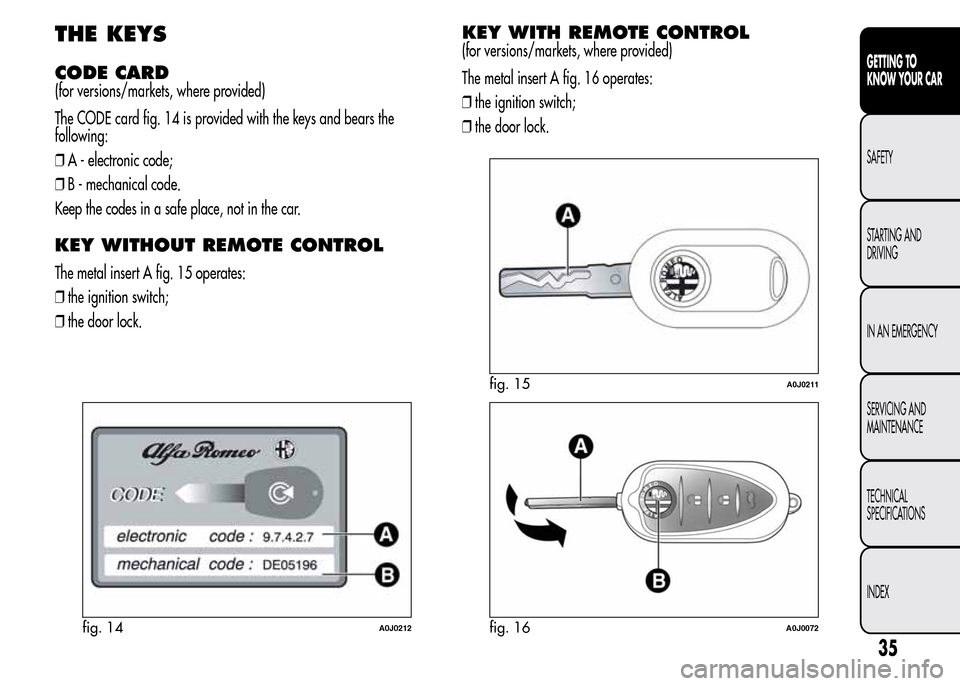
The CODE card fig. 14 is provided with the keys and bears the
following:
❒A - electronic code;
❒B - mechanical code.
Keep the codes in a safe place, not in the car.
KEY WITHOUT REMOTE CONTROL
The metal insert A fig. 15 operates:
❒the ignition switch;
❒the door lock.
KEY WITH REMOTE CONTROL
(for versions/markets, where provided)
The metal insert A fig. 16 operates:
❒the ignition switch;
❒the door lock.
fig. 14A0J0212
fig. 15A0J0211
fig. 16A0J0072
35
GETTING TO
KNOW YOUR CAR
SAFETY
STARTING AND
DRIVING
IN AN EMERGENCY
SERVICING AND
MAINTENANCE
TECHNICAL
SPECIFICATIONS
INDEX
Page 40 of 280
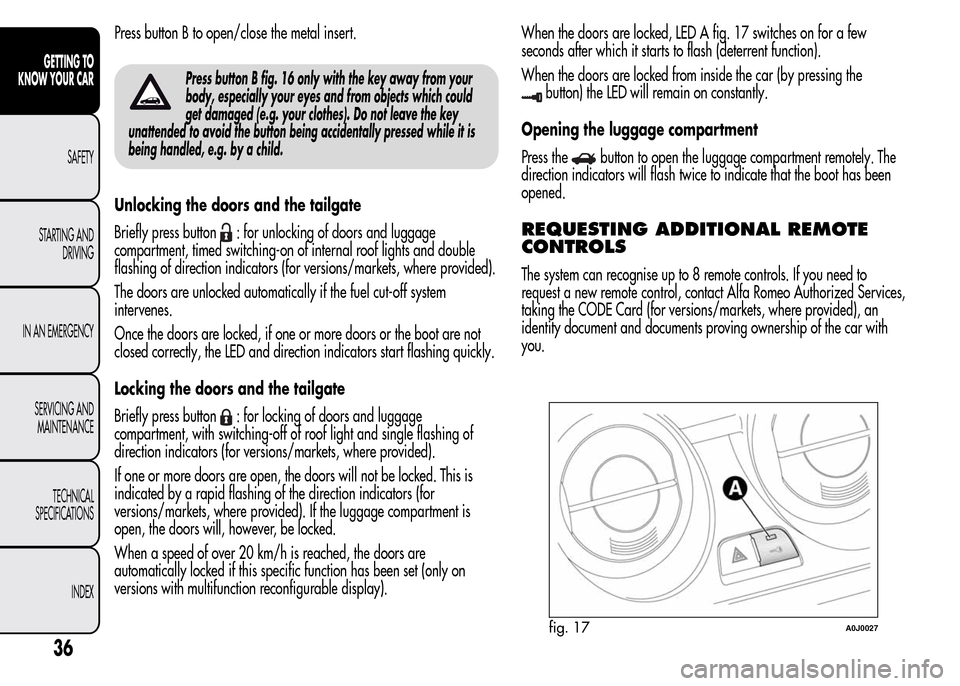
Press button B to open/close the metal insert.
Press button B fig. 16 only with the key away from your
body, especially your eyes and from objects which could
get damaged (e.g. your clothes). Do not leave the key
unattended to avoid the button being accidentally pressed while it is
being handled, e.g. by a child.
Unlocking the doors and the tailgate
Briefly press button
: for unlocking of doors and luggage
compartment, timed switching-on of internal roof lights and double
flashing of direction indicators (for versions/markets, where provided).
The doors are unlocked automatically if the fuel cut-off system
intervenes.
Once the doors are locked, if one or more doors or the boot are not
closed correctly, the LED and direction indicators start flashing quickly.
Locking the doors and the tailgate
Briefly press button
: for locking of doors and luggage
compartment, with switching-off of roof light and single flashing of
direction indicators (for versions/markets, where provided).
If one or more doors are open, the doors will not be locked. This is
indicated by a rapid flashing of the direction indicators (for
versions/markets, where provided). If the luggage compartment is
open, the doors will, however, be locked.
When a speed of over 20 km/h is reached, the doors are
automatically locked if this specific function has been set (only on
versions with multifunction reconfigurable display).When the doors are locked, LED A fig. 17 switches on for a few
seconds after which it starts to flash (deterrent function).
When the doors are locked from inside the car (by pressing the
button) the LED will remain on constantly.
Opening the luggage compartment
Press the
button to open the luggage compartment remotely. The
direction indicators will flash twice to indicate that the boot has been
opened.
REQUESTING ADDITIONAL REMOTE
CONTROLS
The system can recognise up to 8 remote controls. If you need to
request a new remote control, contact Alfa Romeo Authorized Services,
taking the CODE Card (for versions/markets, where provided), an
identity document and documents proving ownership of the car with
you.
fig. 17A0J0027
36
GETTING TO
KNOW YOUR CAR
SAFETY
STARTING AND
DRIVING
IN AN EMERGENCY
SERVICING AND
MAINTENANCE
TECHNICAL
SPECIFICATIONS
INDEX
Page 41 of 280
REPLACING THE BATTERY IN THE KEY
WITH REMOTE CONTROL
Proceed as follows:
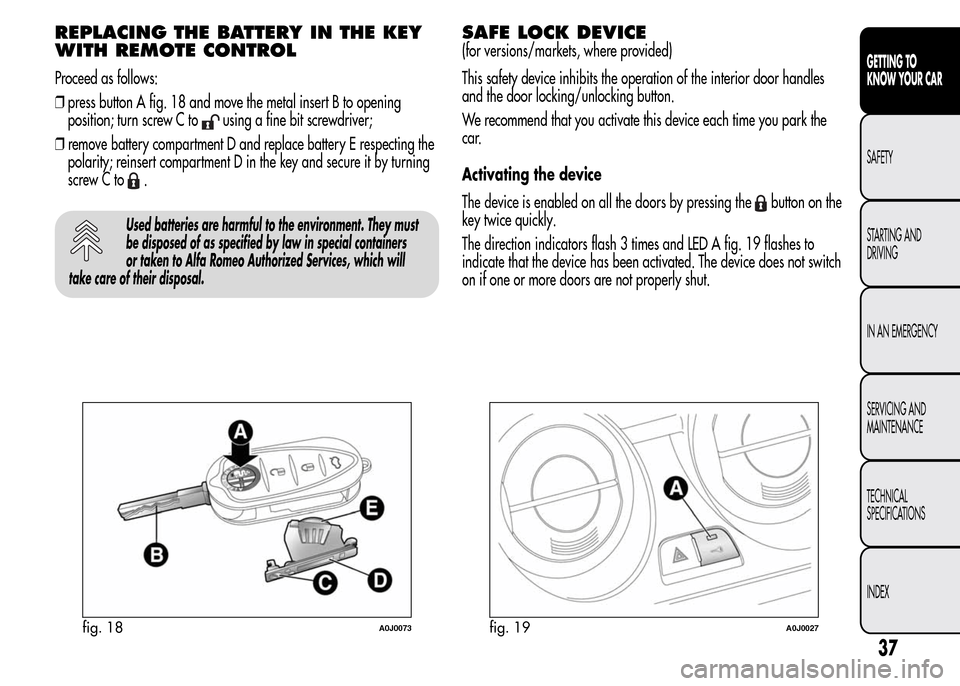
❒press button A fig. 18 and move the metal insert B to opening
position; turn screw C to
using a fine bit screwdriver;
❒remove battery compartment D and replace battery E respecting the
polarity; reinsert compartment D in the key and secure it by turning
screw C to
.
Used batteries are harmful to the environment. They must
be disposed of as specified by law in special containers
or taken to Alfa Romeo Authorized Services, which will
take care of their disposal.
SAFE LOCK DEVICE
(for versions/markets, where provided)
This safety device inhibits the operation of the interior door handles
and the door locking/unlocking button.
We recommend that you activate this device each time you park the
car.
Activating the device
The device is enabled on all the doors by pressing the
button on the
key twice quickly.
The direction indicators flash 3 times and LED A fig. 19 flashes to
indicate that the device has been activated. The device does not switch
on if one or more doors are not properly shut.
fig. 18A0J0073fig. 19A0J0027
37
GETTING TO
KNOW YOUR CAR
SAFETY
STARTING AND
DRIVING
IN AN EMERGENCY
SERVICING AND
MAINTENANCE
TECHNICAL
SPECIFICATIONS
INDEX
Page 42 of 280
Deactivating the device
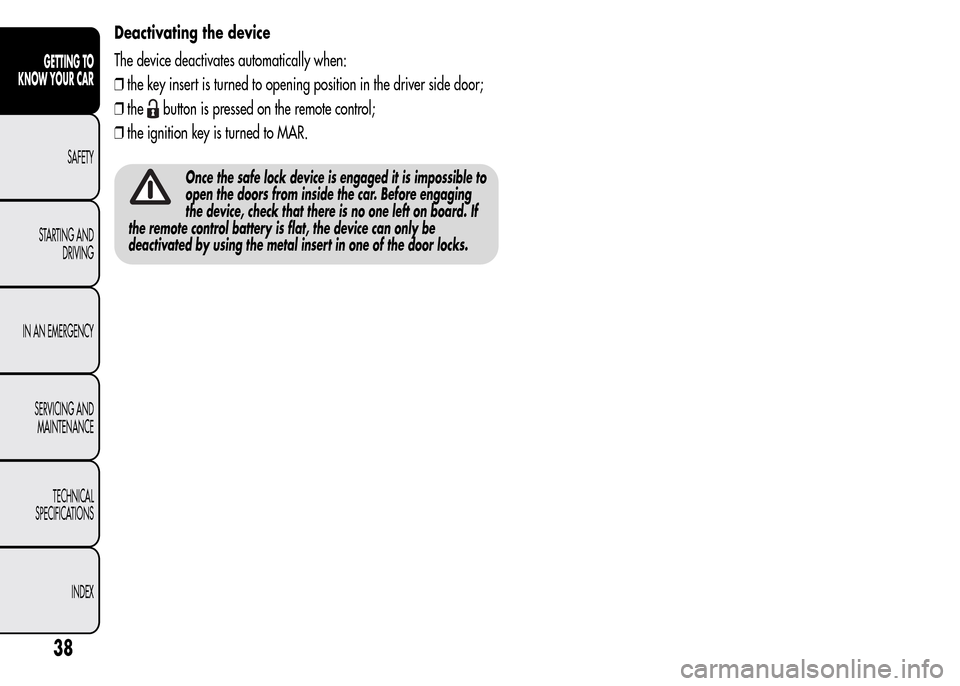
The device deactivates automatically when:
❒the key insert is turned to opening position in the driver side door;
❒the
button is pressed on the remote control;
❒the ignition key is turned to MAR.
Once the safe lock device is engaged it is impossible to
open the doors from inside the car. Before engaging
the device, check that there is no one left on board. If
the remote control battery is flat, the device can only be
deactivated by using the metal insert in one of the door locks.
38
GETTING TO
KNOW YOUR CAR
SAFETY
STARTING AND
DRIVING
IN AN EMERGENCY
SERVICING AND
MAINTENANCE
TECHNICAL
SPECIFICATIONS
INDEX
Page 43 of 280
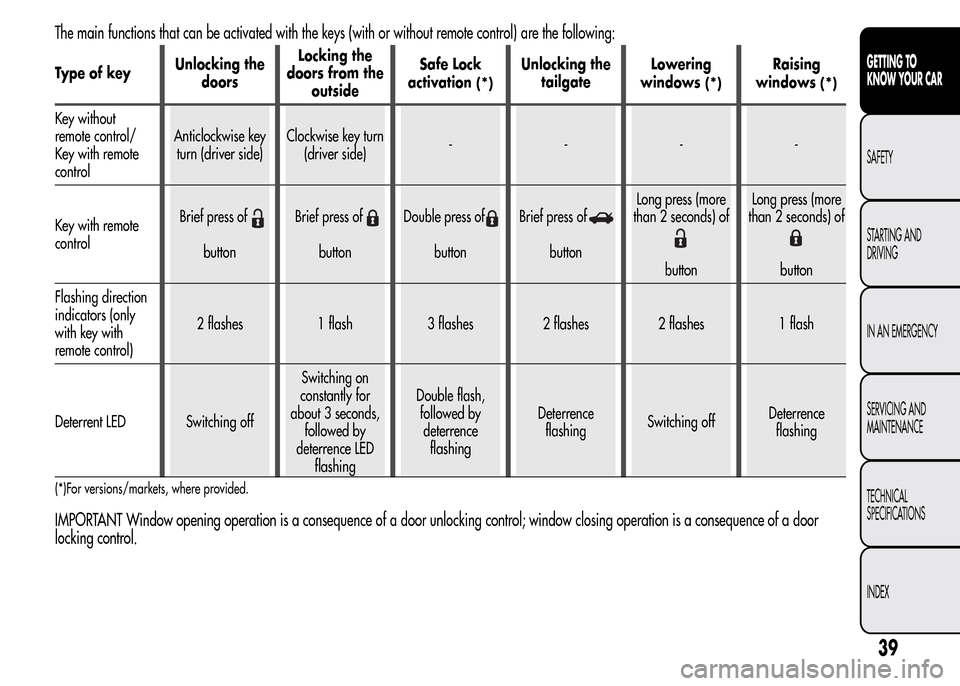
The main functions that can be activated with the keys (with or without remote control) are the following:
Type of keyUnlocking the
doorsLocking the
doors from the
outsideSafe Lock
activation(*)
Unlocking the
tailgateLowering
windows
(*)
Raising
windows
(*)
Key without
remote control/
Key with remote
controlAnticlockwise key
turn (driver side)Clockwise key turn
(driver side)----
Key with remote
controlBrief press of
buttonBrief press ofbuttonDouble press ofbuttonBrief press ofbuttonLong press (more
than 2 seconds) of
buttonLong press (more
than 2 seconds) ofbutton
Flashing direction
indicators (only
with key with
remote control)2 flashes 1 flash 3 flashes 2 flashes 2 flashes 1 flash
Deterrent LED Switching offSwitching on
constantly for
about 3 seconds,
followed by
deterrence LED
flashingDouble flash,
followed by
deterrence
flashingDeterrence
flashingSwitching offDeterrence
flashing
(*)For versions/markets, where provided.
IMPORTANT Window opening operation is a consequence of a door unlocking control; window closing operation is a consequence of a door
locking control.
39
GETTING TO
KNOW YOUR CAR
SAFETY
STARTING AND
DRIVING
IN AN EMERGENCY
SERVICING AND
MAINTENANCE
TECHNICAL
SPECIFICATIONS
INDEX