fuel Alfa Romeo MiTo 2016 User Guide
[x] Cancel search | Manufacturer: ALFA ROMEO, Model Year: 2016, Model line: MiTo, Model: Alfa Romeo MiTo 2016Pages: 280, PDF Size: 8.52 MB
Page 31 of 280
Autoclose (Automatic door lock
operation with car running)
When activated (On), this function locks the doors automatically when
the vehicle speed exceeds 20 km/h.
Proceed as follows to activate or deactivate this function:
❒press the SET/
button briefly to display a submenu;
❒press the SET/
button briefly to make the display flash "On" or
"Off" according to what was previously set;
❒press the "+" or "−" button to select;
❒press the SET/
button briefly to return to the submenu screen or
hold the button down to return to the main menu screen without
saving;
❒hold the SET/
button down again to return to the standard
screen or to the main menu according to where you are in the menu.
Unit of measurement (Setting the
unit of measurement)
With this function it is possible to set the measurement units through
three sub-menus: “Distance”, “Consumption” and “Temperature”.
To set the desired measurement unit, proceed as follows:
❒briefly press the SET/
button to display the three sub-menus;
❒press the "+" or "−" button to move between the three submenus;
❒once the submenu to be modified has been selected, briefly press the
SET/
button;
❒when the “Distance” submenu is entered: briefly pressing SET/
displays "km" or "mi" depending on the previous setting;❒press the "+" or "−" button to select;
❒when the “Consumption” submenu is entered, pressing SET/
displays km/l, l/100 km or mpg depending on the previous
setting;
If the set distance unit is "km", the fuel consumption unit will be
displayed in km/l or l/100 km.
If the distance unit set is “mi” the fuel consumption unit will be
displayed in “mpg”.
❒press the "+" or "−" button to select;
❒when the “Temperature” submenu is entered, pressing SET/
displays “°C” or “°F” depending on the previous setting;
❒press the "+" or "−" button to select;
When you have made the required settings, briefly press the SET/
button to go back to the submenu screen or hold the button down
to go back to the main menu screen without saving the new settings.
Hold the SET/
button down again to return to the standard screen
or to the main menu according to where you are in the menu.
Language (Language selection)
Display messages can be shown in different languages: Italian,
English, German, Portuguese, Spanish, French, Dutch, Turkish and
Brazilian.
To set the desired language proceed as follows:
❒briefly press the SET/
button: the previously set "language"
starts flashing on the display;
❒press the "+" or "−" button to select;
❒briefly press the SET/
button to go back to the menu screen or
hold the button down to go back to the standard screen without
saving.
27
GETTING TO
KNOW YOUR CAR
SAFETY
STARTING AND
DRIVING
IN AN EMERGENCY
SERVICING AND
MAINTENANCE
TECHNICAL
SPECIFICATIONS
INDEX
Page 34 of 280
Courtesy lights (Activation/
deactivation of “Greeting lights”)
(for versions/markets, where provided)
With this function it is possible to turn on the side lights, the number
plate lights and the ceiling lights for approximately 25 seconds when
the doors or boot are opened using the remote control, with the
following exceptions:
❒interruption after 5 seconds from when the door closes
❒interruption after locking using the remote control
❒interruption after a lock or other action using the remote control
Proceed as follows to activate or deactivate this function:
❒press the SET/
button briefly to make the display flash "On" or
"Off" according to what was previously set;
❒press the "+" or "−" button to select;
❒briefly press the SET/
button to go back to the menu screen or
hold the button down to go back to the standard screen without
saving.
Menu exit
This is the last function that closes the cycle of settings listed in the
menu screen.
Pressing the SET/
button briefly will return the display to the
standard screen without saving.
Press the − button to return to the first menu option.
TRIP COMPUTER
GENERAL INFORMATION
The Trip computer is used to display information on car operation
when the key is turned to MAR.
This function allows you to define two separate trips called “Trip A”
and “Trip B” for monitoring the car's "complete journey" in a
reciprocally independent manner.
Both functions are resettable (reset - start of a new journey).
“Trip A” is used to display the figures relating to:
❒Range
❒Distance travelled
❒Average fuel consumption
❒Instant fuel consumption
❒Average speed
❒Trip time (driving time).
“Trip B” may be used to display the figures relating to:
❒Distance travelled B
❒Average consumption B
❒Average speed B
❒Trip time B (driving time).
The “Trip B” function may be disabled (see “Activating Trip B”).
“Range” and “Instant consumption" parameters cannot be reset.
30
GETTING TO
KNOW YOUR CAR
SAFETY
STARTING AND
DRIVING
IN AN EMERGENCY
SERVICING AND
MAINTENANCE
TECHNICAL
SPECIFICATIONS
INDEX
Page 35 of 280
VALUES DISPLAYED
Range
This indicates the indicative distance that may be travelled with the fuel
in the tank, assuming that driving conditions do not change.
The display will show the reading '-----' when the following events take
place:
❒range value lower than 50 km (or 30 mi)
❒car parked with engine running for a long period.
IMPORTANT The range can be affected by several factors: driving style
(see “Driving style” in the “Starting and driving” section), type of
route (motorway, towns and cities, mountain roads, etc.), conditions of
use (load, tyre pressures, etc.). Trip planning must therefore take the
above into account.
Distance covered
Shows the distance covered since the start of the new journey.
Average consumption
Shows the approximate average fuel consumption since the start of the
new journey.
Instantaneous consumption
This indicates the fuel consumption. The value is constantly updated.
The display will show “----”ifthecarisparked with the engine
running.Average speed
This shows the average car speed as a function of the overall time
elapsed since the start of the new journey.
Trip time
The time elapsed since the start of a new journey.
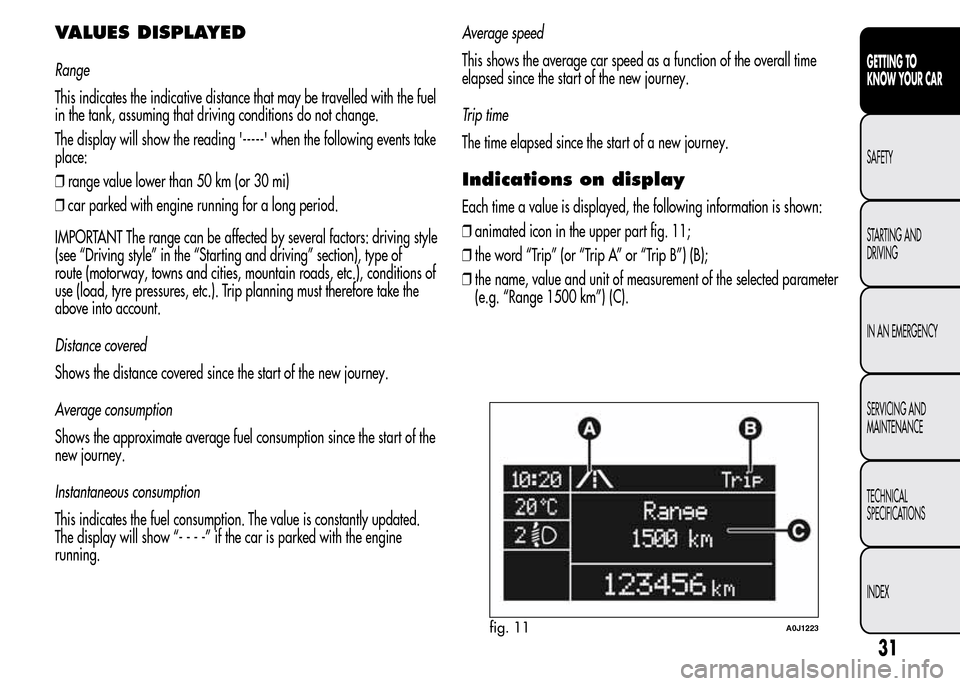
Indications on display
Each time a value is displayed, the following information is shown:
❒animated icon in the upper part fig. 11;
❒the word “Trip” (or “Trip A” or “Trip B”) (B);
❒the name, value and unit of measurement of the selected parameter
(e.g. “Range 1500 km”) (C).
fig. 11A0J1223
31
GETTING TO
KNOW YOUR CAR
SAFETY
STARTING AND
DRIVING
IN AN EMERGENCY
SERVICING AND
MAINTENANCE
TECHNICAL
SPECIFICATIONS
INDEX
Page 40 of 280
Press button B to open/close the metal insert.
Press button B fig. 16 only with the key away from your
body, especially your eyes and from objects which could
get damaged (e.g. your clothes). Do not leave the key
unattended to avoid the button being accidentally pressed while it is
being handled, e.g. by a child.
Unlocking the doors and the tailgate
Briefly press button
: for unlocking of doors and luggage
compartment, timed switching-on of internal roof lights and double
flashing of direction indicators (for versions/markets, where provided).
The doors are unlocked automatically if the fuel cut-off system
intervenes.
Once the doors are locked, if one or more doors or the boot are not
closed correctly, the LED and direction indicators start flashing quickly.
Locking the doors and the tailgate
Briefly press button
: for locking of doors and luggage
compartment, with switching-off of roof light and single flashing of
direction indicators (for versions/markets, where provided).
If one or more doors are open, the doors will not be locked. This is
indicated by a rapid flashing of the direction indicators (for
versions/markets, where provided). If the luggage compartment is
open, the doors will, however, be locked.
When a speed of over 20 km/h is reached, the doors are
automatically locked if this specific function has been set (only on
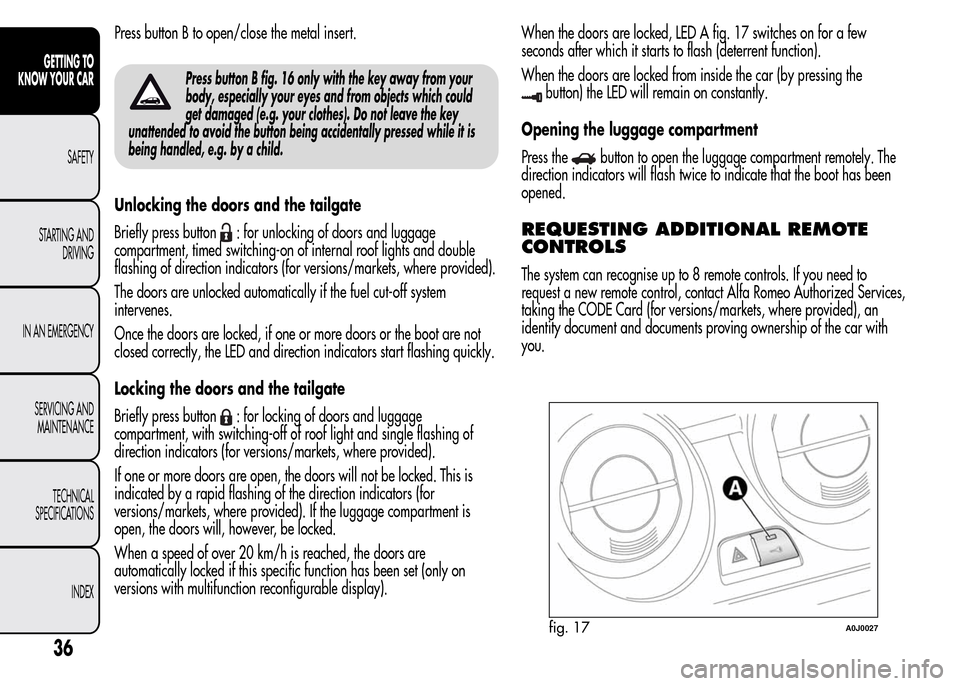
versions with multifunction reconfigurable display).When the doors are locked, LED A fig. 17 switches on for a few
seconds after which it starts to flash (deterrent function).
When the doors are locked from inside the car (by pressing the
button) the LED will remain on constantly.
Opening the luggage compartment
Press the
button to open the luggage compartment remotely. The
direction indicators will flash twice to indicate that the boot has been
opened.
REQUESTING ADDITIONAL REMOTE
CONTROLS
The system can recognise up to 8 remote controls. If you need to
request a new remote control, contact Alfa Romeo Authorized Services,
taking the CODE Card (for versions/markets, where provided), an
identity document and documents proving ownership of the car with
you.
fig. 17A0J0027
36
GETTING TO
KNOW YOUR CAR
SAFETY
STARTING AND
DRIVING
IN AN EMERGENCY
SERVICING AND
MAINTENANCE
TECHNICAL
SPECIFICATIONS
INDEX
Page 74 of 280
FOG LIGHTS
(for versions/markets, where provided)
Operation
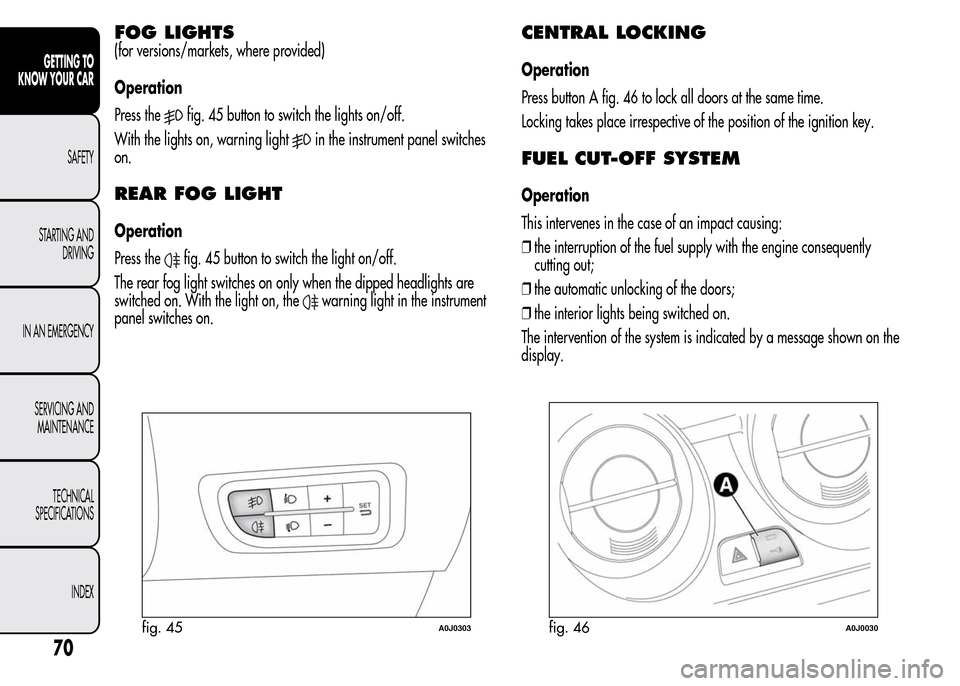
Press the
fig. 45 button to switch the lights on/off.
With the lights on, warning light
in the instrument panel switches
on.
REAR FOG LIGHT
Operation
Press the
fig. 45 button to switch the light on/off.
The rear fog light switches on only when the dipped headlights are
switched on. With the light on, the
warning light in the instrument
panel switches on.
CENTRAL LOCKING
Operation
Press button A fig. 46 to lock all doors at the same time.
Locking takes place irrespective of the position of the ignition key.
FUEL CUT-OFF SYSTEM
Operation
This intervenes in the case of an impact causing:
❒the interruption of the fuel supply with the engine consequently
cutting out;
❒the automatic unlocking of the doors;
❒the interior lights being switched on.
The intervention of the system is indicated by a message shown on the
display.
fig. 45A0J0303fig. 46A0J0030
70
GETTING TO
KNOW YOUR CAR
SAFETY
STARTING AND
DRIVING
IN AN EMERGENCY
SERVICING AND
MAINTENANCE
TECHNICAL
SPECIFICATIONS
INDEX
Page 75 of 280
Carefully check the car for fuel leaks, for instance in the engine
compartment, under the car or near the tank area.
After a collision, turn the ignition key to STOP to prevent the battery
from running down.
To restore the correct operation of the car, proceed as follows:
❒turn the ignition key to the MAR-ON position;
❒activate the right direction indicator;
❒deactivate the right direction indicator;
❒activate the left direction indicator;
❒deactivate the left direction indicator;
❒activate the right direction indicator;
❒deactivate the right direction indicator;
❒activate the left direction indicator;
❒deactivate the left direction indicator;
❒turn the ignition key to the STOP position;
❒turn the ignition key to the MAR-ON position.
If, after an impact, you smell fuel or notice leaks from
the fuel system, do not reactivate the system to avoid
the risk of fire.
INTERIOR FITTINGS
GLOVE COMPARTMENT
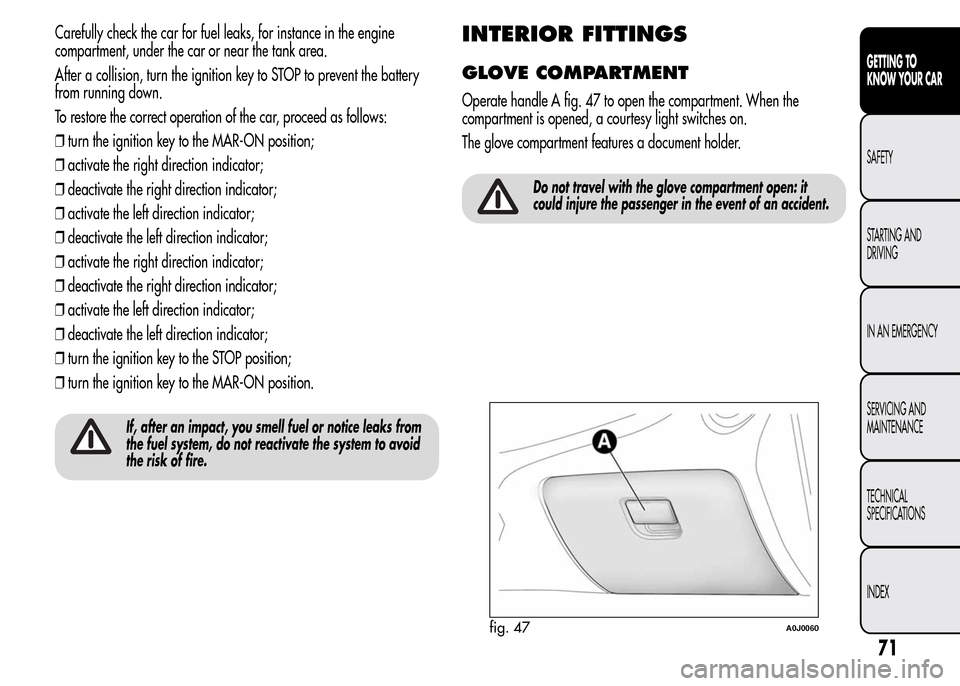
Operate handle A fig. 47 to open the compartment. When the
compartment is opened, a courtesy light switches on.
The glove compartment features a document holder.
Do not travel with the glove compartment open: it
could injure the passenger in the event of an accident.
fig. 47A0J0060
71
GETTING TO
KNOW YOUR CAR
SAFETY
STARTING AND
DRIVING
IN AN EMERGENCY
SERVICING AND
MAINTENANCE
TECHNICAL
SPECIFICATIONS
INDEX
Page 101 of 280
SAFETY FUNCTIONS
When the engine is stopped by the Start&Stop system, if the driver
releases his/her seat belt and opens the driver's or passenger's door,
the engine can be restarted only using the ignition key.
The driver is informed by a buzzer and by the flashing of the symbol
on the display; on some versions, a message is displayed as well.
"ENERGY SAVING" FUNCTION
(for versions/markets, where provided)
If, following automatic engine restarting, the driver does not carry out
any action on the car for over 3 minutes, the Start&Stop system stops
the engine once and for all, to prevent fuel consumption. In these
cases, the engine can be restarted only using the ignition key.
NOTE In any case, it is possible to keep the engine running by
deactivating the Start&Stop system.
IRREGULAR OPERATION
In the event of malfunction, the Start&Stop system is deactivated.
The driver is informed of the fault by the
warning light switching
on in the instrument panel and, for versions/markets where provided,
a message and symbol on the display.
In this case, contact Alfa Romeo Authorized Services.
CAR INACTIVITY
In the event of car inactivity (or if the battery is replaced), special
attention must be paid to the disconnection of the battery power
supply.
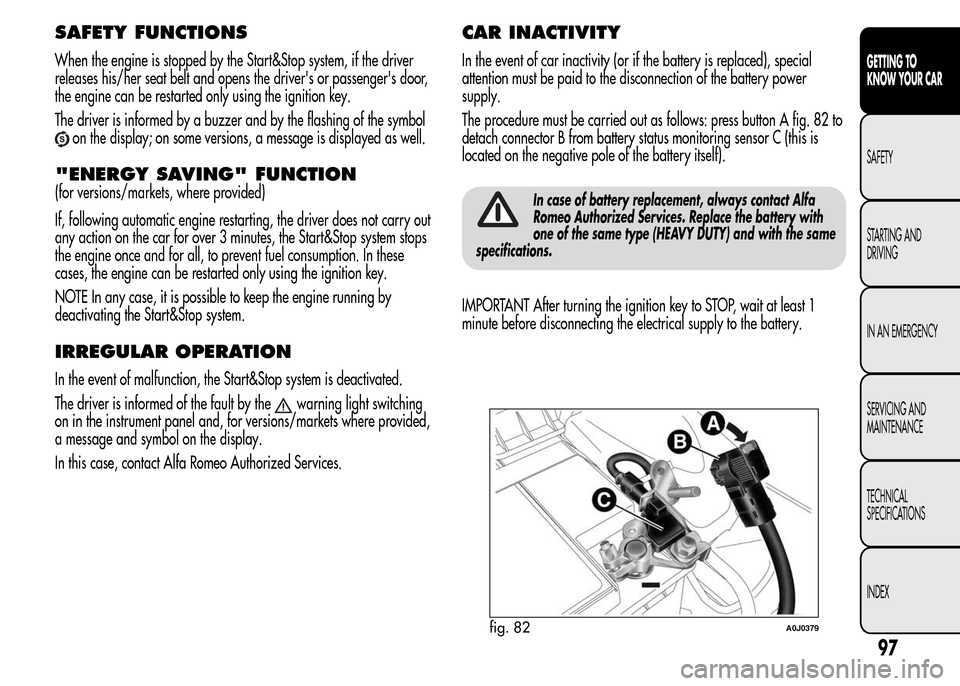
The procedure must be carried out as follows: press button A fig. 82 to
detach connector B from battery status monitoring sensor C (this is
located on the negative pole of the battery itself).
In case of battery replacement, always contact Alfa
Romeo Authorized Services. Replace the battery with
one of the same type (HEAVY DUTY) and with the same
specifications.
IMPORTANT After turning the ignition key to STOP, wait at least 1
minute before disconnecting the electrical supply to the battery.
fig. 82A0J0379
97
GETTING TO
KNOW YOUR CAR
SAFETY
STARTING AND
DRIVING
IN AN EMERGENCY
SERVICING AND
MAINTENANCE
TECHNICAL
SPECIFICATIONS
INDEX
Page 102 of 280
JUMP STARTING
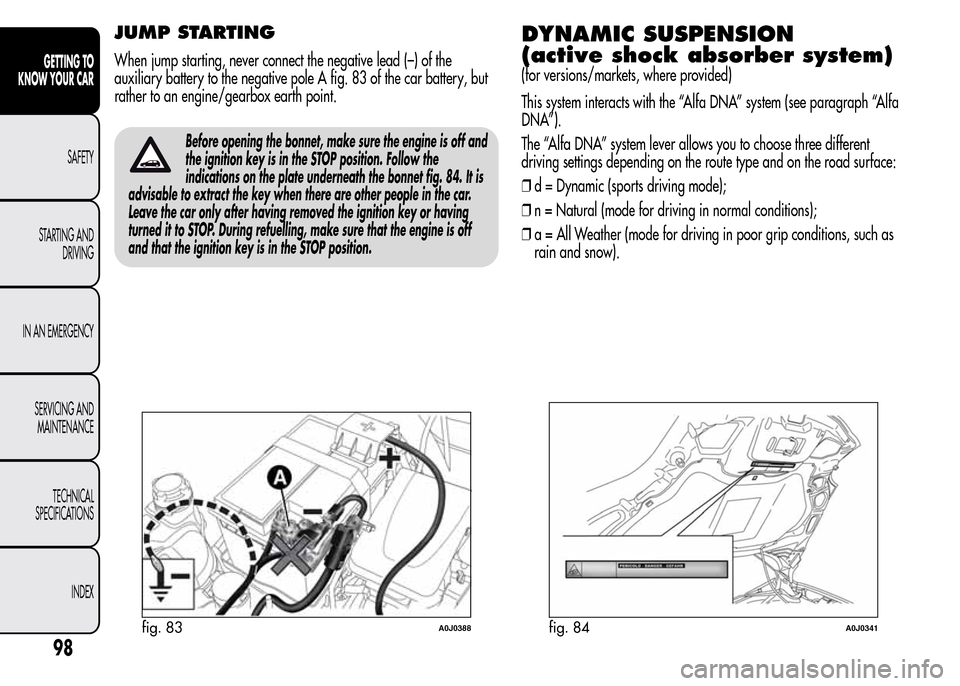
When jump starting, never connect the negative lead (–) of the
auxiliary battery to the negative pole A fig. 83 of the car battery, but
rather to an engine/gearbox earth point.
Before opening the bonnet, make sure the engine is off and
the ignition key is in the STOP position. Follow the
indications on the plate underneath the bonnet fig. 84. It is
advisable to extract the key when there are other people in the car.
Leave the car only after having removed the ignition key or having
turned it to STOP. During refuelling, make sure that the engine is off
and that the ignition key is in the STOP position.
DYNAMIC SUSPENSION
(active shock absorber system)
(for versions/markets, where provided)
This system interacts with the “Alfa DNA” system (see paragraph “Alfa
DNA”).
The “Alfa DNA” system lever allows you to choose three different
driving settings depending on the route type and on the road surface:
❒d = Dynamic (sports driving mode);
❒n = Natural (mode for driving in normal conditions);
❒a = All Weather (mode for driving in poor grip conditions, such as
rain and snow).
fig. 83A0J0388fig. 84A0J0341
98
GETTING TO
KNOW YOUR CAR
SAFETY
STARTING AND
DRIVING
IN AN EMERGENCY
SERVICING AND
MAINTENANCE
TECHNICAL
SPECIFICATIONS
INDEX
Page 111 of 280
REFUELLING THE CAR
Stop the engine before refuelling.
PETROL ENGINES
Only use unleaded petrol. The petrol octane rating (RON) must not be
lower than 95. In order to prevent damage to the catalytic converter
never introduce even the smallest amount of leaded petrol, even in the
event of an emergency.
DIESEL ENGINES
Use only diesel fuel compliant with European specification EN590. The
use of other products or mixtures may damage the engine beyond
repair and consequently invalidate the warranty, due to the damage
caused.
Operation at low temperatures
If the outside temperature is very low, the diesel thickens due to the
formation of paraffin clots with consequent defective operation of the
fuel supply system.
In order to avoid these problems, different types of diesel fuel are
distributed according to the season: summer type, winter type and
arctic type (cold/mountain areas). If refuelling with diesel fuel whose
features are not suitable for the temperature of use, it is advisable
to mix TUTELA DIESEL ART additive with the fuel, in the proportions
shown on the container. Pour the additive into the tank before the fuel.
When using or parking the vehicle for a long time in the mountains
or cold areas, it is advisable to refuel using locally available fuel.
In this case, it is also advisable to keep the tank over 50% full.
FUEL TANK CAP
Opening
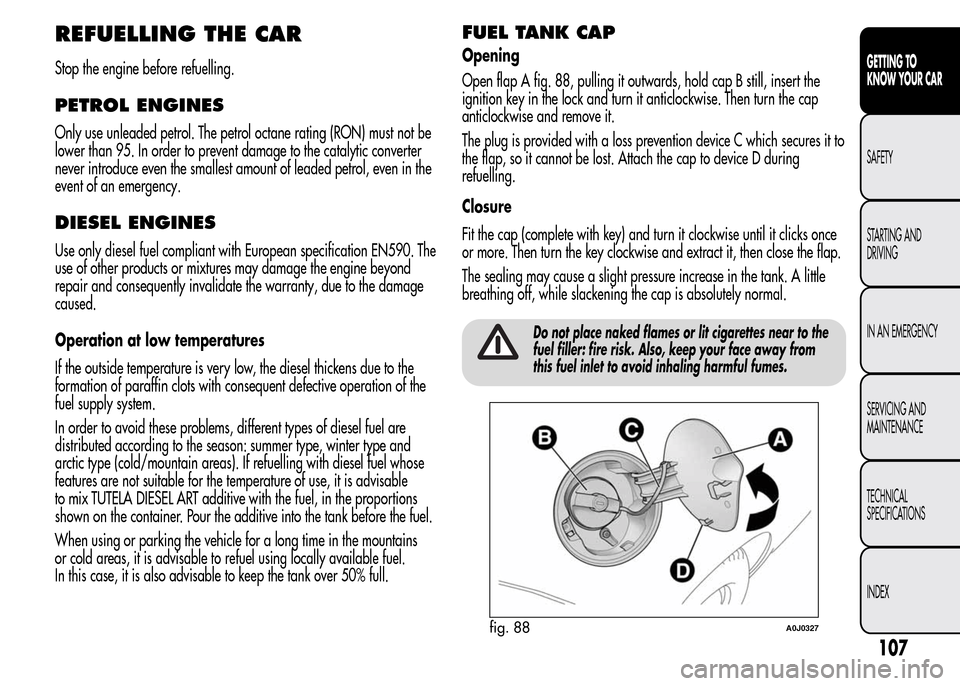
Open flap A fig. 88, pulling it outwards, hold cap B still, insert the
ignition key in the lock and turn it anticlockwise. Then turn the cap
anticlockwise and remove it.
The plug is provided with a loss prevention device C which secures it to
the flap, so it cannot be lost. Attach the cap to device D during
refuelling.
Closure
Fit the cap (complete with key) and turn it clockwise until it clicks once
or more. Then turn the key clockwise and extract it, then close the flap.
The sealing may cause a slight pressure increase in the tank. A little
breathing off, while slackening the cap is absolutely normal.
Do not place naked flames or lit cigarettes near to the
fuel filler: fire risk. Also, keep your face away from
this fuel inlet to avoid inhaling harmful fumes.
fig. 88A0J0327
107
GETTING TO
KNOW YOUR CAR
SAFETY
STARTING AND
DRIVING
IN AN EMERGENCY
SERVICING AND
MAINTENANCE
TECHNICAL
SPECIFICATIONS
INDEX
Page 112 of 280
PROTECTING THE ENVIRONMENT
The following devices are used for reducing petrol fuel engine
emissions: catalytic converter, oxygen sensors and evaporation control
system
The following devices are used for reducing diesel fuel engine
emissions: oxidising catalytic converter, exhaust gas recirculation
system (EGR) and particulate filter (DPF).
DIESEL PARTICULATE FILTER (DPF)
(Diesel Particulate Filter)
(for versions/markets, where provided)
The Diesel Particulate Filter is a mechanical filter, integral to the
exhaust system, that physically traps carbon particles present in the
exhaust gases of diesel engines.
The diesel particulate filter is needed to eliminate almost all carbon
particle emissions in compliance with current/future regulations and
standards.
During standard use of the vehicle, the engine control unit records a set
of data (e.g.: travel time, type of route, temperatures, etc.) and it will
then calculate how much particulate has been trapped by the filter.Since this filter physically traps particulate, it should be periodically
regenerated (cleaned) at regular intervals by burning carbon particles.
The regeneration procedure is controlled automatically by the engine
management control unit according to the filter conditions and vehicle
use conditions.
During the regeneration there may be a limited increase in the engine
idle speed, fan activation, a limited increase in fumes and high
temperatures at the exhaust.
These are not faults; they do not impair normal car performance or
damage the environment. If the dedicated message is displayed, see
contents of "Warning lights and messages" paragraph.
The catalytic converter and particulate filter (DPF) reach
very high temperatures during operation. Therefore
do not park the car on flammable materials (grass, dry
leaves, pine needles, etc.): fire hazard.
108
GETTING TO
KNOW YOUR CAR
SAFETY
STARTING AND
DRIVING
IN AN EMERGENCY
SERVICING AND
MAINTENANCE
TECHNICAL
SPECIFICATIONS
INDEX