radio nav Alfa Romeo MiTo 2017 Owner's Manual
[x] Cancel search | Manufacturer: ALFA ROMEO, Model Year: 2017, Model line: MiTo, Model: Alfa Romeo MiTo 2017Pages: 212, PDF Size: 4.36 MB
Page 45 of 212
within the menu, they allow you to
scroll up or down;
during settings operations, they
increase or decrease values.
SETUP MENU
The menu comprises a series of options
which can be selected using the buttons
andto access the different
selection and setting (Setup) operations
indicated below.
Some options have a submenu. The menu
can be activated by briefly pressing the
SET/ button
.
The menu includes the following items:
MENU
LIGHTING
SPEED WARNING
HEADLIGHT SENSOR (where
provided)
RAIN SENSOR (where provided)
TRIP B ACTIVATION
SET TIME
SET DATE
FIRST PAGE (where provided)
SEE RADIO
AUTOCLOSE
MEASUREMENT UNIT
LANGUAGE
WARNINGS VOLUME
SEAT BELT BEEP
SERVICE
PASSENGER AIRBAG
DAYTIME RUNNING LIGHTS
COURTESY LIGHTS
EXIT MENU
On vehicles equipped withUconnect™
system (where provided), some menu
items are shown on the navigator display.
MENU ITEMS
IMPORTANT If there is anUconnect™
system, some menu items are displayed
and managed by the latter and not the
instrument panel (refer to the
description in the “Multimedia” chapter
or in the supplements available online).
Menu
Access to the Setup Menu.
Lighting
(only with side lights on)
Adjustment (8 levels) of the brightness of
the instrument panel, theUconnect™
system controls (where provided) and the
dual-zone automatic climate control
system controls (where provided).
Speed warning
Vehicle speed limit setting (km/h or mph).
When this is exceeded, the driver is
notified by an audible warning signal.
Headlight sensor
(where provided)
Automatic switch on/off of lights
according to external light conditions.
The dusk sensor sensitivity can be
adjusted according to 3 levels (level
1=minimum sensitivity, level 2=average
sensitivity, level 3=maximum sensitivity).
43
Page 183 of 212
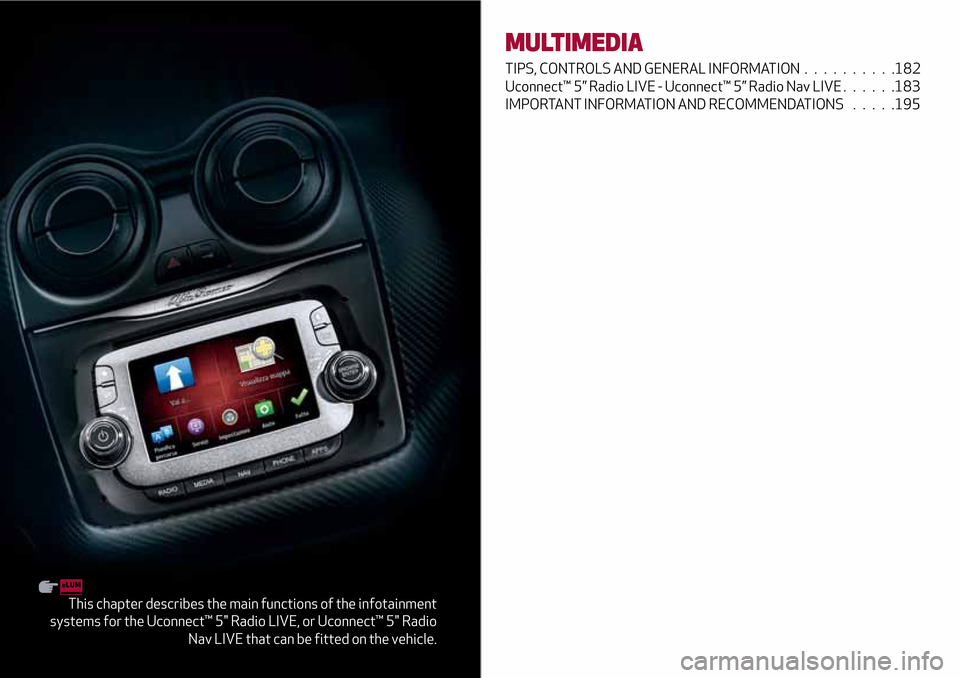
This chapter describes the main functions of the infotainment
systems for the Uconnect™ 5" Radio LIVE, or Uconnect™ 5" Radio
Nav LIVE that can be fitted on the vehicle.
MULTIMEDIA
TIPS, CONTROLS AND GENERAL INFORMATION . . ........182
Uconnect™ 5” Radio LIVE - Uconnect™ 5” Radio Nav LIVE . . . . . .183
IMPORTANT INFORMATION AND RECOMMENDATIONS . . . . .195
Page 185 of 212
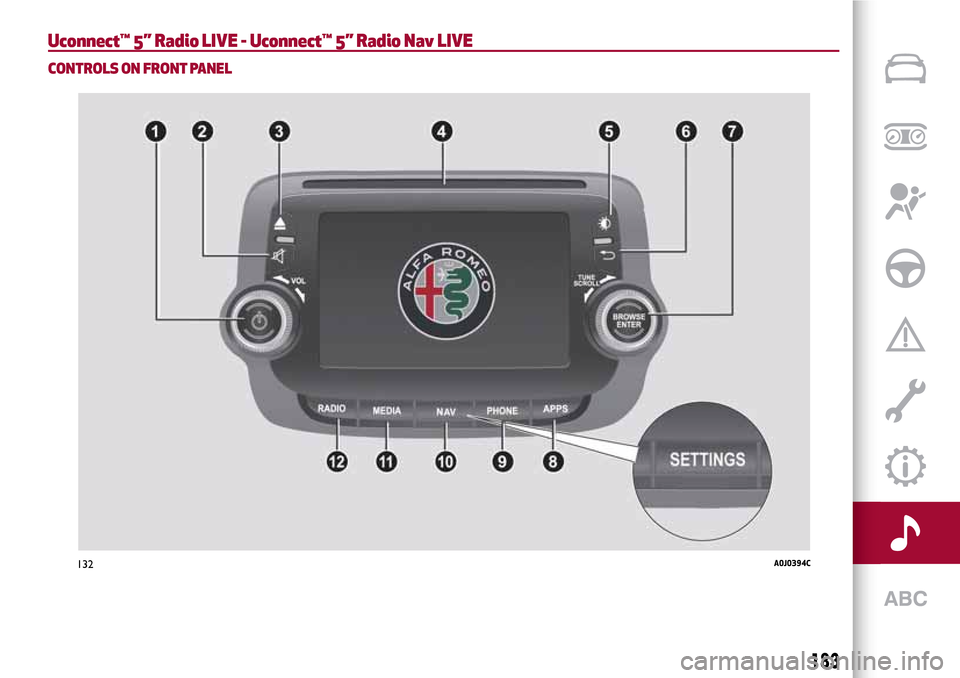
Uconnect™ 5” Radio LIVE - Uconnect™ 5” Radio Nav LIVE
CONTROLS ON FRONT PANEL
132A0J0394C
183
Page 186 of 212
FRONT PANEL CONTROL SUMMARY TABLE
Button Functions Mode
1–Power on/off Short button press
Volume adjustment Left/right rotation of knob
2–
Volume activation/deactivation (Mute/Pause) Short button press
3–
CD ejection Short button press
4CD housing –
5–
Display on/off Short button press
6–
Exit the selection/return to previous screen Short button press
7 –BROWSE ENTERScrolling the list or tuning to a radio station Left/right rotation of knob
Confirmation of the option displayed Short button press
8 - APPSAccess to additional functions: Display of time, Trip
Computer, Compass, External temperature, Settings,
Uconnect
™LIVE services (where provided)Short button press
9 – PHONEAccess to the Phone mode Short button press
10 – SETTINGS
(*)Access to the main settings menu Short button press
10–NAV
(**)Access to the Navigation menu Short button press
11 – MEDIA
Source selection: CD, USB/iPod, AUX,
Bluetooth®Short button press
12 –RADIOAccess to the Radio mode Short button press
(*) Versions withUconnect™5” Radio LIVE / (**) Versions withUconnect™5” Radio Nav LIVE
184
MULTIMEDIA
Page 193 of 212
phone, the correspondingbutton is
deactivated (grey).
When a text message is received, the
display will show a screen where the
options “Listen”, “Call” or “Ignore” can be
selected.
The list of SMS messages received from
the mobile phone can be accessed by
pressing the
button.
NAVIGATION MODE(Uconnect™5” Radio Nav LIVE versions
only)
Programming a route
IMPORTANT In the interest of safety and
to reduce distractions while you are
driving, you should always plan a route
before you start driving.
To plan a route, do the following:
tap the screen to display the
Navigation Main menu, then tap
“Navigate to”;
select “Address”: you can change the
country or state setting by tapping the
flag before you select a city;
enter the town or city name, or the
postcode. Towns with similar names are
shown in the list while you type;
enter the street name. Streets with
similar names are shown in the list while
you type. When the correct street name
appears in the list, tap the name to select
the destination;
enter the house number, then tap
“Done”;
the location is shown on the map. Tap
“Select” to continue or “Back” to enter
another address. If you want your final
destination to be a car park, tap “Parking”
and select a location from the list of car
parks close to your general destination;
when the new route is shown, tap
"Done". For more information about the
route, tap "Details". To change a route tap
“Change route”.
View Map
To view the map, tap “View map” or “View
route”, then “Show map of route” in the
Main menu.
When the display shows the map, the
following options are available:
Map scale (high left corner);
Traffic: current traffic incidents. Use
the "Options" button to select whether
traffic information is shown on the map.
When traffic information is shown on the
map, “Points of Interest” and “My Places”
are not shown;
“Options” graphic button;
“Find” graphic button: Tap this button
to find specific addresses, “My Places” or
“Points of Interest”;
Zoom bar: (bottom right corner): move
the cursor to enlarge/reduce.Settings Menu
To access the “Settings” Menu tap
“Settings” in the Main Menu. The
following settings are available for the
map:
“2D/3D”: allows to set the default map
view (2D or 3D);
“Advanced Settings”: allows to select
the following advanced settings:
“Car symbol”: allows to select the car
symbol that views the vehicle current
position during drive;
“My Places”: allows to add/rename/
delete “My Places”;
“GPS Status”: allows to see the current
status of GPS reception on your
navigation system;
“Home location”: allows to set/change
your Home location;
“Keyboard”: allows to select keyboards
which need to be available (keyboards is
necessary to enter names and
addresses);
“Make your own menu”: allows to add
up to 6 buttons to your own personalised
menu;
“Manage POIs”: allows to manage your
own Points of Interest (POI) categories
and locations;
“Map colours”: allows to select the
view screen of map colours (day or night);
“Me and my navigation”: allows to view
technical information relating to the
system;
191
Page 194 of 212
“Reset factory settings”: allows to
delete all your personal navigation
settings and restore the standard factory
settings to your navigation system;
“Route Planning”: allows to set the way
your system calculates the routes that
you plan;
“Safety Settings”: allows to select the
safety features you want applied to your
navigation;
“Show POI on map”: allows to select
the types of Point of Interest (POI) you
want to see on the map;
“Status bar”: allows to select the
information you want to see on the status
bar:
“Maps”: allows to select the map you
want to use for route planning and
navigation;
“Enable/disable voice guide”: allows to
enable (green button)/disable (red
button) the voice guide during navigation;
“Units”: allows to set the units used for
navigation features (e.g. route planning);
“Switch to day/night colours”: allows
to select day or night view of display;
“Voice settings”: allows to set the type
of spoken directions and other route
instructions that your system will read
aloud;
“Start”: allows to choose if the request
for consent to the processing of data
must be displayed or not displayed every
time the system is turned on;
“Navigation updates”: touch this
button if you wish to prepare a USB
device for the navigation map updates.
“APPS” MODE
Press the APPS button on the front panel
to display the following operating
settings:
External temperature
Trip Computer
Clock
Compass (Uconnect™5” Radio Nav
LIVE versions only)
Uconnect™ LIVE
Settings (Uconnect™5” Radio Nav
LIVE versions only)
Uconnect™LIVE SERVICES
Press the APPS button to access the
Uconnect™LIVEapps.
The services available depend on the car
configuration and the market.
To use theUconnect™LIVEservices, you
need to download theUconnect™LIVE
app from Google Play or Apple Store and
register using the APP or on
www.driveuconnect.eu. website.
First access to the vehicle
Once you have launched the
Uconnect™LIVEApp and entered your
details, in order to access theUconnect™
LIVEservices in your vehicle, you have to
pair the
Bluetooth®with your
smartphone and the system. Whenpairing is complete, the connected
services can be accessed by pressing the
Uconnect™LIVEicon on the system.
Before you can use the connected
services, you must first do the
Bluetooth®pairing, then complete the
activation procedure by following the
instructions that appear in the
Uconnect™LIVEapp.
Settings of the Uconnect™ LIVE
services that can be managed through
the radio
From the dedicated radio menu for
Uconnect™LIVE servicesyou can access
the "Settings" section using the l'icon
In this section you can check the
system options and change them to suit
your own preferences.
System updates
If an update for theUconnect™LIVE
system is available while the
Uconnect™LIVEservices are being used,
the driver will be informed with a
message on the display.
Connected services that can be
accessed on the vehicle
The Efficient Drive (where provided) and
my:Car applications are developed to
improve the customer driving experience,
therefore they are available in all
markets where theUconnect™LIVE
services can be accessed.
OnUconnect™5” Radio Nav LIVE
192
MULTIMEDIA
Page 195 of 212
versions, the access toUconnect™LIVE
services enables the use of “Live”
services.
Efficient Drive
(where provided)
The Efficient Drive application allows you
to display your driving behaviour in real
time, in order to help you reach a more
efficient driving style as far as
consumption and emissions are
concerned.
Driving style is evaluated by means of
four indices which monitor the following
parameters: acceleration, deceleration,
gearchange, speed
Display of the Efficient Drive
(where provided)
Press the Efficient Drive button to
interact with the function.
On theUconnect™display, a screen will
appear showing 4 indices: “Acceleration”,
“Deceleration”, “Speed” and “Gear”. These
indices are grey until the system has
enough data to evaluate the driving style.
Once sufficient data are available, the
indices will have 5 colours depending on
the evaluation: dark green (very good),
light green, yellow, orange and red (very
bad).
In the event of extended inactivity the
display will show the average of the
indices up to that moment (“Averageindex”) then the indices will be coloured
again in real time as soon as the vehicle is
restarted.
my:Car
my:Car application allows you to keep the
condition of your vehicle always under
control.
my:Car can detect malfunction in real
time and inform the driver about the
expiry of the servicing interval. Press the
"my:Car" button to interact with the
application.
The display will show a screen with the
"care:Index" section, which provides all
the detailed information about the status
of the vehicle. Press the "Active
warnings" button to show (if present) the
details of the vehicle's faults which
caused a warning light to switch on.
SETTINGS
Press SETTINGS button on the front
panel (versions withUconnect™5” Radio
LIVE) or APPS button and the graphic
button “Settings” (versions with
Uconnect™5” Radio Nav LIVE) on the
display to view the “Settings” main menu
NOTE The menu items displayed vary
according to the versions.
Display;
Voice (where provided);
Measurement unit (where provided);
Clock & Date;
Safety/Assistance (where provided);
Lights (where provided);
Doors and Door lock;
Audio;
Phone/Bluetooth;
Radio;
Restore Default Settings;
Clear personal data;
Restore apps;
DNA messages.
VOICE COMMANDS
Using voice commands
The
button on the steering wheel
activates the “Phone” voice recognition
mode, there is a "beep" and the display
shows a suggestion screen inviting the
user to say a command.
If the
button is pressed during a
system voice message, it activates the
“Radio/Media” voice recognition mode
that controls the radio and he
USB/iPod/CD and MP3 players.
Please follow the suggestions below to
be sure that the voice commands are
always recognised by the system:
speak at a normal volume;
always wait for the "beep" (warning
sound) before speaking;
if possible, try and keep the noise in
the passenger compartment to a
minimum. It is also advisable to close the
windows and sunroof (where provided).
193