mirror Alfa Romeo Stelvio 2018 User Guide
[x] Cancel search | Manufacturer: ALFA ROMEO, Model Year: 2018, Model line: Stelvio, Model: Alfa Romeo Stelvio 2018Pages: 276, PDF Size: 5.79 MB
Page 111 of 276
Overtaking Vehicles
If another vehicle is overtaken slowly,
with a difference in speed of less than
approximately 15 mph (25 km/h) and the
vehicle stays in the blind spot for
approximately 1.5 seconds, the warning
light on the door mirror of the
corresponding side illuminates.
If the difference in speed between the
two vehicles is greater than
approximately 15 mph (25 km/h), the
warning light does not illuminate.
Rear Cross Path Detection (RCP)
System
This system assists the driver during
reverse maneuvers in the case of reduced
visibility.
The RCP system monitors the rear
detection areas on both sides of the
vehicle to detect objects moving toward
the sides of the vehicle, with a minimum
speed between approximately 1 mph
(1 km/h) and 2 mph (3 km/h) and objects
moving at a maximum speed of 21 mph
(35 km/h), in areas such as parking lots.
The system activation is signaled to the
driver by an audible warning.
Note:If the sensors are covered by
objects or vehicles, the system may not
work as intended.
Warning!
Rear Cross Path Detection (RCP) is not a
back up aid system. It is intended to be used
to help a driver detect an oncoming vehicle in
a parking lot situation. Drivers must be
careful when backing up, even when using
RCP. Always check carefully behind your
vehicle, look behind you, and be sure to check
for pedestrians, animals, other vehicles,
obstructions, and blind spots before backing
up. Failure to do so can result in serious
injury or death.
Operating Mode
The system may be activated/
deactivated via the Information and
Entertainment System. To access the
function, select the following items on
the main menu in sequence:
1. “Settings.”
2. “Safety.”
3. “Blind Spot Alert.”
"Blind Spot Alert", "Visual" Mode
When the system is enabled, the warning
light within the door mirror on the side of
the detected object illuminates.
The visual warning on the mirror will blink
if the driver activates the turn signals,
thus indicating the intention to change
lane. The warning light will be constant if the
driver stays in the same lane.
"Blind Spot Alert" Function
Deactivation
When the system is deactivated ("Blind
Spot Alert" mode off), the BSM or RCP
systems will not emit neither an acoustic
nor visual warning.
The BSM system will store the operating
mode that was active when the engine
was stopped. Each time the engine is
started, the operating mode last set will
be recalled and used.
General Information
This vehicle has systems that operate on
radio frequency that comply with Part
15 of the Federal Communications
Commission (FCC) rules and with
Industry Canada Standards RSS-
GEN/210/220/310.
Operation is subject to the following two
conditions:
1. The device may not cause harmful
interference.
2. The device must accept any
interference received, including
interference that may cause undesired
operation of the device.
Changes or modifications to any of these
systems by other than an authorized
service facility could void authorization
to use this equipment.
109
Page 148 of 276
STARTING THE ENGINE
Before starting the engine, be sure to
adjust the seat, the interior rear view
mirrors, and the door mirrors, and fasten
the seat belt correctly.
Never press the accelerator pedal before
starting the engine.
If necessary, messages indicating the
starting procedure can be shown in the
display.
Warning!
When leaving the vehicle, always remove
the key fob from the vehicle and lock your
vehicle.
Never leave children alone in a vehicle, or
with access to an unlocked vehicle.
Allowing children to be in a vehicle
unattended is dangerous for a number of
reasons. A child or others could be seriously
or fatally injured. Children should be warned
not to touch the parking brake, brake pedal
or the transmission gear selector.
Do not leave the key fob in or near the
vehicle, or in a location accessible to
children. A child could operate power
windows, other controls, or move the
vehicle.
Do not leave children or animals inside
parked vehicles in hot weather. Interior heat
build-up may cause serious injury or death.
Starting Procedure
Proceed as follows:
1. Apply the electric park brake and set
the gear selector to PARK (P) or
NEUTRAL (N).
2. Fully depress the brake pedal without
touching the accelerator.
3. Briefly push the ignition button.
4. If the engine doesn't start within a few
seconds, you need to repeat the
procedure.
If the problem persists, contact an
authorized dealer.
Warning!
Never pour fuel or other flammable liquid
into the throttle body air inlet opening in an
attempt to start the vehicle. This could
result in flash fire causing serious personal
injury.
Do not attempt to push or tow your
vehicle to get it started. Vehicles equipped
with an automatic transmission cannot be
started this way. Unburned fuel could enter
the catalytic converter and once the engine
has started, ignite and damage the
converter and vehicle.
If the vehicle has a discharged battery,
booster cables may be used to obtain a
start from a booster battery or the battery
in another vehicle. This type of start can be
dangerous if done improperly. Refer to “Jump Starting” in “In Case Of Emergency”
for further information.
Caution!
To prevent damage to the starter, do not
continuously crank the engine for more than
25 seconds at a time. Wait 60 seconds
before trying again.
Remote Starting System
This system uses the key fob to start the
engine conveniently from outside the
vehicle while still maintaining security.
The system has a range of at least 300
feet (91 meters).
The remote starting system also
activates the climate control (if
equipped), the heated seats (if equipped),
and the heated steering wheel (if
equipped), depending on temperatures
outside and inside of the vehicle.
Note:
Obstructions between the vehicle
and key fob may reduce this range.
How To Use Remote Start
All of the following conditions must be
met before the engine will remote start:
Gear selector in PARK (P).
Doors closed.
Hood closed.
Liftgate closed.
Hazard switch off.
146
STARTING AND OPERATING
Page 173 of 276
The driver is fully responsible for holding
a safe distance from the vehicle ahead
respecting the highway code in force in the
respective country.
“Stop And Go” Function
The “Stop and Go” feature allows you to
maintain a safe distance from the vehicle
ahead until the vehicle has completely
stopped. It will also restart the vehicle
automatically if the vehicle ahead drives
away within two seconds, otherwise it is
necessary to press the accelerator pedal
or push the RES button to restart.
Warning!
When the ACC system is resumed, the driver
must ensure that there are no pedestrians,
vehicles or objects in the path of the vehicle.
Failure to follow these warnings can result in
a collision and death or serious personal
injury.
Deactivation
The system is deactivated and the set
speed is canceled if:
The(on/off) button is pushed (when
the system is on or paused).
The ignition is in STOP mode.
RACE mode is activated.
The system is canceled (the set speed
and distance are stored):
When the system is paused (refer to
the “Activation / Deactivation” section).
When the conditions shown in the
“Setting The Desired Speed” section
occur.
Limited Operation Warning
If the dedicated message is shown on the
display, a condition limiting the Adaptive
Cruise Control operation may have
occurred.
This could be due to an obstruction of the
vehicle’s sensor or camera. It could also
be due to a fault in the system. If an
obstruction is detected, clean the area of
the windshield opposite the interior rear
view mirror, where the camera is located,
as well as the area of the front bumper
where the sensor is located. Then check
that the message has disappeared.
When the conditions limiting the system
functions end, normal operation will
resume.
Should the fault persist, contact your
authorized dealer.
Precautions While Driving
The system may not work correctly in
some driving conditions (see below). The
driver must control the vehicle at all
times. Vehicle Not Aligned
The system may not detect a vehicle
traveling in the same lane, in the same
direction, but is not aligned. It also may
not detect a vehicle which is cutting in
from a side lane. Sufficient distance from
the vehicles ahead may not be
guaranteed in these cases.
The non-aligned vehicle can weave in and
out of the driving lane causing the vehicle
to brake or accelerate unexpectedly.
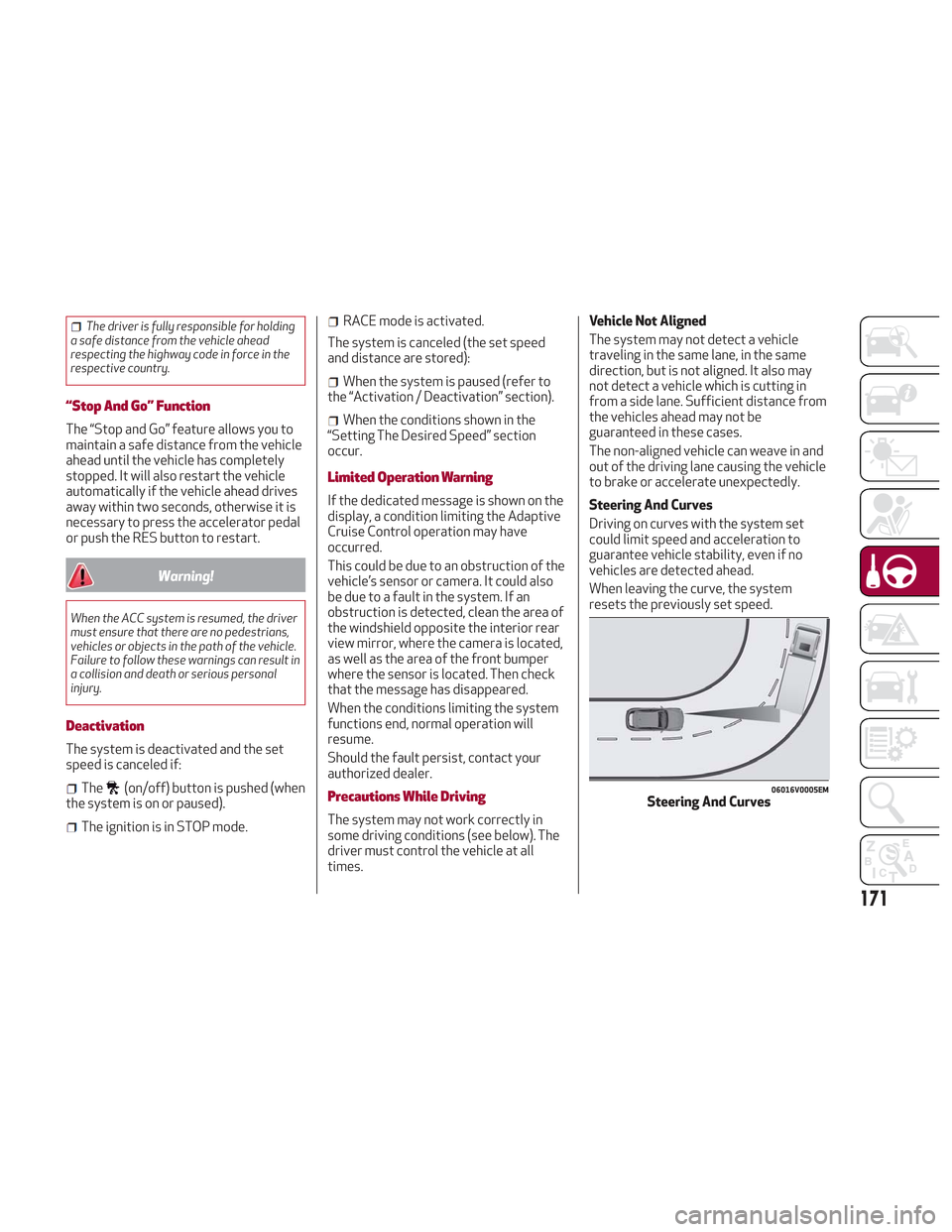
Steering And Curves
Driving on curves with the system set
could limit speed and acceleration to
guarantee vehicle stability, even if no
vehicles are detected ahead.
When leaving the curve, the system
resets the previously set speed.
06016V0005EMSteering And Curves
171
Page 178 of 276
LANE DEPARTURE WARNING
(LDW) SYSTEM — IF EQUIPPED
Description
The Lane Departure Warning system uses
a forward looking camera located on the
windshield to detect lane markings and
measure vehicle position within the lane
boundaries.
When one or both lane limits are
detected and the vehicle passes over one
without an activated turn signal, the
system emits a visual as well as an
acoustic signal.
If the vehicle continues to go beyond the
line of the lane without any intervention
from the driver, the surpassed line will
light up on the display (left or right) to
urge the driver to bring the vehicle back
into the limits of the lane.
Caution!
Do not tamper with nor operate on the
camera. Do not close the openings in the
aesthetic cover located under the interior
rear view mirror. In the event of a failure of
the camera, contact your authorized dealer.
The camera may have limited or absent
operation due to weather conditions such
as: heavy rain, hail, thick fog, heavy snow,
formation of ice layers on the windshield.
Camera operation may also be
compromised by the presence of dust,
condensation, dirt or ice on the windshield,
by traffic conditions (e.g. vehicles that are
driving not aligned with yours, vehicle
driving in a transverse or opposite way on
the same lane, bend with a small radius of
curvature), by road surface conditions and
by driving conditions (e.g. off-road driving).
Make sure the windshield is always clean.
Use specific detergents and clean cloths to
avoid scratching the windshield. The camera
operation may also be limited or absent in
some driving, traffic and road surface
conditions.
If the windshield must be replaced due to
scratches, chipping or breakage, contact
exclusively your authorized dealer. Do not
replace the windshield on your own. It is
advisable to replace the windshield if it is
damaged in the area of the camera.
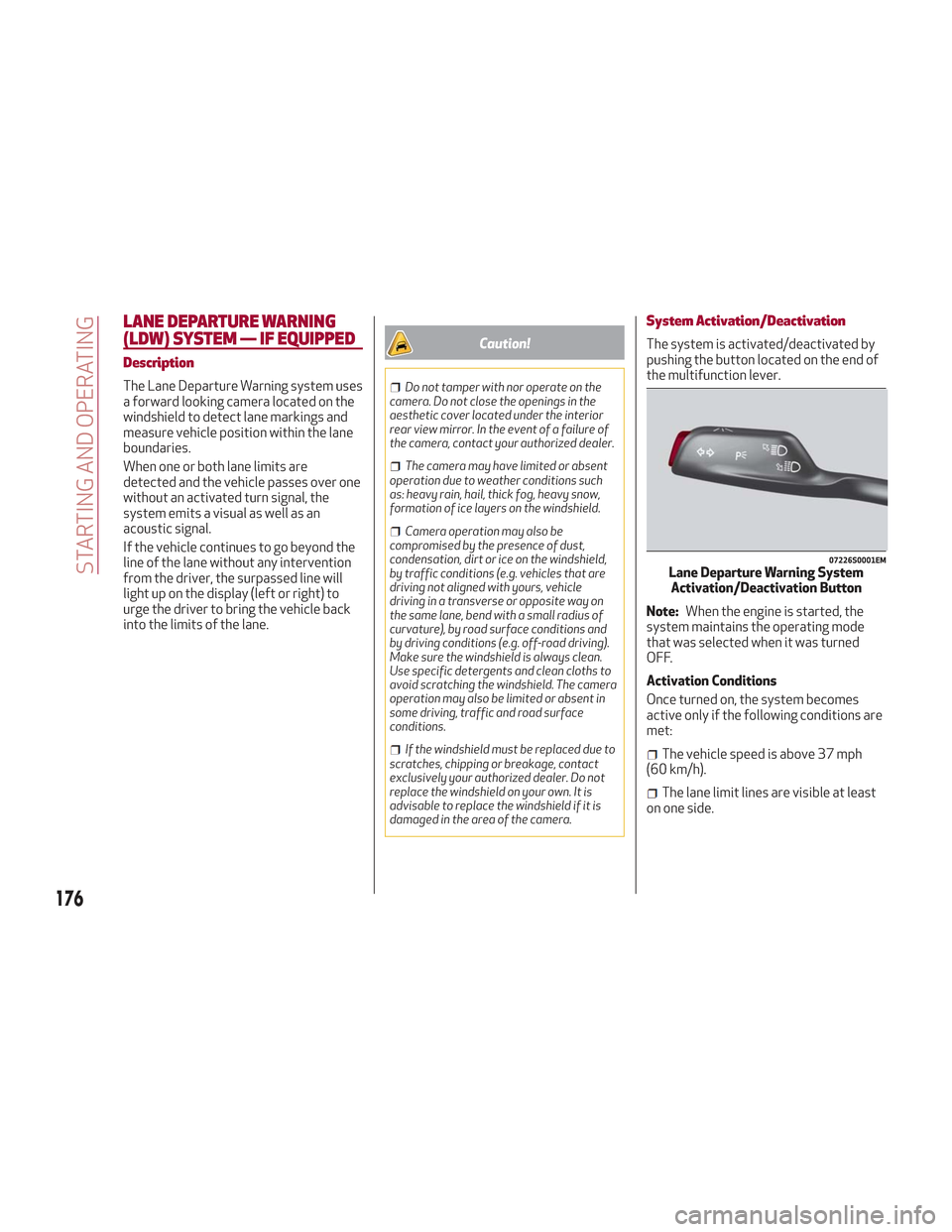
System Activation/Deactivation
The system is activated/deactivated by
pushing the button located on the end of
the multifunction lever.
Note: When the engine is started, the
system maintains the operating mode
that was selected when it was turned
OFF.
Activation Conditions
Once turned on, the system becomes
active only if the following conditions are
met:
The vehicle speed is above 37 mph
(60 km/h).
The lane limit lines are visible at least
on one side.
07226S0001EMLane Departure Warning System Activation/Deactivation Button
176
STARTING AND OPERATING
Page 179 of 276
There are suitable visibility conditions.
The road is straight or with wide radius
bends.
A suitable distance is kept from the
vehicle in front.
The turn signal is not active.
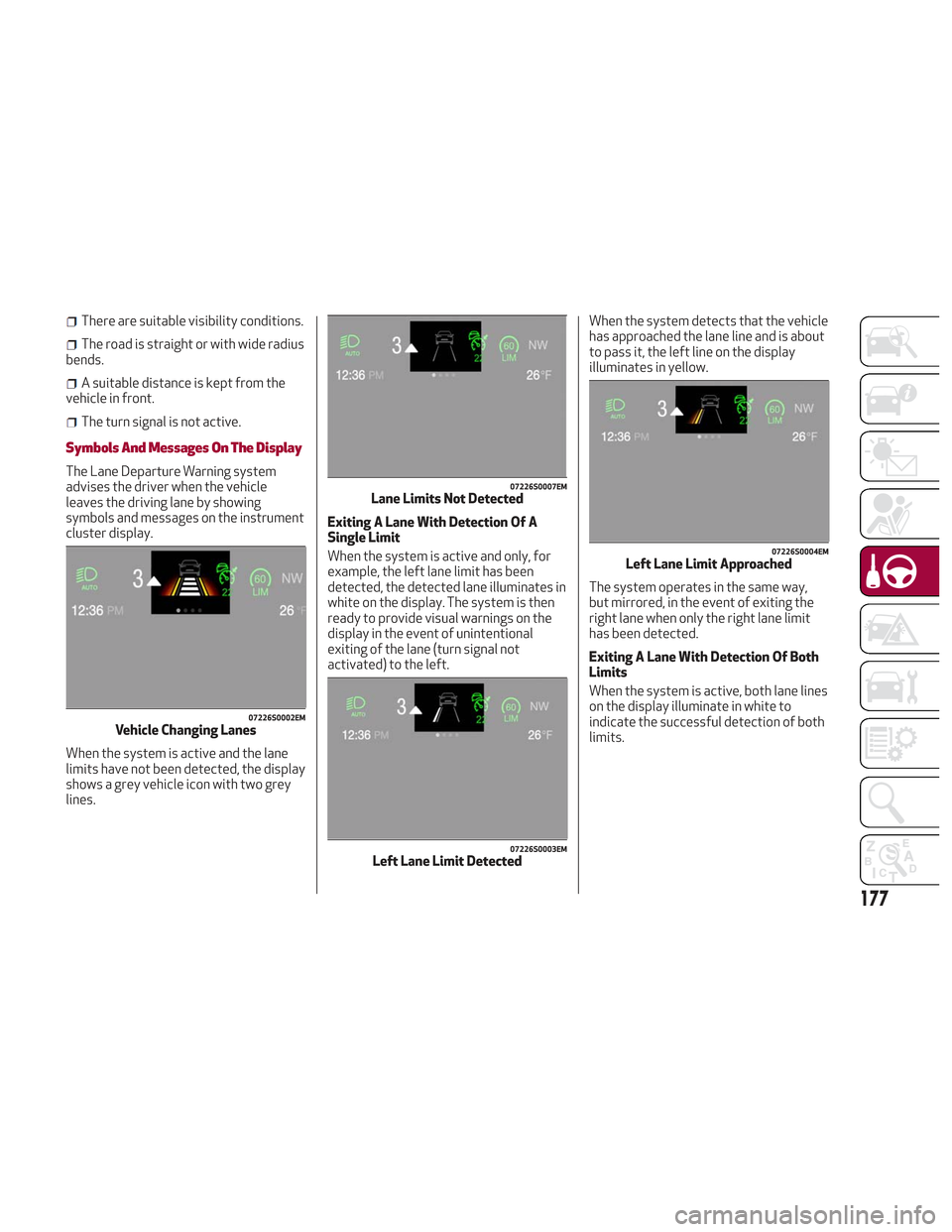
Symbols And Messages On The Display
The Lane Departure Warning system
advises the driver when the vehicle
leaves the driving lane by showing
symbols and messages on the instrument
cluster display.
When the system is active and the lane
limits have not been detected, the display
shows a grey vehicle icon with two grey
lines. Exiting A Lane With Detection Of A
Single Limit
When the system is active and only, for
example, the left lane limit has been
detected, the detected lane illuminates in
white on the display. The system is then
ready to provide visual warnings on the
display in the event of unintentional
exiting of the lane (turn signal not
activated) to the left.When the system detects that the vehicle
has approached the lane line and is about
to pass it, the left line on the display
illuminates in yellow.
The system operates in the same way,
but mirrored, in the event of exiting the
right lane when only the right lane limit
has been detected.
Exiting A Lane With Detection Of Both
Limits
When the system is active, both lane lines
on the display illuminate in white to
indicate the successful detection of both
limits.
07226S0002EMVehicle Changing Lanes
07226S0007EMLane Limits Not Detected
07226S0003EMLeft Lane Limit Detected
07226S0004EMLeft Lane Limit Approached
177
Page 180 of 276
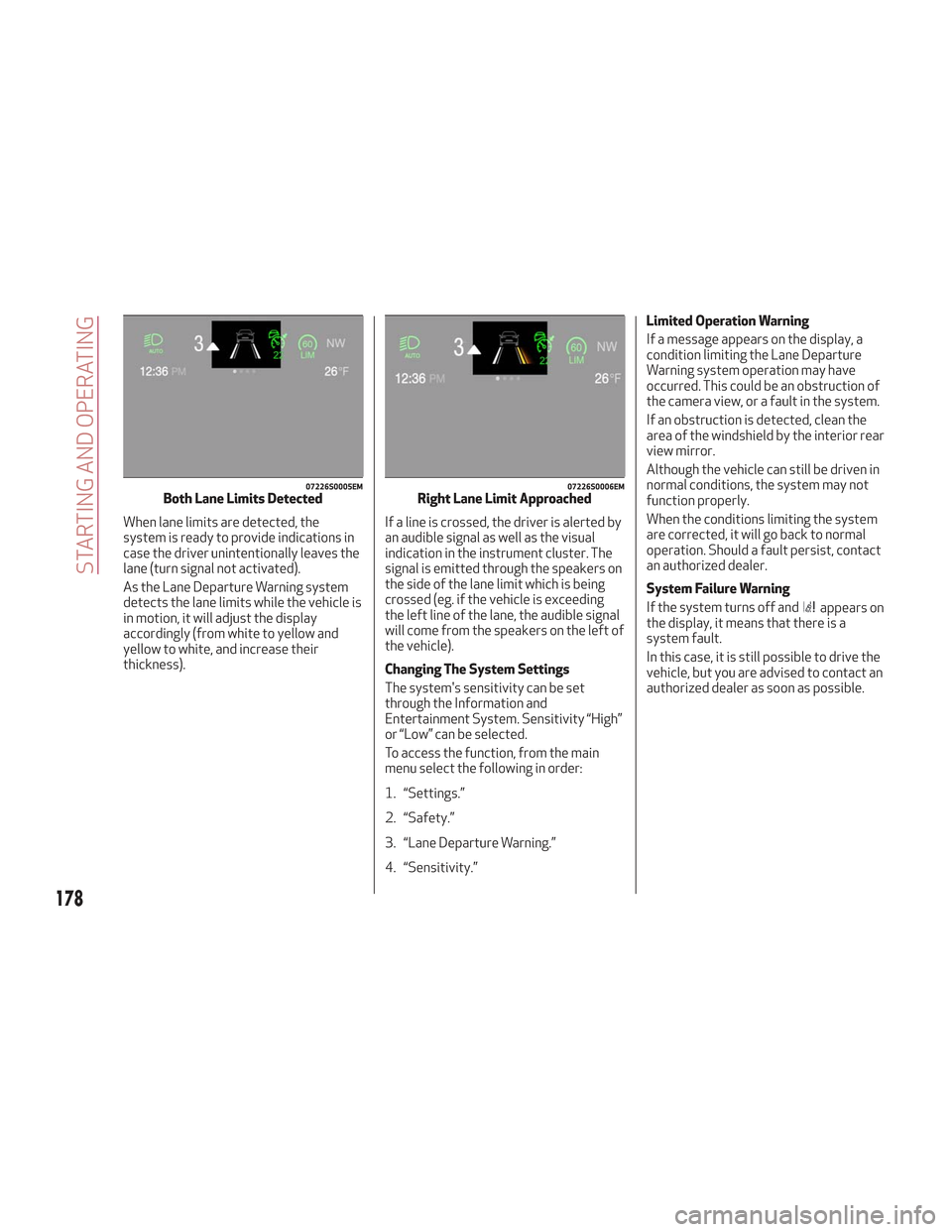
When lane limits are detected, the
system is ready to provide indications in
case the driver unintentionally leaves the
lane (turn signal not activated).
As the Lane Departure Warning system
detects the lane limits while the vehicle is
in motion, it will adjust the display
accordingly (from white to yellow and
yellow to white, and increase their
thickness).If a line is crossed, the driver is alerted by
an audible signal as well as the visual
indication in the instrument cluster. The
signal is emitted through the speakers on
the side of the lane limit which is being
crossed (eg. if the vehicle is exceeding
the left line of the lane, the audible signal
will come from the speakers on the left of
the vehicle).
Changing The System Settings
The system's sensitivity can be set
through the Information and
Entertainment System. Sensitivity “High”
or “Low” can be selected.
To access the function, from the main
menu select the following in order:
1. “Settings.”
2. “Safety.”
3. “Lane Departure Warning.”
4. “Sensitivity.”Limited Operation Warning
If a message appears on the display, a
condition limiting the Lane Departure
Warning system operation may have
occurred. This could be an obstruction of
the camera view, or a fault in the system.
If an obstruction is detected, clean the
area of the windshield by the interior rear
view mirror.
Although the vehicle can still be driven in
normal conditions, the system may not
function properly.
When the conditions limiting the system
are corrected, it will go back to normal
operation. Should a fault persist, contact
an authorized dealer.
System Failure Warning
If the system turns off and
appears on
the display, it means that there is a
system fault.
In this case, it is still possible to drive the
vehicle, but you are advised to contact an
authorized dealer as soon as possible.
07226S0005EMBoth Lane Limits Detected07226S0006EMRight Lane Limit Approached
178
STARTING AND OPERATING
Page 193 of 276
Replacing Exterior Bulbs
Warning!
Only replace bulbs when the engine is off.
Also ensure that the engine is cold, to
prevent the risk of burns.
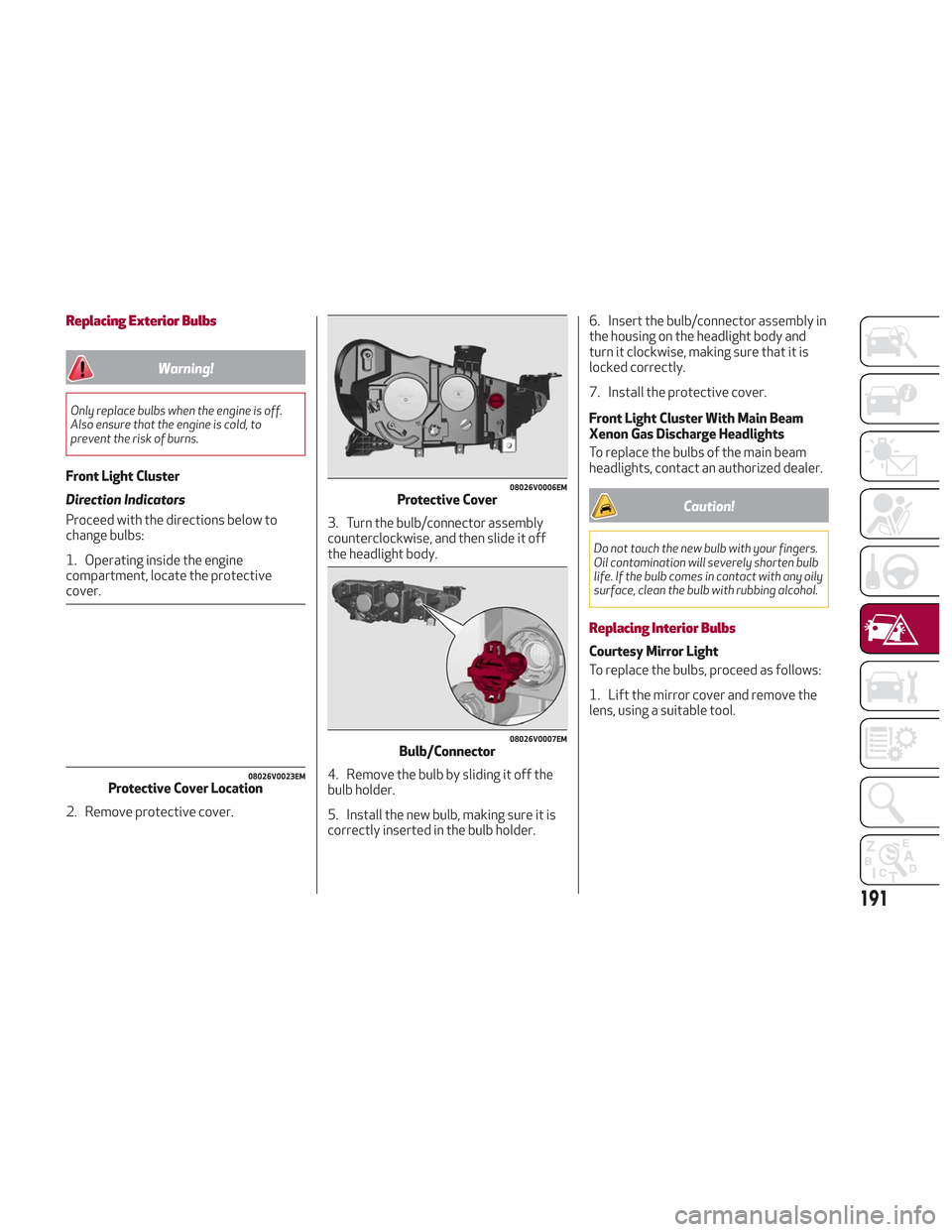
Front Light Cluster
Direction Indicators
Proceed with the directions below to
change bulbs:
1. Operating inside the engine
compartment, locate the protective
cover.
2. Remove protective cover.3. Turn the bulb/connector assembly
counterclockwise, and then slide it off
the headlight body.
4. Remove the bulb by sliding it off the
bulb holder.
5. Install the new bulb, making sure it is
correctly inserted in the bulb holder.6. Insert the bulb/connector assembly in
the housing on the headlight body and
turn it clockwise, making sure that it is
locked correctly.
7. Install the protective cover.
Front Light Cluster With Main Beam
Xenon Gas Discharge Headlights
To replace the bulbs of the main beam
headlights, contact an authorized dealer.
Caution!
Do not touch the new bulb with your fingers.
Oil contamination will severely shorten bulb
life. If the bulb comes in contact with any oily
surface, clean the bulb with rubbing alcohol.
Replacing Interior Bulbs
Courtesy Mirror Light
To replace the bulbs, proceed as follows:
1. Lift the mirror cover and remove the
lens, using a suitable tool.
08026V0023EMProtective Cover Location
08026V0006EMProtective Cover
08026V0007EMBulb/Connector
191
Page 194 of 276
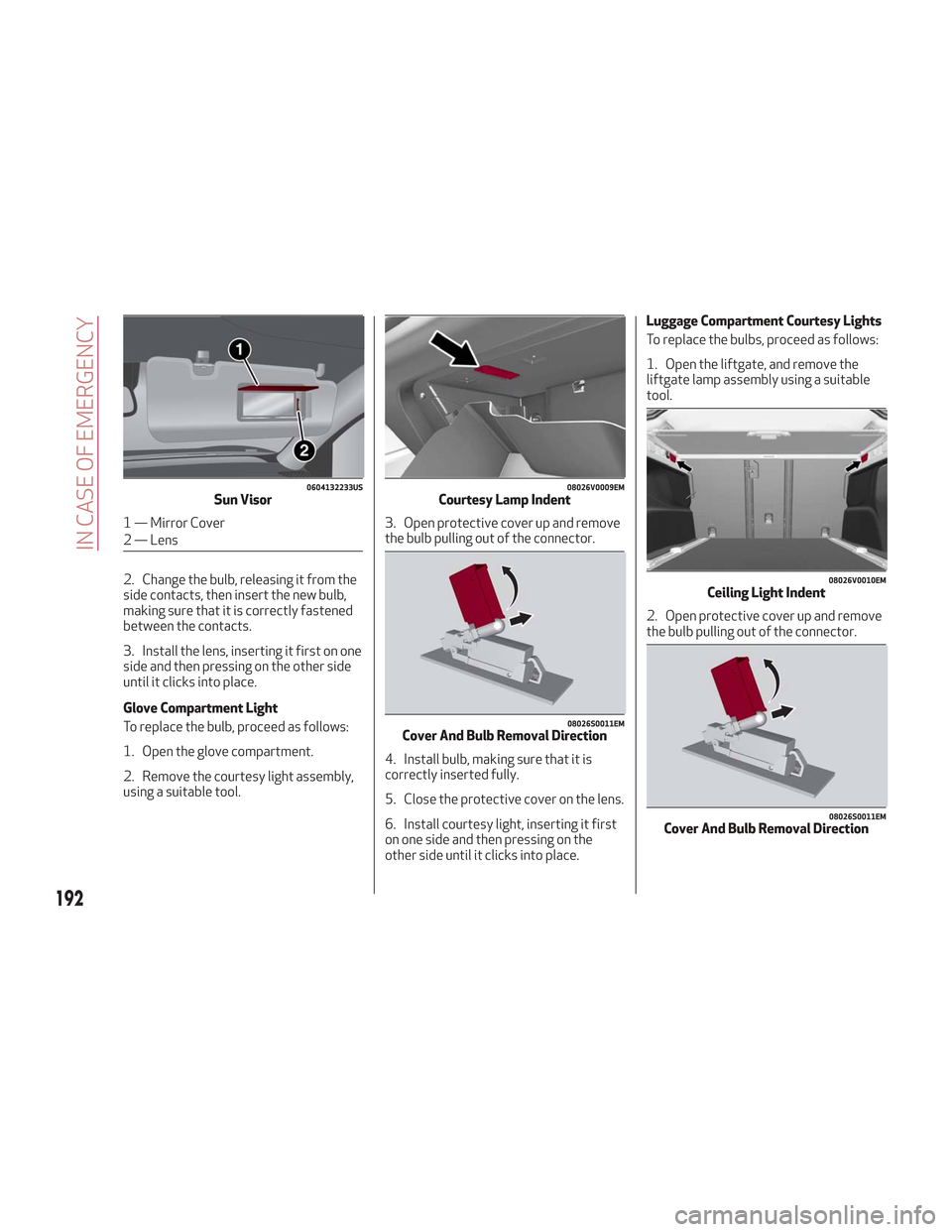
2. Change the bulb, releasing it from the
side contacts, then insert the new bulb,
making sure that it is correctly fastened
between the contacts.
3. Install the lens, inserting it first on one
side and then pressing on the other side
until it clicks into place.
Glove Compartment Light
To replace the bulb, proceed as follows:
1. Open the glove compartment.
2. Remove the courtesy light assembly,
using a suitable tool.3. Open protective cover up and remove
the bulb pulling out of the connector.
4. Install bulb, making sure that it is
correctly inserted fully.
5. Close the protective cover on the lens.
6. Install courtesy light, inserting it first
on one side and then pressing on the
other side until it clicks into place.Luggage Compartment Courtesy Lights
To replace the bulbs, proceed as follows:
1. Open the liftgate, and remove the
liftgate lamp assembly using a suitable
tool.
2. Open protective cover up and remove
the bulb pulling out of the connector.
0604132233USSun Visor
1 — Mirror Cover
2 — Lens
08026V0009EMCourtesy Lamp Indent
08026S0011EMCover And Bulb Removal Direction
08026V0010EMCeiling Light Indent
08026S0011EMCover And Bulb Removal Direction
192
IN CASE OF EMERGENCY
Page 198 of 276
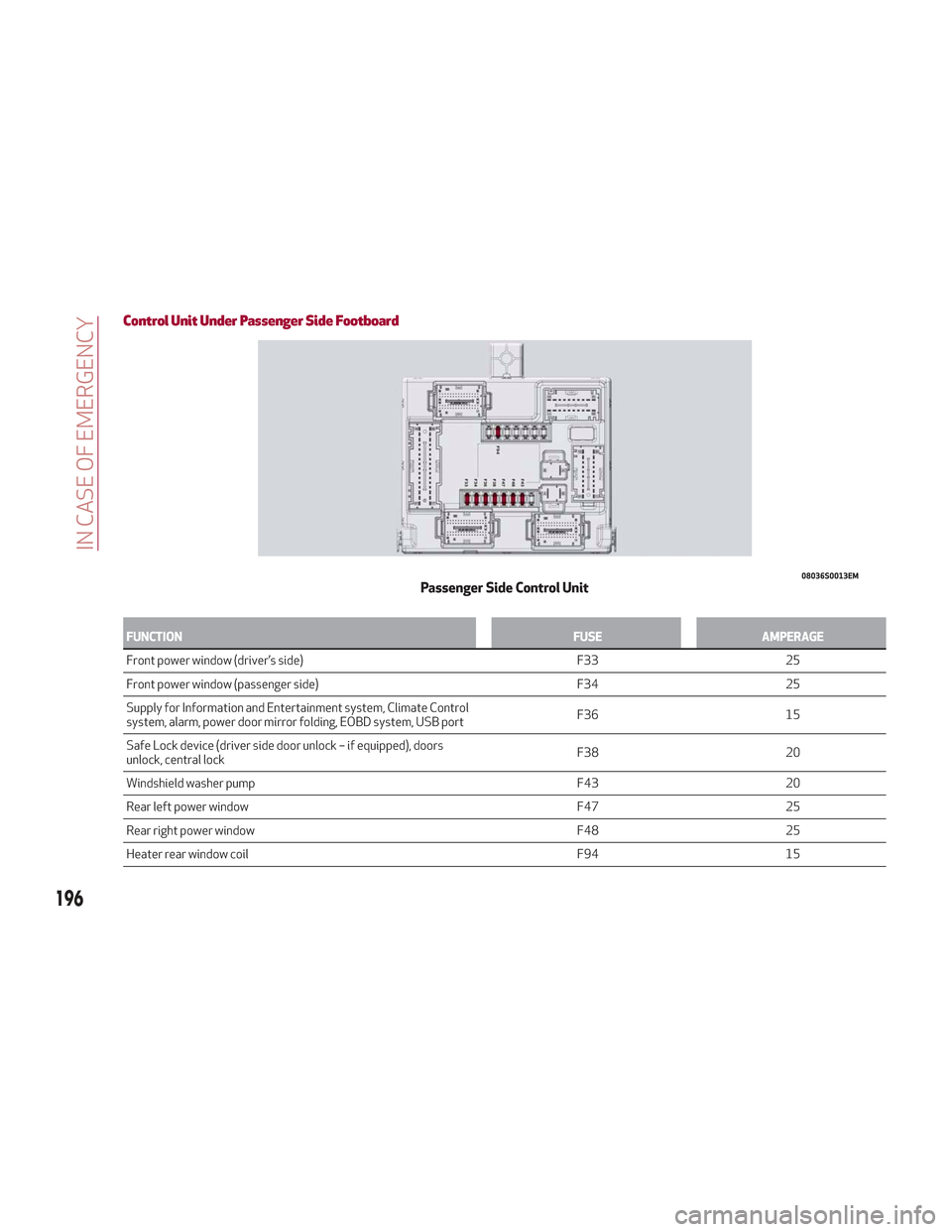
Control Unit Under Passenger Side Footboard
FUNCTIONFUSEAMPERAGE
Front power window (driver’s side) F3325
Front
power window (passenger side) F3425
Supply for Information and Entertainment system, Climate Control
system, alarm, power door mirror folding, EOBD system, USB port F36
15
Safe Lock device (driver side door unlock – if equipped), doors
unlock, central lock F38
20
Windshield washer pump F4320
Rear left power window F4725
Rear right power window F4825
Heater rear window coil F9415
08036S0013EMPassenger Side Control Unit
196
IN CASE OF EMERGENCY
Page 269 of 276
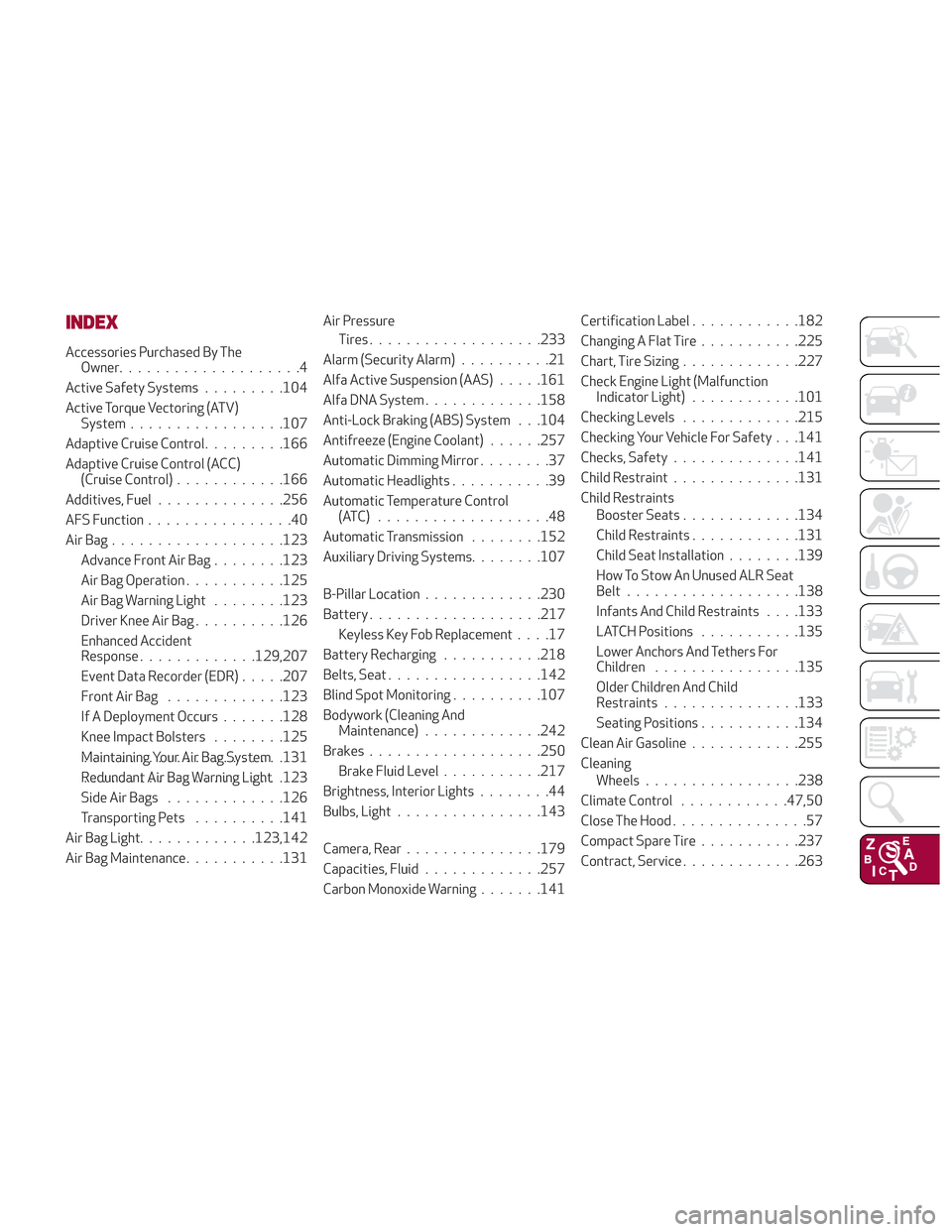
INDEX
Accessories Purchased By TheOwner....................4
Active Safety Systems .........104
Active Torque Vectoring (ATV) System ................ .107
Adaptive Cruise Control .........166
Adaptive Cruise Control (ACC) (Cruise Control) ............166
Additives, Fuel ............. .256
AFS Function ................40
AirBag.................. .123
Advance Front Air Bag ........123
Air Bag Operation ...........125
Air Bag Warning Light ........123
Driver Knee Air Bag ..........126
Enhanced Accident
Response .............129,207
Event Data Recorder (EDR) .....207
Front Air Bag .............123
If A Deployment Occurs .......128
Knee Impact Bolsters ........125
Maintaining Your Air Bag System ..................... .131
Redundant Air Bag Warning Light ..................... .123
Side Air Bags .............126
Transporting Pets ..........141
Air Bag Light .............123,142
Air Bag Maintenance ...........131 Air Pressure
Tires .................. .233
Alarm (Security Alarm) ..........21
Alfa Active Suspension (AAS) .....161
Alfa DNA System .............158
Anti-Lock Braking (ABS) System . . .104
Antifreeze (Engine Coolant) ......257
Automatic Dimming Mirror ........37
Automatic Headlights ...........39
Automatic Temperature Control (ATC) ...................48
Automatic Transmission ........152
Auxiliary Driving Systems ........107
B-Pillar Location .............230
Battery ..................
.217
K
eyless Key Fob Replacement ....17
Battery Recharging ...........218
Belts, Seat ................ .142
Blind Spot Monitoring ..........107
Bodywork (Cleaning And Maintenance) .............242
Brakes .................. .250
Brake Fluid Level ...........217
Brightness, Interior Lights ........44
Bulbs, Light ............... .143
Camera, Rear .............. .179
Capacities, Fluid .............257
Carbon Monoxide Warning .......141Certification Label
............182
Changing A Flat Tire ...........225
Chart, Tire Sizing .............227
Check Engine Light (Malfunction Indicator Light) ............101
Checking Levels .............215
Checking Your Vehicle For Safety . . .141
Checks, Safety ..............141
Child Restraint ..............131
Child Restraints Booster Seats .............134
Child Restraints ............131
Child Seat Installation ........139
How To Stow An Unused ALR Seat
Belt .................. .138
Infants And Child Restraints . . . .133
LATCH Positions ...........135
Lower Anchors And Tethers For
Children ............... .135
Older Children And Child
Restraints .............. .133
Seating Positions ...........134
Clean Air Gasoline ............255
Cleaning Wheels ................ .238
Climate Control ............47,50
Close The Hood ...............57
Compact Spare Tire ...........237
Contract,
Service .............263