start stop button Alfa Romeo Stelvio 2018 User Guide
[x] Cancel search | Manufacturer: ALFA ROMEO, Model Year: 2018, Model line: Stelvio, Model: Alfa Romeo Stelvio 2018Pages: 276, PDF Size: 5.79 MB
Page 157 of 276
Caution!
Before moving the transmission gear
selector out of PARK, you must push the
ignition button to cycle from STOP/OFF
mode to the ON mode, and also press the
brake pedal. Otherwise, damage to the gear
selector could result.
DO NOT race the engine when shifting
from PARK or NEUTRAL into another gear
range, as this can damage the drivetrain.
REVERSE (R)
Select this mode only with the vehicle at
a standstill.
NEUTRAL (N)
Use this range when the vehicle is
standing for prolonged periods with the
engine running. The engine may be
started in this range. Apply the electric
park brake and shift the transmission
into PARK (P) if you must leave the
vehicle.
Warning!
Do not coast in NEUTRAL and never turn off
the ignition to coast down a hill. These are
unsafe practices that limit your response to
changing traffic or road conditions. You
might lose control of the vehicle and have a
collision.
DRIVE (D)
Use this mode in normal driving
conditions.
Shifting from DRIVE (D) to PARK (P) or
REVERSE (R) modes must take place
only after releasing the accelerator
pedal, with vehicle at a standstill and
brake pedal pressed.
This mode ensures automatic
engagement of the most suitable gears
for driving needs and maximum fuel
economy in terms of consumption.
In this position, the transmission shifts
the gears automatically, selecting the
most suitable for forward driving among
those available as you go. In this way the
vehicle's optimal driving characteristics
are provided for all conditions.
AutoStick
In the case of frequent shifting (e.g. for
sport driving, when the vehicle is driven
with a heavy load, on slopes, when towing
heavy trailers), it is recommended to use
the AutoStick (sequential shifting) mode
to select and keep a lower fixed ratio.
In these conditions, the use of a lower
gear improves vehicle performance and
prevents overheating.
It is possible to shift from DRIVE (D)
mode to AutoStick mode regardless of
vehicle speed. Activation
Starting from DRIVE (D) mode, to
activate the sequential drive mode, move
the gear selector to the left (– and +
indication of the trim). The gear engaged
will be shown on the display.
Shifting is made by moving the gear
selector forward, toward symbol – or
backward, toward symbol +.
Steering Column Mounted Shift
Paddles
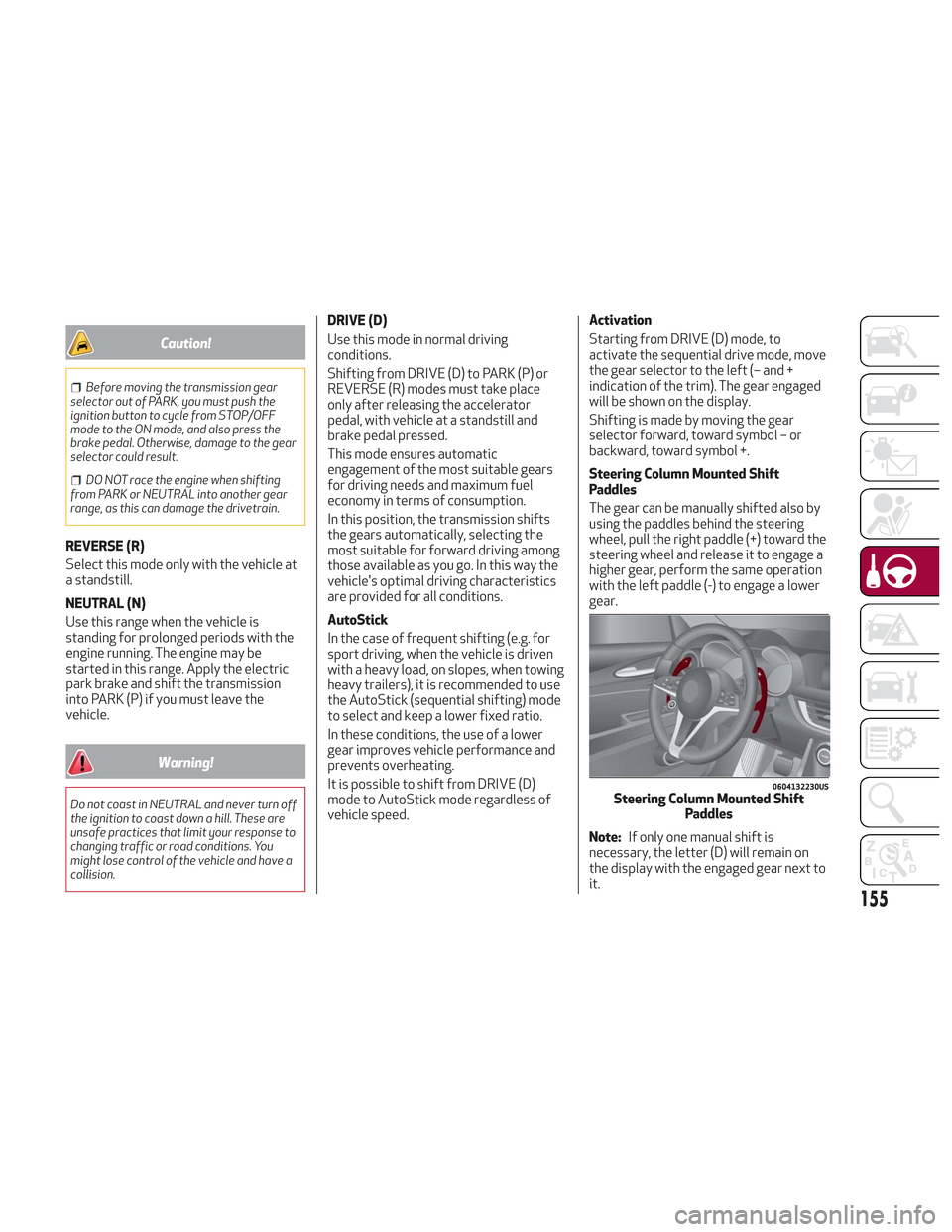
The gear can be manually shifted also by
using the paddles behind the steering
wheel, pull the right paddle (+) toward the
steering wheel and release it to engage a
higher gear, perform the same operation
with the left paddle (-) to engage a lower
gear.
Note:
If only one manual shift is
necessary, the letter (D) will remain on
the display with the engaged gear next to
it.
0604132230USSteering Column Mounted Shift Paddles
155
Page 158 of 276
Deactivation
To deactivate the sequential driving
mode, bring the gear selector back in
position DRIVE (D) ("automatic" driving
mode).
Warning!
Do not downshift for additional engine
braking on a slippery surface. The drive
wheels could lose their grip and the vehicle
could skid, causing a collision or personal
injury.
Note:
To select the correct gear for
maximum deceleration (engine brake),
just keep the gear paddle pulled (–): the
transmission goes to an operating mode
in which the vehicle can slow down
easily.
The vehicle will keep the gear
selected by the driver until the safety
conditions allow it.
This means, for example, that the
system will try to prevent the engine
from switching off, automatically
downshifting if the engine speed is too
low.
Automatic Transmission Limp Home
Mode
Transmission function is monitored
electronically for abnormal conditions. If
a condition is detected that could result
in transmission damage, Transmission
Limp Home Mode is activated.
In this condition, the transmission stays
in fourth gear, regardless of the selected
gear. Positions PARK (P), REVERSE (R)
and NEUTRAL (N) still work.
The
symbol might light up in the
instrument cluster.
Temporary failure
In the event of a momentary problem, the
transmission can be reset to regain all
forward gears by performing the
following steps:
1. Stop the vehicle.
2. Shift the transmission into PARK (P),
if possible. If not, shift the transmission
to NEUTRAL (N).
3. Push and hold the ignition until the
engine turns OFF.
4. Wait for about 10 seconds, then
restart the engine.
5. Shift into the desired gear range. If
the problem is no longer detected, the
transmission will return to normal
operation.
Note: Even if the transmission can be
reset, we recommend that you visit your authorized dealer at your earliest
possible convenience. Your authorized
dealer has diagnostic equipment to
determine if the problem could reoccur. If
the transmission cannot be reset, service
is required at your authorized dealer.
Brake/Transmission Shift Interlock
System
This vehicle is equipped with a Brake
Transmission Shift Interlock system
(BTSI) that holds the gear selector in
PARK (P) unless the brakes are applied.
This system prevents you from moving
the gear selector from position PARK (P)
unless the brakes are applied.
To shift the transmission out of PARK (P),
the ignition must be cycled to the ON
position (engine running or not) and the
brake pedal must be pressed.
Brake/Transmission Shift Interlock
Disabling
Only if strictly necessary (e.g. pushing the
vehicle, conveyor vehicle washing
systems), inhibit the automatic activation
of PARK (P) mode when stopping the
engine. To do so, follow the directions
below:
1. Bring the vehicle to a standstill.
2. Place the transmission in the
NEUTRAL (N) position.
3. Push the ignition button for at least
three seconds.
156
STARTING AND OPERATING
Page 163 of 276
ALFA ACTIVE SUSPENSION
(AAS)
The vehicle's electronic suspension
management system is aimed at
optimizing the vehicle's performance.
The system continuously monitors the
damping of the suspensions through the
actuator installed on each shock
absorber. This way, the calibration of the
shock absorbers can be adjusted to the
conditions of the road surface and to the
dynamic conditions of the vehicle,
improving its comfort and road holding.
The driver can choose, even while driving,
(only in "Dynamic” mode), between two
types of suspension calibration: a more
sporty or a more comfortable one.
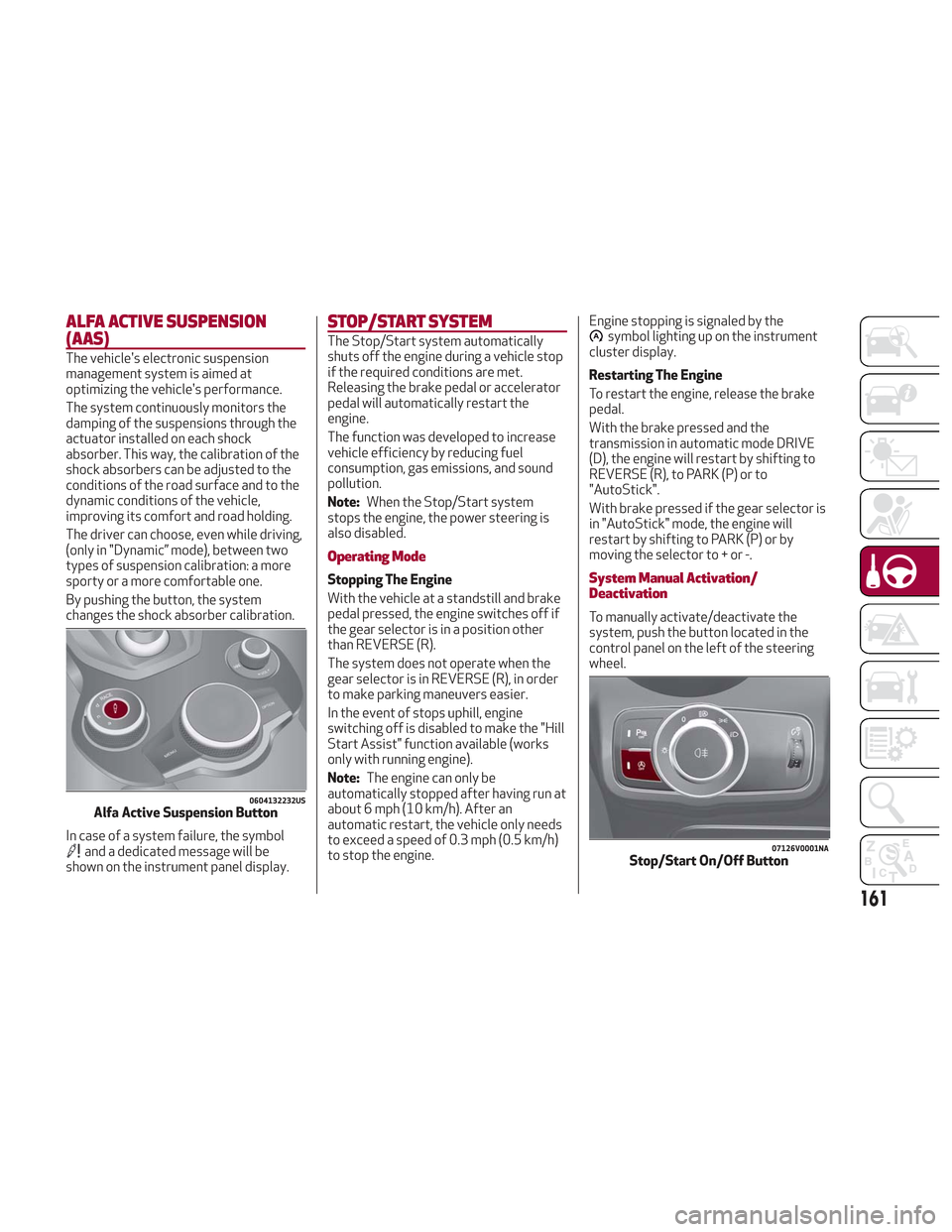
By pushing the button, the system
changes the shock absorber calibration.
In case of a system failure, the symbol
and a dedicated message will be
shown on the instrument panel display.
STOP/START SYSTEM
The Stop/Start system automatically
shuts off the engine during a vehicle stop
if the required conditions are met.
Releasing the brake pedal or accelerator
pedal will automatically restart the
engine.
The function was developed to increase
vehicle efficiency by reducing fuel
consumption, gas emissions, and sound
pollution.
Note:When the Stop/Start system
stops the engine, the power steering is
also disabled.
Operating Mode
Stopping The Engine
With the vehicle at a standstill and brake
pedal pressed, the engine switches off if
the gear selector is in a position other
than REVERSE (R).
The system does not operate when the
gear selector is in REVERSE (R), in order
to make parking maneuvers easier.
In the event of stops uphill, engine
switching off is disabled to make the "Hill
Start Assist" function available (works
only with running engine).
Note: The engine can only be
automatically stopped after having run at
about 6 mph (10 km/h). After an
automatic restart, the vehicle only needs
to exceed a speed of 0.3 mph (0.5 km/h)
to stop the engine. Engine stopping is signaled by the
symbol lighting up on the instrument
cluster display.
Restarting The Engine
To restart the engine, release the brake
pedal.
With the brake pressed and the
transmission in automatic mode DRIVE
(D), the engine will restart by shifting to
REVERSE (R), to PARK (P) or to
"AutoStick".
With brake pressed if the gear selector is
in "AutoStick" mode, the engine will
restart by shifting to PARK (P) or by
moving the selector to + or -.
System Manual Activation/
Deactivation
To manually activate/deactivate the
system, push the button located in the
control panel on the left of the steering
wheel.
0604132232USAlfa Active Suspension Button
07126V0001NAStop/Start On/Off Button
161
Page 164 of 276
System Activation
The activation of the system is indicated
by the
symbol lighting up on the
display. In this condition, the light on the
button is off.
System Deactivation
A message will appear on the display
when the system is deactivated. In this
condition, the light on the button is on.
Note: Each time the engine is started,
the system is activated regardless of
where was when it was previously
switched off.
Possible Reasons The Engine Does Not
Autostop
For higher comfort and increased safety,
and to reduce emissions, there are
certain conditions where the engine will
not autostop despite the system being
active, such as:
Engine still cold.
Especially cold outside temperature.
Battery not sufficiently charged.
Driver's door not shut.
Driver's seat belt not fastened.
Reverse gear engaged (e.g. for parking
maneuvers).
With the automatic climate control
active, an adequate cabin heating or
cooling comfort has not been reached or
with MAX-DEF function active.
During the first period of use, to
initialize the system.
Steering angle beyond threshold.
Engine Restarting Conditions
Due to comfort, emission control, and
safety reasons, the engine can restart
automatically without any action by the
driver, under special conditions, such as:
Battery not sufficiently charged.
Reduced braking system vacuum (e.g.
if the brake pedal is pressed repeatedly).
Vehicle moving (e.g. when driving on
roads with a grade).
Engine stopping by the Stop/Start
system for more than approx. three
minutes.
With the automatic climate control
active, an adjustment in cabin heating or
cooling is made or with MAX-DEF
function active.
Safety Functions
When the engine is stopped through the
Stop/Start system, if the driver releases
their seat belt, opens the driver's or
passenger's door, or opens the hood from
inside the vehicle, the engine can be
restarted only by using the ignition.
This condition is indicated to the driver
both through a buzzer and a message on
the instrument cluster display.
Energy Saving Function
If the driver does not carry out any action
for more than three minutes after the
automatic engine restart, the Start/Stop
system will switch off the engine in order
to prevent fuel consumption.
In this situation, the engine can only be
restarted using the ignition device.
Note: It is possible to keep the engine
running by deactivating the system.
Irregular Operation
In the event of malfunction, the
Stop/Start system is deactivated.
For failure indications, refer to "Warning
Lights and Messages" paragraph in
"Getting To Know Your Instrument Panel".
Vehicle Inactivity
In the event of vehicle inactivity (or if the
battery is replaced), special attention
must be paid to the disconnection of the
battery power supply.
Proceed as follows:
Remove connector from socket to
disconnect sensor (battery status
monitoring) installed on the negative pole
of the battery. This sensor should never
be disconnected from the pole except if
the battery is replaced.
162
STARTING AND OPERATING
Page 168 of 276
you should accelerate until you are close
to that speed. Then, push and release the
RES button.
To Deactivate
Lightly pressing the brake pedal
deactivates the speed control without
deleting the set speed.
The speed control may also be
deactivated by applying the electric park
brake or when the braking system is
operated (e.g. operation of the ESC
system).
The set speed is deleted in the following
cases:
Pushing the on/off button twice
The ignition is cycled to the STOP
position
There is a malfunction with the Speed
Control.
ADAPTIVE CRUISE CONTROL
(ACC) — IF EQUIPPED
System Description
Adaptive Cruise Control (ACC) is a driver
assist system that combines the speed
control functions with maintaining the
distance from the vehicle ahead.
The system allows to set and hold the
vehicle at the desired speed without
needing to press the accelerator. It also
allows to set and hold a distance from the
vehicle ahead (these settings are set by
the driver).
The Adaptive Cruise Control (ACC)
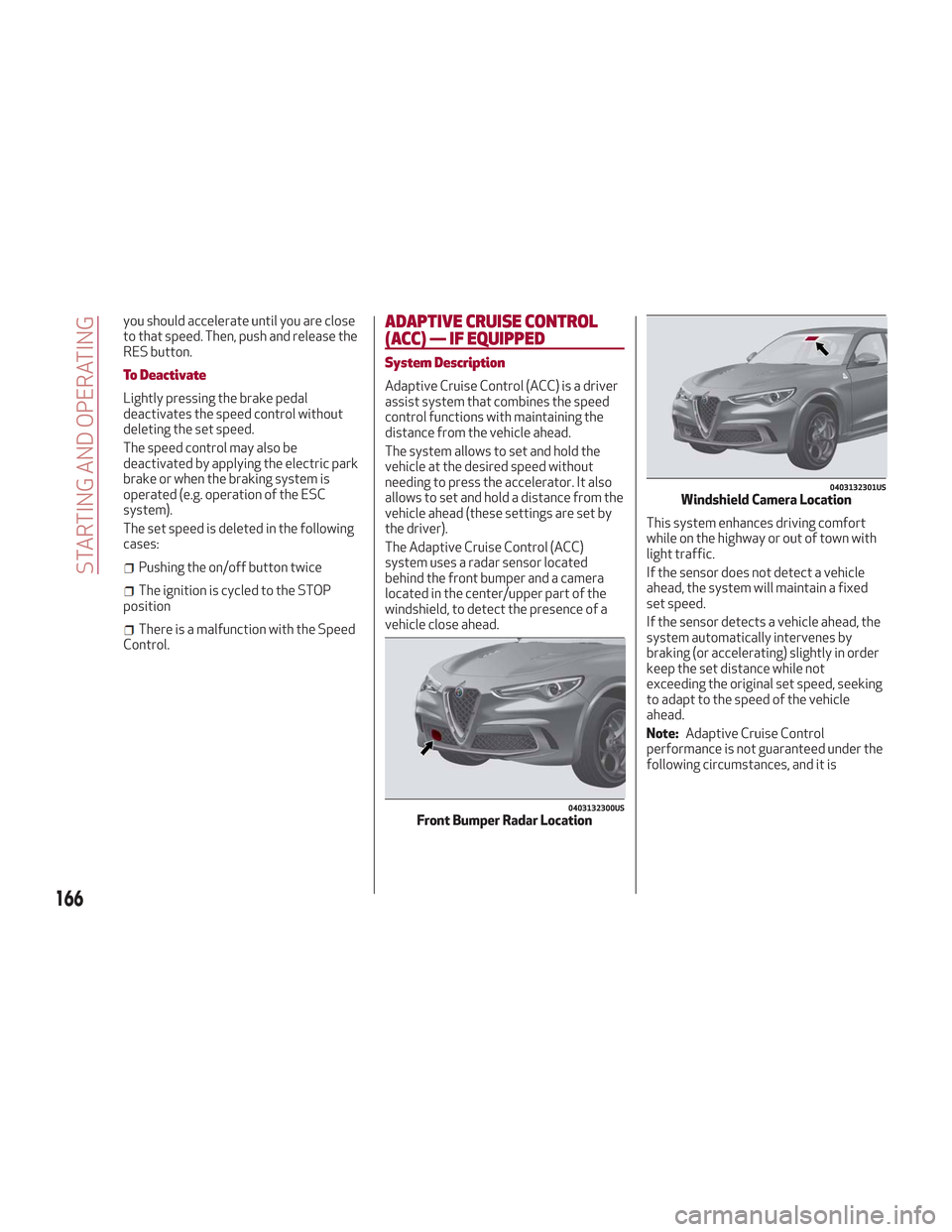
system uses a radar sensor located
behind the front bumper and a camera
located in the center/upper part of the
windshield, to detect the presence of a
vehicle close ahead. This system enhances driving comfort
while on the highway or out of town with
light traffic.
If the sensor does not detect a vehicle
ahead, the system will maintain a fixed
set speed.
If the sensor detects a vehicle ahead, the
system automatically intervenes by
braking (or accelerating) slightly in order
keep the set distance while not
exceeding the original set speed, seeking
to adapt to the speed of the vehicle
ahead.
Note:
Adaptive Cruise Control
performance is not guaranteed under the
following circumstances, and it is
0403132300USFront Bumper Radar Location
0403132301USWindshield Camera Location
166
STARTING AND OPERATING
Page 169 of 276
recommended to disable the system
under the following circumstances:
Driving in fog, heavy rain, or snow.
Driving in heavy traffic or
construction zones.
Driving on icy, snowy, slippery roads,
roads with steep climbs and descents, or
roads with numerous turns and bends.
Entering a turn lane.
When circumstances do not allow
safe driving at a constant speed.
Warning!
Adaptive Cruise Control (ACC) is a
convenience system. It is not a substitute
for active driving involvement. It is always
the driver’s responsibility to be attentive of
road, traffic, and weather conditions,
vehicle speed, distance to the vehicle ahead;
and, most importantly, brake operation to
ensure safe operation of the vehicle under
all road conditions. Your complete attention
is always required while driving to maintain
safe control of your vehicle. Failure to follow
these warnings can result in a collision and
death or serious personal injury.
The ACC system:
Does not react to pedestrians, oncoming
vehicles, and stationary objects (e.g., a
stopped vehicle in a traffic jam or a disabled
vehicle).
Cannot take street, traffic, and weather
conditions into account, and may be limited
upon adverse sight distance conditions.
Does not always fully recognize complex
driving conditions, which can result in wrong
or missing distance warnings.
Will bring the vehicle to a complete stop
while following a target vehicle and hold the
vehicle for approximately 3 minutes in the
stop position. If the target vehicle does not
start moving within 3 minutes the parking
brake will be activated, and the ACC system
will be canceled.
You should switch off the ACC system:
When driving in fog, heavy rain, heavy
snow, sleet, heavy traffic, and complex
driving situations (i.e., in highway
construction zones).
When entering a turn lane or highway off
ramp; when driving on roads that are
winding, icy, snow-covered, slippery, or have
steep uphill or downhill slopes.
When circumstances do not allow safe
driving at a constant speed.
Activation/Deactivation
The system has four operating states:
Enabled (speed not set)
Activated (speed set)
Paused
Deactivated Enabling / Activation
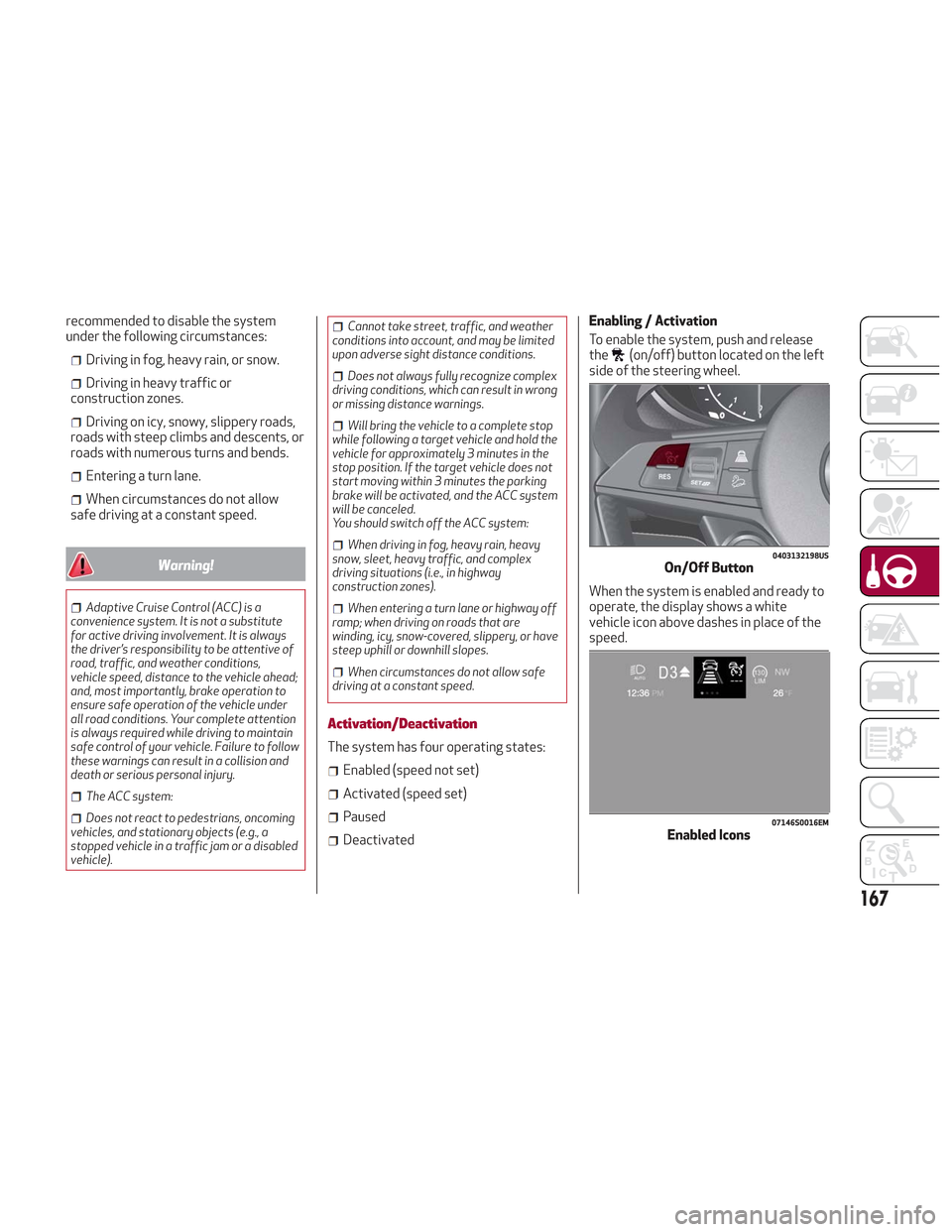
To enable the system, push and release
the
(on/off) button located on the left
side of the steering wheel.
When the system is enabled and ready to
operate, the display shows a white
vehicle icon above dashes in place of the
speed.
0403132198USOn/Off Button
07146S0016EMEnabled Icons
167
Page 173 of 276
The driver is fully responsible for holding
a safe distance from the vehicle ahead
respecting the highway code in force in the
respective country.
“Stop And Go” Function
The “Stop and Go” feature allows you to
maintain a safe distance from the vehicle
ahead until the vehicle has completely
stopped. It will also restart the vehicle
automatically if the vehicle ahead drives
away within two seconds, otherwise it is
necessary to press the accelerator pedal
or push the RES button to restart.
Warning!
When the ACC system is resumed, the driver
must ensure that there are no pedestrians,
vehicles or objects in the path of the vehicle.
Failure to follow these warnings can result in
a collision and death or serious personal
injury.
Deactivation
The system is deactivated and the set
speed is canceled if:
The(on/off) button is pushed (when
the system is on or paused).
The ignition is in STOP mode.
RACE mode is activated.
The system is canceled (the set speed
and distance are stored):
When the system is paused (refer to
the “Activation / Deactivation” section).
When the conditions shown in the
“Setting The Desired Speed” section
occur.
Limited Operation Warning
If the dedicated message is shown on the
display, a condition limiting the Adaptive
Cruise Control operation may have
occurred.
This could be due to an obstruction of the
vehicle’s sensor or camera. It could also
be due to a fault in the system. If an
obstruction is detected, clean the area of
the windshield opposite the interior rear
view mirror, where the camera is located,
as well as the area of the front bumper
where the sensor is located. Then check
that the message has disappeared.
When the conditions limiting the system
functions end, normal operation will
resume.
Should the fault persist, contact your
authorized dealer.
Precautions While Driving
The system may not work correctly in
some driving conditions (see below). The
driver must control the vehicle at all
times. Vehicle Not Aligned
The system may not detect a vehicle
traveling in the same lane, in the same
direction, but is not aligned. It also may
not detect a vehicle which is cutting in
from a side lane. Sufficient distance from
the vehicles ahead may not be
guaranteed in these cases.
The non-aligned vehicle can weave in and
out of the driving lane causing the vehicle
to brake or accelerate unexpectedly.
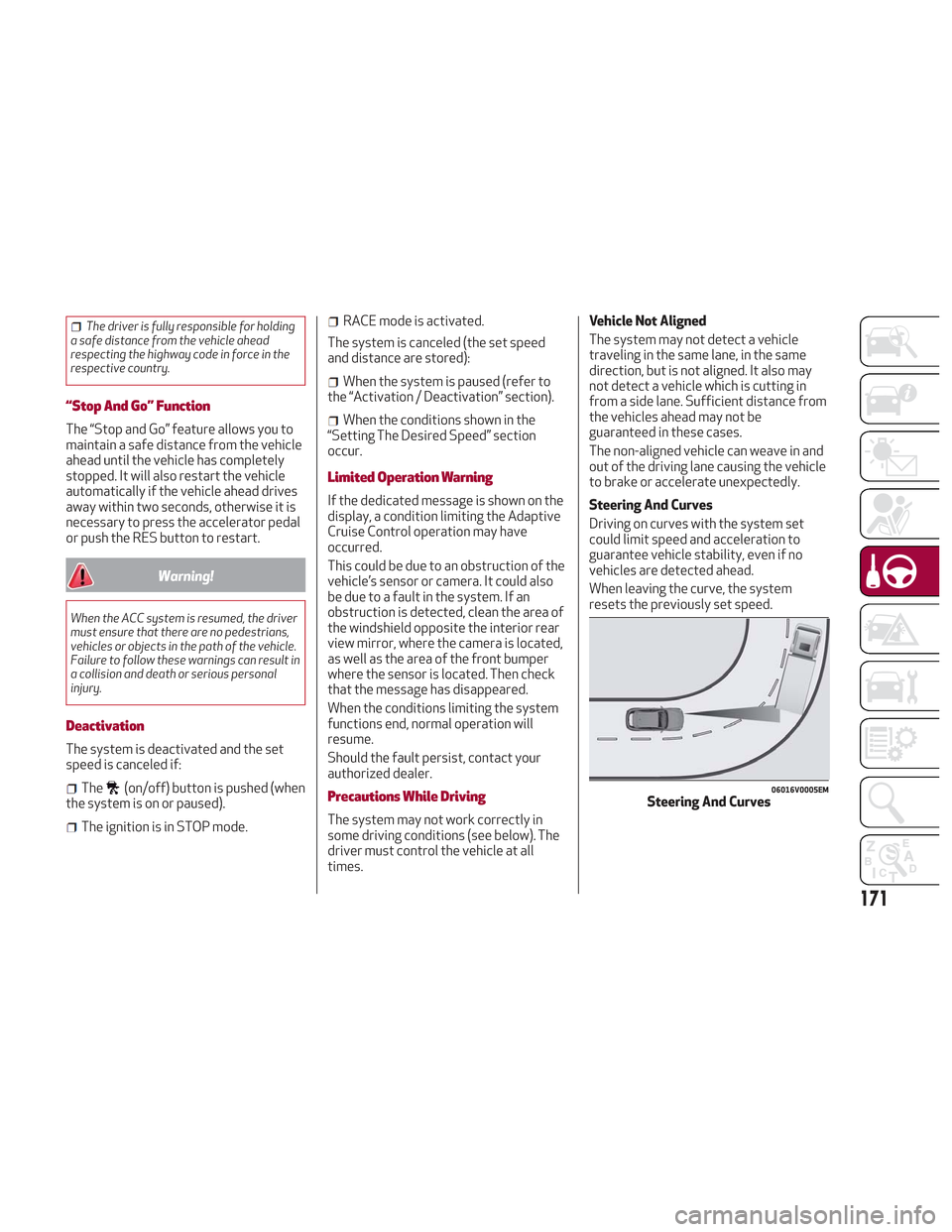
Steering And Curves
Driving on curves with the system set
could limit speed and acceleration to
guarantee vehicle stability, even if no
vehicles are detected ahead.
When leaving the curve, the system
resets the previously set speed.
06016V0005EMSteering And Curves
171
Page 221 of 276
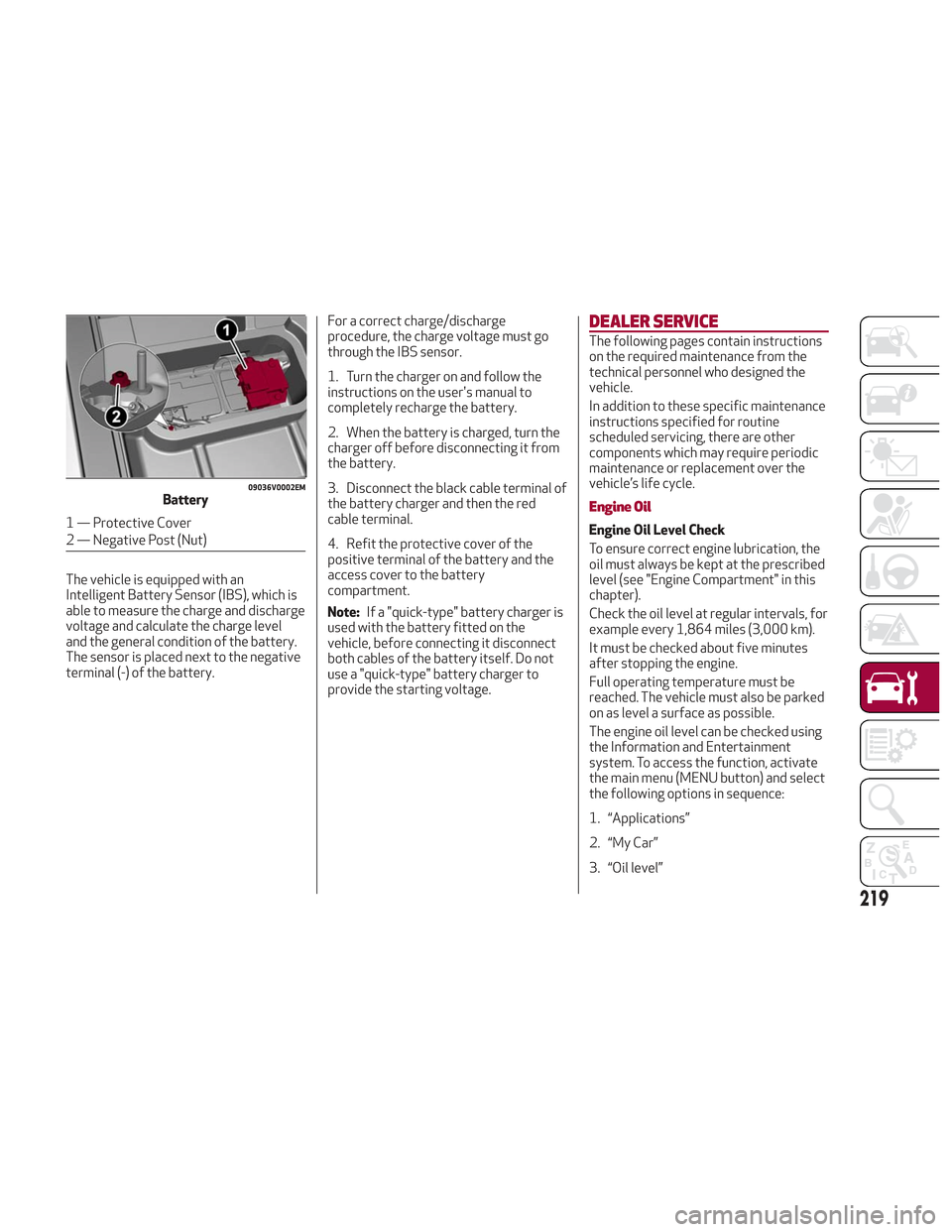
The vehicle is equipped with an
Intelligent Battery Sensor (IBS), which is
able to measure the charge and discharge
voltage and calculate the charge level
and the general condition of the battery.
The sensor is placed next to the negative
terminal (-) of the battery.For a correct charge/discharge
procedure, the charge voltage must go
through the IBS sensor.
1. Turn the charger on and follow the
instructions on the user's manual to
completely recharge the battery.
2. When the battery is charged, turn the
charger off before disconnecting it from
the battery.
3. Disconnect the black cable terminal of
the battery charger and then the red
cable terminal.
4. Refit the protective cover of the
positive terminal of the battery and the
access cover to the battery
compartment.
Note:
If a "quick-type" battery charger is
used with the battery fitted on the
vehicle, before connecting it disconnect
both cables of the battery itself. Do not
use a "quick-type" battery charger to
provide the starting voltage.
DEALER SERVICE
The following pages contain instructions
on the required maintenance from the
technical personnel who designed the
vehicle.
In addition to these specific maintenance
instructions specified for routine
scheduled servicing, there are other
components which may require periodic
maintenance or replacement over the
vehicle’s life cycle.
Engine Oil
Engine Oil Level Check
To ensure correct engine lubrication, the
oil must always be kept at the prescribed
level (see "Engine Compartment" in this
chapter).
Check the oil level at regular intervals, for
example every 1,864 miles (3,000 km).
It must be checked about five minutes
after stopping the engine.
Full operating temperature must be
reached. The vehicle must also be parked
on as level a surface as possible.
The engine oil level can be checked using
the Information and Entertainment
system. To access the function, activate
the main menu (MENU button) and select
the following options in sequence:
1. “Applications”
2. “My Car”
3. “Oil level”
09036V0002EMBattery
1 — Protective Cover
2 — Negative Post (Nut)
219