display Alfa Romeo Stelvio 2018 Owner's Guide
[x] Cancel search | Manufacturer: ALFA ROMEO, Model Year: 2018, Model line: Stelvio, Model: Alfa Romeo Stelvio 2018Pages: 276, PDF Size: 5.79 MB
Page 91 of 276
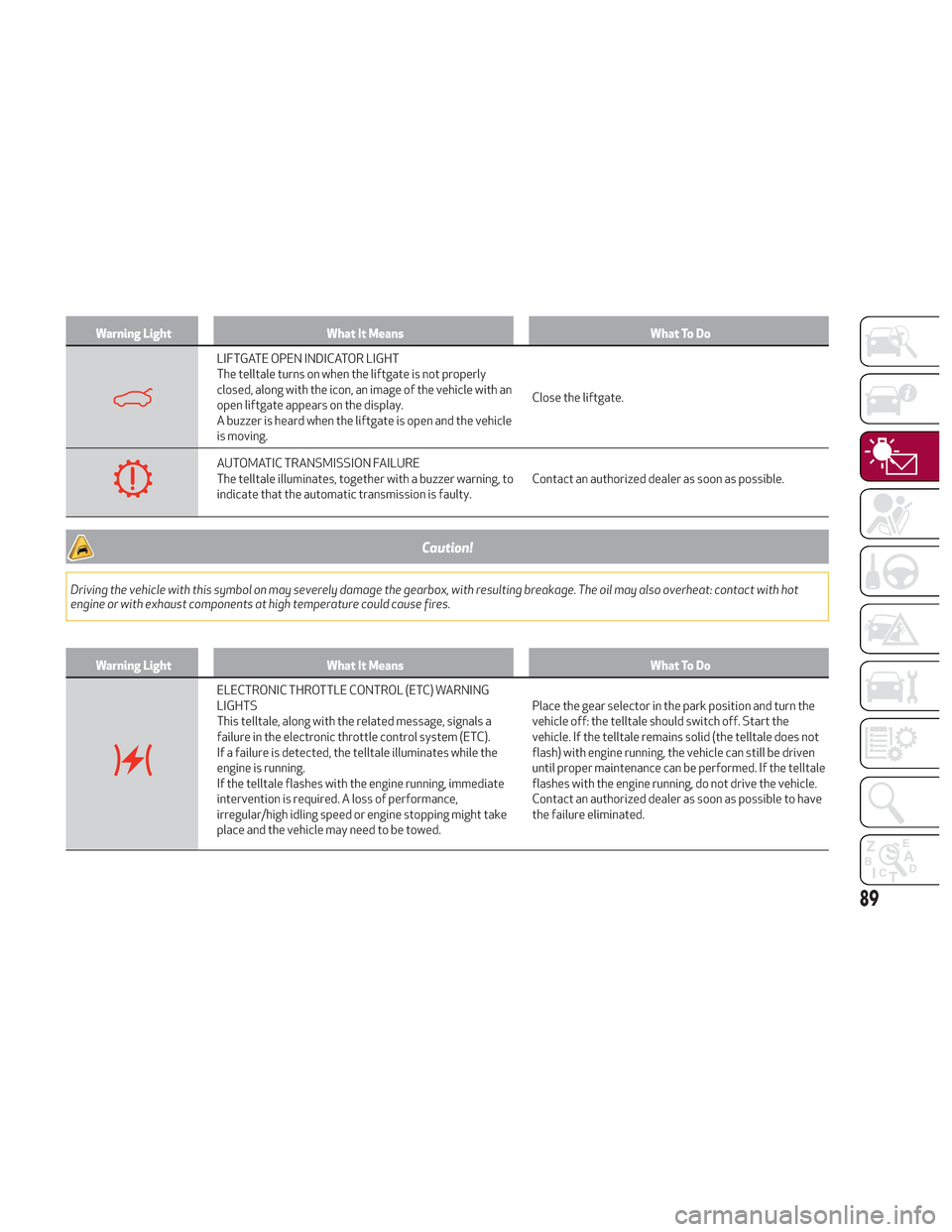
Warning LightWhat It Means What To Do
LIFTGATE OPEN INDICATOR LIGHT
The telltale turns on when the liftgate is not properly
closed, along with the icon, an image of the vehicle with an
open liftgate appears on the display.
A buzzer is heard when the liftgate is open and the vehicle
is moving.Close the liftgate.
AUTOMATIC TRANSMISSION FAILURE
The telltale illuminates, together with a buzzer warning, to
indicate that the automatic transmission is faulty.
Contact an authorized dealer as soon as possible.
Caution!
Driving the vehicle with this symbol on may severely damage the gearbox, with resulting breakage. The oil may also overheat: contact with hot
engine or with exhaust components at high temperature could cause fires.
Warning Light
What It Means What To Do
ELECTRONIC THROTTLE CONTROL (ETC) WARNING
LIGHTS
This telltale, along with the related message, signals a
failure in the electronic throttle control system (ETC).
If a failure is detected, the telltale illuminates while the
engine is running.
If the telltale flashes with the engine running, immediate
intervention is required. A loss of performance,
irregular/high idling speed or engine stopping might take
place and the vehicle may need to be towed.Place the gear selector in the park position and turn the
vehicle off: the telltale should switch off. Start the
vehicle. If the telltale remains solid (the telltale does not
flash) with engine running, the vehicle can still be driven
until proper maintenance can be performed. If the telltale
flashes with the engine running, do not drive the vehicle.
Contact an authorized dealer as soon as possible to have
the failure eliminated.
89
Page 92 of 276
Warning LightWhat It Means What To Do
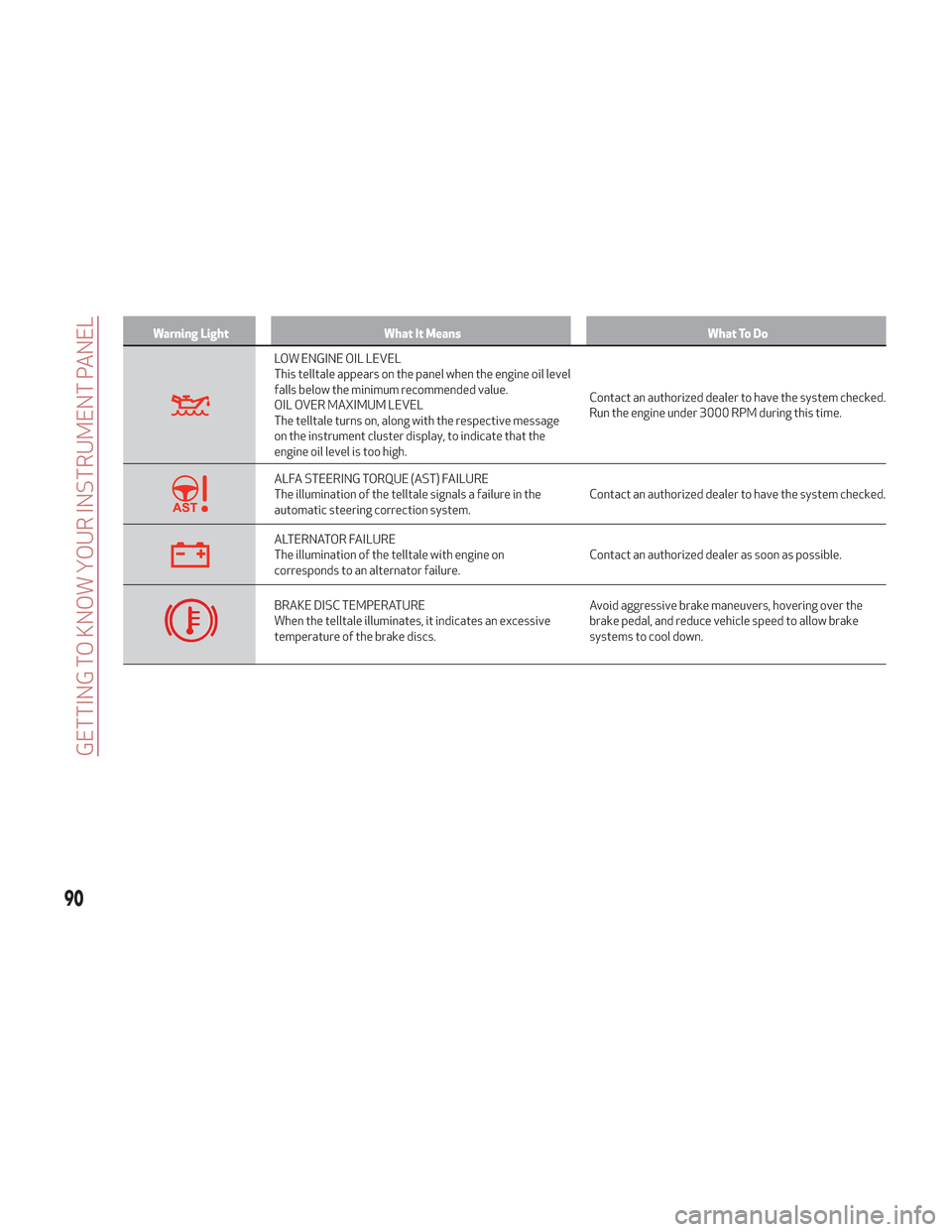
LOW ENGINE OIL LEVEL
This telltale appears on the panel when the engine oil level
falls below the minimum recommended value.
OIL OVER MAXIMUM LEVEL
The telltale turns on, along with the respective message
on the instrument cluster display, to indicate that the
engine oil level is too high.Contact an authorized dealer to have the system checked.
Run the engine under 3000 RPM during this time.
ALFA STEERING TORQUE (AST) FAILURE
The illumination of the telltale signals a failure in the
automatic steering correction system.
Contact an authorized dealer to have the system checked.
ALTERNATOR FAILURE
The illumination of the telltale with engine on
corresponds to an alternator failure.Contact an authorized dealer as soon as possible.
BRAKE DISC TEMPERATURE
When the telltale illuminates, it indicates an excessive
temperature of the brake discs.Avoid aggressive brake maneuvers, hovering over the
brake pedal, and reduce vehicle speed to allow brake
systems to cool down.
90
GETTING TO KNOW YOUR INSTRUMENT PANEL
Page 97 of 276
Warning LightWhat It Means What To Do
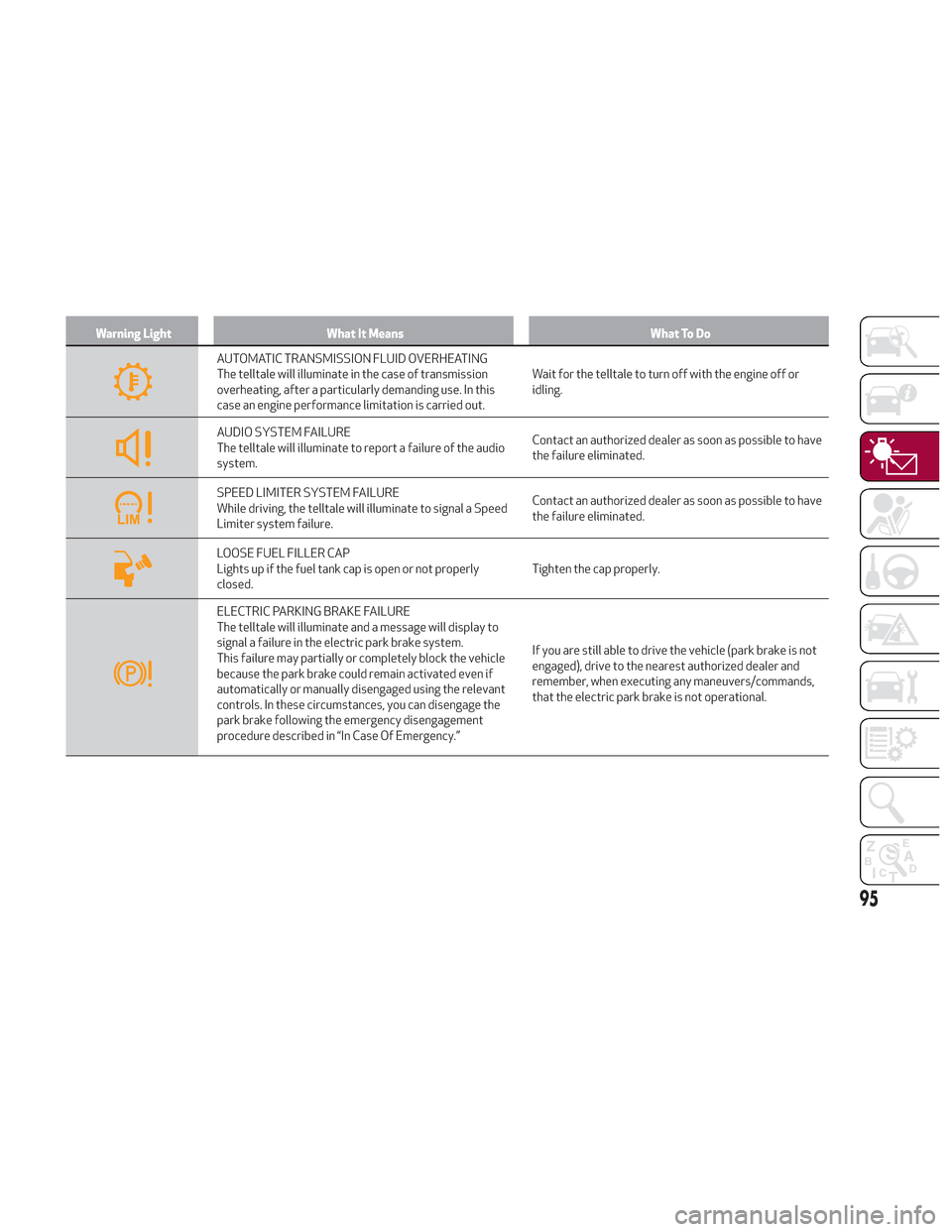
AUTOMATIC TRANSMISSION FLUID OVERHEATING
The telltale will illuminate in the case of transmission
overheating, after a particularly demanding use. In this
case an engine performance limitation is carried out.Wait for the telltale to turn off with the engine off or
idling.
AUDIO SYSTEM FAILURE
The telltale will illuminate to report a failure of the audio
system.
Contact an authorized dealer as soon as possible to have
the failure eliminated.
SPEED LIMITER SYSTEM FAILURE
While driving, the telltale will illuminate to signal a Speed
Limiter system failure.Contact an authorized dealer as soon as possible to have
the failure eliminated.
LOOSE FUEL FILLER CAP
Lights up if the fuel tank cap is open or not properly
closed.
Tighten the cap properly.
ELECTRIC PARKING BRAKE FAILURE
The telltale will illuminate and a message will display to
signal a failure in the electric park brake system.
This failure may partially or completely block the vehicle
because the park brake could remain activated even if
automatically or manually disengaged using the relevant
controls. In these circumstances, you can disengage the
park brake following the emergency disengagement
procedure described in “In Case Of Emergency.”If you are still able to drive the vehicle (park brake is not
engaged), drive to the nearest authorized dealer and
remember, when executing any maneuvers/commands,
that the electric park brake is not operational.
95
Page 112 of 276
Forward Collision Warning Plus (FCW+)
System
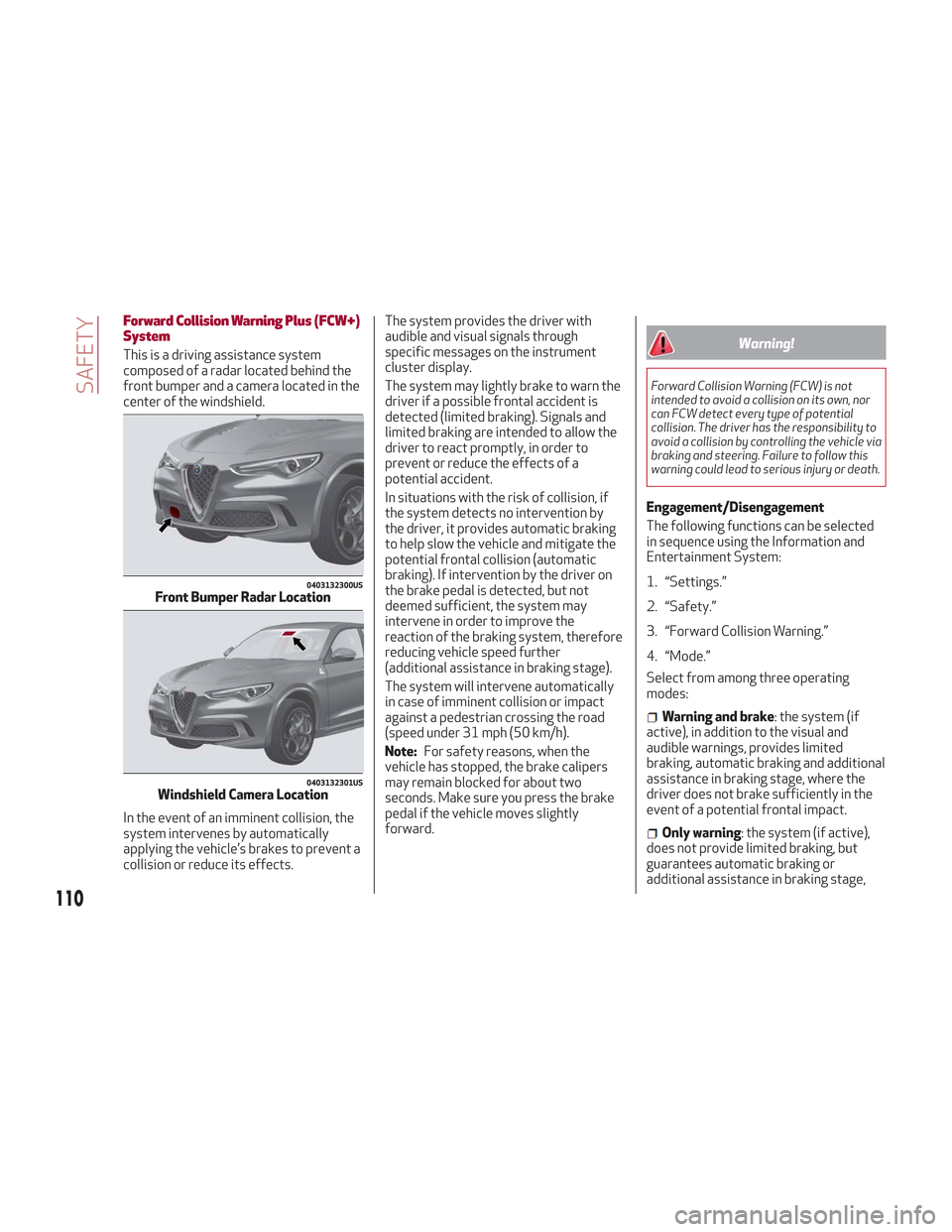
This is a driving assistance system
composed of a radar located behind the
front bumper and a camera located in the
center of the windshield.
In the event of an imminent collision, the
system intervenes by automatically
applying the vehicle’s brakes to prevent a
collision or reduce its effects.The system provides the driver with
audible and visual signals through
specific messages on the instrument
cluster display.
The system may lightly brake to warn the
driver if a possible frontal accident is
detected (limited braking). Signals and
limited braking are intended to allow the
driver to react promptly, in order to
prevent or reduce the effects of a
potential accident.
In situations with the risk of collision, if
the system detects no intervention by
the driver, it provides automatic braking
to help slow the vehicle and mitigate the
potential frontal collision (automatic
braking). If intervention by the driver on
the brake pedal is detected, but not
deemed sufficient, the system may
intervene in order to improve the
reaction of the braking system, therefore
reducing vehicle speed further
(additional assistance in braking stage).
The system will intervene automatically
in case of imminent collision or impact
against a pedestrian crossing the road
(speed under 31 mph (50 km/h).
Note:
For safety reasons, when the
vehicle has stopped, the brake calipers
may remain blocked for about two
seconds. Make sure you press the brake
pedal if the vehicle moves slightly
forward.Warning!
Forward Collision Warning (FCW) is not
intended to avoid a collision on its own, nor
can FCW detect every type of potential
collision. The driver has the responsibility to
avoid a collision by controlling the vehicle via
braking and steering. Failure to follow this
warning could lead to serious injury or death.
Engagement/Disengagement
The following functions can be selected
in sequence using the Information and
Entertainment System:
1. “Settings.”
2. “Safety.”
3. “Forward Collision Warning.”
4. “Mode.”
Select from among three operating
modes:
Warning and brake : the system (if
active), in addition to the visual and
audible warnings, provides limited
braking, automatic braking and additional
assistance in braking stage, where the
driver does not brake sufficiently in the
event of a potential frontal impact.
Only warning : the system (if active),
does not provide limited braking, but
guarantees automatic braking or
additional assistance in braking stage,
0403132300USFront Bumper Radar Location
0403132301USWindshield Camera Location
110
SAFETY
Page 113 of 276
where the driver does not brake at all or
not sufficiently in the event of a potential
frontal impact.
Disable: the system does not provide
visual and audible warnings, limited
braking, automatic braking or additional
assistance in braking stage. The system
will therefore provide no indication of a
possible collision.
Activation/Deactivation
The Forward Collision Warning system is
activated whenever the engine is started
regardless of what is shown in the
Information and Entertainment System.
Following a deactivation, the system will
not warn the driver about the possible
collision with a preceding vehicle,
regardless of the setting selected in the
Information and Entertainment System.
Note: Each time the engine is started,
the system is activated regardless of
what setting was selected when the
engine was turned OFF.
This function is not active at a speed
lower than 4 mph (7 km/h) or higher than
124 mph (200 km/h).
The system is active:
Each time the engine is started.
When feature is selected within the
Information and Entertainment System.
When the ignition is in the ON position.
When the vehicle speed is between
4 mph (7 km/h) and 124 mph (200 km/h).
When the front seat belts are
fastened.
The "Alfa DNA Pro" selector is not in
RACE position (if equipped).
Changing The System Sensitivity
The sensitivity of the system can be
changed through the Information and
Entertainment System menu, choosing
from one of the following three options:
"Near", "Med" or "Far". Refer to the
description in the Information and
Entertainment System Supplement for
how to change the settings.
The default setting is "Med". With this
setting, the system warns the driver of a
possible collision with the vehicle in front
when that vehicle is at a standard
distance, between that of the other two
settings.
With the system sensitivity set to "Far",
the system will warn the driver of a
possible collision with the vehicle in front
when that vehicle is at a greater distance,
thus providing the possibility of acting on
the brakes more lightly and gradually.
This setting provides the drivers with the
maximum possible reaction time to
prevent a potential accident.
With the option set to "Near", the system
will alert the driver of a possible collision
with the vehicle in front when that vehicle
is close. This setting offers the driver a
lower reaction time compared to the "Med" and "Far" settings, in the event of a
potential collision, but permits more
dynamic driving of the vehicle.
The system sensitivity setting is kept in
the memory when the engine is turned
OFF.
System Limited Operation Warning
If a dedicated message is displayed, a
condition limiting the system operation
may have occurred. The possible reasons
of this limitation are something is
blocking the camera view or a fault.
If an obstruction is signaled, clean the
area of the radar on the front bumper,
and the camera area on the windshield.
If a fault in the system is occurring, it will
still be possible to drive the vehicle
normally, but automatic braking will not
be available in the event of an impending
collision.
When the conditions limiting the system
functions end, this will go back to normal
and complete operation. Should the fault
persist, contact your authorized dealer.
System Failure Signaling
If the system turns off and a dedicated
message is shown on the display, it
means that there is a fault with the
system.
In this case, it is still possible to drive the
vehicle, but you are advised to contact
your authorized dealer as soon as
possible.
111
Page 114 of 276
Radar Indication Not Available
If conditions are such that the radar
cannot detect obstacles correctly, the
system is deactivated and a dedicated
message appears on the display. This
generally occurs in the event of poor
visibility, such as when it is snowing or
raining heavily.
The function of this system can also be
temporarily reduced due to obstructions
such as mud, dirt or ice on the bumper. In
such cases, a dedicated message will be
shown on the display and the system will
be deactivated. This message can
sometimes appear in conditions of high
reflectivity (e.g. tunnels with reflective
tiles or ice or snow). When the conditions
limiting the system functions end, it will
go back to normal and complete
operation.
In certain cases, this dedicated message
could be displayed when the radar is not
detecting any vehicles or objects within
its view range.
If atmospheric conditions are not the
reason behind this message, check if the
sensor is dirty. It could be necessary to
clean or remove any obstructions in the
area.If the message appears frequently, even
in the absence of atmospheric conditions
such as snow, rain, mud or other
obstructions, contact your authorized
dealer for a sensor alignment check.
In the absence of visible obstructions,
manually removing the decorative cover
trim and cleaning the radar surface could
be required. Have this operation
performed at your authorized dealer.
Note:
It is recommended that you do not
install devices, accessories or
aerodynamic attachments in front of the
sensor or darken it in any way, as this can
compromise the correct functioning of
the system.
Frontal Collision Alarm With Active
Braking
If this function is selected, the brakes are
operated to reduce the speed of the
vehicle in the event of potential frontal
impact.
This function applies an additional
braking pressure if the braking pressure
applied by the driver does not suffice to
prevent potential frontal impact.
The function is active with speed above
4 mph (7 km/h).
Driving In Special Conditions
In certain driving conditions, system
intervention might be unexpected or
delayed. The driver must therefore be
very careful, keeping control of the
vehicle to drive in complete safety.Driving close to a bend.
The vehicle ahead is leaving a
roundabout.
Vehicles with small dimensions and/or
not aligned in the driving lane.
Lane change by other vehicles.
Vehicles traveling at right angles to the
vehicle.
Note: In particularly complex traffic
conditions, the driver can deactivate the
system manually through the Information
and Entertainment System.
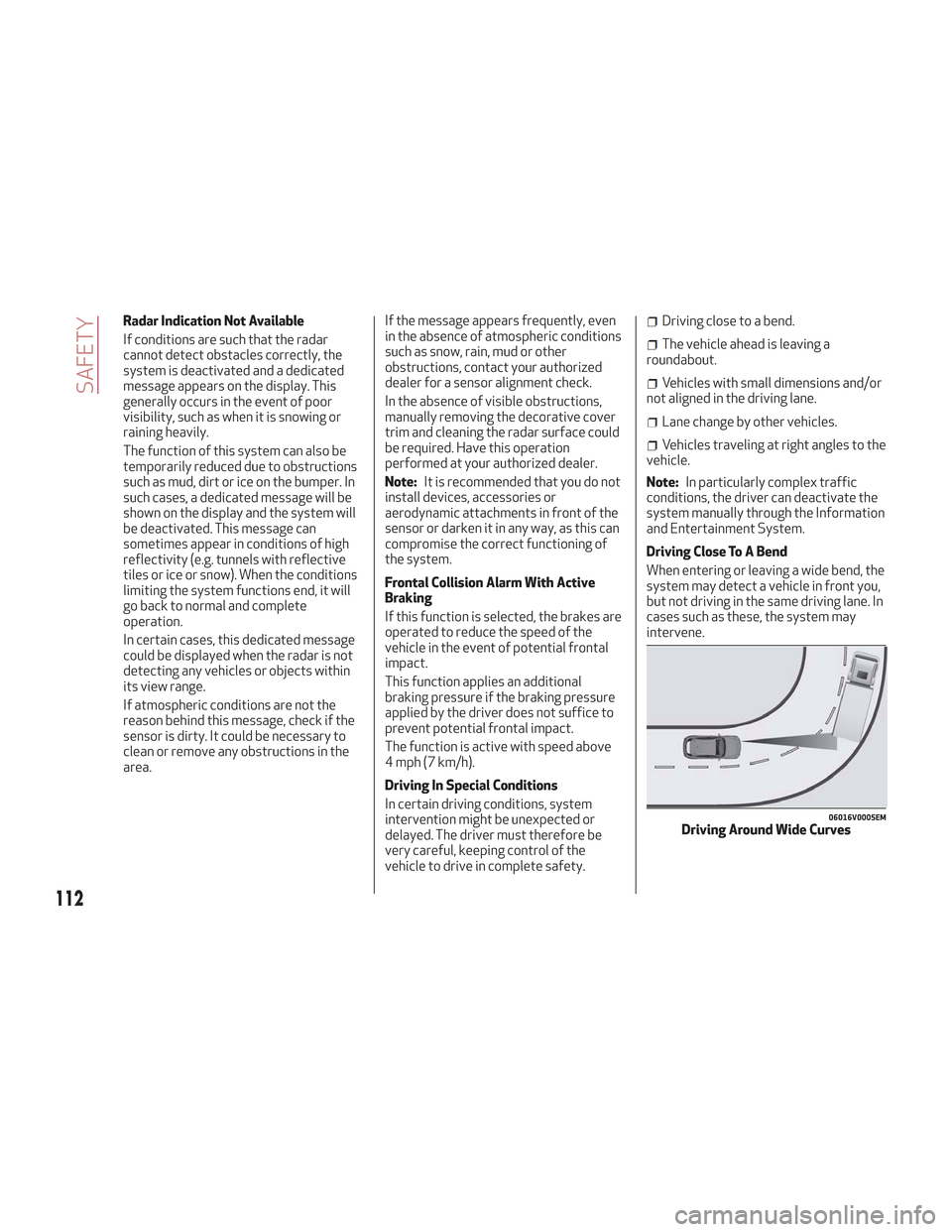
Driving Close To A Bend
When entering or leaving a wide bend, the
system may detect a vehicle in front you,
but not driving in the same driving lane. In
cases such as these, the system may
intervene.
06016V0005EMDriving Around Wide Curves
112
SAFETY
Page 116 of 276
The system has been designed for road
use only. If the vehicle is driven on a track,
the system must be deactivated to avoid
unnecessary warnings. Automatic
deactivation is signaled by the dedicated
warning light/symbol switching on in the
instrument panel (refer to the instructions in
the "Warning Lights And Messages On The
Instrument Panel" in "Getting To Know Your
Instrument Panel" for further information).
General Information
This vehicle has systems that operate on
radio frequency that comply with Part
15 of the Federal Communications
Commission (FCC) rules and with
Industry Canada Standards RSS-
GEN/210/220/310.
Operation is subject to the following two
conditions:
1. The device may not cause harmful
interference.
2. The device must accept any
interference received, including
interference that may cause undesired
operation of the device.
Changes or modifications to any of these
systems by other than an authorized
service facility could void authorization
to use this equipment.
Tire Pressure Monitoring System
(TPMS)
The vehicle is equipped with a Tire
Pressure Monitoring System (TPMS) that
sends the inflation pressure information
of each tire to the control unit, and will
signal the driver in the event of
insufficient tire pressure.
Tire pressure will vary with temperature
by approximately 1 psi (7 kPa) for every
12°F (6.5°C). This means that when the
outside temperature decreases, the tire
pressure will also decrease. Tire pressure
should always be set based on cold
inflation tire pressure. This is defined as
the tire pressure after the vehicle has not
been driven for at least three hours, or
driven less than 1 mile (1.6 km) after a
three hour period. The cold tire inflation
pressure must not exceed the maximum
inflation pressure molded into the tire
sidewall. Refer to “Tires” in “Servicing
And Maintenance” for information on
how to properly inflate the vehicle’s tires.
The tire pressure will also increase as the
vehicle is driven. This is normal, and there
should be no adjustment for this
increased pressure.
The TPMS will signal the driver if
pressure falls below the warning limit for
any reason, including the effects of low
temperature and normal loss of pressure
from the tire.
The TPMS will stop indicating insufficient
tire pressure when pressure is equal to or
greater than the prescribed cold inflation level. Therefore, if insufficient tire
pressure is indicated by the (
) warning
light displaying in the instrument cluster,
increase the inflation pressure up to the
prescribed cold inflation value.
The system will automatically update,
and the “Tire Pressure Monitoring
Warning Light” will turn off once the
system receives the updated tire
pressures. The vehicle may need to be
driven for up to 20 minutes above
15 mph (24 km/h) in order for the TPMS
to receive this information.
Operating Example
For example, your vehicle may have a
recommended cold (parked for more than
three hours) placard pressure of 33 psi
(227 kPa). If the ambient temperature is
68°F (20°C), and the measured tire
pressure is 28 psi (193 kPa), a
temperature drop to 20°F (-7°C) will
decrease the tire pressure to
approximately 24 psi (165 kPa). This tire
pressure is low enough to turn on the
“Tire Pressure Monitoring Warning Light.”
Driving the vehicle may cause the tire
pressure to rise to approximately 28 psi
(193 kPa), but the “Tire Pressure
Monitoring Warning Light” will still be on.
In this situation, the “Tire Pressure
Monitoring Warning Light” will turn off
only after the tires are inflated to the
vehicle’s recommended cold placard
pressure value.
114
SAFETY
Page 117 of 276
Caution!
The TPMS has been optimized for the
original equipment tires and wheels. TPMS
pressures and warning have been
established for the tire size equipped on
your vehicle. Undesirable system operation
or sensor damage may result when using
replacement equipment that is not of the
same size, type, and/or style. The TPM
sensor is not designed for use on
aftermarket wheels and may contribute to a
poor overall system performance or sensor
damage. Customers are encouraged to use
OEM wheels to assure proper TPM feature
operation.
Using aftermarket tire sealants may
cause the Tire Pressure Monitoring System
(TPMS) sensor to become inoperable. After
using an aftermarket tire sealant it is
recommended that you take your vehicle to
your authorized dealer to have your sensor
function checked.
After inspecting or adjusting the tire
pressure always reinstall the valve stem
cap. This will prevent moisture and dirt from
entering the valve stem, which could
damage the TPMS sensor.
Insufficient Tire Pressure Indication
If an insufficient pressure value is
detected on one or more tires, the
warning light in the instrument cluster
will display alongside the dedicated
messages, the system will highlight the
tire or tires with insufficient pressure
graphically, and an acoustic signal will be
emitted.
In this case, stop the vehicle, check the
inflation pressure of each tire, and inflate
the necessary tire or tires to the correct
cold inflation pressure value, shown on
the display or in the dedicated TPMS
menu.
TPMS Temporarily Disabled:
TPMS Check Message
When a system fault is detected, the “Tire
Pressure Monitoring Warning Light” will
flash on and off for 75 seconds, and then
remain on solid. The system fault will also
sound a chime. If the ignition is cycled,
this sequence will repeat, provided that
the system fault still exists. The “Tire
Pressure Monitoring Warning Light” will
turn off when the fault condition no
longer exists. A system fault can occur
due to any of the following:
Jamming due to electronic devices or
driving next to facilities emitting the
same radio frequencies as the TPMS
sensors.
Installing some form of aftermarket
window tinting that affects radio wave
signals.
Packed snow or ice around the wheels
or wheel housings.
Using tire chains on the vehicle.
Using wheels/tires not equipped with
TPMS sensors.
After the punctured tire has been
repaired with the original tire sealant
contained in the TireKit, the previous
condition must be restored so that the
warning light is off during normal
driving.
TPMS Deactivation
The TPMS can be deactivated by
replacing all four wheel and tire
assemblies (road tires) with wheel and
tire assemblies that do not have TPMS
Sensors, such as when installing winter
wheel and tire assemblies on your
vehicle.
To deactivate the TPMS, first replace all
four wheel and tire assemblies (road
tires) with tires not equipped with Tire
Pressure Monitoring (TPM) Sensors.
Then, drive the vehicle for 20 minutes
above 15 mph (24 km/h). The TPMS will
chime, the "TPMS Warning Light" will
flash on and off for 75 seconds and then
remain on. The instrument cluster will
display the “SERVICE TPM SYSTEM”
message and then display dashes (--) in
place of the pressure values.
115
Page 118 of 276
Beginning with the next ignition switch
cycle, the TPMS will no longer chime or
display the “SERVICE TPM SYSTEM”
message in the instrument cluster.
Instead, dashes (--) will remain in place of
the pressure values.
To reactivate the TPMS, replace all four
wheel and tire assemblies (road tires)
with tires equipped with TPM sensors.
Then, drive the vehicle for up to
20 minutes above 15 mph (24 km/h). The
TPMS will chime, the "TPM Warning
Light" will flash on and off for 75 seconds
and then turn off. The instrument cluster
will display the “SERVICE TPM SYSTEM”
message and then display pressure
values in place of the dashes. On the next
ignition switch cycle the "SERVICE TPM
SYSTEM" message will no longer be
displayed, as long as no system fault
exists.Note:
The TPMS is not intended to replace
normal tire care and maintenance, or to
provide warning of a tire failure or
condition.
The TPMS should not be used as a
tire pressure gauge while adjusting your
tire pressure.
Driving on a significantly
underinflated tire will cause the tire to
overheat, and can lead to tire failure.
Underinflation also reduces fuel
efficiency and tire tread life, and may
affect the vehicle’s handling and
stopping ability.
The TPMS is not a substitute for
proper tire maintenance, and it is the
driver’s responsibility to maintain
correct tire pressure using an accurate
tire pressure gauge, even if
underinflation has not reached the level
to trigger illumination of the “Tire
Pressure Monitoring Warning Light”.
Seasonal temperature changes will
affect tire pressure, and the TPMS will
monitor the actual tire pressure in the
tire.
General Information
The following regulatory statement
applies to all radio frequency (RF)
devices equipped in this vehicle:
This device complies with Part 15 of the
FCC rules and RSS-210 of Industry
Canada. Operation is subject to the
following two conditions:
(1) This device may not cause harmful
interference.
(2) This device must accept any
interference received, including
interference that may cause undesired
operation.
Note: Changes or modifications not
expressly approved by the party
responsible for compliance could void the
user’s authority to operate the
equipment.
116
SAFETY
Page 131 of 276
Warning!
Deployed air bags and seat belt
pretensioners cannot protect you in another
collision. Have the air bags, seat belt
pretensioners, and the seat belt retractor
assemblies replaced by an authorized dealer
immediately. Also, have the Occupant
Restraint Controller System serviced as
well.
Note:
Air bag covers may not be obvious in
the interior trim, but they will open
during air bag deployment.
After any collision, the vehicle should
be taken to an authorized dealer
immediately.
Enhanced Accident Response
System
In the event of an impact, if the
communication network remains intact,
and the power remains intact, depending
on the nature of the event, the ORC will
determine whether to have the Enhanced
Accident Response System perform the
following functions:
Cut off fuel to the engine (If Equipped)
Cut off battery power to the electric
motor (If Equipped)
Flash hazard lights as long as the
battery has power
Turn on the interior lights, which
remain on as long as the battery has
power or for 15 minutes from the
intervention of the Enhanced Accident
Response System.
Unlock the power door locks.
Your vehicle may also be designed to
perform any of these other functions in
response to the Enhanced Accident
Response System:
Turn off the Fuel Filter Heater, Turn off
the HVAC Blower Motor, Close the HVAC
Circulation Door
Cut off battery power to the:
– Engine
– Electric Motor (if equipped)
– Electric power steering
– Brake booster
– Electric park brake
– Automatic transmission gear selector
– Horn
– Front wiper
– Headlamp washer pump
Note: After an accident, remember to
cycle the ignition to the STOP
(OFF/LOCK) position and remove the key from the ignition switch to avoid draining
the battery. Carefully check the vehicle
for fuel leaks in the engine compartment
and on the ground near the engine
compartment and fuel tank before
resetting the system and starting the
engine. If there are no fuel leaks or
damage to the vehicle electrical devices
(e.g. headlights) after an accident, reset
the system by following the procedure
described below.
Enhanced Accident Response
System Reset Procedure
After the event occurs, when the system
is active, a message regarding fuel cutoff
is displayed. Turn the ignition switch from
ignition AVV/START or MAR/ACC/ON/
RUN to ignition STOP/OFF/LOCK.
Carefully check the vehicle for fuel leaks
in the engine compartment and on the
ground near the engine compartment and
fuel tank before resetting the system and
starting the engine.
Depending on the nature of the event the
left and right turn signal lights, located in
the instrument panel, may both be
blinking and will continue to blink. In order
to move your vehicle to the side of the
road, you must follow the system reset
procedure.
129