low beam Alfa Romeo Stelvio 2018 Owner's Manual
[x] Cancel search | Manufacturer: ALFA ROMEO, Model Year: 2018, Model line: Stelvio, Model: Alfa Romeo Stelvio 2018Pages: 276, PDF Size: 5.79 MB
Page 42 of 276
Headlight Off Delay
The “Headlight Off Delay” function delays
the turning off of the headlights after the
vehicle’s engine has been stopped.
The function can be activated from the
Information and Entertainment System
by selecting the following functions in
sequence on the main menu:
1. “Settings.”
2. “Lights.”
3. “Headlight Off Delay.”
The side lights and the headlights stay on
for a time that can be set between 30,
60, and 90 seconds.
Function Activation
With the headlights on, cycle the ignition
to STOP mode and the timer will start.
Note:To activate this function, the
headlights must be deactivated within
two minutes after the ignition has been
cycled to the STOP mode.
Function Deactivation
This function is deactivated by turning on
the headlights, the side lights, or by
cycling the ignition to ON mode.
Adaptive Headlight System (AFS)
This is a system combined with Xenon
headlights (Bi-Xenon 35 W headlamp if
equipped) which directs the headlights
horizontally, and continuously and
automatically adapts them to the driving
conditions around bends or when
cornering.
The system directs the headlights to light
up the road in the best way, taking into
account the speed of the vehicle and the
bend or corner angle, as well as the speed
of steering.
The adaptive lights are automatically
activated when the vehicle is started.
High Beam Headlights
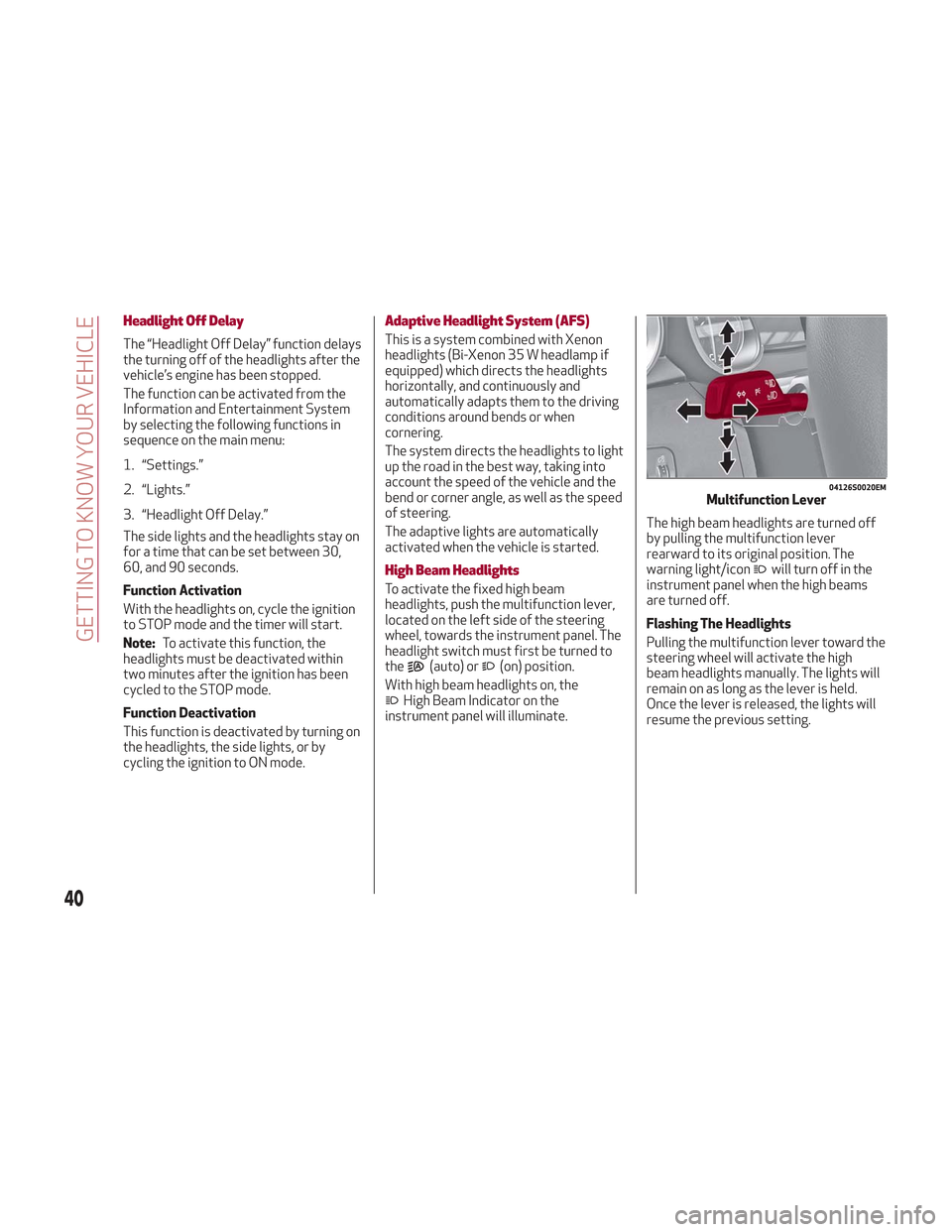
To activate the fixed high beam
headlights, push the multifunction lever,
located on the left side of the steering
wheel, towards the instrument panel. The
headlight switch must first be turned to
the
(auto) or(on) position.
With high beam headlights on, the
High Beam Indicator on the
instrument panel will illuminate. The high beam headlights are turned off
by pulling the multifunction lever
rearward to its original position. The
warning light/icon
will turn off in the
instrument panel when the high beams
are turned off.
Flashing The Headlights
Pulling the multifunction lever toward the
steering wheel will activate the high
beam headlights manually. The lights will
remain on as long as the lever is held.
Once the lever is released, the lights will
resume the previous setting.
04126S0020EMMultifunction Lever
40
GETTING TO KNOW YOUR VEHICLE
Page 43 of 276
Automatic High Beam Headlights — If
Equipped
The Automatic High Beam Headlights
system provides increased forward
lighting at night by automating high beam
control through the use of a digital
camera mounted on the windshield. This
camera detects vehicle specific light and
automatically turns from high beams to
low beams until the approaching vehicle
is out of view.
This function is enabled with the
Information and Entertainment System,
and can only be activated with the light
switch turned to the
(auto) position.
If the high beam headlights are on, the
blue icon/warning light
will illuminate
in the instrument panel.
When the speed is higher than 37 mph
(60 km/h) and the function is active, the
lights will turn off if the multifunction
lever is pushed again.
When the speed is lower than 15 mph
(25 km/h) and the function is active, the
function turns the high beam headlights
off.
If the high beam headlights are operated
again (pushing the multifunction lever
towards the instrument panel), the
warning light/icon
will illuminate in the
instrument panel, and the main beam
headlights only will be on until the speed
exceeds 37 mph (60 km/h).
When the speed of 37 mph (60 km/h) is
exceeded again, the automatic
functioning is reactivated. If the multifunction lever is pushed again
with the Automatic High Beam
Headlights activated, the function
deactivates.
This feature can also be deactivated by
rotating the headlight switch to the
position.
Note: If the system recognizes heavy
traffic areas, the automatic functions
remain disabled independently of the
vehicle’s speed.
Turn Signals
To activate the turn signals, move the
multifunction lever, located on the left
side of the steering wheel, up or down
until it reaches the detent. Moving the
lever upward flashes the right turn signal
and moving the lever downward will flash
the left turn signal.
The
orturn signal will blink on the
instrument panel.
The turn signals turn off automatically
when the vehicle is brought back onto a
straight course.
“Lane Change” Function
Tap the lever up or down once, without
moving beyond the detent, and the turn
signal (right or left) will flash five times.
Then, the turn signal (right or left) will
automatically turn off.
To turn off the flashing before the end of
the cycle, move the lever in the opposite
direction until the first click (about half
way).
INTERIOR LIGHTS
Front Map Reading Lights
The front map/reading and overhead
lights are mounted in the overhead
console. Each light can be turned on by
pushing the corresponding switch on the
console. These switches are backlit for
night time visibility. To turn the lights off,
push the switch a second time.
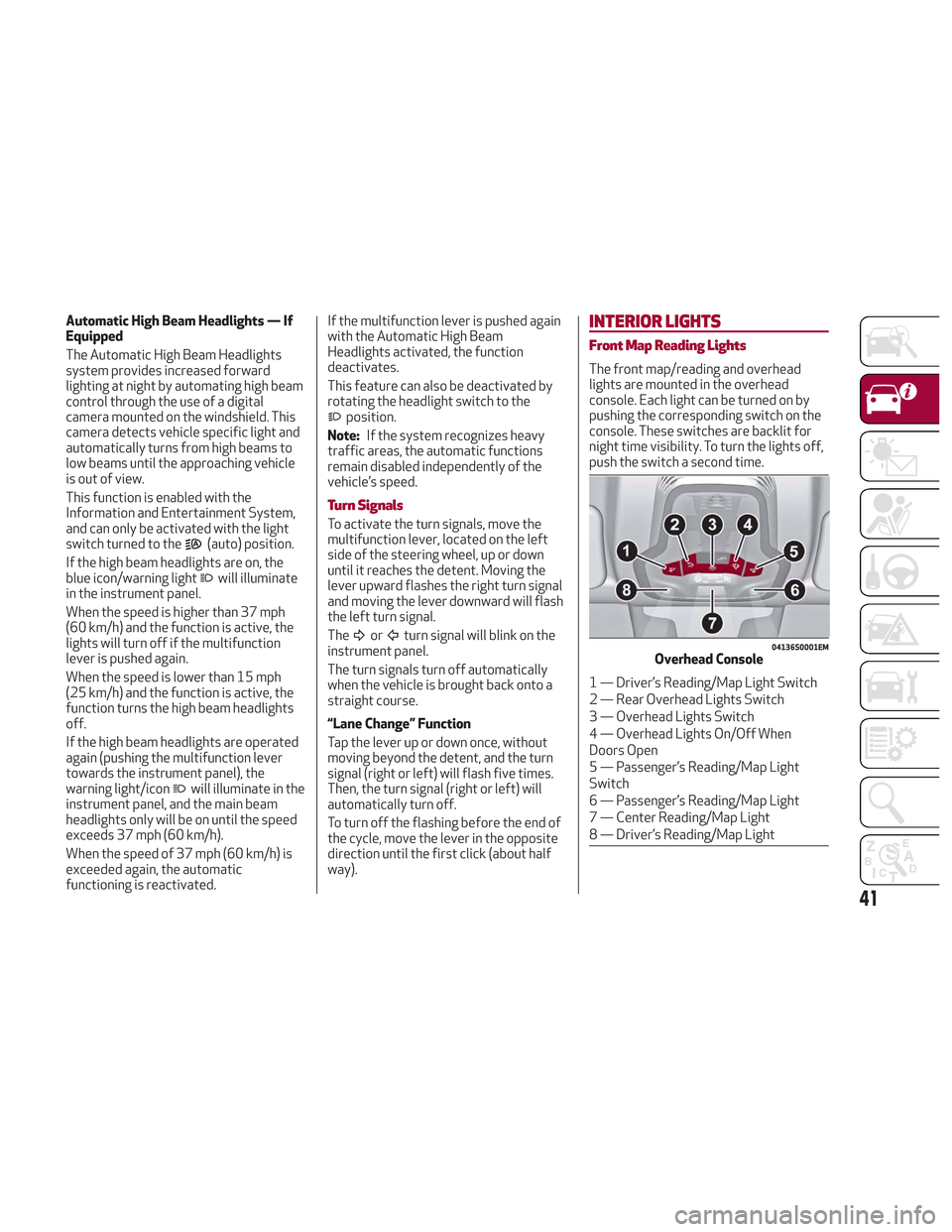
04136S0001EMOverhead Console
1 — Driver’s Reading/Map Light Switch
2 — Rear Overhead Lights Switch
3 — Overhead Lights Switch
4 — Overhead Lights On/Off When
Doors Open
5 — Passenger’s Reading/Map Light
Switch
6 — Passenger’s Reading/Map Light
7 — Center Reading/Map Light
8 — Driver’s Reading/Map Light
41
Page 87 of 276
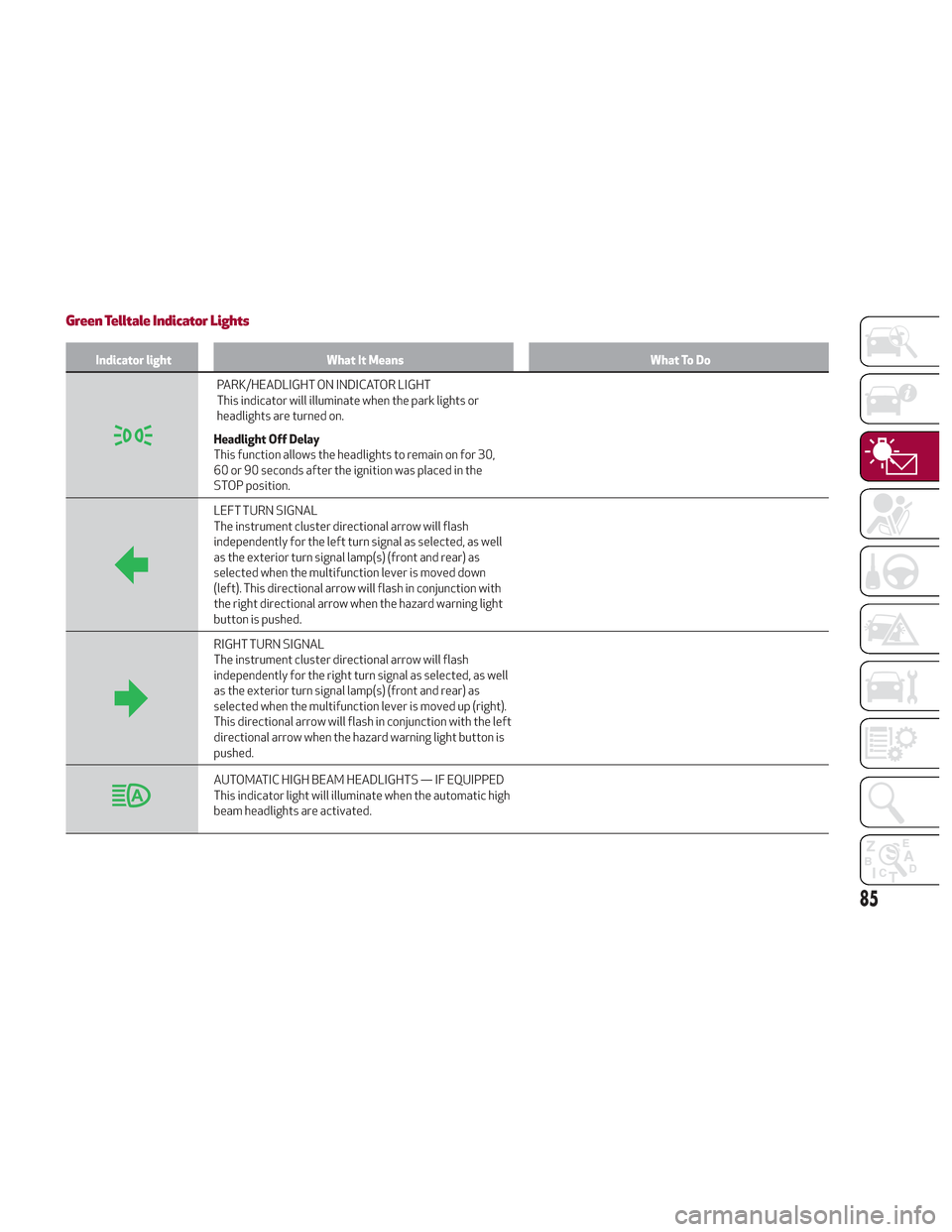
Green Telltale Indicator Lights
Indicator lightWhat It Means What To Do
PARK/HEADLIGHT ON INDICATOR LIGHT
This indicator will illuminate when the park lights or
headlights are turned on.
Headlight Off Delay
This function allows the headlights to remain on for 30,
60 or 90 seconds after the ignition was placed in the
STOP position.
LEFT TURN SIGNAL
The instrument cluster directional arrow will flash
independently for the left turn signal as selected, as well
as the exterior turn signal lamp(s) (front and rear) as
selected when the multifunction lever is moved down
(left). This directional arrow will flash in conjunction with
the right directional arrow when the hazard warning light
button is pushed.
RIGHT TURN SIGNAL
The instrument cluster directional arrow will flash
independently for the right turn signal as selected, as well
as the exterior turn signal lamp(s) (front and rear) as
selected when the multifunction lever is moved up (right).
This directional arrow will flash in conjunction with the left
directional arrow when the hazard warning light button is
pushed.
AUTOMATIC HIGH BEAM HEADLIGHTS — IF EQUIPPED
This indicator light will illuminate when the automatic high
beam headlights are activated.
85
Page 88 of 276
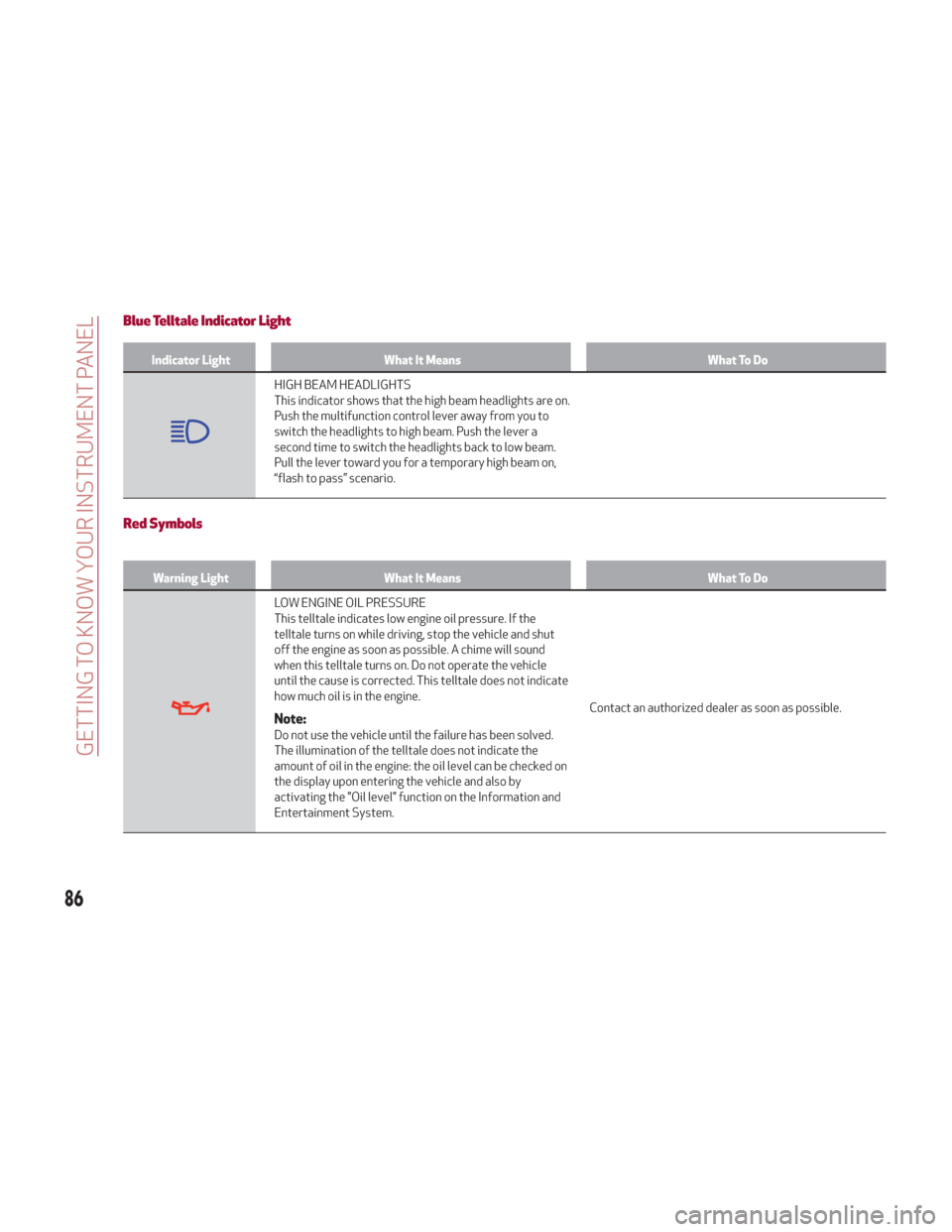
Blue Telltale Indicator Light
Indicator LightWhat It Means What To Do
HIGH BEAM HEADLIGHTS
This indicator shows that the high beam headlights are on.
Push the multifunction control lever away from you to
switch the headlights to high beam. Push the lever a
second time to switch the headlights back to low beam.
Pull the lever toward you for a temporary high beam on,
“flash to pass” scenario.
Red Symbols
Warning LightWhat It Means What To Do
LOW ENGINE OIL PRESSURE
This telltale indicates low engine oil pressure. If the
telltale turns on while driving, stop the vehicle and shut
off the engine as soon as possible. A chime will sound
when this telltale turns on. Do not operate the vehicle
until the cause is corrected. This telltale does not indicate
how much oil is in the engine.
Note:Do not use the vehicle until the failure has been solved.
The illumination of the telltale does not indicate the
amount of oil in the engine: the oil level can be checked on
the display upon entering the vehicle and also by
activating the "Oil level" function on the Information and
Entertainment System.Contact an authorized dealer as soon as possible.
86
GETTING TO KNOW YOUR INSTRUMENT PANEL
Page 95 of 276
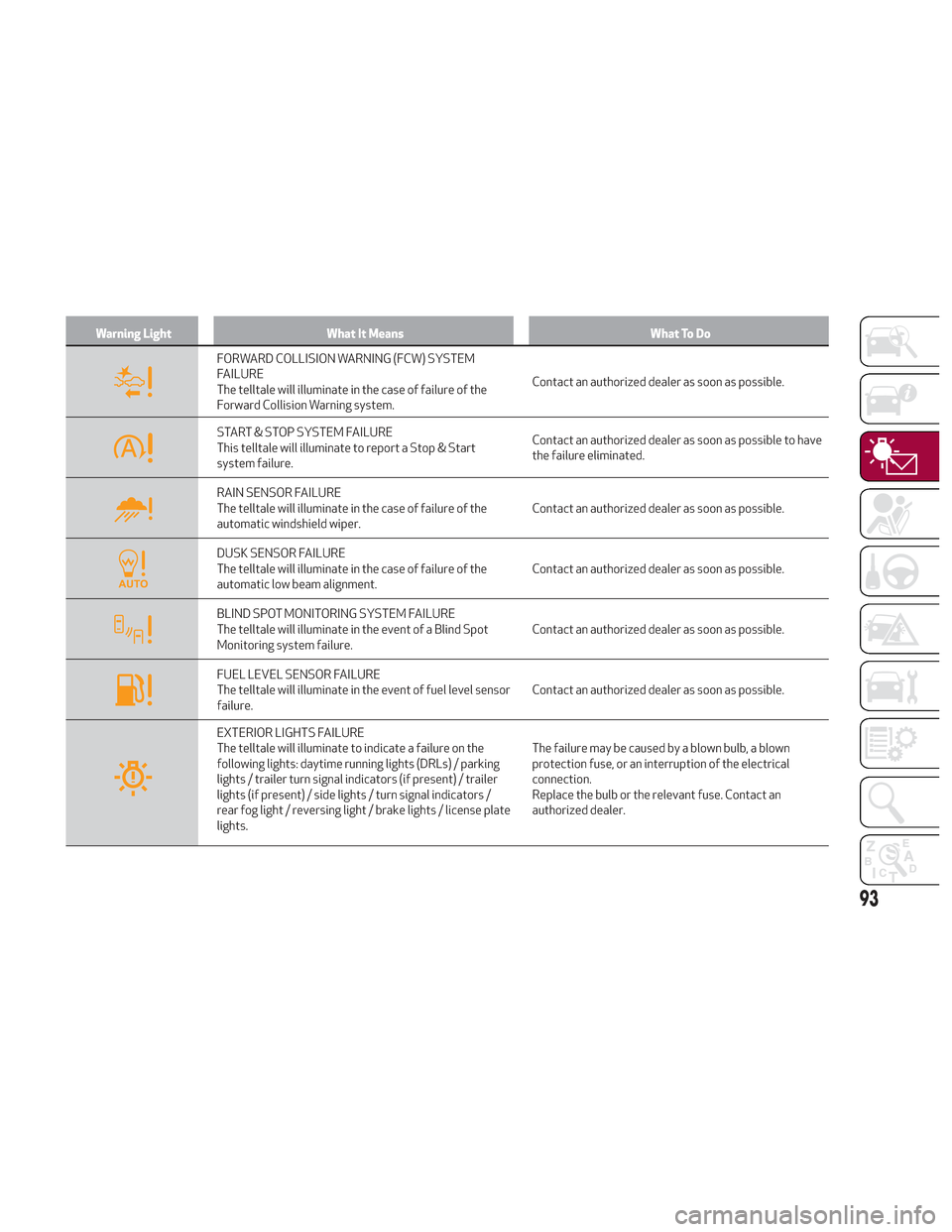
Warning LightWhat It Means What To Do
FORWARD COLLISION WARNING (FCW) SYSTEM
FAILURE
The telltale will illuminate in the case of failure of the
Forward Collision Warning system.Contact an authorized dealer as soon as possible.
START & STOP SYSTEM FAILURE
This telltale will illuminate to report a Stop & Start
system failure.Contact an authorized dealer as soon as possible to have
the failure eliminated.
RAIN SENSOR FAILURE
The telltale will illuminate in the case of failure of the
automatic windshield wiper.
Contact an authorized dealer as soon as possible.
DUSK SENSOR FAILURE
The telltale will illuminate in the case of failure of the
automatic low beam alignment.Contact an authorized dealer as soon as possible.
BLIND SPOT MONITORING SYSTEM FAILURE
The telltale will illuminate in the event of a Blind Spot
Monitoring system failure.Contact an authorized dealer as soon as possible.
FUEL LEVEL SENSOR FAILURE
The telltale will illuminate in the event of fuel level sensor
failure.Contact an authorized dealer as soon as possible.
EXTERIOR LIGHTS FAILURE
The telltale will illuminate to indicate a failure on the
following lights: daytime running lights (DRLs) / parking
lights / trailer turn signal indicators (if present) / trailer
lights (if present) / side lights / turn signal indicators /
rear fog light / reversing light / brake lights / license plate
lights.The failure may be caused by a blown bulb, a blown
protection fuse, or an interruption of the electrical
connection.
Replace the bulb or the relevant fuse. Contact an
authorized dealer.
93
Page 193 of 276
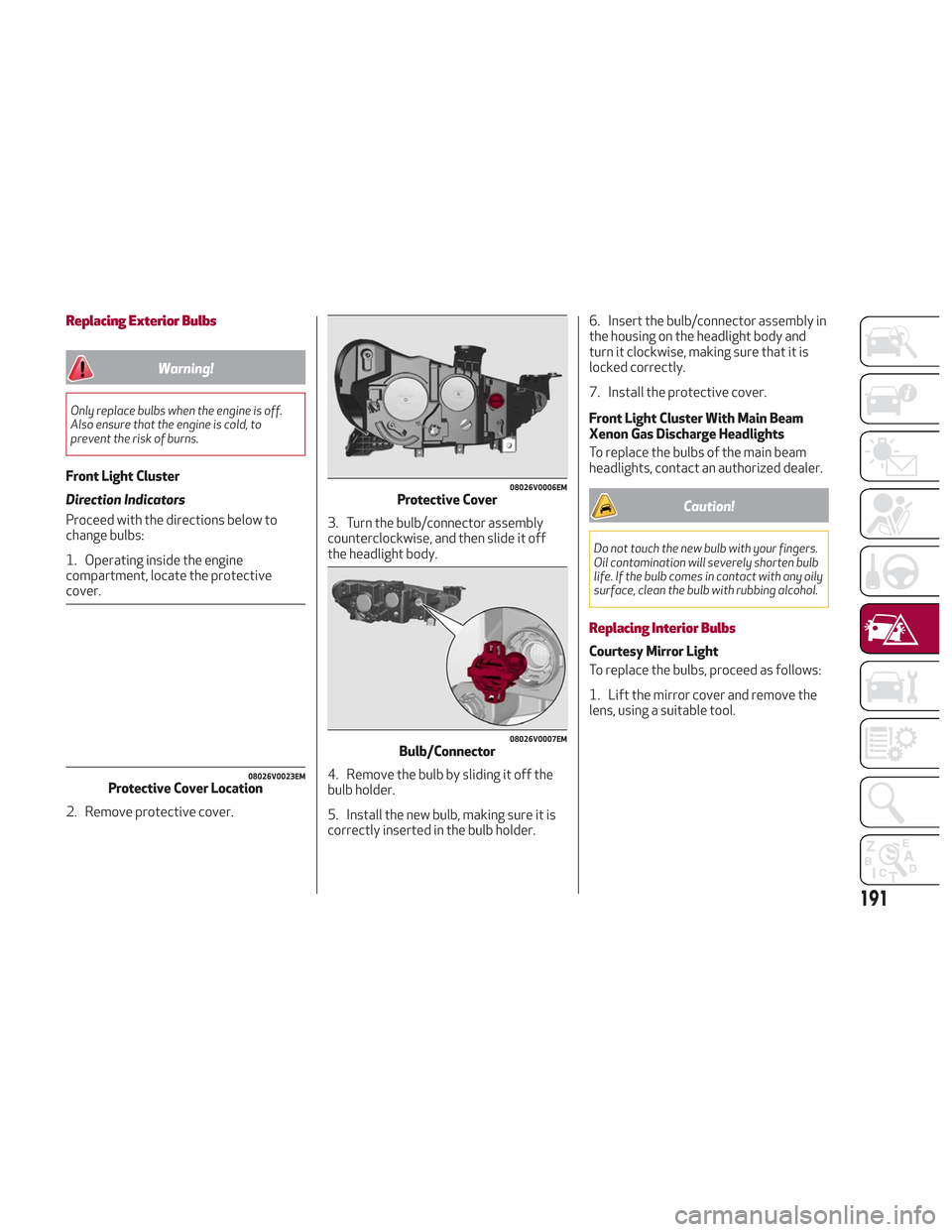
Replacing Exterior Bulbs
Warning!
Only replace bulbs when the engine is off.
Also ensure that the engine is cold, to
prevent the risk of burns.
Front Light Cluster
Direction Indicators
Proceed with the directions below to
change bulbs:
1. Operating inside the engine
compartment, locate the protective
cover.
2. Remove protective cover.3. Turn the bulb/connector assembly
counterclockwise, and then slide it off
the headlight body.
4. Remove the bulb by sliding it off the
bulb holder.
5. Install the new bulb, making sure it is
correctly inserted in the bulb holder.6. Insert the bulb/connector assembly in
the housing on the headlight body and
turn it clockwise, making sure that it is
locked correctly.
7. Install the protective cover.
Front Light Cluster With Main Beam
Xenon Gas Discharge Headlights
To replace the bulbs of the main beam
headlights, contact an authorized dealer.
Caution!
Do not touch the new bulb with your fingers.
Oil contamination will severely shorten bulb
life. If the bulb comes in contact with any oily
surface, clean the bulb with rubbing alcohol.
Replacing Interior Bulbs
Courtesy Mirror Light
To replace the bulbs, proceed as follows:
1. Lift the mirror cover and remove the
lens, using a suitable tool.
08026V0023EMProtective Cover Location
08026V0006EMProtective Cover
08026V0007EMBulb/Connector
191