torque ALFA ROMEO STELVIO 2021 User Guide
[x] Cancel search | Manufacturer: ALFA ROMEO, Model Year: 2021, Model line: STELVIO, Model: ALFA ROMEO STELVIO 2021Pages: 280, PDF Size: 10.02 MB
Page 150 of 280
SAFETY
148
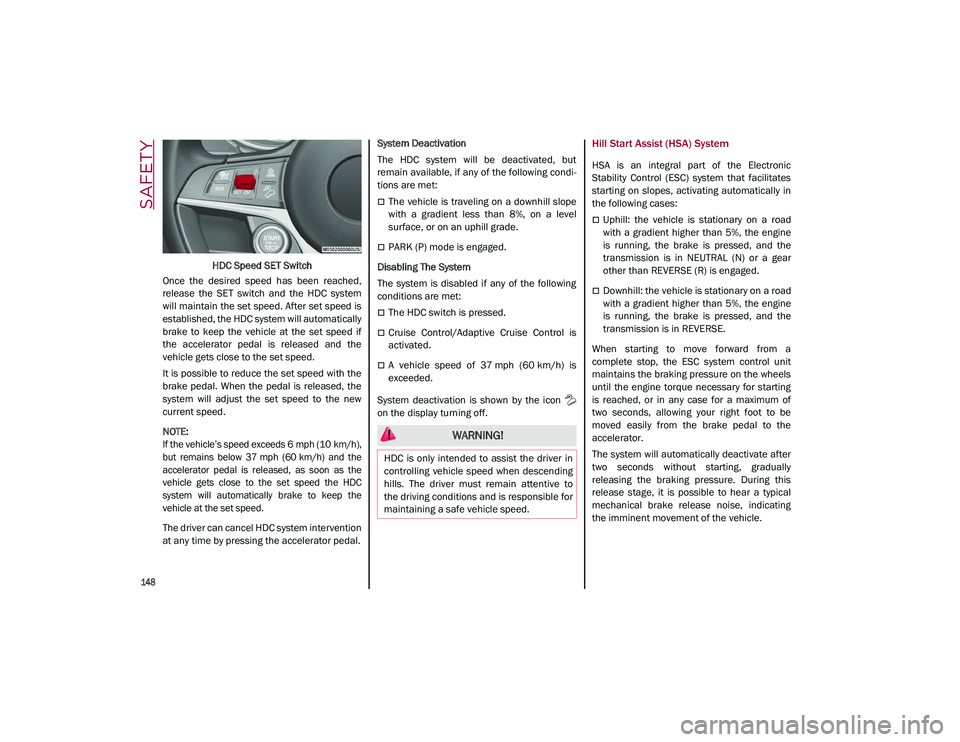
HDC Speed SET Switch
Once the desired speed has been reached,
release the SET switch and the HDC system
will maintain the set speed. After set speed is
established, the HDC system will automatically
brake to keep the vehicle at the set speed if
the accelerator pedal is released and the
vehicle gets close to the set speed.
It is possible to reduce the set speed with the
brake pedal. When the pedal is released, the
system will adjust the set speed to the new
current speed.
NOTE:
If the vehicle’s speed exceeds 6 mph (10 km/h),
but remains below 37 mph (60 km/h) and the
accelerator pedal is released, as soon as the
vehicle gets close to the set speed the HDC
system will automatically brake to keep the
vehicle at the set speed.
The driver can cancel HDC system intervention
at any time by pressing the accelerator pedal. System Deactivation
The HDC system will be deactivated, but
remain available, if any of the following condi
-
tions are met:
The vehicle is traveling on a downhill slope
with a gradient less than 8%, on a level
surface, or on an uphill grade.
PARK (P) mode is engaged.
Disabling The System
The system is disabled if any of the following
conditions are met:
The HDC switch is pressed.
Cruise Control/Adaptive Cruise Control is
activated.
A vehicle speed of 37 mph (60 km/h) is
exceeded.
System deactivation is shown by the icon
on the display turning off.
Hill Start Assist (HSA) System
HSA is an integral part of the Electronic
Stability Control (ESC) system that facilitates
starting on slopes, activating automatically in
the following cases:
Uphill: the vehicle is stationary on a road
with a gradient higher than 5%, the engine
is running, the brake is pressed, and the
transmission is in NEUTRAL (N) or a gear
other than REVERSE (R) is engaged.
Downhill: the vehicle is stationary on a road
with a gradient higher than 5%, the engine
is running, the brake is pressed, and the
transmission is in REVERSE.
When starting to move forward from a
complete stop, the ESC system control unit
maintains the braking pressure on the wheels
until the engine torque necessary for starting
is reached, or in any case for a maximum of
two seconds, allowing your right foot to be
moved easily from the brake pedal to the
accelerator.
The system will automatically deactivate after
two seconds without starting, gradually
releasing the braking pressure. During this
release stage, it is possible to hear a typical
mechanical brake release noise, indicating
the imminent movement of the vehicle.
WARNING!
HDC is only intended to assist the driver in
controlling vehicle speed when descending
hills. The driver must remain attentive to
the driving conditions and is responsible for
maintaining a safe vehicle speed.
21_GU_OM_EN_USC_t.book Page 148
Page 151 of 280
149
Panic Brake Assist (PBA) System
The PBA system is designed to improve the
vehicle’s braking capacity during emergency
braking.
The system detects emergency braking by
monitoring the speed and force with which the
brake pedal is pressed, and consequently
applies the optimal brake pressure. This can
reduce the braking distance: the PBA system
therefore complements the ABS.
Maximum assistance from the PBA system is
obtained by pressing the brake pedal very
quickly. In addition, the brake pedal should be
pressed continuously during braking, avoiding
intermittent presses, to get the most out of thesystem. Do not reduce pressure on the brake
pedal until braking is no longer necessary.
The PBA system is deactivated when the brake
pedal is released.Traction Control System (TCS)
The TCS automatically operates in the event of
slipping, loss of grip on wet roads (hydro
-
planing), and acceleration on one or both drive
wheels on roads that are slippery, snowy, icy,
etc. Depending on the slipping conditions, two
different control systems are activated:
If the slipping involves both drive wheels,
the system intervenes, reducing the power
transmitted by the engine.
If the slipping only involves one of the drive
wheels, the Brake Limited Differential (BLD)
function is activated, automatically braking the wheel which is slipping (the behavior of
a self-locking differential is simulated). This
will increase the engine torque transferred
to the wheel which isn't slipping.
System Intervention
The intervention of the system is indicated by
the flashing of the ESC warning light on the
instrument panel, to inform the driver that the
vehicle stability and grip are critical.
AUXILIARY DRIVING SYSTEMS
The following auxiliary driving systems are
available in this vehicle:
Blind Spot Monitoring (BSM) — if equipped
Active Blind Spot Assist (ABSA) — if
equipped
Forward Collision Warning Plus (FCW+)
Tire Pressure Monitoring System (TPMS)
The vehicle may also be fitted with the
following driving assistance systems:
Driver Attention Assist (DAA)
Lane Departure Warning (LDW)
Lane Keeping Assist (LKA)
Highway Assist System (HAS)
Traffic Jam Assist (TJA)
Adaptive Cruise Control (ACC)
Intelligent Speed Control (ISC)
Traffic Sign Recognition (TSR)
WARNING!
There may be situations where the Hill Start
Assist (HSA) will not activate and slight
rolling may occur, such as on minor hills or
with a loaded vehicle, or while pulling a
trailer. HSA is not a substitute for active
driving involvement. It is always the driver’s
responsibility to be attentive to distance to
other vehicles, people, and objects, and
most importantly brake operation to ensure
safe operation of the vehicle under all road
conditions. Your complete attention is
always required while driving to maintain
safe control of your vehicle. Failure to follow
these warnings can result in a collision or
serious personal injury.
WARNING!
The Panic Brake Assist (PBA) cannot
prevent the natural laws of physics from
acting on the vehicle, nor can it increase
the traction afforded by prevailing road
conditions. PBA cannot prevent collisions,
including those resulting from excessive
speed in turns, driving on very slippery
surfaces, or hydroplaning. The capabilities
of a PBA-equipped vehicle must never be
exploited in a reckless or dangerous
manner, which could jeopardize the user's
safety or the safety of others.
21_GU_OM_EN_USC_t.book Page 149
Page 154 of 280
SAFETY
152
Operating Mode
The system may be activated/deactivated via
the radio system. To access the function,
select the following items on the main menu in
sequence:
1. “Driving Assistance”
2. “Blind Spot Alert”
“Blind Spot Alert”, “Visual” Mode
When the system is enabled, the warning light
within the door mirror on the side of the
detected object illuminates.
The visual warning on the mirror will blink if the
driver activates the turn signals, indicating a
lane change.
The warning light will be constant if the driver
stays in the same lane.
“Blind Spot Alert” Function Deactivation
When the system is deactivated (“Blind Spot
Alert” mode off), the BSM or RCP systems will
not emit an audible or a visual warning.
The BSM system will store the operating mode
that was active when the engine was stopped.
Each time the engine is started, the operating
mode stored previously will be recalled and
used
Ú
page 268.
Active Blind Spot Assist (ABSA) System — If
Equipped
The ABSA system is to help avoid/limit lateral
collisions with cars coming from adjacent lanes changing the vehicle’s trajectory in order
to try to keep it in the detected lane.
The system warns the driver about the pres
-
ence of other vehicles in the detection area by
illuminating the warning light located within
the door mirror on the side in which the other
vehicle was detected and by means of an
acoustic signal and/or vibration on the
steering wheel and/or counter-steering torque
on the steering wheel (if the respective item on
the “Driver Assistance” menu is set up and
then “Safety” is selected on the radio system).
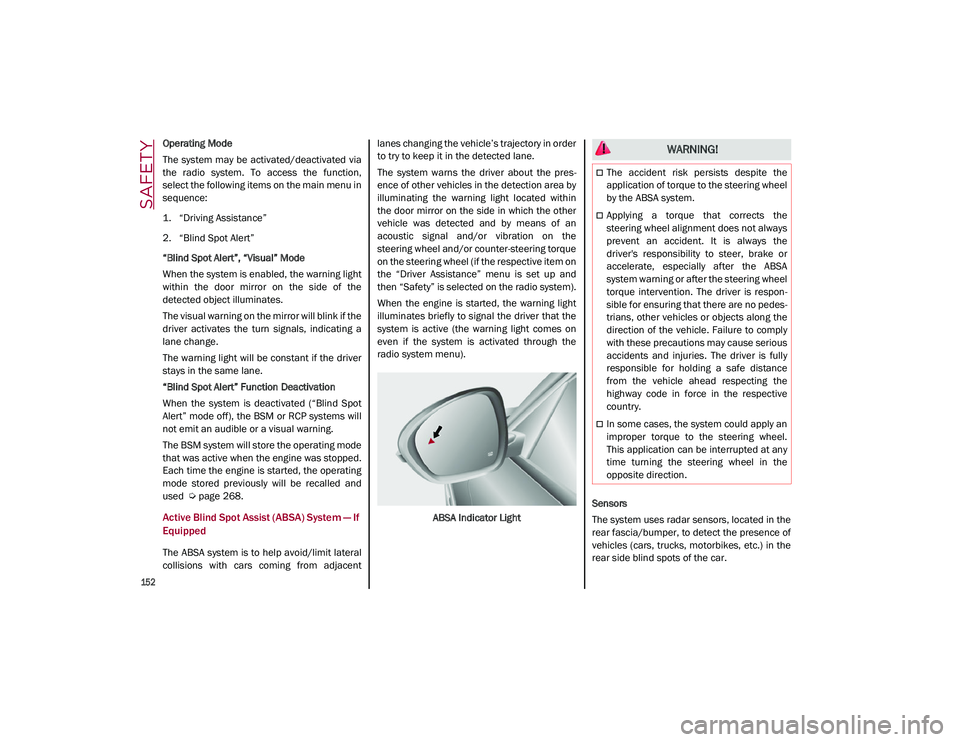
When the engine is started, the warning light
illuminates briefly to signal the driver that the
system is active (the warning light comes on
even if the system is activated through the
radio system menu).
ABSA Indicator Light Sensors
The system uses radar sensors, located in the
rear fascia/bumper, to detect the presence of
vehicles (cars, trucks, motorbikes, etc.) in the
rear side blind spots of the car.
WARNING!
The accident risk persists despite the
application of torque to the steering wheel
by the ABSA system.
Applying a torque that corrects the
steering wheel alignment does not always
prevent an accident. It is always the
driver's responsibility to steer, brake or
accelerate, especially after the ABSA
system warning or after the steering wheel
torque intervention. The driver is respon
-
sible for ensuring that there are no pedes -
trians, other vehicles or objects along the
direction of the vehicle. Failure to comply
with these precautions may cause serious
accidents and injuries. The driver is fully
responsible for holding a safe distance
from the vehicle ahead respecting the
highway code in force in the respective
country.
In some cases, the system could apply an
improper torque to the steering wheel.
This application can be interrupted at any
time turning the steering wheel in the
opposite direction.
21_GU_OM_EN_USC_t.book Page 152
Page 155 of 280
153
The sensors are activated when any forward
gear is engaged at a speed higher than about
6 mph (10 km/h), or when REVERSE (R) is
engaged.
The sensors are temporarily deactivated when
the car is stationary and in PARK (P).
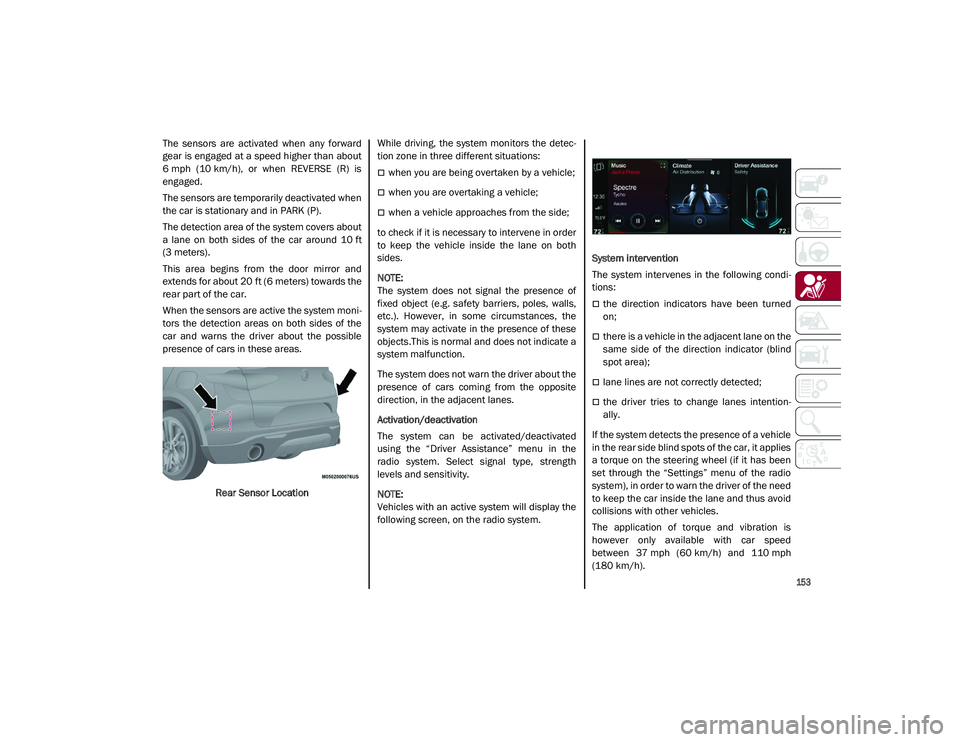
The detection area of the system covers about
a lane on both sides of the car around 10 ft
(3 meters).
This area begins from the door mirror and
extends for about 20 ft (6 meters) towards the
rear part of the car.
When the sensors are active the system moni-
tors the detection areas on both sides of the
car and warns the driver about the possible
presence of cars in these areas.
Rear Sensor Location While driving, the system monitors the detec
-
tion zone in three different situations:
when you are being overtaken by a vehicle;
when you are overtaking a vehicle;
when a vehicle approaches from the side;
to check if it is necessary to intervene in order
to keep the vehicle inside the lane on both
sides.
NOTE:
The system does not signal the presence of
fixed object (e.g. safety barriers, poles, walls,
etc.). However, in some circumstances, the
system may activate in the presence of these
objects.This is normal and does not indicate a
system malfunction.
The system does not warn the driver about the
presence of cars coming from the opposite
direction, in the adjacent lanes.
Activation/deactivation
The system can be activated/deactivated
using the “Driver Assistance” menu in the
radio system. Select signal type, strength
levels and sensitivity.
NOTE:
Vehicles with an active system will display the
following screen, on the radio system. System intervention
The system intervenes in the following condi
-
tions:
the direction indicators have been turned
on;
there is a vehicle in the adjacent lane on the
same side of the direction indicator (blind
spot area);
lane lines are not correctly detected;
the driver tries to change lanes intention -
ally.
If the system detects the presence of a vehicle
in the rear side blind spots of the car, it applies
a torque on the steering wheel (if it has been
set through the “Settings” menu of the radio
system), in order to warn the driver of the need
to keep the car inside the lane and thus avoid
collisions with other vehicles.
The application of torque and vibration is
however only available with car speed
between 37 mph (60 km/h) and 110 mph
(180 km/h).
21_GU_OM_EN_USC_t.book Page 153
Page 156 of 280
SAFETY
154
The application of torque, as well as of the
vibration, is suppressed/inhibited if:
The torque given by the driver of the
steering wheel is high
Lateral acceleration is high
The trailer is connected to the correct
control module
At least one hand is not detected on the
steering wheel for longer than a specific
time
The turn signal is turned off
NOTE:
The steering wheel torque is not applied if the
system is unable to detect a lane and if the
direction indicator for the appropriate side has
not been switched on.
The steering wheel detects the presence of
the driver’s hands by a capacitive sensor
installed in the steering wheel and by the
applied torque measured on the steering
column.
System availability
Aggressive driving of the car, or driving on the
median lines, will prevent the correct opera -
tion of the system. In case of intervention of the stability and
braking systems (FCW, ESC, ABS) they will
prevent the system from operating.
Lane change will disable the system for a
certain period of time.
The road must also comply with some specific
characteristics, such as:
Maximum/minimum lane width.
Clearly identified and defined double yellow
lines and, for a limited period of time, a lane
with a single demarcation line.
NOTE:
In some cases, for a limited period of time, the
system may be activated by a lane with a
single median line.
In cases of good road surface conditions, the
system could correctly recognize other types
of valid lane markings (e.g. road edges, side -
walks, etc.).
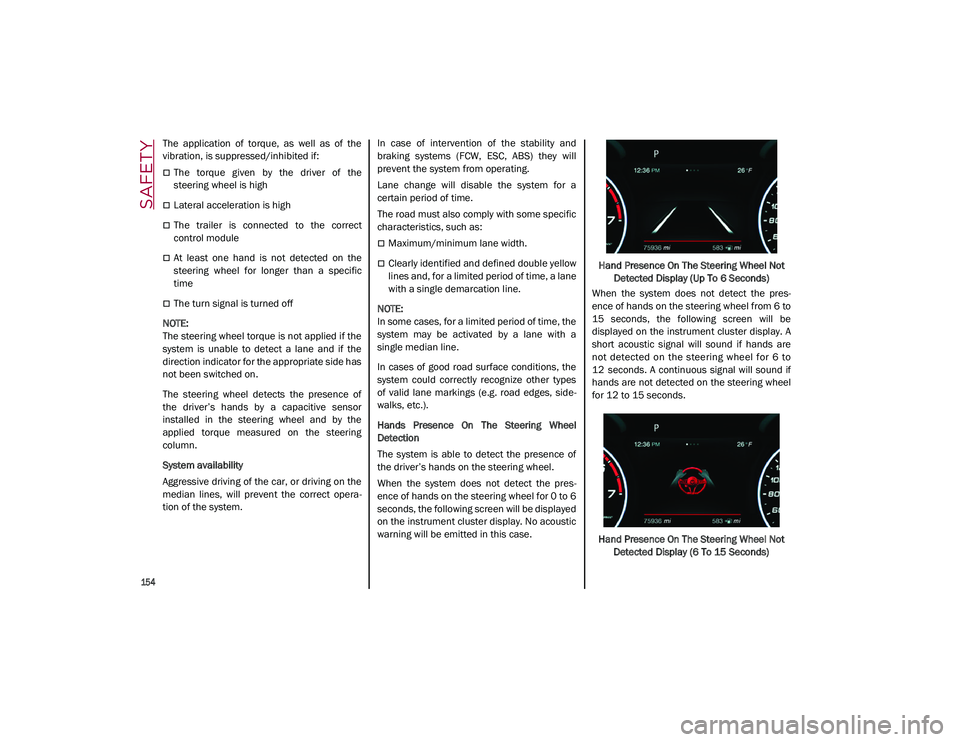
Hands Presence On The Steering Wheel
Detection
The system is able to detect the presence of
the driver’s hands on the steering wheel.
When the system does not detect the pres -
ence of hands on the steering wheel for 0 to 6
seconds, the following screen will be displayed
on the instrument cluster display. No acoustic
warning will be emitted in this case. Hand Presence On The Steering Wheel Not
Detected Display (Up To 6 Seconds)
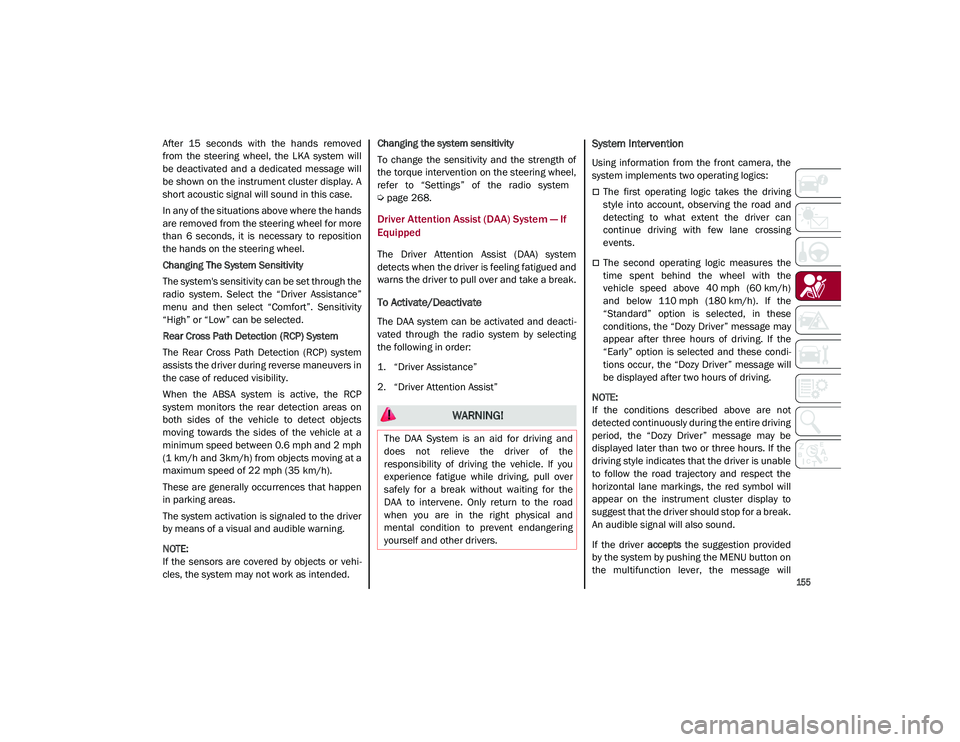
When the system does not detect the pres -
ence of hands on the steering wheel from 6 to
15 seconds, the following screen will be
displayed on the instrument cluster display. A
short acoustic signal will sound if hands are
not detected on the steering wheel for 6 to
12 seconds. A continuous signal will sound if
hands are not detected on the steering wheel
for 12 to 15 seconds.
Hand Presence On The Steering Wheel Not Detected Display (6 To 15 Seconds)
21_GU_OM_EN_USC_t.book Page 154
Page 157 of 280
155
After 15 seconds with the hands removed
from the steering wheel, the LKA system will
be deactivated and a dedicated message will
be shown on the instrument cluster display. A
short acoustic signal will sound in this case.
In any of the situations above where the hands
are removed from the steering wheel for more
than 6 seconds, it is necessary to reposition
the hands on the steering wheel.
Changing The System Sensitivity
The system's sensitivity can be set through the
radio system. Select the “Driver Assistance”
menu and then select “Comfort”. Sensitivity
“High” or “Low” can be selected.
Rear Cross Path Detection (RCP) System
The Rear Cross Path Detection (RCP) system
assists the driver during reverse maneuvers in
the case of reduced visibility.
When the ABSA system is active, the RCP
system monitors the rear detection areas on
both sides of the vehicle to detect objects
moving towards the sides of the vehicle at a
minimum speed between 0.6 mph and 2 mph
(1 km/h and 3km/h) from objects moving at a
maximum speed of 22 mph (35 km/h).
These are generally occurrences that happen
in parking areas.
The system activation is signaled to the driver
by means of a visual and audible warning.
NOTE:
If the sensors are covered by objects or vehi-
cles, the system may not work as intended. Changing the system sensitivity
To change the sensitivity and the strength of
the torque intervention on the steering wheel,
refer to “Settings” of the radio system
Ú
page 268.
Driver Attention Assist (DAA) System — If
Equipped
The Driver Attention Assist (DAA) system
detects when the driver is feeling fatigued and
warns the driver to pull over and take a break.
To Activate/Deactivate
The DAA system can be activated and deacti -
vated through the radio system by selecting
the following in order:
1. “Driver Assistance”
2. “Driver Attention Assist”
System Intervention
Using information from the front camera, the
system implements two operating logics:
The first operating logic takes the driving
style into account, observing the road and
detecting to what extent the driver can
continue driving with few lane crossing
events.
The second operating logic measures the
time spent behind the wheel with the
vehicle speed above 40 mph (60 km/h) and below 110 mph (180 km/h). If the“Standard” option is selected, in these
conditions, the “Dozy Driver” message may
appear after three hours of driving. If the
“Early” option is selected and these condi -
tions occur, the “Dozy Driver” message will
be displayed after two hours of driving.
NOTE:
If the conditions described above are not
detected continuously during the entire driving
period, the “Dozy Driver” message may be
displayed later than two or three hours. If the
driving style indicates that the driver is unable
to follow the road trajectory and respect the
horizontal lane markings, the red symbol will
appear on the instrument cluster display to
suggest that the driver should stop for a break.
An audible signal will also sound.
If the driver accepts the suggestion provided
by the system by pushing the MENU button on
the multifunction lever, the message will
WARNING!
The DAA System is an aid for driving and
does not relieve the driver of the
responsibility of driving the vehicle. If you
experience fatigue while driving, pull over
safely for a break without waiting for the
DAA to intervene. Only return to the road
when you are in the right physical and
mental condition to prevent endangering
yourself and other drivers.
21_GU_OM_EN_USC_t.book Page 155
Page 218 of 280
SERVICING AND MAINTENANCE
216
NOTE:
Always reinstall the oil cap and tighten to
proper torque whenever it is removed to add
oil to engine. Never run the engine with cap
removed as this could cause oil to leak from
engine.
Manual Oil Level Checking Procedure — 2.9L
Quadrifoglio
Check that the oil level is between the MIN and
MAX marks on dipstick, clean it with a lint-free
cloth and reinsert it. Extract the dipstick again
and check that the level is between the MIN
and MAX marks.
Top-Up And Oil Level Indication Update On
Display — 2.9L Quadrifoglio
If an engine oil top-off is needed, in order to
ensure the correct indication of the oil level on
the display, proceed with the process below:
Leave the car on flat ground with the engine
running for approximately five minutes
(temperature higher than 198°F (90°C)
and shut the engine off.
Wait for five minutes, turn the ignition to the
ACC mode without starting the engine and
wait for a few seconds.
NOTE:
If the level indication is not updated after the
previously described procedure, repeat the
engine adjustment, shut the engine off and
wait another five minutes before starting it
again. If the indication is not updated after the
second start, contact an authorized dealer.
Top-Up And Oil Level Indication Update On
Display — 2.0L
If an engine oil top-off is needed, in order to
ensure the correct indication of the oil level on
the display, proceed with the process below:
Leave the car on flat ground with the engine
running for approximately five minutes
(temperature higher than 176°F (80°C)
and shut the engine off.
Start the engine again and idle it for about
two minutes.
NOTE:
If you have added the specified amount of oil
and the indicator is not reading “Full”, please
contact an authorized dealer.
Engine Coolant Fluid
If the level is too low, unscrew the cap of the
reservoir and add the fluid described
Ú
page 263.
CAUTION!
The oil level is not refreshed immediately
on the display after topping off.
Consequently, wait for the oil level to be
refreshed on the display and follow the
procedure below.
WARNING!
If the engine oil is being topped up, wait for
the engine to cool down before loosening
the filler cap, particularly for vehicles with
aluminum cap (if equipped). WARNING: risk
of burns!
CAUTION!
The oil level must never exceed the MAX
mark.
If the MAX mark is exceeded (last notch on
the right turns red) after the fill-up, go to an
authorized dealer as soon as possible to
have the oil in excess removed.
Do not add oil with specifications different
from those of the oil already in the engine.
Used engine oil and oil filters contain
substances which are harmful to the
environment. To change the oil and filters,
we advise you to contact an authorized
dealer.
21_GU_OM_EN_USC_t.book Page 216
Page 256 of 280
TECHNICAL SPECIFICATIONS
254
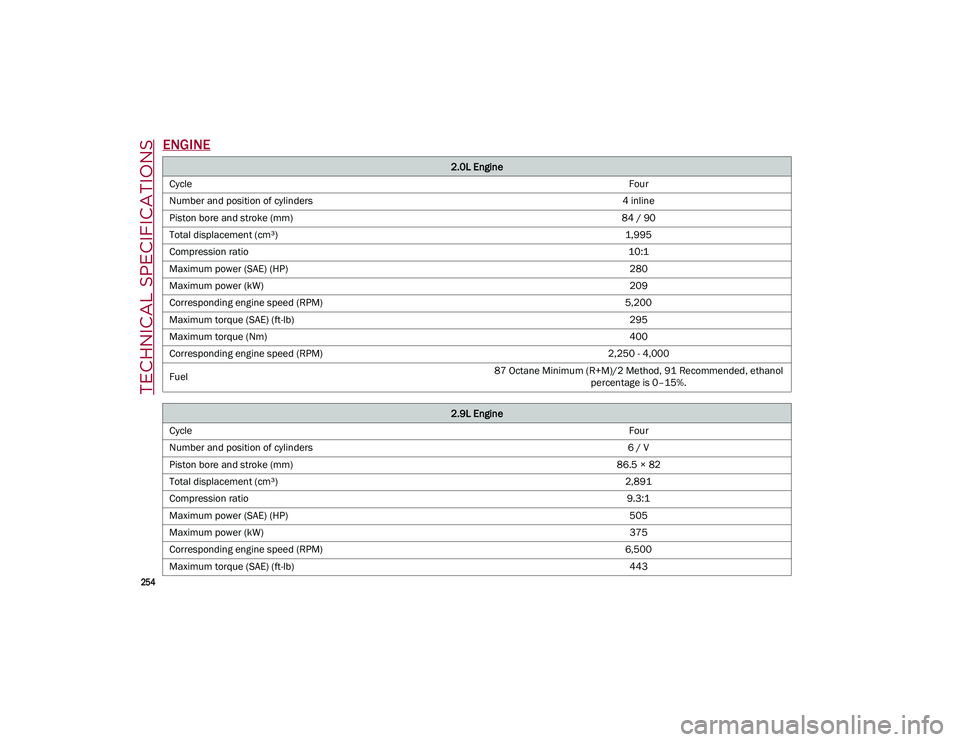
ENGINE
2.0L Engine
Cycle Four
Number and position of cylinders 4 inline
Piston bore and stroke (mm) 84 / 90
Total displacement (cm³) 1,995
Compression ratio 10:1
Maximum power (SAE) (HP) 280
Maximum power (kW) 209
Corresponding engine speed (RPM) 5,200
Maximum torque (SAE) (ft-lb) 295
Maximum torque (Nm) 400
Corresponding engine speed (RPM) 2,250 - 4,000
Fuel 87 Octane Minimum (R+M)/2 Method, 91 Recommended, ethanol
percentage is 0–15%.
2.9L Engine
Cycle Four
Number and position of cylinders 6 / V
Piston bore and stroke (mm) 86.5 × 82
Total displacement (cm³) 2,891
Compression ratio 9.3:1
Maximum power (SAE) (HP) 505
Maximum power (kW) 375
Corresponding engine speed (RPM) 6,500
Maximum torque (SAE) (ft-lb) 443
21_GU_OM_EN_USC_t.book Page 254
Page 257 of 280
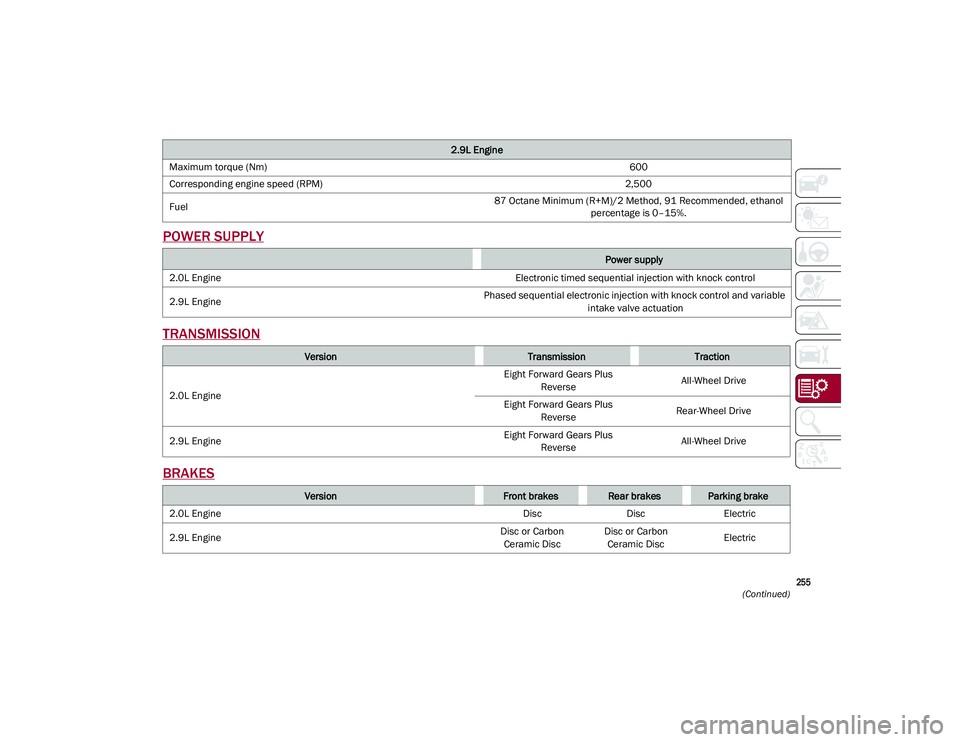
255
(Continued)
POWER SUPPLY
TRANSMISSION
BRAKES
Maximum torque (Nm) 600
Corresponding engine speed (RPM) 2,500
Fuel 87 Octane Minimum (R+M)/2 Method, 91 Recommended, ethanol
percentage is 0–15%.
Power supply
2.0L Engine Electronic timed sequential injection with knock control
2.9L Engine Phased sequential electronic injection with knock control and variable
intake valve actuation
VersionTransmissionTraction
2.0L Engine Eight Forward Gears Plus
Reverse All-Wheel Drive
Eight Forward Gears Plus Reverse Rear-Wheel Drive
2.9L Engine Eight Forward Gears Plus
Reverse All-Wheel Drive
VersionFront brakesRear brakesParking brake
2.0L Engine DiscDiscElectric
2.9L Engine Disc or Carbon
Ceramic Disc Disc or Carbon
Ceramic Disc Electric
2.9L Engine
21_GU_OM_EN_USC_t.book Page 255
Page 271 of 280
269
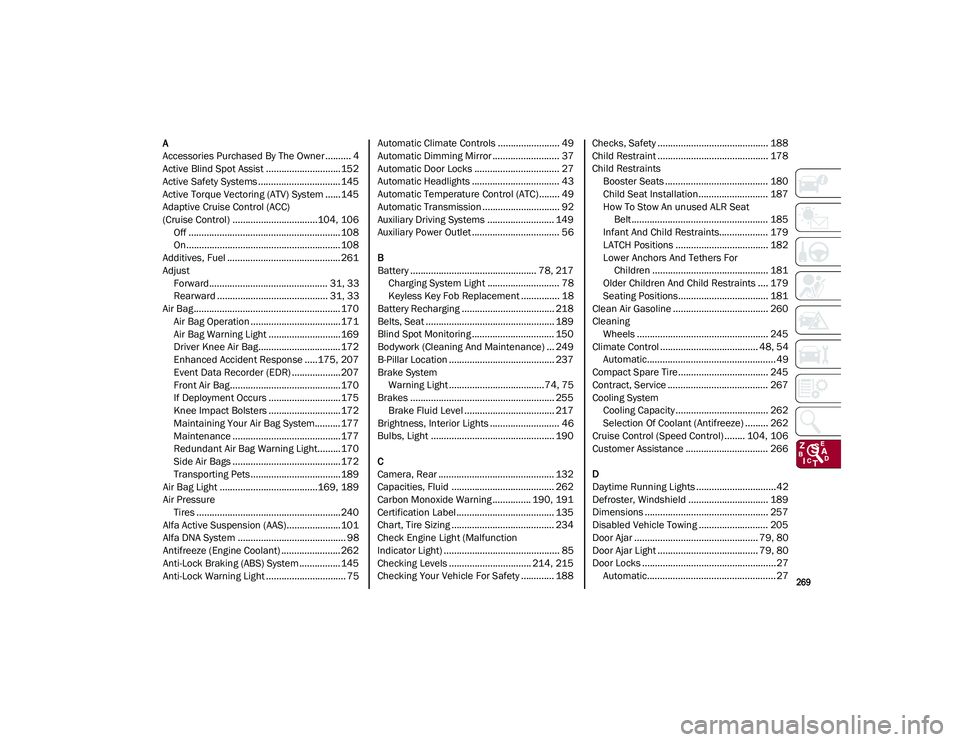
A
Accessories Purchased By The Owner.......... 4
Active Blind Spot Assist .............................152
Active Safety Systems ................................ 145
Active Torque Vectoring (ATV) System ......145
Adaptive Cruise Control (ACC)
(Cruise Control) .................................104, 106Off ........................................................... 108
On............................................................108
Additives, Fuel ............................................ 261
Adjust Forward.............................................. 31, 33
Rearward ........................................... 31, 33
Air Bag......................................................... 170 Air Bag Operation ...................................171Air Bag Warning Light ............................169
Driver Knee Air Bag................................ 172Enhanced Accident Response .....175, 207
Event Data Recorder (EDR) ...................207
Front Air Bag...........................................170
If Deployment Occurs ............................175
Knee Impact Bolsters ............................172
Maintaining Your Air Bag System.......... 177
Maintenance ..........................................177
Redundant Air Bag Warning Light.........170
Side Air Bags ..........................................172
Transporting Pets...................................189
Air Bag Light ......................................169, 189
Air Pressure Tires ........................................................240
Alfa Active Suspension (AAS).....................101
Alfa DNA System .......................................... 98
Antifreeze (Engine Coolant) ....................... 262
Anti-Lock Braking (ABS) System ................ 145
Anti-Lock Warning Light ............................... 75 Automatic Climate Controls ........................ 49
Automatic Dimming Mirror .......................... 37
Automatic Door Locks ................................. 27
Automatic Headlights .................................. 43
Automatic Temperature Control (ATC)........ 49
Automatic Transmission .............................. 92
Auxiliary Driving Systems .......................... 149
Auxiliary Power Outlet .................................. 56
B
Battery ................................................. 78, 217 Charging System Light ............................ 78
Keyless Key Fob Replacement ............... 18
Battery Recharging .................................... 218
Belts, Seat .................................................. 189
Blind Spot Monitoring ................................ 150
Bodywork (Cleaning And Maintenance) ... 249
B-Pillar Location ......................................... 237
Brake System Warning Light .....................................74, 75
Brakes ........................................................ 255 Brake Fluid Level ................................... 217
Brightness, Interior Lights ........................... 46
Bulbs, Light ................................................ 190
C
Camera, Rear ............................................. 132
Capacities, Fluid ........................................ 262
Carbon Monoxide Warning ............... 190, 191
Certification Label...................................... 135
Chart, Tire Sizing ........................................ 234
Check Engine Light (Malfunction
Indicator Light) ............................................. 85
Checking Levels ................................ 214, 215
Checking Your Vehicle For Safety ............. 188 Checks, Safety ........................................... 188
Child Restraint ........................................... 178
Child Restraints
Booster Seats ........................................ 180
Child Seat Installation........................... 187
How To Stow An unused ALR Seat Belt ..................................................... 185
Infant And Child Restraints................... 179
LATCH Positions .................................... 182
Lower Anchors And Tethers For Children ............................................. 181
Older Children And Child Restraints .... 179
Seating Positions................................... 181
Clean Air Gasoline ..................................... 260
Cleaning Wheels ................................................... 245
Climate Control ...................................... 48, 54 Automatic..................................................49
Compact Spare Tire................................... 245
Contract, Service ....................................... 267
Cooling System Cooling Capacity .................................... 262
Selection Of Coolant (Antifreeze) ......... 262
Cruise Control (Speed Control) ........ 104, 106
Customer Assistance ................................ 266
D
Daytime Running Lights ...............................42
Defroster, Windshield ............................... 189
Dimensions ................................................ 257
Disabled Vehicle Towing ........................... 205
Door Ajar ................................................ 79, 80
Door Ajar Light ....................................... 79, 80
Door Locks ....................................................27 Automatic..................................................27
21_GU_OM_EN_USC_t.book Page 269