homelink ALFA ROMEO STELVIO 2022 Owners Manual
[x] Cancel search | Manufacturer: ALFA ROMEO, Model Year: 2022, Model line: STELVIO, Model: ALFA ROMEO STELVIO 2022Pages: 256, PDF Size: 10.17 MB
Page 10 of 256
8
READ THIS CAREFULLY
Refueling..................................................... 2
Starting The Engine .................................... 2
Parking On Flammable Material ............... 2
Respecting The Environment .................... 2
Electrical Accessories ................................ 2
Scheduled Servicing .................................. 2
Rollover Warning ........................................ 3
VEHICLE CHANGES /
ALTERATIONS
Accessories Purchased By The Owner ...... 4
Installing Electrical/Electronic Devices .... 4
Radio Transmitters And Mobile Phones ... 4
HOW TO USE THIS MANUAL
Operating Instructions ............................... 5
Warnings And Cautions.............................. 5
Symbols Key ............................................... 6
Symbols ..................................................... 6
SYMBOL GLOSSARY .................................14
GETTING TO KNOW YOUR
VEHICLE
KEYS..........................................................19
Key Fob................................................... 19
ENGINE IMMOBILIZER SYSTEM ..............21 IGNITION SWITCH .................................... 22
Keyless Push Button Ignition ................ 22
REMOTE START — IF EQUIPPED .............. 23
How To Use Remote Start ..................... 23
To Exit Remote Start Mode ................... 23
Remote Start Comfort Systems —
If Equipped ............................................. 23
VEHICLE SECURITY
SYSTEM — IF EQUIPPED .......................... 24
To Arm The System................................ 24
To Disarm The System .......................... 24
Volumetric/Anti-Lift Protection —
If Equipped ............................................. 24
DOORS ...................................................... 25
Power Door Locks.................................. 25
Locking The Doors With A Depleted
Battery .................................................... 25 Passive Entry System ........................... 26
Power Lock Safety Device..................... 28
Automatic Door Locks — If Equipped .. 28
Child-Protection Door Lock System —
Rear Doors ............................................. 28
STEERING WHEEL.................................... 29
Manual Tilt/Telescoping Steering
Column ................................................... 29 Heated Steering Wheel —
If Equipped ............................................ 30
DRIVER MEMORY SETTINGS —
IF EQUIPPED ............................................ 30
Programming The Memory Feature ..... 30
Memory Position Recall ........................ 31
SEATS .......................................................31
Sparco Racing Seats (Quadrifoglio
Vehicles) — If Equipped .........................31 Split Folding Rear Seat ..........................32
Power Adjustment (Front Seats) ...........33
Heated Seats — If Equipped .................34
Head Restraints .....................................35
MIRRORS .................................................37
Automatic Dimming Mirror ....................37
Vanity Mirror ...........................................37
Outside Power Mirrors ...........................38
Power Folding Outside Mirrors ..............38
Outside Automatic Dimming
Mirrors — If Equipped............................. 38 Heated Mirrors .......................................38
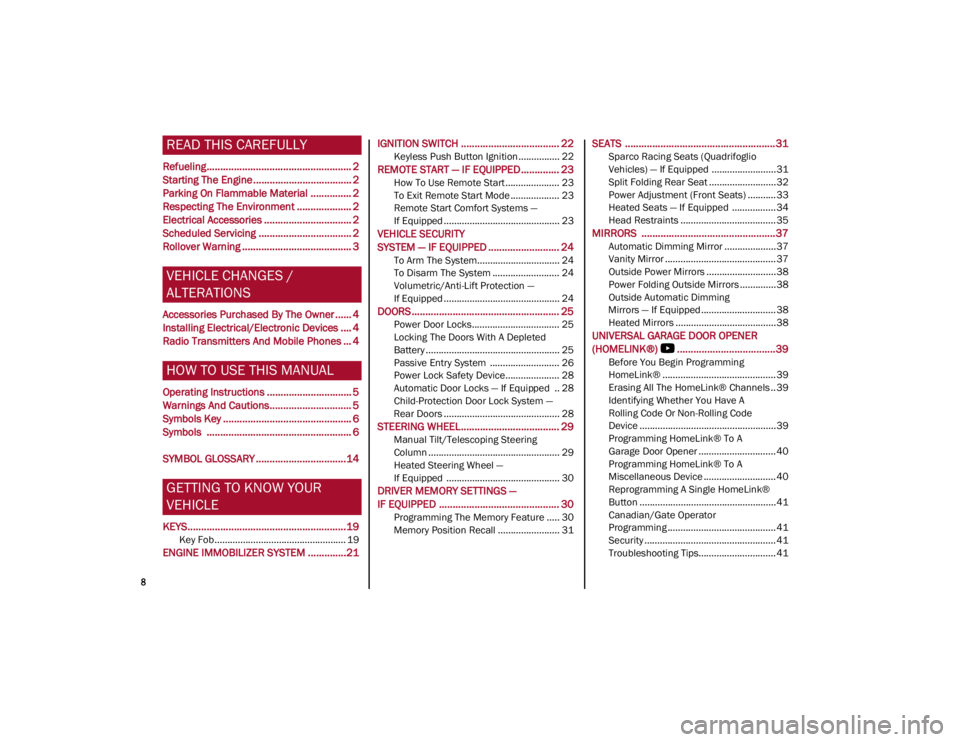
UNIVERSAL GARAGE DOOR OPENER
(HOMELINK®)
S....................................39
Before You Begin Programming
HomeLink® ............................................39 Erasing All The HomeLink® Channels ..39
Identifying Whether You Have A
Rolling Code Or Non-Rolling Code
Device .....................................................39 Programming HomeLink® To A
Garage Door Opener ..............................40 Programming HomeLink® To A
Miscellaneous Device ............................ 40 Reprogramming A Single HomeLink®
Button .....................................................41 Canadian/Gate Operator
Programming .......................................... 41 Security ...................................................41
Troubleshooting Tips..............................41
22_GU_OM_EN_USC_t.book Page 8
Page 41 of 256
39
UNIVERSAL GARAGE DOOR
OPENER (HOMELINK®)
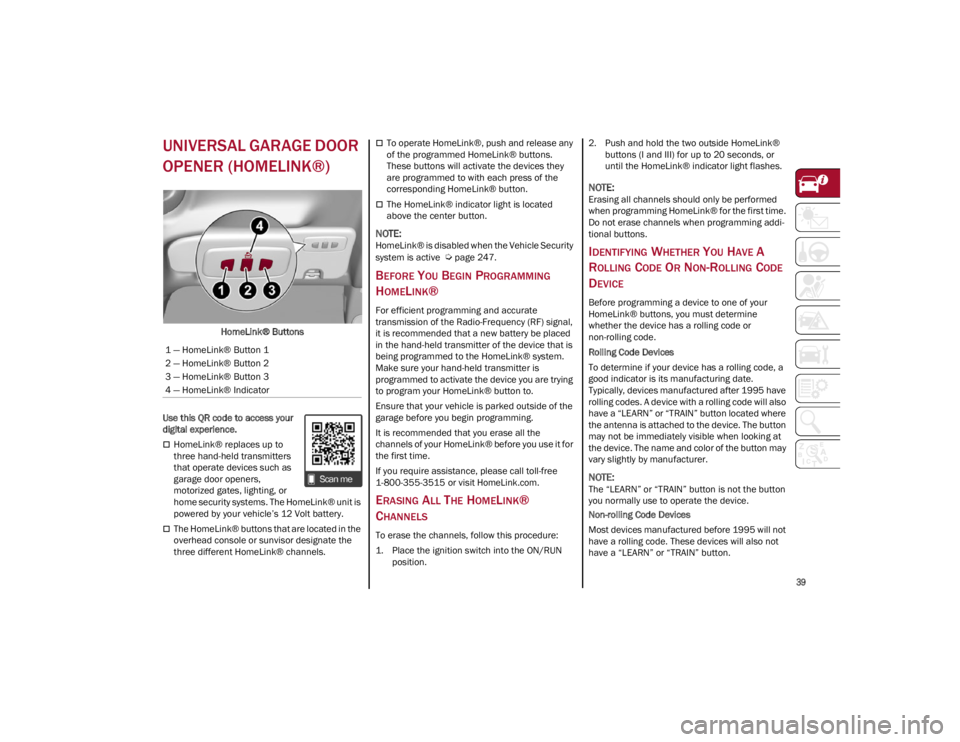
HomeLink® Buttons
Use this QR code to access your
digital experience.
HomeLink® replaces up to
three hand-held transmitters
that operate devices such as
garage door openers,
motorized gates, lighting, or
home security systems. The HomeLink® unit is
powered by your vehicle’s 12 Volt battery.
The HomeLink® buttons that are located in the
overhead console or sunvisor designate the
three different HomeLink® channels.
To operate HomeLink®, push and release any
of the programmed HomeLink® buttons.
These buttons will activate the devices they
are programmed to with each press of the
corresponding HomeLink® button.
The HomeLink® indicator light is located
above the center button.
NOTE:
HomeLink® is disabled when the Vehicle Security
system is active
Ú
page 247.
BEFORE YOU BEGIN PROGRAMMING
H
OMELINK®
For efficient programming and accurate
transmission of the Radio-Frequency (RF) signal,
it is recommended that a new battery be placed
in the hand-held transmitter of the device that is
being programmed to the HomeLink® system.
Make sure your hand-held transmitter is
programmed to activate the device you are trying
to program your HomeLink® button to.
Ensure that your vehicle is parked outside of the
garage before you begin programming.
It is recommended that you erase all the
channels of your HomeLink® before you use it for
the first time.
If you require assistance, please call toll-free
1-800-355-3515 or visit
HomeLink.com
.
ERASING ALL THE HOMELINK®
C
HANNELS
To erase the channels, follow this procedure:
1. Place the ignition switch into the ON/RUN
position. 2. Push and hold the two outside HomeLink®
buttons (I and III) for up to 20 seconds, or
until the HomeLink® indicator light flashes.
NOTE:
Erasing all channels should only be performed
when programming HomeLink® for the first time.
Do not erase channels when programming addi -
tional buttons.
IDENTIFYING WHETHER YOU HAVE A
R
OLLING CODE OR NON-ROLLING CODE
D
EVICE
Before programming a device to one of your
HomeLink® buttons, you must determine
whether the device has a rolling code or
non-rolling code.
Rolling Code Devices
To determine if your device has a rolling code, a
good indicator is its manufacturing date.
Typically, devices manufactured after 1995 have
rolling codes. A device with a rolling code will also
have a “LEARN” or “TRAIN” button located where
the antenna is attached to the device. The button
may not be immediately visible when looking at
the device. The name and color of the button may
vary slightly by manufacturer.
NOTE:
The “LEARN” or “TRAIN” button is not the button
you normally use to operate the device.
Non-rolling Code Devices
Most devices manufactured before 1995 will not
have a rolling code. These devices will also not
have a “LEARN” or “TRAIN” button.
1 — HomeLink® Button 1
2 — HomeLink® Button 2
3 — HomeLink® Button 3
4 — HomeLink® Indicator
22_GU_OM_EN_USC_t.book Page 39
Page 42 of 256
GETTING TO KNOW YOUR VEHICLE
40
PROGRAMMING HOMELINK® TO A
G
ARAGE DOOR OPENER
To program any of the HomeLink® buttons to
activate your garage door opener motor, proceed
as follows:
NOTE:
All HomeLink® buttons are programmed using
this procedure. You do not need to erase all chan -
nels when programming additional buttons.
1. Place the ignition switch into the ON/RUN position.
2. Place the garage door opener transmitter 1 to 3 inches (3 to 8 cm) away from the
HomeLink® button you wish to program,
while keeping the HomeLink® indicator light
in view.
3. Push and hold the HomeLink® button you want to program while you push and hold the
garage door opener transmitter button you
are trying to replicate.
4. Continue to hold both buttons and observe the HomeLink® indicator light. The
HomeLink® indicator light will flash slowly
and then rapidly. Once this happens, release
both buttons.
NOTE:
Make sure the garage door opener motor is
plugged in before moving on to the rolling code/
non-rolling code final steps. Rolling Code Garage Door Opener Final Steps
NOTE:
You have 30 seconds in which to initiate rolling
code final step 2, after completing rolling code
final step 1.
1. At the garage door opener motor (in the
garage), locate the “LEARN” or “TRAIN”
button. This can usually be found where the
hanging antenna wire is attached to the
garage door opener motor. Firmly push and
release the “LEARN” or “TRAIN” button.
2. Return to the vehicle and push the programmed HomeLink® button three times
(holding the button for two seconds each
time). If the garage door opener motor oper-
ates, programming is complete.
3. Push the programmed HomeLink® button to confirm that the garage door opener motor
operates. If the garage door opener motor
does not operate, repeat the final steps for
the rolling code procedure.
Non-Rolling Code Garage Door Opener Final
Steps
1. Push and hold the programmed HomeLink® button and observe the HomeLink® indicator
light. If the HomeLink® indicator light stays
on constantly, programming is complete.
2. Push the programmed HomeLink® button to confirm that the garage door opener motor
operates. If the garage door opener motor
does not operate, repeat the steps from the
beginning.
PROGRAMMING HOMELINK® TO A
M
ISCELLANEOUS DEVICE
The procedure on how to program HomeLink® to
a miscellaneous device follows the same
procedure as programming to a garage door
opener
Ú
page 40. Be sure to determine if the
device has a rolling code, or non-rolling code
before beginning the programming process.
NOTE:
Canadian Radio Frequency (RF) laws require
transmitter signals to time-out (or quit) after
several seconds of transmission, which may not
be long enough for HomeLink® to pick up the
signal during programming. Similar to this Cana -
dian law, some U.S. gate operators are designed
to time-out in the same manner. The procedure
may need to be performed multiple times to
successfully pair the device to your HomeLink®
buttons.
WARNING!
Your motorized door or gate will open and
close while you are programming the
universal transmitter. Do not program the
transmitter if people or pets are in the path
of the door or gate.
Do not run your vehicle in a closed garage or
confined area while programming the
transmitter. Exhaust gas from your vehicle
contains Carbon Monoxide (CO) which is
odorless and colorless. Carbon Monoxide is
poisonous when inhaled and can cause you
and others to be severely injured or killed.
22_GU_OM_EN_USC_t.book Page 40
Page 43 of 256
41
REPROGRAMMING A SINGLE
H
OMELINK® BUTTON
To reprogram a single HomeLink® button that
has been previously trained, without erasing all
the channels, proceed as follows. Be sure to
determine whether the new device you want to
program the HomeLink® button to has a rolling
code, or non-rolling code.
1. Place the ignition in the ON/RUN position,
without starting the engine.
2. Push and hold the desired HomeLink® button until the HomeLink® indicator light
begins to flash after 20 seconds. Do not
release the button.
3. Without releasing the button , proceed with
Step 2 in “Programming HomeLink® To A
Garage Door Opener” and follow all
remaining steps.
CANADIAN/GATE OPERATOR
P
ROGRAMMING
The programming of transmitters in Canada/
United States require the transmitter signals to
“time-out” after several seconds of transmission:
Canadian Radio Frequency (RF) laws require
transmitter signals to time-out (or quit) after
several seconds of transmission, which may not
be long enough for HomeLink® to pick up the
signal during programming. Similar to this
Canadian law, some U.S. gate operators are
designed to time-out in the same manner. It may be helpful to unplug the device during the
cycling process to prevent possible overheating
of the garage door or gate motor.
1. Place the ignition in the ON/RUN position.
2. Place the hand-held transmitter 1 to 3 inches
(3 to 8 cm) away from the HomeLink® button
you wish to program while keeping the
HomeLink® indicator light in view.
3. Continue to press and hold the HomeLink® button, while you press and release (cycle)
your hand-held transmitter every two seconds
until HomeLink® has successfully accepted
the frequency signal. The indicator light will
flash slowly and then rapidly when fully
trained.
4. Watch for the HomeLink® indicator to change flash rates. When it changes, it is
programmed. It may take up to 30 seconds or
longer in rare cases. The garage door may
open and close while you are programming.
5. Press and hold the programmed HomeLink® button and observe the indicator light.
NOTE:
•If the indicator light stays on constantly,
programming is complete and the garage door/device should activate when the HomeLink® button is pushed.
• To program the two remaining HomeLink® buttons, repeat each step for each remaining button. DO NOT erase the chan-nels.
If you unplugged the garage door opener/device
for programming, plug it back in at this time. Reprogramming A Single HomeLink® Button
(Canadian/Gate Operator)
To reprogram a channel that has been previously
trained, follow these steps:
1. Place the ignition to the ON/RUN position.
2. Press and hold the desired HomeLink®
button until the indicator light begins to flash
after 20 seconds. Do not release the button.
3. Without releasing the button, proceed with “Canadian/Gate Operator Programming”
step 2 and follow all remaining steps.
SECURITY
It is advised to erase all channels before you sell
or turn in your vehicle.
To do this, push and hold the two outside buttons
for 20 seconds until the indicator flashes. Note
that all channels will be erased. Individual
channels cannot be erased.
The HomeLink® Universal Transceiver is disabled
when the Vehicle Security system is active.
TROUBLESHOOTING TIPS
If you are having trouble programming
HomeLink®, here are some of the most common
solutions:
Replace the battery in the garage door opener
hand-held transmitter.
Push the LEARN button on the garage door
opener to complete the training for a rolling
code.
Did you unplug the device for programming
and remember to plug it back in?
22_GU_OM_EN_USC_t.book Page 41
Page 44 of 256
GETTING TO KNOW YOUR VEHICLE
42
If you have any problems, or require assistance,
please call toll-free 1-800-355-3515 or, on the
Internet at
HomeLink.com
for information or
assistance.
EXTERIOR LIGHTS
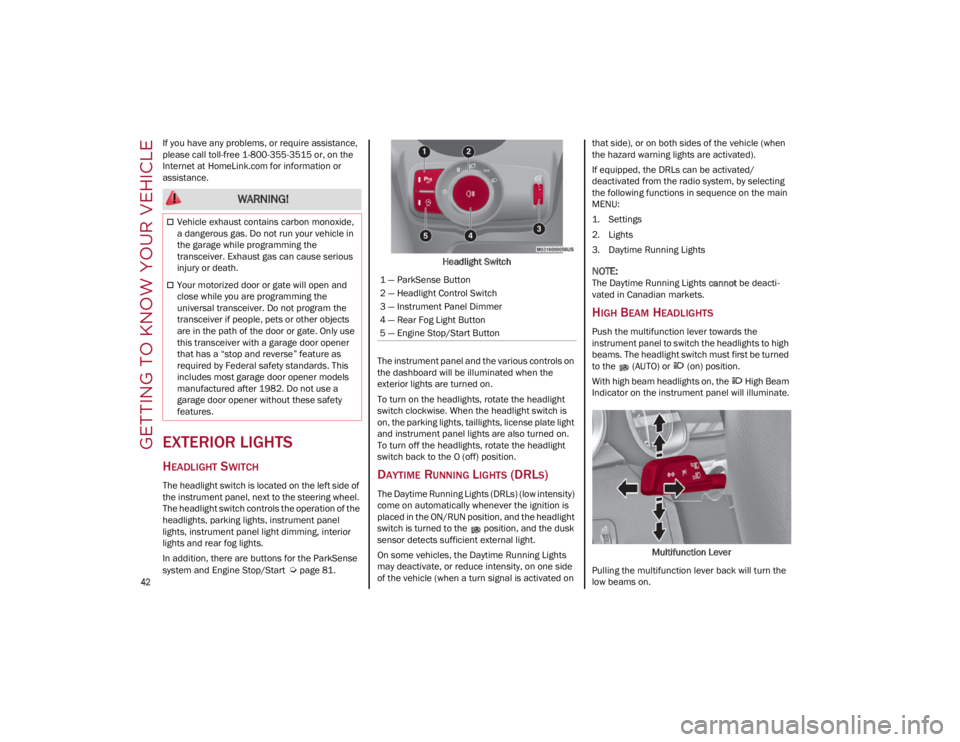
HEADLIGHT SWITCH
The headlight switch is located on the left side of
the instrument panel, next to the steering wheel.
The headlight switch controls the operation of the
headlights, parking lights, instrument panel
lights, instrument panel light dimming, interior
lights and rear fog lights.
In addition, there are buttons for the ParkSense
system and Engine Stop/Start
Ú
page 81. Headlight Switch
The instrument panel and the various controls on
the dashboard will be illuminated when the
exterior lights are turned on.
To turn on the headlights, rotate the headlight
switch clockwise. When the headlight switch is
on, the parking lights, taillights, license plate light
and instrument panel lights are also turned on.
To turn off the headlights, rotate the headlight
switch back to the O (off) position.
DAYTIME RUNNING LIGHTS (DRLS)
The Daytime Running Lights (DRLs) (low intensity)
come on automatically whenever the ignition is
placed in the ON/RUN position, and the headlight
switch is turned to the position, and the dusk
sensor detects sufficient external light.
On some vehicles, the Daytime Running Lights
may deactivate, or reduce intensity, on one side
of the vehicle (when a turn signal is activated on that side), or on both sides of the vehicle (when
the hazard warning lights are activated).
If equipped, the DRLs can be activated/
deactivated from the radio system, by selecting
the following functions in sequence on the main
MENU:
1. Settings
2. Lights
3. Daytime Running Lights
NOTE:
The Daytime Running Lights
cannot be deacti -
vated in Canadian markets.
HIGH BEAM HEADLIGHTS
Push the multifunction lever towards the
instrument panel to switch the headlights to high
beams. The headlight switch must first be turned
to the (AUTO) or (on) position.
With high beam headlights on, the High Beam
Indicator on the instrument panel will illuminate.
Multifunction Lever
Pulling the multifunction lever back will turn the
low beams on.
WARNING!
Vehicle exhaust contains carbon monoxide,
a dangerous gas. Do not run your vehicle in
the garage while programming the
transceiver. Exhaust gas can cause serious
injury or death.
Your motorized door or gate will open and
close while you are programming the
universal transceiver. Do not program the
transceiver if people, pets or other objects
are in the path of the door or gate. Only use
this transceiver with a garage door opener
that has a “stop and reverse” feature as
required by Federal safety standards. This
includes most garage door opener models
manufactured after 1982. Do not use a
garage door opener without these safety
features.1 — ParkSense Button
2 — Headlight Control Switch
3 — Instrument Panel Dimmer
4 — Rear Fog Light Button
5 — Engine Stop/Start Button
22_GU_OM_EN_USC_t.book Page 42
Page 251 of 256

249
Door Locks .................................................... 28Automatic ................................................. 28
Door Opener, Garage ................................... 39
Doors............................................................. 25
Drive Train Control (DTC) System ..............136
Driving Modes .............................................. 92
Dynamic Steering Torque (DST) System ... 136
E
Electric Park Brake....................................... 84
Electric Remote Mirrors ............................... 38
Electronic Speed Control (Cruise Control) .. 98
Electronic Stability Control (ESC)
System ........................................................136
Electronic Throttle Control Warning Light... 75
Emergency In Case Of ......................................176, 181
SOS Emergency Call .............................. 176
Emergency, In Case Of Jump Starting .........................................184
Overheating ............................................ 187
Towing.....................................................189
Emission Control System Maintenance...... 80
Engine ......................................................... 233 Block Heater............................................. 83
Engine Coolant Level .............................198
Exhaust Gas Caution ....................174, 175
Fuel Requirements ................................ 239Jump Starting .........................................186
Oil ............................................................241
Oil Selection ...........................................241
Overheating ............................................ 187
Starting ................................................... 187
Engine Compartment .................................196
Engine Compartment (Washing) ...............231 Engine Oil
Level Check ........................................... 197
Enhanced Accident Response
Feature .............................................. 161, 190
Ethanol ....................................................... 239
Exhaust Gas Cautions ...................... 174, 175 Exhaust System ......................................... 174
Exterior Lighting ............................................42
Exterior Lights ...................................... 42, 174
F
Flashers Hazard Warning ..................................... 176
Turn Signals .............................. 44, 74, 174
Fluid Capacities ......................................... 241
Fluid Leaks ................................................. 174
Fluids And Lubricants................................ 242
Fog Lights, Rear ............................................44
Forward Collision Warning ........................ 145
Fuel Additives ................................................ 240
Clean Air................................................. 239
Ethanol ................................................... 239
Light ..........................................................77
Materials Added .................................... 240
Methanol................................................ 239
Tank Capacity ........................................ 241
G
Garage Door Opener (HomeLink) ................39
Gasoline, Clean Air .................................... 239
Gasoline, Reformulated ............................ 239
Gross Axle Weight Rating .......................... 127
Gross Vehicle Weight Rating..................... 127
GVWR ......................................................... 126 H
Hands-Free Liftgate ..................................... 61
Hazard Warning Flashers .......................... 176
Head Restraints ........................................... 35
Head Rests ................................................... 35
Headlights
Switch ....................................................... 42
Headlights (Cleaning) ................................ 231
Heated Mirrors ............................................. 38
Heated Seats ............................................... 34
Heated Steering Wheel ............................... 30
Heater, Engine Block ................................... 83
Highway Assist System .............................. 106
Hill Decent Control (HDC) System............. 137
Hill Start Assist (HSA) System ................... 138
Hitches Trailer Towing......................................... 128
HomeLink (Garage Door Opener) ............... 39
Hood Closing ...................................................... 59Opening .................................................... 59
I
Ignition .......................................................... 22 Switch ....................................................... 22
Immobilizer (Sentry Key) ............................. 21
In Case Of Emergency ............................... 176
Installing Electrical/Electronic Devices ......... 4
Instrument Cluster ....................................... 64 Descriptions ................................ 65, 66, 74
Display ...................................................... 66Reconfigurable Display ........................... 66
Instrument Panel Features ................................................... 64
22_GU_OM_EN_USC_t.book Page 249
Page 252 of 256

250
INDEX
Intelligent Speed Control System..............113
Interior Lights ............................................... 44
Interiors (Cleaning)..................................... 232
J
Jump Starting ............................................. 184
K
Keyless Enter 'n Go™ ................................... 26Passive Entry ............................................ 26
Keys .............................................................. 19
L
Lane Change And Turn Signals ................... 44
Lane Departure Warning System ..............117
Lane Keep Assist System ..........................119
Lap/Shoulder Belts ....................................152
Latches .......................................................174
Leaks, Fluid ................................................174
Life Of Tires.................................................225
Liftgate .......................................................... 59
Light Bulbs ..................................................174 Types Of Bulbs ....................................... 212
Lights .......................................................... 174 Air Bag .................................... 70, 156, 173Automatic Headlights .............................. 43
Brake Warning .................................. 70, 71Courtesy/Reading ............................. 44, 45Daytime Running ..................................... 42
Electronic Stability Program (ESP) Indicator ........................................ 72, 75 Exterior ................................................... 174
Fog...................................................... 44, 73
Headlight Switch ......................................42
Headlights.................................................42
High Beam ................................................42
Instrument Cluster ...................................42
Intensity Control .......................................45
Interior.......................................................45
Low Fuel ....................................................77
Malfunction Indicator (Check Engine) ....72
Map ...........................................................44
Oil Temperature........................................ 71
Park .................................................... 43, 74
Reading .....................................................44
Seat Belt Reminder ..................................71
Turn Signals .............................. 44, 74, 174
Warning Instrument Cluster
Descriptions .................................. 74, 75
Loading Vehicle ......................................... 126 Tires........................................................ 219
Locks Automatic Door.........................................28
Child Protection ........................................ 28
M
Maintenance .................................................59
Malfunction Indicator Light (Check
Engine) ................................................... 72, 80
Manual Service ................................................... 247
Memory Feature (Memory Seats) ................30
Memory Seat.................................................30
Methanol .................................................... 239 Mirrors .......................................................... 37
Automatic Dimming ................................. 37
Electric Powered ...................................... 38
Electric Remote ....................................... 38
Heated...................................................... 38
O
Occupant Restraints .................................. 151
Oil Pressure Light ......................................... 75
Oil, Engine Capacity.................................................. 241
Pressure Warning Light ........................... 75
Recommendation .................................. 241
Viscosity ................................................. 241
Opener, Garage Door (Homelink) ............... 39
Operator Manual Owner's Manual ..................................... 247
Outlet Power........................................................ 54
Overheating, Engine .................................. 187
P
Paintwork (Cleaning And Maintenance) ... 231
Panic Brake Assist (PBA) System.............. 138
Park Assist.................................................. 115
ParkSense System ..................................... 115
Passive Entry ................................................ 26
Performance (Top Speed) ......................... 244
Pets ............................................................. 173
Placard, Tire And Loading Information ..... 219
22_GU_OM_EN_USC_t.book Page 250
Page 254 of 256

252
INDEX
Stop/Start System ....................................... 95
Storage Console ..................................................... 54
Suggestions For Driving .............................132
Sun Roof ................................................ 57, 59
Supplemental Restraint System –
Air Bag......................................................... 157
Suspension .................................................235
Symbol Glossary ........................................... 14
Symbols .......................................................... 6
System, Remote Starting ............................. 23
T
Telescoping Steering Column...................... 29
Tilt Steering Column..................................... 29
Tire And Loading Information Placard ......219
Tire Markings..............................................216
Tire Safety Information .............................. 216
Tire Service Kit ...........................................181
Tires .................................174, 222, 226, 229 Aging (Life Of Tires) ................................ 225Air Pressure ............................................ 222
Changing.................................................181
Compact Spare ...................................... 226
General Information......................222, 226
High Speed ............................................. 223
Inflation Pressure...................................222Life Of Tires ............................................ 225
Load Capacity................................219, 220Pressure Monitoring System (TPMS) ...... 73
Quality Grading....................................... 229
Radial......................................................224
Replacement ..........................................225
Safety .............................................216, 222
Sizes .......................................................217 Snow Tires ............................................. 228
Spare Tires.................................... 226, 227
Spinning ................................................. 225
Trailer Towing ........................................ 130
Tread Wear Indicators........................... 225
Tongue Weight/Trailer Weight .................. 129
Towing ............................................... 127, 128 Disabled Vehicle.................................... 188
Towing Eyes ............................................... 189
TPMS (Tire Pressure Monitoring
System) ...................................................... 149
Traction Control System (TCS) .................. 139
Traffic Jam Assist System ......................... 109
Traffic Sign Recognition System ............... 112
Trailer Towing............................................. 127 Hitches ................................................... 128
Minimum Requirements ....................... 129Tips ......................................................... 131
Trailer And Tongue Weight........... 128, 129
Wiring ..................................................... 130
Trailer Towing Guide.................................. 128
Trailer Weight............................................. 128
Transmission ............................................. 235
Transporting Pets ...................................... 173
Tread Wear Indicators ............................... 225
Turn Signals ........................................... 44, 74
U
Uconnect Settings Customer Programmable Features.........26
Passive Entry Programming.....................26
Uniform Tire Quality Grades...................... 229
Universal Garage Door Opener (HomeLink®)
S..........................................39
Universal Transmitter ...................................39 Untwisting Procedure, Seat Belt ............... 154
Use Of The Owner’s Manual........................... 5
V
Vehicle Changes/Alterations ......................... 4
Vehicle Identification Number .................. 233
Vehicle Loading ................................. 126, 220
W
Warning Lights (Instrument Cluster
Descriptions) ................................................ 72
Warnings, Roll Over ........................................ 3
Warranty Information ................................ 246
Washer Fluid For Windshield/
Headlights .................................................. 198
Washers, Windshield ................................... 46
Weights ....................................................... 238
Wheel And Wheel Tire Care....................... 227
Wheel And Wheel Tire Trim ....................... 227
Wheels And Tires ....................................... 216
Wind Buffeting ............................................. 57
Windows Power........................................................ 56
Windows (Cleaning) ................................... 231
Windshield Defroster ................................. 173
Windshield Washers .................................... 46
Windshield Wiper Replacing Blades ................................... 203
Windshield Wipers ....................................... 46
Wipers, Rain Sensitive................................. 46
Wireless Charging Pad ................................ 55
22_GU_OM_EN_USC_t.book Page 252