Menu display AUDI A3 2011 Owner´s Manual
[x] Cancel search | Manufacturer: AUDI, Model Year: 2011, Model line: A3, Model: AUDI A3 2011Pages: 320, PDF Size: 75.79 MB
Page 4 of 320
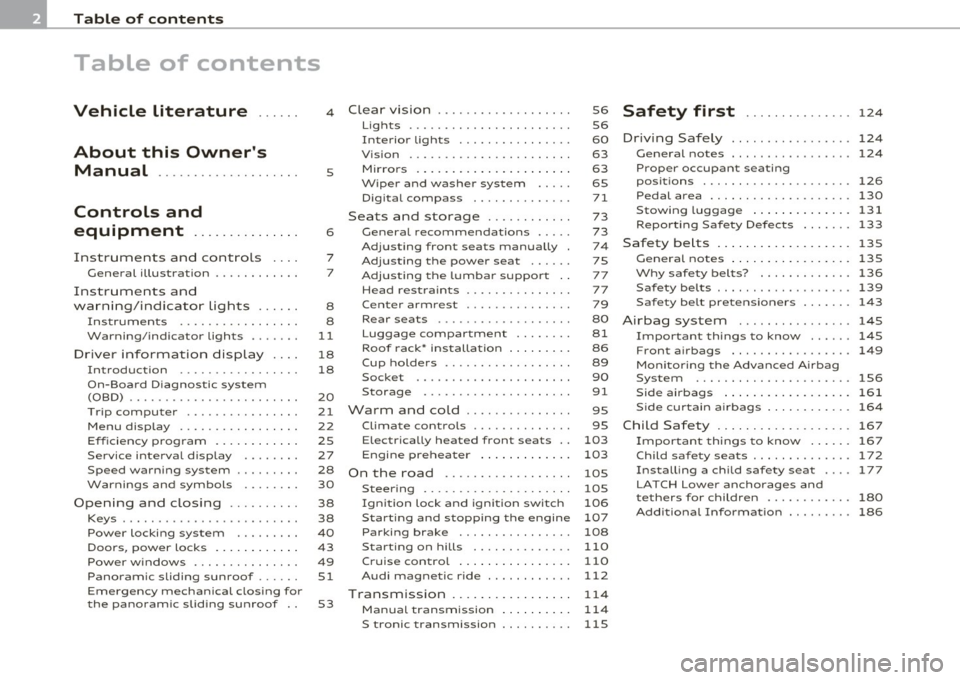
Table of contents
Table of contents
Vehicle literature ..... .
About this Owner's Manual ............. ...... .
Controls and
equipment .............. .
Instruments and controls ... .
General illustration ........... .
Instruments and
warning/indicator Lights ..... .
Instruments ................ .
Warning/indicator ligh ts ...... .
Driver information display ... .
Introduction ............ ... . .
On-Board Diagno stic system
(OBD) ....................... .
T rip com puter .............. . .
Menu display ................ .
Eff iciency program ........ ... .
Service interval display ....... .
Speed warn ing system ........ .
Warning s and symbol s ... .... .
Opening and closing ......... .
Keys ........................ .
Power locking system ........ .
Doo rs, power locks ......... .. .
Power windows .............. .
Panoram ic sliding sunroof ..... .
Emergency mechanical closing for
th e panoramic sliding su nroof .. 4
s
6
7
7
8
8
11
18
18
20
21
22
2S
27
28
30
38
38
40
4 3
49
Sl
S3
Clear vision .................. .
Lights ...................... .
Interior lights ............... .
V is ion ...................... .
M irrors ... ............ ...... .
Wiper and washer sys tem .... .
D igita l compass ............. .
Seats and storage ........... .
General recommendat ions .... .
Adjust ing front seats manually .
Adjusting the power seat ..... .
Adjus ting the lumbar support ..
Head restrain ts .............. .
C ent er armrest ........... ... .
Rear seats ............. ..... .
Lug gage compartment ....... .
Roof rack• inst alla tion ....... . .
Cup holde rs ........... ...... .
Socket .................. ... .
Storage ............. ....... .
Warm and cold .............. .
Climate contro ls ...... ... .. .. .
E lectrica lly heated front seats ..
Engine preheater ............ .
On the road ............ ..... .
Steering .................... .
Ign ition lock and ign ition switch
Start in g and stopping the engine
Parking brake ............... .
Starting on hills .......... ... .
C ru ise con trol ............... .
Audi magnetic r ide ........... .
Transmission ................ .
Manual transm ission
S6
S6
60
63
63
65
71
73
73
74
75
77
77
79
80
81
86
89
90
91
95
95
103
1 03
lOS
105
106
10 7
108
110
110
112
114
114
S tronic transmission . . . . . . . . . . 115
Safety first ............... 124
Driving Safely ................. 124
Gen eral notes ................. 124
Prop er occupant seating
posit ions ...... ............ ...
126
Pedal area ............ ........ 130
Stowingluggage .............. 131
Reporting Safety Defects ..... .. 133
Safety belts .................. . 135
General notes .............. ... 135
Why safety belts? ............. 136
Safety belts ... ............... . 139
Safety belt pretensioners . . . . . . . 143
Airbag system .......... ...... 145
I mportant things to know . . . . . . 145
Front airbags . . . . . . . . . . . . . . . . . 149
Mon itoring the Advanced A irbag
System ......................
156
Side airbags .............. .... 161
Side curtain airbags . . . . . . . . . . . . 164
Child Safety ................... 167
Important things to know ...... 167
Child safety seats . . . . . . . . . . . . . . 172
Installing a chi ld safety seat . . . . 177
LA TCH Lower anchorages and
t ethers for child ren . . . . . . . . . . . .
180
Add itiona l Information . . . . . . . . . 186
Page 20 of 320
Driver information display
Driver information display
Introduction
Introduction
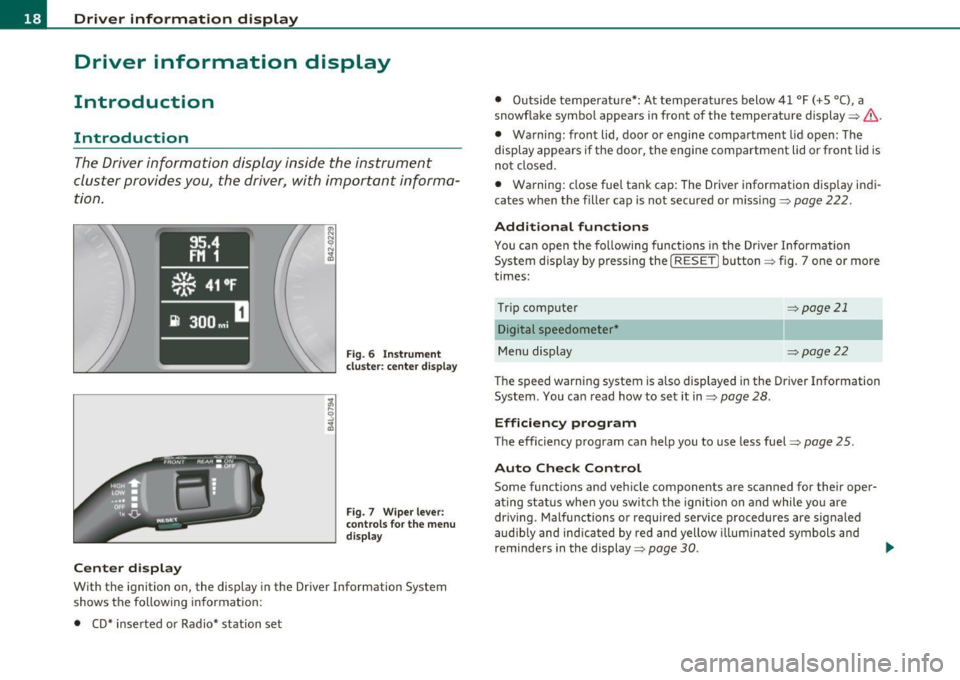
The Driver information display inside the instrument
cluster provides you, the driver, with important informa
tion .
Center display
Fig. 6 In strument
cl uster : cente r disp lay
F ig . 7 Wiper le ver :
c ontro ls for the menu
di splay
With the ignition on, the display in the Dr iver Information System
shows t he fo llow ing in format ion:
• CD* inse rted o r Radio* station set •
Outside tempera ture*: At temperat ures below 41 °F (+5 °C), a
snowflake symbo l appears in front of the temperature display~& .
• Warning: front lid, doo r o r engine compartm ent lid open: The
display appea rs if the door, the eng ine compa rtment lid or front lid is
no t closed .
• Wa rning : close fue l tank cap: The Driver informat ion d isp lay ind i
ca tes when t he fille r ca p is not secure d or missi ng~
pag e 222.
Additional functions
You can open the following functions i n the Driver Information
System d isp lay by pressing the
I RESET! button ~ fig. 7 one or more
times:
T rip computer
D igital speedometer*
M enu display
~page21
~pag e22
The speed wa rni ng system is a lso displayed in the Driver Informat ion
System . You ca n read how to se t it in~
page 28 .
Efficiency program
The efficiency program can help you to use less fuel~ page 25.
Auto Check Control
Some functions and veh icle components are scanned for their oper
a ting status whe n you swi tch the ig nition on and while yo u are
driv ing . Malfunctions or required service procedures are signa led
aud ib ly and ind ica ted by red and yellow illum ina ted sym bols and
reminde rs in the display~
page 30 . _..
Page 24 of 320
Driver information display
Distance
The elapsed distance since the last time the memory was cleared
appears in the display. The maximum distance that can be recorded is
9,999.9 m iles (9,999 .9 kilometers).
[ i ] Tips
All stored values will be lost if the vehicle battery is disconnected. •
Operation
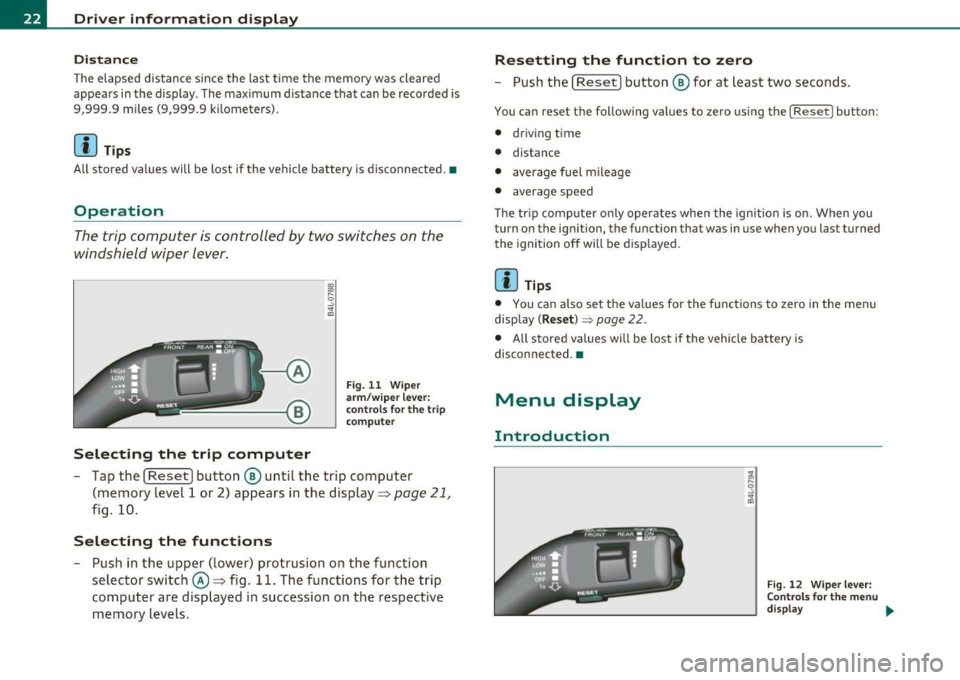
The trip computer is controlled by two switches on the
windshield wiper lever.
Selecting the trip computer
Fig. 11 Wiper
arm/w iper lever:
controls for the trip
co mputer
- Tap the [ Reset] button® until the trip computer
(memory level 1 or 2) appears in the display=>
page 21,
fig. 10.
Selecting the functions
-Push in the upper (lower) protrusion on the function
selector switch@=> fig. 11. The functions for the trip
computer are displayed in succession on the respective
memory levels.
Resetting the function to zero
- Push the [ Reset I button ® for at least two seconds.
You can reset the following values to zero using the [ Reset l button:
• driving time
• distance
• average fuel mileage
• average speed
The trip computer only operates when the ign ition is on. When you
turn on the ignition, the function that was in use when you last turned
the ignition off will be displayed.
[ i ] Tips
• You can also set the values for the functions to zero in the menu
display
( Reset )~ page 22.
• All stored values will be lost if the vehicle battery is
disconnected. •
Menu display
Introduction
Fig. 12 Wiper lever:
Controls for the menu
display ..
Page 25 of 320
Display Ty e
.,Set
. Check ·
Menu off
Fig. 1 3 Displa y: Sta rt
men u
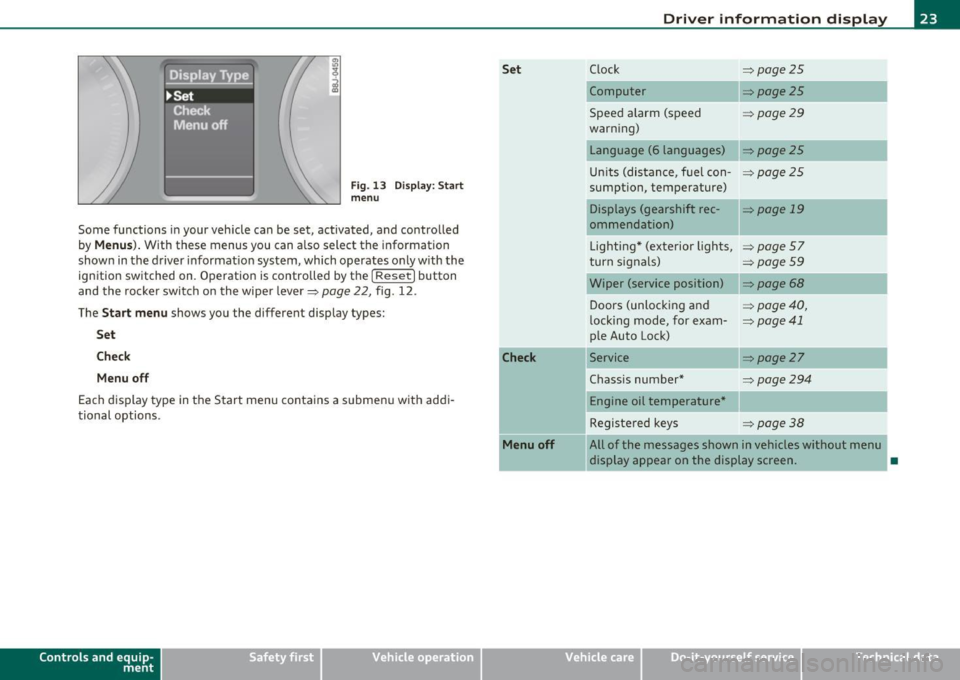
Some functions i n your veh icle can be set, activated, and controlled
by
Menus ). With these menus you can a lso select the information
shown in the driver informat ion system, which operates o nly w ith the
ign ition switched on . Operation is contro lled by t he [
Reset ) button
and the rocke r switch on the wipe r lever~
page 22, fig . 12 .
The
Start menu shows you the different display types:
Set
Che ck
Menu off
Each display type in the Start menu contains a s ubmenu with addi
tional options .
Controls and e quip
m ent Vehicle
OP-eration Set
Check
Menu off
Driver information display
C lock ~page25
Computer ~ page25
Spee d alarm (speed =>page29
war ning)
Language (6 languages)
~ page25
Un its (dis tance, f uel con-=>page2 5
sumption, temperature)
Displays (gearshift rec -
=> page 19
ommendation)
Lighting * (exterior lights,
=> page57
turn s ignals) => page 59
Wiper (service position) ~page68
Doors (unlocking and => page 40,
l ocking mode, for exam-~ page 41
p le Auto Lock)
Service
~ page27
Chass is number * ~page294
Engine oil temperature *
Registe red key s
=>page38
All of the messages shown in vehicles without menu
display appear on the display screen.
•
Vehicle care Do-it-yourselt service iTechnical data
Page 26 of 320
![AUDI A3 2011 Owner´s Manual Driver information displ ay
Navigating the menu
Use the rocker switch on the windshield wiper lever and
the [
Reset] button to operate the menu and carry out
inquiries and selec](/img/6/40268/w960_40268-25.png "AUDI A3 2011 Owner´s Manual Driver information displ ay
Navigating the menu
Use the rocker switch on the windshield wiper lever and
the [
Reset] button to operate the menu and carry out
inquiries and selec")
Driver information displ ay
Navigating the menu
Use the rocker switch on the windshield wiper lever and
the [
Reset] button to operate the menu and carry out
inquiries and selections.
-A
Fig. 14 Wiper lever:
Controls for the menu
display
F ig. 15 Display: Start
men u
[ Reset I button ® and rock er switch @=> fig. 14 functions:
To open the menu
- Press the [Reset] button® until the menu display
=> fig. 15 appears
Selections and settings
- Press the rocker switch @to reach a menu display. The
switch is operated the same as the display (up/down).
Entering and confirming
- Press the [ Reset I button ®·
Returning to the Start m enu
- Press the [ Reset] button longer than 2 seconds to return
from any menu level to the Start menu.
Us ing the rocker sw itch, you can select the menus in the display or
change settings . A cursor appears on the left in front of the selected
values.
By pressing the [ Reset] button, you activate the selection you made
or confirm the values you set.
Selecte d functions are identified with
a check mark or are carried out directly .
Meanings of the symbo ls in the display:
Se lection bar
>
D
Selected function
Cursor
Check mark Meaning
Current Selection
Selected or
Function
act ive
Box Not selected
....
Triangle pointing up Previous page
Triangle pointing down Next page
•
Page 27 of 320
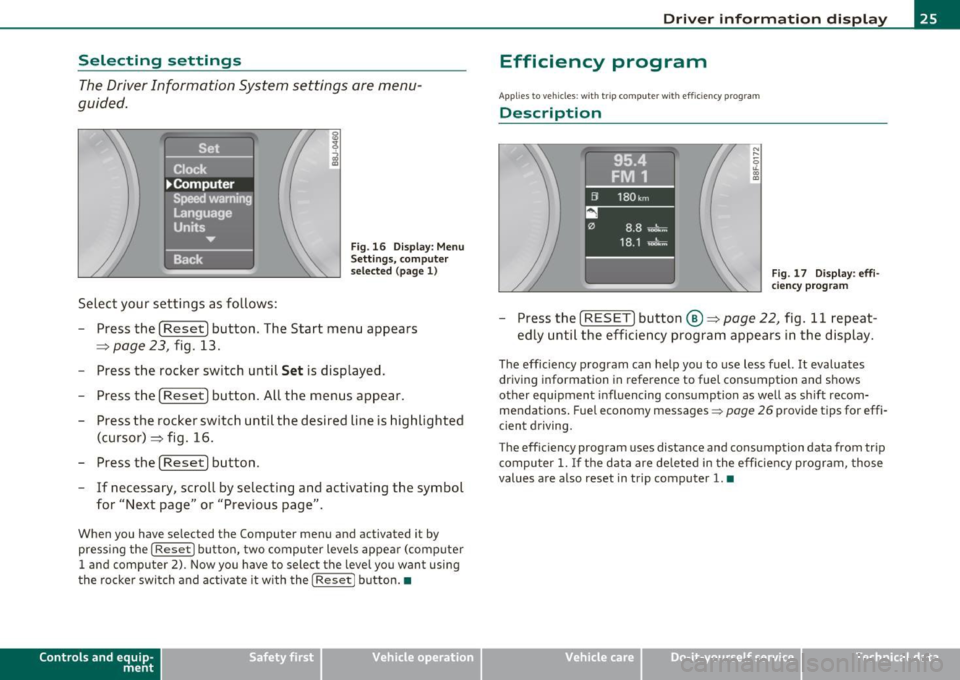
Selecting settings
The Driver Information System settings are menu
guided.
Select your settings as follows :
Fig. 16 Display: Menu
Se ttings, com pute r
selec ted (page 1)
- Press the [Reset] button. The Start menu appears
=> page 23, fig. 13.
- Press the rocker switch until
Set is displayed.
- Press the [
Reset] button. All the menus appear.
- Press the rocker switch until the desired line is highlighted
(cursor)::::> fig . 16.
- Press the [
Reset] button.
- If necessary, scroll by selecting and activating the symbol
for "Next page" or "Previous page".
When you have selected the Computer menu and activated it by
pressing the
I Reset I button, two computer levels appear (computer
1 and computer 2). Now you have to select the level you want using
the rocke r swi tch and activate it w ith the
I Reset j button. •
Contro ls a nd e quip
m en t Vehicle
OP-eration
Driver inf ormation display
Efficiency program
App lies to vehicles: with t rip c omputer with efficiency prog ram
Description
Fig . 17 Display: effi
cie ncy p rogra m
-Press the [ RESET] button@::::> page 22, fig . 11 repeat-
edly until the efficiency program appears in the display.
The efficiency program can help you to use less fuel. It evaluates
driving information in reference to fuel consumption and shows
other equipment influencing consumption as well as sh ift recom
mendations . Fuel economy messages =>
page 26 provide tips for effi
cient driving.
T he effic iency program uses distance and consumption data from trip
compu ter
1. If the data are de leted in the efficiency program, those
values are also reset in trip computer
1. •
Vehicle care Do-it-yourselt service iTechnical data
Page 32 of 320
Driver info rmation d isplay
- Briefly press the button in the instrument cluster
=>
page 29, fig . 22. The odometer and the digital clock are
now i lluminated .
- Press the button for at least 2 seconds . The currently
stored maximum speed appears in the display.
- Press the reset button in the wiper lever@=>
page 29,
fig. 23 until the crossed out speed warning symbol for
warning th reshold 2 appears in the display.
A few seconds after the ad justment is completed, the illuminat io n for
the odometer and the digital clock will go out.
[ i J Tips
This warning thresho ld can also be contro lled through the trip
computer~
page 24, "Navigat ing the menu" .•
Warnings and symbols
Red symbols
A red symbol means DANGER
- P ull of the road and stop the vehicle .
- Turn off the engine.
- Check the malfunctioning syst em. Contact you r au tho-
rized Audi dealer or a qualified workshop for assistance.
BRAKE USA models : ~page32 Malfunction in the brake system
Canada models : ~page32
Malfunction in the brake system
_i_ Engine coolant level too low/ ~page32
-engine coolant temperat ure too
high
~ Engine oil pressure too low ~page33
When a red symbo l appears , a warn ing tone will sound three t imes in
succession. The symbo l continues to flash until the malfunction has
bee n repaired. If there is
more than one malfunction , the symbols
appear one after the other for about two seconds.
[ i J Tips
• The message for a malfunction can be shown by pressing on the
left knob.
• During route guidance on vehicles with a navigat ion system, the
wa rni ng symbo l is shown in the fie ld above. •
Yellow symbols
Ayellow symbol means WARNING.
Clutch pedal ~page33
- -
Low fuel level ~page34
Check eng ine oi l level ~ page34
Page 59 of 320
brightness increases again, the low beams are turned off again auto
matically =>& .
In the
AUTO position the low beams are switched off automatically
when the ignition is turned off.
Light Sensor Malfunction*
In the event of a light sensor ma lfunct ion, the driver is notified in the
instrument cluster display:
Automatic headlights/automatic wipers defective
For safety reasons the low beams are turned on permanently with t he
switch in
AUTO*. H owever, you can continue to turn the lights on and
off using the light switch. Have the light sensor checked as soon as
possible at a dealership.
Coming home/leaving home function*
The function is sw itched on when the sw itch is in the AUTO* position
and the function is shown as active in the driver information system.
The
coming home funct ion illuminates the area around the vehicle
when the ign it ion is switched
off and the driver's door is opened. The
length of time the lights rema in on can be set in the menu display
( Illumination > Exterior lights > coming home ).
The leaving home function illuminates the area around the vehicl e
when u nlocking it .
& WARNING
• Never use daytime running lights to see where you are going.
They are not bright enough and will not let you see far enough
ahead for safety, especially at dusk or when it is dark. Always
switch on the low beams at dusk or when it is dark.
• Automatic headlights are only intended to assist the driver .
They do not relieve the driver of his respon sibility to check the
headlights and to turn them on manually according to the current
light and visibility conditions. For example, fog and rain cannot be
Controls and equip
ment Safety first
Clear vision
& WARNING
(continued )
detected by the light sensors. So always switch on the headlights
under these weather conditions and when driving
in the dark io.
• Crashes can happen when you cannot see the road ahead and
when you cannot be seen by other motorists.
- Always turn on the headlights so that you can see ahead and
so that others can see your car from the back.
(I) Tips
• With the switch in AUTO front fog lights cannot be turned on in
addition.
• Th e light senso r for headlight control is located in the rear view
mirror mount . Do not apply any stickers to the windshield in this area
to prevent malfunctions or fail ures .
• Some exterior lighting functions can be adjusted in the driver
information system => page 22 ,
• If you remove the ignition from t he ignition lock whi le the head
lights are still on, a buzzer will sound as long as the driver's door is
open to remind you to turn off the lights .
• Always observe the specific local regulat ions for your area as to
when to use your lights.
• With automatic headlights, the high-beam funct ion is also avail
able, but with one restr iction:
If you have not switched the high
beams back to low beams during automatic headlig ht operation (for
example, after driving through a tunnel), only the low beams come
on the next time automatic headlights are switched on . To use the
high beams, you first have to pull the high beam lever back and then
push the lever forwa rd again .
• In cool or damp weather, the inside of the headlights, turn signa ls
and ta il lights can fog over due to the temperature difference
between the inside and outside. They will clear shortly after switching
them on. This does not affect the serv ice life of the light ing . _,,
Vehicle care Technical data
Page 268 of 320
-~_T_ ir_e_ s_ a_ n_ d_ w_ h_e_ e_ ls _______________________________________________ _
The ti re pr essure mon itor ing must be reset in the m enu display each
t im e th e pre ssur es a re adjust ed (e .g . w hen sw itching b etwee n parti al
and full load press ure) o r afte r ch angi ng or r eplac ing a tir e on yo ur
vehicle => page
26 7. You ca n find t he recommen ded tire pr essures
for your veh icle o n th e labe l o n the dr ive r's door pillar=> page
249 .
Tire tread circ umference and vibrat ion characterist ics ca n change and
c a us e a tir e pre ssure w arni ng if:
• t he tire pressure in one o r more tires is to o low,
• t he tire has st ru ctu ral damag e,
• the ti re press ure was changed , wh eels ro tate d or r ep laced but the
TPM S was not re set=> page
267 .
Warning symbols
1..1' Loss of p ress ure in at least on e tir e => & . Check th e tir e or tir es
and rep lace or re pair i f necessary. T he in dicator lig ht (• in th e ins tru
men t cluster al so illu mina tes=> page
11. Che ck/co rrect the pre s
sures of a ll four tires an d reset TP MS in t he menu display.
rr :; (T ire Pre ss ure M on itor ing Syst em) Tire pressure! System
malfunction.
I f T ,.;> ap pears a fter swi tc hi ng t he ignition o n or w hile
dr iv ing => page
265 , fig. 177 a nd t he in dic ator lig ht 'in th e i nstr u
m en t clus ter bli nks fo r ap prox ima tely one minute and th en stays o n,
t h ere is a system ma lf u nct io n. S ee your authorized Audi dealer as
soon as poss ible.
& WARNING
• If the tire pressure indicator appears in the instrument cluster
display, one or more of your tires is significantly under-inflated. Reduce your speed immediately and avoid any hard steering or
braking maneuvers. Stop as soon as possible and check the tires
and their pressures . Inflate the tire pressure to the proper pres
sure as indicated on the vehicle's tire pressure label=>
page 249.
Driving on a significantly under-inflated tire causes the tire to
overheat and can lead to tire failure. Under-inflation also is likely
to impair the vehicle's handling and stopping ability.
& WARNING (co ntinued )
• The driver is responsible for maintaining the correct tire pres
sures . You must check the tire pressures regularly .
• Under certain conditions (such as a sporty driving style, winter
conditions or unpaved roads), the pressure monitor indicator may
be delayed.
• Ask your authorized Audi dealer if run-flat tires may be used on
your vehicle. Your vehicle registration becomes invalid if you use
these tires when not permitted. Damage to your vehicle or acci dents could also result.
[ i ] Tips
• Th e tire pressu re monito ring system stops wor king when the re is
a n E SP/ABS malfu nct io n.
• U sin g s now c hains may res ult in a system ma lf u n ct io n.
• Tire s with t he ident ification "AO" or "RO" have been specially
m atched w ith yo ur Audi. We recommend usin g onl y these t ires
b ecause they mee t the hig hest standards regard ing safe ty a nd
dr iving charac ter is ti cs when used cor rec tly . Yo ur au thori ze d Audi
dea ler will g lad ly provi de you wi th mor e info rmation. •
Page 269 of 320
________________________________________________ T_ i_ re _ s_ a_ n_d_ w_ h_ e_ e_l _s _ ....... fflll
Applies to vehicles : with tir e pressure monitor ing syste m
Reset tire pressure monitoring system
(Stepl)
If the tire pressure is adjusted, wheels are rotated or
changed, the TP MS must be reset in the menu display.
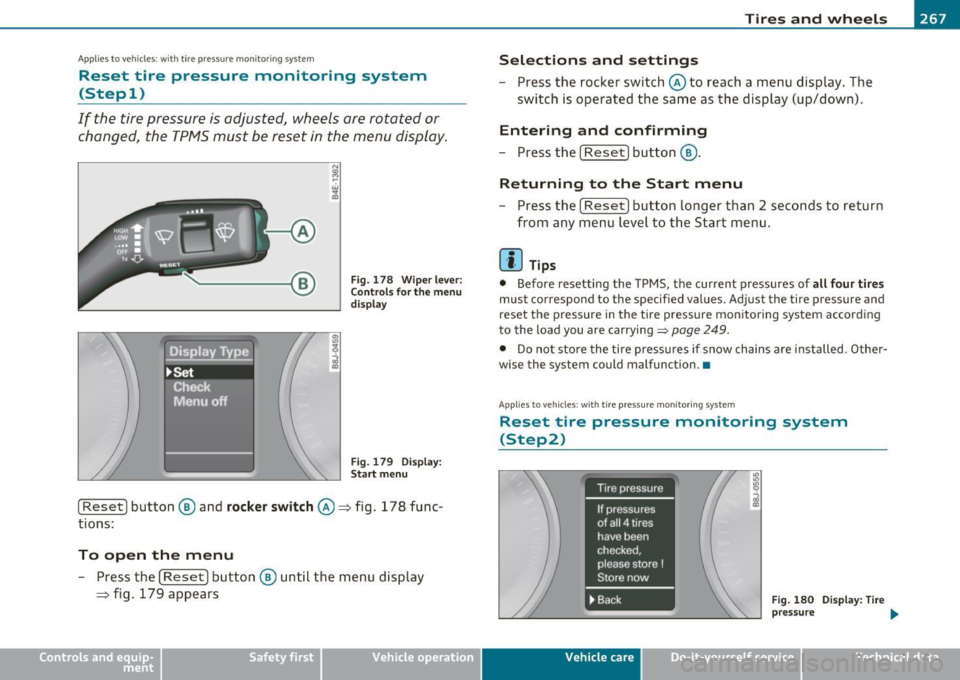
Fig. 1 78 Wip er l ev er:
C ont rol s f or the m enu
display
Fi g. 17 9 Disp la y:
Sta rt me nu
[ Reset) button ® and rocke r switch @=> fig. 178 func
tions:
To open the menu
- Press the (Reset] button ® until the menu disp lay
=> fig. 179 appears
Vehicle OP-eration
Selections and settings
-Press the rocker switch @ to reach a menu display. The
swi tch is operated the sa me as the display (up/down).
Entering and confirming
- Press the [ Reset) button®·
Returning to the Start menu
- Press the [Reset) b ut ton longer than 2 seconds to return
f rom any m enu lev el to th e Start menu .
[ i ] Tips
• Before resetting the TPMS, t he cur rent pressures of a ll four tires
must correspond to the specified values. Adjust the tire pressure and
reset the p ressure in the tire pressure mon ito ring system according
to the load you are carrying=>
page 249.
• Do not sto re the ti re press ures if snow chains are i nstalled . Othe r
wise the system could malfunction .•
App lies to vehicles : w ith t ire pressure monitoring system
Reset tire pressure monitoring system
(Step2)
Fig . 18 0 D ispla y: Ti re
p ress ure
Vehicle care Do-it-yourselt service iTechnical data