lights AUDI A3 2011 Owner´s Manual
[x] Cancel search | Manufacturer: AUDI, Model Year: 2011, Model line: A3, Model: AUDI A3 2011Pages: 320, PDF Size: 75.79 MB
Page 19 of 320
& WARNING (continued)
• USA model s: If both , the BRAKE warning light and the C
warning light come on at the sam e time, the rear wheels could
lock up first under hard brak ing. Lo ck-up of the rear wheel brakes
can cause los s of vehicle control and an accident. Have your vehicle
repaired immediately by your authorized Audi dealer or a qualified
workshop. Drive slowly and avoid sudden, hard brake appli cation .
• Canada models : If both, the brake warning light
ABS warning light
J come on at the same time, the rear wheels
could lock up first under hard b raking. Loc k-up of the rear wheel
brake s can cause loss of vehicle control and an accident . Have your
veh icle repaired immediately by your authorized Audi dealer or a
qualified workshop. Drive slowly and avoid sudden, hard brake
application •
Electro-mechanical power assist /@
If the ind icator light illuminates while you are d riving, there is a
m alfu nction in the ele ctro-mech anical steering . If the ind ic a tor ligh t
is showing , there may be a reduction in power steer ing ass ist . If
t he indi cato r light is sh owing @, there may be a tot al loss o f power
steeri ng assist . The stee ring must be inspected immediately by a
qualif ie d workshop =>
&-With the engi ne not running (e.g. when the
car is be ing towed), t he re is also no power ass ist available.
& WARNING
If there is a malfunction , the indicator light for the electro
mechanical power a ssist illuminate s. Seek professional
assistance. •
Controls and equip
ment Safety first
Instruments and warning
/indicator lights
Vehicle care Technical data
Page 25 of 320
Display Ty e
.,Set
. Check ·
Menu off
Fig. 1 3 Displa y: Sta rt
men u
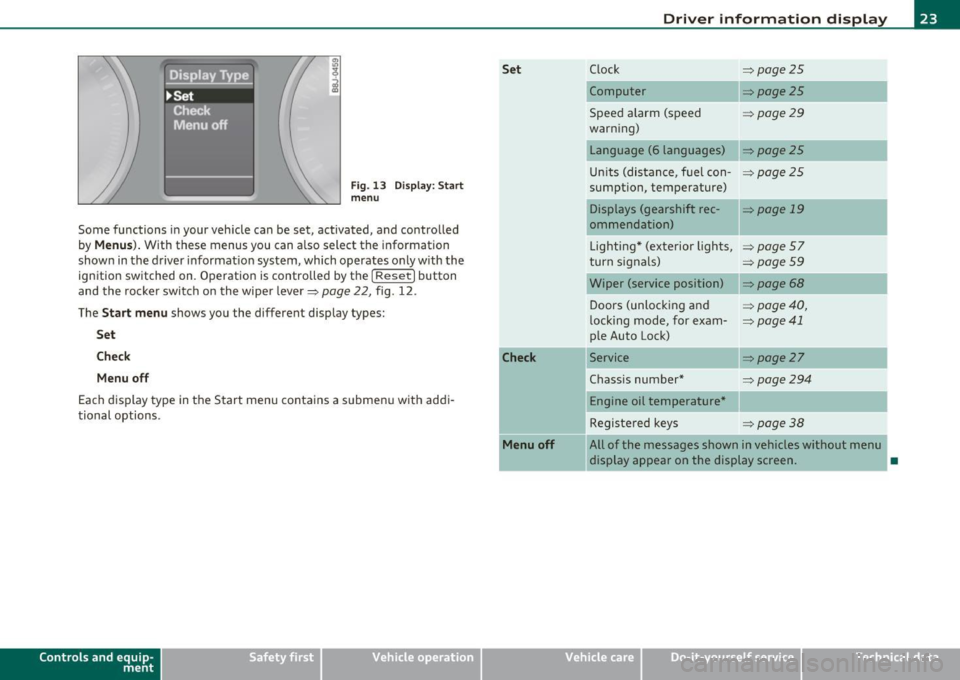
Some functions i n your veh icle can be set, activated, and controlled
by
Menus ). With these menus you can a lso select the information
shown in the driver informat ion system, which operates o nly w ith the
ign ition switched on . Operation is contro lled by t he [
Reset ) button
and the rocke r switch on the wipe r lever~
page 22, fig . 12 .
The
Start menu shows you the different display types:
Set
Che ck
Menu off
Each display type in the Start menu contains a s ubmenu with addi
tional options .
Controls and e quip
m ent Vehicle
OP-eration Set
Check
Menu off
Driver information display
C lock ~page25
Computer ~ page25
Spee d alarm (speed =>page29
war ning)
Language (6 languages)
~ page25
Un its (dis tance, f uel con-=>page2 5
sumption, temperature)
Displays (gearshift rec -
=> page 19
ommendation)
Lighting * (exterior lights,
=> page57
turn s ignals) => page 59
Wiper (service position) ~page68
Doors (unlocking and => page 40,
l ocking mode, for exam-~ page 41
p le Auto Lock)
Service
~ page27
Chass is number * ~page294
Engine oil temperature *
Registe red key s
=>page38
All of the messages shown in vehicles without menu
display appear on the display screen.
•
Vehicle care Do-it-yourselt service iTechnical data
Page 33 of 320
Engine oil sensor malfunction =>page35
._ -
Engine speed limitation =>page34
Diesel particulate filter =>page34
Worn brake pads =>page35
USA models : =>page35 Speed warning 1
Canada models: =>page35 Speed warning 1
USA models : =>page35 Speed warning 2
Canada models: =>page35 Speed warning 2
!! Dynamic headlight range control*
defective
=> page35
Con tro ls a nd e quip
m en t
Windshield washer fluid level low => page35
Battery voltage too high or too low => page 35
Defective light bulb =>page36
USA models : =>page36
Defective brake light
Canada models : =:>page36
Defective brake light
Light/rain sensor defective (auto-
=> page 36
matic headlights)* defective
Tire pressure monitor ing system*
=> page 36
Vehicle OP-eration
Driver information display
When a yellow symbol appears, a warning tone will sound once.
Check the displayed function as soon as possible . If more than one
malfunction is detected, all symbols will appear one after the other
for about two seconds .•
Driver information
In addition to the warning/indicator lights and the
symbols in the instrument cluster display, driver informa
tion is displayed .
-~ a:.. CD m
Fig. 24 Section of
instrument cluster:
Set/Check button
Driver information appears in the display when a defective light bulb
is reported by the defective light bulb warning=>
page 36, when the
brake pads are worn and before you engage a gear on vehicles w ith S
tronic .
In addition, driver information may appear when a red symbol flashes
in the driver disp lay.
To display Drive r information
As an example, the~ symbol appears in the display . If you now
press the button => fig. 24, the following driver message appears in
the disp lay:
Switch off engine and check oil level
The driver message in the display goes out afte r about 5 seconds. You
can display the driver message again by br iefly pressing the button .•
Vehicle care Do-it-yourselt service iTechnical data
Page 35 of 320
If the generator warning/indicator light shou ld also illuminate
=> page 15, t hen t he fan belt m ay be damaged .
& WARNING
• If your vehicle should break down for mechanical or other
reasons , pa rk at a safe distance from mo ving traffic, turn off the
engine and turn on the hazard warning lights=>
page 59, "Emer
gency flasher
A. ".
• Never open the hood if you see or hear steam or coolant
escaping from the engine compartment -you risk being scalded.
Wait until you can no longer see or hear steam or coolant
escaping .
• The engin e compartment of any vehicle i s a dangerou s ar ea .
Before you p erform any work in the engine compartment , turn off
the engine and allow it to cool. Follow the warning sti ckers
=> page 218 , "Engine compartment ".
0 Note
Do not continue driving if the -¥- symbol illuminates . There is a
ma lf u nction in the engine coo ling sys tem -yo u could damage your
eng ine. •
Engine oil pressure malfunction ~
The red engine oil pressure warning symbol requires
immediate se rv ice o r repair.
If the 9=r. symbo l app ears in the d is pl ay a nd flash es, th e oil
p ressure is to o lo w . In add ition to the sym bol, the f ollow ing
messag e al so a pp ea rs in the dis play :
Switch off engine and check oil level
- P ull off the road a nd stop t he ve hicle.
Controls and equip
ment Safety first
Driver information display
-
Shut the eng ine down .
- Check t he eng ine oi l level=>
page 231 .
-Contact your authorized Aud i dea le r for assis tance i f
necessary .
Engine o il level too low
If the eng ine oi l leve l is too low , top off oil to t he p roper level
=>page 232.
Engine oil level OK
If the 't'!::;r. symbol starts flashing again even thoug h the engine oil
level checks O K on t he d ipstick,
do not start driving again and do not
let the engine run at idle .
Instead, contact you r authorized Audi
dealer fo r assis tance.
[ i ] Tips
• The engine oil pressure symbol 'I=:?: is not an indic ato r for a low
engine oil level. Do not rely on it . Instead , check the oil level in your
engine at regular intervals , preferably each t ime you refuel, and
always before going on a long tr ip .
• The yellow oil level warning indication requires oil refill or
workshop service without de lay . Do not wait until the red oil pre s
s ure warning symbol~ starts to flash before you respond to the
low oil level warning _, . By then, your engine may already have
s uffered serious damage. •
Applies to vehicles: with manual trans miss ion
-;y Clutch pedal
T he indica tor lig ht illuminates if you do no t press t he cl utch pedal
when starting the engine . For safety reasons, the engine will only
sta rt when the clut ch pedal is pressed. •
Vehicle care Technical data
Page 36 of 320
Driver information display
Fuel supply too low I
When the symbol illuminates, this means there are about 2.6
gallons (10 liters) of fuel left in the fuel tank. Time to refuel!
=;, page 221.
If the symbol lights up, even when there is ample fue l in the tank, and
the text
Tank system malfunction! Please contact workshop appears
in the display, there is a fault in the system. Contact a qualified work
shop to have the fault rectified .•
App lies to veh icles: w ith eng ine speed limitat ion
Engine speed limitation ~
Engine speed maximum XXXX RPM
The symbol illuminates when there is an engine control malfunc
tion. The indicator light
C in the instrument cluster also illuminates.
Th e eng ine speed is limited to the speed displayed in the driver infor
mation system. Keep in mind that the engine speed will not exceed
the value disp layed in the driver information system, for example
when downshifting .
Please go to an authorized Audi dealer or other qualified workshop to
have the malfunction repai red. •
App lies to vehicles: with diesel eng ine and diesel particulate filter
Diesel particulate filter clogged
Particulate filter ! See owner's manual
If the indicato r light in the instrum ent cluster comes on, the
diesel particulate filter has become blocked with soot as the result of
constant short -distance driving. When the symbol illuminates,
you can alter your driving style to assist the filter self-cleaning
process. Drive for approximately 15 minutes in 4th or 5th gear (auto
matic transm ission w ith the selector lever in the 5 posit ion) at a min
imum speed of 37 mph (60 km/h) and an engine speed of approx
imate ly 2,000 RPM. The temperature increase that will result from
this can burn off the soot in the f ilter. The symbol will switch off when
the cleaning is successful. After a successfu l cleaning, there is no
need to bring the car to an authorized dealer or qualified workshop
because this is part of normal vehicle operation.
If the symbol does not switch off, see your authorized dealer or
other qualified workshop to have the problem corrected.
As long as the indicator light remains on (diese l particulate filter
plugged), you can expect increased fuel consumption and poss ibly
also a loss of engine performance.
For more information on the diesel particulate filter, refer to
=;, page 199.
& WARNING
Always adapt your speed to the current weather, road and traffic
conditions . You should never disobey traffic laws in order to
follow driving recommendations. •
Checking the engine oil level ~-
'LF. Please add max. 1 qt of engine oil!
If the ..:,; symbo l comes on, add 1 quart (1 liter) of oil at the next
opportun ity=-;,
page 232. •
Checking the engine oil level~
When the _ symbol illuminates, check the engine oil level as soon as
possible ~
page 231. Top off the oil at your earliest opportunity
=;, page 232. •
Page 38 of 320
Driver information display
Defective light bulb warning
The defective light bulb warning tells you when a vehicle
light bul b has become defective .
If a defective bu lb has been detected by the system or a light bulb
burns ou t, the symbo l w ith a message appea rs in the display to te ll
you which bulb is burnt out and where it is located. For example:
Rear left turn signal
After 5 seconds, the message d isappears . If you want to recall the
message into t he disp lay, press the CHECK button ::::,
page 8, fig. 2
® ·
There are three reasons w hy the defective bulb message would
appea r in the d ispl ay :
• The light bulb has burnt out::::,
page 285 .
• Th e fuse is "b lown" ::::, page 281, "R ep laci ng fuses".
• The wire connect io n to the light bulb is defective.
Have the bu lb rep lace d or the connec tion repa ired by your au thor ize d
Audi Service department.
& WARNING
• Light bulbs are pressurized and could e xplode while they are
being changed cau sing seriou s personal injur y.
• Work with due care when handling the high-voltage section of
ga s di scharge (xenon ) lamp s. Failing to do so could re sult in death
or se rious injury !•
Brake light defective B • urn (USA
models)/ (Canada models)
In case of a malfunct ion or component fai lure, the symbol
(USA models)/ (Ca nada models) can appea r. The following elec· trical components should be checked
, repaired or rep laced, as neces
sary:
• Brake ligh t bul bs
• All wiri ng connec tions
• Brake light switch
C on tact your au thorized A udi deale r for assistance if necessary .
(I) Tips
The brake light switch is on ly inspected as part of the functional check
after the engine is sta rted .•
A pplies to veh icles: w ith au toma tic head ligh ts
Light/rain sensor defective
The indicator light indicates a defec t in the automatic
headlights/automatic wi per system.
If the symbo l ill umina tes, the ligh t se nso r has failed. Fo r safety
reasons, the low beams are turned on permanen tly with the sw itch in
AUTO . However, you can continue to t urn the lights on and off using
the light sw itch . In the case of a defec t in the ra in se nsor, the wi nd
shield wiper lever functions are still avai lab le . Have the light/rain
s ensor che cked as soon a s poss ible at an a uth oriz e d Au di dea le r.•
A pp lies t o veh icles : wit h tire p ressure mon itoring system
Tire pressure monitoring system )
Tire press ure that is too lo w m ust be correc ted as soon a s
possible.
If the symbo l flashes for about one min ute after the igni
tion is sw itc hed on and then re m ain s on, t here is a malfu nc
tion i n the syste m. Co nsu lt the neares t au thori zed Aud i
d ealer a s so on as possib le.
~
Page 43 of 320

All the doors and the rear lid are locked by the central locking system
when you lock the vehicle.
The unlock ing and locking mode* can be changed in the driver infor
mation system~
page 22.
Unlocking the vehicle
You can unlock the vehicle from outside either by using the remote
control
or by inserting and turning the key in the driver's door lock .
When you
unlock your vehicle:
• Th e anti-theft alarm system is deactivated briefly.
• The vehicle interior lights illuminate for approximately 30
seconds .
• All turn signa l lights will flash twice when the car is unlocked .
• After unlocking the vehicle, you have 30 seconds to open a door or
the rear lid. Afte r 30 seconds, the vehicle automatica lly locks and the
anti-theft alarm system activates again.
The rear lid can be locked or unlocked either by using the remote
control or by inserting and turning the key in the dr iver's door lock.
Unlocking the vehicle with the remote control~ will only
unlock the
rear lid, to
open it, the lid handle needs to be pressed.
Locking the vehicle
You can lock the vehicle from outside either by using the remote
control
or by inserting and turning the key in the drivers's door lock.
When you
lock the vehicle:
• All doors and the rear lid are locked.
• All turn signal lights will flash once when the car is locked.
• Th e anti-theft alarm system is activated. The horn of the anti
theft alarm system will sound and the anti-theft alarm system readi
ness light, located in the center of the instrument panel below the
windshield on the right side of the air vent, will start to blink.
• Th e vehicle interior lights turn off.
Controls and equip
ment Safety first
Opening and closing
Automat
ic locking*
The automatic locking feature locks all the vehicle doors and the rear
lid when you drive faster than 9 mph (15 km/h).
You can unlock the vehicle from the inside by:
• removing the key from the ignition switch (the vehicle wi ll auto
matically unlock itself) or
• pressing the unlock part of the power lock switch
ll::D or
• pulling the inside handle for that door (once - the front door is
unlocked and opened at the same time, twice to open the rear door).
If you wish, you can have an authorized Audi dealer convert your
power door lock system to automatic locking.
& WARNING
• When you lock your vehicle from outside, nobody· especially
children - should remain inside the vehicle. Remember, when you
lock the vehicle from the outside the windows cannot be opened
from the inside .
• When you leave the vehicle, always remove the ignition key
and take it with you. This will prevent passengers (children, for
example) from accidentally being locked in the vehicle should
they accidentally press the power locking switch on the center
console.
• Do not leave children inside the vehicle unsupervised. In an
emergency it would be impossible to open the doors from the
outside without the key.
[ i ] Tips
• In the event of a crash with airbag deployment all locked doors
will be automatically unlocked to give access to the vehicle occupants
from the outside .
• If the power locking system sho uld fail, you can still open the fuel
tank flap in an emergency~
page 224 . .,_
Vehicle care Technical data
Page 44 of 320
Opening and closing
• You are well advised not to keep valuables inside an unattended
vehicle, v isible or not . Even a properly locked vehicle cannot provide
the security of a safe! •
Unlocking and Locking the vehicle with the
remote control
How the remote control works.
Fig. 29 Remote
control : function
buttons
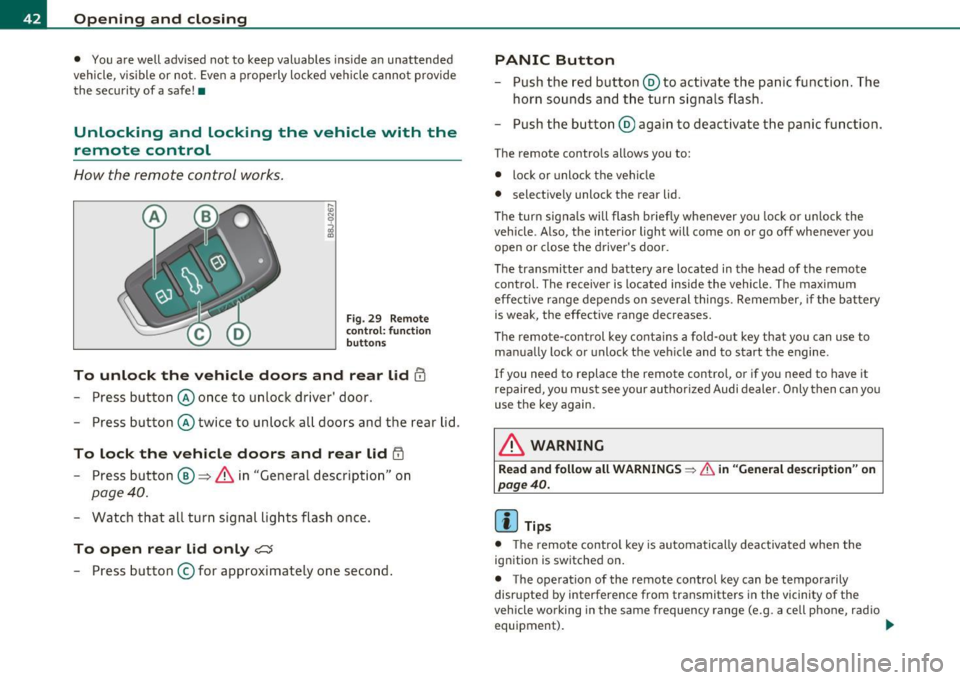
To unlock the vehicle doors and rear lid !TI
- Press button @once to unlock d river' door.
- Press button @twice to unlock all doors and the rear lid.
To lock the vehicle doors and rear lid iTI
- Press button ®~ & in "General description" on
page 40.
-Watch that all turn signal lights flash once.
To open rear lid only?:$
-Press button © for approximately one second .
PANIC Button
-Push the red button @to activate the panic function. The
horn sounds and the turn signals flash.
- Push the button @ again to deactivate the panic function.
The remote contro ls allows you to:
• lock or unlock the vehicle
• selective ly unlock the rear lid.
Th e turn signa ls will flash briefly whenever you lock or unlock the
vehicle. Also, the interior light will come on or go off whenever you
open or close the driver's door.
The transmitter and battery are located in the head of the remote
control. The receiver is located inside the vehicle. The maximum
effect ive range depends on several things. Remember, if the battery
is weak, the effective range decreases.
Th e remo te-control key contains a fold-out key that you can use to
manually lock or unlock the vehicle and to start the engine.
If you need to replace the remote control, or if you need to have it
repaired, you must see your authorized Audi dealer . Only then can you
use the key again.
& WARNING
Read and follow all WARNINGS ~ & in "General description" on
page 40.
(I] Tips
• The remote contro l key is automatically deactivated when the
ignition is switched on .
• The operation of the remote control key can be tempora rily
disr upted by interference from transmitters in the vicinity of the
vehicle wo rking in the same frequency range (e.g. a cell phone, radio
equipment). _..
Page 45 of 320

• In order to make sure the locking funct ion is working, you should
a lways keep your eye on t he vehicle to ma ke sure it is p roperly lo ck ed.
• Do not use the remote contro l if you are inside the car, otherwise
yo u may u nintent ionally loc k the veh icle, and then you would set off
the ant i-theft a larm when you try open a door . In case t his happens
anyhow, push the unl ock button@.
• Use the panic function on ly if you are in an emergency situation. •
Resetting the remote control
The remote control must be reset if the vehicle does not
unlock .
- Press the unlock but ton en on the remote control.
- Manually un lock the driver's door lock with t he mechanical
key w ithin 30 seconds.
- Press either the lock-
rn or the unlock m b utton to
complete the reset sequence .•
Con tro ls a nd e quip
m en t Vehicle
OP-eration
Opening and closing
Doors, power locks
Operating the Locks with the fold-out key
To lock and unlock the vehicle from th e outside, turn the
key in the lock of the driver's door .
N
-N
-a:. gi
Fig. 30 Key turn s for
o pe ning and closing .
To unlock all doors and the rear lid
- Turn the key to positi on @ :::::> fig. 30 to unlock the vehi cle
To lock the vehicle
- Close all windows and doors properly .
- Tu rn t he key in the lock of the driver's door to the lock
posi tion @=>
& in "General descr iption" on page 40.
When you unlock yo ur vehicle:
• The a nti -theft alarm system is deactivated .
• Th e vehicle interior lights illumina te for approximate ly 30
seco nds.
When you
lock the vehicle:
• All doors and the rear lid are loc ked.
• The anti-theft alarm system is activated.
• The vehicle inter ior lights turn off .
Vehicle care Do-it-yourselt service iTechnical data
Page 58 of 320

Clear vision
Clear vision
Lights
Switching the headlights on and off ·"ti-·
!
-ti. ID
panel: light switch
Fig. SO Instrument
panel: Light swit ch
with daytime running
lights (DRL )
The light switch must not be overturned past the stops in
either direction.
Switching on automatic headlight control*
-Turn the light switch to AUTO* =:> fig. 49.
Switching on the side marker lights
- Turn the light switch to ~oo~.
Switching on the headlights and high beam
-Turn the light switch to io.
Push the high beam lever forward towards the instrument
panel=:>
page 59 .
Switching off the lights
-Turn the light switch to 0.
The headlights only work when the ignition is switched on . While
starting the engine or when switching off the ignition, the headlights
w ill go off and only the side marker lights will be on.
Daytime running lights (DRL) (USA models)
The daytime running lights can be turned on or off using this func
tion. If the function is active, the daytime running lights are turned
on automat ically when the ignition is switched on .
The daytime running lights are activated
only when the light switch is
at the
AUTO* or DRL * position .
Daytime running lights (Canada models only)
The daytime running lights are act ivated only when the light switch
~ fig. 49 is either at the O or the ~oa; position.
The daytime running lights function cannot be turned off.
Automatic headlight control*
In the switch position AUTO the automatic headlight control is
turned on . The low beams are turned on automatically through a light
sensor as soon as ambient brightness (e.g . when driving into a
tunnel) falls below a value preset at the factory. When ambient .,_