Symbol AUDI A3 2012 Owner´s Manual
[x] Cancel search | Manufacturer: AUDI, Model Year: 2012, Model line: A3, Model: AUDI A3 2012Pages: 280, PDF Size: 70.11 MB
Page 25 of 280
Driver information
display
Introduction
Introduction
The Driver information display inside the in
strument cluster provides you, the driver,
with important information.
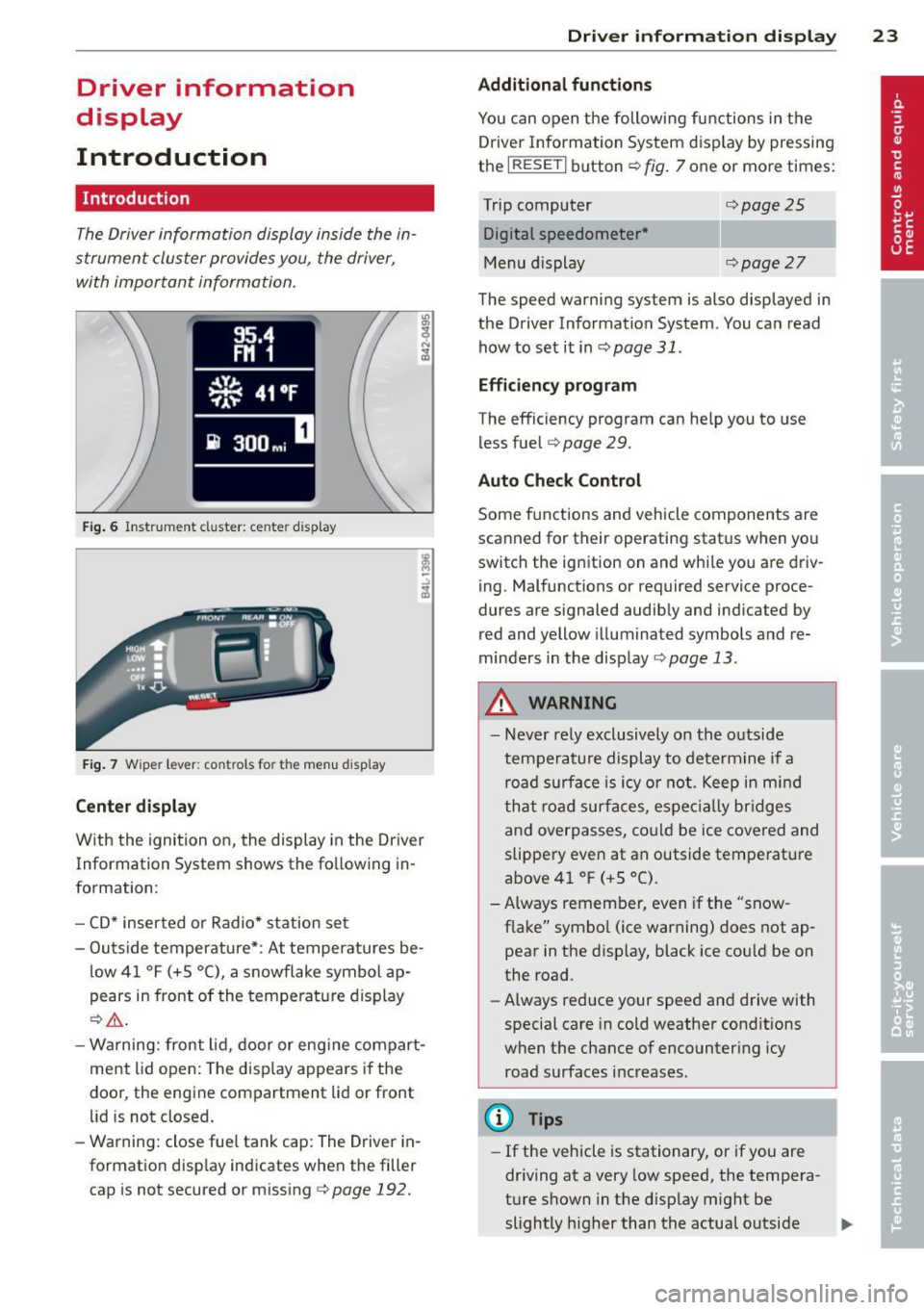
Fig. 6 Instr ument cluster: ce nte r dis play
Fig. 7 Wiper lever: controls fo r the menu d ispl ay
Center display
With the ignition on, the display in the Dr iver
Information System shows the fo llowing in
formation:
- CD* inserted or Radio* station set
- Outs ide temperature*: At temperatures be-
low 41 °F (+5 °C), a snowflake symbol ap
pears in front of the temperature display
¢_&. .
-Warning: front lid, door or eng ine compart
ment lid open: The disp lay appears if the
door, the engine compartment lid or front
lid is not closed.
- Warning: close fue l tank cap: The Driver in
formation disp lay indicates when the filler
cap is not secured or missing c>
page 192.
Driver information display 23
Additional functions
You can open the following functions in the
Driver Information System display by pressing
the
I RESETI button ¢ fig. 7 one or more times:
Trip computer Digital speedometer *
Menu display
¢page25
¢page27
The speed warning system is also displayed in
the Driver Information System. You can read
how to set it inc>
page 31.
Efficiency program
The efficiency program can help you to use
les s fuel
c> page 29.
Auto Check Control
Some f unctions and veh icle components are
scanned for their operating status when you
switch the ignition on and while you are driv
ing. Malfunctions or required service proce
dures are s ignaled audibly and indicated by
red and yellow illuminated symbols and re
minders in the display
¢page 13.
A WARNING
- Never rely exclusively on the outside
temperature display to determine if a
road surface is icy or not . Keep in mind
that road surfaces, especially bridges
and overpasses, could be ice covered and
slippery even at an outside temperature
above 41 °F (+S °C).
- Always remember, even if the "snow
f lake" symbo l (ice warning) does not ap
pear in the display, black ice could be on
the road.
- Always reduce your speed and drive with
special care in cold weather conditions
when the chance of encountering icy
road surfaces increases.
(D Tips
-If the vehicle is stationary, or if you are
driving at a very low speed, the tempera
ture shown in the display might be
slightly h igher than the actual outside .,,.
Page 30 of 280
28 Driver information d isplay
Navigating the menu
Use the rocker switch on the windshield wiper
lever and the
I Reset I button to operate the
menu and carry out inquiries and selections .
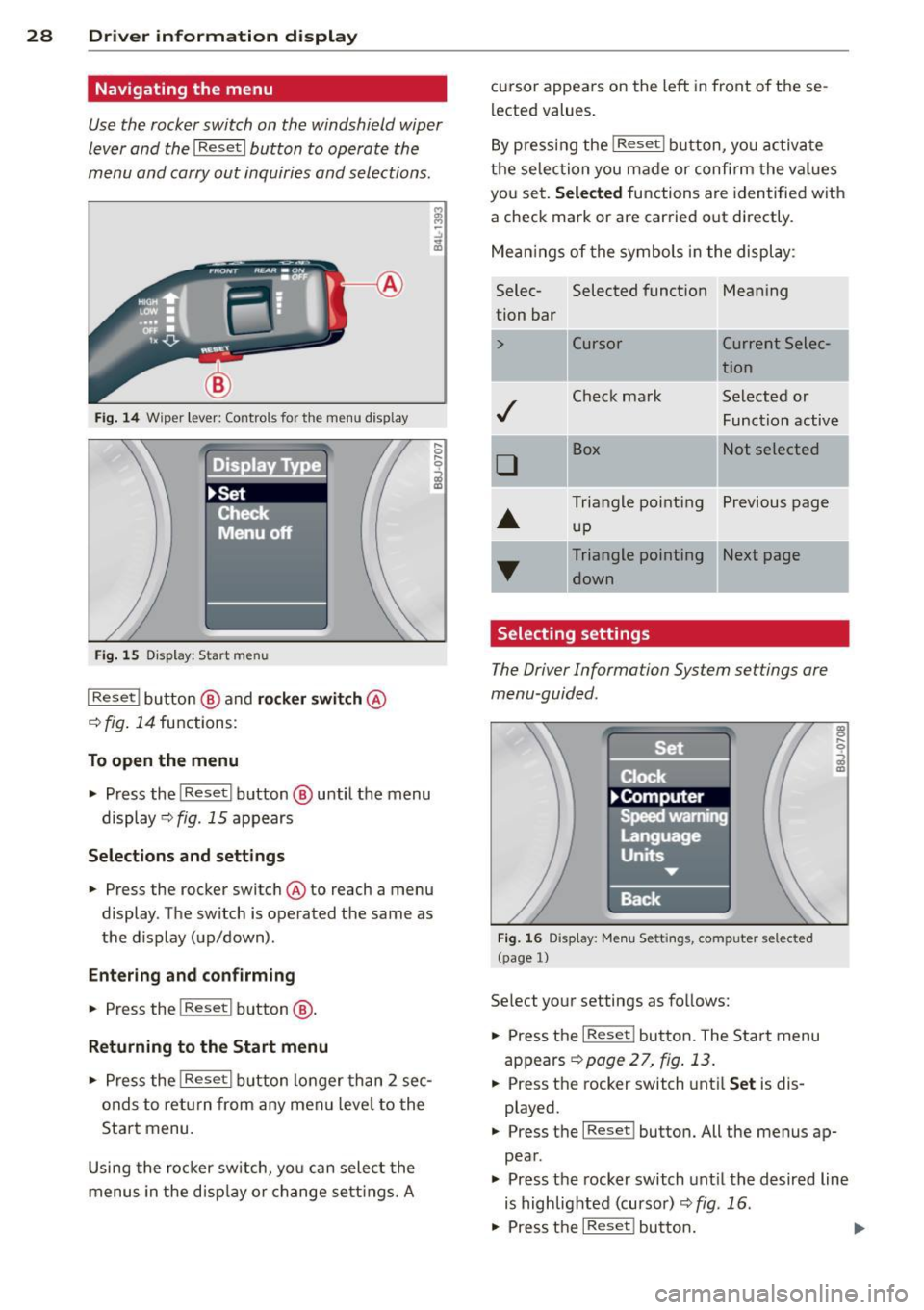
Fig. 14 Wiper lev er: Controls for th e menu disp lay
Fig. 15 D isplay: Start menu
I Reset I button @ and rocker switch @
q fig. 14 functions:
To open the menu
.,. Press the I Reset I button @ until the menu
display ¢
fig. 15 appears
Selections and settings
.,. Press the rocker switch @to reach a menu
display . The switch is operated the same as
the display (up/down) .
Entering and confirming
.,. Press the !Reset I button @.
Returning to the Start menu
.,. Press the !Reset I button longer than 2 sec
onds to return from any menu level to the
Start menu.
Using the rocker switch, you can select the
menus in the d isp lay or change settings. A
.... 0 .... 0 -', a,
lected values.
By press ing the
I Reset ! button, you activate
the selection you made or confi rm the values
you set.
Selected functions are identified with
a check mark or are carried out directly .
Mean ings of the symbols in the display :
Selec- Selected funct ion Mean
ing
tion bar
> Cursor Current Selec-
tion
Check mark Selected or
Function active
D
Box Not selected
Triangle pointing Previous page
up
Triangle pointing IINext page
down
Selecting settings
The Driver Information System settings are
menu -guided .
Fig. 16 Display : Menu Sett ings, com puter selec ted
(page 1)
Select your settings as follows:
.,. Press the
I Reset I button . The Start menu
appears
~ page 2 7, fig . 13 .
.,. Press the rocker switch until Set is dis
played .
..... 0
i
.,. Press the I Reset I button. All the menus ap
pear .
.,. Press the rocker switch until the desired line
is highlighted (cursor)
¢ fig . 16 .
.,. Press the I Reset ! button. ....
Page 31 of 280
.. If necessary, scroll by selecting and activat
ing the symbol for "Next page" or "Previous
page".
When you have selected the Computer menu
and activated it by pressing the !R eset ! but
ton, two computer levels appear (computer 1
and computer 2). Now you have to select the
level you want using the rocker switch and ac
tivate it with the iResetl button .
Efficiency program
Description
Applies to vehicles: with trip computer with efficiency
program
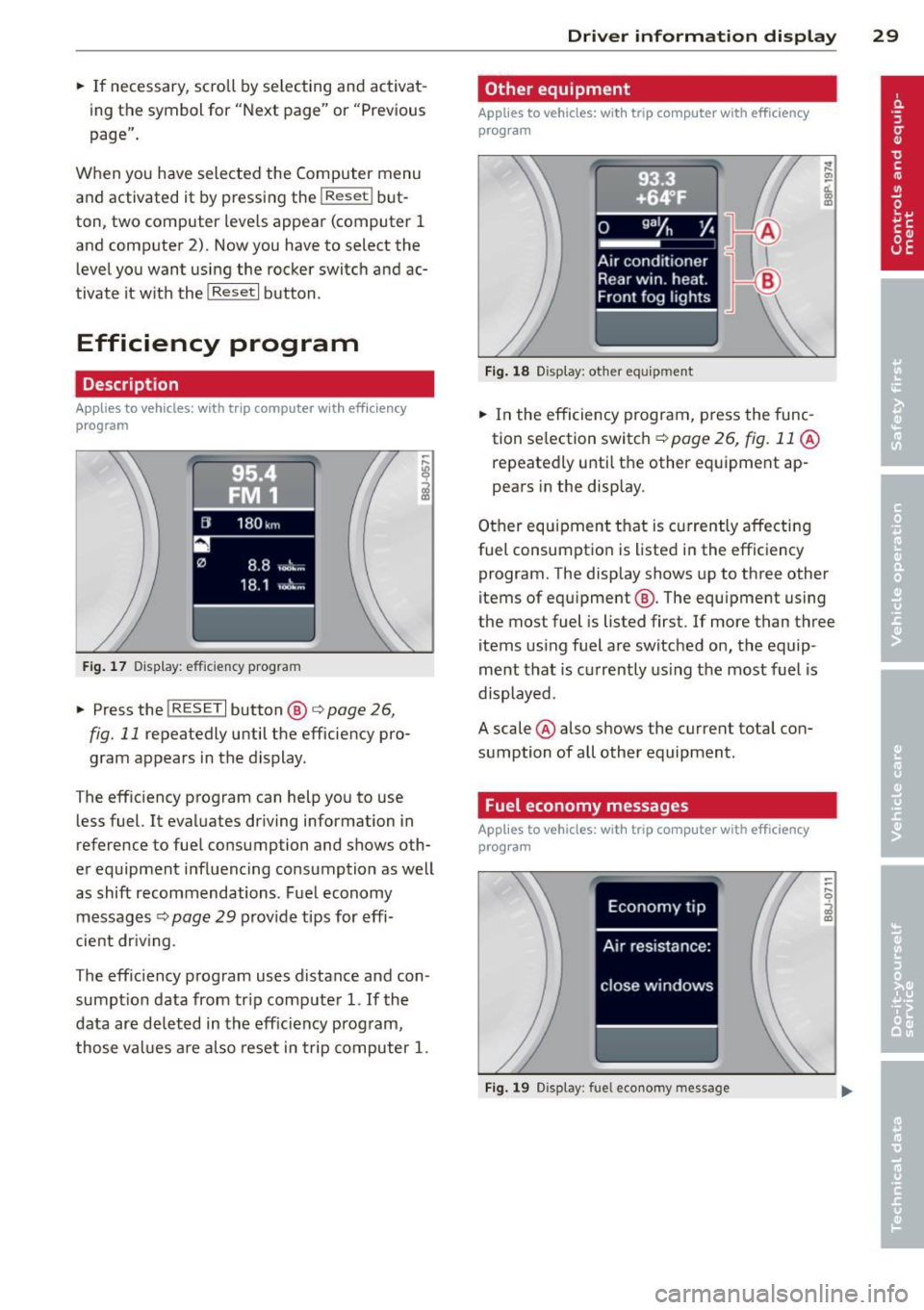
F ig . 17 D isplay: effic iency program
.. Press the !RESE TI button @ i=;,page 26,
fig. 11 repeatedly until the efficiency pro
gram appears in the display.
T he efficiency program can help you to use
less fuel. It evaluates driving information in
reference to fuel consumption and shows oth
er equipment influencing consumption as well
as shift recommendations. Fuel economy
messages
i=;, page 29 provide tips for effi
cient dr iv in g.
The eff ic iency program uses distance and con
sumpt ion data from tr ip computer
1. If the
data are deleted in the efficiency program,
those values are also reset in trip computer
1.
Driver information display 29
Other equipment
Applies to vehicles: with trip computer with efficiency
program
Fig. 18 Display: other equ ip m ent
.. In the efficiency program, press the func
tion se lection switch ~
page 26, fig. 11 @
repeatedly until the other equipment ap
pears in the display.
Other equipment that is currently affecting
fuel consumption is listed i n the effic iency
program. The display shows up to three other
items of equ ipment @. The equ ipment using
the most fuel is listed first . If more than three
items using fuel are switched on, the equip
ment that is currently using the most fuel is
displayed .
A scale @also shows the current total con
sumption of all other equipment.
Fuel economy messages
Applies to vehicles: with trip computer with efficiency
program
Fig. 19 Display: fue l economy message
Page 33 of 280
@ Tips
-If a malfunction is present (red symbol),
the distance remaining cannot be called
up.
- Do not reset the display between service
interva ls. Doing so will result in an incor
rect display.
- If the battery is disconnected, the Serv
ice Interval Display values are retained.
- On vehicles with the Driver Information
System, you can also call up the service
i nterval display
¢page 27.
-If service was not performed at the cor
rect time or the service interval display
was not reset after service was per
formed, the add itiona l mi leage driven or
the elapsed days will be shown as nega
tive numbers.
Engine oil temperature
display
A ppl ies to vehicles : wit h engin e temperat ure cont rol dis
p lay
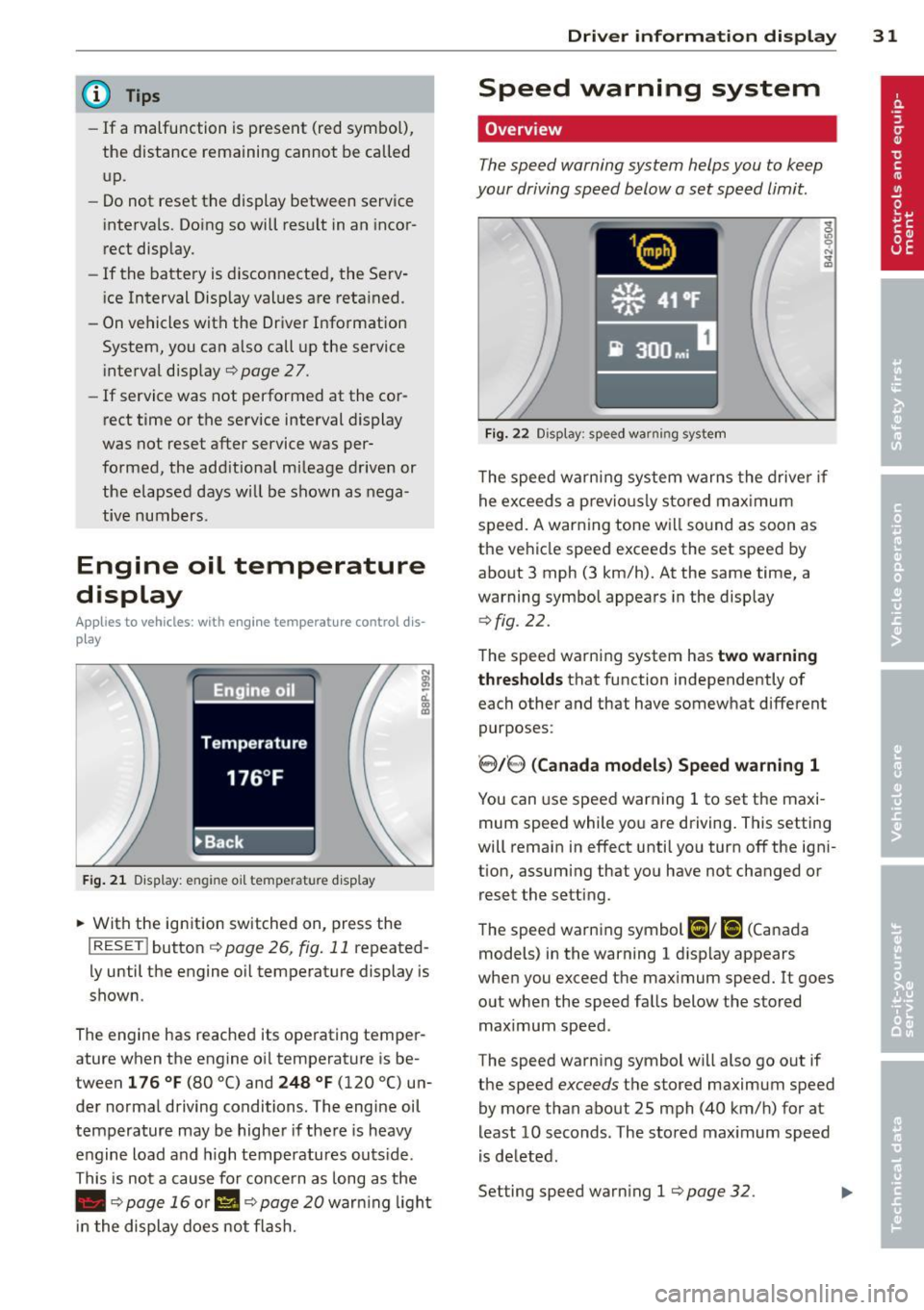
F ig . 21 Display: engine oil temperatu re disp lay
• With the ignition switched on, press the
I RESET I button ¢ page 26, fig. 11 repeated
l y until the engine o il temperature display is
shown.
The engine has reached its operating temper
ature when the engine oil temperature is be
tween
1 76 ° F (80 °() and 248 °F (120 °() un
der normal driving conditions. The engine oil
temperature may be higher if the re is heavy
engine load and h igh temperatures outs ide .
This is not a cause for concern as long as the
• ¢
page 16 or II ¢ page 20 war ning light
i n the display does not flash.
Dri ver inform ation di spl ay 31
Speed warning system
Overview
The speed warning system helps you to keep
your driving speed below a set speed limit.
Fi g. 22 Display: speed warning system
The speed warning system warns the drive r if
he exceeds a previo usly stored max imum
speed. A warning tone will sound as soon as
the vehicle speed exceeds the set speed by
about 3 mph (3 km/h). At the same time, a
warning symbol appears in the display
q fig. 22.
The speed warning system has two warning
t hr es hol ds
that function independently of
each other and that have somewhat different
purposes:
' 8/8 ( Canad a model s) Sp eed warn ing 1
You can use speed warning 1 to set the maxi
mum speed while you are driving. This setting
will remain in effect until you turn
off the igni
tion, assuming that you have not changed or reset the setting.
The speed warning symbol
Ci] ; [i (Canada
models) in the warning 1 disp lay appears
when you exceed the maximum speed.
It goes
out when the speed falls below the stored
maximum speed .
The speed warning symbol will also go out if
the speed
exceeds the stored maximum speed
by more than about 25 mph (40 km/h) for at
least 10 seconds. The stored maximum speed
is de leted.
Setting speed warning 1
¢ page 32. .,.
Page 34 of 280
32 Driver information display
8.18, (Canada models) Speed warning 2
Storing warning 2 is recommended if you al
ways
want to be reminded of a certain speed,
for example when you are traveling in a coun
try that has a general maximum speed limit,
or if you do not want to exceed a specified
speed for winter tires.
The speed warning 2 symbol ,
[I/ [9] (Canada
models) appears in the display when you ex
ceed the stored speed limit. Unlike warning 1, it will not go out until the vehicle speed drops
below the stored speed limit .
Setting speed warning 2
¢ pag e 32.
@ Tips
Even though your vehicle is equipped with
a speed warning system, you shou ld still
watch the speedometer to make sure you
are not driving faster than the speed limit.
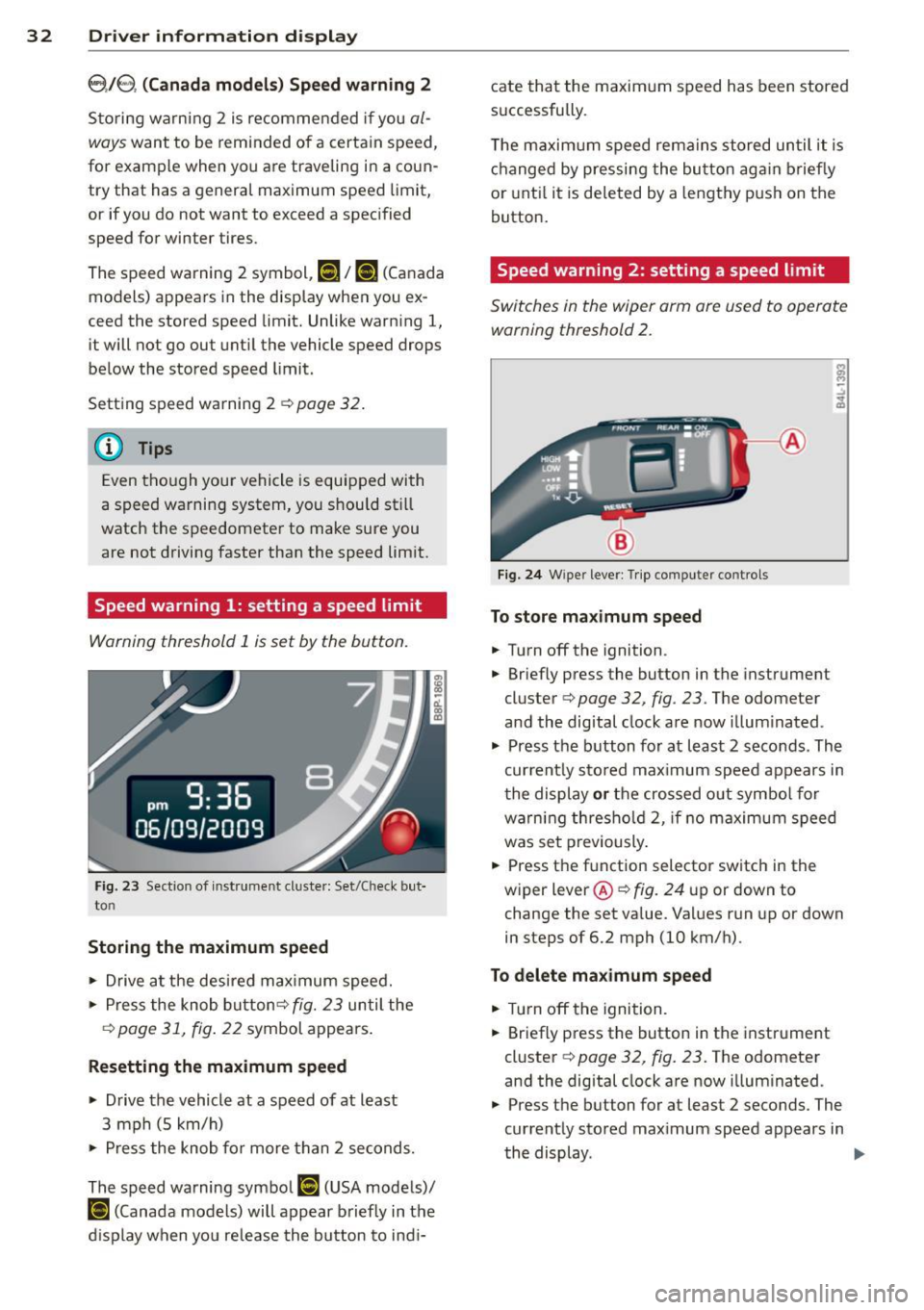
Speed warning 1: setting a speed limit
Warning threshold 1 is set by the button.
Fig. 23 Sectio n of inst rume nt cl uste r: Set/Check but
to n
Storing the maximum speed
11o-Drive at the desired maximum speed.
11o-Press the knob button ¢ fig. 23 until the
q page 31, fig. 22 symbol appears.
Resetting the maximum speed
.. Drive the vehicle at a speed of at least
3 mph (S km/h)
11o-Press the knob for more than 2 seconds.
The speed warning symbol
[I (USA models)/
ISl (Canada models) will appear briefly in the
d isplay when you release the button to indi- cate that
the maximum speed has been stored
successfully .
T he maximum speed remains stored until it is
changed by pressing the button again briefly
or until it is deleted by a lengthy push on the
button.
Speed warning 2: setting a speed limit
Switches in the wiper arm ore used to operate
warning threshold
2.
Fig. 24 W ipe r leve r: Trip compute r co ntrols
To store maximum speed
.. Turn off the ignition .
11o-Briefly press the button in the instrument
cluster ¢
page 32, fig . 23. The odometer
and the dig ital clock are now illuminated .
11o-Press the button for at least 2 seconds . The
current ly sto red max imum speed appears in
the display or the crossed out symbol for
warn ing thresho ld 2, if no maximum speed
was set previously .
.. Press the function selector switch in the
wiper
lever @qfig. 24 up or down to
change the set value. Va lues run up or down
in steps of 6.2 mph (10 km/h).
To delete maximum speed
.. Turn off the ignition.
.. Briefly press the button in the instrument
cluster ¢
page 32, fig. 23. The odometer
and the digital clock are now illuminated .
.. Press the button for at least 2 seconds. The
currently stored max imum speed appears in
the display .
II>
Page 35 of 280
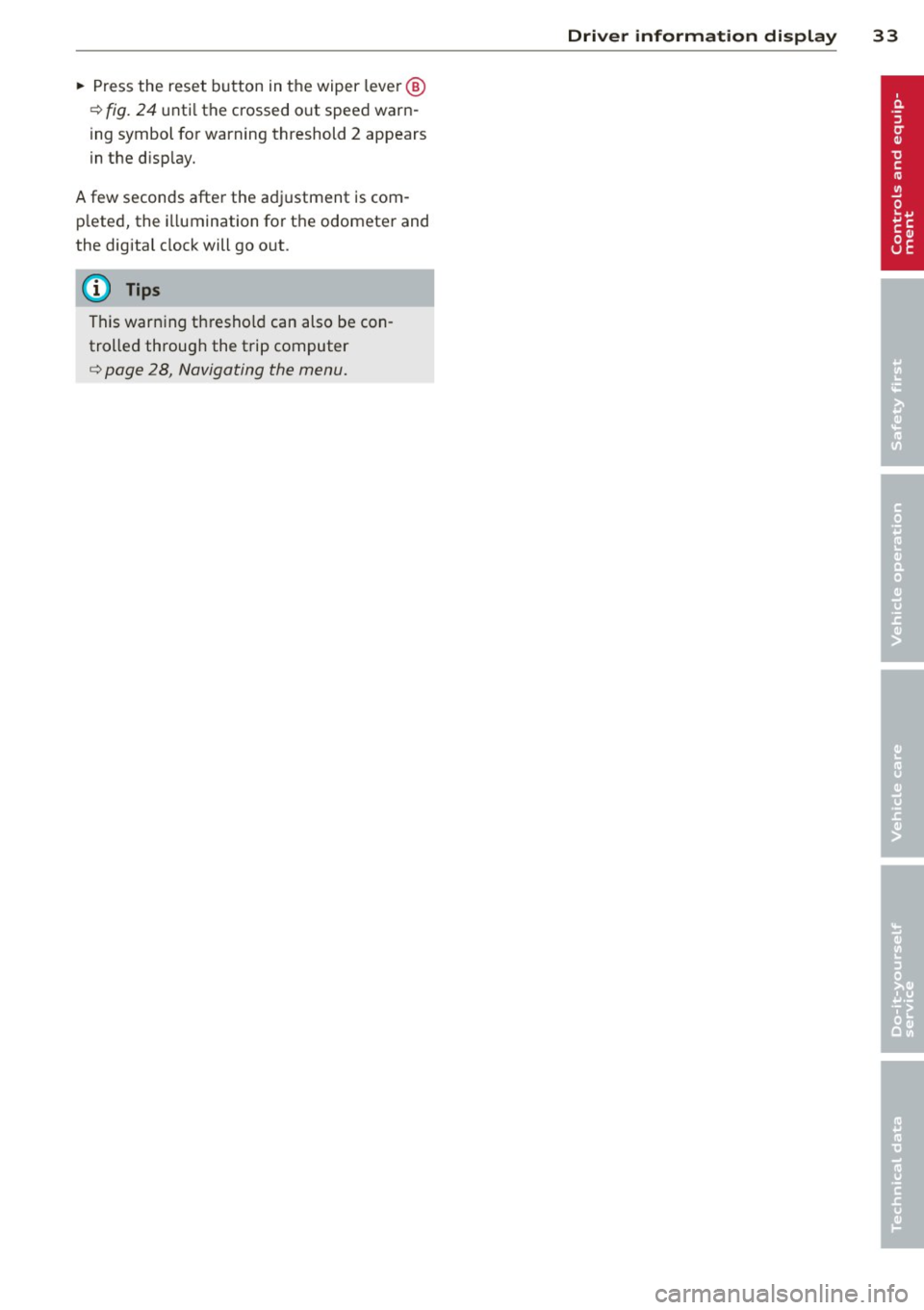
~ Press the reset button in the wiper lever @
¢ fig. 24 until the crossed out speed warn
ing symbol for warning threshold 2 appears
in the d isp lay.
A few seconds after the adjustment is com
p leted, the illumination for the odometer and
the digita l clock will go o ut.
(D Tips
This warning threshold can also be con
trolled through the trip computer
q page 28, Navigating the menu.
Driver information display 33
Page 46 of 280
44 Opening and closing
power window switches have a two-position
function:
Opening the windows
.. Push the switch to the first stop and hold it
t h ere until the window has lowered to the
desired position .
.. Push the switch briefly to the
second stop:
the window will automatically open all the
way.
.. By briefly pressing/pulling the switch again,
the downward travel of the window can be
stopped in any position
c:> .&. in Controls on
page 43.
Closing the windows
.. Pu ll the switch up to the first stop and ho ld
it there until the window has risen to the de
sired posit ion .
.. Pull the switch qu ickly to the
second posi
tion :
the w indow w ill automatically close all
the way
c:> ,&. in Controls on page 43.
.. By briefly pressing/pulling the switch again,
the upward travel of the window can be
stopped in any position
c:> .&. in Controls on
page 43 .
Activating/deactivating rear windows
.. Push the sw itch to the depressed position
to
activate the rear windows - the light in
the switch w ill go out.
.. Briefly press the switch to
deactivate the
rear windows -the switch will return to the
safety position and the light
LJ will illumi
nate.
The safety switch ®
c:> page 43, fig. 40 in the
armrest on the driver's door turns off the rear
power windows. Only when the safety switch
is depressed can the rear windows be opened
or closed. The symbol in the safety sw itch illu
minates when the power windows in the rear
doors are switched off (button NOT de
p ressed). This feature has been provided for
the safety of small children riding in the rear
of the vehicle.
(D Tips
The windows can still be opened and
closed for about ten minutes after the ig
nition has been turned off. The power w in
dows are not shut off unt il one of the front
doors is opened.
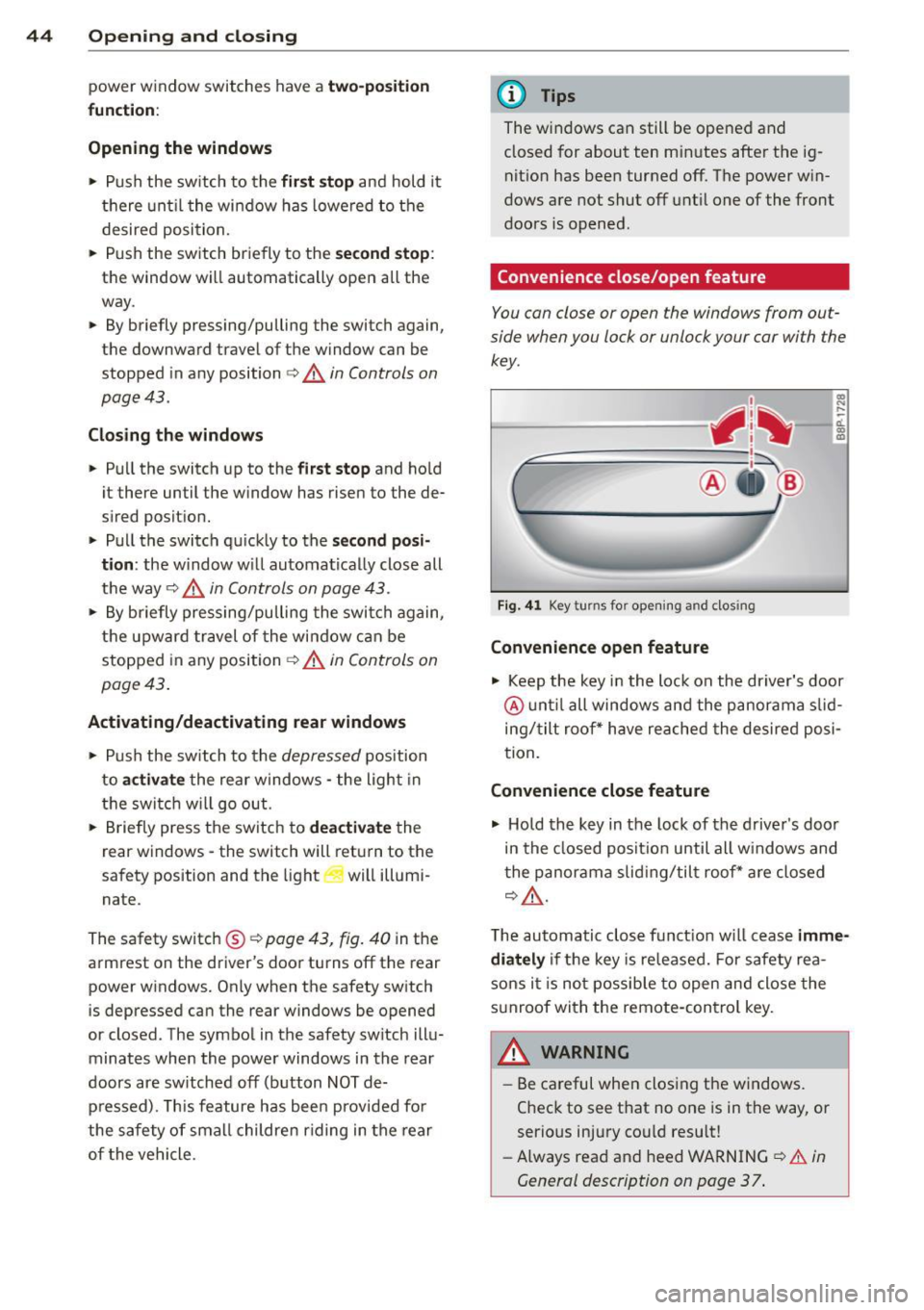
' Convenience close/open feature
You can close or open the windows from out
side when you lock or unlock your car with the
key.
Fig. 41 Key turns for opening and closing
Convenience open feature
co ... ....
11. a:, a,
"' Keep the key in the lock on the driver's door
@ until all windows and the panorama s lid
ing/tilt roof * have reached the desired posi
tion .
Convenience close feature
"' Hold the key in the lock of the driver's door
in the closed position until all w indows and
the panorama slid ing/tilt roof * are closed
c:> ,&..
The automatic close f unct ion w ill cease imme
diately
if the key is released. For safety rea
sons it is not possible to open and close the
sunroof with the remote-control key.
A WARNING
= -
- Be careful when closing the windows.
Check to see that no one is in the way, or
serious injury cou ld resu lt!
- Always read and heed WARNING
c:> A in
General description on page 37 .
Page 51 of 280

:l:D Front fog lights
Use the light switch to turn on the front fog
lights.
Fig. 45 Fog light act ivat ion: light sw itc h pos it ion o n ve
h icles WITHO UT sensor light
}D Switching on the front fog lights
.. Do not turn the light switch -"t;.. -<=> fig. 45 to-
ward the fog light symbol
.. Turn the light switch to
coo: or to @:D.
.. Pull the light switch to the first stop (D.
When the front fog lights are on, the sym
bol
:iO next to the light switch will illuminate.
C:t:t Instrument panel illumination
The illumination of the instruments, displays
and the center console can be adjusted .
Fig. 46 In st rum ent pa nel illum inat ion
0
"' d. .. m
You regulate the brightness of the instru
ments with the left thumbwhee l
Co/<=> fig. 46 .
@ Ignition ON, light switch.
With the ignition switched ON, the glow of in
strument needles
can be adjusted to appear
brighter or d immer.
Clear vision 49
:oo: or io Ignition ON, light switch.
With the lights swit ched on, the brightness of
instrument cluste r (i.e. needles, gauges and
displays) and center console illumination can
be adjusted.
(D Note
The instrument cluster and center console
ill umination (gauges and need les) comes
on when you switch on the ignition and the
vehicle headlights are off . Be aware of the
follow ing difference between models built
to US or Canadian specifications:
-USA models: illumination of the instru
ment cluster (gauges and needles),
dash and center console around the
gearshift lever is controlled by a light
sensor located in the instrument panel.
The instrument panel illumination will
automatically become dimmer as the
daylight fades away and eventually will
go out completely when outside light is
very low. This is to remind you, the driv
er, to switch on the headlights before it
gets too dark.
- Canada models: instrument panel illu·
mination will stay bright regardless of
the intensity of ambient light. Always be aware of changes in outside light
conditions while you are driving. Re
spond in time to fading daylight by
turning the light switch to position
gD
(or "AUTO " if your car is equipp ed with
th is feature)
to turn on your headlights.
Page 103 of 280
@ Tips
With the gear selector lever in either "D"
or "S" the transmiss ion will sw itch back to
the automatic mode if you do not use the paddles within approx. 30 seconds.
Kick-down feature
Applies to vehicles: with S tronic®
The kick-down feature allows maximum ac
celeration .
If you depress the accelerator pedal fully be
yond the full-thrott le position, the transmis
sion automatically downshifts one gear, de pending on vehicle speed and engine rpm. The
upsh ift into the next higher gear takes place
as soon as the max imum specified engine
speed is reached.
A WARNING
Please note that the drive wheels can spin
if the kick-down is used on a smooth s lip
pery road -ris k of skid ding!
Launch Control Program
Applies to vehicles: with Launch Control and S tronic® and
Gasoline engine only
The Launch Control Program permits maxi
mum acceleration .
In order to use launch Control, the ASR (Anti
Slip Regulation) must be disabled. When ASR is disabled, the ESP warning/ind icator
light
G1 in the instrument cluste r illuminates .
So that la unch Control ca n be used, the en
g ine must be at ope rating temperature a nd
the steer ing wheel mus t not be tu rned.
... With the eng ine run ning, briefly press the
ES P bu tton. The message "ASR off" appea rs
in the instrument cluster d isp lay.
... Sh ift th e gea r lever to "5" or the tip tronic ®
pos it ion.
... Step on t he b rake peda l w it h your left foot
and keep the brake peda l fully depressed for
at least one second.
... With your right foot, step on the accelera
tor to the w ide-open throttle position o r
Transm iss ion 10 1
Kickdown. The engine speed sett les at about
3 ,200 rpm.
... Take your left foot
off the b rake .
A WARNING
-Always adapt your dr iving to the traffic
f low.
- On ly use launch Control when road and
traffic cond itions allow it and other dr iv
ers will not be endangered or annoyed by
your driving and th e acce le rat ion of the
veh icle.
- Ma ke sure that ESP remains enab led.
W ith the ESP disabled, the vehicle could
brake away, part icu la rly on a s lick and
slippe ry r oad - ri sk of s kidding!
- Once acceleration is finished, switch ASR
on again by br iefly pushing t he ESP but
ton.
Back-up program
Applies to vehicles: with S tronic®
-
In the event of a system malfunction, there is
an back-up program.
In the event of system malfunction, the auto
matic transmission switches to the fa il-safe
mode . All of the selecto r lever posi tion d is
plays for the au toma tic tra nsmission a re high
li gh ted wi th a ligh t background in t he i nstr u
ment cluster d isp lay . In some cases yo u can
not drive in the reve rse gear any more .
If the t ransmission swit ches to fail-safe
mode, yo u should ta ke the ve hicl e to an a u
thorized Aud i dea le rship as soon as possib le
to have the condition corrected.
Clutch is overheating
Applies to vehicles: with S tronic®
• Clutch is overheating! Please stop vehi
cle!
If the symbols are i llum ina ted, the clutch is
ove rheati ng and could be dama ged if you con
tin ue to drive . Stop the vehicle and a llow the
transmission to cool with the se lector lever in
the
P position w hile the engine runs at idle . If Iii-
Page 173 of 280
-Have your vehicle maintained properly
and in accordance with the service rec
ommendations in your Warranty
&
Maintenance booklet.
- Lack of proper maintenance as well as
improper use of the vehicle will impair
the function of the emission control
system and could lead to damage.
@ For the sake of the environment
Even when the Emission Control System is
operating properly, the exhaust gas can
have a sulfur-like exhaust gas smell under
some operating states. This depends on
the sulfur content of the fuel being used .
Using a different brand of fuel may help,
or filling the tank w ith lead-free super
grade gasoline.
Diesel particulate filter
Ap plies to vehicles: with diesel partic ul ate filter
The diesel particulate filter filters nearly al l of
the soot part icles out of the exhaust. The fi l
ter cleans itse lf automatically under normal
driving conditions . If the fi lter cannot clean it
self (for example, because you are only driving
short distances), the filter becomes clogged
with soot and the
II symbol for the diesel
particulate filter illuminates
c> page 22.
A WARNING
- Do not park your vehicle over flammable
materials such as grass or leaves because
the high temperature of the diesel par
t icu late filter could start a fire .
- Do not apply an underbody protectant in
the exhaust system a rea or a fire could
start.
(D Tip s
-When the diesel particulate filter be
comes saturated, the engine speed in
creases to approximate ly 1,500 rpm
while the vehicle is in motion to init iate
the cleaning of the diesel particulate fil
ter a utomatically without the warning
l amp lighting up . If the warning lamp
Dri vin g and en vironm ent 171
Ill sti ll appears, you shou ld drive to a
qualified workshop .
Avoid damaging the
vehicle
When you are driving on poor roads, or over
curbs, steep ramps, etc., make certain that
low -lying parts such as spo ilers and exhaust
system parts do not bottom out and get dam
aged.
This is espec ially true for veh icles with low
slung chassis (sports chassis) and fully loaded
vehicles.
Operate your vehicle
economically and minimize pollution
General
Your personal style of driving will determine
the economy of your vehicle, as well as ex
haust and noise Levels.
Fuel economy, env ironmenta l impact, and
wear on your eng ine, brakes and tires largely
depend on three facto rs:
- your personal driving style
- operating conditions
- technical limitations
If you ant ic ipate wha t you need to do next and
drive economically, you can easily cut your
fuel consumptio n by 10-15 percent . This sec
tion wi ll give you some tips on how you can
help the env ironment and your pocketbook.
(D Tips
The consumption estimates as published
by ENVIRONMENTAL PROTECTION AGENCY
(EPA) and Transport Canada may not corre
spond to your actual consumption on the road, which will vary depending upon vehi
cle load and speed, road and weather con
dit ions, trip length, etc.
•
•