engine AUDI A3 2012 Owner´s Manual
[x] Cancel search | Manufacturer: AUDI, Model Year: 2012, Model line: A3, Model: AUDI A3 2012Pages: 280, PDF Size: 70.11 MB
Page 44 of 280
42 Opening and clo sing
Child safety lock
The child saf ety lock t prev ents th e re ar
doors from being opened from the inside .
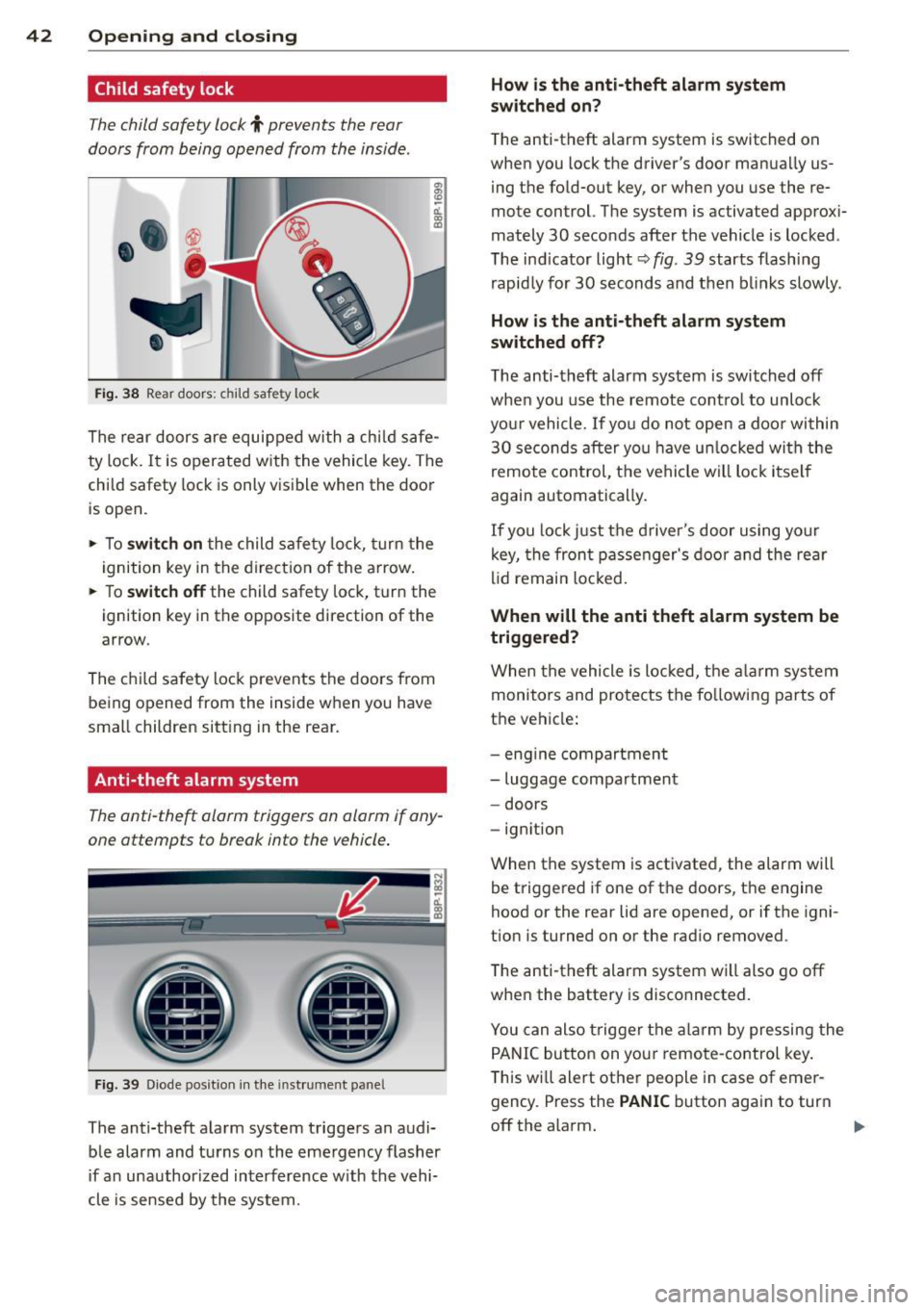
Fig. 38 Rear doors : child safety lock
The rear doors are equipped wi th a ch ild safe
ty lock.
It is operated w ith the vehicle key. The
child safety lock is only visible when the door
is open.
• To
switch on the child safe ty lo ck , tu rn the
i gnition key in the direct ion of the arrow .
• To
switch off the child safety loc k, t urn the
ignition key in the opposite direction of the
arrow.
The c hild safety lock prevents the doors from
being opened from the inside when you have
small children sitt ing in the rear.
Anti-theft alarm system
The anti -theft alarm triggers an alarm if any
one attempts to break into the vehicle .
Fig. 39 Diode pos it ion in th e in st ru men t pane l
The anti-theft a larm system triggers an audi
ble alarm and tu rns o n the emergency flasher
if a n unauthori zed interference w ith the vehi
cle is sensed by the system.
How is the anti -theft alarm system
switched on?
T he anti -theft alarm system is switched on
when you lock the driver's door manua lly us
ing t he fo ld-out key, or when you use the re
mote control. The system is activated approx i
mately 30 seconds after the vehicle is locked .
The ind icator light¢
fig. 39 starts flash ing
rapid ly for 30 s econds and then blinks slowly.
How is the anti-theft alarm sy stem
switched off?
T he anti-theft alarm system is switched off
when you use the remote cont ro l to unlock
yo ur vehicle.
If you do not open a doo r wi thin
30 se co nds after yo u have u nlocked wi th the
remote control, t he vehicle will loc k it se lf
again automatically .
If you lock just t he d river's door using your
k ey, the fron t passenger's door and the re ar
li d remai n locked.
When will the anti th eft alarm system be
triggered?
When the vehicle is lo cked, t he alar m sys tem
monitors and pro te cts the fo llowi ng parts of
the ve hicle :
- eng ine compartmen t
- luggage compartmen t
- doors
- ignition
When the system is activated, the alarm will be triggered if one of t he doors, t he engine
hood or the rear lid are opened, or if the igni
t ion is turned on or the rad io removed .
The anti-theft alarm system wi ll also go off
whe n the battery is disconnected.
You can also trigge r the alarm by pressing the
P ANIC button on you r remo te-control key .
T his wi ll ale rt ot her people in case of emer
gency . Press the
PANIC button again to turn
off the alarm.
Page 45 of 280
How is the anti-theft alarm switched off
when triggered?
The alarm system is switched off when you
un lock the vehicle using the remote-control
key or when the ignition is switched on. The
alarm will also switch itself off when it comes
to the end of its cycle .
Emergency flasher
The emergency flasher will blink briefly when
the doors, engine hood and rear lid are prop
erly closed .
If the emergency flashers do not blink, check
the doors, engine hood and rear lid to make
sure they are properly closed. If you close a
door, the hood or the rear lid with the anti
theft alarm switched on, the emergency flash
ers will blink only after you have closed the
door or lid .
(D Tips
For the anti-theft alarm system to func
tion properly, make sure all vehicle doors
and windows are closed before leaving the
veh icle.
Power windows
Controls
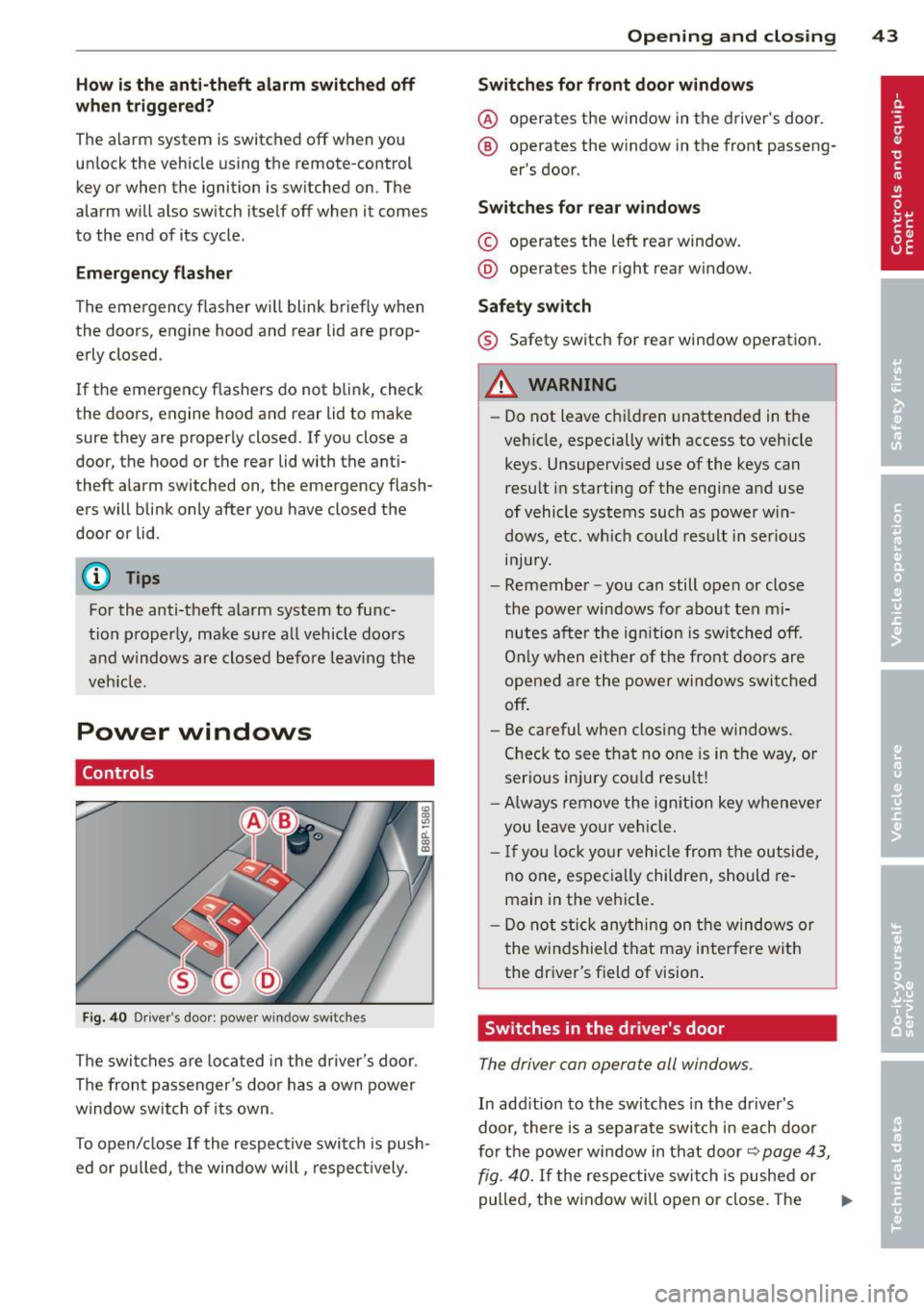
Fig. 40 Dr iver 's door: powe r w ind ow sw itches
The switches are located in the driver's door.
The front passenger's door has a own power
window switch of its own.
To open/close If the respective switch is push
ed or pulled, the window will, respectively.
Opening and closing 43
Switches for front door windows
@ operates the window in the driver's door.
® operates the window in the front passeng -
er 's door.
Switches for rear windows
© operates the left rear window.
@ operates the right rear window.
Safety switch
® Safety switch for rear window operation .
A WARNING
-Do not leave chi ldren unattended in the
veh icle, especially with access to vehicle
keys. Unsupervised use of the keys can
result in starting of the engine and use
of vehicle systems such as power win
dows, etc. wh ich could result in serious
mJury.
- Remember -you can still open or close
the power windows for about ten mi nutes after the ign ition is switched off.
On ly when either of the front doors are
opened are the power windows switched
off .
- Be careful when clos ing the windows .
Check to see that no one is in the way, or
serious injury could result!
-Always remove the ignition key whenever
you leave your vehicle .
- If you lock your vehicle from the outside,
no one, especially children, should re
main in the vehicle.
- Do not stick anything on the windows or
the windshield that may interfere with
the driver's field of vision.
Switches in the driver's door
The driver can operate all windows .
In addition to the switches in the driver's
door, there is a separate switch in each door
for the power window in that door~
page 43,
fig. 40.
If the respective switch is pushed or
pulled, the window will open or close. The
Ill>
Page 58 of 280
56 Clear vis ion
as rain or drizz le re duces visibi lity
through th e windshield.
- The windshie ld must not be treated with
water-repe llent materials. They can in
crease glare under poor visibility condi
t ions such as wetness, darkness, or when
the sun is low on the horizon . In addi
t ion, they can cause th e windshield wip
ers to chatter.
(D Note
- In the case of frost, check whether the
windsh ield wiper b lades are frozen to
the windshield. Switching on the wind
shield wipers can damage the wiper
blades!
- Do not use the wipers to clear a frosted
window . U si ng the w ipers as a conven
i en t ice s craper will destroy the wiper
blades .
- Prior to using a car wash, the windshield
wiper system m ust be switched off (lever
i n position 0) . This helps to prevent unin
tentiona l switching on and damage to
the windshie ld wiper system.
(D Tips
- The w indshield wipers are swi tched off
when the ignition is turned off. Activate
the windshie ld wipers after the ignition
i s sw itched back on by mov ing the w ind
shield wiper lever to any pos it ion.
- Worn or dirty windshie ld wiper blades
cause smearing, which can affect the op
eration of the light/rain sensor*. Check
the condition of your windshie ld w iper
blades regularly.
- The rai n sensor is part of the interval
wiping system. Tur ning off the ignition
will a lso deact ivate the rain sensor. To re
activate t he senso r, switch off the inter
val w iping function, then sw itch it ba ck
on aga in.
- Applies to vehicles with lig ht/ rain sen
sor: When the wipers are swi tched on
manu ally and in rain condi tions, the au
tomatic head lights* turn on¢
page 47,
·'t!.-Switching the headlights on and off
or off during the day when the wipers are
no longer operating. The automatic
head lights* funct ion is available in th is
case on ly when the light switch is in the
"A UTO" position¢
page 47, fig. 43.
-Make s ure the washer fluid reservoir in
the engine compartment is topped off
before going on a long trip. Look up
¢
page 211 for check ing and filling the
washer co nta iner .
- The wipers only operate with the hood
completely closed .
is;J Rear window wiper
The wiper lever is also used to operate the
rear window wiper and the automatic wiper/ washer function .
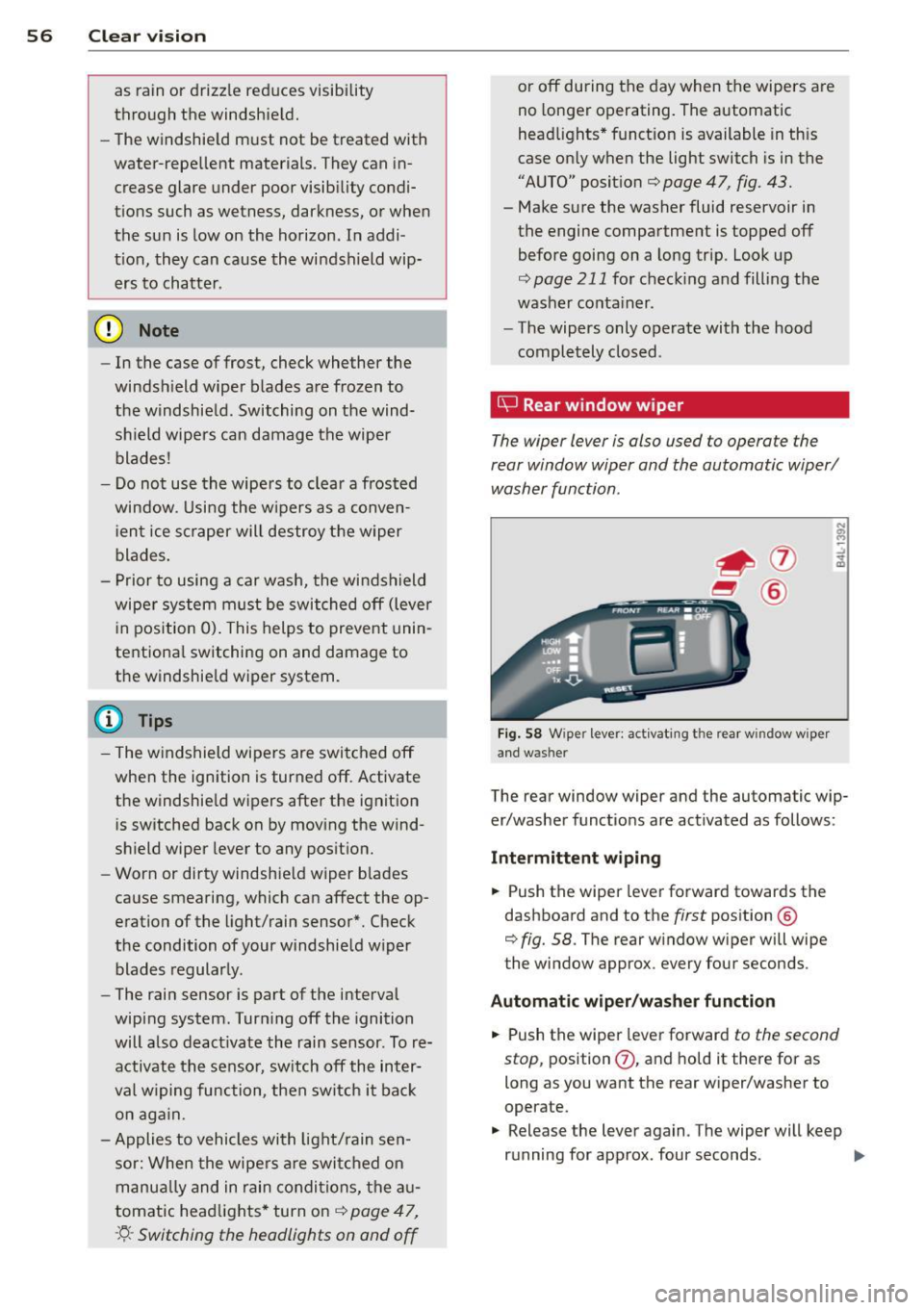
Fig. 5 8 W iper lever: activat ing the rear w indow w iper
and washer
The rear window wiper and the automatic wip
er/washer functions are activated as follows :
Intermittent wiping
.,. Push the wiper leve r forward towards the
dashboard and to the
first position @
¢
fig. 58. The rear w indow wiper will wipe
the window approx. every four seconds .
Automatic wiper /washer function
.,. Push the wiper lever forward to the second
stop,
position (j) , and hold it there for as
long as you want the rear w iper/washer to
operate.
.,. Release the lever again. The wiper will keep
running for approx. four seconds . .,,_
Page 77 of 280
CD Note
Only drink containers with lids should be
carried in the cupho lder. Liqu id could spill
out and damage your veh icle's e lectronic
equ ipment or sta in the upholstery etc.
Socket
Outlets
The outlet in the front center console and in
the luggage compartment may be used for
12-volt appliances.
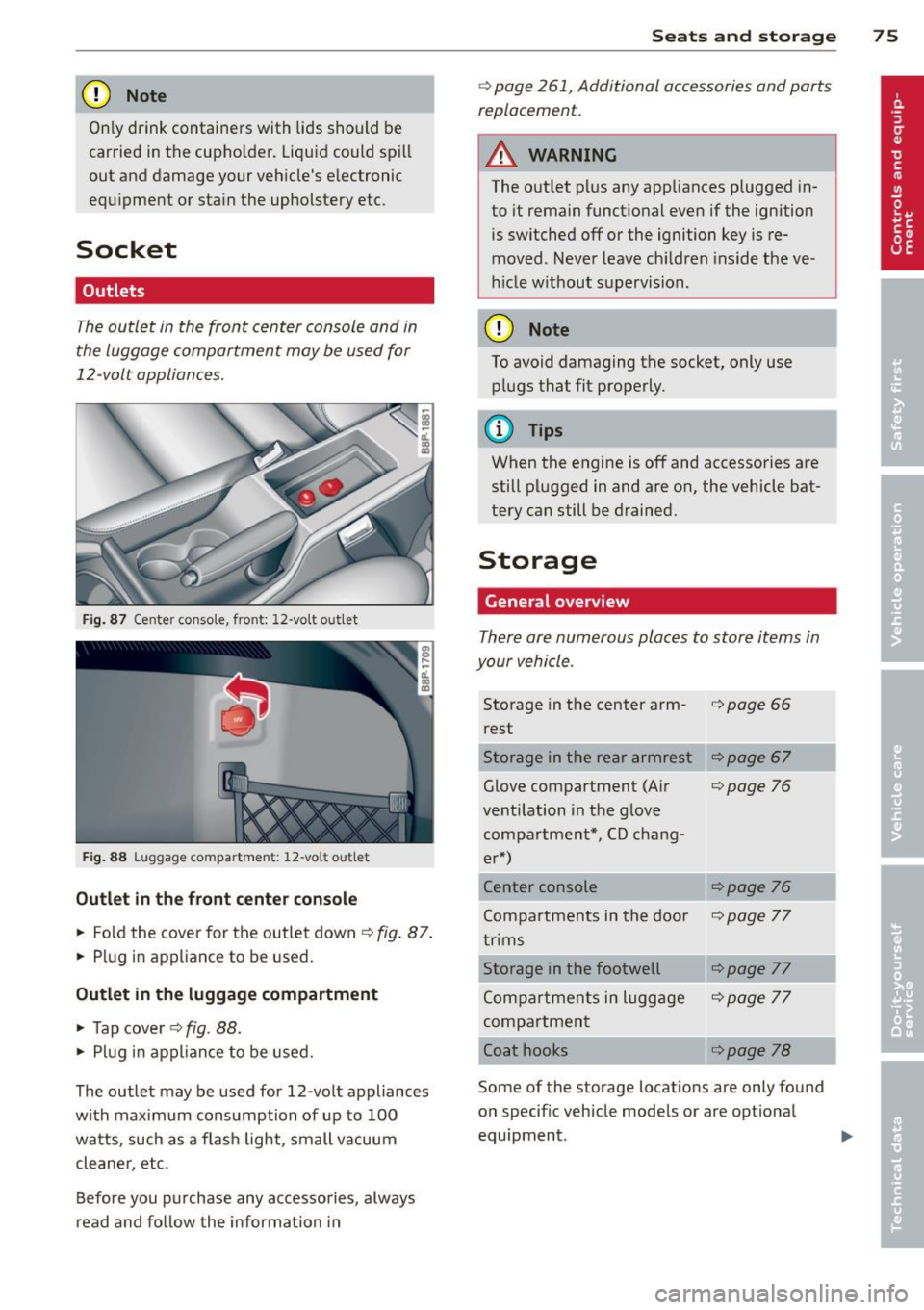
Fig. 87 Ce nter conso le, front: 12-vo lt out let
Fig. 88 L uggage compartmen t: 12-vo lt out let
Outlet in the front center console
.. Fold the cover for the outlet down ¢ fig. 87.
.. Plug in appliance to be used.
Outlet in the luggage compartment
.. Tap cover ¢ fig. 88.
.. Plug in appliance to be used.
The outlet may be used for 12-volt appliances
with maximum consumption of up to 100
watts, such as a f lash light, small vacuum
cleane r, etc.
Before you purchase any accessories, always
read and follow the information in
Seats and storage 75
¢ page 261, Additional accessories and parts
replacement.
A WARNING
The outlet plus any appliances plugged in
to it remain functional even if the ignition
is switched off or the ignition key is re
moved. Never leave children inside the ve
h icle w ithout supervision.
CD Note
To avoid damaging the socket, only use
plugs that fit properly.
(y Tips
When the engine is off and accessories are
still plugged in and are on, the vehicle bat
tery can still be drained.
Storage
General overview
There are numerous places to store items in
your vehicle .
Storage in the center arm-i=>page 66
rest
Storage in the rear armrest
Glove compartment (Air
¢page 76
ventilation in the glove compartment*, CD chang-
er*)
Center console
¢page 76
Compartments in the doo r ¢page 77
trims
Storage in the footwell
¢page 77
Compartments in luggage ¢page 77
compartment
Coat hooks
¢page 78
Some of the storage locations are only found
on specif ic vehicle models or are optional
equipment .
Page 81 of 280
Warm and cold Climate controls
Description
The air conditioner is fully automatic and is
designed to maintain a comfortable and uni
form climate inside the vehicle .
We recommend the following settings:
... Se lect and set a temperature between 64 °F
(+ 22 °C) and 84 °F (+28 °C).
... Press the
!AU TO ! button.
With this setting, you attain maximum com
fort in the least amount of time. Change this
setting, as desired, to meet your personal
needs.
The climate controls are a combination of
heating, ventilation and cooling systems,
which automatically reduce humidity and cool the air inside your vehicle.
The air temperature, air flow and air distribu
tion are automatica lly regulated to achieve
and maintain the desired passenger compart
ment temperature as quickly as possib le.
The system automatically compensates for
changes in the outside temperature and for
the intensity of the sunlight entering the vehi
cle. We recommend you use the
Automatic
mode c> page 81 for year-round comfort.
Please note the following:
Turn on the air conditioner to reduce humidity
in the vehicle. This also p revent the windows
from fogging up .
When the outside temperature is high and the
air is very hum id,
condensation from the
evaporator may drip under the vehicle . This is
normal and does not indicate a leak.
If the outside temperature is low, the fan nor
mally only switches to a h igher speed once
the engine coolant has warmed up sufficient
ly.
Warm and cold 79
T he air conditioner temporari ly switches off
when you drive off from a standstill using full
throttle to save engine power.
T he compressor also switches off if the cool
ant temperature is too high so that the engine
can be adequately cooled under extreme
l oads.
Air pollutants filter
T he air pollutants filter (a combined particle
filter and activated charcoa l filter) reduces or
eliminates outside air pollution (dust, or pol
l en) from entering the vehicle .
T he air pollutants filter must be changed at
the interva ls specified in yo ur Warranty
&
Maintenance booklet, so that the air condi
tioner can properly work.
If you drive your vehicle in an area with high
air pollution, the filter may need to be
changed more frequently than specified in
your Audi Warranty
& Maintenance booklet. If
in doubt, ask your authorized Audi Service Ad
visor for advice.
Energy management
To prevent the battery from being discharged
and to restore the ba lance of energy, compo
nents which require large amounts of energy
are temporarily cut back or switched off c> page 167. Heating systems in particular re
quire a great deal of energy. If you notice, for
example, that the rear window heater is not
heating, then it has been temporarily cut back
o r switched off by
energy management.
These systems are available again as soon as
the energy balance has been restored.
_& WARNING
.-----
Reduced visibility is dangerous and can
cause accidents .
- For safe driving it is very important that
all windows be free of ice, snow and con-
densation.
- Fully familiarize yourself with the proper
use and function of the heating and ven
tilation system and especia lly how to de
fog and defrost the windows.
Page 87 of 280
conditioner automatically se lects the settings
assigned to that key. This way every driver will maintain his/her own persona l settings and
does not have to reset them manually.
(D Tips
If a d ifferent driver uses your key and
changes the air conditioner settings, the
latest adjustments w ill erase and rep lace
the settings you have stored.
mP Rear window defogger
T he rear window defogger clears the rear win
dow of conden sation .
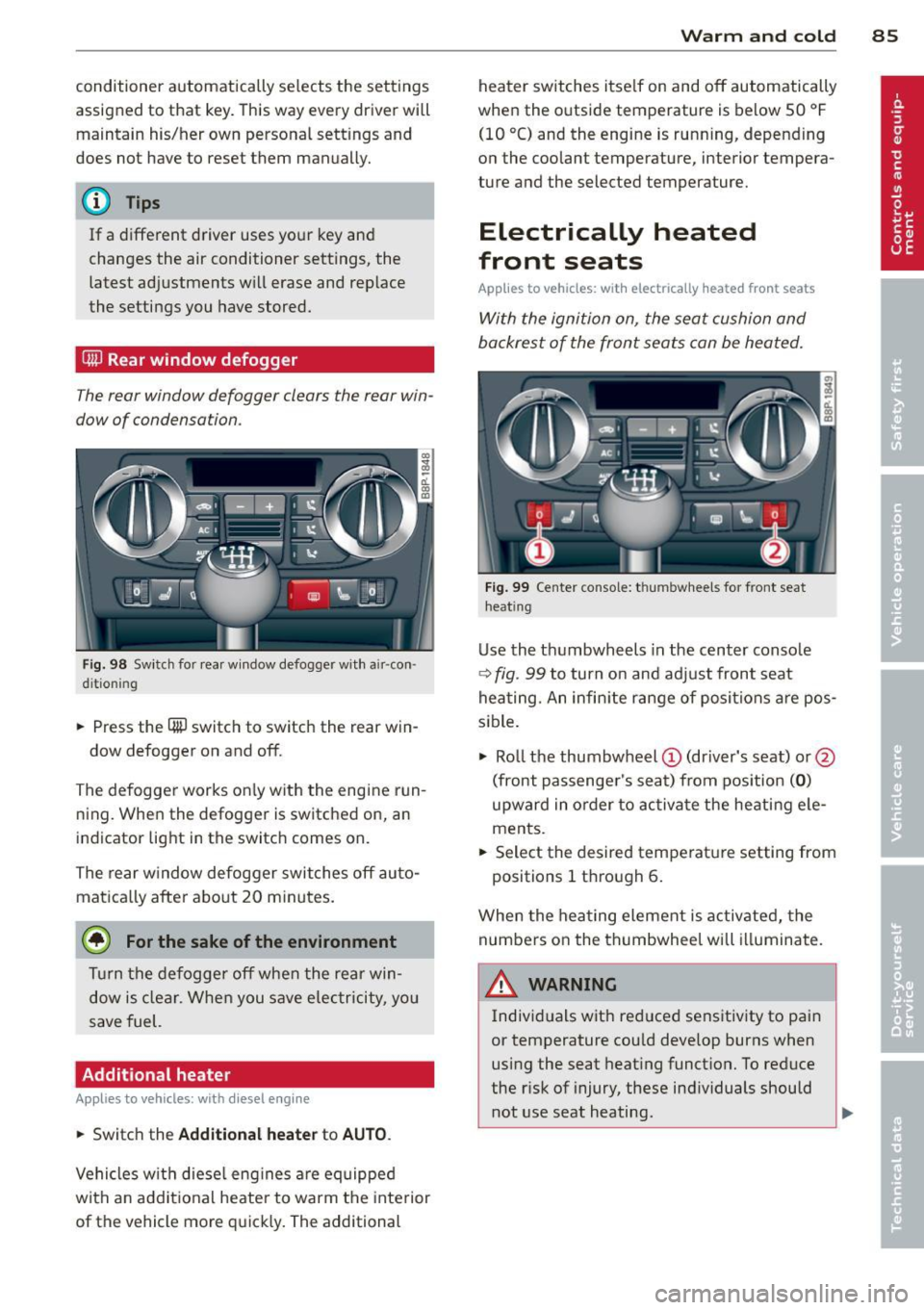
Fig. 98 Swi tch for rea r wi ndow defogger w ith a ir -con ·
d it io nin g
.. Press the QiP switc h to switch the rear win-
dow defogger on and off.
The defogger works on ly with the engine run
n ing. When the defogger is switched on, an
indicator light in the switc h comes on.
The rear w indow defogger switches
off au to
matica lly afte r abo ut 20 m inutes.
@ For the sake of the environment
T ur n the defogger off when the rea r win
dow is clear. When you save elec tricity, you
save fuel.
Additional heater
Applies to vehicles: with diesel engine
.. Switc h the Additional heate r to AUTO .
Vehicles w it h diese l eng ine s are equipped
with an add it ional heate r to warm the interior
of the vehicle mo re q uick ly. The additional
W arm and cold 85
heater switches itse lf on and off automatically
when the o utside temperature is below 50 °F
(10 °C) and the engine is running, depending
o n the coolant temperature , interior tempera
ture and the selected temperature.
Electrically heated
front seats
Applies to vehicles: with electrically heated front seats
With the ignition on , the seat cushion and
backrest of the front seats can be heated.
F ig . 99 Ce nter co nsole: t hu m bwhee ls for front seat
h eat ing
Use the t humbwheels in the center conso le
c;:> fig . 99 to turn on and adjust front seat
heating. An infin ite range of positions are pos
sible .
.. Ro ll t he thumbw heel
(D (dr iver's seat) or@
(front passenger's seat) from pos ition
( 0 )
upward in order to activa te the heati ng e le
ments .
.. Select the desired temperat ure setting from
positions 1 t hrough 6.
When the hea ting element is activated, the
numbers on the thumbwheel will illuminate .
& WARNING
Individuals wit h reduced sensitiv ity to pai n
or temperature cou ld deve lop burns when
using the seat heating funct ion. To reduce
the r isk of injury, these ind ividuals should
not use seat heating .
Page 88 of 280
86 Warm and cold
(D Note
To prevent possible damage to the heating
elements, do not kneel on the seats or ap
ply a heavy load to relatively small areas of
the seat.
Engine preheater
Applies to vehicles: with engine p reheate r
Use of the engine pre heater is recommended
when the ambient temperature is below
-5 °F
(-20 °C) .
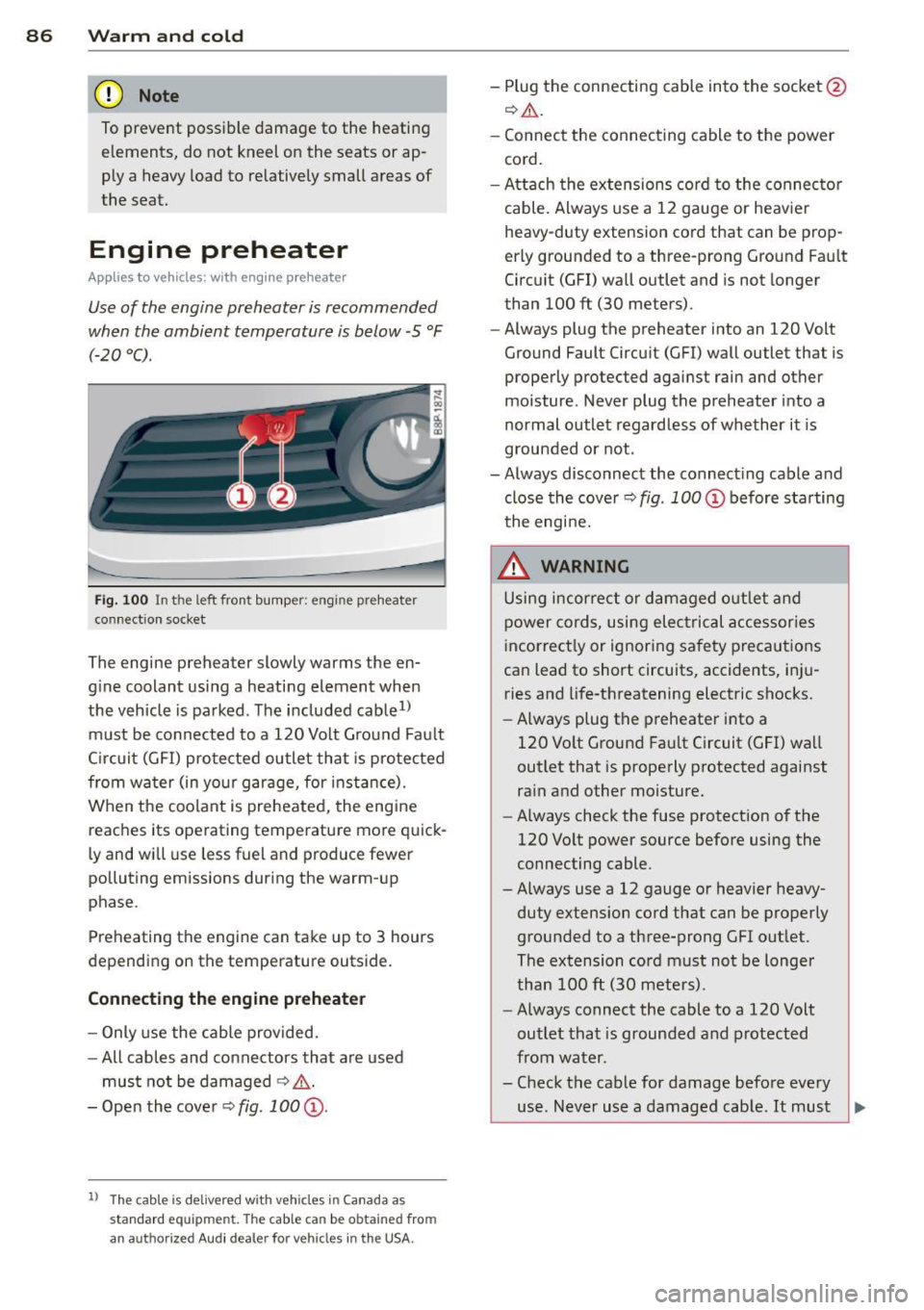
Fig. 100 In t he l eft fron t bump er: en gine preheater
co nn ect ion socket
The engine preheater slowly w arms the en
gine coolant using a heating element when
the vehicle is parked. The included cable
1>
must be connected to a 120 Volt Ground Fault
Circuit (GFI) protected outlet that is protected
from water (in your garage, for instance).
When the coolant is preheated, the engine
reaches its operating temperature more quick
ly and will use less fuel and produce fewer
polluting emissions during the warm-up
phase.
Preheating the engine can take up to 3 hours
depending on the temperature outside.
Connecting the engine preheater
- Only use the cable provided.
-All cables and connectors that are used
must not be damaged
¢ .&.
-Open the cover Q fig. 100 @.
l) Th e cabl e is de live red w it h veh icles i n Canada a s
s tandard e quipmen t. The cable c an be o btain ed fro m
an a uth orize d Au di d ea le r fo r veh icl es in the USA.
- Plug the connecting cable into the socket @
Q.ii_.
-Connect the connecting cable to the power
cord.
- Attach the extensions cord to the connector
cable. Always use a 12 gauge or heavier
heavy -duty extension cord that can be prop
erly grounded to a three-prong Ground Fault
Circuit (GFI) wall outlet and is not longer
than 100
ft (30 meters).
- Always plug the preheate r into an 120 Volt
Ground Fault Circuit (GFI) wall outlet that is
properly protected against rain and other
moisture. Never plug the preheater into a
normal outlet regardless of whether it is
grounded or not .
- Always disconnect the connecting cable and
close the cover
Q fig . 100 @ before starting
the engine.
_&. WARNING
-
Using incorrect or damaged outlet and
power cords, using electrical accessories
incorrectly or ignoring safety precautions
can lead to short circuits, accidents, inju ries and life-threatening electric shocks.
- Always plug the preheater into a
120 Volt Ground Fault Circuit (GFI) wall
outlet that is properly protected against
rain and other moisture.
- Always check the fuse protection of the
120 Volt power source before using the
connecting cable .
- Always use a 12 gauge or heavier heavy
duty extension cord that can be properly
grounded to a three-prong GFI outlet .
The extension cord must not be longer
than 100
ft (30 meters).
- Always connect the cable to a 120 Volt
outlet that is grounded and protected
from water .
- Check the cable for damage before every
use . Never use a damaged cable.
It must ~
Page 89 of 280
be replaced. Please see your authorized
Audi dealer.
- Only use the cable provided*.
- Always remove the connecting cab le be-
fore starting the engine .
- Never attempt to alter or repair electri
cal components.
Warm and c old 87
Page 91 of 280
Ignition lock and ignition switch
Ignition lock
The engine can be started or turned off with
the ignition key.
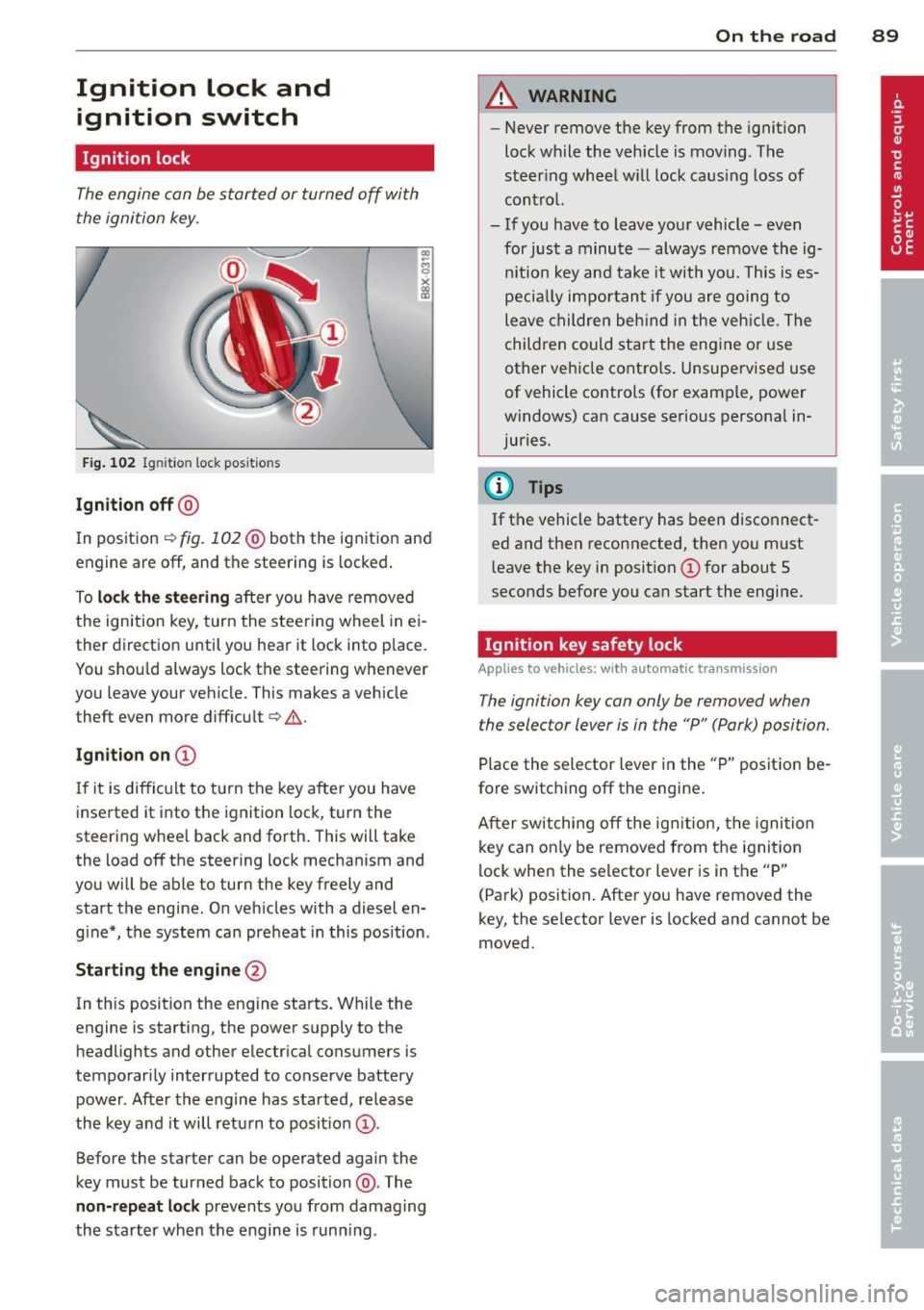
Fig. 102 I gni tion lock positio ns
Ignition off@
In position ¢ fig. 102@both the ignition and
engine are off, and the steering is locked.
To
lock the steering after you have removed
the ignition key, turn the steering wheel in ei
ther direction until you hear it lock into place.
You shou ld always lock the steering whenever
you leave your vehicle. This makes a vehicle
theft even more difficul t
q ,&.
Ignition on CD
If it is difficult to turn the key after you have
inserted it into the ignition lock, turn the
steering wheel back and forth. This will take
the load off the steering lock mechan ism and
you will be able to turn the key freely and
start the engine. On vehicles with a diesel en
g ine*, the system can preheat in this pos ition .
Starting the engine @
In this position the engine starts. While the
engine is starting, the power supply to the
headlights and other electrical consumers is
temporarily interrupted to conserve battery power. After the engine has started, release
the key and it will return to position @.
Before the starter can be operated again the
key must be turned back to position @. The
non-repeat lock prevents you from damag ing
the starter when the engine is running.
On the road 89
A WARNING
-Never remove the key from the ignition
lock wh ile the vehicle is moving. The
steering wheel will lock caus ing loss of
control.
- If you have to leave your vehicle - even
for just a minute -always remove the ig
nition key and take it with you. This is es
pecia lly important if you are going to
leave children behind in the vehicle. The
children could start the engine or use
other vehicle controls. Unsupervised use
of vehicle controls (for example, power
windows) can cause serious personal in
juries.
(D Tips
If the vehicle battery has been disconnect
ed and then reconnected, then you must leave the key in position @for about 5
seconds before you can start the engine.
Ignition key safety lock
Applies to vehicles: wit h automatic transmission
The ignition key can only be removed when
the selector lever is in the "P" (Park) position.
Place the selector lever in the "P" position be
fore switching off the engine .
After switching off the ign ition, the ignition
key can on ly be removed from the ignition
lock when the selector lever is in the "P"
(Park) position. After you have removed the
key, the se lector lever is locked and cannot be
moved.
Page 92 of 280

90 On the road
Starting and stopping
the engine
Starting the engine
The engine can only be started with your orig
inal Audi key.
Fig. 10 3 Igni tio n key pos itio ns
Vehicles with a gasoline eng ine:
.. Move the selector lever to the neut ral posi
t ion (a utomatic transmission): se lector lever
in Por
N) c> .&_ .
.. On vehicles with manual transmission, fully
depress t he clu tch pedal.
.,. Turn the ig nition key to position @
¢ page 89, fig. 102 -do not d epress th e gas
peda l when start ing the e ngine!
.. Let go of the key as soon as the eng ine
s tar ts.
Vehicles with a diesel engine:
.. Set the parking bra ke .
.. Move t he sele cto r lever to the neut ral posi
t ion (a utomat ic tr ansm iss ion): se lecto r lever
i n
P or N) c> .&_ .
.. On vehicles wi th m anu al transm is s ion, fully
depress the clutch pedal.
.. Turn the ignition key to position
(D
¢ fig . 103 . The glow plug warning light II
lights up while the glow plugs are warming
up .
.. When the warning light goes out, tur n the
i gnition key to posi tion @to s tart the en
gine
c> page 89, fig . 102 . Do no t depress t he
gas pedal when s tart ing the engine!
.. Let go of the key as soon as t he eng ine
sta rts . A cold engine may sound lo
ud after it has
been started . This is due to the hydraulic
valves b uilding up o il pressure. This is normal
and is not a need for co ncern .
If the engine does not start immediate ly, stop
t rying after 10 seconds and then try to restart
t h e engine about
30 seconds later.
Glow plug system*
Diesel engines are e quipped w ith a glow pl ug
system whose prehe ating time is co ntrolled
by the coo la nt an d ou tside temperature . Sta rt
the engine
immediately after the g low plug
i ndicator light
II switches off.
T he glow plug indica to r ligh t will only illumi
nate fo r approximate ly 1 second w hen t he en
gine is warm or the outside temperature is
higher than
46 °F (8 °(). That means yo u can
start the eng ine
immedia tely .
To start the diesel eng ine after the fuel
tank has been run dry
If the fuel tank was r un comp lete ly dry, the
starting process after refue ling with diesel
fuel can take longer than usua l - up to one mi
nute . This is because the fue l system first has
to be vented of a ir wh ile s tarting .
A WARNING
-Neve r sta rt or l et the eng in e r un in a con-
fi ned o r encl ose d area. Exhaus t fumes
fr om the e ngine co ntain ca rbo n m onoxide ,
a colorless and odorless g as. Ca rbon mo n
oxi de can be fatal if inhaled .
- N ever le ave the engi ne id ling una tten d
ed . An unat tende d veh icle w ith a run ning
e ng ine poses a dan ger of personal injury
or theft .
(D Note
-Av oid high engine spee ds, fast a cceler a
t ion or heavy engine loa ds w hile the en
gine is st ill co ld. This could damage the
eng ine .
- The e ngine cannot be starte d by pushing
or towing t he vehicle . .,.