seats AUDI A3 2012 Owner´s Manual
[x] Cancel search | Manufacturer: AUDI, Model Year: 2012, Model line: A3, Model: AUDI A3 2012Pages: 280, PDF Size: 70.11 MB
Page 158 of 280
156 Child Safet y
These new performance requirements make a
tether necessary on most new child seats.
Ins tal ling a chi ld restraint that requ ires a top
tether without one can serious ly impair the
performance of the child restraint and its abi l
ity to protect the chi ld in a co llis ion. Installing
a child restraint that requires a top tether
witho ut the top tether may be a v io lation of
state law .
Child restraint manufacturers offer LATCH l ower anchorages on the ir ch ild seats with
hook-on or push -on connectors attached to
adjustable straps.
In addit ion to the LATCH lower anchorages ,
these child restraint systems usually require
the use of tether straps to help keep the child restraint firmly in place.
A WARNING
Improper insta llation of chi ld restraints
w ill increase the risk of injury and death in
a c rash .
- Always follow the instructions p rov ided
by the manufacturer of the ch ild re
st raint you intend to install in your veh i
cle.
- Never install a child restraint without a
properly atta ched top tether strap if the
child rest rain t manufacturer's instruc
tions req uire the top tethe r strap to be
used.
- Improper use of c hild restra int LA TCH
lower anchorage points can lead to injury
in a collis ion . The LATCH lower anchorage
points are designed to w ithstand only
those loads imposed by correct ly fitted
child restraints.
- Never mount two chi ld restraint systems
on one LATCH Lower anchorage point.
- Never secure or attach any L uggage or
other item to the LATCH lower anchorag
es.
@ Tips
- In Canada, the terms "top tether" with
"lower universa l anchorages" (or " lower
-
unive rsal ancho rage bars") a re used to
describe the system.
- In o ther coun tries, the term " ISOFI X" is
used to describe the Lower anc ho rages .
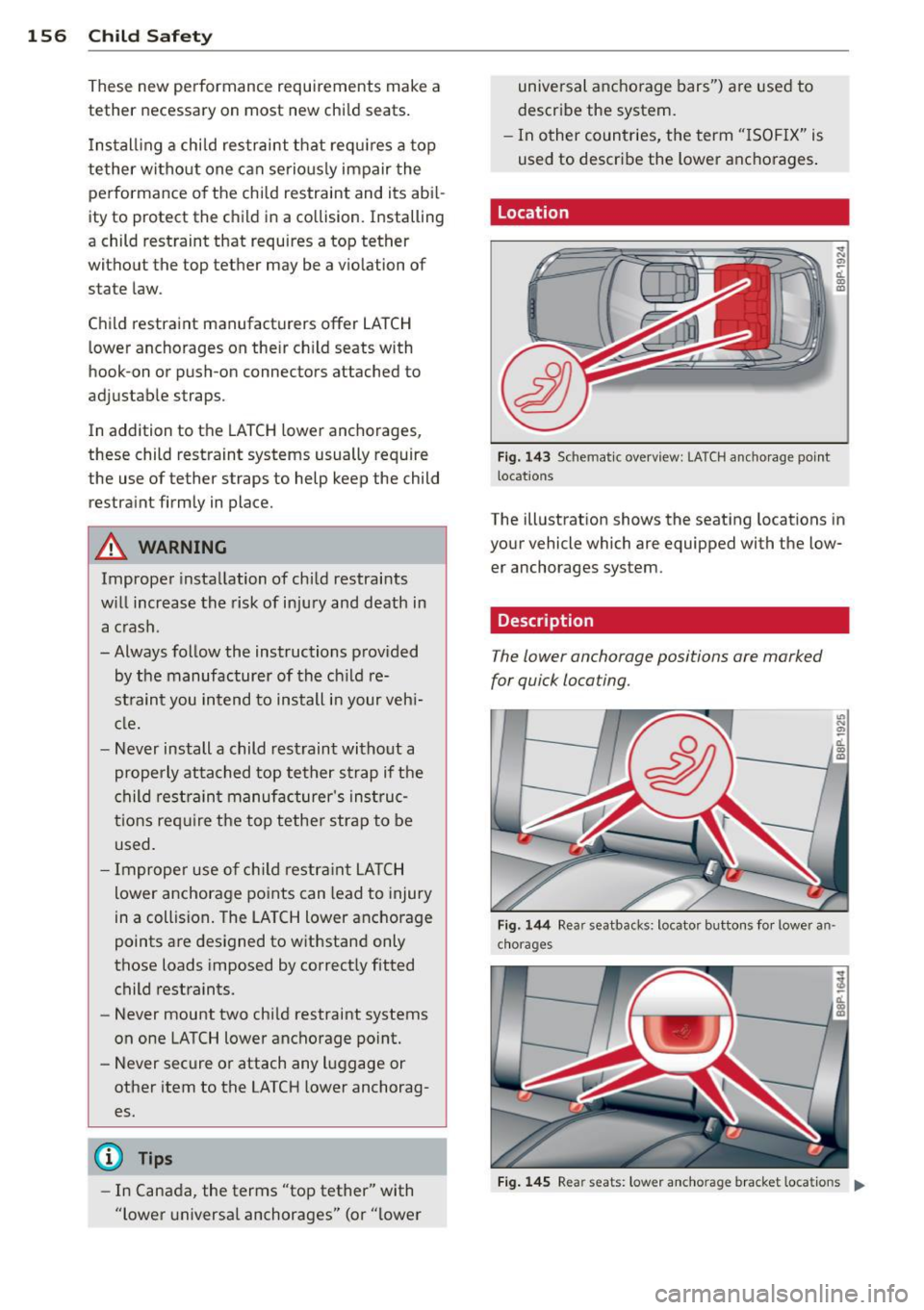
Location
Fig. 143 Sch emat ic overview: LATCH anc horage po int
l ocat io ns
a, ~ ti. m a,
The illustration shows the seating locations in
your vehicle which are equipped with the low er anchorages system.
Description
The lower anchorage positions are marked
for quick locating.
F ig. 1 44 Rear seatbacks: locato r buttons fo r lowe r an
c h ora g es
Fi g. 14 5 Rear seats: low er an cho rage bracket loca tions .,.
Page 159 of 280
Attachment locator markers for lower
anchorages
Circular locator buttons on the rear seatback indicate the lower anchorage locations on the
rear seating positions ¢
fig. 144.
Lower anchorages
The lower anchorage attachment points are
l ocated between the rear seatback and rear
seat cushion ¢
fig. 145.
Lower anchorages secure the child restraint in
the seat witho ut using the vehicle 's safety
be lts . Anchorages provide a secure and easy
to-use attachment and minimize the possibili
ty of improper child restraint installation.
A ll child restraints manufactured after Sep
tember 1, 2002, must have lower anchorage
attachments for the
LATCH system.
Remember that the lower anchorage points
are only intended for installation and attach
ment of child restraints specifically certif ied
for use with
LATCH l ower anchorages . Child
restraints that are not equipped with the low
er anchorage attachments can still be instal led in compliance with the ch ild restra int
manufacturer's instruct ions on using vehicle
safety belts .
.&, WARNING
Improper use of LATCH lower anchorages
can cause serious persona l injury in an ac
cident .
- Always carefully fo llow the child re
straints manufacturer's instructions for
proper installation of the child restraint
and proper use of the lower anchorages
or safety belts in your vehicle.
- Never secure or attach any l uggage or
other items to the
LATCH lower ancho
rages.
-Always read and heed the important in
formation about child restraints in this
chapter and WARNINGS ¢
page 143,
Child Safety .
Child Safety 15 7
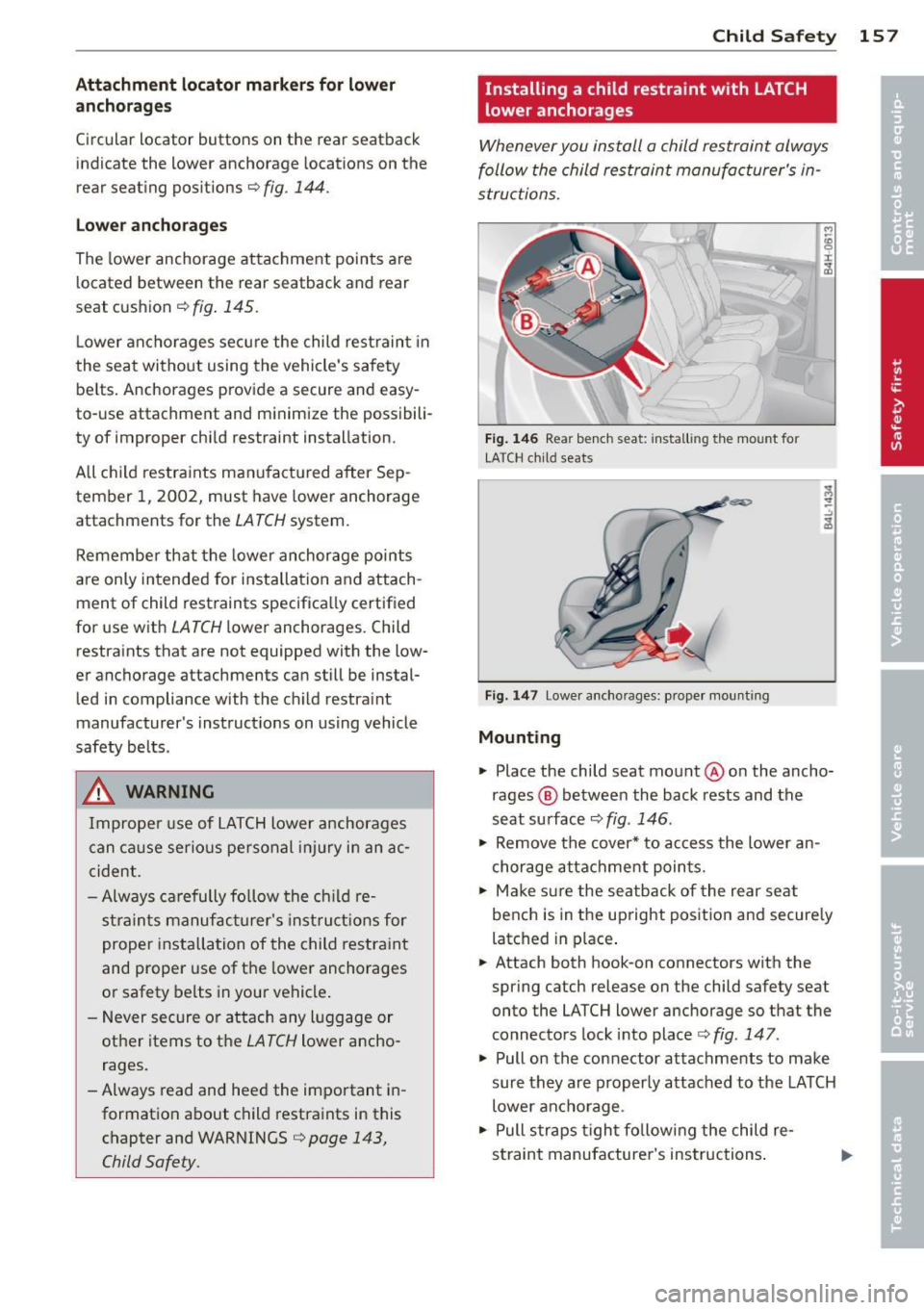
Installing a child restra int with LATCH
lower anchorages
Whenever you install a child restraint always
follow the child restraint manufacturer's in
structions.
Fig. 146 Rear bench seat: insta llin g the mount fo r
LATCH child seats
Fig. 147 Lower anchorages: proper mount ing
Mounting
.,. Place the child seat mount@on the ancho
rages @ between the back rests and the
seat surface ¢
fig. 146 .
.,. Remove the cover* to access the lower an
chorage attachment points.
.,. Make sure the seatback of the rear seat
bench is in the upright position and secure ly
latched in place.
.,. Attach both hook-on connectors with the
spring catch release on the child safety seat
onto the LATCH lower anchorage so that the
connectors lock into place ¢
fig. 147.
.,. Pull on the connector attachments to make
sure they are properly attached to the LATCH
lower anchorage .
.,. Pull straps tight fo llowing the child re-
straint manufacturer's instructions . .,..
Page 160 of 280
158 Child S afet y
Relea sin g
.,. Loosen the tension on the straps following
the chi ld restraint manufacturer 's instruc
tions .
.,. Depr ess th e spr ing catch es to re lease the
a nchorage hooks from the lowe r anchorag
es.
Rem emb er: Use tether straps to help keep the
child restraint fi rmly in p lace.
A WARNING
Improper use of the LATCH system can in
crease the risk of serious personal injury
and death in an acc ident.
- These anchors were developed only for
child safety seats us ing the "LATCH" sys
tem .
- Never attach other child safety seats,
belts or other objects to these anchors .
- Always make sure that you hear a click
when latching the seat in place . If you do
not hear a click the seat is not secure and
could fly forward and h it the interior of
the vehicle, or be ejected from the vehi
cl e.
&_ WARNING
Imprope r insta llation of chi ld restrai nts
w ill increase the risk of inju ry in an acc i
dent.
- Always fo llow the child restraint system
man ufa cturer's instr uctions for proper
installation of the child restraint system
and proper use of tether straps as we ll as
the lower anchorages or sa fety belts in
your vehicle .
- Always read and heed the important in
format ion and WARNINGS about child
safety and the installation of child re
straint systems
c:> page 143, Child Safe
ty.
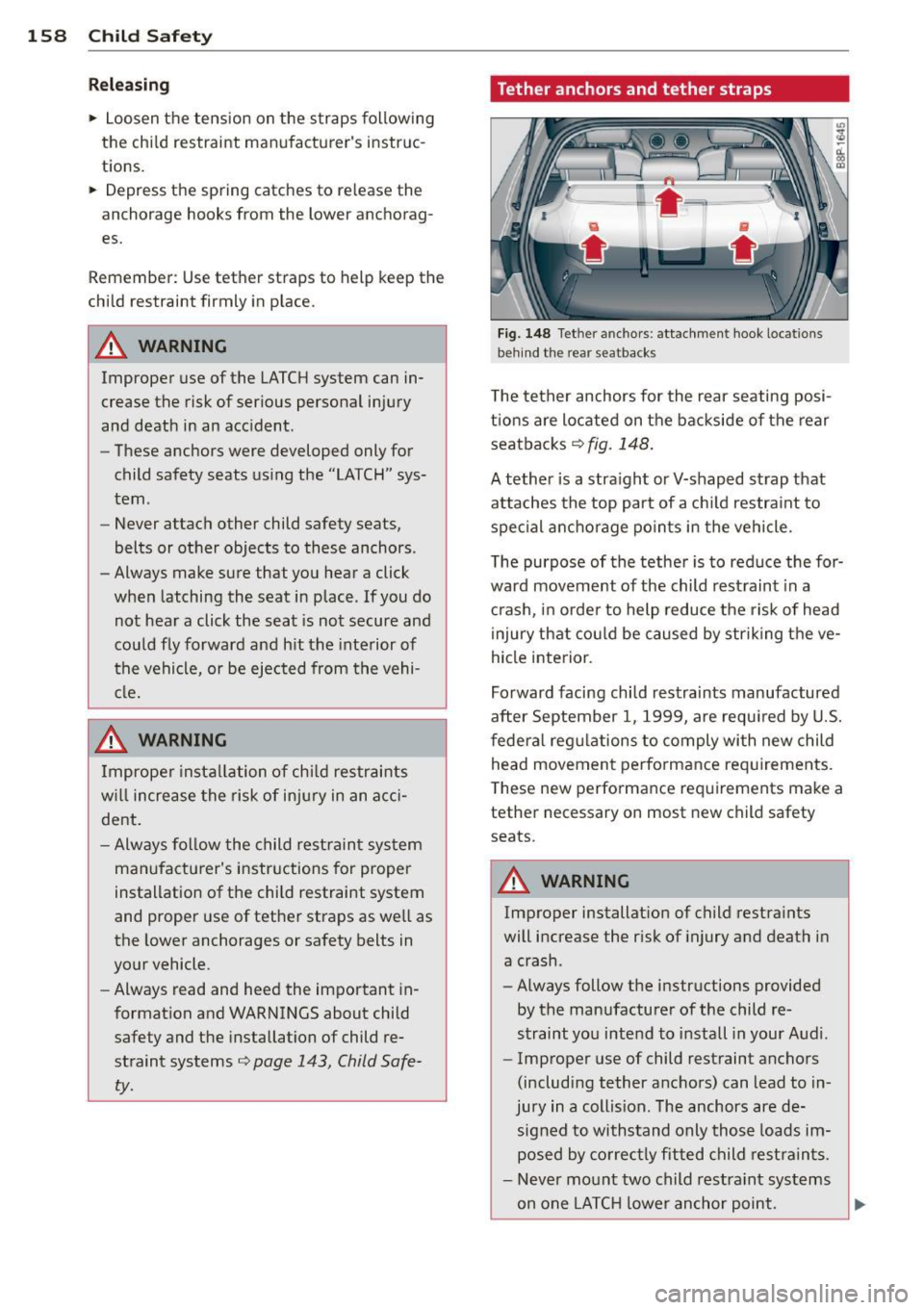
Tether anchors and tether straps
F ig. 148 Tet her an ch ors : attachment hook loca tions
b ehi nd the rea r se atba cks
T he tether anchors for the rear seating posi
tions are located on the backside of the rear
seatbacks
c:> fig. 148.
A tether is a stra ight or V-shaped st rap that
attaches the top par t of a ch ild restra int to
spe cial ancho rage po in ts in the vehicle.
The purpose of the tether is to reduce the for
ward movement of the child rest raint in a
cr ash , in orde r to help reduce the risk of head
injury that cou ld be caused by str ik ing the ve
hicle interior.
Forward facing child restraints manufactured
after September 1, 1999, are requ ired by U.S.
federa l reg ulations to comply wi th new child
head movemen t perfo rmance req uirements.
T hese new performa nce req uirements make a
tether necessary on most new child safety seats .
&_ WARNING
-Improper installat ion of child restra ints
will increase the risk of injury and death in
a crash .
- Always follow the instructions provided
by the manufacturer of the child re
straint you intend to install in your Audi .
- Improper use of child restraint anchors
(including tether anchors) can lead to in
jury in a collis ion. The anchors are de
s igned to withstand only thos e loads im
posed by co rrec tly fitted child rest rain ts.
- Never mo unt two child restra int sys tems
-
on one LATC H lower anchor point. .,_
Page 161 of 280
-Never attach two child restraint systems
to one tether strap or tether anchorage.
- Never attach a tether strap to a tie-down
hook in the luggage compartment.
- Never use child restraint tether ancho
rages to secure safety belts or other
kinds of occupant restraints.
- Never secure or attach any luggage or
other items to the LATCH lower ancho
rages or to the tether anchors.
-If a tether or other strap is used to at
tach a child restraint to the front passen ger seat, make sure that it is not so
t ight , that it causes the weight-sensi ng
mat to measure more weight than is ac
tually on the seat .
- The heav ier weight reg istered can make
the Advanced Airbag System work as
though an adult were on the seat and de
ploy the Advanced Ai rbag when it must
be s uppressed causing serious o r even
f atal injury to the child.
- If you mus t install a rearward facing
child safe ty seat o n the fron t passenger
seat beca use of exceptional circ ums tan
ces and the
PASSENGER AIR BAG OFF
light does not come on and stay on , im
med iately install the rear -facing child
safety seat in a rear seating position and
have the a irbag system inspected by you r
Audi dealer.
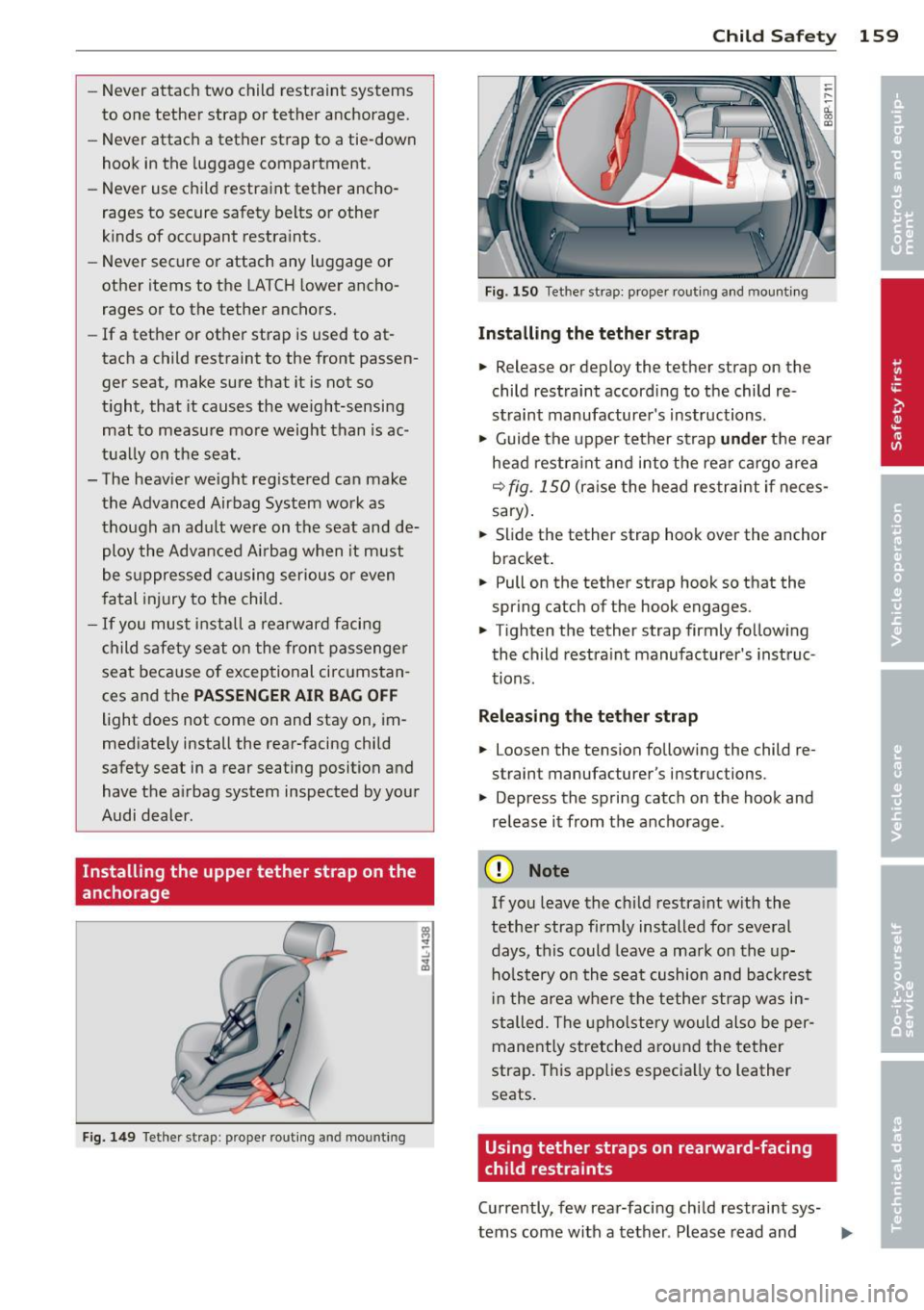
Installing the upper tether strap on the
anchorage
F ig. 1 49 Tether strap : prope r ro utin g and mountin g
Child S afety 159
Fig. 1 50 Tet her st rap: prope r routing an d mounti ng
Installing the tether str ap
.. Release or deploy the te ther s trap on the
child restraint according to the child re
straint manufacture r's instructions .
.. Guide the upper tether st rap
und er the rear
head restra int and into the rea r cargo a rea
r=;, fig . 150 (ra ise the head restraint if neces
sary) .
.. Slide the tether strap hook over the anchor
bracket.
.. Pull on the tether st rap hook so th at the
spring cat ch of the hook engages .
.. Tighten the tether strap firmly follow ing
the child restra int manufacturer's inst ruc
tions.
Relea sing the tether strap
.. Loosen the tension following the ch ild re
strain t manufac turer 's ins truc tions .
.. Depress the spring catch on the hook and
release it from the anchorage .
(D Note
If you leave the child restraint w ith the
tether strap firm ly installed for several
days, this could leave a ma rk on the up
ho lstery on the seat cushion and backrest
i n the area where the tether strap was in
stalled. The upholstery would also be per
mane ntly stretched a round the tether
strap. T his app lies especia lly to leather
seats.
Using tether straps on rearward-facing
child restraints
Cu rrently, few rear-facing child restraint sys-
tems come with a tether . Please read and ...,
Page 170 of 280
168 Intelligent technology
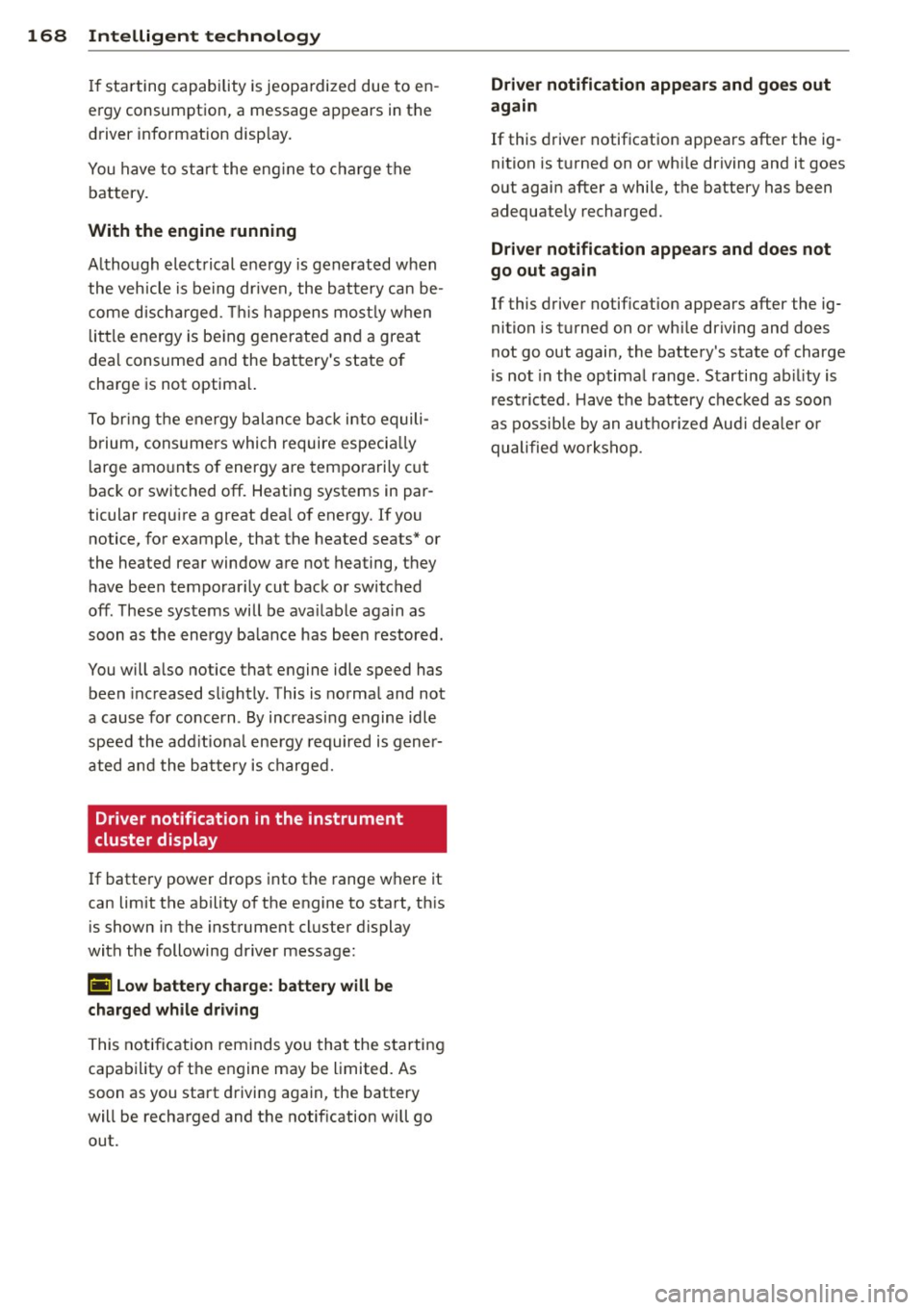
If starting capability is jeopa rdized due to en
ergy consumption, a message appears in the
driver information disp lay.
You have to start the eng ine to charge the
battery.
With the engine running
A lthough electrical energy is generated when
the vehicle is be ing driven, the battery can be
come discha rged. This happens mos tly when
little e nergy is be ing generated and a great
dea l consumed and the battery's state o f
charge is not optima l.
To br ing the energy balance back into equili
brium, cons umers which require especia lly
l arge amo unts of energy are temporari ly c ut
back or switched off. Heating systems in par
ticular requ ire a great dea l of energy. If you
notice, for example, that the heated seats* or
the heated rear window are not heating, they have been temporar ily cut back or switched
off. These systems will be ava ilable again as
soon as the energy ba lance has bee n restored.
You will a lso notice that engine idle speed has
been increased s lightly . This is norma l and not
a cause fo r co ncern . By increas ing engine idle
speed the add itiona l ene rgy required is gene r
ated and the ba tte ry is charged.
Driver notification in the instrument
cluster display
If batte ry power drops into the range w here it
can limit the ab ility of the engine to start, th is
is shown in the instrument cluster display
with the following driver message:
(•) Low batter y charge : batte ry will be
charged while dr iving
This notif ication reminds you tha t the s tarti ng
capability of the engine may be limited. As
soon as you start d riving again, the battery
will be recharged and the notification wi ll go
out.
Driver notification appears and goes out
again
If this driver notif ication appears after the ig
nition is t urned on or whi le driving and it goes
out again after a while, the battery has been
adequately recharged.
Driver notification appea rs and doe s not
go out again
If this driver notif ication appears after the ig
nition is turned on or whi le driving and does
not go out again, the battery 's state of charge
is not in the optima l range. Starting ab ility is
rest ricted . H ave t he battery chec ked as soon
as possib le by an autho rized Aud i dea le r o r
qualified wo rks hop.
Page 186 of 280
184 Cleaning and protection
Fabrics and fabric coverings
Fab rics and fabr ic coveri ngs (e.g. seats, door
tr im panels, etc.) should be cleaned at reg ular
inte rva ls with a vacuum cleaner. This removes
sur face dirt particles which could become em
bedded in the fabric through use. Steam
cleaners shou ld not be used, because the
steam tends to push the dirt deeper into the
fabric and lock it there.
Normal cleaning
Generally, we recommend using a soft sponge
or a lint-free microfiber cloth to the clean fab
ric. Brushes should on ly be used for carpets
and floor mats, s ince other fabric surfaces
could be harmed by brushes.
Normal surface stains can be cleaned using a
commercially available foam cleaner. Spread
the foam on the surface of the fabric with a
soft sponge and work it in gently. Do not satu
rate the fabric. Then pat the foam d ry using
absorbent, dry cloths (e.g . microfiber cloth)
and vacuum it afte r it has dried comp lete ly.
Cleaning stain s
Stains caused by beverages (e.g. coffee, fruit
ju ice, etc.) can be treated with a mild deter
gent solut ion. App ly the detergent so lution
with a sponge. In the case of stubbor n stains,
a detergent paste can be applied directly to
the sta in and wor ked into the fabric. Afte r
wards, use copio us amo unts o f cle an water to
remove t he remaining dete rgent. Apply the
water with a damp cloth or sponge and pat
the fabric d ry w ith an absorbent, dry cloth.
S tains from chocola te or make up s hou ld have
detergent paste (e .g. ox -gall soap) r ubbed in
to them. Afterwards, remove the soap with
water (damp sponge).
A lcohol can be used to t rea t stains from
g rease, oi l, lips tick or a ballpo in t pen . Me lted
grease or dye must be patted off using ab
sorbent materia l. It may be necessary to re
treat the areas with dete rgent paste and wa
ter. In the case of gene
ra l soiling o f the uphols
tery and cover material, we recommend hiring
a spec ia list that has the equipment to clean
the seat covers and other fabr ic surfaces by
shampooing and spray extraction.
A WARNING '"--
A lways read and heed all WARNINGS and
the information
~ page 178.
(D Tips
Open Ve lcro fasteners on yo ur clothing can
damage the seat cover. Please make sure
that Velcro fasteners are closed.
Plastic parts and instrument panel
~ Always use a clean cloth moistened in clear
wate r.
Always use a clean cloth moistened in clear
water to clean these areas. For pe rsisten t dirt
use an Aud i approved
solvent -free p lastic
cl eaner/p rotec tant.
A WARNING
S olven ts ca n ch ange the prope rties of
some p lastics and make it harde r fo r the
a ir ba g to de ploy .
-
- N ever cle an the in st rument p anel or the
sur face of Ai rbag modu les with cleaning
prod ucts t hat conta in solvents .
- P roduc ts containing solven ts will make
the surface of this part poro us.
- Ser ious inju ries c an resu lt if p lastic parts
come loose when t he ai rbag is deployed.
- Always re ad and heed a ll WAR NIN GS and
t he information¢
page 178 .
(J) Note
Cleaning agents conta ining so lvents w ill
a ttack t he mate rial and can ch ange the
w ay it behaves.
Page 187 of 280
Natural leather
Appl ies to vehicles: with nat ura l leather
Audi makes great efforts to maintain the
properties , natural look and feel of interior
leather .
General
We offer many different types of leather on
our veh icles. Most are different types of nappa
leather, which has a smooth surface and
comes in var ious colors .
The intensity of the color determines the v isu
al characteristics and appearance. If the sur
face of the leather has a typical natural look,
then the leather is a nappa leather that has been left in a relatively nat ural condition . This
l eather offers pa rticularly good comfo rt and
breathes well. Fine ve ins, closed g rains, i nsect
b ites, skin folds, and subtle variations in color
remain visib le. These characteristics demon
strate that the materia l is natural.
Natural nappa leather is not covered by a col
or finish .
It is therefore more sensitive to soil
ing and wear, which is something you need to
consider if chi ldren, animals or other factors
might prove to be particularly hard on the
leather.
By contrast, leather types that are covered by
a co lored finish layer are more durable. This
has a positive effect on the leather's resist
ance to wear and soiling in daily use. On the
other hand, the typical characterist ics of natu
ral leather a re barely or not apparent . Howev
er, this does not mean that the leather itself
i s of infer ior quality.
Care and handling
Because of the exclusive nature of the types of
leather that Audi uses and the ir unique prop
erties (such as sensitivity to o ils, grease, so il
in g, etc.), you will need to be somewhat care
fu l w ith these leathers, and a certain type of
care is required. For examp le, da rk cloth ing
materials can d iscolor leather seats (especial
l y i f such clothing is damp and was not dyed
correctly) . Dust and dirt particles in pores,
fo lds, and seams can have an abrasive effect
Cleaning and protec tion 185
and can damage the leather surface as we ll as
weaken seams.
T he lea ther should be cleaned regularly as
needed. After hav ing been used for a relat ive ly
long time, your leather seats will acq uir e a
rich aged finish . This is a characteristic of nat
ural leather and a sign of true quality.
In order to maintain the val ue of this natural
product over the li fe of your vehicle, you
sho uld follow the recommendations below:
(D Note
- T o keep your lea ther from b leach ing out,
do not allow it to be exposed to bright
sunlight for long periods of time . If you
have to leave the ve hicle parked outside
for long per iods, cover the leather to
protect it from direct exposure to sun
light.
- Sharp objects on clothing, such as zip
pers, rivets or sharp pieces on belts can
leave permanent scratches or scrape
marks on the surface of the leather.
(D Tips
-After each time you clean the leather and
at regular intervals, use a leather preser
vative creme that contains UV-blockers and that works into the leathe r. T his
c reme w ill nour is h and mo istu rize the
lea ther, helping it to breathe and stay
supple.
It also helps to build up a protec
tive coating on the surface.
- C lean the leather every 2 - 3 mon ths,
and clean any areas that get soi led .
- Remove fresh m arks made by ballpo int
pens, ink, lipstick, shoe polish, etc. as
soon as possible .
- Preserve the color o f the leather as need
ed by using a specia l co lored leathe r care
creme to touch up areas of uneven color . •
•
Page 246 of 280
244 Fuses and bulbs
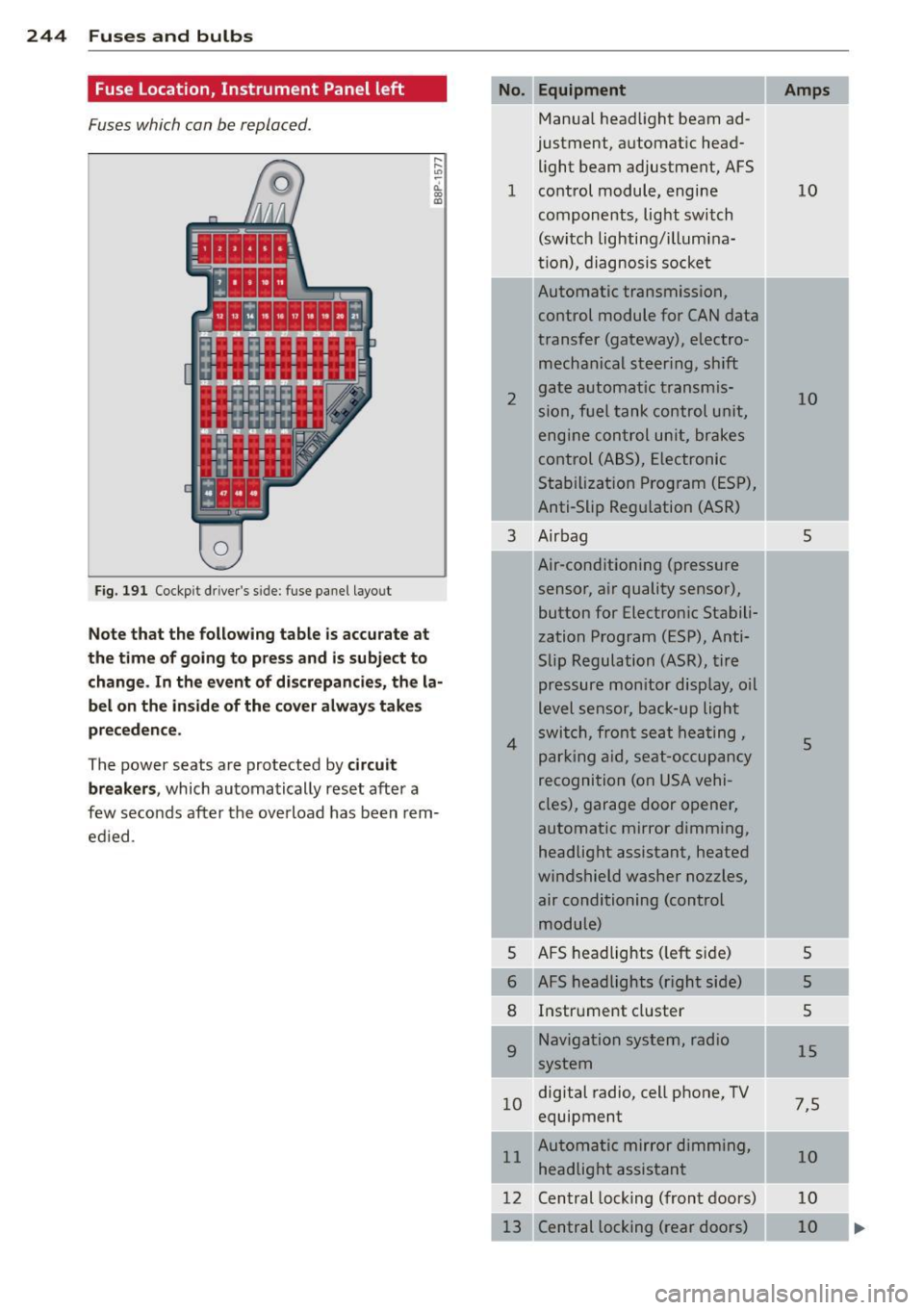
Fuse Location, Instrument Panel left
Fuses which can be replaced.
Fig. 191 Cockp it driver 's s ide: fuse pane l layout
Note that the following table is accurate at
the time of going to pr ess and i s subject to
change . In the event of d iscrepancies, the la
bel on the in side of the cover always take s
pr eceden ce .
The power seats are protected by circuit
break ers,
which automatically reset after a
few seconds after the ove rload has been rem
ed ied .
Equipment
Manua l head light beam ad
justment, a utomat ic head
light beam adjustment, AFS
1 co ntrol m odule, engine
components, light switch
(switch lighting/illumina
ti on), diagnosis socke t
2
3
4
5
6
8
9
Automatic transmission,
control module for CAN data
transfer (gateway), electro
mechanical steering, shift
gate automatic transmis
sion, fuel tank control unit,
engine control unit, brakes
control (A BS), Electronic
Stabili zation Program (ESP) ,
Anti-Slip Regulation (ASR)
Air bag
Air-conditioning (pressure
sensor, air quality sensor), button for Electronic Stabili
zation Program (ESP), Anti
Slip Regulat ion
(ASR), tire
pressure monitor display, oil
level senso r, back-up ligh t
s w itch, front se at he ati ng ,
p ark ing aid, sea t-occupancy
recognition (on USA vehi
cles), garage door opener,
automa tic mirror dimming,
headlight assistant, heated
windshield washer nozzles, air conditioning (control
module)
AFS headlights ( left si de)
AFS headlights (right side) Instr ument cluster
Navigation system, radio
system
1 0 digital
radio, cell phone, TV
equipment
11 Automatic mirror dimming,
headlight assistant
12 Central lock ing (front doors)
Central locking ( rear doors)
Amps
10
10
5
5
5
5
5
15
7 ,5
10
10
10
Page 266 of 280
264 Index .:..:..:..::....::..
...:..._ ___________________________ _
A
ABS
refer to Anti-lock brake system . ... .. . 164
Accessories .. ... .. ..... ... .. .. .. .. . 26 1
Acoust ic park assist ........ .. .. .... .. 93
AC (a ir cond itioner) ......... .. .. .. .. .. 81
Adapter for anti-theft wheel bolts . .. .. . 238
Adaptive light
defective . . . . . . . . . . . . . . . . . . . . . . . . . . 21
Adding Engine coolant .......... .... ..... . 204
Engine oil . ...... ....... ... .. .... . 200
Windshield washer fluid ............ 211
Addit ional accessories .......... .... . 261
Additional heater Climate controls . . . . . . . . . . . . . . . . . . . . 85
Additives Engine oil . ............... ... .. .. . 200
Adj ustab le steering wheel column .... .. 88
Adjusting Steer ing wheel column ........ .. .... 88
Adjusting front seats ........ ... .... .. 61
Advanced Airbag System
Components ... .......... .. .. .. .. . 129
Fr ont airbags ................ .... . 127
How the components work together .. 130
Monitoring ................. ..... . 133
PASS ENG ER A IR BAG OFF light .. .... . 133
A irbag
Warning/indicator lights ............. 16
A irbag system . . . . . . . . . . . . . . . . . 122, 139
Advanced Airbag System . . . . . . . . . . . . 126
Care . .. .. ............... .. .. .... . 135
Ch ildren . .... ........... .. .. .. .. . 144
Ch ild r estra ints ........... .. .. .. .. . 145
Components (front airbags) . ... .... . 129
Danger of fitting a child safety seat on
the front passenger seat . . . . . . . . . . . . 123
Disposal . ................. .. .... . 135
Front airbags . ........... .. .. .... . 126
How do the front airbags work? . . . . . . 131
H ow many airbags does my vehicle
have? ..... .......... ...... ... .. . 129
I mportant things to know .... .. .... . 122
I ndicator light ........... .. .. .. .. . 133
Monitoring ................. ..... . 133 Repairs ...
.... .. ............. .... 135
Side airbags ..... ................ . 137
S ide curtain airbags ................ 140
When must the system be inspected? 133
Airbag System
Weight-sensing mat .............. . 144
Air conditioner .. .. ................ .. 81
also refer to Climate controls .. .. .. .. . 79
Air conditioning Switching on and off ........... .. .. . 81
Air distribution Climate controls . ................. .. 83
Air outlets Adjusting the outlets for rapid defrost -
ing/defogging ... ................ .. 84
Climate controls . .............. ..... 84
Air quality sensor . . . . . . . . . . . . . . . . . . . . 82
Air recirculation . .. ... .......... .... . 83
Climate controls .. ............. .... . 82
When should I use the air recirculation? 82
Air recirculation mode Climate controls . ................. .. 82
All-wheel drive Winter tires ... .. ... .......... .... 227
Alloy wheels ...... ................ . 182
All Wheel Drive .... ............. .... 166
Alternator
refer to Generator ............. .. .. . 16
Aluminum alloy wheels .... ...... .... 182
Ambient lighting . . . . . . . . . . . . . . . . . . . . 52
Anti-lock brake system How the ABS system works ........ .. 164
Warning/ind icator lights ........ .. .. . 18
Anti -theft systems
Anti-Theft Alarm System . . . . . . . . . . . . . 42
Anti-theft wheel bolts ........... .... 238
Armrest Center armrest . . . . . . . . . . . . . . . . . . . . . 66
Rear armrest .... ................ .. 67
Asterisk What does it mean when something is
marked with an aster isk? ........ .... .. 6
Audi magnetic ride . . . . . . . . . . . . . . . 22, 9S
Description . . . . . . . . . . . . . . . . . . . . . . . . 95
Indicator light ... ....... ...... .. .. . 22
Audi Service Repair Manuals and Litera-
ture 259
Page 267 of 280
Index 265 ____________________________ ...:.:..:.=.:::.::.:
AUTO
Climate controls .. ..... ... .. .. .. .... 81
Sw itching on .... ........ ... .. .. .. .. 81
When should I use AUTO? ............ 81
Automatic air recircu lation ............ 82
Automatic belt retractor . . . . . . . . . . . . . 116
Automatic car wash
refer to Washing .................. 179
Automatic t ransmission . . . . . . . . . . . . . . . 96
D riving Notes . . . . . . . . . . . . . . . . . . . . . . 98
Emergency program ... ... .. .. .. .. . 10 1
Emergency release . . . . . . . . . . . . . . . . . 102
Ignition key safety lock . . . . . . . . . . . . . . 89
Kick-down .. ... .......... .. .. .. ... 101
Launch Contro l Program ..... .. .. .. . 101
Selector lever lock .................. 97
Selector lever pos it ions . . . . . . . . . . . . . . 96
Tiptronic . . . . . . . . . . . . . . . . . . . . . . . . . 100
Tiptroni c con trols on the steering
wheel . .. .. .... ............. .. .. . 100
Automatic Transmission
Automatic T ransm ission ....... .. .. .. 99
Auto Safety Hotline . . . . . . . . . . . . . . . . . 111
Average fue l m ileage ................. 26
Average speed . . . . . . . . . . . . . . . . . . . . . . . 26
Avoid damaging the vehicle . ... .. .. .. . 17 1
B
Battery . .. .. ................. .. .. . 20 7
charging ... .. .... .... ... .. .. .. ... 209
Disconnecting and connecting . ... .. . 207
Important warn ings when working on
the battery . ............. .... .. ... 208
Low . .... .. .. .. ........... ....... 167
Replacing the batte ry ...... ... .. .. . 210
State of charge .................... 167
W inte r operation .......... ...... .. 207
Wo rking on t he battery ............. 208
Battery voltage . . . . . . . . . . . . . . . . . . . . . . 20
B efore driving . .. .. ..... ... .. .. .. ... 103
B lended gasoline . .......... ...... .. 189
Body cavity sealing .................. 183
B ooste r seats .. ........... .. .. .. ... 1 51
Brake assistant ............. ...... .. 165
Brake booster .... .. .... ... .. .. .. ... 164 Brake fluid
Changing the bra ke fluid ..... ... .. .. 206
Check ing the brake fluid level . ... .. .. 206
Reservoir . .. .. .. ................. 206
What is the correct brake fluid level? .. 206
What should I do if the brake fluid warn-
ing light comes on? .. .. .. ..... ... .. 206
Brake pads . ... .. .. .. .. .. ...... ... .. 169
B rake system ....................... 206
An ti-l ock b rake syste m . . . . . . . . . . . . . . 18
B rake fluid .. .... .. . .. .. ..... ... .. 206
Brake fluid specifications for refill and re-
placement .. .... ... .. .. ..... ... .. 206
Brake light defective ................ 21
General information ............... 163
How does moistu re or road salt affect the
brakes? .......... ................ 163
Malfunction ..... .. ................ 15
Wa rning/ind icator lights ........ .. .. . 15
Wor n bra ke pads s ymbol ............ . 19
Break-in per iod .. .. .... ....... ...... 169
B rake pads ....................... 169
T ires 169
Bul bs ............................. 246
C
California Proposition 65 Warning ... .. 195
Battery specific . ... .. ...... ... .. .. 209
Capaci ties ......................... 257
Car care . . . . . . . . . . . . . . . . . . . . . . . . . . . 178
Interior . . . . . . . . . . . . . . . . . . . . . . . . . . 183
Plastic and vinyl .. .. . .. .. ..... ... .. 181
Care of exterior .. ...... ............. 178
Cargo a rea
refer to L oading the l uggage compa rt-
ment ... .. .. .. .... . ... ...... ... .. 109
Cargo net . . . . . . . . . . . . . . . . . . . . . . . . . . . 69
Cata lytic converter .............. .... 170
Center armres t . . . . . . . . . . . . . . . . . . . . . . 66
Cent igrade
Switching between Centig rade and Fah-
renhe it . ..... ...... ....... ........ 83
Central locking
panoramic sliding sunroof closing .. .. . 46
Certif ication .. .... ... .. .. ..... ... .. 262
Chang ing a flat t ire ... . .. .. ..... ... .. 236
•
•