airbag AUDI A3 2015 Owners Manual
[x] Cancel search | Manufacturer: AUDI, Model Year: 2015, Model line: A3, Model: AUDI A3 2015Pages: 288, PDF Size: 71.46 MB
Page 5 of 288
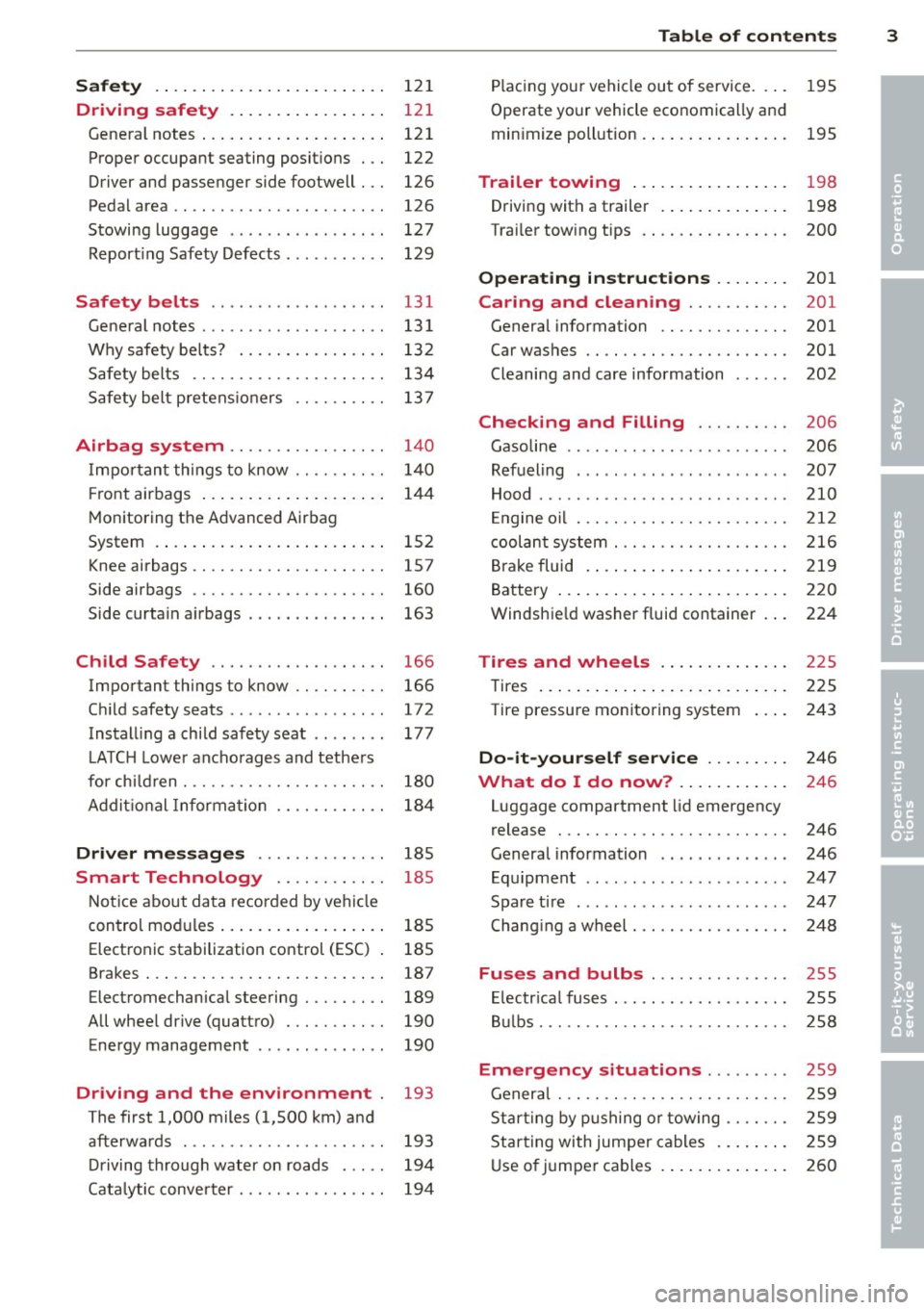
Safety . . . . . . . . . . . . . . . . . . . . . . . . . 12 1
Driving safety . . . . . . . . . . . . . . . . . 121
General notes . . . . . . . . . . . . . . . . . . . . 121
Proper occupant seating posit ions . . . 122
Driver and passenger side footwell . . . 126
Pedal area . . . . . . . . . . . . . . . . . . . . . . . 126
Stowing luggage . . . . . . . . . . . . . . . . . 127
R eport ing Safety Defects . . . . . . . . . . . 129
Safety belts ... .. ...... .. .. .. . .
General notes ............... .. .. .
Why safety bel ts? ........ .... .. . .
Safety belts ............. .. .. .. . . 131
13
1
13 2
134
Safety belt p re tens ioners . . . . . . . . . . 13 7
Airbag system . . . . . . . . . . . . . . . . . 140
I mpor tan t th ings to know . . . . . . . . . . 1 40
Fr ont airbags . . . . . . . . . . . . . . . . . . . . 14 4
M onitoring the Advanced Airbag
System . . . . . . . . . . . . . . . . . . . . . . . . . 152
Knee airbags . . . . . . . . . . . . . . . . . . . . . 157
Side airbags . . . . . . . . . . . . . . . . . . . . . 160
Side curta in a irbags . . . . . . . . . . . . . . . 163
Ch ild Safety . . . . . . . . . . . . . . . . . . . 166
Important things to know . . . . . . . . . . 166
C hi ld safety seats ............ .... . 172
Install ing a chi ld safety seat . . . . . . . . 177
L A TC H L ower ancho rages and tethe rs
fo r ch ild ren . . . . . . . . . . . . . . . . . . . . . . 180
A ddit io nal Informa tion 184
Driver messages . . . . . . . . . . . . . . 185
Smart Technology . . . . . . . . . . . . 185
N ot ice about da ta recorded by vehi cle
control mod ules . . . . . . . . . . . . . . . . . . 185
Electron ic stabilization control (ESC) 185
Brakes . . . . . . . . . . . . . . . . . . . . . . . . . . 187
Electromechanical steering . . . . . . . . . 189
All whee l drive (quatt ro) . . . . . . . . . . . 190
Energy management . . . . . . . . . . . . . . 190
Driving and the environment 193
The first 1,000 miles (1,500 km) and
afterwards . . . . . . . . . . . . . . . . . . . . . . 193
D riving through water on roads . . . . . 194
Cata lytic conve rter . . . . . . . . . . . . . . . . 194
Table of contents 3
P lac ing you r vehicle out of service. . . . 195
Operate yo ur vehicle economically an d
min imize poll ution. .. .. ... .... ... . 195
Trailer towing . . . . . . . . . . . . . . . . . 198
Driving with a trailer . . . . . . . . . . . . . . 198
Trai ler tow ing tips . . . . . . . . . . . . . . . . 200
Operating instructions ..... .. .
Caring and cleaning .......... .
General information ........... .. .
Car was hes .. .. .. ............... .
Cleaning and care information 201
201
201
201
202
Checking and Filling
. . . . . . . . . . 206
Gasoline . . . . . . . . . . . . . . . . . . . . . . . . 206
Refueling . . . . . . . . . . . . . . . . . . . . . . . 207
Hood . . . . . . . . . . . . . . . . . . . . . . . . . . . 210
E ngine o il . . . . . . . . . . . . . . . . . . . . . . . 212
c oolant system . . . . . . . . . . . . . . . . . . . 216
Br ake fluid . ... .. .. .. .. .. .... ... . 219
Battery . . . . . . . . . . . . . . . . . . . . . . . . . 220
Windshie ld washer fluid container . . . 224
Tires and wheels . . . . . . . . . . . . . . 225
Tires . . . . . . . . . . . . . . . . . . . . . . . . . . . 225
Tire pressure monitoring system 243
Do-it-yourself service . . . . . . . . . 246
What do I do now? . . . . . . . . . . . . 246
Luggage compartment lid emergency
release . . . . . . . . . . . . . . . . . . . . . . . . . 246
General information . . . . . . . . . . . . . . 246
Equ ipment . . . . . . . . . . . . . . . . . . . . . . 247
Spare ti re .... ... .. ..... ......... 247
Chang ing a wheel . . . . . . . . . . . . . . . . . 248
Fuses and bulbs . . . . . . . . . . . . . . . 255
El ectr ica l fus es . . . . . . . . . . . . . . . . . . . 255
B ulbs. . . . . . . . . . . . . . . . . . . . . . . . . . . 258
Emergency situations . . . . . . . . . 259
Genera l . . . . . . . . . . . . . . . . . . . . . . . . . 259
Star ting by p ushing o r towing . . . . . . . 259
Star ting with jumpe r cables . . . . . . . . 259
U se o f jumpe r cables . . . . . . . . . . . . . . 260
•
•
•
Page 11 of 288
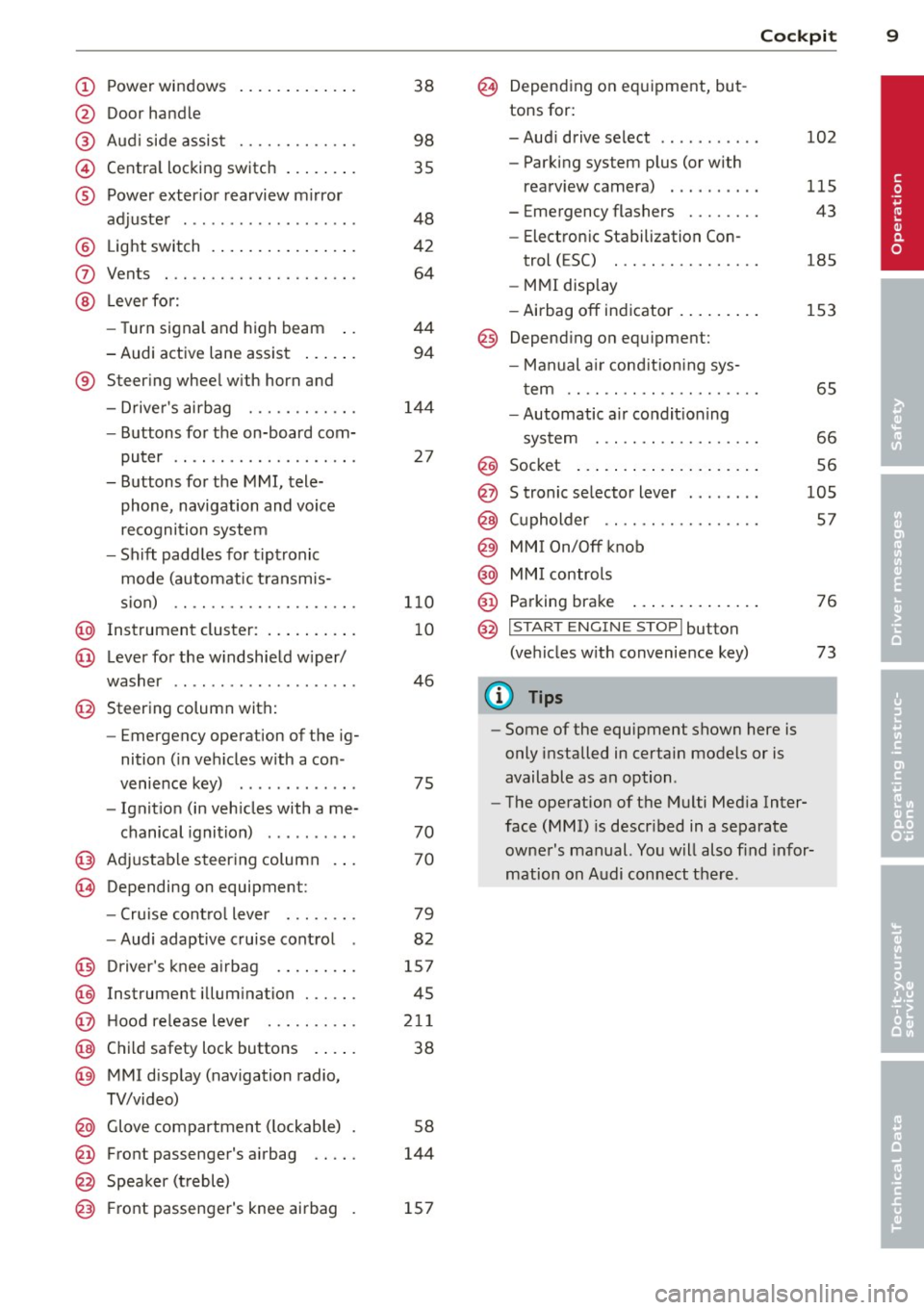
CD
@
®
©
®
Power windows
Door handle
Aud i side assist ........ .... .
Centra l locking switch ... .. .. .
Powe r exter ior rearview m irror
adjuster .................. .
@ Light switch .... .... ... .. .. .
(J) Vents
® Leve r fo r:
- Turn signal and high beam ..
- Audi act ive lane assist ... .. .
® Steer ing whee l w ith horn and
- Drive r's airbag ........... .
- Buttons for the on-board com-
puter .. ................. .
- Buttons for the MMI, tele
phone, navigation and voice
recognition system
- Sh ift padd les for t ipt ronic
mode (automatic t ransm is-
sion) .. .. .. ........... .. .
@ Instrument cluster : .. ... .. .. .
@ Leve r for the w indshield w iper/
washer
....................
@ Steering column with:
- Emergency operation of the ig
nition ( in ve hicles w ith a con -
venience key) ............ .
- Ignit io n (in veh icles with a me-
chanical ignition) ......... .
@ Adjustable s teer ing column
~ Depending on equipmen t: 38
98
35
48
42
64
44
94
1
4 4
27
1 10
10
46
75
70
70
- Cru ise cont ro l lever . . . . . . . . 79
- Audi adaptive cruise cont rol 82
@ D river's knee a irbag . . . . . . . . . 157
@ Instrument illum ination . . . . . . 45
@ Hood re lease leve r . . . . . . . . . . 211
@ Child safety lock buttons . . . . . 38
@ MMI disp lay (navigation radio,
TV/video)
@ Glove compartment ( lockable)
@ Front passenger's airbag .. .. .
@ Spea ker (t reble) 5
8
144
@) Front passenger's knee airbag 157
Cockpi t 9
@ Depending on equipment, but
tons for:
- Aud i drive select . . . . . . . . . . . 102
- Parking system plus (or with
rearv iew camera) . . . . . . . . . . 115
- Emergency flashers . . . . . . . . 43
- Elect ron ic Stabilization Con-
trol ( ESC) . . . . . . . . . . . . . . . . 185
- MMI display
- Airbag off in dicator . . . . . . . . . 153
@ Depend ing on equ ipment:
- Manual a ir cond it io ni ng sys-
t em . . . . . . . . . . . . . . . . . . . . . 65
- Automatic a ir condit ioning
sys tem . .. .. .... ........ .
66
Socket ... .... .. . .. .. ..... . 56 @
@
@
@
@
@
S tronic se lector lever ....... .
( upholder .. .. .. . ......... . 105
57
MMI On/Off knob
MM I controls
Parking brake
@ ,.., I s=T~ A~R~ T_ E _N_ G_I _N_ E_S_ T_ O_ P_ I button
(ve hicles w ith convenience key)
(D Tips
- Some of the equipment shown here is
only installed in certain models or is
available as an option .
- The operation of t he M ulti Med ia Inter
face
(MMI) i s descr ibed in a separate
owne r's manual. Yo u will also find infor
mation on A udi con nect t here .
76
73
•
Page 34 of 288
32 Opening and closing
Selective unlocking
The doors and rear lid lock when they close.
You can set in the MMI whether
only the driv
er's door or the entire vehicle should lock
when closing
c::> page 36.
Automatic locking (Auto Lock)
The Auto Lock funct ion locks all doors and the
l uggage compartment lid once the speed has
exceeded approximately 9 mph (15 km/h) .
The car is un locked again once the ignition key
is removed. In addition, the vehicle can be un
l ocked if the opening function in the power
locking system switch is used or one of the
door handles is pulled. The Auto Lock function
can be turned off or on in the MMI
c::>page36.
In the event of a crash with airbag dep loy
ment, the doors automatically unlock to allow
access to the vehicle.
Anti -theft alarm system*
If the anti-theft alarm system detects a vehi
cle break-in, audio and visual warning signa ls
are triggered .
The anti-theft alarm system turns on auto mat ica lly when you lock the vehicle.
It deacti
vates when un locking using the remote con
trol key or by touching the sensor on the door
handle (convenience key).
To switch the alarm off, press them button on
the remote control key or convenience key or
switch the ignition on . The alarm also stops
automatically after a certain amount of time.
Turn signals
The turn signals flash twice when you unlock
the vehicle and once when yo u lock the vehi
cle.
If they do not flash, one of the doors, the lug
gage compartment lid or the hood is not
lock ed or the ignition is still sw itched on (the
latter applies to vehicles with a convenience
key) .
Unintentionally locking yourself out
The following situat ions prevent you from
locking your remote control key in the vehicle:
- The vehicle does not lock w ith the cent ral
lock ing switc h if the driver's door is open
c::>page3 5.
-On veh icles with a convenience key*, the lug
gage compartment lid unlocks again after
clos ing if the most recent ly used key is in
the luggage compartment.
Do not lock your veh icle w ith the remote con
trol key or convenience key* until all doors and
the luggage compartment lid are closed. This
helps to prevent from locking yourself out ac
cidentally .
(D Tips
-Do not leave va luab les unattended in the
vehicle. A locked vehicle is not a safe!
- If the LED in the upper edge of the driv
er's door turns on for about 30 seconds
after the vehicle is locked, there is a mal
function in the power locking or the anti
theft alarm system*. Have the problem
corrected by an authorized dealer or
qualif ied repair facility.
- The interior monitor ing of the anti-theft
alarm system* only operates correctly if
the windows and the sunroof* are closed.
Page 37 of 288
(D Tips
If you vehicle is left standing for a long pe
riod of t ime, note the following:
- The proximity sensor sw itches off afte r a
few days to save energy. You then have
to pull once on the door hand le to unlock
the vehicle and a second time to open it.
- To prevent the battery from draining and
to retain the start ing ability of your vehi
cle as long as poss ible, the energy man
agement system gradually tuns off un necessary convenience functions You
may not be able to unlock your vehicle
using the convenience key.
- For Declaration of Compliance to United
States FCC and Industry Canada regula
tions, see
r:o page 2 71.
Unlocking /locking with the key
In the event that the power locking system
fails, the driver's door can locked and un
locked using the door lock .
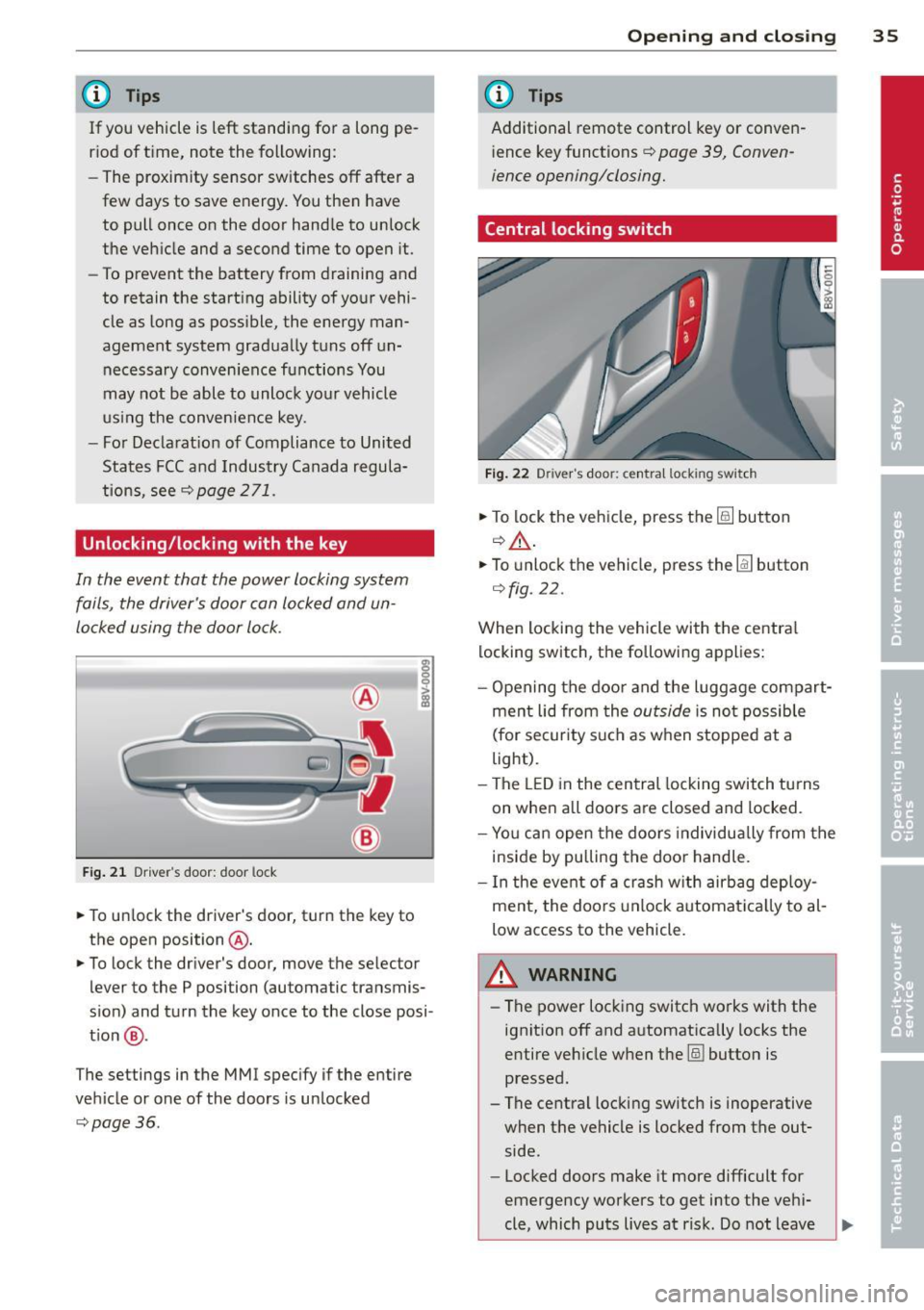
Fig . 21 Driver's door: door lock
• To un lock the driver's door, t urn the key to
the open position @.
• To lock the driver's door, move the selector
lever to the P position (automatic transmis
s ion) and turn the key once to the close posi
t ion @.
The settings in the MMI specify if the entire
vehicle or one of the doors is unlocked
i:::o page36 .
Openin g an d clos ing 35
@ Tips
Additional remote control key or conven
i ence key functions~
page 39, Conven-
ience opening/closing.
Central locking switch
Fig . 22 Driver's door: centra l locking switch
• To lock the vehicle, press the [§] button
q ,&..
• To unlock the vehicle, press the Im button
r=ofig.22.
When locking the vehicle with the centra l
locking switch, the following applies:
- Opening the doo r and the luggage compart
ment lid from the
outside is not possib le
(for security such as when stopped at a
light).
- The LED in the central locking switch turns
on when all doors are closed and locked.
- Yo u can open the doo rs individually from the
inside by pulling the doo r handle.
- In the event of a crash w ith airbag deploy
ment, the doo rs unlock automat ica lly to al
low access to the vehicle.
A WARNING
- The power lock ing switch works with the
ignit ion off and a utomatica lly locks the
entire veh icle when the [§] button is
pressed.
- The central locking switch is inoperative
when the vehicle is locked from the out side.
- Locked doors make it more difficult for
emergency workers to get into the veh i-
cle, which puts lives at risk. Do not leave ..,
Page 54 of 288
52 Seat s a nd s tor ag e
Seats and storage
General information
Important information
& WARNING
Refer to the chapter Driving Safely
r::!>poge 121, Driving safety for important
information, t ips, suggestions and warn
ings that you should read and follow for
your own safety and the safety of your pas sengers.
Why is your seat adjustment so important?
The safety belts and the airbag system con
only provide maximum protection if the front
seats ore correctly adjusted.
There are various ways of adjusting the front
seats to provide safe and comfortable support
for the driver and the front passenger. Adjust
your seat properly so that :
- you can easily and quickly reach all the
switches and controls in the instrument
panel
- your body is properly supported thus reduc
ing physical stress and fatigue
- the safety belts and airbag system can offer
maximum protection
r::!> page 140.
In the following sections, you will see exactly
how you can best adjust your seats .
There are special regulations and instructions
for insta lling a child seat on the front pas
senger's seat. Always follow the information regarding child safety provided in
r::!> page 166, Child Safety .
& WARNING
Incorrect seating position of the dr iver and
all other passengers can result in serious
personal in jury.
- Always keep your feet on the f loor when
the vehicle is in motion - never p ut your
feet on top of the instrumen t panel, out of the window or on top of the seat c
ush
ion. This applies espec ially to the passen
gers. If your seating position is incorrect,
you increase the risk of injury in the case
of sudden braking or an accident .
If the
airbag inflates and the seating position is incorrect, this could result in pe rsonal
inj ury or even death.
- It is important for both the drive r and
front passenger to keep a distance of at least 10 inches ( 25 cm) between them
selves and the steering wheel and/or in
strument panel. If you're sitting any
closer than this, the airbag system can not protect you properly. In addition, the
front seats and head restraints must be
adjusted to your body height so that they
can give you max imum protect ion.
- Always try to keep as much distance as
possible between yourself and the steer
ing wheel o r instrument panel.
- Do not adjust the driver's or front pas
senger's seat whi le the vehicle is moving.
Your seat may move unexpectedly, caus
ing sudden loss of veh icle cont ro l and
pe rsonal injury. If you adjust yo ur seat
while the veh icle is moving, yo u are ou t
of posit ion .
Driver's seat
The correct seat position is important for safe
and relaxed driving.
We recommend that you adjust the dr iver's
seat in the fo llow ing manne r:
.. Adjust the seat in fore and aft direction so
that you can easily push the peda ls to the
floor wh ile keeping your knees sl ightly bent
r::!> &. in Why is your seat adjustment so im
portant? on page 52.
.. Ad just the bac krest so tha t when you sit
w ith your back against the backrest, you can
still hold the top of the steering wheel.
.. For adjustab le head restraints: adjust the
head restra int so the upper edge is as even
as poss ible with the top of your head. If that
is not possible, try to adjust the head ..,.
Page 55 of 288
restraint so that it is as close to this position
as possible
q page 55 . Move the head re
stra int so that it is as close to the back of
the head as possible .
A WARNING
Never place any objects in the driver's foot
well. An object could get into the pedal
area and interfere with pedal function. I n
case of sudden braking or an accident, you
would not be ab le to brake or acce lerate.
Front passenger's seat
Always move the front passenger seat into
the rearmost position.
To avoid contact with the airbag while it is de
ploying, do not sit any closer to the instru
ment panel than necessary and always wear
the three -point safety belt provided adjusted
correctly . We recommend that you adjust the
passenger's seat in the following manner :
• Bring the backrest up to an (almost) upright
pos ition.
D o not ride w ith the seat reclined.
• For adjustable head restraints : adjust the
head restraint so the upper edge is as even
as possib le with the top of your head. If that
is not possible, try to adjust the head re
straint so that it is as close to this position
as possible
q page 55 . Move the head re
straint so that it is as close to the back of
the head as possible.
• Place your feet on the floor in front of the
passenger's seat .
Sea ts a nd s to rage 53
Front seats
Manual seat adjustment
App lies to vehicles: with manually adjustab le seats
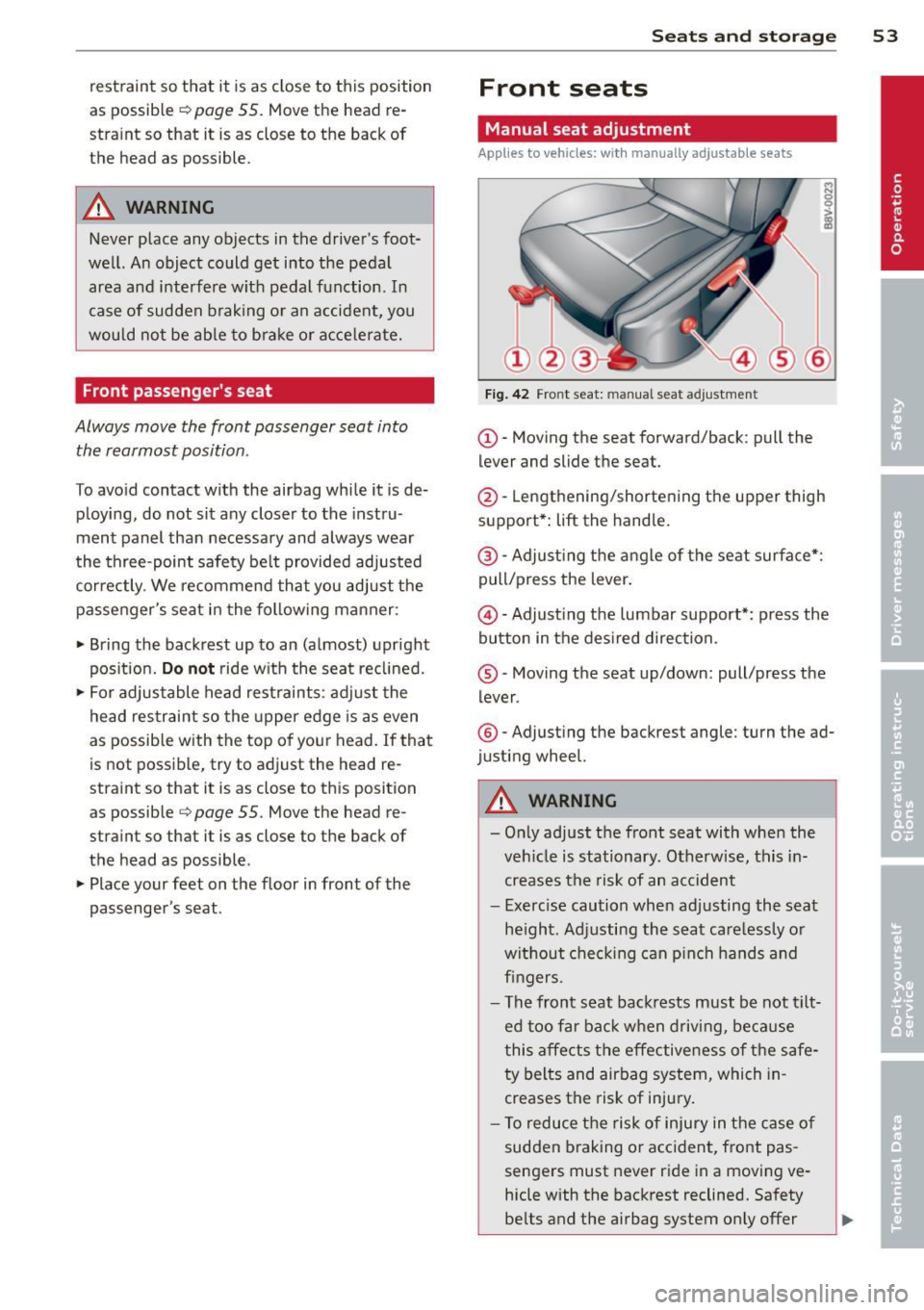
Fig . 42 Fro nt seat: man ual seat adjustment
(D-Moving the seat forward/back : pull the
lever and slide the seat.
@-Lengthening/shortening the upper thigh
support*:
lift the handle.
@ -Adjust ing the a ngle of the seat surface*:
pull/press the lever.
@ -Adjusting the lumbar support*: press the
button in the des ired direction.
® -Moving the seat up/down: pull/press the
lever .
®-Adjust ing the backrest angle : turn the ad
justing wheel.
A WARNING
-Only adjust the front seat with whe n the
veh icle is stationary. Otherwise, this in
creases the risk of an accident
- Exerc ise caution when adjusting the seat
he ight. Ad justing the seat care lessly or
without check ing can p inch hands and
fingers .
- The front seat backrests must be not tilt
ed too far bac k when driving, because
this affects the effective ness of the safe
ty belts and airbag system, which in
creases the risk of injury.
- To reduce the risk of injury in the case of
sudden braking o r accident, front pas
sengers must never ride in a moving ve
hicle with the backrest reclined. Safety
be lts and the airbag system only offer
Page 56 of 288
54 Seats and storage
maximum protection when the backrest
is upright and the safety belts are prop
erly positioned on the body. The more
the backrest is reclined, the greater the
risk of personal injury from an incorrect
seating position and improperly posi
tioned safety belts.
Power seat adjustment
Appl ies to vehicles: with power a djustable seats
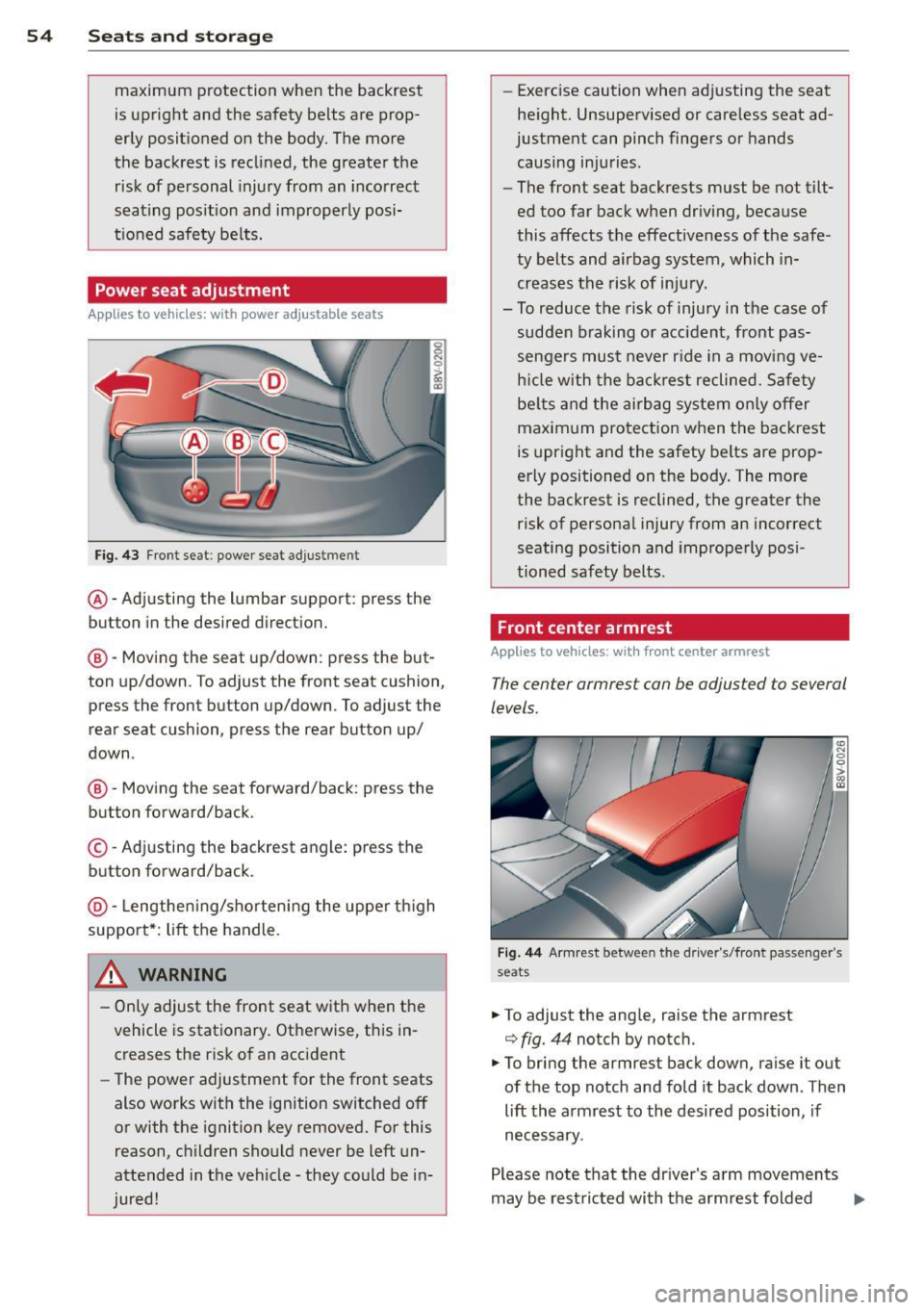
Fig. 43 Front seat: power seat adjustment
@-Adjusting the lumbar support: press the
button in the desired direction.
@-Moving the seat up/down: press the but
ton up/down . To adjust the front seat cushion,
press the front button up/down. To adjust the
rear seat cushion, press the rear button up/
down .
@-Moving the seat forward/back: press the
button forward/back.
©-Adjusting the backrest angle: press the
button forward/back.
@-Lengthening/shortening the upper thigh
support*: lift the handle.
.&_ WARNING
- Only adjust the front seat with when the
vehicle is stationary. Otherwise, this in
creases the risk of an accident
- The power adjustment for the front seats
also works with the ignition switched off
or with the ignition key removed. For this
reason, children should never be left un
attended in the vehicle -they could be in
jured! -
Exerc ise caution when adjusting the seat
height. Unsupervised or careless seat ad
justment can pinch fingers or hands
causing injuries .
- The front seat backrests must be not tilt
ed too far back when driving, because
this affects the effectiveness of the safe
ty belts and airbag system, which in
creases the risk of injury.
- To reduce the risk of injury in the case of sudden braking or accident, front pas
sengers must never ride in a moving ve
hicle with the backrest reclined. Safety
belts and the airbag system only offer
maximum protection when the backrest
is upright and the safety belts are prop
erly positioned on the body. The more
the backrest is reclined, the greater the
risk of personal injury from an incorrect
seating position and improperly posi
tioned safety belts.
Front center armrest
App lies to vehicles: wit h front cente r armrest
The center armrest con be adjusted to several
levels.
Fig. 44 A rmr est between the driver's/fro nt passenger's
seats
.. To adjust the ang le, raise the armrest
¢ fig. 44 notch by notc h.
.. To bring the armrest back down, raise it out
of the top notch and fold it back down . Then
lift the armrest to the desired position, if
necessary .
Please note that the driver 's arm movements
may be restricted with the armrest folded
Ill>
Page 60 of 288
58 Seats and storage
Glove compartment
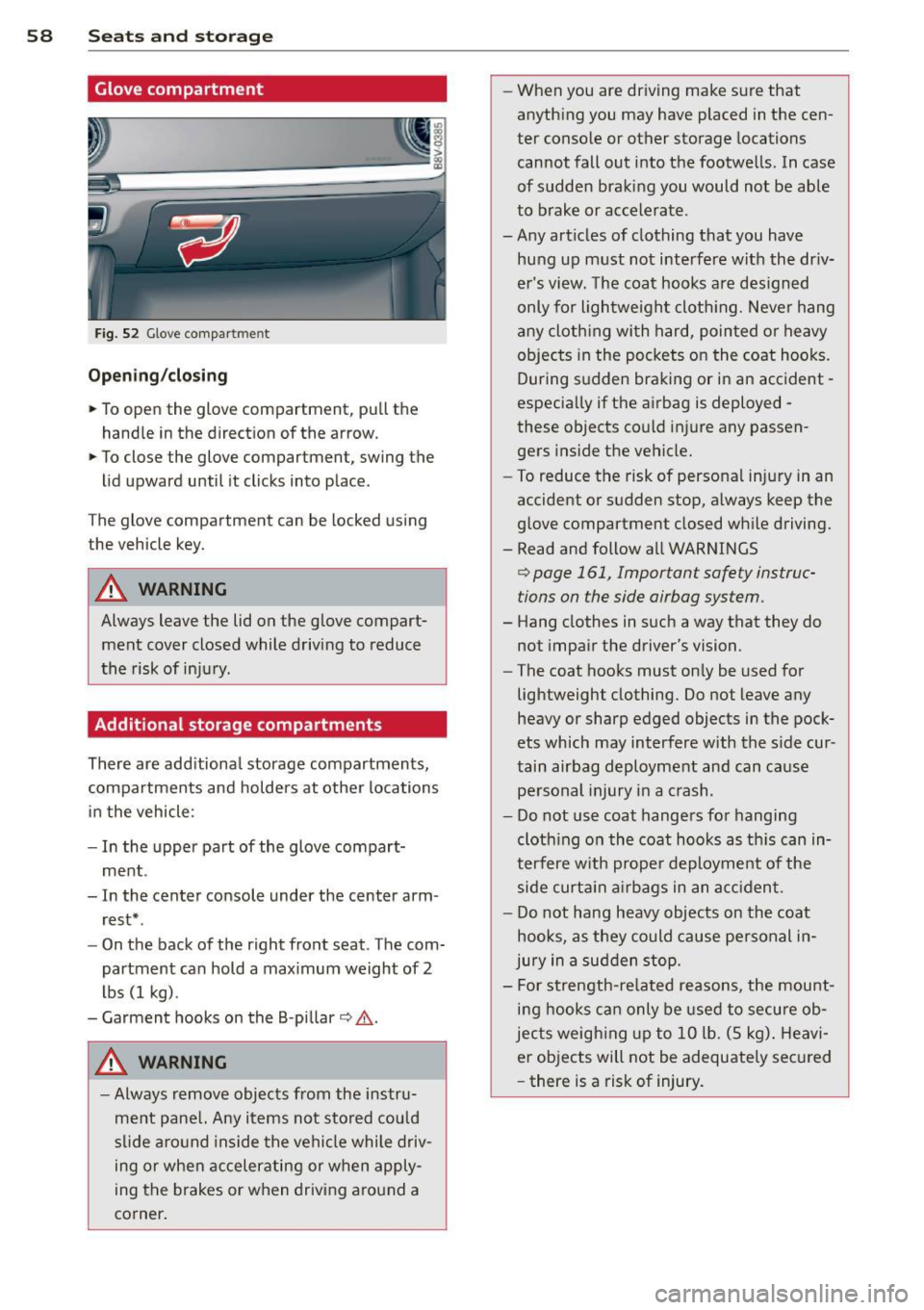
Fig. 52 Glove compa rt m en t
Open ing /closing
,,. To open the glove compartment, pull the
handle in the direct ion of the arrow.
,,. To close the glove compartment, swing the
lid upward until it clicks into place .
The glove compartment can be locked using
the vehicle key.
A WARNING
Always leave the lid on the glove compart ment cover closed while driving to reduce
the risk of in ju ry .
Additional storage compartments
There are add itiona l storage compartments,
compartments and holders at other locations
in the vehicle :
- In the upper part of the glove compart
ment .
- In the center console under the center arm rest* .
- On the back of the right front seat. The com
partment can hold a max i mum weight of 2
lbs (1 kg) .
- Garment hooks on the B -pillar
c:> A .
A WARNING
-Always remove objects from the instru
me nt pane l. Any items not stored could
s li de aro und inside the vehicle while driv
ing or when accelerating or when apply
ing the brakes or when driving a round a
corner .
-
-When you are dr iving make sure that
anyth ing you may have placed in the cen
ter conso le or other storage locations
cannot fall out into the footwells . In case
of sudden braking you would not be able
to b rake or accele rate .
- A ny articles of clothing that you have
hung up m ust not interfere with the dr iv
e r's vi ew. The coat hooks are des igned
only for lightweight cloth ing. Neve r hang
a ny cloth ing wi th hard, pointed o r heavy
objects in the pockets on the coat hooks.
During s udden braking or in an accident -
especia lly if the airbag is deployed -
these objects cou ld injure any passen
gers inside the vehicle.
- To reduce the risk of persona l in ju ry in an
accident or s udden stop, always keep the
g love compartment closed wh ile driving.
- Read and follow all WARNINGS
<=> page 161, Important safety instruc
tions on the side airbag system.
- Hang clothes in such a way that they do
not impair the driver's vision.
- The coat hooks must on ly be used for
lightweight clothing. Do not leave any heavy or sharp edged objects in the pock
ets which may interfere w ith the s ide cur
tain airbag deployment and can cause
pe rsonal injury in a crash .
- Do not use coat hange rs fo r hanging
cloth ing o n the coat hooks as th is can in
terfere w ith prope r deployment of the
side curt ain air bags in an a cciden t.
- Do not hang heavy objects on the coat
hooks, as they could cause pe rsonal in
jury in a sud den stop.
- For strength-re lated reasons, the mount
i n g hooks ca n only be used to secure ob
jects weigh ing up to 10 lb . (5 kg) . Heavi
er objects will not be adequate ly sec ured
- there is a risk of injury.
Page 72 of 288
70 Driving
Driving
Steering
Adjusting the steering wheel position
The steering wheel position is fully adjustable
up and down and forward and bock .
Fig. 64 Steering column: steering column adjustment
lever
.. Tilt the lever¢ fig. 64 downward ¢ &_.
.. Bring the steering wheel into the desired
position .
.. Push the lever against the steering column
until it latches .
_& WARNING
Improper use of steering wheel adjust
ment and improper seating position can
cause serious personal injury.
- Adjust the steering wheel column only
when the veh icle is not moving to pre
vent loss of vehicle control.
- Adjust the driver's seat or steering wheel
so that there is a min imum of 10 inches
(25 cm) between your chest and the
steering wheel¢
page 122, fig. 109 . If
you cannot maintain this minimum dis
tance, the airbag system cannot protect
you properly.
- If phys ica l limitations prevent you from
sitting 10 inches (25 cm) or more from
the steering wheel, check w ith your au
thorized Aud i dealer to see if adaptive
equipment is availab le .
- If the steering wheel is alig ned with your
face, the supplemental driver's airbag cannot p rovid e as much protectio n in an
accident. Always make sure that the steer
ing whee l is aligned with your
chest.
- Always hold the steering wheel with your
hands at the 9 o'clock and 3 o'clock posi
tions to reduce the risk of personal injury
if the driver's airbag deploys.
- Never hold the steering wheel at the 12
o'clock position or with your hands inside
the steering wheel rim or on the steering
wheel hub. Holding the steering wheel
the wrong way can cause serious injuries
to the hands, arms and head if the driv
er's airbag deploys.
Ignition lock
Depending on the model, your vehicle has the
follow ing equipment:
- Mechanical ignition key
c::> page 70 or
- Convenience key
c::> page 73
Starting and stopping
the engine (vehicles
with an ignition lock)
Starting the engine with the key
App lies to vehicles: wit h mechanica l igni tio n loc k
The ignition is switched on and the engine
started with the key in the ignition.
Fig. 65 Ignit ion key positio ns
Steering wheel lock
If the steering wheel will not turn, the steer
ing lock is engaged .
To engage the steering wheel lock: The selec
tor lever must be in the P position (automatic
transmission*). ..,.
Page 92 of 288
90 Audi pre sense
Audi pre sense
Introduction
Applies to vehicles: with Audi pre sense basic or Audi pre
sense front
Within the limits of the system, pre sense ba
sic and pre sense front can initiate steps to
protect vehicle occupants in certain danger
ous situations.
Critical driving situations can be recognized by
the pre sense front via a network of different
vehicle systems and can take steps to prepare
the vehicle occupants for a potential collision.
The pre sense front works with a radar sensor
and a video camera*.
It also functions within
the limits of the system when adaptive cruise
control* is switched
off.
General information
General information
App lies to vehicles: with Audi pre sense front or Audi
adaptive cruise control
A WARNING
Also follow the general information found
on
~ page 82, General information.
Audi pre sense basic
Descript ion
Applies to vehicles: with Audi pre sense basic
The function of the pre sense basic is activat
ed at a speed of 10 mph (30 km/h) or higher.
The following functions can be triggered un
der certain conditions within the limits of the
system:
- Tensioning of the safety belts (for example,
during heavy braking) : The front safety belts
have reversible belt pretensioners. If a colli
sion does not occur, the safety belts loosen
slightly and are ready to trigger again .
- Closing the windows and the sunroof* (for
example, when over- or understeering): The
windows and the sunroof" close until there is only a small gap open. Audi drive select:
The deployment time is
adapted in dynamic mode.
A WARNING
-The pre sense basic cannot overcome natu- ral physical laws.
It is a system designed to
assist and it cannot prevent a collision. Do not let the increased safety provided
tempt you into taking risks. This could in
crease your risk of a collision.
- The system can deploy incorrectly due to system-specific limits .
(D Tips
-Certain pre sense basic functions switch
off when ESC is switched off (sport
mode) or when driving in reverse .
- The pre sense basic functions may not be
available if there is a malfunction in the
ESC system or the airbag control mod
ule .
- Note that with pre sense basic, the rever
sible safety belt pretensioner on the
front passenger's side deactivates when
the front passenger's a irbag is deactivat
ed.
Audi pre sense front
Description
Applies to vehicles: with Audi pre sense front or Audi
adapt ive cru ise control
Pre sense front informs you if the distance to
the vehicle ahead falls below the safe distance
for an extended period of time. It can warn of a possible collision and initiate braking ma
neuvers, within the limits of the system .
When detected in time, the system can assess
dangerous situations where an object ahead
brakes suddenly or if your own vehicle is trav
eling at a high speed and approaching an ob
ject that is moving more slow ly . If detection is
not possible, then pre sense front does not re
act.