cruise control AUDI A3 2016 Owner´s Manual
[x] Cancel search | Manufacturer: AUDI, Model Year: 2016, Model line: A3, Model: AUDI A3 2016Pages: 328, PDF Size: 81.78 MB
Page 138 of 328
Ass is t
Changing the speed
Applies to vehicles: with Audi adaptive cruise contro l
0
f
•
0
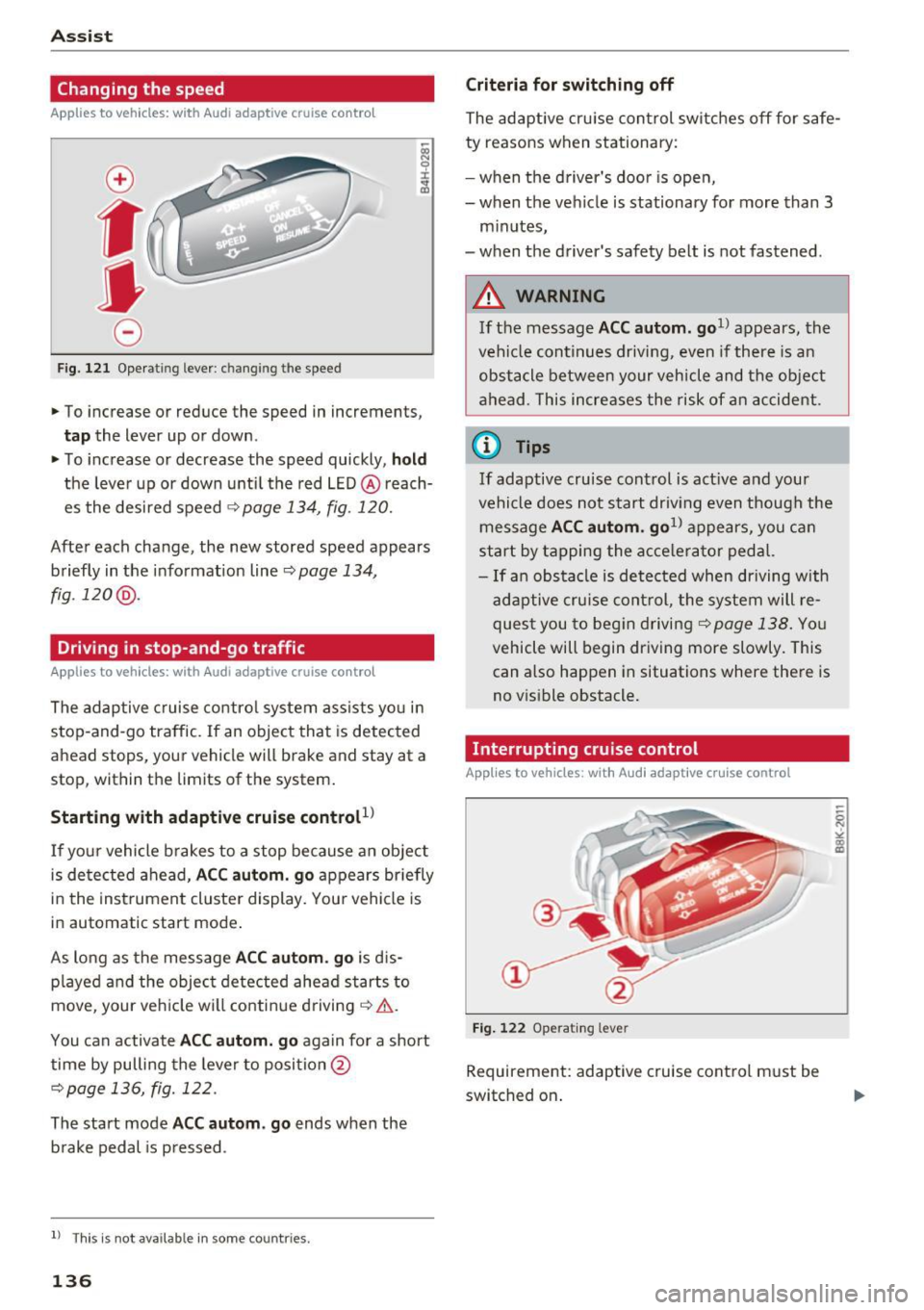
Fig. 121 Operating lever : c han gin g th e speed
.,. To increase or reduce the speed in increments,
tap the lever up or down .
.,. To increase or decrease the speed quickly , hold
the leve r up or down until the red LED @ reach
es the desired speed
¢ page 134 , fig . 120.
After each change, the new stored speed appears
briefly in the informat ion line ¢
page 134 ,
fig .120 @.
Driving in stop-and-go traffic
Applies to vehicles: with Audi adaptive cruise control
The adaptive c ruise control system assists yo u in
stop-and-go traffic. If an object that is detected
ahead stops, your vehicle will brake and stay at a
stop, within the limits of the system.
Starting with adaptive cru ise control
l)
If yo ur vehicle b rakes to a stop because an object
is de tected ahead,
AC C autom. go appears br iefly
in the instrument cluste r display. You r vehicle is
in automat ic start mode .
As long as the message
A CC au tom . go is d is
p layed and the object detected ahead starts to
move , your veh icle wi ll continue driving¢& .
You can activate
AC C autom. go again for a short
time by pulling the lever to posi tion @
¢page 136, fig. 122.
The start mode ACC autom . go ends when the
b rake pedal is p ressed .
l) Th is is no t ava ila b le in s ome c ountries .
136
Criteria for switching off
The adaptive cru ise con trol switches off for safe
ty reasons when stationary:
- when the d river 's doo r is open,
- when the vehicle is stationary for more than 3
minutes,
- when the driver's safety belt is not fastened .
A WARNING
If the message ACC autom. go1> appears, the
vehicle continues driving , even if there is an
obstacle between your vehicle and the ob je ct
ahead . This increases the risk of an accident .
@ Tips
If adaptive cruise control is act ive and your
vehicle does not start driv ing even though the
message
AC C autom . go1> appears, you ca n
start by tapping the a cce le ra tor ped al.
- If an obstacle is detected when dr iving with
adaptive cruise con trol, the system will re
ques t you to beg in d riving
¢page 138. You
vehicle will begin dr iving more slowly. This
can also happen in situations where there is
no v is ible obstacle.
Interrupting cruise control
Applies to vehicles: with Audi adaptive cruise control
Fi g. 12 2 Ope rating leve r
Requ irement: adaptive cruise cont rol must b e
switched on .
Page 139 of 328
,....,
N
0 > co ,....,
Ove rriding means ex ceeding the selected speed
when adaptive cruise control is active, for exam
p le when pressing the accelerator peda l when
passing.
"'T o accelerate manua lly, p ull the lever toward
you into position @and ho ld it there. The mes
sage
ACC : over ride appears . Or
"' press the accelerator pedal.
"' To resume cruise control, release the lever or
take your foot off the acce lerator pedal.
Inte rrupting cruise contr ol w hil e driving
"'Move the lever into position @. The message
ACC: standb y appears. Or
"' press the brake pedal.
"' To resume the stored speed, move the lever in
to posit ion @.
Int errupting c rui se contr ol wh en stopped
"' Push the lever away from you into position @.
The message
ACC : stan dby appears.
"' To resume cruise control, press the brake pedal
and pull the lever toward you into position@.
A WARNING
It is dangerous to activate cruise control and
resume the stored speed when the current
road, traffic or weather conditions do not pe r
m it this. This could result in a crash.
Setting the distance
A ppl ies to v ehicles: with Audi a daptive cruise co ntro l
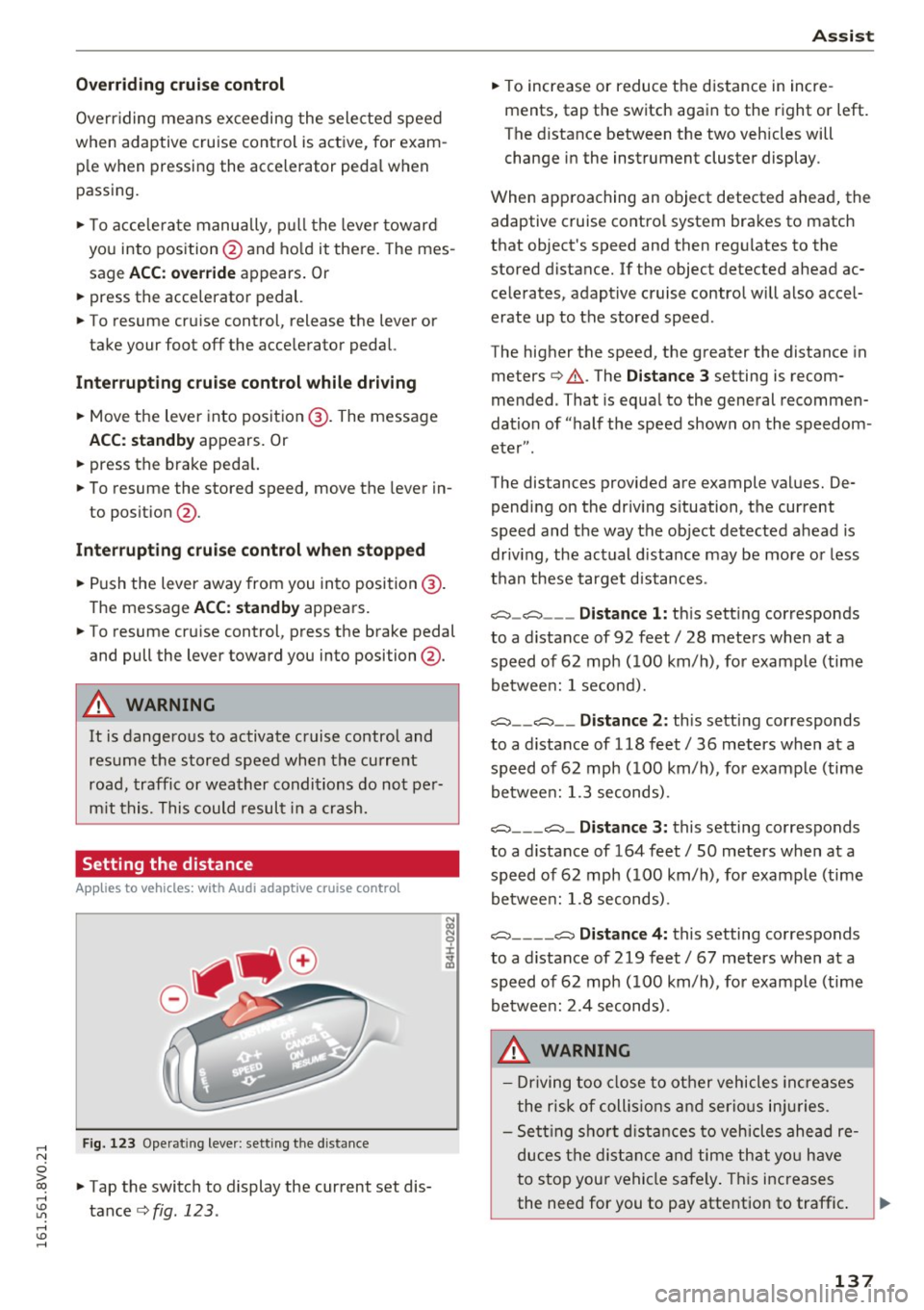
Fig. 123 Operat ing lever: setting the distance
"' Tap the switch to display the current set dis
tance
c>fig. 123 .
Assist
"'To increase or reduce the d istance in incre
ments, tap the switch again to the right or left.
The distance between the two veh icles will
change in the instrument cluster display.
When approaching an object detected ahead, the adaptive cruise contro l system brakes to match
that object's speed and then regu lates to the
stored distance. If the object detected ahead ac celerates, adaptive cruise control will also accel
erate up to the stored speed.
The higher the speed, the greater the distance in
meters
c> & . The Distance 3 setting is recom
mended. That is equa l to the general recommen
dation of "half t he speed shown on the speedom
eter" .
The distances provided are example values. De pending on the driv ing s ituation, the current
speed and the way the object detected ahead is
driv ing, the actual d ista nce may be more or less
t h an these target d istances .
o::::::::,_o::::::::, ___ Distance 1: th is sett ing corresponds
to a distance of 92 feet/ 28 meters when at a speed of 62 mph ( 100 km/h), for example (time
betwee n: 1 second).
o::::::::, __ o::::::::, __ Distanc e 2: this setting corresponds
to a distance of 118 feet/ 36 meters when at a speed of 62 mph ( 100 km/h), for example (time
betwee n: 1.3 seconds) .
o::::::::, ___ o::::::::,_ Distance 3: this setting corresponds
to a distance of 164 feet
I SO meters when at a
speed of 62 mph ( 100 km/h), for example (time
betwee n: 1.8 seconds) .
o::::::::, ____ o::::::::, Distance 4: this setting corresponds
to a distance of 219 feet
I 67 meters when at a
speed of 62 mph ( 100 km/h), for example (time
betwee n: 2.4 seconds) .
A WARNING
-Driving too close to other vehicles increa ses
the risk of collis ions an d serio us inj uries.
- Se ttin g sho rt d istances to vehicles ahead re
duces the dis tance an d time th at you have
to stop you r vehicle safe ly . Th is increases
the need for you to pay attention to traffic . ..,.
137
Page 140 of 328

Ass is t
- Always follow applicable traffic laws, use
common sense and select a distance to
vehicles ahead that takes the current traffic,
road and weather conditions into account .
(D Tips
Distan ce 3
is set automatically each time you
switch the ignition on. If you would like to set
another d istance as the standard setting, you
can have the
Ad apti ve cruis e control menu
added or enabled by an authorized Aud i dea l
er or author ized Audi Se rvice Facility.
Setting the driving program
Applies to vehicles: with Audi adaptive cruise control
A adaptive cru ise cont rol d riving program is ad
justable on veh icles w ithout A udi drive selec t*.
• In the MMI, se lect: the
I MENU I b utton > C ar >
Sy stem s*
cont rol button > Drive r assi stance >
Adaptiv e crui se c ontrol > Driving program >
Comfort /S tandard /Dynami c.
Selecting the driving mode
Applies to veh icles: with Audi adaptive cruise control
The adaptive cruise contro l dr iving program is ad
justable for vehicles with Audi drive select usi ng
the driving mode.
• Se lect the des ired dr iving mode
C o mfort , Auto ,
Dynamic
o r Indi vidual * with the knob
Qpoge 148 .
Request for driver intervention
Applies to vehicles: with Audi adaptive cruise control
Fig. 1 24 Ins trument cluster: request fo r drive r interven
tio n
138
In some situat ions, the braking from the adap
tive cruise control system is not enough to main
ta in enough distance to the object ahead. In
these situations, the system will request you to
take action.
The . indicator light and the graphic in the dis
play will warn you abo ut the danger
Q fig . 124.
You w ill also hear an audio signal. Press the
brake pedal to slow your vehicle down.
Driver messages
App lies to vehicles: with Audi adaptive cruise control
ill ACC: unavailable
The system cannot guarantee that it will detect
objects correctly and is sw itched
off. The sensor
was moved or is faulty . Drive to an author ized
Audi dealer or authorized Audi Service Fac ility im
med iate ly to have the ma lfunction corrected .
ill ACC: currently una vailable. No sensor v is ion
IIJ ACC and Audi pre sen se: currently una vaila
ble. No sensor vis ion
This message appears if the sensor v iew is ob
structed, for e xamp le by leaves, snow, heavy
spray or dirt. Clean the sensor
c:>page 133,
fig . 116 .
II ACC: currently unavailable . Gradient too
steep
The road exceeds the maxim um poss ible angle
fo r safe adaptive cruise control operat ion. The
adaptive cruise co ntro l canno t be switched on.
ill ACC: only a vailable in D, Sor M
Select the 0/5 or M selector lever position.
IIJ ACC: pa rking brake applied
The adaptive cru ise control system sw itches off
a utomat ica lly if the parking brake is set. The
adaptive c ruise cont ro l is available again after re
l easing the parking brake .
II ACC: currently unavailable . Stabilization
control input
This message appears if the Electronic Stab iliza
tion Con trol (ESC) is taking action to stab ilize the ..,.
Page 141 of 328
,....,
N
0 > co ,....,
switches
off automatically .
ill ACC off: manual control!
This message appears if the veh icle rolls back
when sta rting on a slight incl ine, even though
ACC is act ive. Press the brake pedal to p revent
the veh icle from ro lling or starting to move.
ill ACC: engine speed
This message appears if the driver has not shift
ed up or down in time when the adapt ive cruise
control is braking or accelerating, caus ing the ve
h icle to exceed or to not reach the permitted en
g ine speed . The adaptive cru ise cont rol turns
off.
A chime sounds as a remi nder.
•••
Three white dots appear if a sett ing cannot be se
lected with the operating lever. For example, this
happens if adaptive cruise control cannot be acti
vated when stopped because the dr iver has not
fastened the safety belt.
Doo r open
Adapt ive cruise control cannot be switched on
when the vehicle is stationary and the driver's
door is open.
Audi pre sense
Introduction
Applies to vehicles: with Audi pre sense basic or Audi pre sense front
With in the limits of the system, p re sense basic
and pre sense front can in it iate steps to protect
vehicle occupants in certain dangerous s itua
tions .
Critical driving situat ions can be recogn ized by
the pre sense front via a network of different ve hi cle systems and can take steps to prepare the
ve hicl e o ccupants for a potential collis ion.
The pre sense front works w ith a radar sensor
and a video camera*. It also functions within the limits of the system when adaptive c ruise con
tro l* is switched off .
Assist
General information
General information
Applies to vehicles: with Audi pre sense front or Audi adaptive
cruise control
_&. WARNING
Also fo llow the gene ral in format ion found on
~ page 133, General information.
Audi pre sense basic
Description
Applies to vehicles: with Audi pre sense basic
The function of the pre sense basic is activated at
a speed of 20 mph (30 km/h) or h igher .
The following functions can be triggered under certain condit ions w ith in the lim its of the sys
tem:
- Tensioning of the safety belts (for examp le,
during heavy braking): the front safety belts have reversib le be lt tens ioners. If a collision
does not occur, the safety belts loosen slightly
and are ready to tr igger aga in.
- Closing the windows and the sunroof* (for ex
ample when over- or understeering): the win
dows close until the re is only a small gap open
and the s unroof* closes all the way .
Audi drive select: the deployment time is adapt ed in dynam ic mode.
_&. WARNING ~
The pre sense basic cannot overcome natural
physical laws. It is a system desig ned to ass ist
and it cannot p revent a collision. Do not let
the increa sed safe ty p rovided tempt you into
t aking r is ks. This co uld in crease yo ur risk of a
collis ion .
- The system can dep loy inco rre ctly due to
system-specif ic limits.
(D Tips
- Certa in p re sense basic functions switch off
when ESC is swi tched off (sport mode) or
w hen driving in reverse. .,.
139
Page 142 of 328
Ass is t
- The pre sense b asic functions may not be
available if there is a ma lfunction in the ESC
system or the airbag contro l module.
- Note that with pre sense basic, the reversi
ble safety belt pretensioner on the front
passenger 's s ide deact ivates when the front
passenger's airbag is deactivated.
Audi pre sense front
Description
A pp lies to veh icles: with Audi pre sense front or Audi adapt ive
cr uise control
Pre sense front informs you if the distance to the
vehicle ahead falls below the safe distance for an
extended period of time.
It c an warn of a poss i
b le co llision and initiate braki ng maneuve rs,
within the limits of the system.
When detected in time, the system can assess
dangerous s ituations where an object ahead
b rakes suddenly or if your own vehi cle is t raveling
at a high speed and approaching an object that is
mov ing more slowly. If detect ion is not possible,
then pre sense front does not react.
Warnings
Applies to veh icles: with Audi p re se nse front o r Aud i ada ptive
cr uise con trol
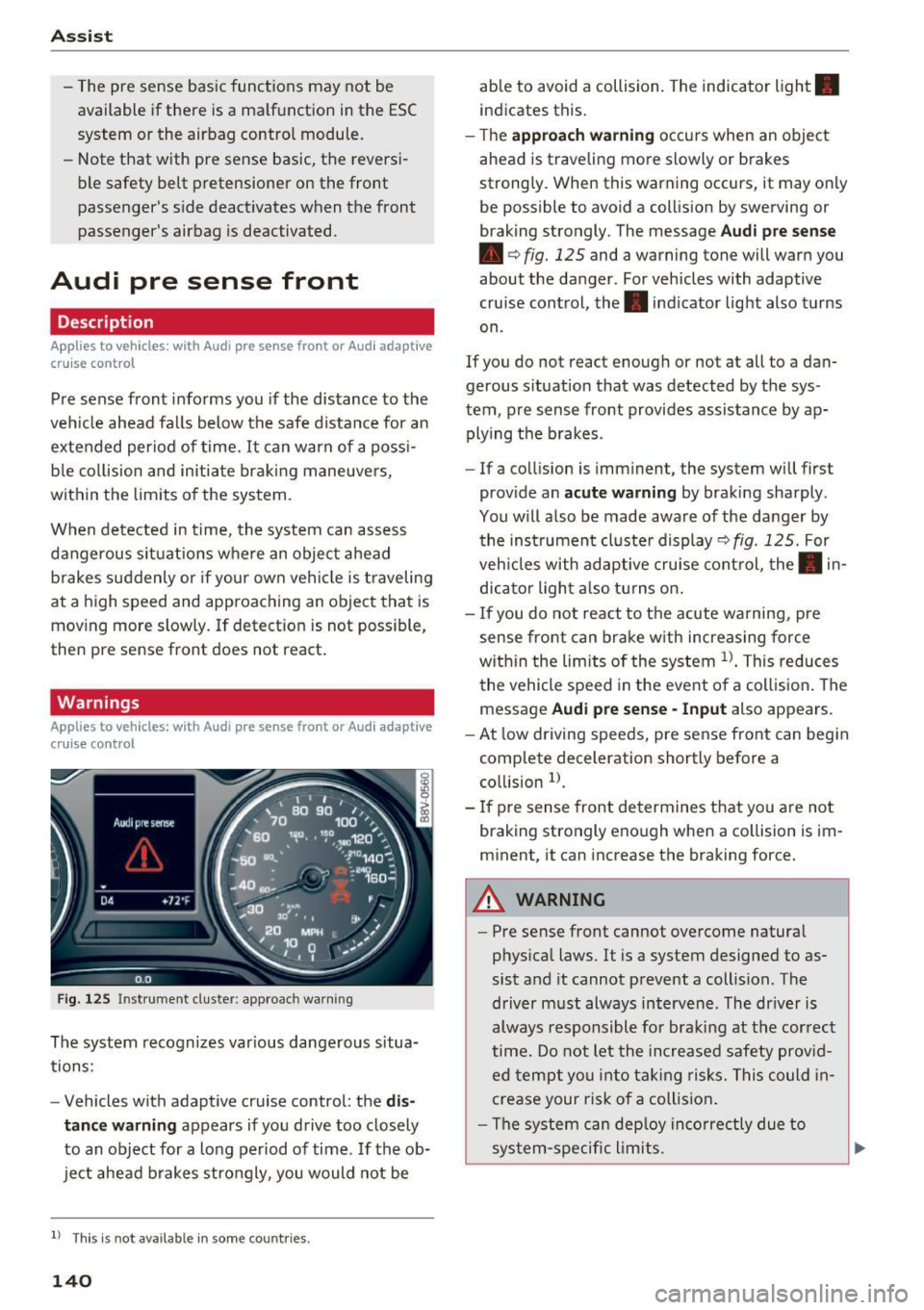
F ig . 12 5 Instrument cluster: app roach wa rning
The system recognizes var ious dange rous situa
tions:
- Vehicles with adapt ive cruise control: the
dis
tance warning
appears if yo u drive too closely
to an object for a long period of time. If the ob
ject ahead b rakes strongly, you would not be
l ) Thi s is not ava ilab le in some co un tri es .
140
able to avoid a collision. The indicator light .
indicates this.
- T he
approach w arning occurs when an object
ahead is traveling more slowly or brakes
strong ly. When this warning occurs, it may only
be possible to avoid a coll is ion by swerving or
braking strongly. The message
Aud i p re sense
• c:> fig. 125 and a warning tone will warn you
about the danger. For vehicles with adaptive
cruise control, the. indicator light also turns
on .
If you do not react enough or not at all to a da n
gerous s ituation that was detected by the sys
tem , pre sense front provides assistance by ap
plying t he b rakes .
- If a collision is imminent, the system will first
prov ide an
acute w arning by braking sharply .
You will also be made aware of the danger by the ins trument cluste r display
c:> fig . 125. For
veh icles with adaptive cru ise cont rol, the . in
dic ator light a lso tu rns on .
- If you do not react to the acute warning, pre
sense front can brake w ith increasing force
w it hi n the lim its of the system
l )_ This reduces
the vehicle speed in the event o f a collis ion . The
message
Audi pre sense -Input also appears.
- At low driving speeds, pre sense front can begin
complete deceleration shortly before a
co llision
l).
- If p re sense front determines t hat you are not
braking strongly enough when a co llision is im
m inent, it can increase the braking force.
A WARNING
-
- Pre sense front cannot overcome natura l
phys ica l laws. It is a system designed to as
sist and it cannot prevent a collision . The
driver m ust always intervene . The dr iver is
always responsible fo r braki ng at the correct
time . Do not let the in crease d sa fety prov id
ed tempt you into ta king risks. This could in
crease your risk of a collision .
- The system can dep loy inco rre ctly due to
sys tem-specific li mits.
Page 143 of 328

,....,
N
0 > co ,....,
detect all objects. This increases the risk of
a collision.
- Pre sense front does not react to people or
animals or objects that are crossing the ve
hicle's path or are difficult to detect
¢ page 133.
-Reflective objects such as guard rails or the
entrance to a tunnel, heavy rain and ice can
affect the function of the radar sensor and
the system's ability to detect a collision risk.
- Lack of attention can lead to collisions, oth
er accidents and serious injuries. pre sense
front is an assistance system and cannot
prevent a collision by itself. The driver must
always intervene. The driver is always re
sponsible for braking at the right time.
- Always pay attention to traffic, even when
pre sense front is switched on. Always be
ready to intervene and take over complete
control of the vehicle whenever it is neces
sary. Always follow traffic laws regarding
maintaining a safe distance between your
vehicle and vehicles ahead.
- pre sense front works within certain limits
and cannot react to situations that are out
side of the system limits, such as when ap
proaching a stationary vehicle or a station
ary obstacle (the end of a traffic jam or ave
hicle that has broken down).
- Always keep in mind that the radar sensor
for pre sense front only works within de
fined detection zones, which means other
vehicles may not always be detected cor
rectly.
- The function and range of the radar sensor
can be impaired by rain, snow and heavy
mist. Vehicles ahead may not be detected
right away, or not detected at all.
- Reflective surfaces such as guard rails or en
trances to tunnels may impair the function
of the radar sensor.
(D Note
The sensor can be disp laced by impacts or
damage to the bumper, wheel housing and
underbody. Pre sense front can be impaired
by this. Have an authorized Audi dea ler or au-
Assist
thorized Audi Service Facility check their func
tion.
(D Tips
- You can cancel the bra king with increas ing
force that is initiated by the system by brak
ing yourself, by acce lerating noticeably or
by swerving.
- For information on driver messages about
pre sense, refer to¢
page 142.
- Keep in mind that pre sense front can brake
unexpectedly. Always secure any cargo or
objects that you are transporting to reduce
the risk of damage or injury.
- Certain pre sense front functions switch off
when ESC is switched off (sport mode) or
when driving in reverse.
- The pre sense front functions are not availa
ble if there is a malfunction in the adaptive
cruise control* system¢
page 138 or
¢page 142.
-Keep in mind that pre sense front can brake
abruptly. Always secure cargo or objects
that you transport to reduce the risk of
damage or injury .
Settings in the Infotainment system
Applies to vehicles: with Audi pre sense front or Audi adaptive
cruise control
.,. In the MMI, select: the I MENU I button >Car>
Systems*
control button > Driver assistance >
Audi pre sense .
Switching the system on and off
Audi pre sense (Syste m): if the system is turned
off, it automatically turns on again once the igni
tion is switched on.
System -switch Audi pre sense On/Off. With
this, you can switch the prewarning and the brak
ing intervention from Audi pre sense on or off.
Early warning -the distance and approach warn
ings can be switched
On /Off .
(D Tips
-If you restrict or switch off the ESC, the pre
sense also switches itse lf off¢
page 160.
141
Page 150 of 328

Ass is t
Driver messages
Applies to vehicles: with Audi side assist
If the side assist switches off automatically, a
message appears i n the ins trument cluster dis
p lay .
@j Audi side assist : cur rentl y unav ailable No
s en so r vi sion
The radar senso rs ' vision is affected. Do not cover
the area in front of the sensors with b ike wheels,
stickers, dirt or other objects. Clean the area in
front of the sensors, if necessary~
page 146,
fig. 133.
@j Audi side a ssi st : cur rentl y una vailable
Side assist cannot be switched on tempo rar ily be
cause there is a malfunction (for example, the
battery charge level may be too low).
@j Audi side a ssist: System fault!
The system cannot guarantee that it wi ll detect
ve hicles co rrectly and it is switched off. The sen
sors have been d isp laced or are faulty. Have the
system checked by an authorized Audi dea ler or
authorized Audi Service Facility soon.
Audi drive select (drive settings)
Introduction
Applies to vehicles: with Audi drive select
Audi drive select makes it possible to experience
different types of vehicle settings in one vehicle .
The driver can select from three
C omfort , Auto
and Dynamic modes using the r.1:a button in the
center console or the MMI to switch between a
sporty and a comfortable dr iving mode, for ex
ample . In the
In div idual * mode, the vehicle set
tings can be adjusted to your personal preferen
ces. This makes it possible to combine settings
such as a sporty eng ine set ting with smooth
s teer ing .
A WARNING
Using Audi drive select incorrectly can lead to
collisions, othe r accidents and serious inju
ries .
148
· Description
Applies to vehicles: with Audi drive select
The vehicle setup in each mode depends on the
vehicle's features. However, the eng ine and
steering are a lways affected.
Engine and automatic tr ansmiss ion
Depend ing on the mode, the engine and auto
matic transmission* respond more qu ickly or in a
more ba lanced manner to acce lerato r pedal
movements.
Adaptive damper s (Audi magnetic ride )*
The adaptive dampers use sensors to record in
formation regarding steering movements, brak
i ng and acce le ration operations by the dr iver,
r oad su rface, driving speed, and load. W it h Aud i
drive select you can adjust the adaptive dampers
spo rty (dynamic), comfortable (comfort) or ba l
anced (auto).
Steering
The steering adapts in terms of steering ass is
tance. There are d ifferent modes
c;;:> page 149.
Ind irect steering that moves easi ly as in comfort
mode is especia lly suited to long drives on a high
way. The dynamic mode provides sporty, direct
steering .
For vehicles with progress ive steering* the steer
ing performance is more agi le .
Corn ering light *
The cornering light adjusts when driv ing on
cu rves at speeds between 6 mph (10 km/h) and
68 mp h (110 km/h). The pivoting act ion and the
li gh ting are also adapted to the mode.
Adaptive cruise control*
The behavio r whe n accelerating can be adjusted
from comfortable to sporty, depending on the
Audi drive select mode. Adaptive cr uise control
also responds to the dr iving beh avior of the vehi
cle ahead in a more conservative or sporty man-
ner .
1111>
Page 161 of 328
,....,
N
0 > co ,....,
wireless te lecommunications provider and the
"About Aud i connect" tab in your vehicle's
MMI:
! MENUI button> Aud i connect > About
Audi conne ct .
Electronic stabilization
control (ESC)
Description
Electronic Stabilization Control (ESC) supports
driver safety. It reduces the risk of slipping and
improves dr iving stability. ESC detects crit ical sit
uations suc h as the vehicle overstee ring and un
de rs teer ing or the wheels are sp inning. The vehi
cle is s tabilized by app ly ing the brakes or reduc
i ng e ngine torque. Once t he ES C i s ac tiva ted, the
indicator light
DJ b li nks in the instrument clus
ter .
The fol low ing systems are integrated in the ESC:
Anti-lock braking system (ABS)
ABS preve nts the whee ls from lock ing whe n brak
i ng. The vehicle can s till be steered even during
h a rd brak ing. Apply steady press ure to the brake
pedal. Do not pump the pedal. A puls ing in t he
bra ke pedal indica tes th at the system is act ing to
s tabili ze the vehicle.
Brake assist system
The brake assist sys tem can decrease braking dis
tance .
It increases brak ing power when the d rive r
p resses the brake pedal q uic kl y in eme rgency sit
uations. Yo u m ust press and hold the b rake pedal
u nti l the dangero us si tuati on is over. In ve hicles
with adaptive cruise contro l*, the bra ke assist
system is more sensitive if the d istance detected
to the veh icle ahead is too small.
Anti-slip regulation (ASR)
ASR red uces eng ine power when the drive wheels
begin spinning an d adapts the force to the road
conditions. This makes it easie r to sta rt, acceler
ate and drive up inclines .
Intelligent Technology
Electronic differential lock (EDL)
T he ED L brakes wheels t hat are spi nning and
transfe rs the drive power to the o ther dr ive
whee l or wheels if the vehicle is equ ipped with all
whee l drive *). T his function is not available at
higher speeds.
In extreme cases, ED L automat ica lly swi tches off
to keep the b rake o n the braked whee l from over
heating. The vehicle is still working correct ly. ED L
will switc h on again automatically when condi
tions have returned to normal.
Steering recommendation
T he ESC he lps to s tabilize the vehicle by changing
the steering torque.
Selective wheel torque control
Se lective w heel torque con trol is used w hen d riv
i ng on curves. The front whee l on the ins ide of
the curve or both wheels on t he i nsid e of the
c ur ve are braked se lective ly as needed . This al
lows more precise driving in c urves .
Automatic post -collision braking system
T he "Automat ic pos t-collis ion braki ng system"
ca n help to reduce the ris k of sliding and of othe r
collisions af ter an a cciden t. If th e ai rbag cont rol
module detects a collision above a certai n vehicle
speed, the vehicle is brake d by the ESC.
T he veh icle does not br ake au tomatic ally if:
- the dr iver presses the acce lera tor pedal, or
- the braking fo rce generated by the pressed
brake pedal is greater than the b raking force
that would be in itiated by the system, or
- the ESC, the brake system o r the veh icle electri
cal system are not functioning.
A WARNING
- T he ESC and its i nteg rated systems ca nnot
over come the li mits posed by natu ral physi
cal laws. This is espe cially impor tant on slip
pery o r we t roads . If the systems beg in act
ing to stabilize your veh icle, you should im
mediately a lter your speed to match the
road and tra ffic condit ions. Do not let the
increased safety provided tempt you into
159
Page 311 of 328
,....,
N
0 > co ,....,
in the operationa l safety of your vehicle and an
increased wear of vehicle parts¢
A.
Author ized Audi dealers w ill per form this wor k in
a professional and competent manner or, in spe
cial cases, refer you to a professional company
that spec ializes in such modifications.
A WARNING
Improper repairs and mod ificat ions can
change the way veh icle systems work and
cause damage to the veh icle and ser ious per
sonal injury.
If emergency repa irs must be pe rformed else
where, have the vehicle examined by an au thorized A udi dealer as soon as possib le .
Declaration of
Compliance, Telecom munication and
Electronic Systems
Radio Frequency Devices and Radio Communica
tion Equipment User Manual Notice.
T he manufacturer is not respons ible for any radio
or TV interference caused by unauthor ized modi
fications to this equ ipment .
Devices
The fo llow ing devices each comp ly w ith FCC Part
15.19, FCC 15.21 and RSS-Gen Issue
1:
- Adaptive cruise control*
- Audi s ide ass ist*
- Cell p ho ne pac kage*
- Convenience k ey*
- E lectron ic immobilizer
- Homelink universal remote contro l"
- Remote contro l key
FCC Part 15.19
This devi ce comp lies with p art 15 of the FCC
Ru les. Ope ra tion is subject to the following two
conditions :
Consumer inf ormation
(1) This dev ice may not ca use ha rmf ul inter fer
ence, and
( 2 ) th is d evice m us t ac cep t any inte rference re
c e ived, in clu ding in terference tha t may c ause un
desired ope ra tion.
FCC Part 15.21
CAU TION:
Changes or mod ificat ions not express ly approved
by the party responsible for compliance cou ld
vo id the user's a uth ori ty to ope rate t he equ ip
me nt.
RSS-Gen Issue 1
Operat ion is subject to the following two cond i
t ions:
(1) this device may not cause inte rfe rence, and
( 2 ) this devi ce m us t a cc ep t any inte rference, in
cl udi ng interference tha t may cause undes ired
operation of the device .
309
Page 312 of 328

Index
A
A/C
refer to Climate control system (automatic) .7.2
r e fer to Climate control system (manual) . 71
A/C (automat ic climate control system) . . . . 72
A/C (manual climate control system) . . . . . . 71
Accessories . . . . . . . . . . . . . . . . . . . . . . . 62, 308
Active lane assist . . . . . . . . . . . . . . . . . . . . . 142
Activating vibrat ion warn ing . . . . . . . . . . . 144
Adjusting steering t ime . . . . . . . . . . . . . . . 144
Clean ing the camera area . . . . . . . . . . . . . 275
Driver messages . . . . . . . . . . . . . . . . . . . . . 143
Indicator light . . . . . . . . . . . . . . . . . . . . . . 143
switching on and off . . . . . . . . . . . . . . . . . 143
Adapt ive cruise control. . . . . . . . . . . . . . . . . 132
Automatic transmission . . . . . . . . . . . . . . 136
Cleaning the sensor . . . . . . . . . . . . . . . . . . 275
Driver messages . . . . . . . . . . . . . . . . . . . . . 138
General Information . . . . . . . . . . . . . . . . . 133
Request for driver intervention . . . . . . . . . 138
Stop-and-go traffic . . . . . . . . . . . . . . . . . . 136
Adaptive dampers . . . . . . . . . . . . . . . . . . . . . 148
Indicator light . . . . . . . . . . . . . . . . . . . . . . . 26
Adapt ive light . . . . . . . . . . . . . . . . . . . . . 46, 148
I ndicator l ight . . . . . . . . . . . . . . . . . . . . . . . 25
AdBlue .... .. .. ................... ... 234
Messages . . . . . . . . . . . . . . . . . . . . . . . . . . 234
Adjusting air distribution (Climate contro l sys-
tem) . . . . . . . . . . . . . . . . . . . . . . . . . . . . . . . . 73
Adjusting air vents .. ... ........ .. .. .. .. 74
Adjusting air vents (manual climate control
system) . . . . . . . . . . . . . . . . . . . . . . . . . . . . . . 71
Adjusting automatic headlights . . . . . . . . . . 48
Adjusting the center console lighting . . . . . . 50
Adjusting the temperature manual climate control system . . . . . . . . . . 71
advanced key
refer to Convenience key . . . . . . . . . . . . . . . 82
A irbag . . . . . . . . . . . . . . . . . . . . . . . . . . . . . . 184
I ndicator light . . . . . . . . . . . . . . . . . . . . . . . 21
Airbag system . . . . . . . . . . . . . . . . . . . . . . . . 204
Advanced Airbag-System . . . . . . . . . . . . . . 188
Advanced Airbag System components . . . 191
Care . . . . . . . . . . . . . . . . . . . . . . . . . . . . . . 199
Ch ildr en . .. .. ............... .... ... 211
Ch ild restraints ... .............. .... 211
310
Components (front airbags) . . . . . . . . . . . 191
Danger of fitting a chi ld seat on the front
passenger seat . . . . . . . . . . . . . . . . . . . . . . 185
Disposal . . . . . . . . . . . . . . . . . . . . . . . . . . . 199
Front airbags . . . . . . . . . . . . . . . . . . . 188, 189
How do the front airbags work? . . . . . . . . 194
How many airbags does my vehicle have? 191
How the Advanced Airbag System compo-
nents work together . . . . . . . . . . . . . . . . . 193
Important informat ion . . . . . . . . . . . . . . . 184
Important safety instructions on the knee
airbag system . . . . . . . . . . . . . . . . . . . . . . . 202
Kne e airbags. . . . . . . . . . . . . . . . . . . . . . . . 200
Monitoring . . . . . . . . . . . . . . . . . . . . . . . . . 196
PASSENGER AIR BAG OFF light . . . . . . . . . 196
Repairs . . . . . . . . . . . . . . . . . . . . . . . . . . . . 199
Safety instructions . . . . . . . . . . . . . . . . . . . 198
Side airbags . . . . . . . . . . . . . . . . . . . . . . . . 202
S id e curtain airbags . . . . . . . . . . . . . . . . . . 205
Warning/Indicator lights . . . . . . . . . . . . . 196
When must the system be inspected? . . . 196
Air transport . . . . . . . . . . . . . . . . . . . . . . . . . 108
Alarm system
refer to Anti-theft alarm system . . . . . . . . . 35
Al ignmen t pin (tire chang ing) . . . . . . . . . . . 280
All-weather lights (LED headlights) . . . . . . . 46
All season tires . . . . . . . . . . . . . . . . . . . . . . . 269
All wheel drive . . . . . . . . . . . . . . . . . . . . . . . 163
Alternator
refer to Alternator (indicator light) . . . . . . 20
Alternator (indicator light) . . . . . . . . . . . . . . 20
Ambient lighting . . . . . . . . . . . . . . . . . . . . . . 49
Anti-freeze Windshield washer system . . . . . . . . . . . . 2Sl
also refer to Engine coolant . . . . . . . . . . . 244
Anti- lock b raking system . . . . . . . . . . . . . . . 159
Indicator light . . . . . . . . . . . . . . . . . . . . . . . 22
Ant i-slip regulat ion . . . . . . . . . . . . . . . . . . . 159
Indicator light . . . . . . . . . . . . . . . . . . . . . . . 22
Anti -theft alarm system . . . . . . . . . . . . . . . . . 35
Anti-theft protection Electronic immobilizer . . . . . . . . . . . . . . . . . 40
Audi active lane assist
refer to Active lane ass ist . . . . . . . . . . . . . 142
Audi adaptive cruise control
refer to Adaptive cruise control . . . . . . . . 132