lane assist AUDI A3 2016 Owner´s Manual
[x] Cancel search | Manufacturer: AUDI, Model Year: 2016, Model line: A3, Model: AUDI A3 2016Pages: 328, PDF Size: 81.78 MB
Page 145 of 328
.... N
0 > CX)
.... I.Cl U"I
.... I.Cl ....
-For safety reasons, active lane assist must
not be used when there are poor road and/
or weather conditions such as slippery
roads, fog, gravel, heavy ra in, snow and the
potent ial for hydroplaning . Using active lane
assist under these conditions may increase
the risk of a c rash.
Switching on and off
Applies to vehicles: with Audi active lane assist
•
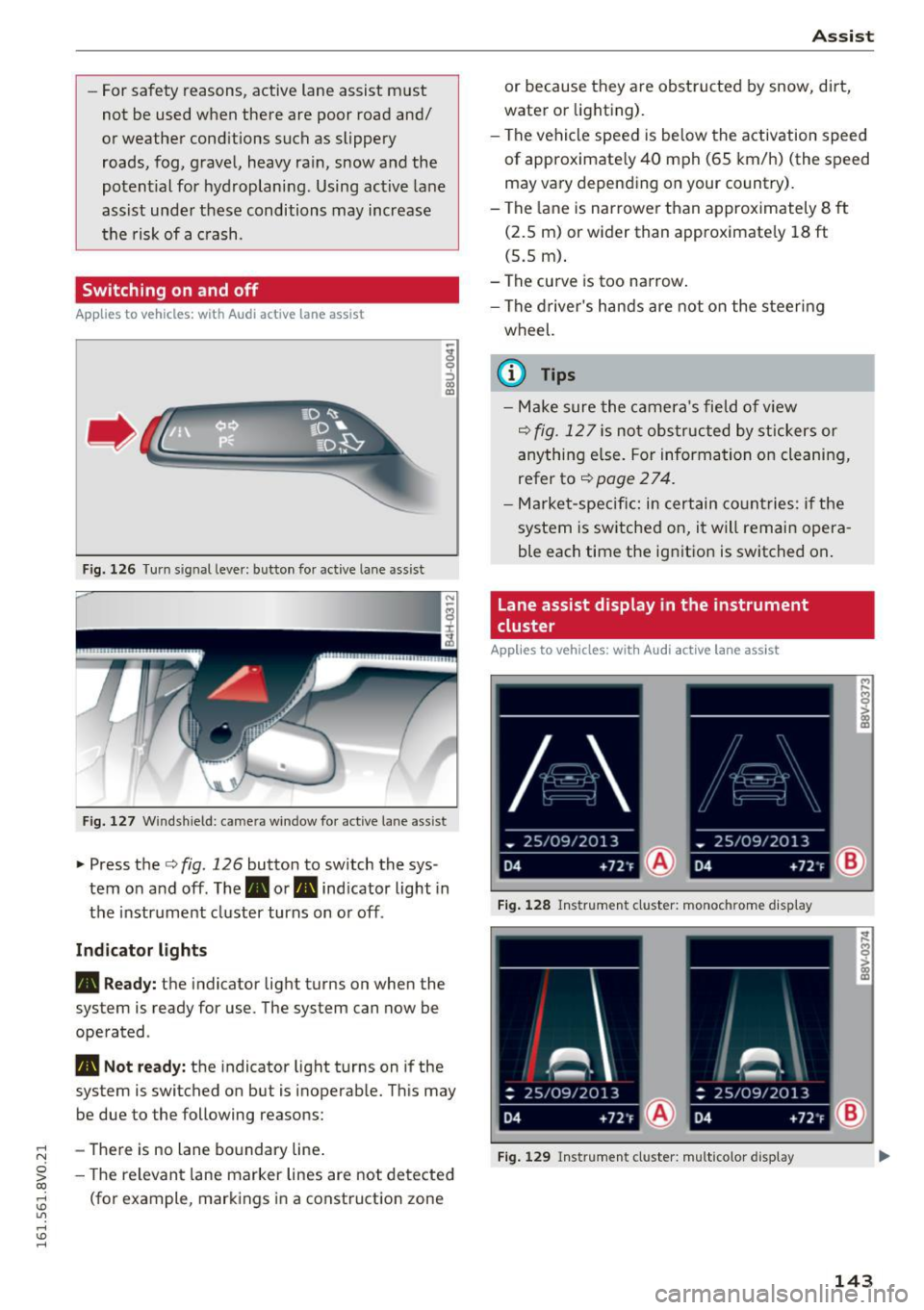
F ig. 1 26 Turn s ig n al leve r: button for active lane as sist
F ig. 127 W ind sh ield: c ame ra win dow fo r act ive lane ass is t
~ Press the c::> fig. 126 button to sw itch the sys
tem on and off . The . or. indicator light in
the instrument cluster turns on o r off .
Ind icator light s
• Read y :
the indicator light turns on when the
system is ready for use. The system can now be
operated .
• Not ready: the indicator light turns on if the
system is switched on but is inoperable. Th is may
be due to the following reasons:
- There is no lane bo undary line .
- The relevant lane marker lines are not de tected
(fo r example, markings in a const ruction zone
A ss ist
or because they are obstructed by snow, dirt,
water or lighting).
- The vehicle speed is be low the activation speed
of approximate ly 40 mph (65 km/h) (the speed
may va ry depend ing on your country).
- The lane is narrowe r th an approximately 8
ft
(2.5 m) or wider than approximate ly 18 ft
(5.5 m) .
- The curve is too narrow .
- The d river's hands are not on the steering
wheel.
(0 Tips
- Make sure the camera's field o f view
c::> fig . 12 7 is not obs tructed by st ickers or
anything e lse. For informa tion on clea nin g,
refer to
c::> page 2 7 4.
- Market-specifi c: in certain co untries: if the
system is switched on, it will remain opera
ble each time the ig nitio n is switched on .
Lane assist display in the instrument
cluster
Applies to vehicles: with Audi act ive lane assist
Fig. 1 28 Ins trumen t cl uster: monoc hrom e disp lay
F ig . 12 9 Instru men t cl uster: multicolor display
143
Page 146 of 328
Assist
The lane assist display can be called up using the
buttons in the
multifunction steering wheel
c::>page29 .
Monochrome display
Refer to c::> fig. 128
® Solid lines: active lane assist is switched
on and ready to provide warnings on the
side that is ind icated.
® Blinking lines (left or right): using vi bra-
tions in the steering whee l, active lane as-
sist is warning you that you are leaving
the lane.
® Unfilled line(s): active lane assist is
switched on but is not ready to provide
warn ings.
No lines: active lane assist is sw itched off.
Multi-Color Display
Refer to q fig. 129
® Solid white lines: active lane ass ist is
sw itched on and ready to provide warn-
ings on the side that is indicated.
® Red lines (left or right) : using vibrations in
the steering wheel, active lane assist is
warn ing you that you are leaving the lane.
® Solid gray lines: active lane assist is
switched on but is not ready to provide
warn ings.
No lines: active lane assist is switched off.
Messages in the instrument cluster display
If the active lane ass ist has a malfunction , the
rm indicator light in the instrument cluster dis
p la y turns off and one of the following messages
appears:
Audi active lane assist: currently not available.
No camera view
This message appears if the camera is unable to
detect the lines . Th is could happen if :
l) This fun ction is not availab le in all coun tries.
144
-The camera fie ld of view c;,page 143, fig . 127 is
dirty or covered in ice. Clean this area on the
w indshield.
- The camera fie ld of view is fogged over . Wait
until the fog has cleared before switching the
active lane assist on again.
- The system has been unable to detect the lanes
for an extended period of time due to road con
ditions . Switch the act ive lane assist back on
when the lines are more visible .
Audi active lane assist: Currently unavailable
There is a temporary active lane assist malfunc
tion. Try switching the active lane ass ist on again
l ater.
Audi active lane assist: System fault!
Drive to an authorized Audi dealer or authorized
Audi Service Fac ility immed iately to have the
malfunction corrected.
rm Audi active lane assist: Please continue
steering vehicle!
This message appears if you are not steering by
yourself .
If this is the case, active lane assist does
not switch off, but it is "not ready" to provide a
warning . The system can help you keep the vehi
cle in the lane. However, you are responsible for
driv ing the veh icle and must steer it yourse lf .
Adjusting the steering time and vibration
warning
Applies to vehicles: with Audi active lane assist
You can adjust individual active lane assist set
tings in the MMI.
.,. Select: the I MENU I button> Car> Systems *
control button > Driver assistance > Audi ac
tive lane assist .
Steering time
1 >
Early: in this setting, the corrective steering hap
pens continuously to help keep the veh icle in the
center of the lane .
IJII>
Page 147 of 328

.... N
0 > CX)
.... I.Cl U"I
.... I.Cl ....
Late: in this set ting, t he system provides correc
tive steering just before a vehicle whee l touches a
detected lane marker line.
Vibrat ion warning
You can switch the additional vibrating warning
i n the steering wheel on or
off.
& WARNING
With the vibration warning switched off, no
visible warning will appear in the instr ument
cluster display when crossing a lane marker.
@ Tips
Market-specific: your sett ings are stored au
tomatically and assigned to the remote con
trol key in use.
Audi side assist
Description
A pp lies to vehicles: with Audi side assist
Fig. 130 Sensor detectio n range
Fig. 131 D isplay on the exterior mirro r
Side assist he lps you monitor your blind spot and
traffic behind your vehicle. Within the limits of
the system, it warns you about vehicles that are
com ing closer or that are traveling with yo u with-
A ss ist
in senso r range (D ¢ fig. 130 : if a lane change is
classified as critical, the display @ in the exterior
mirror¢
fig. 131 turns on .
T he displ ay in the left exterior mirror p rovides as
sistance when making a lane change to the le ft,
whi le the display in the right exterior mirror pro
vides ass istance when making a lane ch ange to
the right.
Information stag e
As long as you do not a ct ivate the tu rn signal,
side assist
informs you about vehicles that are
detected and classified as critical. The display in
the mirror turns on, but is dim .
T he disp lay remains dim i n the information stage
so that your view toward the front is not distur
bed.
Warning stage
If you activate the turn s ignal, side assist warns
yo u about vehicles that are detected and classi
fied as crit ica l. T he d isp lay in the respective mir
ror blinks bright ly. If this happens, check traffic
by glancing in the rearview mirror and over your
shou lder ¢.&.
in General information on
page 146.
(D Tips
- You can adjust the brightness on of the dis
play on the rearview mirror¢
page 147.
145
Page 148 of 328

Assist
General information
Applies to veh icles: w ith Audi side assist
®
@
©
F ig. 132 Driving s itu atio ns
I AU DI
-·
Fig. 133 Rear of the vehicle: pos it ion of the senso rs (exa m·
pie)
Side assist functions at speeds above approxi·
mately 19 mph (30 km/h).
@ Vehicles that are approaching
In certain cases, a vehicle will be classified as
cr itical for a lane change even if it is still some·
what far away . The faster a veh icle approaches,
the sooner the display in the exterior mirror wi ll
turn on.
@ Vehicles traveling with you
Vehicles traveling with you are indicated in the
exterior mirror if they are classified as critical for
a lane change. All vehicles detected by side assist
146
are indicated by the time they enter your "blind
spot", at the latest .
© Vehicles left behind
If you slow ly pass a vehicle that side assist has
de tected (the diffe rence in speed between the
vehicle and your vehicle is less than 9 mph or 15
km/h), the display in the exterior mirror turns on
as soon as the vehicle enters your blind spot.
The display will not turn on if you quickly pass a
vehicle that side ass ist has detected (the differ
ence in speed between the vehicle and your vehi
cle is greater than 9 mph or 15 km/h).
Functional limitations
The radar sensors are designed to detect the lef t
and right adjacent lanes when the road lanes are
the normal width . In some situations, the display
in the exterior mirror may turn on even though
there is no vehicle located in the area that is criti·
cal for a lane c hange. For example:
- If the lanes are narrow or if your are driving on
the edge of your lane . If this is the case, the
system may have detected the vehicle in anoth·
er lane that is
not adjacent to your current lane.
- If you are driving through a curve . Side assist
may react to a vehicle that is one lane over
from the ad jacent lane.
- If side assist reacts to other objects (such as
high or disp laced guard rai ls).
- In poor weather conditions. The side assist
functions are limited.
Do not cover the radar sensors <=?
fig. 133 with
stickers, deposits, bicycle wheels or other ob
jects, since this wi ll impair the function . For in·
formation on cleaning, refer to<=?
page 274.
_& WARNING
-Always pay attention to traffic and to the
area around your vehicle. Side assist cannot
replace a d river's attention. The driver alone
is always respo nsible for lane changes a nd
similar driving maneuvers .
- In some situations, the system may not
function or its function may be limited. For
example:
-
Page 149 of 328

,....,
N
0 > co ,....,
behind very quickly. The display may not
turn on in time.
- In poor weather conditions such as heavy
rain, snow or heavy mist.
- On very wide lanes, in tight curves, or if
there is a rise in the road surface. Vehicles
in the adjacent lane may not be detected
because they are outside of the sensor range.
- Audi side assist cannot detect all vehicles
under all conditions, which can increase the
risk of accidents.
- Please note that side assist only displays ap
proaching vehicles or vehicles in your blind
spot if your vehicle is traveling at least
19 mph (30 km/h).
- In certa in situations, the system may not
work or its function may be limited. For ex
amp le:
- The display may not turn on at the right
time if vehicles are approaching or passing
very quickly.
- In poor weather conditions, such as heavy rain, snow or fog.
- In very wide lanes, in tight curves or when
there are slopes in the roadway, vehicles
in the neighboring lanes may not be de
tected because they are outside of the
sensor range.
(D Note
The sensors can be displaced by impacts or
damage to the bumper, wheel housing and
underbody. This can affect the system. Have
an authorized Audi dealer or authorized Audi
Serv ice Facility check their function .
(Di Tips
-If the window glass in the driver's door or
front passenger's door has been t inted, the
display in the exterior mirror may be misin
terpreted.
- For an explanation on conformity with the
FCC regulations in the United States and the
Industry Canada regu lations, refe r to
r::!> page 309.
Assist
Switching on and off
App lies to vehicles : wi th Audi side ass ist
T he system and be switched on and off in the
MM I*.
"' Select: the I MENU I button> Car> Sys tem s"
control button > Driver a ssistanc e > Audi s ide
a ssis t.
With Off , the system is switched off.
An activated system w ill s ignal every time the ig
nition is switched on by turning the displays in
the exte rior m irro rs on briefly.
Adjusting the display brightness
App lies to vehicles: wi th Audi side ass ist
The display brightness can be adjusted in the
MM!* .
"' Select: the IM ENU I button > Ca r > Sys te m s*
control button > Dri ver assi st a n ce > Au di s ide
a ssis t.
The display br ightness adjusts automatically to
the brightness of the surroundings, both in the
information and in the warning stage. In very
dark or very bright surround ings, the d isp lay is
al ready set to the minimum o r max imum level by
the automatic adjustment. In such cases, you may not ice no change when adjust ing the bright
ness, or the change may only be noticeable once
the surroundings change.
Adjus t the br igh tness to a leve l where the display
in the information stage will not disrupt your
view forward . If you change the brightness, the
display in the exterior mirror will briefly show the
brightness level in the information stage . The
brightness of the warning stage is linked to the
brightness in the information stage and is adjust
ed along with the information stage adjustment .
(D Tips
-Side ass ist is not act ive while you are mak
ing the adjustment.
- Your settings are automatica lly stored and
assigned to the remote control key being
used.
147
Page 312 of 328

Index
A
A/C
refer to Climate control system (automatic) .7.2
r e fer to Climate control system (manual) . 71
A/C (automat ic climate control system) . . . . 72
A/C (manual climate control system) . . . . . . 71
Accessories . . . . . . . . . . . . . . . . . . . . . . . 62, 308
Active lane assist . . . . . . . . . . . . . . . . . . . . . 142
Activating vibrat ion warn ing . . . . . . . . . . . 144
Adjusting steering t ime . . . . . . . . . . . . . . . 144
Clean ing the camera area . . . . . . . . . . . . . 275
Driver messages . . . . . . . . . . . . . . . . . . . . . 143
Indicator light . . . . . . . . . . . . . . . . . . . . . . 143
switching on and off . . . . . . . . . . . . . . . . . 143
Adapt ive cruise control. . . . . . . . . . . . . . . . . 132
Automatic transmission . . . . . . . . . . . . . . 136
Cleaning the sensor . . . . . . . . . . . . . . . . . . 275
Driver messages . . . . . . . . . . . . . . . . . . . . . 138
General Information . . . . . . . . . . . . . . . . . 133
Request for driver intervention . . . . . . . . . 138
Stop-and-go traffic . . . . . . . . . . . . . . . . . . 136
Adaptive dampers . . . . . . . . . . . . . . . . . . . . . 148
Indicator light . . . . . . . . . . . . . . . . . . . . . . . 26
Adapt ive light . . . . . . . . . . . . . . . . . . . . . 46, 148
I ndicator l ight . . . . . . . . . . . . . . . . . . . . . . . 25
AdBlue .... .. .. ................... ... 234
Messages . . . . . . . . . . . . . . . . . . . . . . . . . . 234
Adjusting air distribution (Climate contro l sys-
tem) . . . . . . . . . . . . . . . . . . . . . . . . . . . . . . . . 73
Adjusting air vents .. ... ........ .. .. .. .. 74
Adjusting air vents (manual climate control
system) . . . . . . . . . . . . . . . . . . . . . . . . . . . . . . 71
Adjusting automatic headlights . . . . . . . . . . 48
Adjusting the center console lighting . . . . . . 50
Adjusting the temperature manual climate control system . . . . . . . . . . 71
advanced key
refer to Convenience key . . . . . . . . . . . . . . . 82
A irbag . . . . . . . . . . . . . . . . . . . . . . . . . . . . . . 184
I ndicator light . . . . . . . . . . . . . . . . . . . . . . . 21
Airbag system . . . . . . . . . . . . . . . . . . . . . . . . 204
Advanced Airbag-System . . . . . . . . . . . . . . 188
Advanced Airbag System components . . . 191
Care . . . . . . . . . . . . . . . . . . . . . . . . . . . . . . 199
Ch ildr en . .. .. ............... .... ... 211
Ch ild restraints ... .............. .... 211
310
Components (front airbags) . . . . . . . . . . . 191
Danger of fitting a chi ld seat on the front
passenger seat . . . . . . . . . . . . . . . . . . . . . . 185
Disposal . . . . . . . . . . . . . . . . . . . . . . . . . . . 199
Front airbags . . . . . . . . . . . . . . . . . . . 188, 189
How do the front airbags work? . . . . . . . . 194
How many airbags does my vehicle have? 191
How the Advanced Airbag System compo-
nents work together . . . . . . . . . . . . . . . . . 193
Important informat ion . . . . . . . . . . . . . . . 184
Important safety instructions on the knee
airbag system . . . . . . . . . . . . . . . . . . . . . . . 202
Kne e airbags. . . . . . . . . . . . . . . . . . . . . . . . 200
Monitoring . . . . . . . . . . . . . . . . . . . . . . . . . 196
PASSENGER AIR BAG OFF light . . . . . . . . . 196
Repairs . . . . . . . . . . . . . . . . . . . . . . . . . . . . 199
Safety instructions . . . . . . . . . . . . . . . . . . . 198
Side airbags . . . . . . . . . . . . . . . . . . . . . . . . 202
S id e curtain airbags . . . . . . . . . . . . . . . . . . 205
Warning/Indicator lights . . . . . . . . . . . . . 196
When must the system be inspected? . . . 196
Air transport . . . . . . . . . . . . . . . . . . . . . . . . . 108
Alarm system
refer to Anti-theft alarm system . . . . . . . . . 35
Al ignmen t pin (tire chang ing) . . . . . . . . . . . 280
All-weather lights (LED headlights) . . . . . . . 46
All season tires . . . . . . . . . . . . . . . . . . . . . . . 269
All wheel drive . . . . . . . . . . . . . . . . . . . . . . . 163
Alternator
refer to Alternator (indicator light) . . . . . . 20
Alternator (indicator light) . . . . . . . . . . . . . . 20
Ambient lighting . . . . . . . . . . . . . . . . . . . . . . 49
Anti-freeze Windshield washer system . . . . . . . . . . . . 2Sl
also refer to Engine coolant . . . . . . . . . . . 244
Anti- lock b raking system . . . . . . . . . . . . . . . 159
Indicator light . . . . . . . . . . . . . . . . . . . . . . . 22
Ant i-slip regulat ion . . . . . . . . . . . . . . . . . . . 159
Indicator light . . . . . . . . . . . . . . . . . . . . . . . 22
Anti -theft alarm system . . . . . . . . . . . . . . . . . 35
Anti-theft protection Electronic immobilizer . . . . . . . . . . . . . . . . . 40
Audi active lane assist
refer to Active lane ass ist . . . . . . . . . . . . . 142
Audi adaptive cruise control
refer to Adaptive cruise control . . . . . . . . 132
Page 319 of 328
,....,
N
0 > co ,....,
Climate control system . . . . . . . . . . . . . . . . 70
Kick-down Automatic transm iss ion . . . . . . . . . . . . . . . 94
Knee airbags . . . . . . . . . . . . . . . . . . . . . . . . . 200
Description . . . . . . . . . . . . . . . . . . . . . . . . . 200
Howthe ywork .................... .. 201
Important safety instruct ions . . . . . . . . . . 202
L
Lane assist
refer to Active lane assist . . . . . . . . . . . . . 142
Lap t imer. . . . . . . . . . . . . . . . . . . . . . . . . . . . . 32
Evaluating recorded t imes. . . . . . . . . . . . . . 33
Starting . . . . . . . . . . . . . . . . . . . . . . . . . . . . 32
LATC H . . . . . . . . . . . . . . . . . . . . . . . . . . . . . . 222
Description . . . . . . . . . . . . . . . . . . . . . . . . . 223
Install ing a child restraint . . . . . . . . . . . . . 224
Location . . . . . . . . . . . . . . . . . . . . . . . . . . . 223
Mounting and releasing the anchorage
hook . . . . . . . . . . . . . . . . . . . . . . . . . . . . . . 224
L aunch Control-Program (automatic transmis-
sion) . . . . . . . . . . . . . . . . . . . . . . . . . . . . . . . . 95
L eather care/clean ing . . . . . . . . . . . . . . . . . 277
Leaving home . . . . . . . . . . . . . . . . . . . . . . . . . 48
L ED headlights
All-weather lights . . . . . . . . . . . . . . . . . . . . 46
L eft hand dr ive . . . . . . . . . . . . . . . . . . . . . . . . 49
Lifting jack . . . . . . . . . . . . . . . . . . . . . . . . . . 286
Light Adaptive light . . . . . . . . . . . . . . . . . . . . . . . . 46
Adjusting automatic headlights . . . . . . . . . 48
Coming/Leaving home . . . . . . . . . . . . . . . . . 48
Fog lights/rear fog light(s) . . . . . . . . . . . . . 46
H eadlight flasher . . . . . . . . . . . . . . . . . . . . . 48
Head lights . . . . . . . . . . . . . . . . . . . . . . . 46, 48
H ighway light . . . . . . . . . . . . . . . . . . . . . . . . 47
L ow beams . . . . . . . . . . . . . . . . . . . . . . . . . . 46
Park ing light . . . . . . . . . . . . . . . . . . . . . . . . . 46
Switching dayt ime running lights on and off .49
Travel mode . . . . . . . . . . . . . . . . . . . . . . . . . 49
Li ght/ rain sensor
H eadlights . . . . . . . . . . . . . . . . . . . . . . . . . . 46
I ndicator light . . . . . . . . . . . . . . . . . . . . . . . 25
Int ermi ttent (w indshield wipers) . . . . . . . . 52
Index
Lighting
Exterior . . . . . . . . . . . . . . . . . . . . . . . . . . . . . 46
Interior . . . . . . . . . . . . . . . . . . . . . . . . . . . . . 49
Lights Amb ient lighting . . . . . . . . . . . . . . . . . . . . . 49
Hea dlight range control system . . . . . . . . . 46
Interior/read ing . . . . . . . . . . . . . . . . . . . . . . 49
Loadin g the roof rac k . . . . . . . . . . . . . . . . . . . 69
Locking/unlocking by remote control . . . . . . . . . . . . . . . . . . . . 3 7
with the central locking switch . . . . . . . . . . 39
with the conve nience key. . . . . . . . . . . . . . . 38
with the door lock . . . . . . . . . . . . . . . . . . . . 39
Long-term memory . . . . . . . . . . . . . . . . . . . . 29
Lo w beam
Indicator light . . . . . . . . . . . . . . . . . . . . . . . 25
Lo w beams . . . . . . . . . . . . . . . . . . . . . . . . . . . 46
Lowering the cargo floor . . . . . . . . . . . . . . . . 66
Lo wer universal anchorages (Canada ) . . . . . 222
Luggage compartment . . . . . . . . . . . . . . . . . . 64
Bag hooks . . . . . . . . . . . . . . . . . . . . . . . . . . . 67
Cargo net . . . . . . . . . . . . . . . . . . . . . . . . . . . 66
Co ver............................... 64
Increasing the siz e . . . . . . . . . . . . . . . . . . . . 65
Loading. .. .. .. .. ... .. .......... .. .. . 64
Lowering the cargo floor . . . . . . . . . . . . . . . 66
Pass-thro ugh . . . . . . . . . . . . . . . . . . . . . . . . 67
Reversible mat . . . . . . . . . . . . . . . . . . . . . . . 67
Socket.............................. 62
Stor ing cargo cor rectly . . . . . . . . . . . . . . . 172
Stow ing lugga ge . . . . . . . . . . . . . . . . . . . . 172
Tie-downs . . . . . . . . . . . . . . . . . . . . . . . . . . . 66
Luggage compartment lid
Centra l locking . . . . . . . . . . . . . . . . . . . . . . . 41
Emergency release . . . . . . . . . . . . . . . . . . . . 42
Lumbar support . . . . . . . . . . . . . . . . . . . . 58, 59
M
Maintenance . . . . . . . . . . . . . . . . . . . . . . . . . 306
Maintenance intervals with driver information system . . . . . . . . . 252
Mirror Digital compass sw itching on and off . . . . . 55
dimming . . . . . . . . . . . . . . . . . . . . . . . . . . . . 51
Vanity mirror . . . . . . . . . . . . . . . . . . . . . . . . 52
Mirror compass . . . . . . . . . . . . . . . . . . . . . . . . 55
317