brake light AUDI A3 2016 Owner´s Manual
[x] Cancel search | Manufacturer: AUDI, Model Year: 2016, Model line: A3, Model: AUDI A3 2016Pages: 328, PDF Size: 81.78 MB
Page 94 of 328
Automatic transmissio n
Stopp ing /park ing
If the se lecto r lever is not in the P posit ion when
you open the driver's door, the vehicle could roll .
In vehicles with a convenience key*, the message:
Shift to P , vehicle can roll away . Doors c an be
lo cked onl y in P
appears. You will a lso hear a
warn ing tone.
... Press and hold the brake pedal¢_&. .
... Set the parking brake.
.,. Se lect the P selector lever position.
Stopp ing on an inclin e
.,. Always press the brake peda l to hold the vehi
cle in place and prevent it from "rolling back"
¢ _&. . Do
not try to prevent the vehicle from
"ro lling back" when a gear is engaged by in
creasing the engine speed ¢(D.
Starting on an inclin e in vehicl es without Hill
H old *
... Set the parking brake.
.,. With the driving gear selected, press the acce l
erator pedal carefully. The parking brake re
leases automatically . Requirement : the driver's
door must be closed and the driver's safety belt must be fastened .
Starting on an incline in veh icles with Hill
Hold*
.,. With the driving gear selected, remove your
foot from the brake pedal and press the accel
erator pedal~
page 87, Hill hold.
Under certain c ircumstances, (such as driv ing in
the mountains or towing a trailer), it may be use
fu l to sw itch temporarily to the manua l shift p ro
g ram in o rde r to adjust the gea rs to the driving
conditions by hand
c:? page 94.
When parking on a level surface, simply place the
selecto r leve r in the P position. On inclines, act i
vate the parking brake first and then move the
selector lever to the P posi tion
~ page 85. This
prevents the loc king mechanism from being
loaded too heav ily and wi ll make it easier to
move the selector lever out of the P position.
92
A WARNING
- The vehicle can roll even when the engine is
sw itched off.
- Unintended vehicle movement can lead to
serious injuries.
- Never leave your veh icle with the engine
running while in gear. If you must leave
your veh icle when the engine is running, set
the park ing brake and move the selector lev
er to the P posit ion.
- Power is still transferred to the wheels when the engine is running at idle . To pre
vent the vehicle from "creeping", yo u must
keep your foot on t he b rake when the en
gine is ru nning and the selector lever is in
the D, Sor R position or "tip tronic" mode is
selected.
- Do not inadve rten tly p ress the accelerator
pedal when the vehicle is stationary. Other
wise the vehicle will start to move immedi
ately, even if the parking brake is set. This
could result in a crash.
- Do not press the acce lerator pedal when
changing the selector lever posit ion while
the vehicle is stat ionary and the engine is
running.
- Never engage the R or P selector level pos i
tions while dr iv ing. It could cause a crash.
- Before driving down a steep slope, reduce your speed and shift into a lower gear w ith
"t i ptronic".
- Do not ride the brakes or press the brake pedal too often o r too long when dr iv ing
downhill. Constant braking causes the brakes to overheat and substant ially re
duces bra king performance, increases b rak
ing d istance or causes comp lete failure of
the bra ke sys tem.
- If you must stop on an incline, always hold
the vehicle in place w ith the foot brake or
p ar king bra ke to p revent it from rolling
back.
- Never hold the vehicle on an incline with a
slipping clu tch. The clutch opens automati
cally when it becomes too hot from the
over load . T he
l§1 indicator light turns on
Page 95 of 328
,....,
N
0 > co ,....,
the clutch is over loaded.
- If the engine must run while you are work
ing in the engine compartment with the
hood open, make sure a gear is not engag
ed. The selector lever must be firmly in the
P position and locked in place and the park
ing brake must be set¢
page 236. Other
w ise, the vehicle could begin moving when
the engine speed is high, even w ith the
par king brake set.
(D Note
- When stopping on a n incline, do not t ry to
ho ld the vehicle in place by press ing the ac
ce le ra to r pedal wh ile a driv ing gear is se
l ected. This can ca u se the au toma tic trans
mission to overheat and can damage it. Set
the pa rking brake or press the brake pedal
to prevent the vehicle from ro lling .
- Allow ing the vehicle to ro ll when the eng ine
is stopped and the se lector lever is in the N
pos ition w ill damage the automatic trans
mission because it is not l ubricated under
those circumstances.
- The transmiss ion can overheat and be dam
aged under certain driving and traffic condi
tions such as frequent starts , creeping for a
l ong time, or stop-and-go traffic. When t he
mJ o r. indicator light tu rns o n, s top the
vehicle at the next oppo rt u nity and let the
transm issio n coo l
¢page 95 .
-Allow ing the ve hicle to ro ll when the eng ine
i s s topped w ill damage the S tro nic trans
mission because it is not lubric ated
¢ page 297, Towing with a tow truck .
(D Tips
For safety reasons, the parking b rake releases
au tomatically on ly w hen the dr iver's door is
closed and driver's sa fe ty belt is fastened.
Autom atic tran sm iss ion
Hill descent control
Applies to vehicles: with S tronic transmission
The hill descent control system assists the driver
when driving down hills.
Hill descent control is act ivated when the se lec
tor lever is in the D or S position and you press
the brake pedal. The transmission automatically
selects a gear that is su itable for the incline . H ill
descent con trol tr ies to maintain the speed ach
i eved a t the time of braking, w it hi n physi cal a nd
technical lim itations . If may s till be necessary to
adjus t the speed w ith the bra kes . Because hill de
scent control cannot shift down farthe r than 3rd
gear, it may be necessary to shift into tiptronic
mode in very steep areas. In this case, shift into 1st or 2nd gear in tiptronic mode to use the en
gine's braking force to relieve the brakes .
Hill descent control switches off once the decline
levels out or you press the accelerator pedal.
On vehicles with a cru ise con trol system*
¢ page 130, hill descent control is a lso activated
when the speed is set.
A WARNING
-Hill descent control cannot overcome physical
limitat ions, so it may not be able to ma intain
a constant speed under all conditions. A lways
be ready to app ly the brakes.
93
Page 97 of 328
,....,
N
0 > co ,....,
Applies to vehicles: with launch control
The Launch Control Program enables maximum
acceleration .
Requirement: the engine must be at operating
temperature and the steering wheel must not be
turned .
.. With the engine running, press the
l~OFF ! but
ton briefly one time
ll .
.. Pull the selector lever back out of the D/S posi
tion briefly to select the S position, or press it
toward the right into the tiptronic pos ition or
select the
D ynami c driving mode in drive se
lect*
~page 148.
.. Press the b rake peda l firmly wi th you r left foot
and hold it all the way down for at least 1 sec
ond.
.. At the same time, press the gas pedal all the
way down with your right foot until the engine
reaches and stays at a high RPM level.
.. Remove your left foot from the brake.
A WARNING
-Always adapt yo ur driv ing to the traffic flow.
- Only use Launch Control when road and traf-
fic cond itions allow it and other dr ivers will
not be endangered or impacted by you r d riv
ing and the vehicle's accele ration.
- Please note that the drive whee ls can sp in
and the vehicle can break away when sport
mode is swit ched o n, especia lly when the
road is s lippery.
- Once t he vehicle has sta rted moving, press
the
I $? OFF ! button briefly to t urn the sport
mode off.
(D Tips
- The transmiss ion temperature may increase
s ignificantly after using the lau nch cont rol
program.
If that happe ns, the program m ay
l) In vehicles w ith a d river information system, an ESC light
in the instrument cluster stays o n continuous ly and the
message
Stabili za tion contro l (E SC ): sport . Warning! Re·
stricted st abi lity
appears temporar ily.
Autom atic tran sm iss ion
not be ava ilab le for a few minutes. It will be
avai lab le again after a cool-down period.
- Whe n accelerating using the launch contro l
program, all vehicle parts a re su bject to
heavy loads. This can lead to increased
wear.
Emergency mode
Applies to vehicles: wit h S tronic transmiss ion
In the event of o system mo/function, there is on
emergency program.
If all of the selector lever positions are hig hlight
ed with a light background in the instrument
cluster disp lay, there is a system malfunction and
the S tronic transmission is running in the emer
gency program. The vehicle can still be driven in
emergency mode, but only with reduced speed
and not in all gears . In some cases, the vehicle
cannot drive in rever se .
(D Note
If the transm ission runs in emergency mode,
drive to an authorized A udi dealer or author
iz ed Audi Se rvice Facility immed iate ly to have
the malfunc tion corrected.
Transmission malfunction
• Tran smi ssion malfunction ! Pl ea se stop the
vehicle and select P
The re is a ma lfunction in the transmission. Park
the vehi cle secure ly and do not cont in u e driv ing.
See a n author ized Audi dealer or au thori zed A udi
Service Facility for assis tance.
• Tran smission overheating! Plea se stop the
vehicle!
The transmiss ion is too hot and can become dam
aged. Stop and let the transmiss ion cool w ith the
engi ne r unning (at idle) in the P se lector lever po
s it ion. Then the ind icator lig ht and the message .,.
95
Page 98 of 328
Automatic transmission
turn off, drive to an authorized Audi dea ler or au
thorized Audi Service Facility immediate ly to have
the malfunction corrected . If the ind icator light
and the driver message do not turn off, do not
continue driving. See an authorized Audi dealer
or authorized Audi Service Facility for assistance .
rm Transmission malfunction: you can continue
driving
Drive to an autho rized Audi dea ler or authorized
Audi Service Facility immediately to have the
malfunct ion corrected .
rm Transmission malfunction: no reverse gear
(you can continue driving)
Drive to an authorized Aud i dea ler or authorized
Aud i Service Facility immediately to have the
malfunct ion corrected.
[O] Transmission malfunction: You can continue
driving in D until engine off
Drive the vehicle away from moving traffic and
park. See an authorized Audi dealer or authorized
Audi Service Facility for assistance .
rm Transmission overheating! Please adapt
driving style
Continue driving moderately. When the indicator
light turns off, you can continue driving normal
ly .
rm Transmission: Press brake pedal and select
gear again.
If the transmission malfunctions because the
temperature is too high, a message appears
when the transmission is cooled.
96
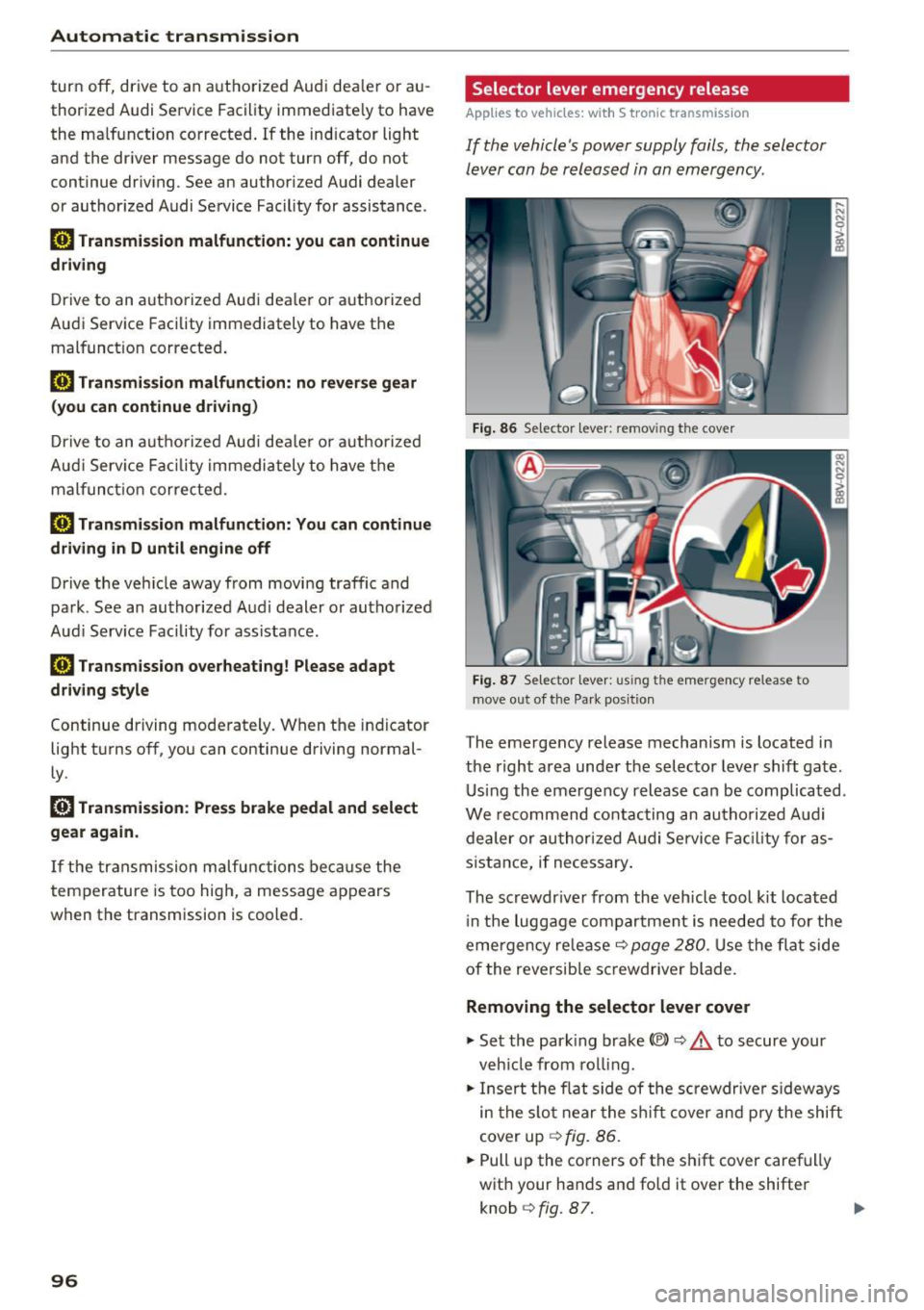
Selector lever emergency release
App lies to vehicles: wit h S tronic transmission
If the vehicle's power supply fails, the selector
lever can be released in an emergency.
Fig. 86 Se lector leve r: remov ing the cover
Fig. 87 Selector lever: us ing the emergency release to
move out of the Pa rk posit ion
The emergency release mechanism is located in
the right area under the selector lever shift gate.
Using the emergency release can be complicated.
We recommend contacting an authorized Audi
dealer or authorized Audi Service Facility for as
sistance, if necessary .
The screwdr iver from the vehicle tool kit located
i n the luggage compartment is needed to for the
eme rgency release¢
page 280 . Use the flat side
of the reversible screwdriver blade.
Removing the selector lever cover
.,. Set the parking brake(®)¢,& to secure your
vehicle from rolling .
.,. Insert the flat side of the screwdriver s ideways
in the slot near the s hift cover and pry the shift
cover up
¢ fig. 86 .
.,. Pull up the corners of the shift cover carefully
with your hands and fo ld it over the shifter
knob
¢ fig . 87. ..,.
Page 102 of 328
e-tron
serious damage and/or a decrease of the ca
pacity void coverage under the New Vehicle
Limited Warranty.
Starting/driving the vehicle
Applies to veh icles: w ith plug-in hybrid drive
The vehicle is started and stopped with the
I START S TOP I button. Also note the informa
tion here ¢
page 82.
Establishing drive ready mode
See¢.& in Introduction on page 98.
Requ irement: a charging cable must not be con
nected to the vehicle ¢
page 121 and the selec
tor lever must be in the P or
N position.
- Press the brake pedal.
- Press the
I START STOPI button .
When the vehicle enters drive ready mode, the
status message
e-tron READY appears briefly in
the instrument cluster display and the needle in
the power meter points to
READY r:::;, page 101 .
Driving
The vehicle starts with the electric motor after
establishing the drive ready mode and if the con
ditions for electric drive mode have been met
¢page 103.
The conditions to drive are essentially the same
for the automatic transmission : ¢
page 89
You and your passengers should anticipate the
possibility of a sporty acce leration.
Ending drive ready mode
- Place the selector lever in the P position.
- Switch the ignition off with the
le!> START STOPI
button.
Vehicle sound
The vehicle generates electronic vehicle sound at
speeds up to approximately 2S mph (40 km/h) so
that your vehicle can be heard from the outside
when in electric drive mode. The veh icle sound
automatically fades out at higher speeds when
the sounds from the tires and wind start increas
ing .
100
Switching the ignition on/off
You can switch the ignit ion on without establish
ing drive ready mode.
- Press the
I START STOP ! button to switch the
ign ition on and off. Do not press the brake ped
al while doing this.
The needle stays pointing to
OFF@ r:::;, page 101,
fig. 88 when the ignit ion is switched on.
No indicator lights stay turned on when the igni
tion is switched off .
Ignition is switched off automatically
To prevent the battery from draining, the ignition
will switch off automatically under the following conditions:
- The vehicle must have already been driven.
- The vehicle must be stationary.
- The gaso line engine must not be runn ing .
- The driver 's door must be open .
- The driver's safety belt must be unbuckled.
- The brake pedal must not be pressed.
In this case, the activated low beam is replaced
by the parking light. The message
Side marker
lights automatically shut off in 30 minutes. See
owner's manual
appears in the instrument clus
ter display . The parking lights w ill switch off af
ter approximately 30 minutes or when you lock
the vehicle.
If the gasoline engine was not stopped, the mo
tor continues running and the ignition does not
automat ically switch off
r:::;, ,& .
A WARNING
To reduce the risk of poisoning, never allow
the engine to run in confined spaces.
(D Tips
The vehicle cannot start when outside tem
peratures are below-18
°F (-28 °()
r:::;,page 101.
-
Page 129 of 328
,....,
N
0 > co ,....,
General information
Your Audi was designed primarily for passenger
transportation .
If you plan to tow a trailer, please remember that
the additional load will affect durability, econo
my and performance.
T railer towing not only places more stress on the
vehicle, it also calls for more concentration from
the driver.
For this reason, always follow the operating and
driving instructions provided and use common
sense.
Technical requirements
Trailer hitch
Use a weight-carrying hitch conforming to the
gross trailer weight. The hitch must be suitable
for your vehicle and trailer and must be mounted
securely on the vehicle's chassis at a technically
sound
location . Use only a trailer hitch with a re
movable ball mount . Always check with the trail
er hitch manufacturer to make sure that you are
using the correct hitch.
Do not use a bumper hitch.
The hitch must be installed in such a way that it
does not interfere with the impact -absorbing
bumper system . No modifications should be
made to the vehicle exhaust and brake systems .
From time to time, check that all hitch mounting
bo lts remain securely fastened.
When you are not towing a trailer,
remove the
tra iler hitch ball mount . This prevents the hitch
from causing damage should your vehicle be
struck from beh ind
~ ,&. .
Trailer brakes
If your trailer is equipped with a braking system,
check to be sure that it conforms to all regula
tions .
Trailer mode
The trailer hydraulic brake system must not be
directly connected to the vehicle's hydraulic
brake system.
Safety chains
Always use safety chains between your vehicle
and the trailer.
Trailer lights
T ra iler lights must meet all regulations . Be sure
to check with your Aud i dea ler for correct wiring,
switches and relays .
Mirrors
If you are unable to see the traffic behind you us
ing the regular outside mirrors, then you
must in
stall extended mirrors . It is important that you
always have clear vision to the rear.
,8. WARNING
After removing the trailer hitch, do not store
it in your vehicle. In case of sudden braking,
the hitch could fly forward and injure you or
your passengers.
Operating instructions
Maximum trailer weight
A trailer for your vehicle is limited to a typical
class 1 or class 2 trailer.
Trailer load distribution Be sure the load in the trailer is held securely in
place to prevent it from shifting forward, back
ward or sideways.
Never allow a passenger to ride in a trailer~.&.
in Driving instructions on page 128.
Engine cooling system
Towing a trailer makes the engine work harder. It
is important that the cooling system's perform
ance is up to the additional load. Make sure that
the cooling system has enough fluid.
Tire pressure
When towing a trailer, inflate the tires of your
vehicle to the cold tire pressure listed under "Full ..,.
127
Page 130 of 328
Trailer mod e
load" on the la bel located on the driver's side B
pillar (visib le when the door is open) . Inflate
tra iler tires to trailer and tire manufacturers'
specif ications.
Lights
Check to make sure both vehicle and t railer lights
are working p roper ly.
Safety chains
Be sure t railer safety chains are properly connect
ed from the trai le r to the hi tch on the veh icle.
L eave enough sla ck in the cha ins to permi t turn
ing corners. When yo u install safety chains, ma ke
sure they wi ll not drag on the road when yo u are
driving .
The cha ins s hou ld cross under the trailer tongue
t o prevent it from dropping in case of separation
from the h itch .
Driving instructions
Driving with a trailer always requires extra care
and consideration .
To obtain t he best poss ible handling of vehicle
and traile r, please note the fo llow ing :
.,. Do not tow a loaded trailer when your car itself
is not loaded.
.. Be especi ally ca ref ul when pass ing othe r
vehicles.
.. Observe speed limi ts .
.. Do not d rive at the maximum permissible
speed.
.. Always apply brakes early.
.. Monitor the temperature gauge .
Weight distribution
Towing a loaded t railer w ith an empty car res ults
in a high ly unstable distribution of weight . If this
cannot be avoided, drive at very low speeds on ly
to avoid the risk of losing steering control.
A "balanced" rig is easie r to operate and cont rol.
This means that the tow vehi cle should be loaded
to the extent possible and permissible, while
keep ing the tra iler as light as possib le under the
circumstances. Whenever possible, transfer
some cargo to the l uggage compartment of the
128
tow veh icle wh ile observing tong ue load require
ments and vehicle loading considerations.
Speed
The higher the speed, the mo re diff icu lt i t be
comes for the driver to con trol the r ig. Do not
drive at t he maxim um permissible speed. Reduce
you r speed even more if load, weather or wind
con dit ions are unfavorab le - partic ularly when
go ing downh ill.
Reduce vehicle speed
immediately if the trailer
shows the slightest sign of swaying.
Do not try
to stop the swaying by accelerating.
Observe speed limi ts. In some areas, s peeds fo r
vehicles towing trailers are lower than for regular
vehicles .
A lways apply bra kes early. Whe n driving down
hill, shift in to a lower gea r to use the engine
b raki ng effect to slow the vehi cle. Use of the
brakes alone ca n cause them to over heat and fai l.
Coolant temperature
The coolant temperature gauge 9 page 12 must
be obse rved caref ully. The coolant temperature
c a n incre ase if yo u drive o n long incl ines in a low
gear a t high engine speeds . Red uce your speed
immediately if the LE Ds in the top part of the dis
play turn on .
Fo r more info rm ation abou t indicator lights, re
fer to . ¢
page 20 .
A WARNING
-
Anyone not prope rly restrai ned in a moving
vehicle is at a much greate r risk in an acci
dent. Never let anyone ride in your car who is
not properly wear ing the restraints provided
by Aud i.
Trailer mode notes
Important to know
Your vehicle handles differen tly when towing a
trailer because o f the additiona l weight and di f
ferent weight distribution. Safety, performance
and economy will g reatly depend on how caref ul-
l y you load your trai ler and operate you r rig. ..,_
Page 133 of 328
.... N
0 > CX)
....
"' U"I
....
"' ....
-Please note that unconsciously "resting"
your foot on the accelerator pedal prevents the cruise control from braking. This is be
cause pressing the accelerator pedal over
rides the cruise control system .
-If there is a brake system malfunction such
as overheating when the speed warning sys
tem is switched on, the braking function in
the system will be deactivated. The remain
ing speed warning system functions will re
ma in active, as long as the~ (USA mod
els) /
fil (Canada models) indicator light is
on.
{i) Tips
- The cruise control system is ideal for
stretches w ith speed limits. The d river is re
sponsible for adhering to the correct speed.
- The cruise control remains active when
shifting gears.
- The brake lights turn on when the brakes
are act ivated.
Switching on
Appl ies to vehicles: with c ru ise control system
0
f
®t
0
Fig. 114 Operat ing lever: cruise contro l system
.. To switch the cruise control on, pull the lever
into position @~
fig. 114.
.. Drive at the speed to be maintained .
.. To store the speed, press the button @. The
@;\1)~14 (USA models) / l'I (Canada models)
turns on in the instrument cluster.
Assist
Changing speed
App lies to vehicles: w ith cruise control system
., To increase or decrease the speed in incre
ments,
tap the lever in the 010 direction
~ page 131, fig. 114.
.. To increase or decrease the speed quickly, hold
the lever in the 0 / 0 direction until the de
sired speed is reached.
Overriding the speed
You can press the accelerator pedal down to in
crease your speed, for example if you want to
pass someone. The speed you saved earlier will
resume as soon as you let off of the accelerator
pedal.
If, however, you exceed your saved speed by 5
mph (10 km/h) for longer than 6 minutes, the
cruise control turns off temporarily .
The@;\!)~14
(USA mode ls) ;fil (Canada models) indicator
light in the instrument cluster turns off and the
stored speed is maintained.
Preselecting the speed
Appl ies to vehicles: w it h cruise co ntrol system
You can pre-select your desired speed when the
vehicle is stationary.
., Switch on the ign ition .
.. Pull the lever into position
(D 9 page 131,
fig. 114 .
.. To increase or decrease the speed, tap the lever
in the
010 direction.
This function makes it possible, for example, to
save the speed you want before driving on the
highway. Once on the highway, activate the
cruise control system by pulling the lever toward
the position
(D .
Switching off
Applies to veh icles: w it h cru ise co ntrol system
Temporary deactivation
.. Press the brake pedal, or
.. Press the lever into position@ (not clicked into
place)
~ page 131, fig. 114, or ..,
131
Page 136 of 328

Assist
(D Note
The sensor can be displaced by impacts or
damage to the bumper , whee l housing and
underbody. The adaptive cruise control and
pre sense front may become impaired as a re
sult . Have an authorized Audi dealer or au
thorized Audi Service Fac ility check their func
tion .
In curves
Applies to veh icles: w ith Aud i adapt ive cru ise co ntro l and Audi
pre se nse front
Fig. 117 Example: driving into a curve
When driving into a curve ¢fig. 117 and out of a
curve, the adaptive cruise control may react to an
objec t in the neighboring lane and apply the
brakes. You can prevent that by pressing the ac
celerator pedal briefly .
Stationary objects
App lies to veh icles: with Aud i adapt ive cruise co ntro l an d Audi
p re se nse front
Fig . 118 Examp le: object changing lanes and stat ionary
object
l) Speed limits de pend on t he country and th e s pee domet er.
134
Adaptive cruise control
The adaptive cruise control system only reac ts to
objects that are moving or that the system has
already detected as moving. For example, if a de
tected vehicle @turns or changes lanes, the
adaptive cruise contro l will not react to a stopped
vehicle @. Press the brake pedal to slow your ve
hicle down.
Pre sense front
Pre sense front only reacts to stationary objects
at low speeds.
Switching on/off
App lies to vehicles: wit h Audi adapt ive c ru ise control
Fig . 11 9 Operat ing lever: swi tching on and off
Fig. 120 Instrument cluster: adapt ive cruise contro l
You can set any speed l) between 20 mph and 95
mph (30 and 150 km/h).
Indicator lights and messages in the instrument
cluster display inform you about the current sit-
u ation and settings .
1JJ,-
Page 137 of 328
,....,
N
0 > co ,....,
"' Pull the lever toward you into position @
¢fig. 119 . ACC: stan dby appears in the instru
ment cluster disp lay .
Saving the speed and activating regulati on
"'T o save the c urrent speed , press the ISETI
¢fig. 119 button. The stored speed is shown in
t h e tachomete r LED line @and appears briefly
in the information line @¢
fig. 120.
"' To activate the regu lation whi le stationary, you
must press the brake pedal.
Sw itching adaptiv e cruis e control off
"' Push the lever away from you into position @
until it clicks i nto place. The message
AC C: off
appears .
The stored speed in the LED line is erased.
@ Indicato r lights
II -adaptive cruise control is switched on. No
objects are detected ahead. The stored speed is
maintained.
• -An object a head was detected . The adaptive
cruise control system regulates the speed and
d istance to the object ahead and brakes/acce ler
ates automatica lly.
fij -adaptive cru ise control is switched on. An
object ahead was detected. Your vehicle remains
stopped and w ill not start driving automatica lly.
• -T he automatic bra king is no t enough to
maintain a sufficient distance to a n object ahead.
You must intervene ¢
page 138, Request for
driver intervention.
© Instrument clu ster display
If adaptive cruise control is not shown in the in
s trument cluster disp lay, yo u can call it up using
the mu ltifunction steering wheel b uttons
¢ page 29 .
Based on the g raph ics in the d isp lay, you can de
termine if the system is m ainta ining a distance to
a vehicle ahead and what that distance to this ve
hicle is:
No vehi cle -No object ahead was detected.
Assist
White vehicl e -An object ahead was de tected .
Red vehicl e -Request for the dr iver to take action
¢page 138.
Both arrows on the scal e© indicate the d istance
to the object ahead . No arrow appears when the
vehicle is on an open road and t here is no object
ahead. If an object is detec ted ahead, the a rrow
moves on the sca le.
T he green zone o n the scale indicates the store
distance. For informat ion on changing the dis
t a nce, refer to ¢
page 13 7. If the distance se
l ected is exceeded or not reached, the arrow
moves into the red zone on the scale.
A WARNING
- Using adaptive cruise control incorrectly can
cause collisions, other accidents and ser ious
in ju ries.
- If you press the
!SET ! button w hen driving at
speeds be low 20 mph (30 km/h), the vehi
cle acce lerates automatically up to 20 mph
(30 km/h), wh ich is the minimum speed
that can be set.
{!) Tips
- If you switch the ignit ion or the adaptive
cruise control system off, the set speed is
erased for safety reason.
- The Electronic Stabilization Control (ESC) and Anti-S lip Regulat ion (ASR) both sw itch
on when the adaptive cruise control is
switched on . ESC and ASR ca nnot be switch
ed off when adapt ive cruise control is
switched on.
- With the adaptive cruise control act ivated
t he ESC spo rt mode cannot be activated.
135