light AUDI A3 2016 Owner´s Manual
[x] Cancel search | Manufacturer: AUDI, Model Year: 2016, Model line: A3, Model: AUDI A3 2016Pages: 328, PDF Size: 81.78 MB
Page 29 of 328
,....,
N
0 > co ,....,
station can interpret the code and perform the
necessary repair.
A WARNING
Do not use the diagnostic connector for per
sonal use. Incorrect usage can cause malfunc tions, which can increase the risk of a colli
sion!
-
Instruments and indicator lights
27
Page 30 of 328
Driver information system
Driver information
system
Overview
A pp lies to veh icles: w ith driver information system
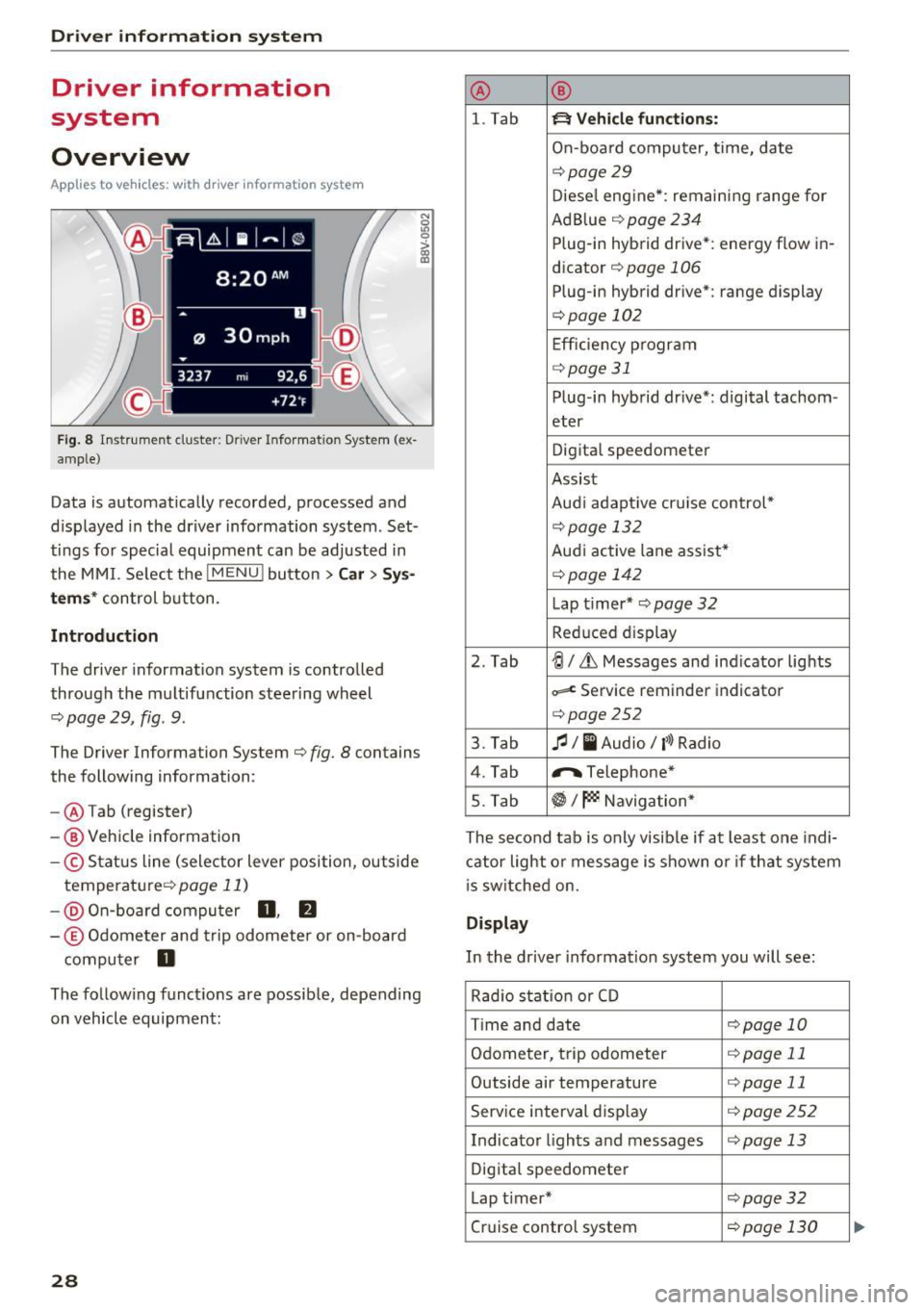
F ig. 8 In strum ent cluster: Drive r Info rmation System (ex
amp le)
Data is automatically recorded, processed and
d isplayed in the driver information system . Set
tings for special equipment can be adjusted in
the MMI. Se lect the
I MENU ! button >Car > Sys
tems* control button .
Introduction
The driver inform ation system is controlled
through the multifunction steering wheel
<=.> page 29, fig . 9.
The Driver Information System <=.> fig. 8 contains
the following information:
- @ Tab (register)
- @ Vehicle information
-© Status line (selector lever position, outside
temperature <=.>
page 11)
-@ On-board computer 0, fJ
-© Odometer and trip odometer or on-board
computer
D
N
0
LO 0
> OJ a,
The follow ing functions are possible, depending
on vehicle equipment:
28
@ ®
l. Tab ~ Vehicle functions:
On-board computer, time, date
<=.>page 29
Diesel engine*: remaining range for
Ad Blue <=.>
page 234
Plug-in hybrid drive*: energy flow in-
dicator
<=.> page 106
Plug-in hybrid drive*: range display
<=.>page 102
Efficiency program
<=.>page 31
Plug-in hybrid drive*: digital tachom -
eter
Digital speedometer
Assist
Aud i adapt ive cruise control*
<=.> page 13 2
Audi active lane assist*
<=.> page 142
Lap t i mer* <=.> page 32
Reduc ed display
2. Tab
~I&, Messages and ind icator lights
~ Service reminder indicator
<=.>page252
3. Tab fl I I Audio/ l'>l Radio
4. Tab "'Telephone*
5. Tab
~I~ Navigation*
The second tab is only visib le if at least one indi
cator light or message is shown or if that system
is switched on.
Display
In the driver information system you will see :
Rad io stat ion or CD
T ime and date
<=.>page 10
Odometer, trip odometer <=.>page 11
Outside air temperature <=.>page 11
Service interval display <=.>page 252
Indicator lights and messages <=.>page 13
Digital speedometer
Lap timer*
<=.>page 32
Cruise control system <=.>page 130
Page 32 of 328
Driver information system
You can identify which level (on-board computer
1, 2 or the efficiency program) is shown in the
d isp lay based on the small
0 , fJ or the nozzle
ii .
The tab@¢ page 28, fig. 8 is displayed once you
press the button
CD ~ fig. 9 on the mu ltifunction
steer ing wheel.
Operating
• Switch on the ignition. The last select function
is d isp layed.
• To switch between the tabs, press the rocker
button
CD to the left or right~ fig. 9.
• To access additional information below or
above, rotate the thumbwheel @down or up.
• To confirm a selection, press the thumbwheel
@ .
• To select a function programmed to a steering
wheel button, press the button
@ . For addi
tional information, see ¢
page 30, Assigning
a function to a programmable steering wheel
button
Opening the Vehicle functions
• Select the first tab with the button CD-
• Press the button@. The Vehicle functions
menu is displayed¢ fig. 10.
,.. To select a menu item, turn and press the
thumbwheel @.
Resetting values to zero
• In the Vehicle functions menu, select On
board computer or Efficiency program.
• Select a value in the desired trip computer or in
the efficiency program.
• To reset the values in a memory, press and hold
the thumbwheel @for one second .
Recalling indicator lights and messages
• Press the button CD repeatedly until the D tab
appears.
The
D tab is only v is ible when there is a mal·
function .
30
Assigning a function to a programmable
steering wheel button
• Select: the IM ENU I button > Car > Systems*
control button > Vehicle settings > Steering
wheel button programming .
The Q tab is only visible when there is at least
one indicator light or message displayed.
@ Tips
- If the vehicle battery is disconnected, all
memory values are erased .
- Information on the efficiency program
¢page 31.
- There is more information o n the multifunc
t ion steering whee l in the
MMI* owner's
manual.
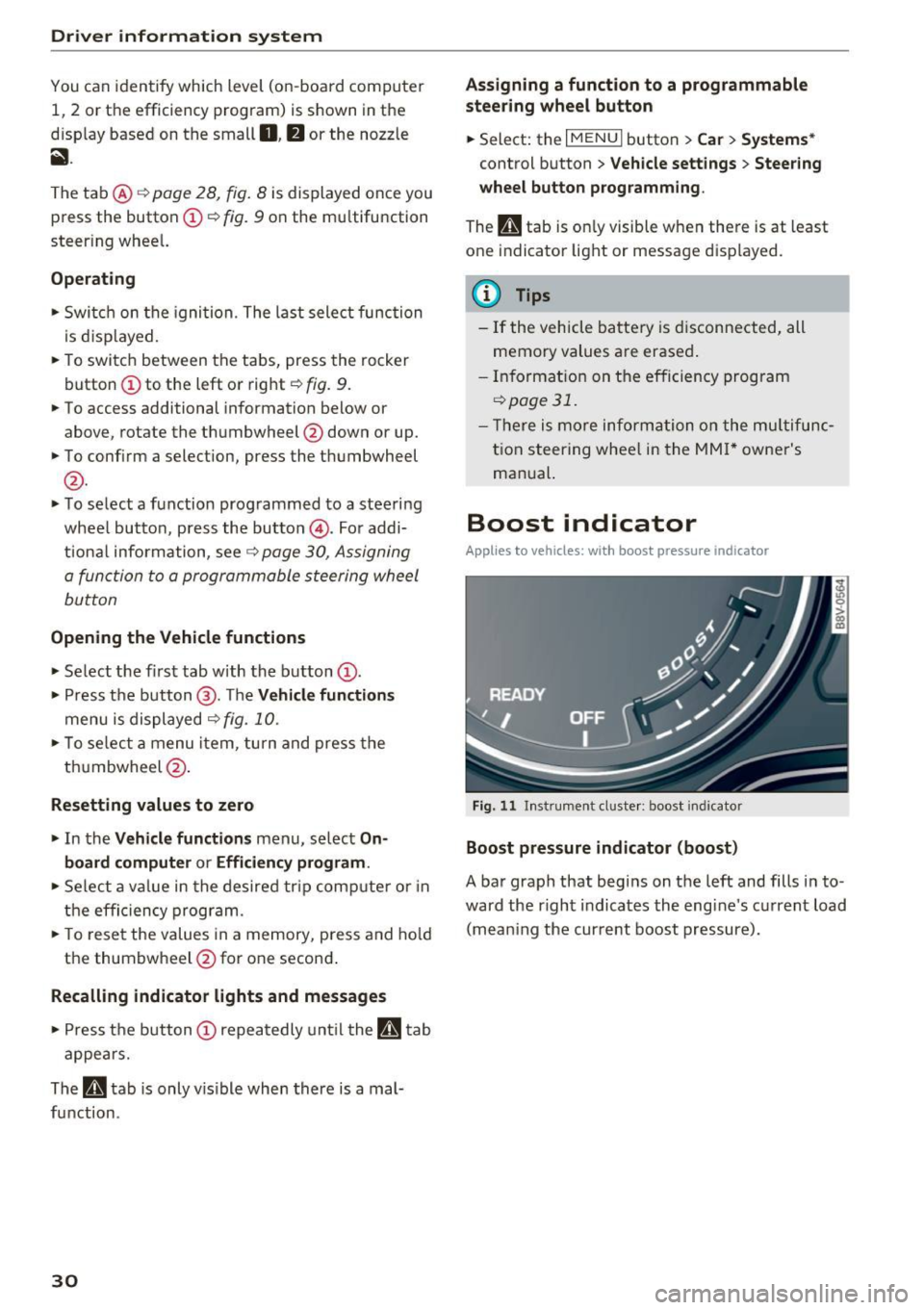
Boost indicator
App lies to vehicles: wi th boos t pressure indicator
Fig. 11 Instrument cluster: boost indicator
Boost pressure indicator (boost)
A bar graph that begins on the left and fills in to
ward the r ight indicates the engine 's current load
(mean ing the current boost pressure).
Page 34 of 328
Driver information system
Lap timer and engine oil
temperature indicator
Introduction
Applies to vehicles: with lap timer (S models)
The engine oil temperature is only shown in the
lap timer display.
Lap timer
You can record and evaluate lap times with the
lap timer in the display
i=:,page 32, fig. 16. Th e
time is measured in minutes, seconds and
1/10
seconds . With lap times longer than 60 minutes,
the hour is also shown and the display of
1/10 seconds is removed.
The time measurement on an individua l lap ends
after
99 hours 59 minutes and 59 seconds. A
new lap starts automatically after that .
The measurement ends after a maximum of
30
laps. You can then evaluated the lap times or
start a new time measurement .
Engine oil temperature indicator
I f the engine o il temperature is below
140 °F
(60 °C), the 'l=:1: symbol followed by three hy
phens"- --" and the °C un it is shown .
The engine has reached its operating tempera
ture when the engine oil temperature is between
176 °f (80 °C) and 248 °f (120 °C) under nor
mal d riving conditions. The engine oil tempera
ture may be higher if there is heavy eng ine load
and high temperatures outside. This is not a
cause for concern as long as the .¢
page 20 or
Ill i=:,page 24 indicator lights in the display do
not blink.
A WARNING
Your focus should always be on driving your
vehicle safely . As the driver, you have com
plete responsibility for safety in traffic . Only
use the functions such as the lap timer in such
a way that you always maintain complete con
trol over your vehicle in all traffic s ituations.
32
.
@ Tips
You can retrieve information from the trip
computer while the lap timer stopwatch is
running.
Opening the lap timer and measuring time
Applies to vehicles: with lap timer (S models)
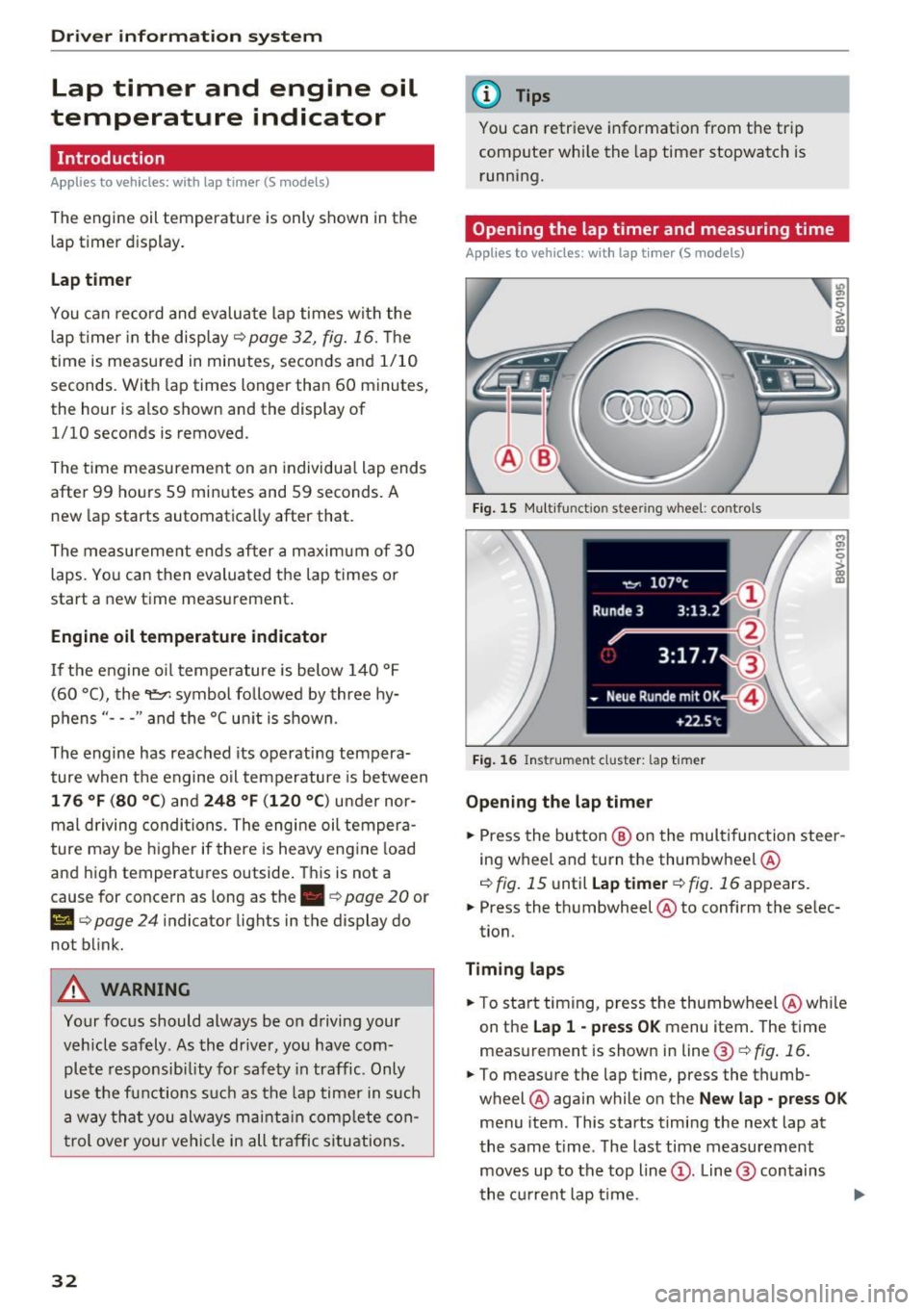
Fig. 15 Multi functio n stee ring whee l: co ntro ls
Fig. 16 Instrumen t cluster: lap timer
Opening the lap timer
M 0,
0
> g;:
.. Press the button @ on the multifunction steer
ing wheel and turn the thumbwheel
®
i=:, fig. 15 until Lap timer ¢ fig. 16 appears.
.. Press the thumbwheel
® to confirm the selec
tion.
Timing laps
.. To start timing, press the thumbwheel @while
on the
Lap 1 - press OK menu item. The time
measurement is shown in line @¢
fig. 16.
.. To measure the lap time, press the thumb
wheel
® again while on the New lap· press OK
menu item. This starts timing the next lap at
the same time . The last time measurement
moves up to the top line@. Line @ contains
the current lap t ime .
Page 41 of 328
.... N
0 > CX)
.... I.Cl U"I
.... I.Cl ....
Unlocking/locking w ith the key
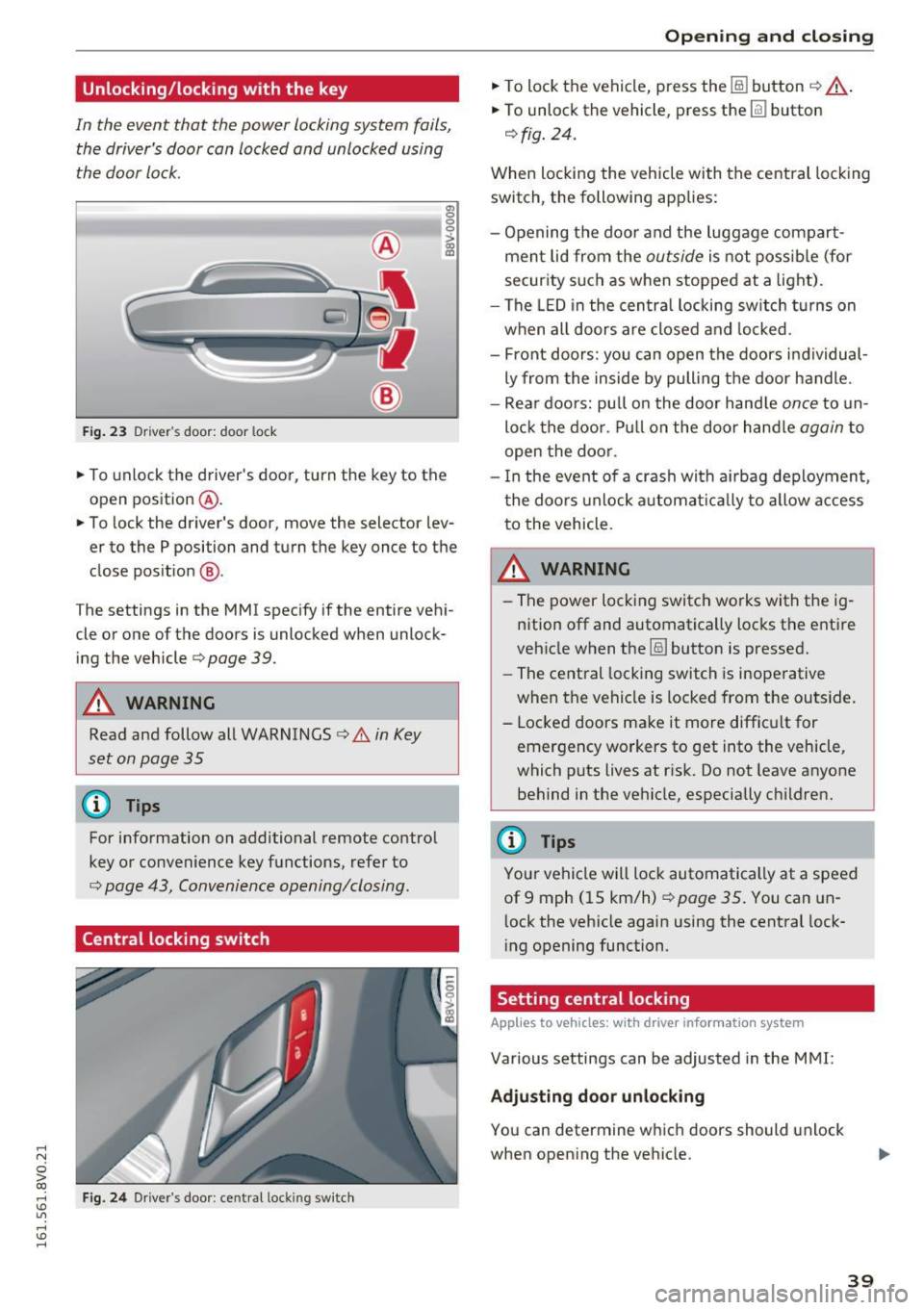
In the event that the power locking system fails,
the driver's door can locked and unlocked using
the door lock.
F ig . 23 Driver 's door: door lock
a, 0 0 0 :> Q) a,
• To unlock the driver's door, turn the key to the
open position
® ·
• To lock the driver's door, move the selector lev
er to the P position and turn the key once to the
close posit ion
@ .
The settings in the MMI specify if the entire vehi
cle or one of the doors is unlocked when unlock ing the vehicle
c:::> page 39.
A WARNING
Read and follow all WARNINGS c:::> .& in Key
set on page 35
(D Tips
For information on additional remote control
key or convenience key functions, refer to
c:::> page 43, Convenience opening/closing .
Central locking switch
Fig. 24 Driver's door : central lock ing switch
Open ing and closing
• To lock the vehicle, press the @] button c:::> _&..
• To unlock the vehicle, press the [fil button
c:::> fig. 24.
When locking the vehicle with the central locking
switch, the following applies:
- Opening the door and the luggage compart
ment lid from the
outside is not possible (for
security such as when stopped at a light).
- The LED in the central locking switch turns on
when all doors are closed and locked .
- Front doors: you can open the doors individual
ly from the inside by pulling the door handle.
- Rear doors: pu ll on the door hand le
once to un
lock the door. Pull on the door handle
again to
open the door .
- In the event of a crash with a irbag deployment ,
the doors unlock automat ically to allow access
to the vehicle.
_&. WARNING
-The power locking switch works with the ig
nition off and automatically locks the entire
vehicle when the
1§) button is pressed.
- The central locking switch is inoperative
when the vehicle is locked from the outside.
- Locked doors make it more difficult for
emergency workers to get into the vehicle,
which puts lives at risk. Do not leave anyone
behind in the vehicle, especially children.
(D Tips
Your vehicle will lock automatically at a speed
of 9 mph (15 km/h)
c:::> page 35. You can un
l ock the vehicle again using the central lock
ing opening function.
Setting central locking
App lies to vehicles: wit h drive r info rmatio n system
Various settings can be adjusted in the MMI:
Adjusting door unlocking
You can determine which doors should unlock
when opening the vehicle.
39
Page 48 of 328
Lights and Vision
Lights and Vision
Exterior lighting
Switching lights on and off
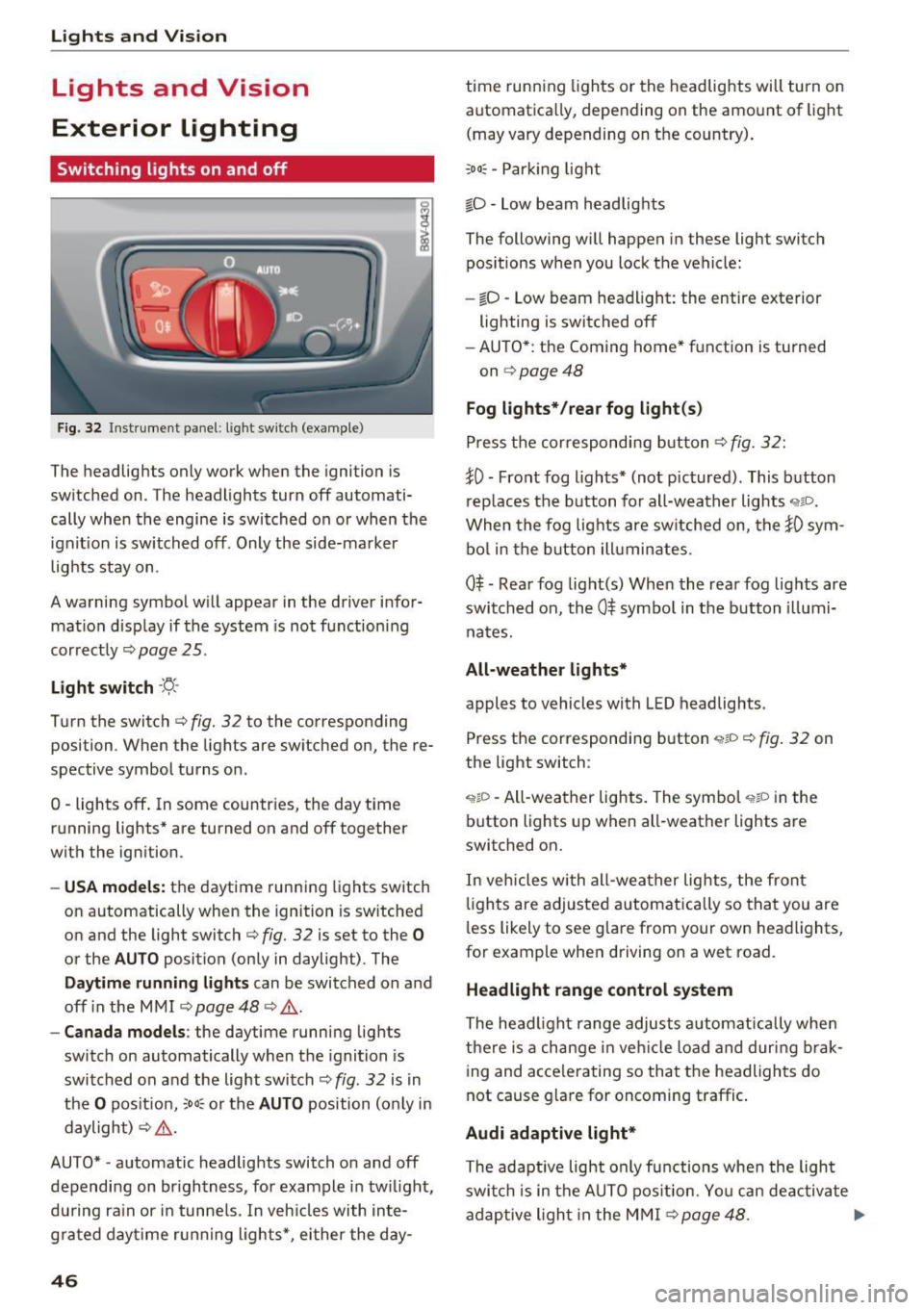
Fig. 32 Instrument pa nel: lig ht sw it c h (ex am ple)
I
The headlights only work when the ignition is
sw itched on . The headlights turn off automati
cally when the engine is switched on or when the
ignit ion is switched off . Only the side-marker
lights stay on .
A warning symbol w ill appear in the driver infor
mat ion disp lay if the system is not functioning
correctly ¢page 25.
Light switch ·f!-·
Turn the switch¢ fig. 32 to the corresponding
posi tion . When the ligh ts are sw itched on, the re
spective symbol turns on .
O -lights off . In som e countr ies, th e day tim e
r unning lights * are turned on and off together
with the ign ition.
- USA mode ls: the daytime running lights switch
on automatically when th e ignition is switched
on and the light switch ¢ fig. 32 is set to the
0
or the AUTO position (only in daylight) . The
Daytime runn ing lights can be switched on and
off in the MMI ¢ page 48 ¢
,&..
-Canad a models : the daytime runni ng lights
switch on automatically when the ignit ion is
switched on and the light switch¢ fig . 32 is in
the
O pos it ion, :oo~ or the AUTO position (only in
daylight)
~ ,&. .
AU TO* -automatic headlights switch o n and off
dependi ng on br igh tness, for example in tw ilight,
du ring ra in or in tunne ls. In veh icles with inte
g ra ted day time r unning lights*, ei ther the day-
46
time runn ing lights or the headlights will turn on
automatica lly, depending on the amount of light
(may vary depending on the country) .
;oo~ -Par king light
iD -low beam headlig hts
The following w ill happen in these light switch
pos itions when you lock the vehicle:
- io -Low beam headlight: the entire exterior
lighting is switched off
- AU TO* : the Coming home* f unction is turned
on ¢page48
Fog lights* /rear fog light (s )
Press the cor respondi ng b utton ¢fig. 32:
~0 -Front fog ligh ts* (not pictured) . This b utton
r ep laces the b utton for all-weath er lights
"1io.
When the fog lig hts are sw itched on, the }0 sym
bo l in the b utton ill uminates.
0$ -Rear fog light(s) When the rear fog lights are
swi tched on, the
0$ symbo l in the b utton illumi
na tes.
All-weather lights*
apples to vehicles with L ED headlights .
Press the correspondi ng button
'wlD ~ fig . 32 on
the light switch :
'?IP -All-wea ther lights. The symbo l "1$D in the
button lights up when all-weather lights are
switched on .
In vehicles with all-wea ther lights , the front
li g ht s are adjusted automatically so that you are
l ess likely to see g lare from your own head lights,
for example when driving on a wet road.
Headlight range control system
The head light range adjusts a utom atically whe n
there is a change in vehicl e load and during brak
ing and acce lerating so that the headlights do
not cause g la re for oncoming traffic .
Audi adaptive light*
The adaptive light only functions when the ligh t
swi tch is in the AU TO pos it ion. Yo u can de activate
adaptive ligh t in the M MI
~ page 48. .,.
Page 49 of 328

.... N
0 > CX)
.... I.Cl U"I
.... I.Cl ....
When switched on, adaptive light adjusts to
curves depending on the vehicle speed and steering wheel angle. This provides better lighting
through the curve. The system operates in a
speed range from approximately 6 mph (10 km/
h) to 68 mph (110 km/h).
Static cornering light* (vehicles with adaptive
light) -the cornering light switches on automati
cally when the steering wheel is turned at acer
tain angle at speeds up to approximately 44 mph
(70 km/h) and when the turn signal is activated
at speeds up to approximately 25 mph (40 km/
h). The area to the side of the vehicle is illuminat
ed better when turning.
Speed dependent light distribution* -The speed
dependent light distribution adapts the light in
towns and on highways or expressways . Intersec
tions can also be illuminated on vehicles with a
navigation system* .
Highway light function*
(Vehicles with adaptive light or LED headlights) -
This function adapts the lighting for highway
driving based on vehicle speed .
& WARNING
-Automatic headlights* are only intended to
assist the driver. They do not relieve the
driver of responsibility to check the head
lights and to turn them on manually accord
ing to the current light and visibility condi
tions. For example, fog cannot be detected by the light sensors . So always switch on the
low beam under these weather conditions
and when driving in the dark
io.
-Accidents could occur if you cannot see the
road ahead of you well and if others on the
road cannot see you . Always switch your
headlightsonsothatyoucanseetheroad
ahead of you and others can see your vehicle
from behind.
- The rear fog lights should only be turned on
in accordance with traffic regulations, to
prevent glare for traffic behind your vehicle .
-If the battery has been discharging for a
while, the parking lights may switch off au
tomatically to conserve the battery charge
Lights and Vision
for the next time the engine is started. Al·
ways make sure your vehicle complies with
legal regulations regarding sufficient and
safe lighting when parking it. Avoid using
the parking lights for several hours.
- Please observe legal regulations when using
the lighting systems described .
@ Tips
-The light sensor for the automatic head
lights* is in the rearview mirror mount.
Therefore, do not place any stickers in this
area on the windshield.
- Some functions of the exterior lighting can
be adjusted
¢ page 48 .
-If you turn off the ignition while the exterior
lights are on and open the door, you will
hear a warning tone.
- In some market-specific versions, the tail
lights do not turn on when switching on the
daytime running lights .
- In cool or damp weather, the inside of the
headlights, turn signals and tail lights can
fog over due to the temperature difference
between the inside and outside. They will
clear shortly after switching them on. This
does not affect the service life of the light
ing.
- A message will appear in the instrument
cluster if there is a malfunction in the light
sensor
¢ page 25.
Emergency flasher
Fig. 33 Inst rume nt panel: e merge ncy flasher butto n
The emergency flashers makes other drivers
aware of your vehicle in dangerous situations .
N Cl) M 0
> Cl) (0
47
Page 50 of 328

Lights and Vision
.,. Press the~ button to switch the emergency
flashers on or off.
You can indicate a lane change or a turn whe n the
emergency f lashers are sw itched on by using the
turn signal lever. The emergency flashers stop
temporarily .
The emergency flashers also work when the igni
tion is turned off.
(0, Tips
You s hou ld sw itch the emergency flashers on
if:
- You are the last car in a traff ic jam so that
a ll other vehicles appro ach ing from be hind
can see yo u, or if
- You r vehicle has bro ke n down or you are
having an eme rgency, or if
- Y our vehicle is being towed or if you a re
tow ing another vehicle .
Turn signal and high beam lever
The lever operates the turn signals, the high
beams and the headlight fla sher.
F ig. 34 Turn signal and h igh bea m lever
Tu rn signal s¢¢
N
0
.... 9 ::i:
;ii
The turn signals activate when you move the lev
er into a turn signal position when the ignition is
sw itched on.
(D -Turn signal
@ -Turn signal
The turn signal blinks three times if you tap the
lever (conven ience turn s ignal).
48
High beams and headlight flasher [D
Move the lever to the corresponding position:
@ -high beams on
@-high beams off or headlight flasher
The
II i ndicator light in the instrument cl uster
turns on.
A WARNING
High beams can cause glare for other drivers,
which increases the risk of an accident. For
this reason, only use the high beams or the
headlight flasher when they will not create
gla re for othe r drive rs .
Adjusting the exterior lighting
The settings are adjusted in the MMI.
.,. Select : the I MENU I button > Car > Systems *
control button > Vehicle settings > Exte rior
light ing .
Automatic headlights
Yo u can adjust the following settings in the Au
tomati c headlights
menu:
Activation time -you can ad ju st if the headlights
swi tch on
Early , Medium or Late acco rd ing to t he
sensi tivity of the light sensor.
Audi adaptive light * -you can sw itch adaptive
li gh t
On an d Off .
Coming home, Leaving home*
The coming home f unction illuminates the area
outside the vehicle when you turn the ignition off
and open the driver 's door . To turn the function
o n, select
Lights when leaving car > On .
The leaving home illum inates the area outside
the ve hicle when you unlock the vehicle . To turn
the function on, se lec t
Lights when unlocking
car > On .
The coming home and leav ing home functions
o nl y operate when it is dark and the light sw itch
i s in the
AUTO pos ition . ..,.
Page 51 of 328
.... N
0 > CX)
.... I.Cl U"I
.... I.Cl ....
Daytime running lights*
USA models :
the daytime running lig hts can be
switched on or off using the MMI. Sele ct
On or
Off .
Canada models :
this function ca nno t be switched
off. They activate au tom atically e ach time the ig
n it ion is swi tched o n. Th is menu item is shown
with a "gray backgro und" .
Travel mode*
The headlig ht beam is asymmetrical. This pro
v id es s tronge r illu mination on the side of the
r oad on whi ch you are driving. In ve hicles w it h
Xenon headlights* with turning light* or LED
headlight s*,
you must adjust the head lights
when yo u are driv ing in a co untry whe re the tra f
f ic direction is opposite from your own country.
Otherw ise, oncoming traffic will be blinded by
the glare from t he headlights . An adjustment is
not needed in vehicles with Xenon head lights
witho ut t urning lights .
To prevent glare:
- Travel mode must be activated in vehicles wit h
Xenon headlights * and turning light* or LED
headlights*. Select: the
I MENU I button> Car >
Systems *
control button > Vehicle settings >
Exterior lighting > light for driving on left , for
example .
After you have adjusted the headlights, the fol
l owing message will appear:
l'iD Headlight converter active for driving on
left. Range reduced!
(D Tips
When travel mode is activa ted, a d is pl ay in
the dr iver information system in dicates this
each time you switch the ignition on .
Lights and Vision
Interior lighting
Front and rear interior lighting front
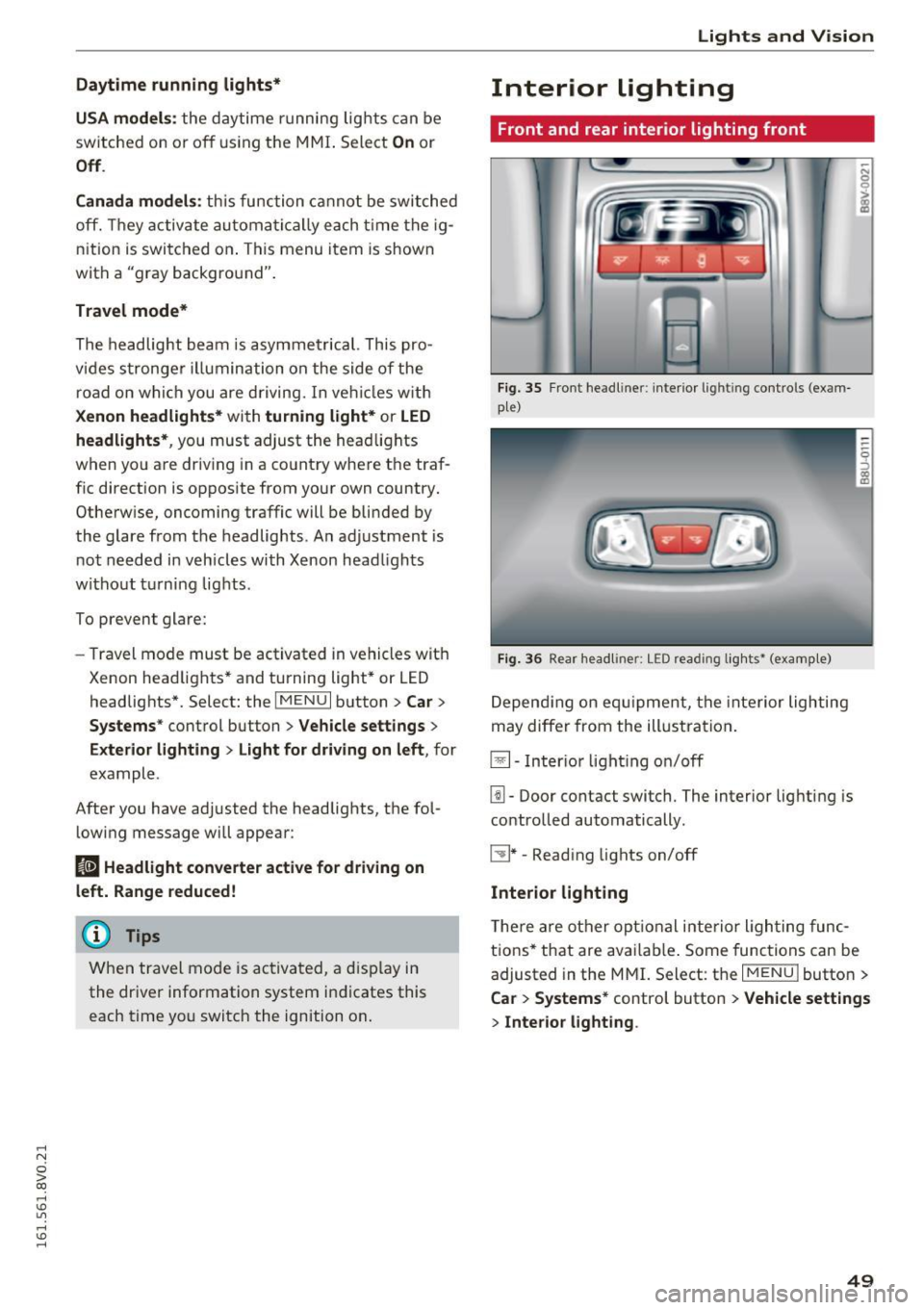
Fig. 35 Front headli ner: interio r lig htin g con trols (exam
pl e)
Fi g. 36 Rea r head li ner : LED read ing lig hts* (examp le)
D epend ing on e quipme nt, the interior lighting
may diffe r from the ill ustra tion .
~- Inter io r ligh ting o n/off
[j]. Door contact switch. The interior lig hting is
contro lled automatically .
C:!J * -Read ing lights on/off
Interior lighting
T he re a re ot her op tion al i nte rior ligh ting func
tions* that are ava ilab le . Some func tions can be
adjusted in the MM
I. Select: the IM ENU I butto n >
Ca r > Systems* control button > Vehicle settings
> Interior lighting .
49
Page 52 of 328
Lights and Vision
Instrument illumination
The brightness of the instrument cluster and the
center console can be adjusted .
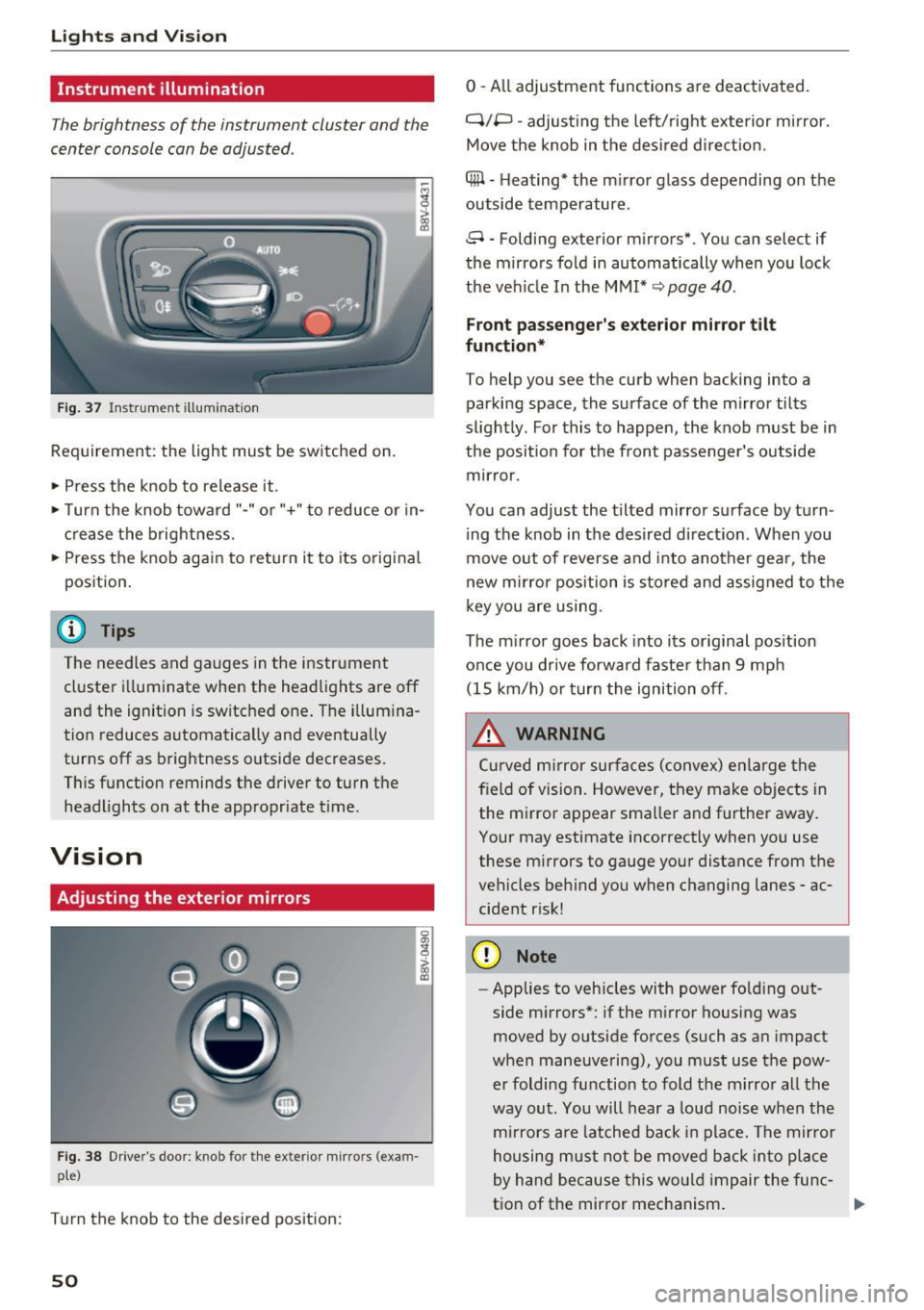
Fig. 37 Instrument ill umination
Requirement: the light must be switched on.
~ Press the knob to release it .
~ Turn the knob toward"-" or"+" to reduce or in
crease the brightness.
~ Press the knob again to return it to its original
position.
(D Tips
The needles and gauges in the instrument cluster illuminate when the headlights are off
and the ignition is switched one. The illumina
tion reduces automatically and eventually
turns off as brightness outside decreases.
This function reminds the driver to turn the
headlights on at the appropriate time.
Vision
Adjusting the exterior mirrors
Fig. 38 Driver's door: knob for the ex ter ior mirrors (exam
ple)
Turn the knob to the desired position:
50
0 - All adjustment functions are deactivated.
q;p -adjusting the left/right exterior mirror.
Move the knob in the desired direction.
4#1 -Heating* the mirror glass depending on the
outside temperature.
8 -Folding exterior mirrors*. You can select if
the mirrors fold in automatically when you lock
the vehicle In the
MMI* ~ page 40.
Front passenger's exterior mirror tilt
function*
To help you see the curb when backing into a
parking space, the surface of the mirror tilts
slightly. For this to happen, the knob must be in
the position for the front passenger's outside mirror.
You can adjust the tilted mirror surface by turn ing the knob in the desired direction . When you
move out of reverse and into another gear, the
new mirror position is stored and assigned to the
key you are using.
The mirror goes back into its original position
once you drive forward faster than 9 mph (15 km/h) or turn the ignition off.
.&, WARNING
Curved mirror surfaces (convex) enlarge the
field of vision. However, they make objects in the mirror appear smaller and further away.
Your may estimate incorrectly when you use
these mirrors to gauge your distance from the
vehicles behind you when changing lanes -ac
cident risk!
(D Note
- Applies to vehicles with power folding out
side mirrors*: if the mirror housing was
moved by outside forces (such as an impact
when maneuvering), you must use the pow er folding function to fold the mirror all the
way out. You will hear a loud noise when the
mirrors are latched back in place. The mirror
housing must not be moved back into place
by hand because this would impair the func
tion of the mirror mechanism.
-