lights AUDI A3 2016 Owner´s Manual
[x] Cancel search | Manufacturer: AUDI, Model Year: 2016, Model line: A3, Model: AUDI A3 2016Pages: 328, PDF Size: 81.78 MB
Page 123 of 328
.. Press the~ button @ r::?vpage 115, fig. 106 on
the control unit.
Unlocking the control unit
Requirement: the P IN must be activated.
.. Press any button on the control unit.
.,. PIN? appears on the display field .
.. Enter the PIN .
.. Press the
IOKI button @.
{O) Tips
-The PIN is deactivated in the factory default
settings.
- If you do not remember your PIN, contact
an authorized Audi dea ler or authorized
Audi Service Fac ility.
- If the first PIN entry differs from the second
ent ry, the first PIN entry is displayed.
- If nothing is entered w ith in 20 seconds of
th is, the set value is not changed.
Indicator Lights and
messages
Applies to vehicles: with plug-in hybrid drive
If the B indicator light turns on, the high-volt
age battery is charging or is already completely
charged.
I f the . indicator light stays on, there is a mal
function in the charging system. Have the prob l em corrected immediately by an authorized Audi
dea ler or authorized Audi Service Facility.
l'I Charging connector still attached. Driving
not possible
This message appears when the charg ing system
is sti ll connected to the veh icle. Remove the con
nector
r::?v page 117, After charging.
1,1 AC charging: currently not possible
This message appears when the charging system
is incompatible. Only charge using the charging
system that is designed for your vehicle.
;::: 1,1 AC charging : system fault! Plea se contact 0
iii Service
e-tron
This message appears if there is a malfunction in
the charging system. Have the prob lem corrected
immediately by an authorized Audi dealer or au
thori zed Audi Service Facility .
Vehicle charging
connector emergency
release
Applies to vehicles: with plug -in hybrid drive
There could be a malfunction if you are not able
to pull the vehicle charging connector out of the
vehicle charging port. You must use the emer
gency release to release the vehicle charging con
nector.
Requirement: the se lector lever must be in the P
position, the vehicle must be unlocked and the
charging process must have been ended or inter
rupted.
.,. Press and hold the immediate charging button
@ r::?vpage 115, fig . 107 .
.. Press the [@l button on the remote control key
at the same time.
.. Remove the connector.
.. Drive to an authorized Audi dealer or author
ized Audi Service Facility immediately to have
the malfunction corrected .
If the charging connector still cannot be removed
after using the emergency release, see an author
ized Audi dealer or authorized Audi Service Facili -
ty for assistance .
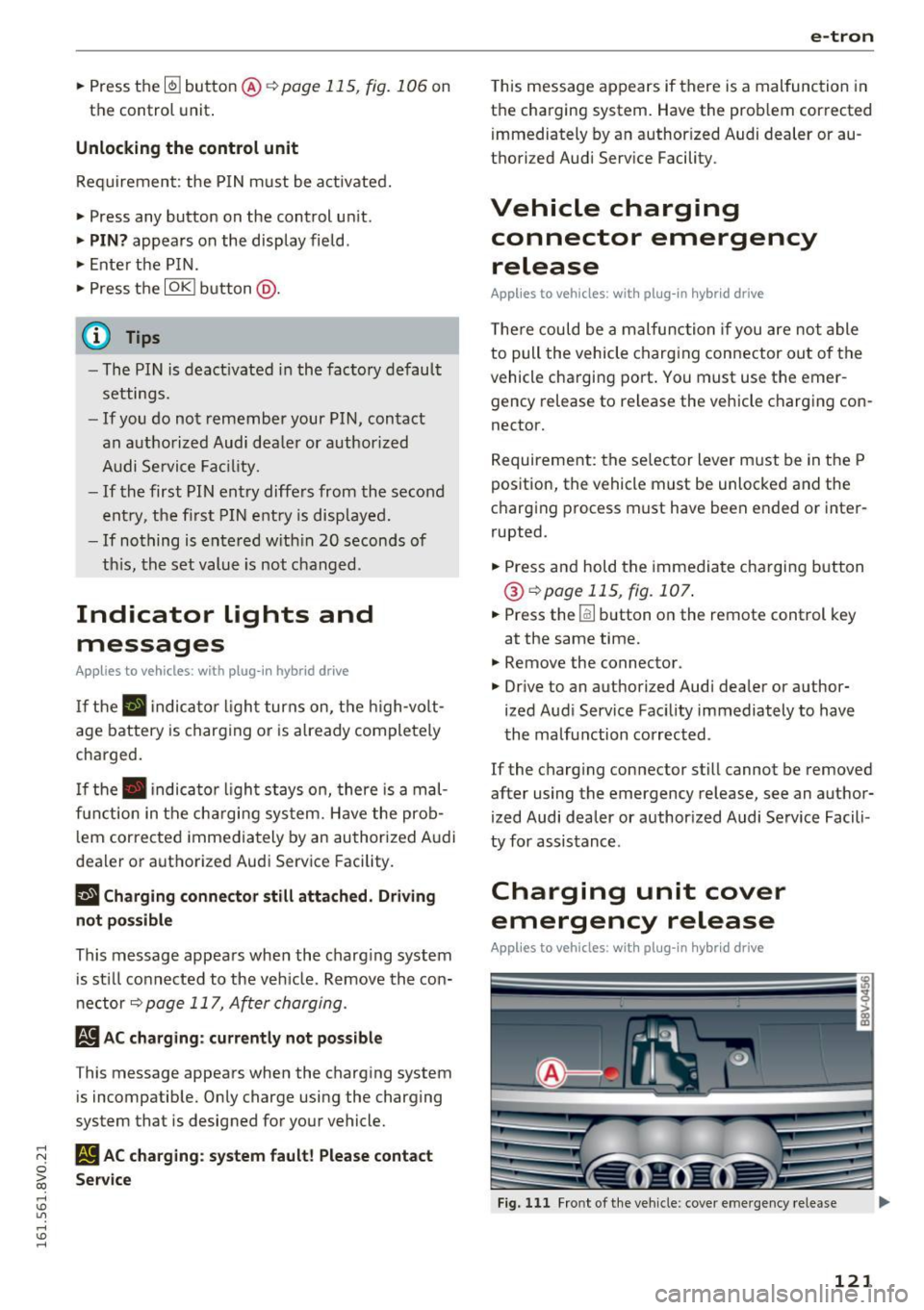
Charging unit cover
emergency release
Applies to vehicles: with plug-in hybrid drive
~ Fig. 111 Front of the vehicle: cover emergency release U"I
121
Page 126 of 328
e-tron
(D Tips
-You can set the timer a maximum of 7 days
in advance.
- You can operate the climate control in the
vehicle interior when the high-voltage bat
tery is charging using the charging timer
c>page 116.
-Make sure the time and date match in the
MMI settings so that the timer can function
properly. Refer to the MMI Operating Man
ual for setting the date and time.
- The auxiliary heating or auxiliary heating/
air conditioning* can run longer after the
departure time is reached.
Audi connect e-tron
services
General information
A pp lies to ve hicles : w ith plug- in hy brid drive
With Audi connect e-tron services l), you can ac
cess various information or control individual
functions remotely using mobile devices (such as
a smartphone) or a web portal.
To use Audi connect e-tron services
l), please
note the following:
- You will need to register for Audi connect e
tron services at
myaudiconnect .com. You can
access and manage e-tron services and features
at
etron.audiusa.com. If you need assistance
with your Audi A3 e-tron EV services, you can
contact customer service at 844-573-8766.
- Your mobile devices must be compatible.
A WARNING
Read and follow the safety precautions in
your MMI Operating Manual.
l) Wireless serv ice is provided by a thir d- part y provider.
-
Please contact your dea le r or call 877 -505 -2834 for more
informat ion about your carrier. Co nnected dev ices may
not be 4G -capab le. Full speeds avai lable but may be
slowed due to excessive usage, locatio n, coverage and
othe r factors. Coverage not available everyw here . See cov
erage map for your Audi co nnect data carrier for more in
format ion.
124
· Vehicle data
App lies to vehicles : wi th plug-i n hybrid drive
The Dr iver Information System collects data un
der certain conditions and sends it to a server.
When data is stored, you can data such as the ex
amples listed below using the Audi connect e
tron services:
- Duration of the drive in hours and minutes,
- average speed driven in mph (km/h),
- distance driven in miles (km),
- average electric consumption .
For additional information on the Driver Informa
tion System, refer to
c> page 28, Driver informa
tion system.
Doors and lights
App lies to v ehicl es: wi th plug-in hybrid drive
You can access and display the current status of
the following vehicle data on your mobile devices
without having to be inside the vehicle.
- If the vehicle doors and lids are open/closed,
- If the parking l ights are on/off.
For additional information on opening and clos
i ng the doors or for the vehicle light ing, refer to
c> page 3 5, Opening and closing or to c> page 46,
Exterior lighting.
(D Tips
-If the high-voltage battery is not charged,
the amount of access requests is limited to
15 after switching off the ignition. This
helps conserve the 12 volt vehicle battery.
You cannot contro l functions or access in
formation if the charge level of the 12 volt
vehicle battery is too low.
- If at least two minutes have passed after
the last time the ignition was switched off,
Page 127 of 328

,....,
N
0 > co ,....,
as needed after switching the ignition on/
off again.
Vehicle status
Applies to vehicles: with plug- in hybrid drive
You can access various vehicle statuses using the
services, such as:
- high-voltage battery charge level,
- electric range,
- mileage,
- next inspection.
For addit ional information, refer to¢
page 101,
Power meter overview
and ¢ page 102, Range
display.
A WARNING
Do not be misled by the status report displays
by ignor ing messages and/or illuminated
warning and indicator lights in the vehicle.
This could lead to break downs in on the road,
accidents and serious injuries.
@ Tips
- If the high-voltage battery is not charged,
the amount of access requests is limited to
15 after switching off the ignition. This
helps conserve the 12 volt vehicle battery.
You cannot control functions or access in
formation if the charge level of the 12 volt
vehicle battery is too low.
- If at least two minutes have passed after
the last time the ign ition was switched off,
you can reset the access counter back to "0"
as needed after switching the ignition on/
off again .
Vehicle position
Applies to vehicles: with plug -in hybrid drive
The vehicle collects data under certa in conditions
and sends it to a server.
When data is stored, you can data such as the ex
amples listed below using the Audi connect e
tron services:
- Vehicle location display
e-tron
-Display of one's own location
- Route to your vehicle
If your mob ile dev ice also has a navigation func
tion, you can nav igate to your last known parking
location .
For example, you have the option to show the
route to your vehicle and to send the correspond
i ng locations.
(D Tips
- The new parking locat ion cannot be deter
m ined with this service if the vehicle is
moved after shutting the vehicle off and
w ithout switching the ignition on and off
again, for example when being towed or if
the vehicle is stolen .
-If the vehicle is moved and shut off again
using the second key, for example, the new
park position is transmitted to the
server af
ter removing the key.
Charging
Applies to vehicles: with plug- in hybrid drive
You can contro l and access the high-voltage bat
tery ch arging process remotely using these
serv
ices. You have the following options:
- check the battery charge level,
- start/end the charging process,
- program the charging t imer with/without cl i-
mate control,
- deactivate/activate the charging timer.
For additional information, refer to¢
page 112,
Charging the battery with the Audi e-tron charg
ing system.
A WARNING
Only perform charging functions on the high
voltage battery if the vehicle is shut off cor
rectly, is connected to a suitable socket and if
the ignition is switched off.
125
Page 129 of 328
,....,
N
0 > co ,....,
General information
Your Audi was designed primarily for passenger
transportation .
If you plan to tow a trailer, please remember that
the additional load will affect durability, econo
my and performance.
T railer towing not only places more stress on the
vehicle, it also calls for more concentration from
the driver.
For this reason, always follow the operating and
driving instructions provided and use common
sense.
Technical requirements
Trailer hitch
Use a weight-carrying hitch conforming to the
gross trailer weight. The hitch must be suitable
for your vehicle and trailer and must be mounted
securely on the vehicle's chassis at a technically
sound
location . Use only a trailer hitch with a re
movable ball mount . Always check with the trail
er hitch manufacturer to make sure that you are
using the correct hitch.
Do not use a bumper hitch.
The hitch must be installed in such a way that it
does not interfere with the impact -absorbing
bumper system . No modifications should be
made to the vehicle exhaust and brake systems .
From time to time, check that all hitch mounting
bo lts remain securely fastened.
When you are not towing a trailer,
remove the
tra iler hitch ball mount . This prevents the hitch
from causing damage should your vehicle be
struck from beh ind
~ ,&. .
Trailer brakes
If your trailer is equipped with a braking system,
check to be sure that it conforms to all regula
tions .
Trailer mode
The trailer hydraulic brake system must not be
directly connected to the vehicle's hydraulic
brake system.
Safety chains
Always use safety chains between your vehicle
and the trailer.
Trailer lights
T ra iler lights must meet all regulations . Be sure
to check with your Aud i dea ler for correct wiring,
switches and relays .
Mirrors
If you are unable to see the traffic behind you us
ing the regular outside mirrors, then you
must in
stall extended mirrors . It is important that you
always have clear vision to the rear.
,8. WARNING
After removing the trailer hitch, do not store
it in your vehicle. In case of sudden braking,
the hitch could fly forward and injure you or
your passengers.
Operating instructions
Maximum trailer weight
A trailer for your vehicle is limited to a typical
class 1 or class 2 trailer.
Trailer load distribution Be sure the load in the trailer is held securely in
place to prevent it from shifting forward, back
ward or sideways.
Never allow a passenger to ride in a trailer~.&.
in Driving instructions on page 128.
Engine cooling system
Towing a trailer makes the engine work harder. It
is important that the cooling system's perform
ance is up to the additional load. Make sure that
the cooling system has enough fluid.
Tire pressure
When towing a trailer, inflate the tires of your
vehicle to the cold tire pressure listed under "Full ..,.
127
Page 130 of 328
Trailer mod e
load" on the la bel located on the driver's side B
pillar (visib le when the door is open) . Inflate
tra iler tires to trailer and tire manufacturers'
specif ications.
Lights
Check to make sure both vehicle and t railer lights
are working p roper ly.
Safety chains
Be sure t railer safety chains are properly connect
ed from the trai le r to the hi tch on the veh icle.
L eave enough sla ck in the cha ins to permi t turn
ing corners. When yo u install safety chains, ma ke
sure they wi ll not drag on the road when yo u are
driving .
The cha ins s hou ld cross under the trailer tongue
t o prevent it from dropping in case of separation
from the h itch .
Driving instructions
Driving with a trailer always requires extra care
and consideration .
To obtain t he best poss ible handling of vehicle
and traile r, please note the fo llow ing :
.,. Do not tow a loaded trailer when your car itself
is not loaded.
.. Be especi ally ca ref ul when pass ing othe r
vehicles.
.. Observe speed limi ts .
.. Do not d rive at the maximum permissible
speed.
.. Always apply brakes early.
.. Monitor the temperature gauge .
Weight distribution
Towing a loaded t railer w ith an empty car res ults
in a high ly unstable distribution of weight . If this
cannot be avoided, drive at very low speeds on ly
to avoid the risk of losing steering control.
A "balanced" rig is easie r to operate and cont rol.
This means that the tow vehi cle should be loaded
to the extent possible and permissible, while
keep ing the tra iler as light as possib le under the
circumstances. Whenever possible, transfer
some cargo to the l uggage compartment of the
128
tow veh icle wh ile observing tong ue load require
ments and vehicle loading considerations.
Speed
The higher the speed, the mo re diff icu lt i t be
comes for the driver to con trol the r ig. Do not
drive at t he maxim um permissible speed. Reduce
you r speed even more if load, weather or wind
con dit ions are unfavorab le - partic ularly when
go ing downh ill.
Reduce vehicle speed
immediately if the trailer
shows the slightest sign of swaying.
Do not try
to stop the swaying by accelerating.
Observe speed limi ts. In some areas, s peeds fo r
vehicles towing trailers are lower than for regular
vehicles .
A lways apply bra kes early. Whe n driving down
hill, shift in to a lower gea r to use the engine
b raki ng effect to slow the vehi cle. Use of the
brakes alone ca n cause them to over heat and fai l.
Coolant temperature
The coolant temperature gauge 9 page 12 must
be obse rved caref ully. The coolant temperature
c a n incre ase if yo u drive o n long incl ines in a low
gear a t high engine speeds . Red uce your speed
immediately if the LE Ds in the top part of the dis
play turn on .
Fo r more info rm ation abou t indicator lights, re
fer to . ¢
page 20 .
A WARNING
-
Anyone not prope rly restrai ned in a moving
vehicle is at a much greate r risk in an acci
dent. Never let anyone ride in your car who is
not properly wear ing the restraints provided
by Aud i.
Trailer mode notes
Important to know
Your vehicle handles differen tly when towing a
trailer because o f the additiona l weight and di f
ferent weight distribution. Safety, performance
and economy will g reatly depend on how caref ul-
l y you load your trai ler and operate you r rig. ..,_
Page 133 of 328
.... N
0 > CX)
....
"' U"I
....
"' ....
-Please note that unconsciously "resting"
your foot on the accelerator pedal prevents the cruise control from braking. This is be
cause pressing the accelerator pedal over
rides the cruise control system .
-If there is a brake system malfunction such
as overheating when the speed warning sys
tem is switched on, the braking function in
the system will be deactivated. The remain
ing speed warning system functions will re
ma in active, as long as the~ (USA mod
els) /
fil (Canada models) indicator light is
on.
{i) Tips
- The cruise control system is ideal for
stretches w ith speed limits. The d river is re
sponsible for adhering to the correct speed.
- The cruise control remains active when
shifting gears.
- The brake lights turn on when the brakes
are act ivated.
Switching on
Appl ies to vehicles: with c ru ise control system
0
f
®t
0
Fig. 114 Operat ing lever: cruise contro l system
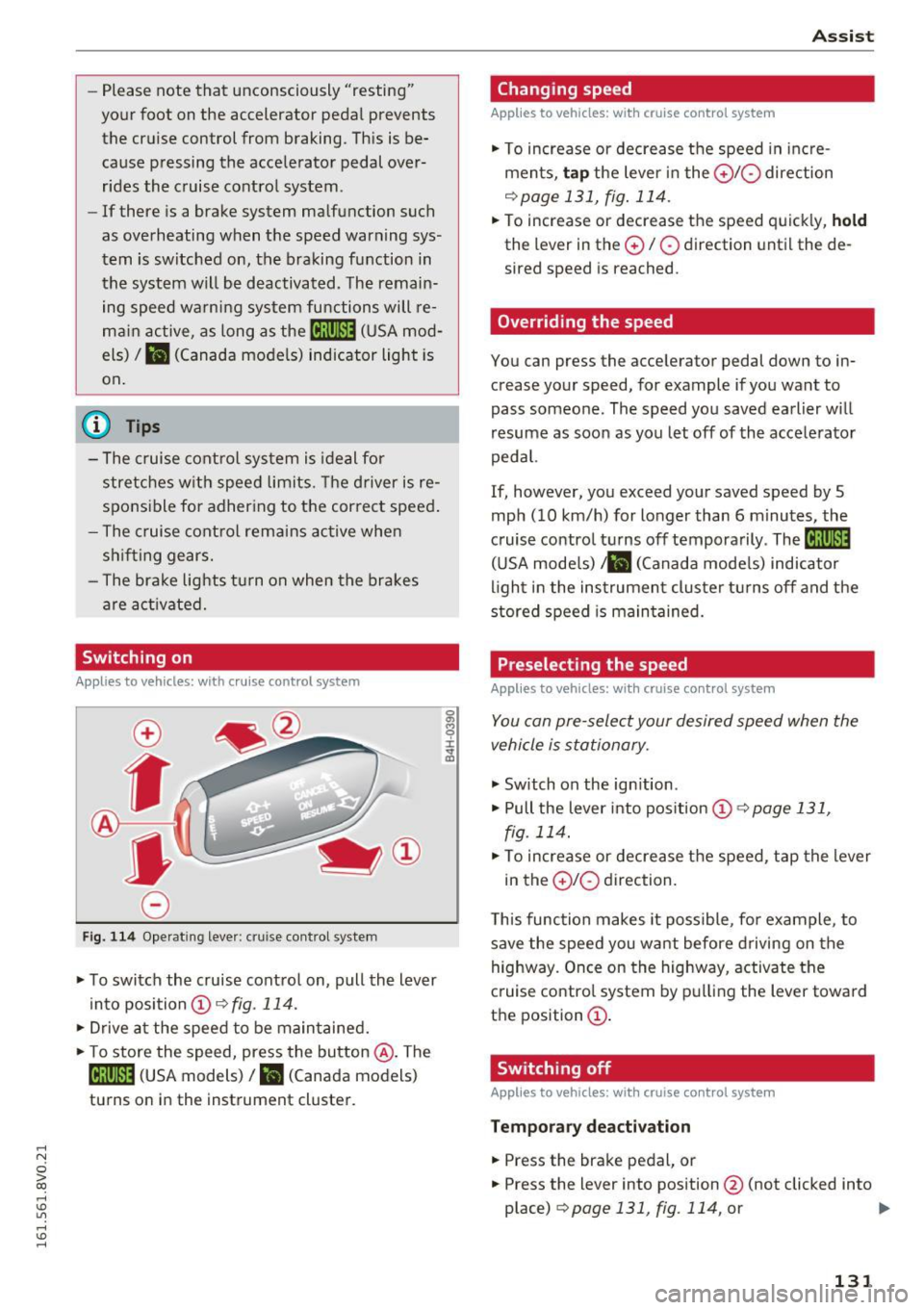
.. To switch the cruise control on, pull the lever
into position @~
fig. 114.
.. Drive at the speed to be maintained .
.. To store the speed, press the button @. The
@;\1)~14 (USA models) / l'I (Canada models)
turns on in the instrument cluster.
Assist
Changing speed
App lies to vehicles: w ith cruise control system
., To increase or decrease the speed in incre
ments,
tap the lever in the 010 direction
~ page 131, fig. 114.
.. To increase or decrease the speed quickly, hold
the lever in the 0 / 0 direction until the de
sired speed is reached.
Overriding the speed
You can press the accelerator pedal down to in
crease your speed, for example if you want to
pass someone. The speed you saved earlier will
resume as soon as you let off of the accelerator
pedal.
If, however, you exceed your saved speed by 5
mph (10 km/h) for longer than 6 minutes, the
cruise control turns off temporarily .
The@;\!)~14
(USA mode ls) ;fil (Canada models) indicator
light in the instrument cluster turns off and the
stored speed is maintained.
Preselecting the speed
Appl ies to vehicles: w it h cruise co ntrol system
You can pre-select your desired speed when the
vehicle is stationary.
., Switch on the ign ition .
.. Pull the lever into position
(D 9 page 131,
fig. 114 .
.. To increase or decrease the speed, tap the lever
in the
010 direction.
This function makes it possible, for example, to
save the speed you want before driving on the
highway. Once on the highway, activate the
cruise control system by pulling the lever toward
the position
(D .
Switching off
Applies to veh icles: w it h cru ise co ntrol system
Temporary deactivation
.. Press the brake pedal, or
.. Press the lever into position@ (not clicked into
place)
~ page 131, fig. 114, or ..,
131
Page 136 of 328

Assist
(D Note
The sensor can be displaced by impacts or
damage to the bumper , whee l housing and
underbody. The adaptive cruise control and
pre sense front may become impaired as a re
sult . Have an authorized Audi dealer or au
thorized Audi Service Fac ility check their func
tion .
In curves
Applies to veh icles: w ith Aud i adapt ive cru ise co ntro l and Audi
pre se nse front
Fig. 117 Example: driving into a curve
When driving into a curve ¢fig. 117 and out of a
curve, the adaptive cruise control may react to an
objec t in the neighboring lane and apply the
brakes. You can prevent that by pressing the ac
celerator pedal briefly .
Stationary objects
App lies to veh icles: with Aud i adapt ive cruise co ntro l an d Audi
p re se nse front
Fig . 118 Examp le: object changing lanes and stat ionary
object
l) Speed limits de pend on t he country and th e s pee domet er.
134
Adaptive cruise control
The adaptive cruise control system only reac ts to
objects that are moving or that the system has
already detected as moving. For example, if a de
tected vehicle @turns or changes lanes, the
adaptive cruise contro l will not react to a stopped
vehicle @. Press the brake pedal to slow your ve
hicle down.
Pre sense front
Pre sense front only reacts to stationary objects
at low speeds.
Switching on/off
App lies to vehicles: wit h Audi adapt ive c ru ise control
Fig . 11 9 Operat ing lever: swi tching on and off
Fig. 120 Instrument cluster: adapt ive cruise contro l
You can set any speed l) between 20 mph and 95
mph (30 and 150 km/h).
Indicator lights and messages in the instrument
cluster display inform you about the current sit-
u ation and settings .
1JJ,-
Page 137 of 328
,....,
N
0 > co ,....,
"' Pull the lever toward you into position @
¢fig. 119 . ACC: stan dby appears in the instru
ment cluster disp lay .
Saving the speed and activating regulati on
"'T o save the c urrent speed , press the ISETI
¢fig. 119 button. The stored speed is shown in
t h e tachomete r LED line @and appears briefly
in the information line @¢
fig. 120.
"' To activate the regu lation whi le stationary, you
must press the brake pedal.
Sw itching adaptiv e cruis e control off
"' Push the lever away from you into position @
until it clicks i nto place. The message
AC C: off
appears .
The stored speed in the LED line is erased.
@ Indicato r lights
II -adaptive cruise control is switched on. No
objects are detected ahead. The stored speed is
maintained.
• -An object a head was detected . The adaptive
cruise control system regulates the speed and
d istance to the object ahead and brakes/acce ler
ates automatica lly.
fij -adaptive cru ise control is switched on. An
object ahead was detected. Your vehicle remains
stopped and w ill not start driving automatica lly.
• -T he automatic bra king is no t enough to
maintain a sufficient distance to a n object ahead.
You must intervene ¢
page 138, Request for
driver intervention.
© Instrument clu ster display
If adaptive cruise control is not shown in the in
s trument cluster disp lay, yo u can call it up using
the mu ltifunction steering wheel b uttons
¢ page 29 .
Based on the g raph ics in the d isp lay, you can de
termine if the system is m ainta ining a distance to
a vehicle ahead and what that distance to this ve
hicle is:
No vehi cle -No object ahead was detected.
Assist
White vehicl e -An object ahead was de tected .
Red vehicl e -Request for the dr iver to take action
¢page 138.
Both arrows on the scal e© indicate the d istance
to the object ahead . No arrow appears when the
vehicle is on an open road and t here is no object
ahead. If an object is detec ted ahead, the a rrow
moves on the sca le.
T he green zone o n the scale indicates the store
distance. For informat ion on changing the dis
t a nce, refer to ¢
page 13 7. If the distance se
l ected is exceeded or not reached, the arrow
moves into the red zone on the scale.
A WARNING
- Using adaptive cruise control incorrectly can
cause collisions, other accidents and ser ious
in ju ries.
- If you press the
!SET ! button w hen driving at
speeds be low 20 mph (30 km/h), the vehi
cle acce lerates automatically up to 20 mph
(30 km/h), wh ich is the minimum speed
that can be set.
{!) Tips
- If you switch the ignit ion or the adaptive
cruise control system off, the set speed is
erased for safety reason.
- The Electronic Stabilization Control (ESC) and Anti-S lip Regulat ion (ASR) both sw itch
on when the adaptive cruise control is
switched on . ESC and ASR ca nnot be switch
ed off when adapt ive cruise control is
switched on.
- With the adaptive cruise control act ivated
t he ESC spo rt mode cannot be activated.
135
Page 162 of 328
Inte llig ent Techn olo gy
tak ing risks . This could increase your risk of
a collision.
- Please note the risk of a collision increases
when driving fast, especially through curves
and on slippery or wet roads, and when driv
ing too close to objects ahead. The ESC and
its integrated systems cannot always pre
vent collisions - there is still a r isk of acci
dents!
- Press the accelerator pedal carefully when
accelerating on even, s lippery surfaces such
as ice and snow. The drive wheels can spin
Switching on/off
even when these control systems are instal
led and this can affect dr iving stability and
increase the risk of a collision.
@ Tips
- ABS and ASR only function correctly when
all four wheels are equipped with identical
tires . Different tire sizes can lead to a reduc
t ion in engine power.
- You may hear noises when the systems de
scribed are working.
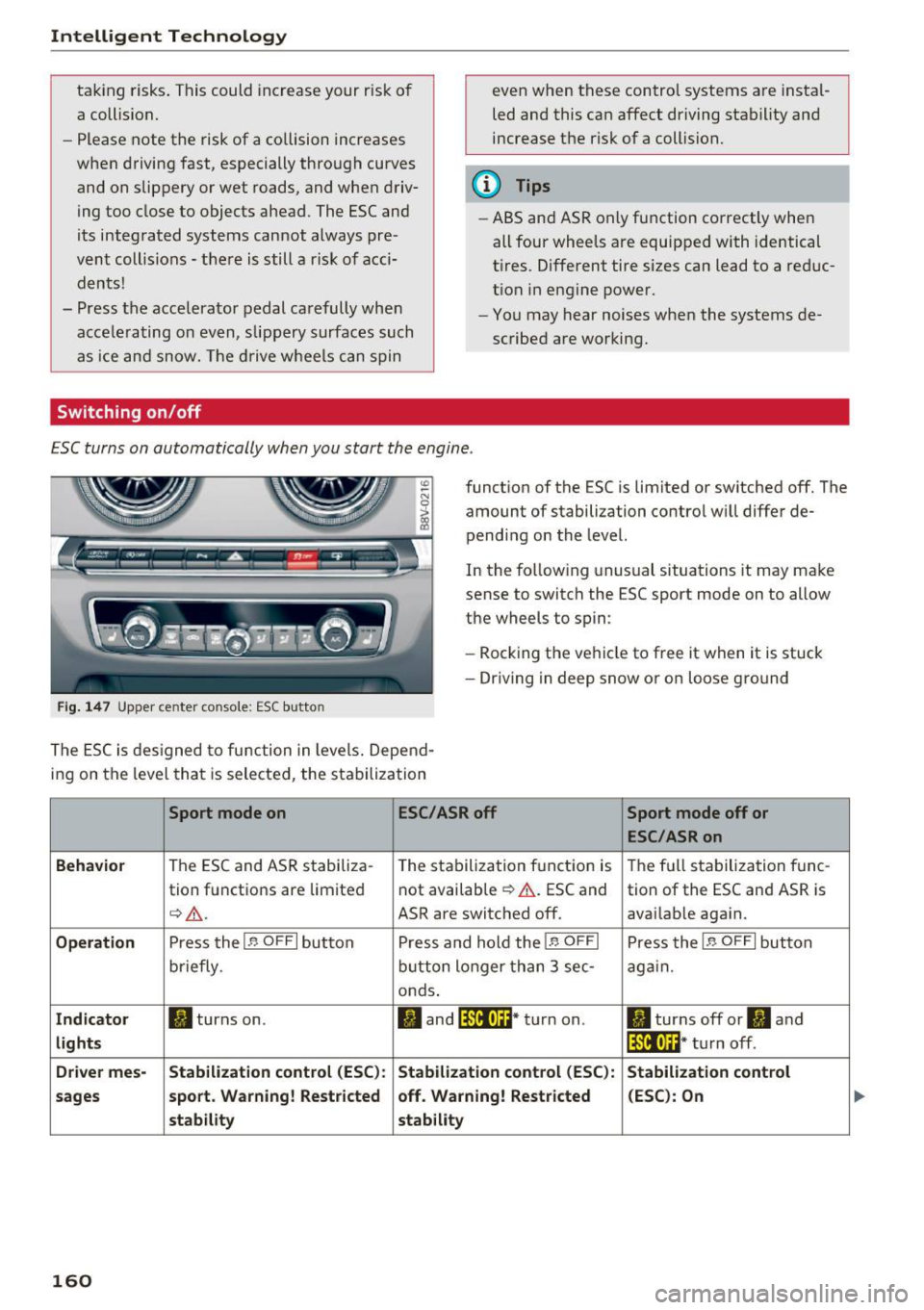
ESC turns on automatically when you start the engine .
Fig . 1 47 Upper center conso le: ESC butto n
function of the ESC is limited or switched off. The
amount of stabilization contro l will differ de
pending on the level.
In the follow ing unusual situations it may make
sense to switch the ESC sport mode on to allow
the wheels to spin:
- Rocking the vehicle to free it when it is stuck
- Dr iving in deep snow or on loose g ro und
The ESC is des igned to function in levels. Depend
ing on the level that is selected, the stabilization
Sport mode on ESC/ASR off Sport mode off or
ESC /ASR on
Beh avio r
The ESC and ASR stabiliza-
The stabilization function is The full stabilization tune-
tion functions are limited not available
¢ &.
. ESC and
tion of the ESC and ASR is
¢&_ . ASR are switched off. avai lable again.
Operati on Press the I~ OFF I button P ress and hold the I~ OFFI Press the I~ OFFI button
briefly . button longer than 3 sec -again.
onds .
Indicat or II turns on. II and lf11f•lH * turn on . II turns off or II and
lights lf111,n~ · turn off .
Driv e r mes- Stab ilization cont rol (E S C): Stabilization control (ESC ):
Stabilizat ion cont rol
sa ge s s port. Warning ! Re st ric ted off . Warning ! Re stri cted (E
SC ): On
st ability stability
160
Page 165 of 328
,....,
N
0 > co ,....,
• Do not drive vehicle: steering defective
If th is ind icator light turns on and stays on and
this message appears, the power steering may
h ave fa iled.
Do
not cont inue driving . See an authorized Aud i
dealer or authorized Aud i Serv ice Faci lity for as
sistance.
• Do not dr ive vehicle: steering defective
There is a malfunction in the electronic steering
lock. You cannot turn the ignition on.
Do
not tow your vehicle beca use it cannot be
steered. See an authorized A udi dealer or author
ized Audi Service Facility for assistance.
':r- ij Steering malfunction : you can continue driv
ing
I f the indicator light turns on, the steering whee l
may be more diff icult to move o r more sensitive
than usual. The steering wheel may also be at an
angle when driving st raight.
Drive slowly to an author ized Audi dealer or au
thor ized Audi Service Facility to have the mal
function corrected.
1;11 Steering lock: system fault! Please contact
Service
There is a malfunction in the electronic steering
lock.
Drive to an authorized Aud i dea ler or authorized
Aud i Service Faci lity immediately to have the
malfunct ion corrected.
A WARNING -
Have the system malfunction corrected as
soon as possible by an authorized Audi dealer
or authorized Audi Service Facility, as this in
creases the risk of an accident .
(D Tips
If the . or t~ff indicator light only stays on
for a short time, you may continue dr iv in g.
Intelligent Technology
All wheel drive (quattro)
Applies to vehicles: with all wheel drive
In all wheel drive, all four wheels ore powered.
General information
In all wheel dr ive, the driving power is div ided be
tween all fou r wheels . This happens automatical
ly depending on yo ur driving behavior as well as
the current road conditions . A lso see
c> page 159, Electronic stabilization control
(ESC).
The all whee l drive concept is designed for high
engine power. Yo ur vehicle is exceptionally pow
erfu l and has excellent driving characteristics
both under normal driving conditions and on
snow and ice. Always read and follow safety pre
cautions
c> ,&. .
Winter tires
By using all wheel drive, your vehicle has good
forward motion with standard tires in winter con
ditions. However, in winter we recommend using
winter or all season tires on
all four wheels, be
cause this will improve the
broking effect.
Snow chains
If there are snow chain laws, snow chains must
also be used on veh icles w ith all wheel dr ive
c> page 269, Snow chains.
Replacing tires
For vehicles with a ll wheel d rive, only wheels with
the same rolling circumference should be used .
Avoid wheels with different tread depths
c> poge 260.
Offroad vehicle?
Your Audi is not an offroad vehicle -there is not
enough ground clearance. For this reason, avoid
difficu lt terrain . Also see<=)
page 302.
A WARNING
--Also, in veh icles with all whee l drive, adapt
your driving style to the current road and
traffic cond itions. Do not let the increased
safety prov ided tempt you into taking r isks.
163