airbag AUDI A3 2020 Owner´s Manual
[x] Cancel search | Manufacturer: AUDI, Model Year: 2020, Model line: A3, Model: AUDI A3 2020Pages: 400, PDF Size: 107.47 MB
Page 184 of 400
Audi connect
Audi connect
General information
Applies to: vehicles with Audi connect
Depending on the country and the vehicle equip-
ment, the following functions may be available:
— Audi connect Infotainment
— Applies to: vehicles with plug-in hybrid drive:
Audi connect vehicle control services (Audi con-
nect e-tron services)
You can also find more information on Audi con-
nect online at my.audi.com.
Z\ WARNING
—To reduce the risk of an accident, only use
Audi connect services and the Wi-Fi hotspot
only if the traffic situation permits it. Read
and follow the guidelines provided in
= page 146, Traffic safety information.
— It is only safe to use tablets, laptops, mobile
devices and other similar devices when the
vehicle is stationary because, like all loose
objects, they could be thrown around the in-
side of the vehicle in a crash and cause seri-
ous injuries. Store these types of devices se-
curely while driving. Also read the warnings
in the chapter > page 257, Front airbags.
©) Note
— Applies to: embedded SIM card usage: The
connection costs for Audi connect Infotain-
ment services are included in the price of
Audi connect Infotainment during the sub-
scription period with some exceptions.
Please note that there may be additional
charges when using some services. For ex-
ample, this applies to online radio/
podcasts, Gracenote online database or for
Internet connections and services that use
the Wi-Fi hotspot, such as online media
sources. Depending on the country, data
plans may need to be purchased for these
services > page 187. For additional infor-
mation, see my.audi.com.
—Incertain situations, the Wi-Fi hotspot data
connection may be established as a replace-
ment for the SIM card on your Wi-Fi device.
182
This feature depends on the configuration
of your Wi-Fi device and operating system.
This could result in fees depending on your
cell phone service provider, especially if you
are using this feature while abroad. A flat
rate data plan is strongly recommended. For
more information, contact your cell phone
service provider or refer to the owner's man-
ual for your Wi-Fi device.
— You are responsible for all precautions taken
for data protection, anti-virus protection,
and protection against loss of data on mo-
bile devices that are used, for example, to
access the Internet through the Wi-Fi hot-
spot.
— In areas with poor GPS reception or outside
the coverage range of the respective cell
phone service provider, some functions
and/or services may not be available, it may
not be possible to send or receive data, or
functionality may be limited.
(i) Tips
— The availability of services depends on the
subscription.
— AUDI AG provides access to services from
third party providers. Permanent availability
cannot be guaranteed, because that de-
pends on the third party provider.
— Use of the most up-to-date mobile network
standard is not available in every country.
Contact an authorized Audi dealer or au-
thorized Audi Service Facility or your cell
phone service provider for additional infor-
mation.
— Availability, scope, providers, screen display,
and costs of services may vary depending on
the country, model, model year, end device
and rates.
Audi connect
Infotainment
Applies to: vehicles with Audi connect Infotainment
With Audi connect Infotainment services, online
information is transmitted directly to the vehicle. >
Page 217 of 400

8V2012721BK
Media
Requirement: the Wi-Fi function on your media
player must be switched on. The myAudi app or a
UPnP server app is installed on your media play-
er, or your media player has an integrated UPnP/
DLNA server.
— Connecting a media player: press the [MEDIA
button. Press the left control button until the
sources overview > page 219 is displayed. Se-
lect and confirm Wi-Fi audio player 7)
=> page 219, fig. 192.
— If necessary, select and confirm Wi-Fi turned
off > Turn on Wi-Fi to activate Wi-Fi in the
MMI. Select Wi-Fi settings, if necessary. Select
the same settings on the wireless media player
that are used for the Wi-Fi hotspot.
— Starting the Wi-Fi audio player: start the
myAudi app or a UPnP server app, or set media
permissions on your media player.
Operating the media player: the media player is
operated through the MMI.
— Press the left control button repeatedly until
the Folders menu item appears. Select and con-
firm
Folders.
— Playing music from the media player: select
and confirm Media center.
Web radio: see > page 215.
ZA\ WARNING
— As the driver, do not allow usage of the Wi-
Fi hotspot to distract you from driving, as
this could increase the risk of an accident.
—To reduce the risk of an accident, only use
Audi connect services and the Wi-Fi hotspot
only if the traffic situation permits it. Read
and follow the guidelines provided in
=> page 146, Traffic safety information.
— It is only safe to use tablets, laptops, mobile
devices and other similar devices when the
vehicle is stationary because, like all loose
objects, they could be thrown around the in-
side of the vehicle in a crash and cause seri-
ous injuries. Store these types of devices se-
curely while driving. Also read the warnings
in the chapter > page 257, Front airbags.
CG) Note
Always follow the information found in >@ in
General information on page 182.
@) Tips
— Always read the chapter > page 182, Audi
connect.
— Please note that a Wi-Fi connection does
not automatically make it possible to use
the Internet. For additional information,
see > page 182.
—To avoid interruptions during playback, de-
activate the power saving function on the
media player or connect it to a charger.
—The loading times for the audio data depend
on the media player used and the number of
files
that it contains.
—A maximum of 2,000 entries per directory
are displayed in the MMI.
— Songs downloaded for offline use using mu-
sic streaming services are stored on your
mobile device (such as a smartphone) and
may be DRM protected. The Wi-Fi audio
player will not play DRM protected files.
— Contact an authorized Audi dealer or au-
thorized Audi Service Facility for additional
information on the Wi-Fi audio player.
Online media and
Internet radio
Applies to: vehicles with Audi connect Infotainment
sh
Fig. 189 Infotainment system: online media
You can playback and operate various online me-
dia services and Internet radio using the MMI.
> Press the [MEDIA] button. Press the left control
button until the sources overview > fig. 189 is
displayed.
215
>
Page 218 of 400
Media
Applies to: online media and Internet radio usage
Requirement:
— The myAudi app must be installed and open on
your mobile device.
— You must be logged in to your myAudi account
in the myAudi app and you must have selected
your vehicle.
— The Wi-Fi function on the mobile device and on
the MMI must be switched on.
— If necessary, check in the connection manager
=> page 231 if the mobile device you connected
is selected under the MMI connect app (™).
—The MMI must be connected to the network.
— The symbol for the Online media source (@ is
shown in the MMI.
Applies to: online media usage
Additional requirement:
— A supported online media service must be avail-
able in the country where the vehicle is being
operated.
— You must have an account with a supported on-
line media service.
— Depending on the online media service, you
may need to install and open an app on your
mobile device.
Starting Online media
— Press the [MEDIA] button. Press the left control
button until the sources overview > page 219 is
displayed.
— Select and confirm an online media service.
Starting Internet radio
— Press the [MEDIA] button. Press the left control
button until the sources overview > page 219 is
displayed.
— Select and confirm Internet radio. The Internet
radio browser or the last station that was play-
ing is shown.
— Selecting the station: if necessary, select and
confirm a category in the Internet radio Brows-
er > a station.
Online media and Internet radio: additional op-
tions
— Press the right control button.
216
The following options may be available, depend-
ing on the information shown (such as the sta-
tion/track that is currently playing):
— Sound settings: see > page 234.
— Wi-Fi settings: see > page 187, Wi-Fi settings.
— Connection manager: see > page 231.
— Additional options may be available, depending
on the active online media service or Internet
radio.
ZA WARNING
—To reduce the risk of an accident, only use
Audi connect services and the Wi-Fi hotspot
only if the traffic situation permits it. Read
and follow the guidelines provided in
=> page 146, Traffic safety information.
— It is only safe to use tablets, laptops, mobile
devices and other similar devices when the
vehicle is stationary because, like all loose
objects, they could be thrown around the in-
side of the vehicle in a crash and cause seri-
ous injuries. Store these types of devices se-
curely while driving. Also read the warnings
in the chapter > page 257, Front airbags.
@) Note
— Always follow the information found in >®
in General information on page 182.
— There generally are additional costs when
using an online media service account, espe
cially when it is used internationally.
(i) Tips
— Depending on the Internet connection and
network traffic, the connection may discon-
nected when online media sources are play-
ing.
— Online media and Internet radio usage de-
pends on the service availability of the third
party provider.
— Audi AG simply makes the access to online
media services possible through the MMI
and does not take any responsibility for the
contents of the online media services.
— Always read the chapter > page 182, Audi
connect.
Page 239 of 400
8V2012721BK
Driving safety
Driving safety
Basics
SER Nails mali
Please remember - safety first!
The individual safety features of your vehicle can
work together as a system to help protect you
and
your passengers in a wide range of accidents.
These features cannot work as a system if they
are not always correctly adjusted and correctly
used.
This chapter contains important information,
tips, instructions and warnings that you need to
read and observe for your own safety, the safety
of your passengers and others. We have summar-
ized here what you need to know about safety
belts, airbags, child restraints as well as child
safety. Your safety is for us priority number 1. Al-
ways observe the information and warnings in
this section - for your own safety as well as that
of your passengers.
The information in this section applies to all
model versions of your vehicle. Some of the fea-
tures described in this sections may be standard
equipment on some models, or may be optional
equipment on others. If you are not sure, ask
your authorized Audi dealer.
ZA WARNING
— Always make sure that you follow the in-
structions and heed the WARNINGS in this
Manual. It is in your interest and in the in-
terest of your passengers.
— Always keep the complete Owner's Litera-
ture in your Audi when you lend or sell your
vehicle so that this important information
will always be available to the driver and
passengers.
— Always keep the Owner's literature handy so
that you can find it easily if you have ques-
tions.
Important things to do before driving
Safety is everybody's job! Vehicle and occupant
safety always depends on the informed and care-
ful driver.
For
your safety and the safety of your passen-
gers, before driving always:
> Make sure that all lights and signals are operat-
ing correctly.
> Make sure that the tire pressure is correct.
> Make sure that all windows are clean and afford
good visibility to the outside.
> Secure all luggage and other items carefully
= page 60, > page 60.
> Make sure that nothing can interfere with the
pedals.
> Adjust front seat, head restraint and mirrors
correctly for your height.
> Instruct passengers to adjust the head re-
straints according to their height.
> Make sure to use the right child restraint cor-
rectly to protect children > page 278, Child
safety.
» Sit properly in your seat and make sure that
your passengers do the same > page 54, Front
seats.
> Fasten your safety belt and wear it properly. Al-
so instruct your passengers to fasten their safe-
ty belts properly > page 245.
What impairs driving safety?
Safe driving is directly related to the condition of
the vehicle, the driver as well as the driver’s abili-
ty to concentrate on the road without being dis-
tracted.
The driver is responsible for the safety of the ve-
hicle and all of its occupants. If your ability to
drive is impaired, safety risks for everybody in the
vehicle increase and you also become a hazard to
everyone else on the road > /\. Therefore:
> Do not let yourself be distracted by passengers
or by using a cellular telephone.
> NEVER drive when your driving ability is im-
paired (by medications, alcohol, drugs, etc.).
> Observe all traffic laws, rules of the road and
speed limits and plain common sense.
237
Page 240 of 400

Driving safety
> ALWAYS adjust your speed to road, traffic and
weather conditions.
> Take frequent breaks on long trips. Do not drive
for more than two hours at a stretch.
> Do NOT drive when you are tired, under pres-
sure or when you are stressed.
ZX WARNING
Impaired driving safety increases the risk of
serious personal injury and death whenever a
vehicle is being used.
Safety systems monitoring
The Ba indicator light in the instrument cluster
monitors the safety systems such as the airbags
(including the control modules, sensors, and wir-
ing) and the belt tensioners. It turns on when you
switch the ignition on and turns off after several
seconds.
If the Ea indicator light does not turn on when
the ignition is switched on, does not turn off af-
ter several seconds, or turns on or flashes while
driving, there may be a malfunction in one of the
safety systems. Drive to an authorized Audi deal-
er or authorized Audi Service Facility immediately
to have the malfunction corrected.
Z\ WARNING
Have the malfunction in the safety systems in-
spected immediately. Otherwise, there is a
risk that the systems may not activate during
an accident, which increases the risk of seri-
ous or fatal injury.
238
Correct passenger
seating positions
Proper seating position for the driver
The proper driver seating position is important
for safe, relaxed driving.
B4G-0375
Fig. 198 Correct seating position
For your own safety and to reduce the risk of in-
jury in the event of an accident, we recommend
that you adjust the driver's seat to the following
position:
> Adjust the driver's seat so that you can easily
push the pedals all the way to the floor while
keeping your knee(s) slightly bent > A\.
> Adjust the angle of the seatback so that it is in
an upright position so that your back comes in
full contact with it when you drive.
> Adjust the steering wheel so that there is a dis-
tance of at least 10 inches (25 cm) between the
steering wheel and your breast bone © fig. 198.
If not possible, see your authorized Audi deal-
ership about adaptive equipment.
> Adjust the steering wheel so that the steering
wheel and airbag cover points at your chest and
not at your face.
> Grasp the top of the steering wheel with your
elbow(s) slightly bent.
> For adjustable head restraints: Adjust the head
restraint so the upper edge is as even as possi-
ble with the top of your head. If that is not pos-
sible, try to adjust the head restraint so that it
is as close to this position as possible. Move the
head restraint so that it is as close to the back
of the head as possible.
> Fasten and wear safety belts correctly
=> page 248.
Page 241 of 400

8V2012721BK
Driving safety
> Always keep both feet in the footwell so that
you are in control of the vehicle at all times.
For detailed information on how to adjust the
driver's seat, see > page 54.
ZA WARNING
Drivers who are unbelted, out of position or
too close to the airbag can be seriously injured
by an airbag as it unfolds. To help reduce the
risk of serious personal injury:
— Always adjust the driver's seat and the
steering wheel so that there are at least
10 inches (25 cm) between your breastbone
and the steering wheel.
— Always adjust the driver's seat and the
steering wheel so that there are at least
4 inches (10 cm) between the knees and the
lower part of the instrument panel.
— Always hold the steering wheel on the out-
side of the steering wheel rim with your
hands at the 9 o'clock and 3 o'clock posi-
tions to help reduce the risk of personal in-
jury if the driver's airbag inflates.
— Never hold the steering wheel at the
12 o'clock position or with your hands at
other positions inside the steering wheel
rim or on the steering wheel hub. Holding
the steering wheel the wrong way can cause
serious injuries to the hands, arms and head
if the driver's airbag inflates.
— Pointing the steering wheel toward your
face decreases the ability of the supplemen-
tal driver's airbag to protect you in a colli-
sion.
— Always sit in an upright position and never
lean against or place any part of your body
too close to the area where the airbags are
located.
— Before driving, always adjust the front seats
properly and make sure that all passengers
are properly restrained.
— For adjustable head restraints: before driv-
ing, always also adjust the head restraints
properly.
— Never adjust the seats while the vehicle is
moving. Your seat may move unexpectedly
and you could lose control of the vehicle.
— Never drive with the backrest reclined or tilt-
ed far back! The farther the backrests are
tilted
back, the greater the risk of injury due
to incorrect positioning of the safety belt
and improper seating position.
— Children must always ride in child seats
=> page 278. Special precautions apply when
installing a child seat on the front passenger
seat > page 253.
Proper seating position for the front
passenger
The proper front passenger seating position is
important for safe, relaxed driving.
For your own safety and to reduce the risk of in-
jury in the event of an accident, we recommend
that you adjust the seat for the front passenger
to the following position:
> Adjust the angle of the seatback so that it is in
an upright position and your back comes in full
contact with it whenever the vehicle is moving.
> For adjustable head restraints: adjust the head
restraint so the upper edge is as even as possi-
ble with the top of your head. If that is not pos-
sible, try to adjust the head restraint so that it
is as close to this position as possible
=> page 57. Move the head restraint so that it is
as close to the back of the head as possible.
> Keep both feet flat on the floor in front of the
front passenger seat.
> Fasten and wear safety belts correctly
=> page 248.
For detailed information on how to adjust the
front passenger's seat, see > page 54.
ZA\ WARNING
Front seat passengers who are unbelted, out
of position or too close to the airbag can be
seriously injured or killed by the airbag as it
unfolds. To help reduce the risk of serious per-
sonal injury:
— Passengers must always sit in an upright po-
sition and never lean against or place any
part of their body too close to the area
where the airbags are located. >
239
Page 242 of 400
Driving safety
— Passengers who are unbelted, out of posi-
tion or too close to the airbag can be seri-
ously injured by an airbag as it unfolds with
great force in the blink of an eye.
— Always make sure that there are at least
10 inches (25 cm) between the front pas-
senger‘s breastbone and the instrument
panel.
— Always make sure that there are at least
4 inches (10 cm) between the front passen-
ger‘s knees and the lower part of the instru-
ment panel.
— Each passenger must always sit on a seat of
their own and properly fasten and wear the
safety belt belonging to that seat.
— Before driving, always adjust the front pas-
senger seat properly.
— For adjustable head restraints: before driv-
ing, always also adjust the head restraints
properly.
— Always keep your feet on the floor in front of
the seat. Never rest them on the seat, in-
strument panel, out of the window, etc. The
airbag system and safety belt will not be
able to protect you properly and can even in-
crease the risk of injury in a crash.
— Never drive with the backrest reclined or tilt-
ed far back! The farther the backrests are
tilted
back, the greater the risk of injury due
to incorrect positioning of the safety belt
and improper seating position.
— Children must always ride in child seats
= page 278. Special precautions apply when
installing a child seat on the front passenger
seat > page 253.
Proper seating positions for passengers in
israel -r- 1}
Rear seat passengers must sit upright with both
feet on the floor consistent with their physical
size and be properly restrained whenever the ve-
hicle is in use.
To reduce the risk of injury caused by an incorrect
seating position in the event of a sudden braking
maneuver or an accident, your passengers on the
rear bench seat must always observe the follow-
ing:
240
> For adjustable head restraints: adjust the head
restraint so the upper edge is as even as possi-
ble with the top of your head. If that is not pos-
sible, try to adjust the head restraint so that it
is as close to this position as possible
=> page 57.
> Keep both feet flat in the footwell in front of
the rear seat.
> Fasten and wear safety belts properly
=> page 248.
> Make sure that children are always properly re-
strained in a child restraint that is appropriate
for their size and age > page 278.
ZA WARNING
Passengers who are improperly seated on the
rear seat can be seriously injured in a crash.
— Each passenger must always sit on a seat of
their own and properly fasten and wear the
safety belt belonging to that seat.
— Safety belts only offer maximum protection
when the safety belts are properly posi-
tioned on the body and securely latched. By
not sitting upright, a rear seat passenger in-
creases the risk of personal injury from im-
properly positioned safety belts!
— For adjustable head restraints: always adjust
the head restraint properly so that it can
give maximum protection.
Examples of improper seating positions
The occupant restraint system can only reduce
the risk of injury if vehicle occupants are properly
seated.
Improper seating positions can cause serious in-
jury or death. Safety belts can only work when
they are properly positioned on the body. Im-
proper seating positions reduce the effectiveness
of safety belts and will even increase the risk of
injury and death by moving the safety belt to crit-
ical areas of the body. Improper seating positions
also increase the risk of serious injury and death
when an airbag deploys and strikes an occupant
who is not in the proper seating position. A driver
is responsible for the safety of all vehicle occu-
pants and especially for children. Therefore: >
Page 243 of 400
8V2012721BK
Driving safety
> Never allow anyone to assume an incorrect
seating position when the vehicle is being used
>.
The following bulletins list only some sample po-
sitions that will increase the risk of serious injury
and death. Our hope is that these examples will
make you more aware of seating positions that
are dangerous.
Therefore, whenever the vehicle is moving:
— never stand up in the vehicle
— never stand on the seats
— never kneel on the seats
— never ride with the seatback reclined
— never lie down on the seats
— never lean up against the instrument panel
— never sit on the edge of the seat
— never sit sideways
— never lean out the window
— never put your feet out the window
— never put your feet on the instrument panel
— never rest your feet on the seat cushion or back
of the seat
— never ride in the footwell
— never ride in the cargo area
ZA WARNING
Improper seating positions increase the risk
of serious personal injury and death whenever
a vehicle is being used.
— Always make sure that all vehicle occupants
stay in a proper seating position and are
properly restrained whenever the vehicle is
being used.
Driver's and front
passenger's footwell
eae mesa
Applies to: vehicles with knee airbags
ZA WARNING
Always make sure that the knee airbag can in-
flate without interference. Objects between
yourself and the airbag can increase the risk
of injury in an accident by interfering with the
way the airbag deploys or by being pushed in-
to you as the airbag deploys.
— No persons or animals should ride in the
footwell in front of the passenger seat. If
the airbag deploys, this can result in serious
or fatal injuries.
— No objects of any kind should be carried in
the footwell area in front of the driver's or
passenger's seat. Bulky objects (shopping
bags, for example) can hamper or prevent
proper deployment of the airbag. Small ob-
jects can be thrown through the vehicle if
the airbag deploys and injure you or your
passengers.
Pedal area
The pedals must always be free to move and
must never be interfered with by a floor mat or
any other object.
Make sure that all pedals move freely without in-
terference and that nothing prevents them from
returning to their original positions.
Only use floor mats that leave the pedal area free
and can be secured with floor mat fasteners.
If a brake circuit fails, increased brake pedal trav-
el is required to bring the vehicle to a full stop.
ZA WARNING
Pedals that cannot move freely can cause loss
of vehicle control and increase the risk of seri-
ous injury.
— Never place any objects in the driver's foot-
well. An object could get into the pedal area
and interfere with pedal function. In case of
sudden braking or an accident, you would
not be able to brake or accelerate!
— Always make sure that nothing can fall or
move into the driver's footwell.
241
Page 249 of 400
8V2012721BK
Safety belts
bracing themselves. Without the benefit of safe-
ty restraint systems, the unrestrained occupant
will slam violently into the steering wheel, in-
strument panel, windshield, or whatever else is
in the way > fig. 206. This impact with the vehi-
cle interior has all the energy they had just before
the crash.
Never rely on airbags alone for protection. Even
when they deploy, airbags provide only additional
protection. Airbags are not supposed to deploy in
all kinds of accidents. Although your Audi is
equipped with airbags, all vehicle occupants, in-
cluding the driver, must wear safety belts cor-
rectly in order to minimize the risk of severe in-
jury or death in a crash.
Remember too, that airbags will deploy only once
and that your safety belts are always there to of-
fer protection in those accidents in which airbags
are not supposed to deploy or when they have al-
ready deployed. Unbelted occupants can also be
thrown out of the vehicle where even more severe
or fatal injuries can occur.
It is also important for the rear passengers to
wear safety belts correctly. Unbelted passengers
in the rear seats endanger not only themselves
but also the driver and other passengers
=> fig. 207. In a frontal collision they will be
thrown forward violently, where they can hit and
injure the driver and/or front seat passenger.
1-1 al LheM ogo) alas
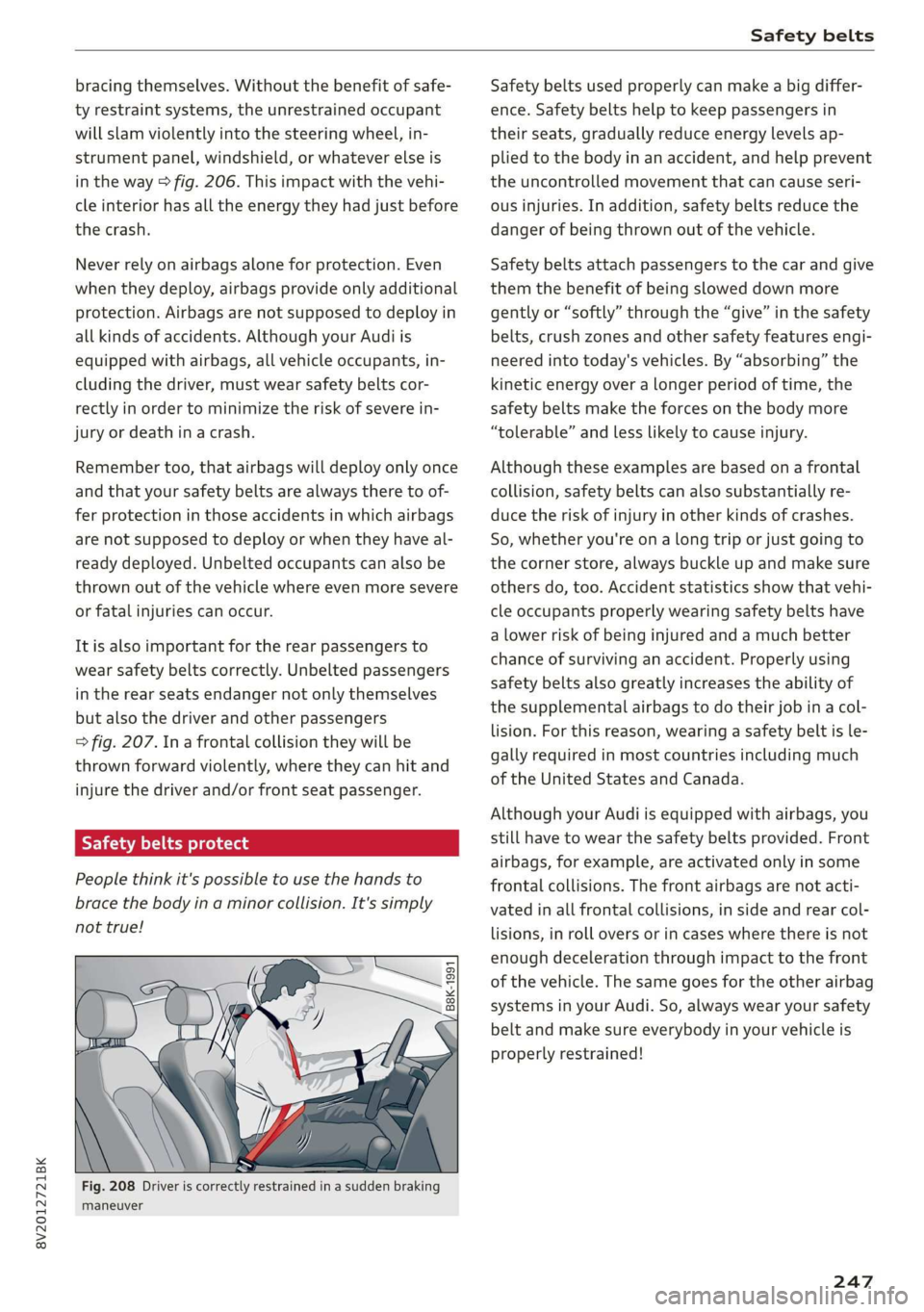
People think it's possible to use the hands to
brace the body in a minor collision. It's simply
not true!
“=
a
8
x % 8
Fig. 208 Driver is correctly restrained in a sudden braking
maneuver
Safety belts used properly can make a big differ-
ence. Safety belts help to keep passengers in
their seats, gradually reduce energy levels ap-
plied to the body in an accident, and help prevent
the uncontrolled movement that can cause seri-
ous injuries. In addition, safety belts reduce the
danger of being thrown out of the vehicle.
Safety belts attach passengers to the car and give
them the benefit of being slowed down more
gently or “softly” through the “give” in the safety
belts, crush zones and other safety features engi-
neered into today's vehicles. By “absorbing” the
kinetic energy over a longer period of time, the
safety belts make the forces on the body more
“tolerable” and less likely to cause injury.
Although these examples are based on a frontal
collision, safety belts can also substantially re-
duce the risk of injury in other kinds of crashes.
So, whether you're on a long trip or just going to
the corner store, always buckle up and make sure
others do, too. Accident statistics show that vehi-
cle occupants properly wearing safety belts have
a lower risk of being injured and a much better
chance of surviving an accident. Properly using
safety belts also greatly increases the ability of
the supplemental airbags to do their job in a col-
lision. For this reason, wearing a safety belt is le-
gally required in most countries including much
of the United States and Canada.
Although your Audi is equipped with airbags, you
still have to wear the safety belts provided. Front
airbags,
for example, are activated only in some
frontal collisions. The front airbags are not acti-
vated in all frontal collisions, in side and rear col-
lisions, in roll overs or in cases where there is not
enough deceleration through impact to the front
of the vehicle. The same goes for the other airbag
systems in your Audi. So, always wear your safety
belt and make sure everybody in your vehicle is
properly restrained!
247
Page 253 of 400
8V2012721BK
Safety belts
Adjusting the safety belt latch tongue
Applies to: vehicles with adjustable latch tongue
& Ss
g = & 3
Fig. 213 Safety belt: latch tongue clip (example)
> Slide the clip so that you can easily reach the
belt latch when putting the safety belt on.
ONT Leia aia tell
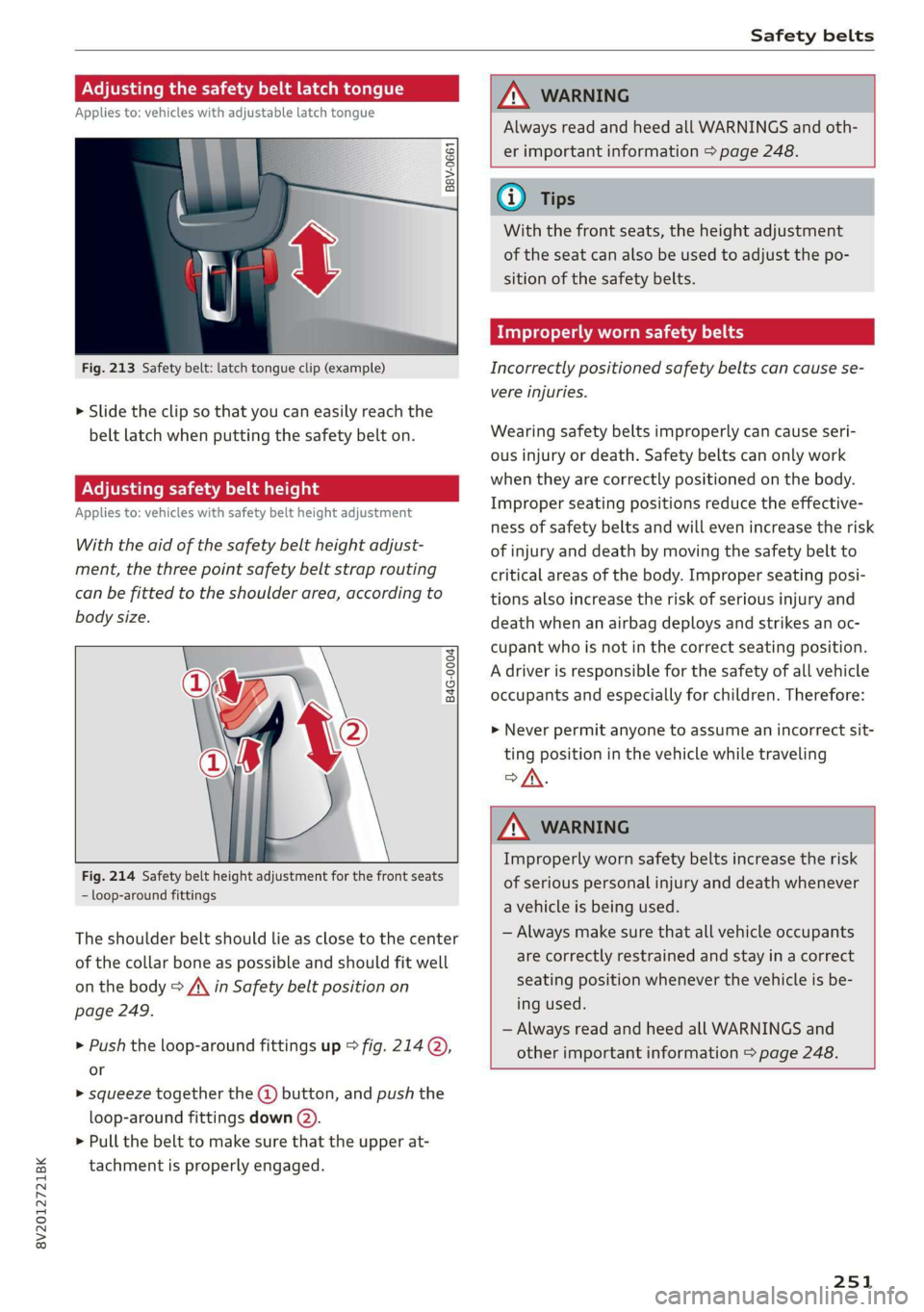
Applies to: vehicles with safety belt height adjustment
With the aid of the safety belt height adjust-
ment, the three point safety belt strap routing
can be fitted to the shoulder area, according to
body size.
B4G-0004)
Fig. 214 Safety belt height adjustment for the front seats
- loop-around fittings
The shoulder belt should lie as close to the center
of the collar bone as possible and should fit well
on the body > A\ in Safety belt position on
page 249.
> Push the loop-around fittings up > fig. 214@,
or
> squeeze together the (@) button, and push the
loop-around fittings down (2).
> Pull the belt to make sure that the upper at-
tachment is properly engaged.
ZA WARNING
Always read and heed all WARNINGS and oth-
er important information > page 248.
(i) Tips
With the front seats, the height adjustment
of the seat can also be used to adjust the po-
sition of the safety belts.
Improperly worn safety belts
Incorrectly positioned safety belts can cause se-
vere injuries.
Wearing safety belts improperly can cause seri-
ous injury or death. Safety belts can only work
when they are correctly positioned on the body.
Improper seating positions reduce the effective-
ness of safety belts and will even increase the risk
of injury and death by moving the safety belt to
critical areas of the body. Improper seating posi-
tions also increase the risk of serious injury and
death when an airbag deploys and strikes an oc-
cupant who is not in the correct seating position.
A driver is responsible for the safety of all vehicle
occupants and especially for children. Therefore:
> Never permit anyone to assume an incorrect sit-
ting position in the vehicle while traveling
of.
ZA\ WARNING
Improperly worn safety belts increase the risk
of serious personal injury and death whenever
a vehicle is being used.
— Always make sure that all vehicle occupants
are correctly restrained and stay in a correct
seating position whenever the vehicle is be-
ing used.
— Always read and heed all WARNINGS and
other important information > page 248.
251