fuel AUDI A3 2020 Owner´s Manual
[x] Cancel search | Manufacturer: AUDI, Model Year: 2020, Model line: A3, Model: AUDI A3 2020Pages: 400, PDF Size: 107.47 MB
Page 84 of 400
Driving
— Turn off electrical equipment that is not need-
ed, for example seat heating*.
— Anticipate upcoming traffic situations while
driving to avoid unnecessary acceleration and
braking.
— Avoid driving at high speeds.
— Avoid adding extra weight to the vehicle if pos-
sible, for example by not leaving roof racks or
bike racks installed when they are not needed.
— Make sure the tire pressure is correct.
— Have maintenance performed regularly on the
vehicle.
— Do not drive with winter tires during the summ-
er.
— Do not let the engine run while the vehicle
parked.
— Use the Start/Stop system.
— Utilize the engine braking effect.
— Avoid driving short distances when possible.
— Plug-in hybrid drive: brake early and evenly to
use the recuperation function.
@) Tips
The amount of noise produced by the vehicle
can increase significantly when driving with a
sporty style. Show respect to others around
you and the environment with the way you op-
erate your vehicle, especially at night.
Energy management
Your vehicle is equipped with an intelligent ener-
gy management system for distributing electrici-
ty. This significantly improves the starting ability
and increases the vehicle battery life.
G) Tips
— If you drive short distances frequently, the
vehicle battery may not charge enough
while driving. As a result, convenience func-
tions for electrical equipment may be tem-
porarily unavailable.
— The vehicle battery will gradually drain if
the vehicle is not driven for long periods of
time, or if electrical equipment is used
when the engine is not running. To ensure
that the vehicle can still be started, the
82
electrical equipment will be limited or
switched off.
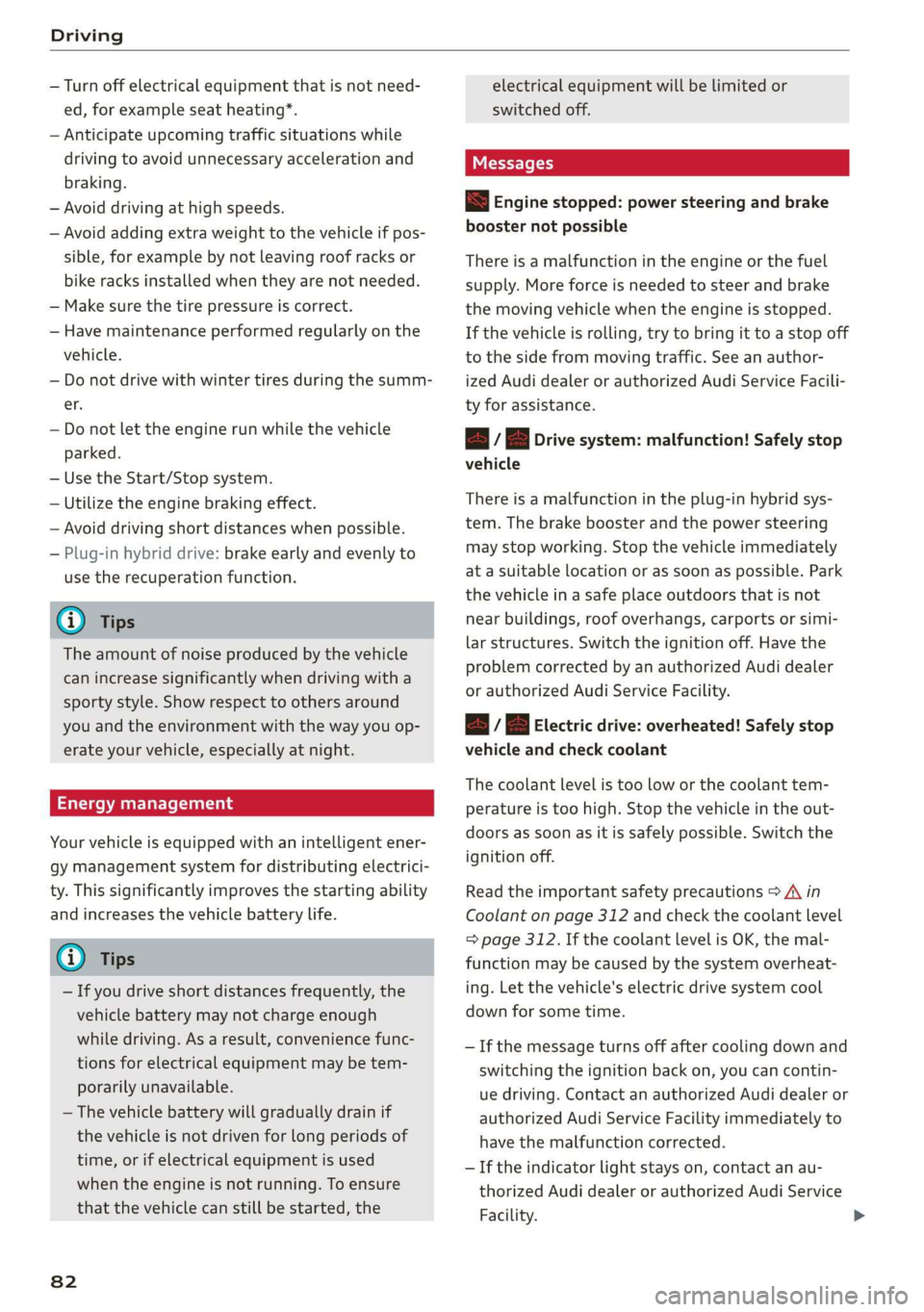
S Engine stopped: power steering and brake
booster not possible
There is a malfunction in the engine or the fuel
supply. More force is needed to steer and brake
the moving vehicle when the engine is stopped.
If the vehicle is rolling, try to bring it to a stop off
to the side from moving traffic. See an author-
ized Audi dealer or authorized Audi Service Facili-
ty for assistance.
EB EB Drive system: malfunction! Safely stop
vehicle
There is a malfunction in the plug-in hybrid sys-
tem. The brake booster and the power steering
may stop working. Stop the vehicle immediately
at a suitable location or as soon as possible. Park
the vehicle in a safe place outdoors that is not
near buildings, roof overhangs, carports or simi-
lar structures. Switch the ignition off. Have the
problem corrected by an authorized Audi dealer
or authorized Audi Service Facility.
B i B Electric drive: overheated! Safely stop
vehicle and check coolant
The coolant level is too Low or the coolant tem-
perature is too high. Stop the vehicle in the out-
doors as soon as it is safely possible. Switch the
ignition off.
Read the important safety precautions > A in
Coolant on page 312 and check the coolant level
= page 312. If the coolant level is OK, the mal-
function may be caused by the system overheat-
ing. Let the vehicle's electric drive system cool
down for some time.
— If the message turns off after cooling down and
switching the ignition back on, you can contin-
ue driving. Contact an authorized Audi dealer or
authorized Audi Service Facility immediately to
have the malfunction corrected.
— If the indicator light stays on, contact an au-
thorized Audi dealer or authorized Audi Service
Facility.
Page 85 of 400

8V2012721BK
Driving
B / BI Drive system: malfunction! Please con-
tact Service
There is a malfunction in the drive system. Drive
slowly to an authorized Audi dealer or authorized
Audi Service Facility to have the malfunction cor-
rected.
B / BI Drive system: malfunction! Restart not
possible. Please contact Service
There is a malfunction in the plug-in hybrid sys-
tem. Do not open the hood. Drive to an author-
ized Audi dealer or authorized Audi Service Facili-
ty immediately to have the malfunction correct-
ed.
B / B Battery temperature too low. Vehicle
cannot be started. See owner's manual
The outside temperature is too low. The vehicle
can no longer start at temperatures below -18 °F
(-28 °C). Contact an authorized Audi dealer or au-
thorized Audi Service Facility.
| - POWER LIMIT| Warning! Limited performance
If the indicator light turns on and this message
appears, there may be an engine control mal-
function. The engine output is reduced. Drive to
an authorized Audi dealer or authorized Audi
Service Facility immediately to have the malfunc-
tion corrected.
Drive system: engine must be running.
Please exit EV e-tron mode
It may be necessary for the gasoline engine to
run longer for technical reasons, such as when
condensation accumulates in the engine. Driving
exclusively in electric mode is not possible in this
phase.
Other indicator lights
If the B i Ha indicator light turns on, there may
be an engine control malfunction. Drive slowly to
an authorized Audi dealer or authorized Audi
Service Facility to have the engine checked.
D In certain countries.
ZA WARNING
If the engine stops while driving, you will
need to use more force to brake the vehicle.
This increases the risk of an accident. There
will still be power steering if the ignition is
switched on while the vehicle is rolling and
there is sufficient vehicle battery charge. Oth-
erwise, you must use greater force when
steering.
Start/Stop system
Applies to: vehicles with Start/Stop system
The Start/Stop system can help increase fuel
economy and reduce CO2 emissions.
In Start/Stop mode, the engine shuts off auto-
matically when the vehicle is stopped, such as at
a traffic light. The ignition remains switched on
during this Stop phase. The engine will restart
automatically when needed.
The Start/Stop system is automatically activated
once the ignition is switched on.
Basic requirements for Start/Stop mode
— The driver's door must be closed.
— The driver's seat belt much be fastened.
— The hood must be closed.
— The vehicle must have driven faster than 2 mph
(3 km/h) since the last time it stopped.
@) Note
Always switch the Start/Stop system off when
driving through water > page 85.
@ Tips
The engine stops shortly before the vehicle
comes to astop ). The full function of the
brake booster and the power steering is still
available.
83
Page 98 of 400

High-voltage system
High-voltage system
General information
Introduction
Applies to: vehicles with plug-in hybrid drive
All work done on the high-voltage system must
only be performed by certified high-voltage tech-
nicians at authorized Audi dealers or authorized
Audi Service Facilities in accordance with Audi
guidelines.
The high-voltage system is composed of the fol-
lowing high-voltage components, among other
things: the high-voltage battery, the power elec-
tronics, the electric motor, the high-voltage A/C
compressor, the high-voltage heater, the charg-
ing system and charging port, and the orange
high-voltage wiring.
The high-voltage battery is located on the vehicle
underbody in front of the rear axle and does not
require any maintenance from the driver.
ZA WARNING
The voltage in the high-voltage system is life-
threatening. Touching a damaged high-volt-
age component can result in a fatal electric
shock. The components in the high-voltage
system are marked with a warning label which
warns against the high-voltage.
— The voltage level in the high-voltage system
is still dangerous and potentially life-threat-
ening when the ignition is switched off.
— Never perform work on the orange high-
voltage cables or on other high-voltage
components. Only authorized repair facili-
ties that are certified may perform work on
the high-voltage system.
— Never damage, alter or remove the orange
high-voltage cable or disconnect it from the
high-voltage system.
— Never perform any work using cutting, shap-
ing or sharp-edged tools or heat sources
near the high-voltage system and high-volt-
age cables.
— Gases that escape from the high-voltage
battery can be poisonous or flammable.
96
— Damage to the high-voltage battery could
cause the high-voltage battery to leak im-
mediately or in the future, and poisonous or
flammable gases could escape. Do not in-
hale the gases!
— Do not expose yourself to any leaking fluids
and do not come into contact with them.
— The high-voltage battery electrolyte fluid is
caustic. If electrolyte fluid comes into con-
tact with the skin, flush the affected area for
at least 15 minutes with clean water. Then
wash the affected area with soap. Have the
affected area examined by a medical profes-
sional.
— In the event of a technical emergency, in-
form the responders that the vehicle is
equipped with a high-voltage battery.
@) Note
— The high-voltage system can be damaged if
the vehicle underbody comes into contact
with the ground. Immediately drive your ve-
hicle to an authorized repair facility and
have it inspected.
— The electric drive motor can become very
hot during operation. Do not stop the vehi-
cle if there is oil, fuel residue or other flam-
mable substances under or next to the vehi-
cle.
Special considerations for the high-voltage
battery
Applies to: vehicles with plug-in hybrid drive
Please first read and note the introductory infor-
mation and heed the warnings > page 96.
All batteries age with use and over time. There
are things you should know about the care of the
high voltage battery that will help it keep giving
you good service and reliability over time. Please
read and keep the following information in mind
while you enjoy the performance and economy of
your vehicle.
— Be sure to charge the high voltage battery be-
fore leaving the vehicle parked and unused for a
longer period of time. Ideally the high-voltage >
Page 163 of 400
8V2012721BK
Voice recognition system
BAR COMMANDS
* Telephone
* Audi connect
* Navigation
* Directory
* Radio
+ Media
* Sound
* Help
+ Help Speech dialog system
* Help Telephone
* Help Audi connect
* Help Navigation
* Help Map
* Help Radio
* Help Media
TELEPHONE
+ Enter number
* Delete number / correction
+ Directory
* Call (XY)
* business / private / land line / mobile
NAVIGATION
+ Navigate to (XY)
+ Start / cancel route guidance
+ Directory
+ Last destinations
+ Navigation favorites
+ Drive home
- Enter address
+ Enter country / town / street / state
+ Exclude route / Exclude route for (XY) km /m
+ Map
* Day map / Night map
AUDI CONNECT
* Audi connect
* Travel information / Parking information
* Fuel prices
* Weather
+ Radio presets
“FM
*FM/AM/ SIRIUS XM tlle,
* Station (XY) / Frequency (XY)
* Traffic announcement on / off
* 2D driving position map / 2D north position map / 3D map / Destination map / Overview map
+ Favorites a »)
+ Call (XY) sDS
* Enter number
* Redial
* Read new text message
+ Navigate to (XY)
+ Enter address/destination
* Online destinations
* Cancel route guidance
* Map
+ Line (XY)
* Next page / previous page
* Cancel
* No, I meant (XY)
* Correction
Call list _ a.
Redial
Call mailbox we
Enter PIN / delete PIN
Telephone favorites
+ Block route for (XY) miles / Block
the next section
* Route list
* Calculate alternative routes
* Online destinations
* Special destination
Flight information
City events
Online news
Twitter
MEDIA
Jukebox s))
+ CD/DVD MEDIA
SD card 1/ SD card 2
Audi music interface / iPod / USB / Bluetooth /
Wi-Fi / Medium (XY)
* Media favorites / Artists / Albums / Genres /
Tracks / Playlists / Videos
* Folder up
* Random playback on / off
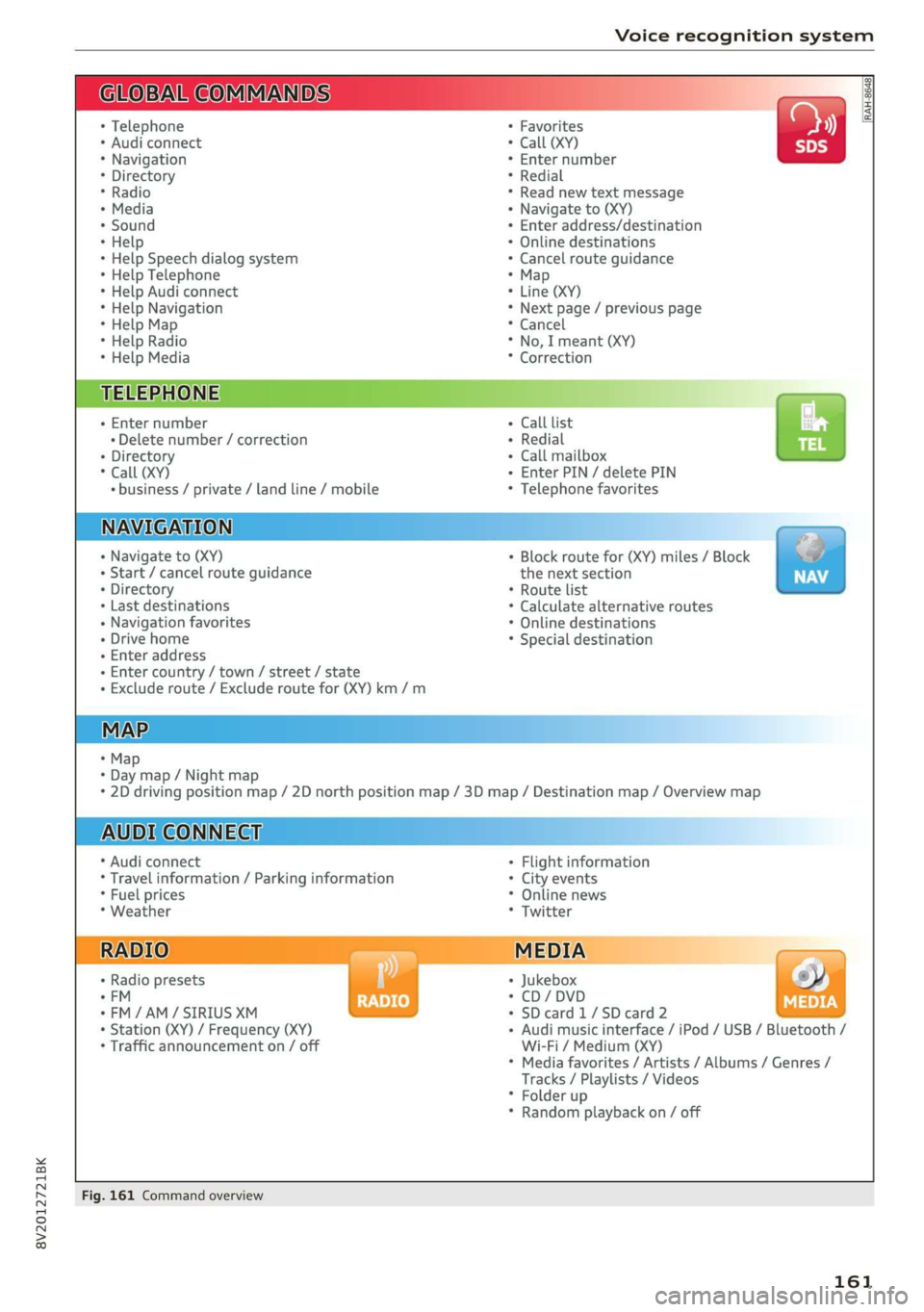
Fig. 161 Command overview
161
Page 166 of 400
Voice recognition system
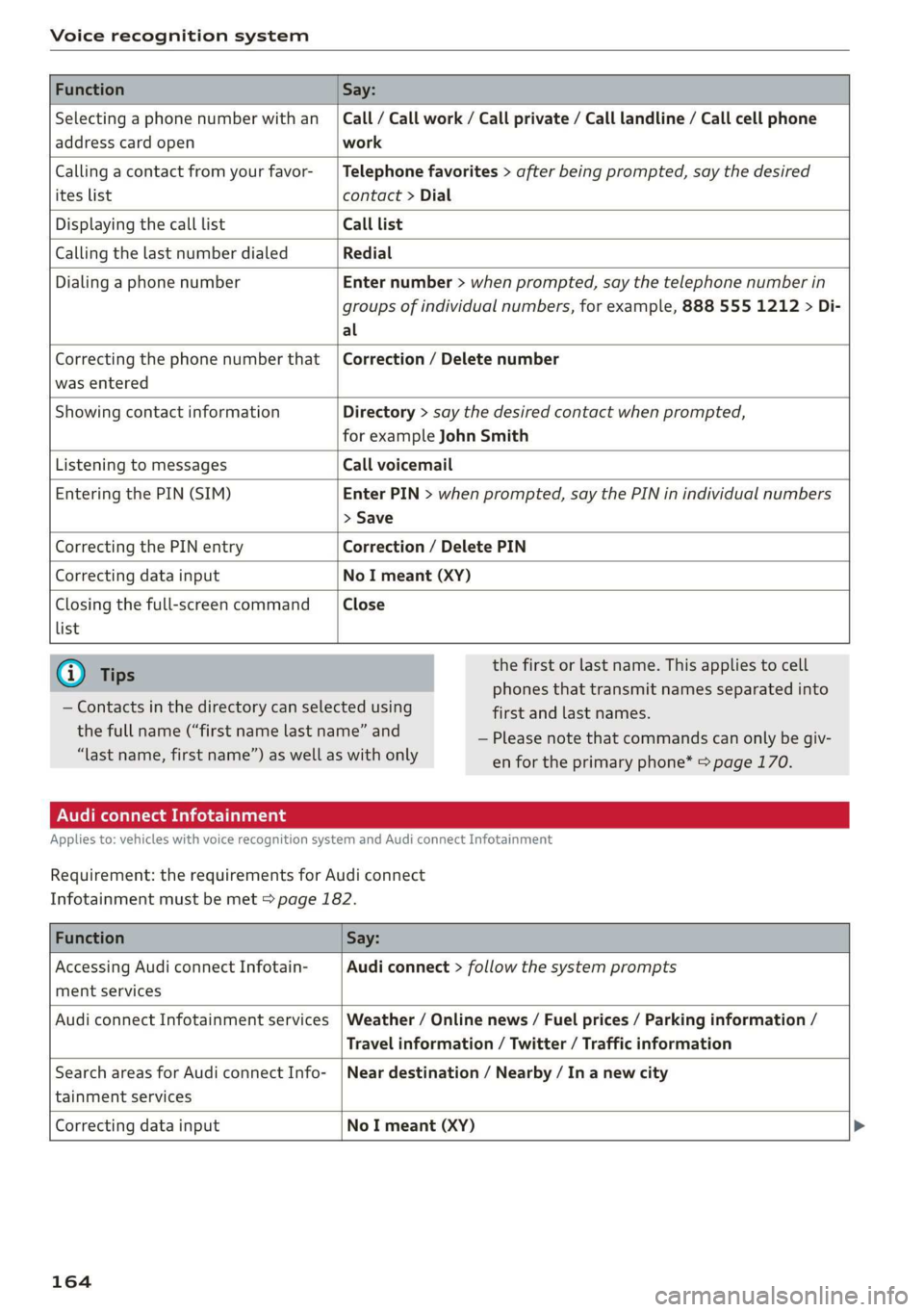
Function Say:
Selecting a phone number with an
address card open
Call / Call work / Call private / Call landline / Call cell phone
work
Calling a contact from your favor-
ites list
Telephone favorites > after being prompted, say the desired
contact > Dial
Displaying the call list Call list
Calling the last number dialed Redial
Dialing a phone number Enter number > when prompted, say the telephone number in
groups of individual numbers, for example, 888 555 1212 > Di-
al
Correcting the phone number that
was entered
Correction / Delete number
Showing contact information Directory > say the desired contact when prompted,
for example John Smith
Listening to messages Call voicemail
Entering the PIN (SIM) Enter PIN > when prompted, say the PIN in individual numbers
> Save
Correcting the PIN entry Correction / Delete PIN
Correcting data input No I meant (XY)
Closing the full-screen command
list
Close
@) Tips
— Contacts in the directory can selected using
the full name (“first name last name” and
“last name, first name”) as well as with only
the first or last name. This applies to cell
phones that transmit names separated into
first and last names.
— Please note that commands can only be giv-
en for the primary phone* = page 170.
Audi connect Infotainment
Applies to: vehicles with voice recognition system and Audi connect Infotainment
Requirement: the requirements for Audi connect
Infotainment must be met > page 182.
Function Say:
Accessing Audi connect Infotain-
ment services
Audi connect > follow the system prompts
Audi connect Infotainment services Weather / Online news / Fuel prices / Parking information /
Travel information / Twitter / Traffic information
Search areas for Audi connect Info-
tainment services
Near destination / Nearby / In a new city
Correcting data input
No I meant (XY) >
164
Page 171 of 400
8V2012721BK
Telephone
Telephone
Introduction
Applies to: vehicles with telephone
You can operate various telephone functions easi-
ly through the MMI in your vehicle.
Depending on the country and the vehicle equip-
ment, the following options may be available:
— Connecting a cell phone with Bluetooth
— Using two telephones
— Using the Audi phone box
ZA WARNING
— Medical experts warn that mobile devices
can interfere with the function of pacemak-
ers. Always maintain a minimum distance of
about 7.9 inches (20 cm) between the mo-
bile device antennas and the pacemaker.
— Do not carry the mobile device in a pocket
directly over the pacemaker when the
phone is switched on.
— Switch the mobile device off immediately
if you suspect it may be interfering with
the pacemaker.
— Do not use the voice recognition system*
= page 162 in emergencies because your
voice may change in stressful situations. The
system may take longer to dial the number
or may not be able to dial it at all. Dial the
emergency number manually.
— Switch your mobile device off in areas where
there is a risk of an explosion. These loca-
tions are not always clearly marked. This
may include gas stations, fuel and chemical
storage facilities or transport vehicles, or lo-
cations where fuel vapors (such as propane
or gasoline vapor in vehicles or buildings),
chemicals or large quantities of dust parti-
cles (such as flour, sawdust or metal) may
be present in the air. This also applies to all
other locations where you would normally
turn your vehicle engine off.
— The demands of traffic require your full at-
tention. Always read the chapter
=> page 146, Traffic safety information.
CG) Note
Read the information about Audi connect, and
be sure to note the connectivity costs section
=> page 182.
G@) Tips
— The Bluetooth connection range is limited
to inside the vehicle.
—Aselection of supported Bluetooth devices
can be found in the database for tested mo-
bile devices at www.audi.com/bluetooth.
Setup
Connecting a cell phone via Bluetooth
Applies to: vehicles with telephone
Requirement: the vehicle must be stationary and
the ignition must be switched on. The Bluetooth
settings must be open on your mobile device dur-
ing the connection setup. The mobile device to be
connected must not be actively connected to any
other Bluetooth device. The MMI must not be
connected to a mobile device.
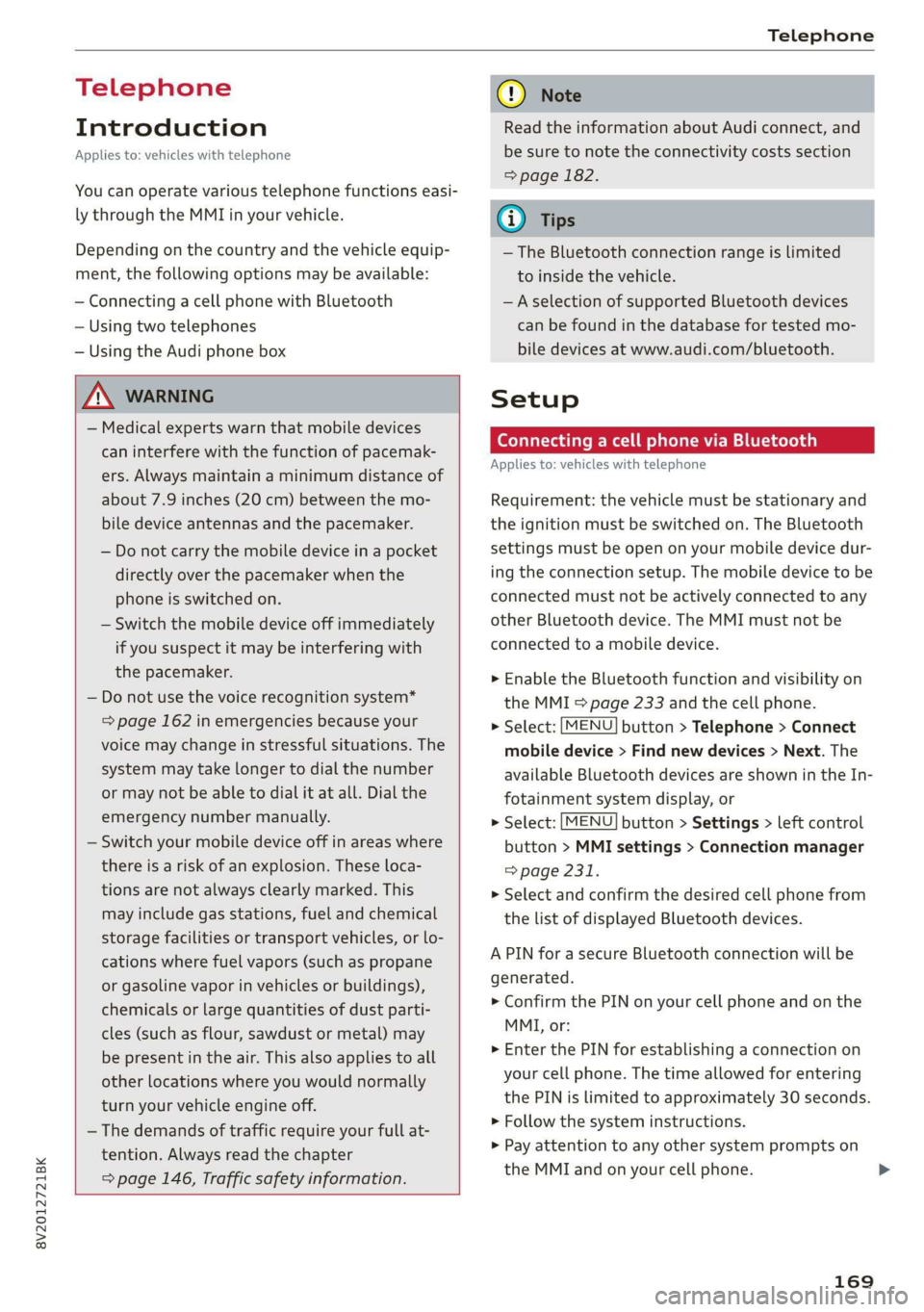
> Enable the Bluetooth function and visibility on
the MMI => page 233 and the cell phone.
> Select: [MENU] button > Telephone > Connect
mobile device > Find new devices > Next. The
available
Bluetooth devices are shown in the In-
fotainment system display, or
> Select: [MENU] button > Settings > left control
button > MMI settings > Connection manager
> page 231.
> Select and confirm the desired cell phone from
the list of displayed Bluetooth devices.
A PIN for a secure Bluetooth connection will be
generated.
> Confirm the PIN on your cell phone and on the
MMI, or:
> Enter the PIN for establishing a connection on
your cell phone. The time allowed for entering
the PIN is limited to approximately 30 seconds.
> Follow the system instructions.
> Pay attention to any other system prompts on
the MMI and on your cell phone.
169
Page 199 of 400

8V2012721BK
Navigation
Storing a destination as a contact in the
directory
Requirement: a mobile device must be connected
to the MMI 5 page 169.
> Select: a destination > right control button >
Add destination to contact.
> Enter the first letters of the desired contact in
the free text search input field > page 189,
fig. 166 and then select a contact from the list.
> Select and confirm Add business destination or
Add private destination.
Alternative routes
Applies to: vehicles with navigation system
Fig. 172 Infotainment system: display of alternative
routes
Requirement: a destination must be entered and
the route guidance must be started.
> Press the [NAV/MAP| button repeatedly until
the Enter destination menu is displayed
=> page 189, fig. 166.
> Select: right control button > Navigation set-
tings > Show alternative routes.
Three routes are displayed in the overview map
after you enter a destination.
> Select and confirm the desired route that you
would like to use for route guidance.
If available, the following information will ap-
pear on the route suggestions:
— Route type (fast (, fast alternative (2), eco-
nomic route @))
— Distance to the destination and the calculated
arrival time
— Traffic congestion along the route including
time delays
The route that was calculated according to the
route criteria you selected is shown on the over-
view map . The special properties of the route
will also be displayed @) and provided as a spo-
ken message.
Using the control knob, you can select the possi-
ble routing for the alternative routes and show
them on map Select and confirm the desired
route that you would like to use for route guid-
ance.
Additional settings
Navigation settings
Applies
to: vehicles with navigation system
> Press the [NAV/MAP] button repeatedly until
the Enter destination menu is displayed
=> page 189, fig. 166.
> Select: right control button > Navigation set-
tings.
Depending on the selected function, the follow-
ing settings can be selected:
Show alternative routes
Up to three suggested routes are shown on the
map when this function is switched on
=> page 197.
Low fuel warning
A message is displayed if the fuel gauge goes be-
low the reserve marking when this function is
switched on (M. Confirming this message displays
a list of gas stations in the area. When a gas sta-
tion is selected, route guidance from the current
vehicle position is calculated.
Trailer mode*
Trailer mode is switched off at the factory.
When the function is switched on M, the maxi-
mum permitted speed for vehicles with trailers is
incorporated into the route guidance and the cal-
culated arrival time is adjusted accordingly. Trail-
er mode is displayed using symbols % in the side
menu on the map.
197
Page 232 of 400
![AUDI A3 2020 Owner´s Manual System settings
System settings
Setting the date and
time
You can set the clock time manually or using the
GPS*.
> Select: [MENU] button > Settings > left control
button > MMI settings](/img/6/40265/w960_40265-231.png "AUDI A3 2020 Owner´s Manual System settings
System settings
Setting the date and
time
You can set the clock time manually or using the
GPS*.
> Select: [MENU] button > Settings > left control
button > MMI settings")
System settings
System settings
Setting the date and
time
You can set the clock time manually or using the
GPS*.
> Select: [MENU] button > Settings > left control
button > MMI settings > Date & time, or:
> Select: [MENU] button > Vehicle > left control
button > Vehicle settings > Date & time.
Automatic setting
When this function is switched on ¥, the time
and date are automatically set.
Time
Requirement: the Automatic setting must be
switched off.
Press the control knob. You can set the Time
manually by turning and pressing the control
knob.
Date
Requirement: the Automatic setting must be
switched off.
Press the control knob. You can set the Date
manually by turning and pressing the control
knob.
Time zone
When selecting the appropriate time zone, a
sampling of countries in this zone will be listed.
Automatic time zone*
When this function is switched on ¥, the time
will automatically adjust to the corresponding
time zone.
Automatic daylight saving time*
When this function is switched on M, the time
will automatically switch to daylight saving time.
) The Qi standard makes it possible to charge your mobile
device wirelessly.
230
Time format
If you select 24h, the clock will display, for exam-
ple, 13:00. If you select AM/PM, the clock will
display, for example, 1:00 PM.
Date format
If you select DD.MM.YYYY, the date display will
show, for example, 31.03.2019. If you select
MM/DD/YYYY, the date display will show, for ex-
ample, 03/31/2019. If you select YYYY-MM-DD,
the date display will show, for example,
2019-03-31.
MMI settings
> Select: [MENU] button > Settings > left control
button > MMI settings.
Language
You can change the display language as well as
the language for the voice guidance* and voice
recognition system*.
The number of languages available depends on
the country.
Measurement units
The following measurement units can be set de-
pending on availability: Speed, Distance, Tem-
perature, Fuel consumption, Volume, Pressure.
Mobile device reminder signal
Applies to: vehicles with Audi phone box
Requirement: your cell phone must be Qi-capa-
ble ) or connected to the Audi music interface @
with a USB adapter cable > page 171, fig. 162.
When the device reminder signal is switched on,
you will be notified that your mobile device is still
in the Audi phone box when you leave the vehicle.
You can select between Spoken cue, Signal tone
and Off.
Mobile device reminder signal volume: you can
adjust the reminder signal volume by turning the
control knob.
Page 300 of 400

Checking and Filling
Checking and Filling
Fuel
Types of gasoline
The correct gasoline grade is stated on the inside
of the fuel filler door.
The vehicle is equipped with a catalytic converter
and must only be driven with unleaded gasoline.
Audi recommends using TOP TIER Detergent Gas-
oline. For additional information on TOP TIER De-
tergent Gasoline, visit www.toptiergas.com.
The individual gasoline grades are differentiated
by octane ratings. This value is given with (R
+M)/2 equating to AKI or in RON.
The headings below match the sticker in the fuel
filler door (examples):
UNLEADED FUEL ONLY MIN. (R+M)/2 87
Regular / MIN. RON 91 Regular
Use regular gasoline with minimum 87 AKI /
91 RON > ©.
Audi recommends using premium gasoline with
minimum 91 AKI / 95 RON to achieve the rated
horsepower and torque.
UNLEADED FUEL ONLY PREMIUM MIN. (R
+M)/2 91 / SUPER MIN. RON 95
Using premium gasoline with minimum 91 AKI /
95 RON is recommended.
If premium gasoline is not available, you can also
use regular gasoline 87 AKI / 91 RON. However
this does reduce the engine power slightly.
() Note
— Filling the tank just one time with leaded
fuel or other metallic additives will cause
permanent deterioration to the catalytic
converter function.
— When gasoline with an octane rating that is
too low is used, high speeds or heavy engine
load can lead to engine damage.
298
G) Tips
The vehicle may be filled with fuel that has a
higher octane rating than what is required by
the engine.
Gasoline mixture
Gasoline with alcohol or MTBE (Methyl-Tert-
Butyl-Ether)
You can use unleaded gasoline mixed with alco-
hol or MTBE (generally labeled as oxygenated
compounds) as long as the fuel meets the follow-
ing conditions:
Gasoline with methanol content (methyl alco-
hol
or methanol)
— Anti-Knock Index is at least 87 AKI
—No more than 3% methanol
— More than 2% solvent
Gasoline with ethanol content (ethyl alcohol or
ethanol)
— Anti-Knock Index is at least 87 AKI
—No more than 15% ethanol
Gasoline with MTBE content
— Anti-Knock Index is at least 87 AKI
—No more than 15% MTBE
Gasoline adapted to the season
Many gasoline fuels are adapted to the seasons.
When the season changes, we recommend refu-
eling at high-traffic gas stations. It is more likely
that the gasoline will be suitable for the season
there.
() Note
— Gasoline with methanol content that does
not meet the specified conditions may cause
corrosion damage and damage to plastic or
rubber components in the fuel system.
— Do not use gasoline that does not meet the
specifications.
— If you are unable to find out if a specific gas-
oline mixture meets the specifications, ask
the gas station operator or their fuel suppli-
er.
Page 301 of 400

8V2012721BK
Checking and Filling
— Do not use any gasoline mixture whose
composition cannot be identified.
— Audi does not assume any responsibility for
damage to the fuel system or for perform-
ance problems caused by using gasoline
mixtures different from those specified.
This type of damage also does not fall under
the New Vehicle Limited Warranty or under
the emissions control system warranty.
— If you notice a higher fuel consumption or
poor handling or performance problems due
to such gasoline mixtures, we recommend
fueling with unblended gasoline.
Gasoline additives
An important issue for many automobile manu-
facturers is combustion residue in the engine
that results from the use of certain fuels.
Although types of gasoline differ depending on
the manufacturer, there are similarities. Certain
substances in the gasoline may cause deposits in
the engine. Additives in the gasoline that should
keep the engine and fuel system clean do not all
function equally.
Audi recommends using TOP TIER Detergent Gas-
oline. For additional information on TOP TIER De-
tergent Gasoline, visit www.toptiergas.com.
If you use incorrect fuels over a long period of
time, the maximum engine performance may be
impaired by combustion residue.
@) Note
— Damage or malfunctions caused by the use
of incorrect types of gasoline are not cov-
ered by the New Vehicle Limited Warranty.
— Only gasoline additives that have been ap-
proved by Audi may be used.
Refueling
Fueling procedure
B8V-0111
Applies to: vehicles with conventional drive system
Fig. 239 Right rear side of vehicle: opening the fuel filler
door
B8V-0110
Applies to: vehicles with conventional drive system
Fig. 240 Fuel filler door with tank cap on
Plug-in hybrid drive*: refer to the information un-
der > page 302, Refueling.
The fuel filler door is unlocked or locked by the
central locking system.
> Plug-in hybrid drive: read and follow the in-
structions under > page 302, Opening the fuel
filler door.
>» Unlock the vehicle if necessary.
> Conventional drive system: press on the left
side of the fuel filler door to open it > fig. 239.
> Unscrew the tank cap counterclockwise.
» Place the cap from above on the open fuel filler
door > fig. 240.
> Insert the fuel pump nozzle all the way into the
fuel filler neck.
> Begin fueling. Once the fuel pump nozzle turns
off the first time, the fuel tank is full. Do not
continue fueling, or else the expansion space in
the tank will be filled with fuel. >
299